
A quiet macOS menu-bar app that tells you when to look away. Counts only real keyboard time, waits out calls and videos, zero permissions, zero network. 1.4 MB, free & open source.
Swift
0
3 commits
updated Oct 2, 2026
See what people are saying
README
Farview
A better rhythm for long hours at the screen.
A quiet macOS menu-bar app that notices how long you've actually been working
and tells you to look away at a sensible moment.





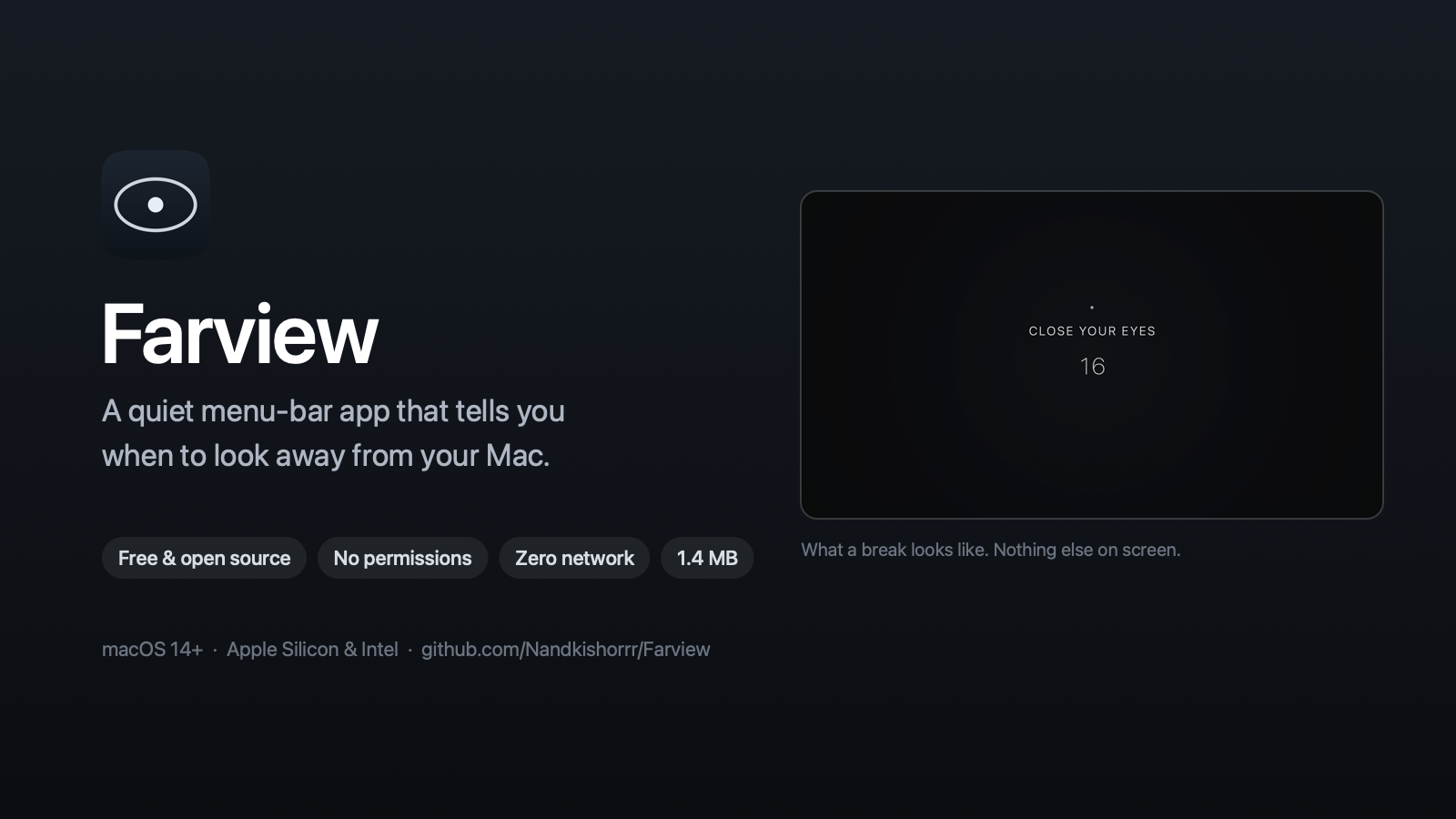
⬇ Download Farview for Mac · free, open source, no account, no tracking
The problem
If you sit at a Mac all day, you know the feeling. You start at 10, look up and it's 2. Eyes dry, neck stiff, head a bit heavy. You didn't blink properly for hours because you were deep in something.
The usual fix is a 20-20-20 timer. You try one, and within a week you've uninstalled it. It fires in the middle of a call. It goes off during a movie. It keeps counting while you're at lunch, then nags you the moment you sit back down. It throws a busy screen full of text at you right when you're meant to stop looking at screens.
Farview is the break app I wanted and couldn't find:
- It counts only the time you're actually at the keyboard. Walk away and it stops. Stay away long enough and that was your break.
- It waits when you're on a call, presenting, or watching something, and tells you in plain words that it's waiting.
- The break screen is nearly black with one line on it: no dashboards, no animations, nothing to read.
- It asks for zero permissions and makes zero network connections. Nothing leaves your Mac.
- If you skip three in a row, it backs off instead of nagging harder.
It is not a 20-20-20 timer, and it deliberately isn't marketed as one. The evidence for those exact numbers is thin (see docs/RESEARCH.md). It is a break companion built around the parts that hold up: don't work uninterrupted for hours, change your viewing distance, move occasionally, and set your workstation up properly.
Screenshots
| The break screen | Settings |
|---|---|
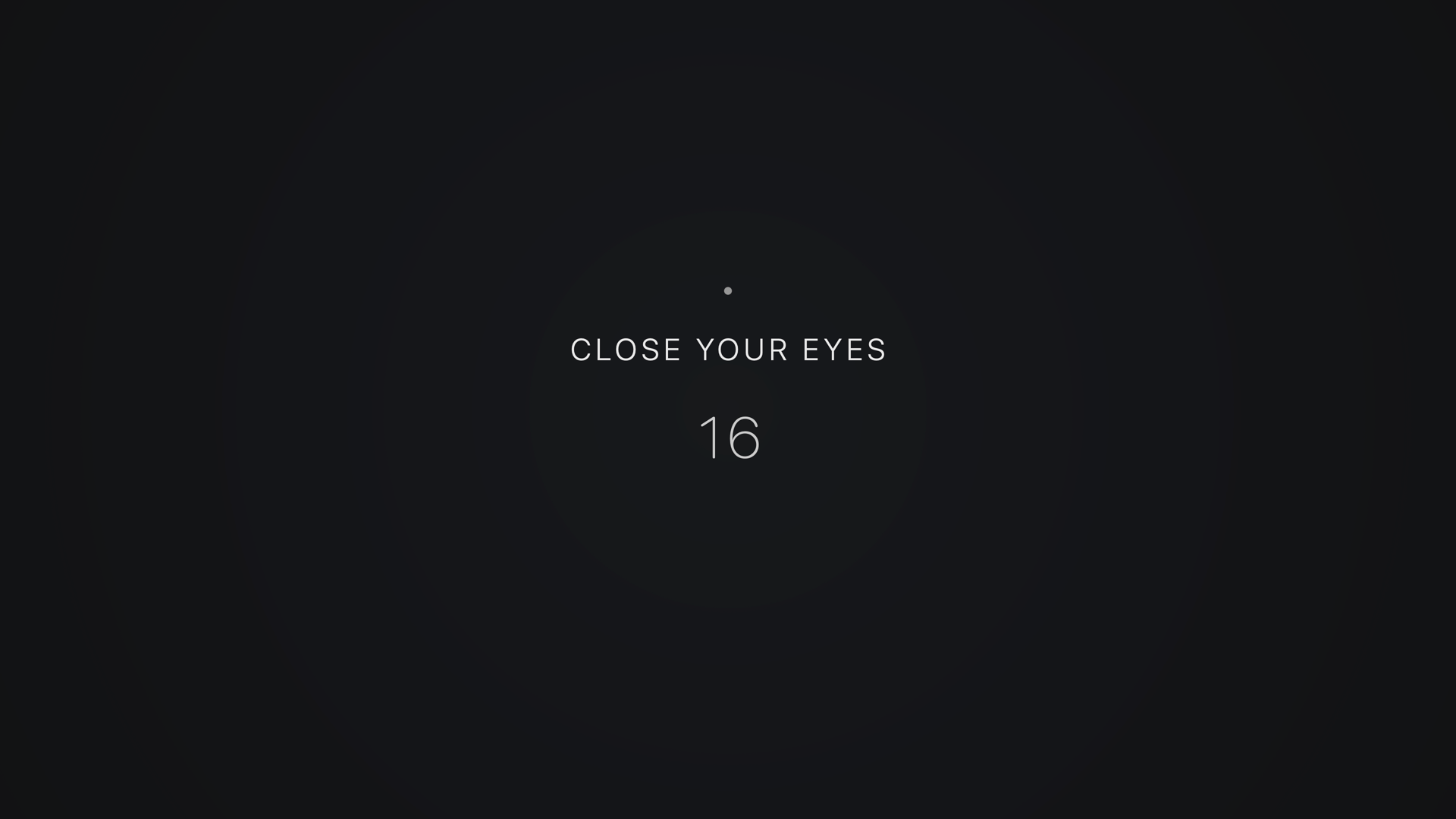 | 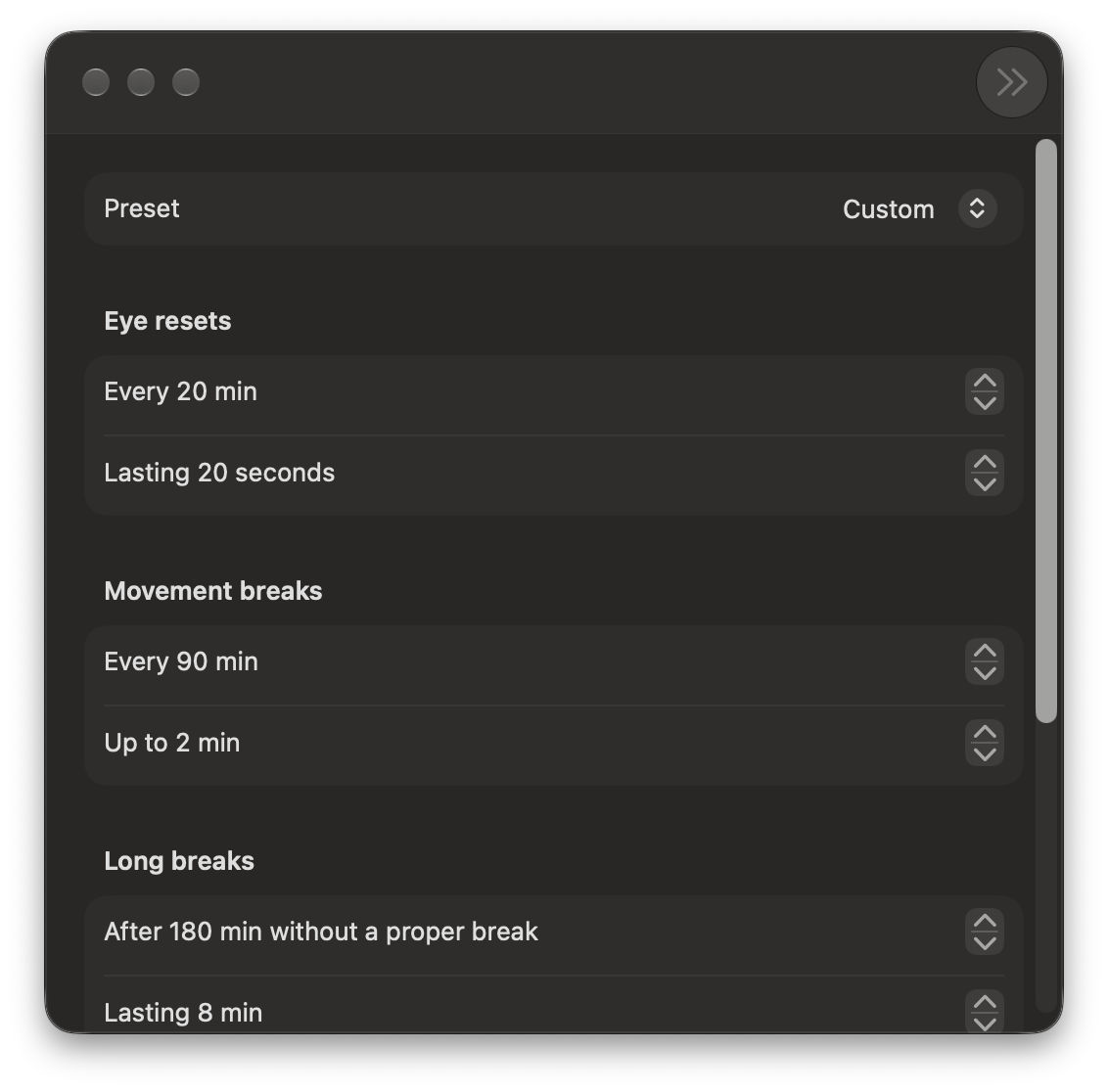 |
| One instruction, one number, a dark field. Controls stay hidden until you move the mouse. | Every interval is yours to set, or pick a preset for coding, design, study, and more. |
The menu bar popover:
  👁 19m
  ┌─────────────────────────────────┐
  │  ◉ Farview                  ··· │
  ├─────────────────────────────────┤
  │  Next reset in                  │
  │  18:42                          │
  │  A short eye reset.             │
  ├─────────────────────────────────┤
  │  TODAY                          │
  │  6h 12m   14      4      86%    │
  │  active   resets  movement taken│
  ├─────────────────────────────────┤
  │  [ Take a break ▾ ]  [ Pause ▾ ]│
  └─────────────────────────────────┘
Why this one
Most break apps are a countdown with a nag attached. Four things make this different, and they are the reasons it survives past week one:
It knows when you're not there. The timer runs on active time, not wall-clock time. Step away for lunch and it stops counting; be away long enough and that counts as the break. The "6h 12m" it reports is time you were genuinely at the keyboard, which is why it doesn't match your OS screen-time number.
It won't interrupt you at the worst moment. If something is holding the display awake — a video, a presentation, a screen share — or your microphone is live, Farview waits, and says in plain words that it's waiting. It gives up after ten minutes and downgrades to a quiet notification rather than seizing the screen.
The break screen doesn't become another screen. An eye break shows
LOOK AWAY and a number on a dark field. No dense instructions, no progress
ring to track, no motion worth watching. Controls stay hidden until you move
the mouse.
It asks for no permissions. No Screen Recording, no Accessibility, no Camera, no Calendar. The only prompt is the standard one for notifications, and it works fine if you say no. Nothing is uploaded because there is nowhere to upload it to — the app makes no network connections at all.
It takes the hint. Skip three breaks in a row and it stretches the interval and stops taking over the screen, until you take one again. An app that keeps pushing after being told no three times is an app that gets uninstalled.
Install
Download (easiest)
- Grab Farview-1.0.dmg from the latest release.
- Open it and drag Farview into Applications.
- Open Farview. An eye appears in your menu bar. That's it.
The app isn't notarised by Apple yet (that needs a paid developer account), so macOS blocks the first launch. Go to System Settings → Privacy & Security and click Open Anyway. You only do this once. If you prefer the terminal:
xattr -dr com.apple.quarantine /Applications/Farview.app
Build from source
git clone https://github.com/Nandkishorrr/Farview.git && cd Farview
./scripts/build-app.sh --install
open /Applications/Farview.app
Or build a disk image to hand to someone else:
./scripts/package.sh
That produces a universal (Apple Silicon + Intel) 1.4 MB image with a designed installer window. It is small because it is one binary against system frameworks — there is nothing else in it.
Requires macOS 14 or later and the Xcode Command Line Tools (xcode-select --install). Full Xcode is not needed.
After installing, Farview appears in Launchpad and in your Applications folder like any other app. Opening it puts an eye in the menu bar — there is no Dock icon and no window, which is the point. Settings → Hours can turn a Dock icon on if you want one. See docs/BUILD.md for signing details.
How it works
Three tiers, escalating with how long you've gone without a real break:
| Tier | Default trigger | Default length | What it's for |
|---|---|---|---|
| Micro | 20 min active | 20 s | Change viewing distance, blink fully, rest the eyes |
| Movement | 90 min active | 2 min | Posture, standing, circulation |
| Long | 180 min without a proper break | 8 min | An actual step away |
Ten break types rotate through a weighted least-recently-used selector, so you never get the same one twice running and it never settles into a predictable loop. Every type can be switched off individually; every interval is yours to set. Presets for coding, deep work, design, office, study, and gaming set sensible starting points.
Pause offers 15 min / 30 min / 1 hour / 2 hours / until tomorrow, plus one-tap I'm presenting, I'm watching something, and I'm in a meeting.
⌘⇧B takes a break right now.
Sound-only breaks
The point of an eye break is to stop looking at the screen, so a break screen you have to read is a contradiction. Set Reminders → Break style to Sound only and a break is: the display goes to near-black with nothing written on it at all, a soft two-note tone marks the start, another marks the end. Look out of the window, or close your eyes.
The tones are synthesised rather than taken from the system sounds — every macOS alert is designed to grab your attention, which is exactly wrong here. These are sine tones with a half-second fade in and a long fade out, at low volume: audible across a room, impossible to find startling.
Choose Visual, Sound only, or Both.
Focus sessions
Start a 25, 50, or 90-minute session and Farview holds every ordinary break back for the duration, then insists on one real break at the end. That trade — quiet now, a proper break later — matches how people actually work far better than a fixed cadence.
Your own breaks
Write your own: a name, an instruction, a length, and which tier it belongs to. A physiotherapy exercise, a stretch your back needs, a medication reminder. They join the same rotation as the built-in ones. Leave the instruction blank and the break screen shows only the name — right for anything where you should be looking away.
Learned working hours
Working hours are off by default and most people never set them, so after a couple of weeks Farview offers what it has observed: "You seem to work 10:00–19:00. Use these hours?" It is worked out from the hourly totals already on your disk, and it never leaves the machine. Say no and it won't ask again for a month.
Automation
farview focus 90        # start a deep-work session
farview pause 30m       # quiet for half an hour
farview break movement  # stand up now
farview status          # today's figures, works even if the app is closed
Backed by a farview:// URL scheme, so Raycast, Alfred, Shortcuts, a Stream
Deck, or a Makefile can drive it. See docs/AUTOMATION.md.
Statistics
Local, capped at 90 days, and framed as awareness rather than a scoreboard. There are no streaks, badges, or goals — the moment an app starts keeping score, skipping a break becomes a failure, and people uninstall things that make them feel bad.
Today: active time, eye resets, movement breaks, completion rate, longest uninterrupted session, and a 24-hour band of when you were at the screen. This week: one bar per day plus averages.
Everything is plain JSON in ~/Library/Application Support/Farview/, with
Show in Finder, Export, and Erase everything in Settings → Privacy.
Privacy
| What it reads | What that can reveal |
|---|---|
| Seconds since the last input event | That you touched the machine. Never which key. |
| Display awake / screen locked | Whether you can see a break screen at all. |
| Whether an app holds a display-sleep assertion, and its name | That something is playing. Never what. |
| Whether the microphone is running | That it's on. Never what it hears. |
| Frontmost app's bundle id | Only if you add apps to skip. Never window titles or contents. |
| Ambient light sensor, where one is readable | Roughly how bright the room is. Never anything else — and on Apple Silicon it is not readable at all, so the feature hides itself. |
Never touched: screenshots, screen contents, keystrokes, clipboard, documents, browser history, camera, audio, location. Full detail in docs/PRIVACY.md.
Health note
Farview is a wellness and productivity aid. It is not a medical device and does not provide medical advice. It cannot prevent, diagnose, or treat any condition.
If you have persistent eye pain, blurred or double vision, severe or recurring headaches, or any noticeable change in your vision, please see an eye-care professional. Don't rely on an app for that.
Development
swift build            # compile
./scripts/test.sh      # 113 unit tests, ~0.1s
./scripts/build-app.sh # build/Farview.app
./scripts/package.sh   # build/Farview-1.0.dmg
The domain logic lives in FarviewCore, a pure-Foundation library with no
AppKit or SwiftUI dependency, which is why the timing rules can be tested
properly. The app target is the shell around it.
- docs/RESEARCH.md — the evidence, and its limits
- docs/AUTOMATION.md — the CLI and URL scheme
- docs/PRODUCT-SPEC.md — features, flows, states, copy
- docs/ARCHITECTURE.md — how the code is put together
- docs/BUILD.md — building, signing, distributing
- docs/TESTING.md — unit tests and the manual QA checklist
- docs/PRIVACY.md — every signal read, and why
Idle cost
Measured on this machine over a steady-state minute: 0.05% CPU, ~54 MB resident, zero network. One 1 Hz timer with tolerance, an idle probe that is a single syscall, and deferral probes that only run when a break is within 90 seconds of being due.
Contributing
Issues and pull requests are welcome. If a break fired at a bad moment, or the app missed a call or a video, open an issue and say what was running. Those reports are the most useful thing you can send.
Before a PR, run ./scripts/test.sh. Timing logic lives in FarviewCore and
should come with a test.
If Farview helps you, a ⭐ on the repo helps other people find it.
Licence
MIT © 2026 Nand Kishor
Similar repos


Languages
Swift
91.1%
Shell
4.5%
Python
4.4%
A quiet macOS menu-bar app that tells you when to look away. Counts only real keyboard time, waits out calls and videos, zero permissions, zero network. 1.4 MB, free & open source.
Swift
0
3 commits
updated Oct 2, 2026
See what people are saying
README
Farview
A better rhythm for long hours at the screen.
A quiet macOS menu-bar app that notices how long you've actually been working
and tells you to look away at a sensible moment.
⬇ Download Farview for Mac · free, open source, no account, no tracking
The problem
If you sit at a Mac all day, you know the feeling. You start at 10, look up and it's 2. Eyes dry, neck stiff, head a bit heavy. You didn't blink properly for hours because you were deep in something.
The usual fix is a 20-20-20 timer. You try one, and within a week you've uninstalled it. It fires in the middle of a call. It goes off during a movie. It keeps counting while you're at lunch, then nags you the moment you sit back down. It throws a busy screen full of text at you right when you're meant to stop looking at screens.
Farview is the break app I wanted and couldn't find:
- It counts only the time you're actually at the keyboard. Walk away and it stops. Stay away long enough and that was your break.
- It waits when you're on a call, presenting, or watching something, and tells you in plain words that it's waiting.
- The break screen is nearly black with one line on it: no dashboards, no animations, nothing to read.
- It asks for zero permissions and makes zero network connections. Nothing leaves your Mac.
- If you skip three in a row, it backs off instead of nagging harder.
It is not a 20-20-20 timer, and it deliberately isn't marketed as one. The evidence for those exact numbers is thin (see docs/RESEARCH.md). It is a break companion built around the parts that hold up: don't work uninterrupted for hours, change your viewing distance, move occasionally, and set your workstation up properly.
Screenshots
| The break screen | Settings |
|---|---|
| |
| One instruction, one number, a dark field. Controls stay hidden until you move the mouse. | Every interval is yours to set, or pick a preset for coding, design, study, and more. |
The menu bar popover:
  👁 19m
  ┌─────────────────────────────────┐
  │  ◉ Farview                  ··· │
  ├─────────────────────────────────┤
  │  Next reset in                  │
  │  18:42                          │
  │  A short eye reset.             │
  ├─────────────────────────────────┤
  │  TODAY                          │
  │  6h 12m   14      4      86%    │
  │  active   resets  movement taken│
  ├─────────────────────────────────┤
  │  [ Take a break ▾ ]  [ Pause ▾ ]│
  └─────────────────────────────────┘
Why this one
Most break apps are a countdown with a nag attached. Four things make this different, and they are the reasons it survives past week one:
It knows when you're not there. The timer runs on active time, not wall-clock time. Step away for lunch and it stops counting; be away long enough and that counts as the break. The "6h 12m" it reports is time you were genuinely at the keyboard, which is why it doesn't match your OS screen-time number.
It won't interrupt you at the worst moment. If something is holding the display awake — a video, a presentation, a screen share — or your microphone is live, Farview waits, and says in plain words that it's waiting. It gives up after ten minutes and downgrades to a quiet notification rather than seizing the screen.
The break screen doesn't become another screen. An eye break shows
LOOK AWAY and a number on a dark field. No dense instructions, no progress
ring to track, no motion worth watching. Controls stay hidden until you move
the mouse.
It asks for no permissions. No Screen Recording, no Accessibility, no Camera, no Calendar. The only prompt is the standard one for notifications, and it works fine if you say no. Nothing is uploaded because there is nowhere to upload it to — the app makes no network connections at all.
It takes the hint. Skip three breaks in a row and it stretches the interval and stops taking over the screen, until you take one again. An app that keeps pushing after being told no three times is an app that gets uninstalled.
Install
Download (easiest)
- Grab Farview-1.0.dmg from the latest release.
- Open it and drag Farview into Applications.
- Open Farview. An eye appears in your menu bar. That's it.
The app isn't notarised by Apple yet (that needs a paid developer account), so macOS blocks the first launch. Go to System Settings → Privacy & Security and click Open Anyway. You only do this once. If you prefer the terminal:
xattr -dr com.apple.quarantine /Applications/Farview.app
Build from source
git clone https://github.com/Nandkishorrr/Farview.git && cd Farview
./scripts/build-app.sh --install
open /Applications/Farview.app
Or build a disk image to hand to someone else:
./scripts/package.sh
That produces a universal (Apple Silicon + Intel) 1.4 MB image with a designed installer window. It is small because it is one binary against system frameworks — there is nothing else in it.
Requires macOS 14 or later and the Xcode Command Line Tools (xcode-select --install). Full Xcode is not needed.
After installing, Farview appears in Launchpad and in your Applications folder like any other app. Opening it puts an eye in the menu bar — there is no Dock icon and no window, which is the point. Settings → Hours can turn a Dock icon on if you want one. See docs/BUILD.md for signing details.
How it works
Three tiers, escalating with how long you've gone without a real break:
| Tier | Default trigger | Default length | What it's for |
|---|---|---|---|
| Micro | 20 min active | 20 s | Change viewing distance, blink fully, rest the eyes |
| Movement | 90 min active | 2 min | Posture, standing, circulation |
| Long | 180 min without a proper break | 8 min | An actual step away |
Ten break types rotate through a weighted least-recently-used selector, so you never get the same one twice running and it never settles into a predictable loop. Every type can be switched off individually; every interval is yours to set. Presets for coding, deep work, design, office, study, and gaming set sensible starting points.
Pause offers 15 min / 30 min / 1 hour / 2 hours / until tomorrow, plus one-tap I'm presenting, I'm watching something, and I'm in a meeting.
⌘⇧B takes a break right now.
Sound-only breaks
The point of an eye break is to stop looking at the screen, so a break screen you have to read is a contradiction. Set Reminders → Break style to Sound only and a break is: the display goes to near-black with nothing written on it at all, a soft two-note tone marks the start, another marks the end. Look out of the window, or close your eyes.
The tones are synthesised rather than taken from the system sounds — every macOS alert is designed to grab your attention, which is exactly wrong here. These are sine tones with a half-second fade in and a long fade out, at low volume: audible across a room, impossible to find startling.
Choose Visual, Sound only, or Both.
Focus sessions
Start a 25, 50, or 90-minute session and Farview holds every ordinary break back for the duration, then insists on one real break at the end. That trade — quiet now, a proper break later — matches how people actually work far better than a fixed cadence.
Your own breaks
Write your own: a name, an instruction, a length, and which tier it belongs to. A physiotherapy exercise, a stretch your back needs, a medication reminder. They join the same rotation as the built-in ones. Leave the instruction blank and the break screen shows only the name — right for anything where you should be looking away.
Learned working hours
Working hours are off by default and most people never set them, so after a couple of weeks Farview offers what it has observed: "You seem to work 10:00–19:00. Use these hours?" It is worked out from the hourly totals already on your disk, and it never leaves the machine. Say no and it won't ask again for a month.
Automation
farview focus 90        # start a deep-work session
farview pause 30m       # quiet for half an hour
farview break movement  # stand up now
farview status          # today's figures, works even if the app is closed
Backed by a farview:// URL scheme, so Raycast, Alfred, Shortcuts, a Stream
Deck, or a Makefile can drive it. See docs/AUTOMATION.md.
Statistics
Local, capped at 90 days, and framed as awareness rather than a scoreboard. There are no streaks, badges, or goals — the moment an app starts keeping score, skipping a break becomes a failure, and people uninstall things that make them feel bad.
Today: active time, eye resets, movement breaks, completion rate, longest uninterrupted session, and a 24-hour band of when you were at the screen. This week: one bar per day plus averages.
Everything is plain JSON in ~/Library/Application Support/Farview/, with
Show in Finder, Export, and Erase everything in Settings → Privacy.
Privacy
| What it reads | What that can reveal |
|---|---|
| Seconds since the last input event | That you touched the machine. Never which key. |
| Display awake / screen locked | Whether you can see a break screen at all. |
| Whether an app holds a display-sleep assertion, and its name | That something is playing. Never what. |
| Whether the microphone is running | That it's on. Never what it hears. |
| Frontmost app's bundle id | Only if you add apps to skip. Never window titles or contents. |
| Ambient light sensor, where one is readable | Roughly how bright the room is. Never anything else — and on Apple Silicon it is not readable at all, so the feature hides itself. |
Never touched: screenshots, screen contents, keystrokes, clipboard, documents, browser history, camera, audio, location. Full detail in docs/PRIVACY.md.
Health note
Farview is a wellness and productivity aid. It is not a medical device and does not provide medical advice. It cannot prevent, diagnose, or treat any condition.
If you have persistent eye pain, blurred or double vision, severe or recurring headaches, or any noticeable change in your vision, please see an eye-care professional. Don't rely on an app for that.
Development
swift build            # compile
./scripts/test.sh      # 113 unit tests, ~0.1s
./scripts/build-app.sh # build/Farview.app
./scripts/package.sh   # build/Farview-1.0.dmg
The domain logic lives in FarviewCore, a pure-Foundation library with no
AppKit or SwiftUI dependency, which is why the timing rules can be tested
properly. The app target is the shell around it.
- docs/RESEARCH.md — the evidence, and its limits
- docs/AUTOMATION.md — the CLI and URL scheme
- docs/PRODUCT-SPEC.md — features, flows, states, copy
- docs/ARCHITECTURE.md — how the code is put together
- docs/BUILD.md — building, signing, distributing
- docs/TESTING.md — unit tests and the manual QA checklist
- docs/PRIVACY.md — every signal read, and why
Idle cost
Measured on this machine over a steady-state minute: 0.05% CPU, ~54 MB resident, zero network. One 1 Hz timer with tolerance, an idle probe that is a single syscall, and deferral probes that only run when a break is within 90 seconds of being due.
Contributing
Issues and pull requests are welcome. If a break fired at a bad moment, or the app missed a call or a video, open an issue and say what was running. Those reports are the most useful thing you can send.
Before a PR, run ./scripts/test.sh. Timing logic lives in FarviewCore and
should come with a test.
If Farview helps you, a ⭐ on the repo helps other people find it.
Licence
MIT © 2026 Nand Kishor
Similar repos
Languages
Swift
91.1%
Shell
4.5%
Python
4.4%