
Tasks, notes and AI agents (Claude Code, Codex, Grok) in one calm Windows app
TypeScript
2
8 commits
updated Oct 6, 2026
See what people are saying
README

Orlo
Tasks, notes and AI agents in one calm Windows app.
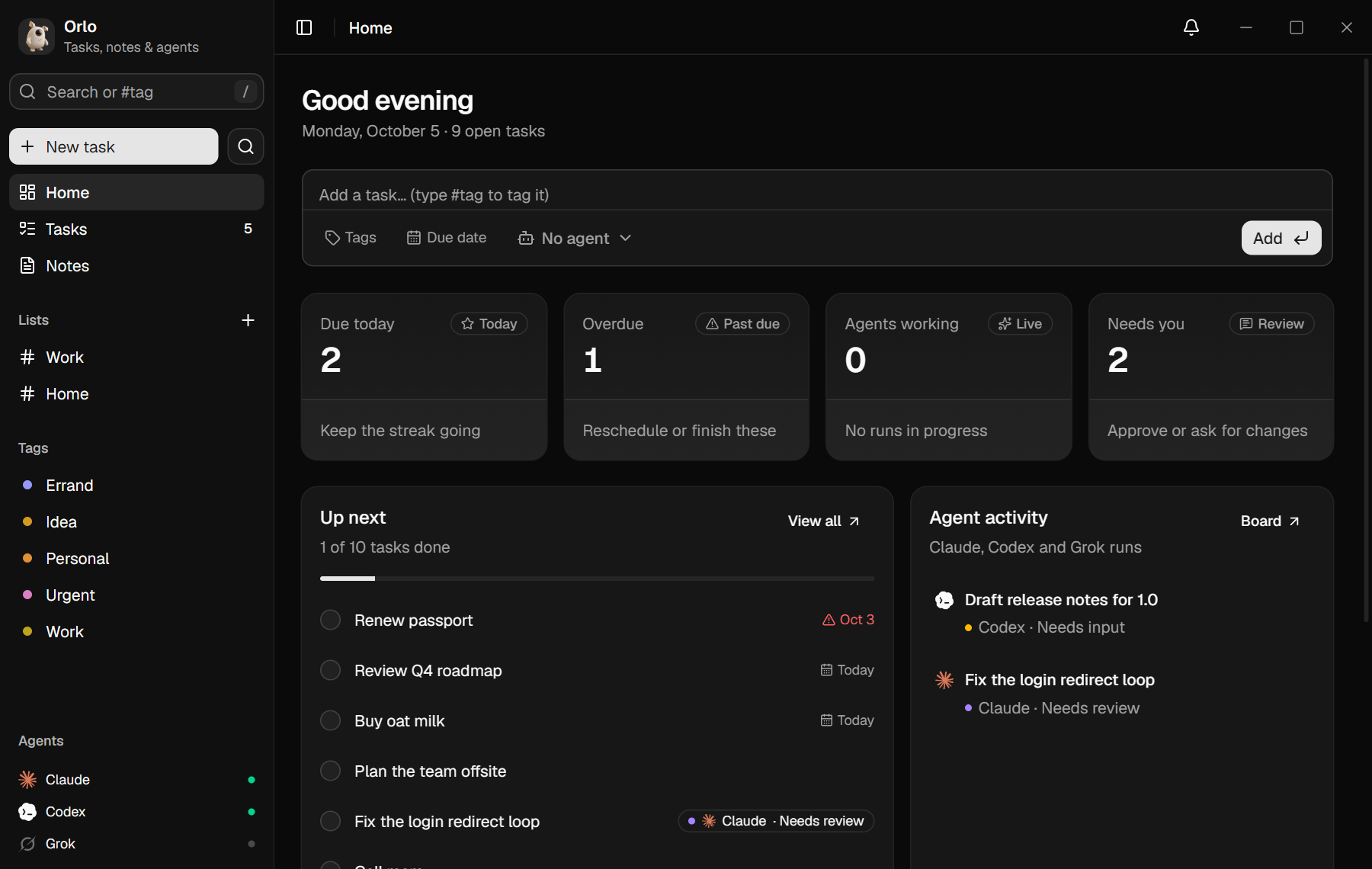
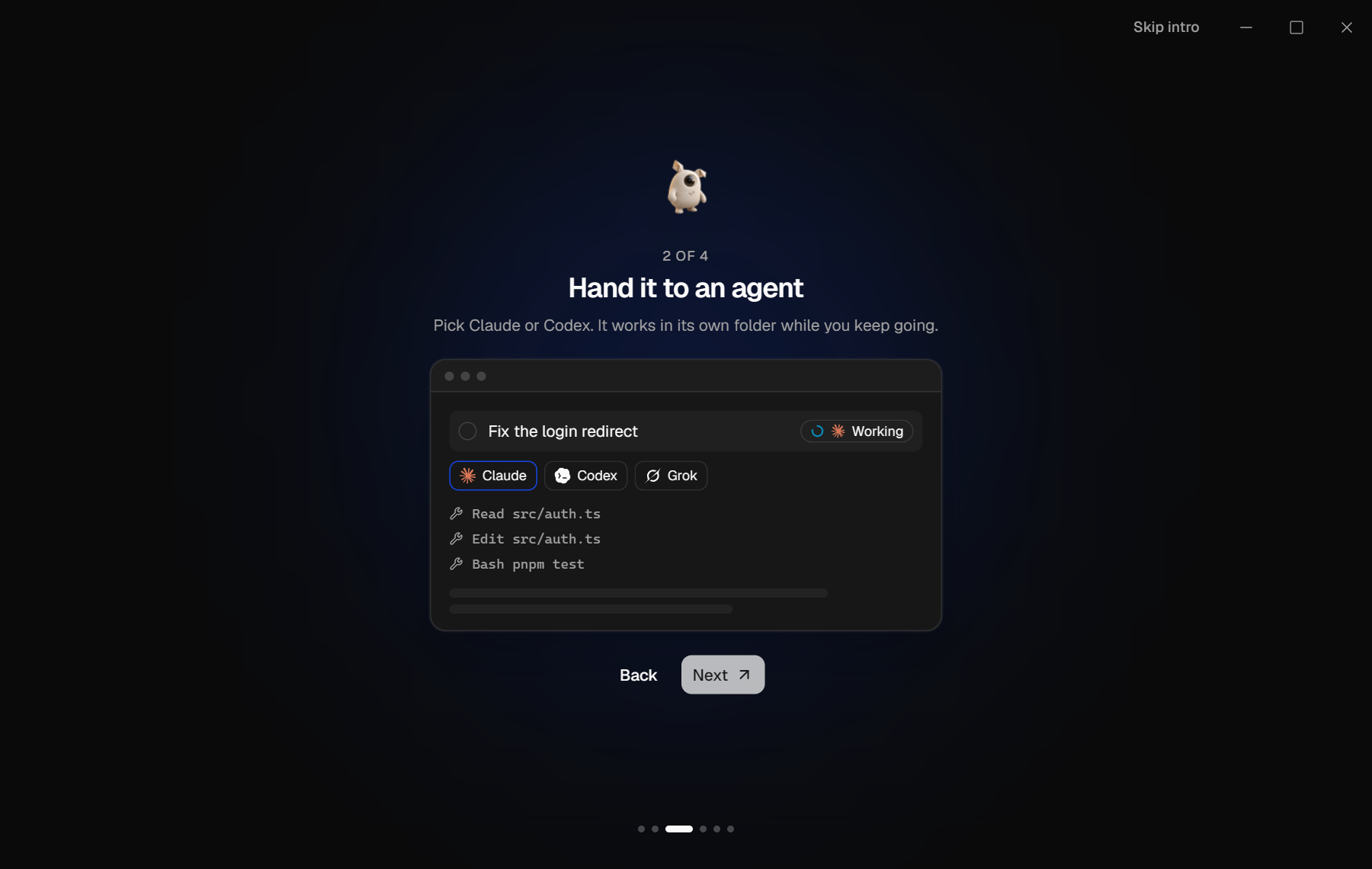
Write a task, hand it to Claude Code, Codex or Grok, then review and approve the result, all from your to-do list.
Download for Windows · Report a bug · Contributing

Features
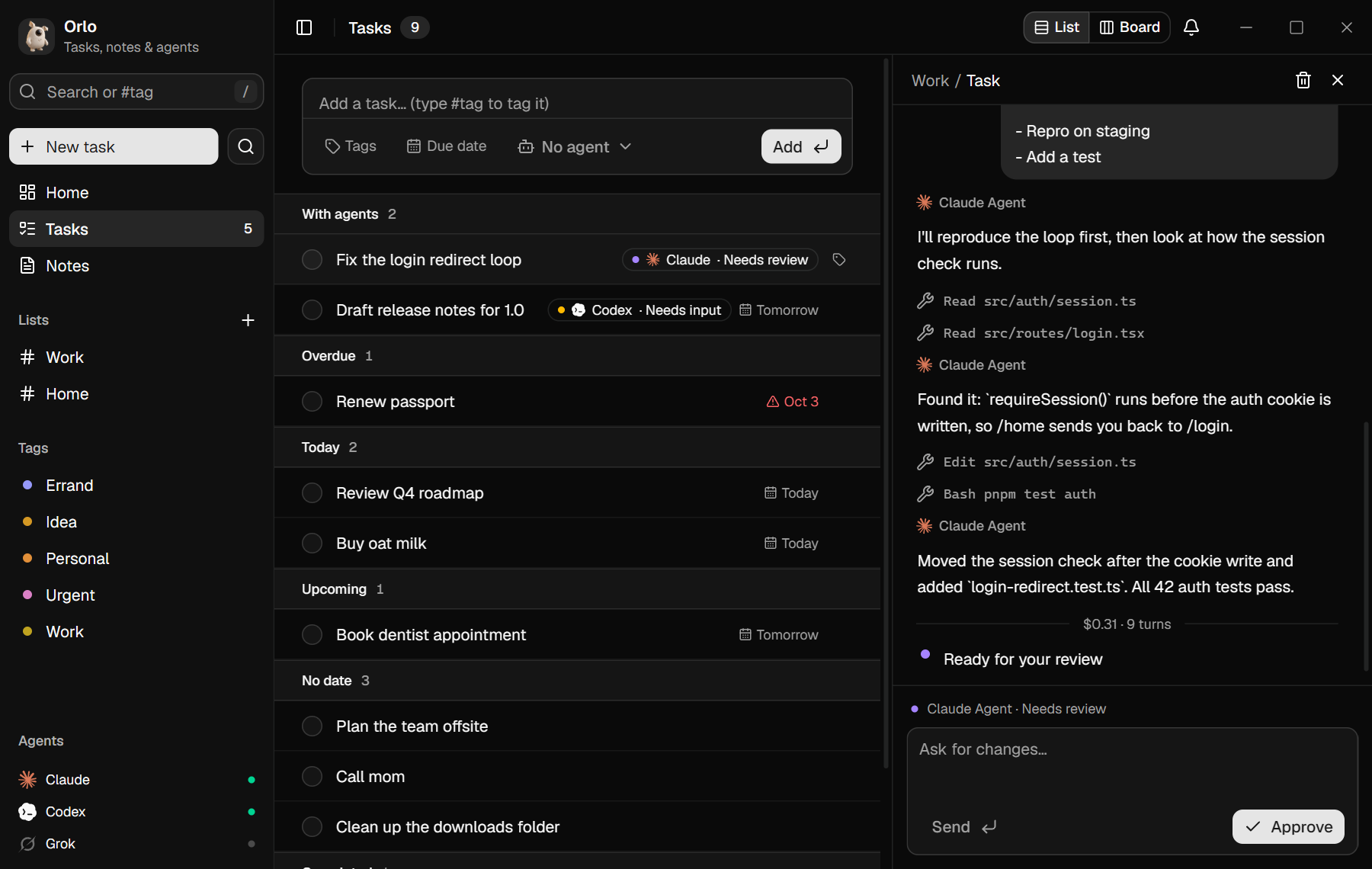
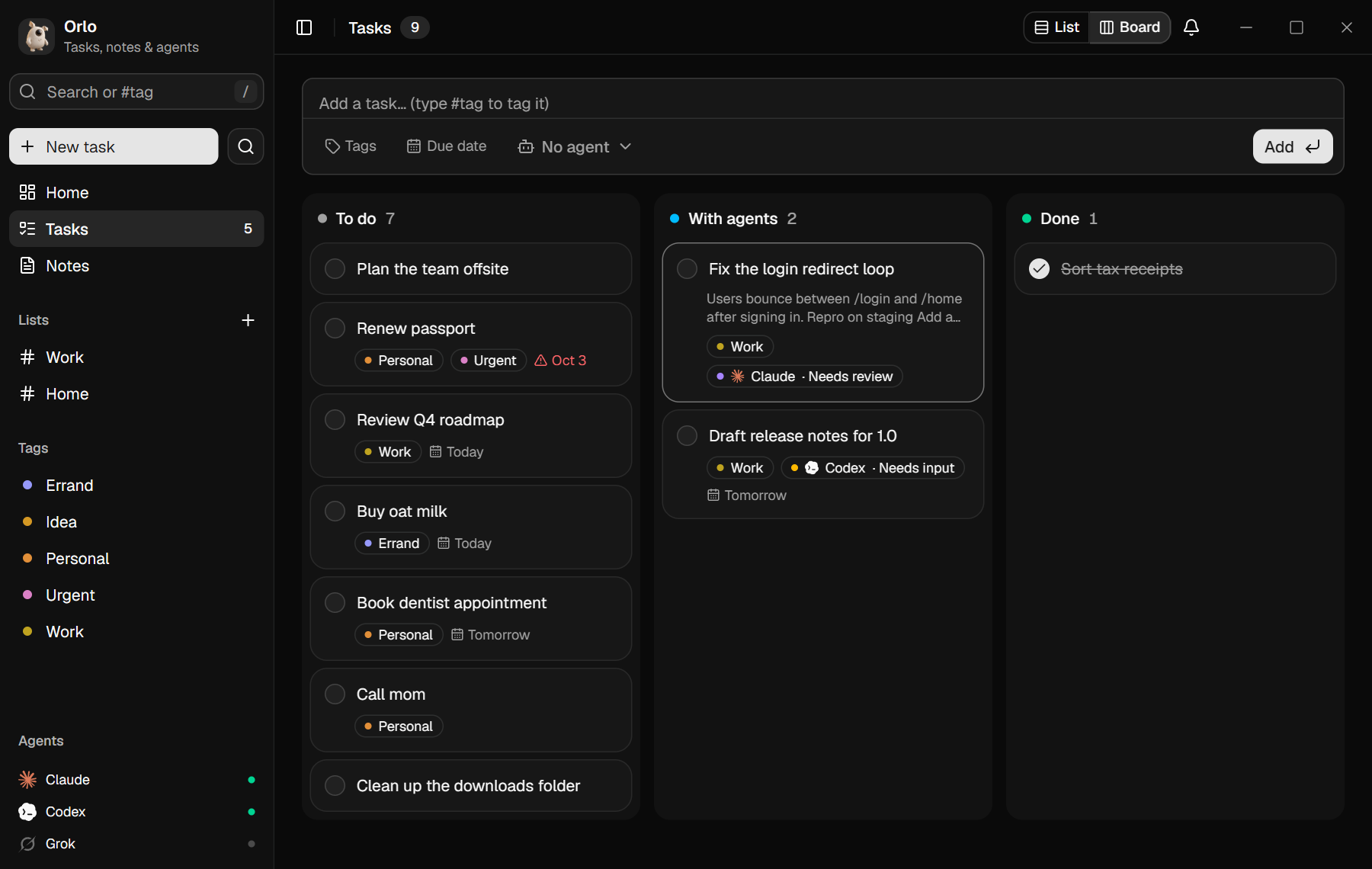
- Tasks: one list with Overdue, Today, Upcoming and No date sections. Tasks you've handed to an agent sit at the top. Add lists,
#tagsand due dates, then switch between list and board. - Delegate to agents: send a task to the
claude,codexorgrokCLI you already use. The agent works in its own folder, streams its progress into the task, and ends by reporting one of three outcomes: done, needs review or needs input. - Review loop: reply to ask for changes, which resumes the same session. Approve to check the task off. Stop kills the run.
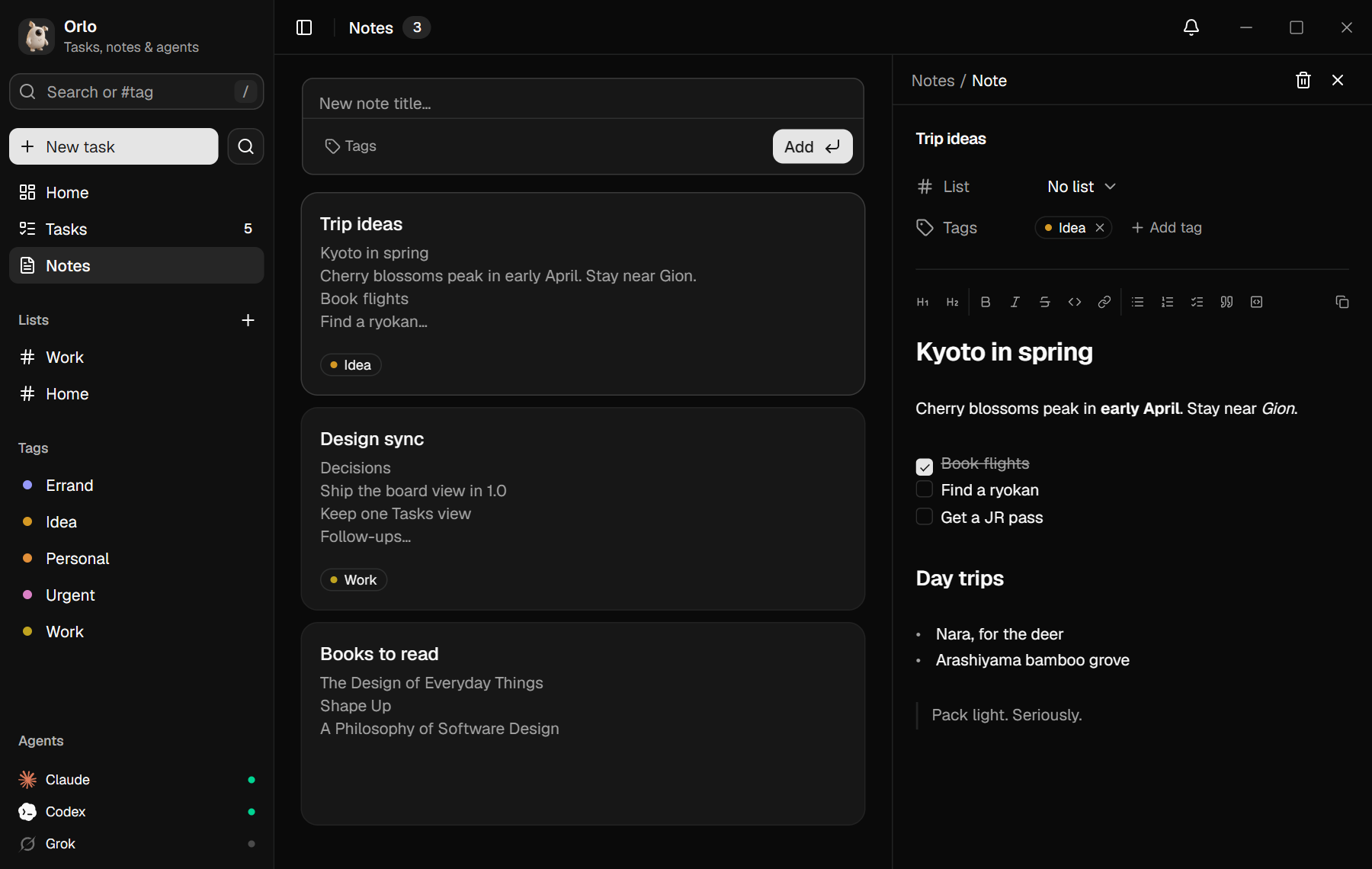
- Markdown notes:
- Formatting appears as you type:
#gives a heading,-a list,- [ ]a checklist and>a quote. - Bold, italic,
codeand links render inline too. - Copying always gives you the raw Markdown.
- Formatting appears as you type:
- Notifications: a bell inside the app plus Windows toasts when an agent finishes or needs you, and a daily reminder for tasks that are due.
- Command menu: Ctrl+K searches everything and runs any command.
- Local-first: everything lives in a SQLite file on your PC. There's no account, no server and no telemetry. The only request Orlo itself makes is the update check against GitHub releases.
 |  |
 |  |
Install
- Download from Releases:
Orlo-<version>-windows-x64-setup.exeinstalls Orlo for your user with a Start Menu shortcut.Orlo-<version>-windows-x64.exeis the portable version: one file, nothing installed.
- Windows may show a SmartScreen warning because the build isn't code-signed. Click More info → Run anyway, or build it yourself from source (see below).
Updates: Orlo checks GitHub for a new release at launch and every 6 hours, or when you pick Check for updates in the command menu (Ctrl+K). Click Update and it downloads the new exe, checks it against the SHA-256 that GitHub publishes for the release, swaps it in and restarts. Your data is untouched.
Requirements:
- Windows 10 or 11 (x64) with the WebView2 runtime. It's preinstalled on Windows 11.
- Agents are optional. To use one, install its CLI, sign in in that CLI, and make sure it's on your
PATH:
| Agent | CLI | Sign in |
|---|---|---|
| Claude | Claude Code (claude) | run claude, then /login |
| Codex | OpenAI Codex CLI (codex) | codex login |
| Grok | grok CLI | run grok once and follow its prompts |
The agent list at the bottom of the sidebar shows which CLIs Orlo found.
How Orlo works with Claude, Codex and Grok
Orlo is an independent project. It is not affiliated with, endorsed by or sponsored by Anthropic, OpenAI or xAI. It was designed to stay inside each provider's rules.
- It only launches the official CLI you installed, as you, on your own machine. That's the same as typing the command in a terminal. Each run gets its own folder,
%USERPROFILE%\Orlo\<task-id>, which you can change withORLO_WORK. - It never touches credentials. Orlo doesn't read, store, log, proxy or forward OAuth tokens, refresh tokens or API keys. It sets no auth environment variables and never opens the CLIs' credential files. Signing in happens only inside each CLI.
- No shared accounts and no proxying. Orlo is a local app for one person. Don't use it to share one subscription between several people, to resell access, or to run agents as a service for others. Those uses break the providers' terms.
- The CLI talks to its provider directly. Orlo only reads the CLI's output and saves the run log in your local database.
- You stay responsible for your usage under each provider's terms:
- Anthropic: Consumer Terms, Commercial Terms, Usage Policy
- OpenAI: Terms of Use, Usage Policies
- xAI: Terms of Service
What an agent is allowed to do. Agents run commands with your user's permissions, so only delegate work you'd be happy to run yourself.
- Claude runs with
--permission-mode acceptEdits --allowedTools Bash,Read,Edit --max-turns 30 --max-budget-usd 1.50. - Codex runs with
-s danger-full-access, because its sandbox on Windows refuses every command when Orlo launches it. - Every run is stopped after 20 minutes. Stop ends it straight away, and closing Orlo ends any agent still running.
Claude, Codex and Grok names and logos are trademarks of their owners. They appear here only to show which tool a task uses. The logo artwork comes from @lobehub/icons (MIT).
Keyboard
| Key | Action |
|---|---|
| N | New task |
| / | Search (#tag filters by tag) |
| Ctrl+K | Command menu |
| J / K | Next / previous task |
| Space | Complete or reopen |
| Enter | Open details |
| Del | Delete (with undo) |
| Esc | Close panel |
| Ctrl+B / I / E | Bold, italic, inline code (in notes) |
| Ctrl+Alt+1–3 | Heading 1–3 (in notes) |
Your data
| What | Where |
|---|---|
| Tasks, notes, lists, agent logs | %APPDATA%\com.orlo.app\orlo.db (SQLite) |
| Agent work folders | %USERPROFILE%\Orlo\<task-id>, or ORLO_WORK if set |
To back up, copy the .db file. To reset, delete it.
Build from source
You'll need Node.js 20+, pnpm, and Rust with the MSVC toolchain (Visual Studio Build Tools with the C++ workload).
pnpm install
pnpm tauri dev                  # run with hot reload
pnpm tauri build --no-bundle    # target/release/orlo.exe (or src-tauri/target/…)
Built with Tauri 2, React 19, TypeScript, Tailwind CSS v4, shadcn/ui, CodeMirror 6 and SQLite.
Contributing
Issues and pull requests are welcome. Start with CONTRIBUTING.md, and see SECURITY.md for reporting vulnerabilities.
License
Similar repos


Tasks, notes and AI agents (Claude Code, Codex, Grok) in one calm Windows app
TypeScript
2
8 commits
updated Oct 6, 2026
See what people are saying
README
Orlo
Tasks, notes and AI agents in one calm Windows app.
Write a task, hand it to Claude Code, Codex or Grok, then review and approve the result, all from your to-do list.
Download for Windows · Report a bug · Contributing
Features
- Tasks: one list with Overdue, Today, Upcoming and No date sections. Tasks you've handed to an agent sit at the top. Add lists,
#tagsand due dates, then switch between list and board. - Delegate to agents: send a task to the
claude,codexorgrokCLI you already use. The agent works in its own folder, streams its progress into the task, and ends by reporting one of three outcomes: done, needs review or needs input. - Review loop: reply to ask for changes, which resumes the same session. Approve to check the task off. Stop kills the run.
- Markdown notes:
- Formatting appears as you type:
#gives a heading,-a list,- [ ]a checklist and>a quote. - Bold, italic,
codeand links render inline too. - Copying always gives you the raw Markdown.
- Formatting appears as you type:
- Notifications: a bell inside the app plus Windows toasts when an agent finishes or needs you, and a daily reminder for tasks that are due.
- Command menu: Ctrl+K searches everything and runs any command.
- Local-first: everything lives in a SQLite file on your PC. There's no account, no server and no telemetry. The only request Orlo itself makes is the update check against GitHub releases.
| |
| |
Install
- Download from Releases:
Orlo-<version>-windows-x64-setup.exeinstalls Orlo for your user with a Start Menu shortcut.Orlo-<version>-windows-x64.exeis the portable version: one file, nothing installed.
- Windows may show a SmartScreen warning because the build isn't code-signed. Click More info → Run anyway, or build it yourself from source (see below).
Updates: Orlo checks GitHub for a new release at launch and every 6 hours, or when you pick Check for updates in the command menu (Ctrl+K). Click Update and it downloads the new exe, checks it against the SHA-256 that GitHub publishes for the release, swaps it in and restarts. Your data is untouched.
Requirements:
- Windows 10 or 11 (x64) with the WebView2 runtime. It's preinstalled on Windows 11.
- Agents are optional. To use one, install its CLI, sign in in that CLI, and make sure it's on your
PATH:
| Agent | CLI | Sign in |
|---|---|---|
| Claude | Claude Code (claude) | run claude, then /login |
| Codex | OpenAI Codex CLI (codex) | codex login |
| Grok | grok CLI | run grok once and follow its prompts |
The agent list at the bottom of the sidebar shows which CLIs Orlo found.
How Orlo works with Claude, Codex and Grok
Orlo is an independent project. It is not affiliated with, endorsed by or sponsored by Anthropic, OpenAI or xAI. It was designed to stay inside each provider's rules.
- It only launches the official CLI you installed, as you, on your own machine. That's the same as typing the command in a terminal. Each run gets its own folder,
%USERPROFILE%\Orlo\<task-id>, which you can change withORLO_WORK. - It never touches credentials. Orlo doesn't read, store, log, proxy or forward OAuth tokens, refresh tokens or API keys. It sets no auth environment variables and never opens the CLIs' credential files. Signing in happens only inside each CLI.
- No shared accounts and no proxying. Orlo is a local app for one person. Don't use it to share one subscription between several people, to resell access, or to run agents as a service for others. Those uses break the providers' terms.
- The CLI talks to its provider directly. Orlo only reads the CLI's output and saves the run log in your local database.
- You stay responsible for your usage under each provider's terms:
- Anthropic: Consumer Terms, Commercial Terms, Usage Policy
- OpenAI: Terms of Use, Usage Policies
- xAI: Terms of Service
What an agent is allowed to do. Agents run commands with your user's permissions, so only delegate work you'd be happy to run yourself.
- Claude runs with
--permission-mode acceptEdits --allowedTools Bash,Read,Edit --max-turns 30 --max-budget-usd 1.50. - Codex runs with
-s danger-full-access, because its sandbox on Windows refuses every command when Orlo launches it. - Every run is stopped after 20 minutes. Stop ends it straight away, and closing Orlo ends any agent still running.
Claude, Codex and Grok names and logos are trademarks of their owners. They appear here only to show which tool a task uses. The logo artwork comes from @lobehub/icons (MIT).
Keyboard
| Key | Action |
|---|---|
| N | New task |
| / | Search (#tag filters by tag) |
| Ctrl+K | Command menu |
| J / K | Next / previous task |
| Space | Complete or reopen |
| Enter | Open details |
| Del | Delete (with undo) |
| Esc | Close panel |
| Ctrl+B / I / E | Bold, italic, inline code (in notes) |
| Ctrl+Alt+1–3 | Heading 1–3 (in notes) |
Your data
| What | Where |
|---|---|
| Tasks, notes, lists, agent logs | %APPDATA%\com.orlo.app\orlo.db (SQLite) |
| Agent work folders | %USERPROFILE%\Orlo\<task-id>, or ORLO_WORK if set |
To back up, copy the .db file. To reset, delete it.
Build from source
You'll need Node.js 20+, pnpm, and Rust with the MSVC toolchain (Visual Studio Build Tools with the C++ workload).
pnpm install
pnpm tauri dev                  # run with hot reload
pnpm tauri build --no-bundle    # target/release/orlo.exe (or src-tauri/target/…)
Built with Tauri 2, React 19, TypeScript, Tailwind CSS v4, shadcn/ui, CodeMirror 6 and SQLite.
Contributing
Issues and pull requests are welcome. Start with CONTRIBUTING.md, and see SECURITY.md for reporting vulnerabilities.