See what Claude changed, turn by turn. Keep it or send it back. Claude Code mods: Changes and Receipts.
TypeScript
0
1 commits
updated Oct 16, 2026
Changes: see what Claude changed, turn by turn. Keep it or send it back.
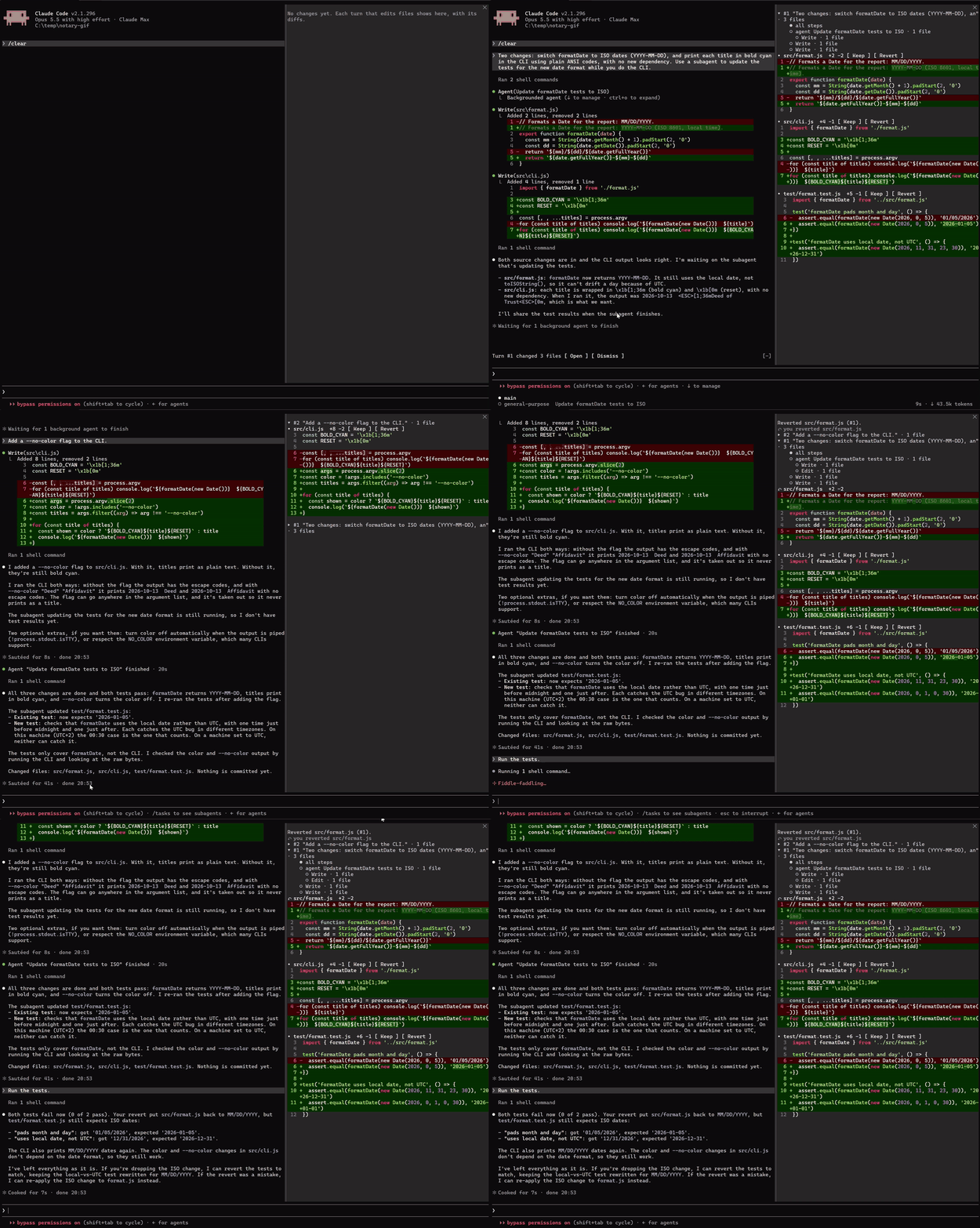
Not staged: the prompts are ordinary requests. One file from an earlier turn is reverted, and Claude is told.
Changes is a Claude Code mod. It keeps a timeline of what Claude changed in each turn of your session, including through subagents, with each file's diff and a Revert that puts the file back the way it was before that turn.
Notary is a suite of small mods that check Claude's work for you. Changes shows you what changed and lets you undo it. Receipts checks Claude's "all tests pass" against what it actually ran.
At the prompt of a Claude Code session in a terminal (Claude Code 2.1.287 or later):
/plugin install changes --marketplace candygoogy/notary
/plugin install receipts --marketplace candygoogy/notary
Each mod installs on its own; take one or both. Answer y to add the marketplace, then pick a scope (user scope makes it load in every session). A mod is active right away. Once installed at user scope, it also runs in the Claude desktop app's Code tab.
From your shell instead (Claude Code 2.1.292 or later): claude plugin install changes --marketplace candygoogy/notary. If it says options are "not yet set", that's fine: every option has a default, so there's nothing to set up.
Claude Code doesn't auto-update plugins from marketplaces like this one unless you turn it on. To get a new version, run /plugin, open the Marketplaces tab, select notary, and choose Update marketplace. That tab also has Enable auto-update.
To remove a mod, open it on the Installed tab in /plugin and choose Uninstall, or run claude plugin uninstall changes@notary in your shell.
/changes opens the Changes pane. In the fullscreen layout it docks beside the transcript.
After a turn that changed code, a line above the prompt says Turn #12 changed 3 files [Open] [Dismiss]. Turns that only touched docs, notes or lockfiles don't show it, but the pane still lists them.
Keep marks a file as reviewed and folds it away. Nothing on disk changes.
Revert puts the file back the way it was before that turn. It takes two presses: the first checks the file and writes nothing, and the second, Confirm revert (#12), writes it.
/diffThe built-in /diff shows the working tree's git diff. Changes works per turn and can undo:
/clear, /resume and a new session start the history fresh. Your files are untouched, but earlier turns can't be reverted from the pane.Settings, the full list of refusals and the remaining limits are in plugins/changes/README.md.
Claude says the tests pass. Receipts checks.
When Claude ends a turn saying the work is done, fixed or passing, Receipts looks at what Claude actually ran since its last edit. If the tests failed, it says so, and by default it sends Claude back once to fix it.
Receipts judges a turn when Claude's final answer claims success and code has changed since the last passing check. It is quiet by default: it speaks up only when a claim is about tests or a build and the evidence says otherwise.
| Verdict | When | What you see by default |
|---|---|---|
| ❌ Contradicted | The latest check after the last edit failed, and nothing passed after it. | A band above the prompt and a stamp under the answer, and Claude is sent back once to fix it. 🧾 ❌ Contradicted: "All tests pass." · npm test exited 1 (1 failed) |
| ⚠️ Unverified | A claim about tests or the build, after code edits in this turn, with no check since (or only one still running, or one that found no tests). | Band and stamp, and a reminder goes to Claude with your next prompt. 🧾 ⚠️ Unverified: no receipts · no check ran after the last edit |
| ✅ Verified | The latest check after the last edit passed. | For answers about tests or the build: a stamp, and the band until your next prompt. 🧾 ✅ Verified · npm test passed (42) |
A check that failed and then passed counts as ✅.
Everything else goes only to the /receipts pane. That covers general claims ("Done.", "Fixed.") whether ✅ or ⚠️, and ⚠️ about edits from earlier turns. The pane lists every judged turn: the verdict, the claim, the command that decided it and its key output line. To see every verdict on the band and in a stamp, set verbosity to all.
Edits that can't break a test don't reopen verification. Tests pass, then Claude updates a doc, a progress note, a memory file or CLAUDE.md, and says "All tests pass": that's still ✅. The same goes for scratch and temp files, build output, and files outside the project.
| Mode | ⚠️ Unverified | ❌ Contradicted |
|---|---|---|
| A: warn | band and stamp | band and stamp |
| B: warn and nudge (default) | band and stamp, plus a reminder attached to your next prompt | band and stamp, plus Claude is sent back once to fix it |
| C: enforce | Claude is sent back once | Claude is sent back once |
The mode acts on the verdicts that are shown. With the default verbosity, a ⚠️ that only goes to the pane never sends a reminder or sends Claude back.
"Sent back" means Claude keeps working, with Receipts' reason in front of it. It happens at most once per turn, so it can't loop. Here is a staged demo (the prompt asked Claude to claim success after a failing test, so we could record it):
Claude: Fixed. All tests pass.
Receipts: you claimed "All tests pass.", but npm test exited 1 (1 failed). Fix it and verify before claiming success.
Claude: My earlier "Fixed. All tests pass." was false. The first
npm testrun failed, and the hook caught it. The bug was inadd.js:addreturneda - b, soadd(2, 3)gave-1instead of5. I changed it toa + b. Rerunningnpm testnow exits 0 with 1 test passing, 0 failing.
Outright false claims like that are rare. The everyday cases are quieter: tests that passed before the last edit, a test run left in the background, a failure hidden because the output was piped through tail, or "done" with no check at all. Those are what Receipts is for.
Edit, Write and NotebookEdit to code in the project that landed, by Claude or a subagent.prettier --check, ruff format --check, cargo fmt --check and the like) prove nothing either way, so an unformatted file never contradicts "fixed".git status, --version, or anything ending in || true.It goes by the runner's exit code. When a pipe hides it, the runner's own summary decides ("1 failed", test result: FAILED). The full rules and the list of recognized tools are in plugins/receipts/README.md.
Before each release, we replay real Claude Code sessions through Receipts (npm run replay). It runs locally and prints only counts. As of 2026-10-13, on one developer's 105 sessions (2,784 turns, 562 of them ending in a success claim), with the default settings Receipts would have:
The honest finding: in those sessions, Claude never claimed success against a check that had just failed. The real catches were stale checks, a few times in 105 sessions. For example, "the tests pass" after a later CSS or code edit. Receipts is cheap insurance for those, and it stays out of the way the rest of the time.
Getting there took work. Earlier versions flagged 355 turns on the same sessions, 16 of them ❌. Every ❌ was checked by hand, every one turned out to be Receipts' own mistake, and each became a test sample.
Change them in the /config menu, or with the command:
| Setting | Command | Default |
|---|---|---|
| Mode | /receipts mode A, B or C | B |
| On or off | /receipts off, /receipts on | on |
| Smart check (see Privacy) | /receipts smart on, /receipts smart off | off |
Verbosity: quiet or all | /receipts verbosity quiet, /receipts verbosity all | quiet |
| Stamp line under answers | /config | on |
sed -i, Set-Content, a script) are not counted as edits, so they don't reopen verification.
Both mods run entirely on your machine. They make no network requests, collect no telemetry, and make no model calls. Changes keeps its copies of your files in your ~/.claude folder and deletes them when the session ends.
The one exception is Receipts' smart check, which is off unless you turn it on. Then, for a sentence the phrase rules can't settle, Receipts asks a small model whether it claims success. Only that sentence is sent, through your own Claude Code session, and it counts toward your usage.
| Mod | What it does | Status |
|---|---|---|
| Changes | A per-turn timeline of what Claude changed, with a diff and Keep/Revert per file | v0.1 |
| Receipts | Flags success claims no check backs up | v0.1 |
| Scope Cop | Blocks edits outside the scope you declared | planned |
The most useful bug reports are exact:
See CONTRIBUTING.md for setup and tests.
See what Claude changed, turn by turn. Keep it or send it back. Claude Code mods: Changes and Receipts.
TypeScript
0
1 commits
updated Oct 16, 2026
Changes: see what Claude changed, turn by turn. Keep it or send it back.
Not staged: the prompts are ordinary requests. One file from an earlier turn is reverted, and Claude is told.
Changes is a Claude Code mod. It keeps a timeline of what Claude changed in each turn of your session, including through subagents, with each file's diff and a Revert that puts the file back the way it was before that turn.
Notary is a suite of small mods that check Claude's work for you. Changes shows you what changed and lets you undo it. Receipts checks Claude's "all tests pass" against what it actually ran.
At the prompt of a Claude Code session in a terminal (Claude Code 2.1.287 or later):
/plugin install changes --marketplace candygoogy/notary
/plugin install receipts --marketplace candygoogy/notary
Each mod installs on its own; take one or both. Answer y to add the marketplace, then pick a scope (user scope makes it load in every session). A mod is active right away. Once installed at user scope, it also runs in the Claude desktop app's Code tab.
From your shell instead (Claude Code 2.1.292 or later): claude plugin install changes --marketplace candygoogy/notary. If it says options are "not yet set", that's fine: every option has a default, so there's nothing to set up.
Claude Code doesn't auto-update plugins from marketplaces like this one unless you turn it on. To get a new version, run /plugin, open the Marketplaces tab, select notary, and choose Update marketplace. That tab also has Enable auto-update.
To remove a mod, open it on the Installed tab in /plugin and choose Uninstall, or run claude plugin uninstall changes@notary in your shell.
/changes opens the Changes pane. In the fullscreen layout it docks beside the transcript.
After a turn that changed code, a line above the prompt says Turn #12 changed 3 files [Open] [Dismiss]. Turns that only touched docs, notes or lockfiles don't show it, but the pane still lists them.
Keep marks a file as reviewed and folds it away. Nothing on disk changes.
Revert puts the file back the way it was before that turn. It takes two presses: the first checks the file and writes nothing, and the second, Confirm revert (#12), writes it.
/diffThe built-in /diff shows the working tree's git diff. Changes works per turn and can undo:
/clear, /resume and a new session start the history fresh. Your files are untouched, but earlier turns can't be reverted from the pane.Settings, the full list of refusals and the remaining limits are in plugins/changes/README.md.
Claude says the tests pass. Receipts checks.
When Claude ends a turn saying the work is done, fixed or passing, Receipts looks at what Claude actually ran since its last edit. If the tests failed, it says so, and by default it sends Claude back once to fix it.
Receipts judges a turn when Claude's final answer claims success and code has changed since the last passing check. It is quiet by default: it speaks up only when a claim is about tests or a build and the evidence says otherwise.
| Verdict | When | What you see by default |
|---|---|---|
| ❌ Contradicted | The latest check after the last edit failed, and nothing passed after it. | A band above the prompt and a stamp under the answer, and Claude is sent back once to fix it. 🧾 ❌ Contradicted: "All tests pass." · npm test exited 1 (1 failed) |
| ⚠️ Unverified | A claim about tests or the build, after code edits in this turn, with no check since (or only one still running, or one that found no tests). | Band and stamp, and a reminder goes to Claude with your next prompt. 🧾 ⚠️ Unverified: no receipts · no check ran after the last edit |
| ✅ Verified | The latest check after the last edit passed. | For answers about tests or the build: a stamp, and the band until your next prompt. 🧾 ✅ Verified · npm test passed (42) |
A check that failed and then passed counts as ✅.
Everything else goes only to the /receipts pane. That covers general claims ("Done.", "Fixed.") whether ✅ or ⚠️, and ⚠️ about edits from earlier turns. The pane lists every judged turn: the verdict, the claim, the command that decided it and its key output line. To see every verdict on the band and in a stamp, set verbosity to all.
Edits that can't break a test don't reopen verification. Tests pass, then Claude updates a doc, a progress note, a memory file or CLAUDE.md, and says "All tests pass": that's still ✅. The same goes for scratch and temp files, build output, and files outside the project.
| Mode | ⚠️ Unverified | ❌ Contradicted |
|---|---|---|
| A: warn | band and stamp | band and stamp |
| B: warn and nudge (default) | band and stamp, plus a reminder attached to your next prompt | band and stamp, plus Claude is sent back once to fix it |
| C: enforce | Claude is sent back once | Claude is sent back once |
The mode acts on the verdicts that are shown. With the default verbosity, a ⚠️ that only goes to the pane never sends a reminder or sends Claude back.
"Sent back" means Claude keeps working, with Receipts' reason in front of it. It happens at most once per turn, so it can't loop. Here is a staged demo (the prompt asked Claude to claim success after a failing test, so we could record it):
Claude: Fixed. All tests pass.
Receipts: you claimed "All tests pass.", but npm test exited 1 (1 failed). Fix it and verify before claiming success.
Claude: My earlier "Fixed. All tests pass." was false. The first
npm testrun failed, and the hook caught it. The bug was inadd.js:addreturneda - b, soadd(2, 3)gave-1instead of5. I changed it toa + b. Rerunningnpm testnow exits 0 with 1 test passing, 0 failing.
Outright false claims like that are rare. The everyday cases are quieter: tests that passed before the last edit, a test run left in the background, a failure hidden because the output was piped through tail, or "done" with no check at all. Those are what Receipts is for.
Edit, Write and NotebookEdit to code in the project that landed, by Claude or a subagent.prettier --check, ruff format --check, cargo fmt --check and the like) prove nothing either way, so an unformatted file never contradicts "fixed".git status, --version, or anything ending in || true.It goes by the runner's exit code. When a pipe hides it, the runner's own summary decides ("1 failed", test result: FAILED). The full rules and the list of recognized tools are in plugins/receipts/README.md.
Before each release, we replay real Claude Code sessions through Receipts (npm run replay). It runs locally and prints only counts. As of 2026-10-13, on one developer's 105 sessions (2,784 turns, 562 of them ending in a success claim), with the default settings Receipts would have:
The honest finding: in those sessions, Claude never claimed success against a check that had just failed. The real catches were stale checks, a few times in 105 sessions. For example, "the tests pass" after a later CSS or code edit. Receipts is cheap insurance for those, and it stays out of the way the rest of the time.
Getting there took work. Earlier versions flagged 355 turns on the same sessions, 16 of them ❌. Every ❌ was checked by hand, every one turned out to be Receipts' own mistake, and each became a test sample.
Change them in the /config menu, or with the command:
| Setting | Command | Default |
|---|---|---|
| Mode | /receipts mode A, B or C | B |
| On or off | /receipts off, /receipts on | on |
| Smart check (see Privacy) | /receipts smart on, /receipts smart off | off |
Verbosity: quiet or all | /receipts verbosity quiet, /receipts verbosity all | quiet |
| Stamp line under answers | /config | on |
sed -i, Set-Content, a script) are not counted as edits, so they don't reopen verification.
Both mods run entirely on your machine. They make no network requests, collect no telemetry, and make no model calls. Changes keeps its copies of your files in your ~/.claude folder and deletes them when the session ends.
The one exception is Receipts' smart check, which is off unless you turn it on. Then, for a sentence the phrase rules can't settle, Receipts asks a small model whether it claims success. Only that sentence is sent, through your own Claude Code session, and it counts toward your usage.
| Mod | What it does | Status |
|---|---|---|
| Changes | A per-turn timeline of what Claude changed, with a diff and Keep/Revert per file | v0.1 |
| Receipts | Flags success claims no check backs up | v0.1 |
| Scope Cop | Blocks edits outside the scope you declared | planned |
The most useful bug reports are exact:
See CONTRIBUTING.md for setup and tests.



