
Panels, guardrails and quality-of-life mods for Claude Code: context, usage, live activity, notifications, safety rules, prompt coach, command hub.
TypeScript
3
29 commits
updated Oct 6, 2026
See what people are saying
README
🧩 claude-mods
Panels, guardrails and quality-of-life mods for Claude Code: see what fills your context, how fast you burn your plan, and what the agent is running right now, and block the commands you never want run.





What is this?
Claude Code is a black box while it works. You can't see the context window filling up until it compacts away the decision you made an hour ago. You find out you've burned your 5-hour limit when it stops answering. You approve a command, tab away, and come back ten minutes later to find it has been waiting on a second approval the whole time. And most people discover /rewind only after the edit they wanted to undo.
claude-mods is a set of small plugins that open that box. Each mod is a standalone Claude Code plugin built on function hooks, the in-process plugin API: it sees every prompt, tool call and turn as it happens, and it can draw panels, toasts and status lines inside Claude Code itself. Install all eleven or only the ones you want.
They are deliberately boring about tokens. Nine of the eleven never call a model. The two that do (prompt-coach's review and context-keeper's handoff note) say so and are easy to turn off.
✨ Features
| 🧩 mod-manager | One panel (/mods) to install, turn on or off, update, or remove each mod, with presets (Safety only, Essentials, Zero tokens, Everything). Shows when a mod has a newer version. Install this first and pick the rest |
| 🚦 quickbar | One line above the prompt: live context % and a button for every claude-mods panel you have installed. Start here |
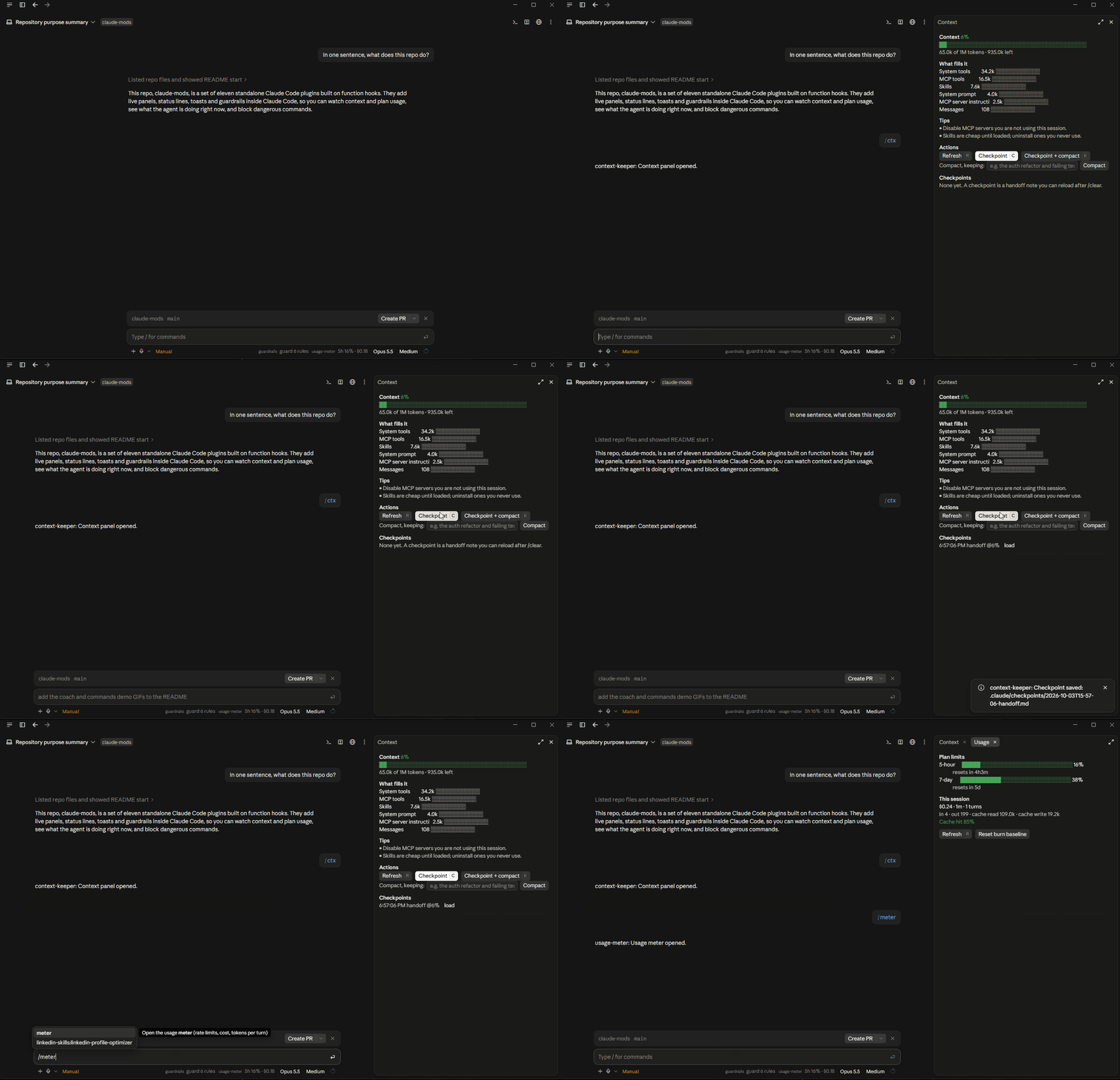
| 🧠 context-keeper | What fills your context window, tips to trim it, and checkpoints: a handoff note (goal, decisions, files, TODOs) saved to .claude/checkpoints/ so /clear and /compact stop losing the thread. Archives the raw transcript before every compaction, for zero tokens |
| 📈 usage-meter | 5-hour and 7-day plan-limit bars with reset countdown, burn rate and "full in ~2.3h", session cost, cache hit ratio (and why it's low), tokens-per-turn sparkline (drawn as charts in the desktop app) |
| 🔔 notify | Notification inbox plus native OS notifications (Windows, macOS, Linux) when a long turn ends, a subagent or background task finishes, Claude asks you something, or an approval has been waiting 15s |
| 👀 activity | What Claude is doing this second: thinking, running $ npm test for 0m42s, waiting for YOUR approval, which subagents run, and its todo plan with progress |
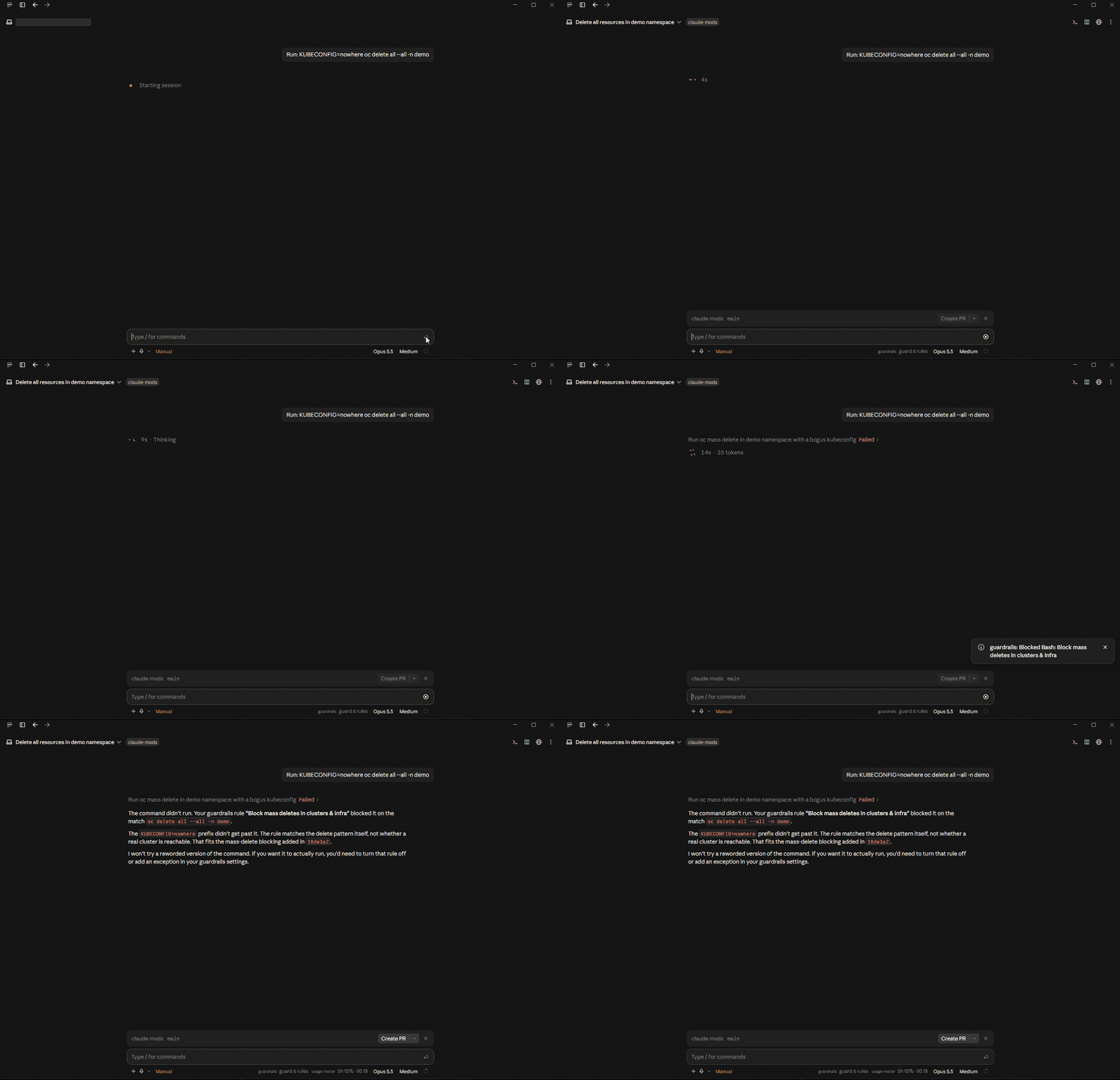
| 🛡️ guardrails | Clickable safety rules with presets (Safe defaults, Locked to project, Read-only review): block rm -rf, mass kubectl/oc deletes, terraform destroy, force-push, destructive git, .env and key files, sudo, installs, network; keep Claude inside the project; add your own patterns |
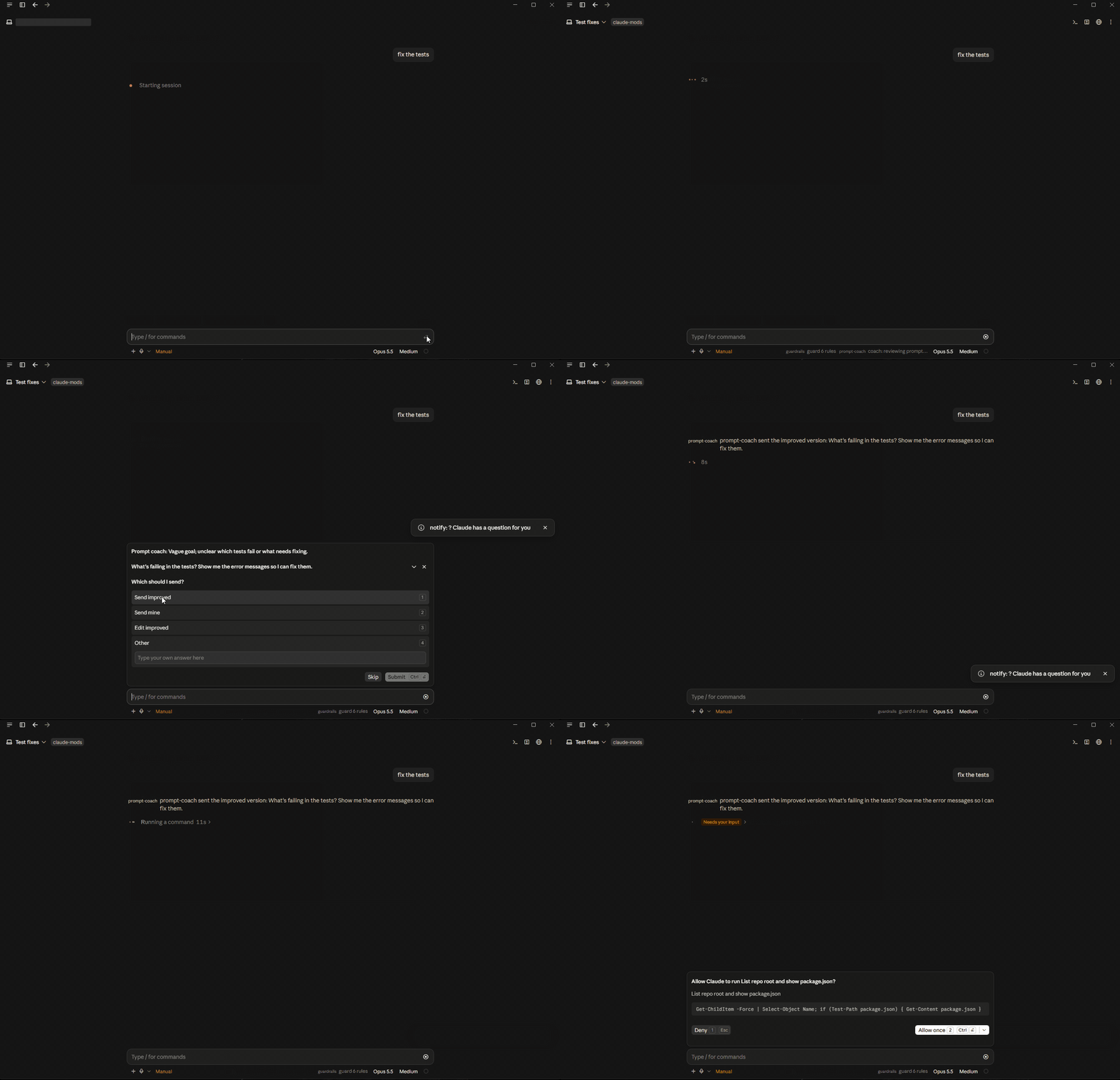
| ✍️ prompt-coach | Before a vague prompt is sent, a small fast model suggests a sharper one. You pick Send improved / Send mine / Edit. Never rewrites silently, never touches "yes" or "continue" |
| 🧰 toolbox | Every tool Claude can use (built-in and MCP, grouped by server) in plain language, how often each was used, and suggestions for the project you're in |
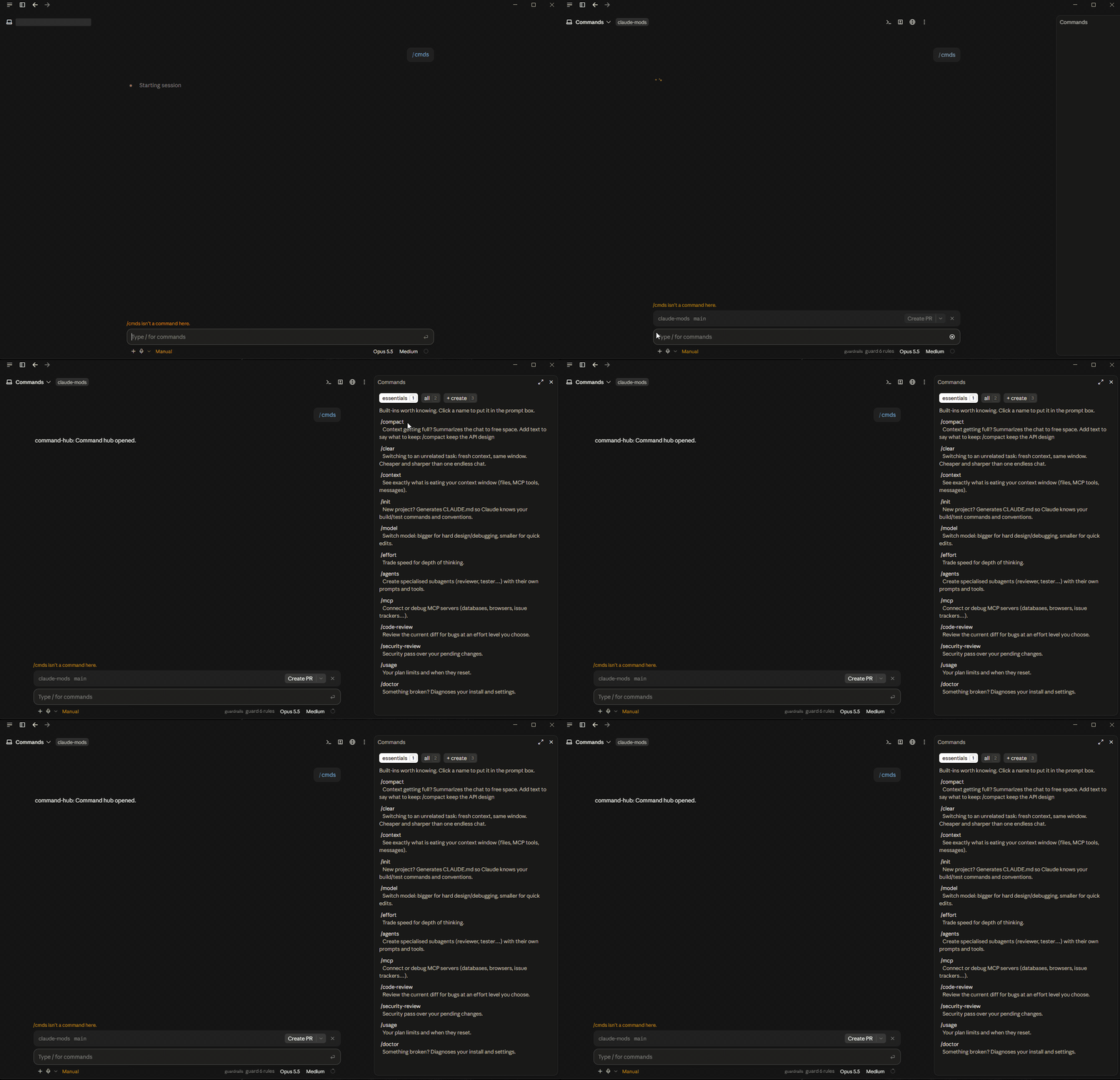
| ⌨️ command-hub | The built-in commands you're probably missing, each with when to use it; a searchable list of everything installed; a form to create your own slash command; tips when your prompt matches one ("undo that" → /rewind) |
| 📝 changes | Every file Claude created or edited this session with +/- counts from git, plus one-click why?, summarize all and self-review |
| 🔁 loop-breaker | Notices Claude going in circles (the same command failing 3×, the same code rewritten 3× in a turn), tells you, and tells Claude to stop and rethink |
🎬 See it in action
activity: what Claude is running right now, and the moment it's waiting on you
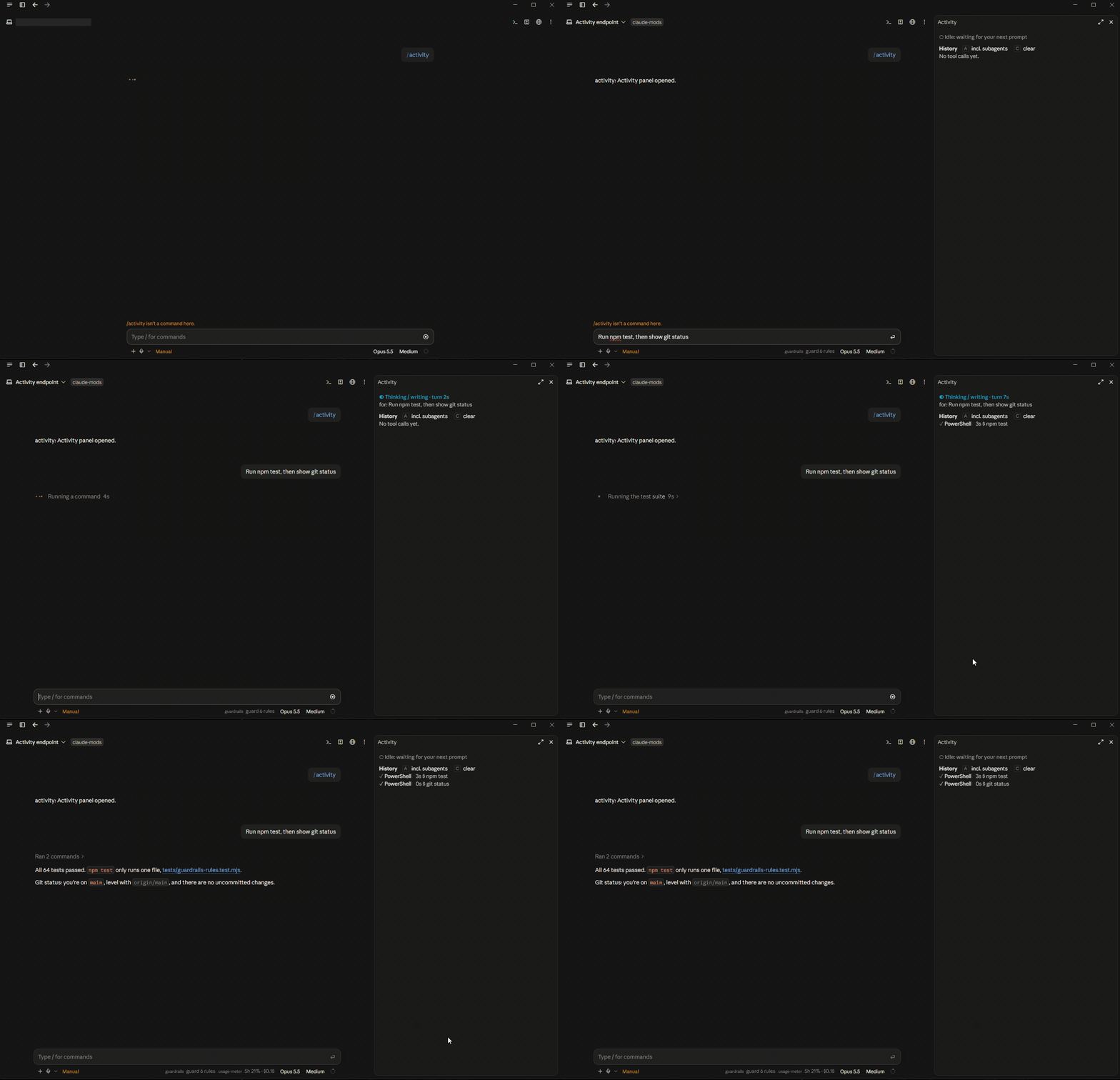
context-keeper + usage-meter: what fills the window, a checkpoint saved to disk, plan limits
prompt-coach: a vague prompt, a suggested rewrite, you choose
command-hub: the built-in commands worth knowing, explained
🏗️ How it works
              You ──prompt──▶ ┌──────────────────────────────┐
                              │        Claude Code engine     │
                              │                               │
                              │  prompt.submit   tool.call    │
                              │  turn.start      turn.complete│
                              │  session.compact ui.render    │
                              └──────┬─────────────────▲──────┘
                       events, in    │                 │  allow · deny · rewrite
                       order, live   ▼                 │  panes · toasts · status
                              ┌──────────────────────────────┐
                              │  claude-mods (one plugin each)│
                              │                               │
                              │  guardrails ── may deny ──────┤
                              │  prompt-coach ─ may ask you ──┤
                              │  activity · changes · notify  │
                              │  usage-meter · context-keeper │──▶ .claude/checkpoints/
                              │  toolbox · command-hub ...    │──▶ OS notifications
                              └──────────────────────────────┘
What a mod sees. Each mod registers hooks on engine events. A tool.call hook sits in front of every tool the agent runs (Bash, Edit, MCP tools, subagents) and sees its real arguments before anything executes. That is how activity can show the exact command and guardrails can refuse it.
What it can change. A hook either passes the event on, rewrites it, or answers it itself. Guardrails answers with a denial the model reads ("blocked by the user's guardrails, don't work around it"). Prompt-coach never rewrites on its own: it asks you first, in Claude Code's own question dialog.
What it draws. Panels are ui.render hooks returning a small element tree (Box, Text, Button, Input) that Claude Code draws natively in the terminal and the desktop app. State lives in the engine ($.state), so panels survive a hot reload and redraw only when their data changes.
What it costs. Nothing, for nine of the mods. They read numbers the engine already has ($.session.usage(), $.tool.list(), $.command.list()). The two model calls are opt-out and listed under Honest limits.
🚀 Quick Start
Prerequisites: Claude Code 2.1.286 or newer (claude update). Panels dock beside the chat in the desktop app or a terminal ≥ 144 columns wide, and open inline in narrower terminals.
1. Add the marketplace and the manager
From any terminal:
claude plugin marketplace add mishgoldenberg/claude-mods
claude plugin install mod-manager@claude-mods
(In the Claude Code CLI you can also use /plugin marketplace add mishgoldenberg/claude-mods and the /plugin menu.)
2. Pick your mods
Restart Claude Code. The first session says hello once ("claude-mods ready: /mods to pick your set"). Type /mods: the manager lists every mod with what it does, whether it uses tokens, and whether an update is available. Install, turn on or off, update, or remove each one with a click, or apply a preset:
| Preset | What you get |
|---|---|
| Safety only | guardrails, notify |
| Essentials | guardrails, activity, notify, context-keeper, usage-meter |
| Zero tokens | every mod that never calls a model |
| Everything | all eleven |
Presets turn off what they don't list and never remove anything. Changes apply in your next session.
3. Use the quickbar
With quickbar installed, a one-line bar sits above the prompt: live context % and a button for every installed panel. /quickbar (or its ×) hides it; /quickbar again brings it back.
Or just ask Claude: "Install the claude-mods plugins from github.com/mishgoldenberg/claude-mods. Follow its INSTALL-FOR-CLAUDE.md."
VS Code
The VS Code extension has no /plugin menu, so install from a terminal with the two commands in step 1, then use /mods inside VS Code. Mods need the extension to run Claude Code 2.1.286 or newer.
Install everything without the manager
for m in quickbar context-keeper usage-meter notify activity guardrails          prompt-coach toolbox command-hub changes loop-breaker; do
  claude plugin install "$m@claude-mods"
done
Try one without installing
git clone https://github.com/mishgoldenberg/claude-mods.git
claude --plugin-dir claude-mods/plugins/activity --plugin-dir claude-mods/plugins/guardrails
💬 Commands
| Command | Mod | What it does |
|---|---|---|
/mods | mod-manager | Install, turn on or off, update, or remove mods; apply a preset |
/quickbar | quickbar | Show or hide the launcher above the prompt |
/ctx | context-keeper | Open the context panel |
/checkpoint | context-keeper | Save a handoff note of this session now |
/resume-checkpoint | context-keeper | Load the latest checkpoint into the prompt box (use after /clear) |
/meter | usage-meter | Open plan limits, burn rate and cost |
/notifications | notify | Open the notification inbox |
/mute [on|off] | notify | Mute or unmute notifications |
/activity | activity | Open the live activity panel |
/guard | guardrails | Open the rules panel |
/guard-preset <safe|locked|review|off> | guardrails | Apply a preset |
/coach [on|off] | prompt-coach | Turn the prompt coach on or off |
/tools | toolbox | Open the tools panel and project suggestions |
/cmds | command-hub | Open the command hub |
/new-command | command-hub | Create your own slash command |
/changes | changes | Open the changed-files panel |
⚙️ Configuration Reference
Options appear in /config once a mod is installed, or go in ~/.claude/settings.json under pluginConfigs.<mod>.
context-keeper
| Option | Default | Description |
|---|---|---|
warnAt | 70 | Toast a tip when context passes this % |
checkpointAt | 85 | Write a handoff note automatically at this % (0 = off) |
usage-meter
| Option | Default | Description |
|---|---|---|
warnAt | 80 | Toast when a plan window passes this % (a second toast always fires at 95%) |
notify
| Option | Default | Description |
|---|---|---|
minSeconds | 30 | Only notify for turns at least this long |
osNotify | true | Also raise a native OS notification |
approvalWaitSeconds | 15 | Ping when an approval has waited this long (-1 = off) |
activity · prompt-coach · loop-breaker
| Mod | Option | Default | Description |
|---|---|---|---|
| activity | autoOpen | false | Dock the panel on session start when there is room |
| prompt-coach | enabled | true | Review prompts before sending |
| prompt-coach | model | claude-haiku-4-5 | Reviewer model; small keeps the delay near a second |
| prompt-coach | minChars | 8 | Never review prompts shorter than this |
| loop-breaker | failLimit | 3 | Same failing command this many times in a row |
| loop-breaker | editLimit | 3 | Times the same code is rewritten in one turn (separate edits to different parts of a file never count) |
guardrails rules
| Rule | Blocks | In preset |
|---|---|---|
no-rm-rf | rm -rf, rm -fr, Remove-Item -Recurse -Force, rmdir /s | Safe · Locked |
no-mass-delete | kubectl/oc delete --all or -A, delete namespace/project, helm uninstall, terraform destroy | Safe · Locked · Review |
no-force-push | git push --force / -f (--force-with-lease allowed) | Safe · Locked |
no-history-rewrite | git reset --hard, git clean -f, git checkout -- ., branch -D, stash drop | Safe · Locked |
protect-secrets | reading or writing .env*, *.pem, *.key, id_rsa, credentials files | Safe · Locked · Review |
no-sudo | sudo, su -, runas | Safe · Locked · Review |
no-installs | npm i, pip install, cargo add, brew/apt/winget install … | Review |
no-network | WebFetch, WebSearch, curl, wget, Invoke-WebRequest | — |
jail-writes | Write/Edit outside the project folder | — |
jail-all | any file tool outside the project, cd out of it | Locked |
read-only | all edits; shell limited to look-only commands | Review |
Guardrails turns on Safe defaults the first time it loads. /guard-preset off turns everything off.
🔒 Is it safe to install?
Mods run inside Claude Code with your permissions and no sandbox, so this is the right question to ask about any mod, including these. What these ones do:
- No network. No mod makes a web request, and there is no telemetry. Nothing leaves your machine except the two opt-in model calls below, which go through your own Claude Code session like any prompt.
- Processes they start, all of them:
git diff --numstat(changes), theclaude pluginCLI when you open/modsor click in it (mod-manager; only Install, Update and Check for updates go online, through Claude Code's own plugin installer), your OS notification tool (notify), andgh --versionto see whether the GitHub CLI exists (toolbox). - Files they write: checkpoints and pre-compaction archives under
.claude/checkpoints/(context-keeper), and a new slash command file when you use the form (command-hub). Nothing else. - Model calls: prompt-coach and context-keeper's handoff note, both listed below and both easy to turn off.
Every mod is a few hundred lines of TypeScript in plugins/<mod>/hooks/register.tsx. Read the ones you install.
⚠️ Honest limits
- Guardrails is a seatbelt, not a sandbox. Rules are pattern checks on the commands and paths the agent passes to tools. A script that deletes files, or an obfuscated command, gets through. Quoted prose (commit messages, text written to files) is ignored so that mentioning
rm -rfdoesn't block you, except when the text is handed to a shell (bash -c,| sh,powershell -Command), which is checked. For hard guarantees use Claude Code's permission rules and sandboxing; use guardrails to catch the honest mistakes. - prompt-coach costs a little. A reviewed prompt waits about a second for a small model, and uses a few hundred tokens. When you send the improved version, the chat still shows what you typed; a dim "prompt-coach sent the improved version" line below it shows what was actually sent. Short replies are never reviewed.
/coach offturns it off. - context-keeper's handoff note costs a little. It asks the model for a summary over the already-cached conversation, so it is mostly cache reads. The pre-compaction archive costs nothing.
- Function hooks are early access. A Claude Code update can break a mod. CI validates every mod against the engine's own validator, and issues are welcome.
🗂️ Project Structure
claude-mods/
├── .claude-plugin/
│   └── marketplace.json        The marketplace: one entry per mod
├── plugins/
│   ├── activity/
│   │   ├── .claude-plugin/
│   │   │   └── plugin.json     Name, description, userConfig options
│   │   ├── hooks/
│   │   │   ├── hooks.json      Points at the hooks module
│   │   │   └── register.tsx    The mod: hooks, commands, panel
│   │   ├── tests/
│   │   │   └── surfaces.test.tsx   The panel draws on every surface (claude plugin test)
│   │   └── types/
│   │       └── index.d.ts      Its $.state contract
│   ├── guardrails/             …same shape for every mod
│   └── …
├── docs/
│   └── design.md               The shared design spec and kit every mod copies
├── tests/
│   ├── guardrails-rules.test.mjs   Every rule against real commands
│   └── design-kit.test.mjs     Every mod's kit matches docs/design.md
├── INSTALL-FOR-CLAUDE.md       Steps Claude follows when asked to install
└── tsconfig.json               Type-checks all mods against the engine API
🔧 Extending it
Add a guardrail rule. Append an entry to RULES in plugins/guardrails/hooks/register.tsx (an id, a title, and a test that returns the offending text) and add cases to tests/guardrails-rules.test.mjs. The panel and presets pick it up automatically.
Add an essential command. One line in ESSENTIALS in plugins/command-hub/hooks/register.tsx. It only shows when that command exists in the user's Claude Code.
Write a new mod. Copy plugins/changes (a small mod with a panel) or plugins/loop-breaker (no UI), rename it everywhere, and add it to marketplace.json. Or ask Claude Code to "make a mod that …": it has a built-in skill for exactly this, with hot reload.
🤝 Contributing
Issues and pull requests are welcome. Start with CONTRIBUTING.md, which has the mod checklist.
npm install
npm run typecheck
npm test
claude plugin validate plugins/<mod>
claude plugin test plugins/<mod>
Every mod follows one design spec, docs/design.md: theme colors only (Claude orange as the single accent), the same pane header, glyphs, hotkeys and empty states, so the set feels like one product in any theme.
Two house rules worth knowing before you write anything, because the validator enforces both:
- Helpers that take
$must be top-levelfunctiondeclarations. A closure insideregisterthat receives$is rejected. - Every
$.statekey is declared in the mod'stypes/index.d.ts, under the mod's name.
Found a way around guardrails, or another security problem? Please report it privately; see SECURITY.md.
📄 License
MIT © 2026 Michael Goldenberg
Similar repos


Panels, guardrails and quality-of-life mods for Claude Code: context, usage, live activity, notifications, safety rules, prompt coach, command hub.
TypeScript
3
29 commits
updated Oct 6, 2026
See what people are saying
README
🧩 claude-mods
Panels, guardrails and quality-of-life mods for Claude Code: see what fills your context, how fast you burn your plan, and what the agent is running right now, and block the commands you never want run.
What is this?
Claude Code is a black box while it works. You can't see the context window filling up until it compacts away the decision you made an hour ago. You find out you've burned your 5-hour limit when it stops answering. You approve a command, tab away, and come back ten minutes later to find it has been waiting on a second approval the whole time. And most people discover /rewind only after the edit they wanted to undo.
claude-mods is a set of small plugins that open that box. Each mod is a standalone Claude Code plugin built on function hooks, the in-process plugin API: it sees every prompt, tool call and turn as it happens, and it can draw panels, toasts and status lines inside Claude Code itself. Install all eleven or only the ones you want.
They are deliberately boring about tokens. Nine of the eleven never call a model. The two that do (prompt-coach's review and context-keeper's handoff note) say so and are easy to turn off.
✨ Features
| 🧩 mod-manager | One panel (/mods) to install, turn on or off, update, or remove each mod, with presets (Safety only, Essentials, Zero tokens, Everything). Shows when a mod has a newer version. Install this first and pick the rest |
| 🚦 quickbar | One line above the prompt: live context % and a button for every claude-mods panel you have installed. Start here |
| 🧠 context-keeper | What fills your context window, tips to trim it, and checkpoints: a handoff note (goal, decisions, files, TODOs) saved to .claude/checkpoints/ so /clear and /compact stop losing the thread. Archives the raw transcript before every compaction, for zero tokens |
| 📈 usage-meter | 5-hour and 7-day plan-limit bars with reset countdown, burn rate and "full in ~2.3h", session cost, cache hit ratio (and why it's low), tokens-per-turn sparkline (drawn as charts in the desktop app) |
| 🔔 notify | Notification inbox plus native OS notifications (Windows, macOS, Linux) when a long turn ends, a subagent or background task finishes, Claude asks you something, or an approval has been waiting 15s |
| 👀 activity | What Claude is doing this second: thinking, running $ npm test for 0m42s, waiting for YOUR approval, which subagents run, and its todo plan with progress |
| 🛡️ guardrails | Clickable safety rules with presets (Safe defaults, Locked to project, Read-only review): block rm -rf, mass kubectl/oc deletes, terraform destroy, force-push, destructive git, .env and key files, sudo, installs, network; keep Claude inside the project; add your own patterns |
| ✍️ prompt-coach | Before a vague prompt is sent, a small fast model suggests a sharper one. You pick Send improved / Send mine / Edit. Never rewrites silently, never touches "yes" or "continue" |
| 🧰 toolbox | Every tool Claude can use (built-in and MCP, grouped by server) in plain language, how often each was used, and suggestions for the project you're in |
| ⌨️ command-hub | The built-in commands you're probably missing, each with when to use it; a searchable list of everything installed; a form to create your own slash command; tips when your prompt matches one ("undo that" → /rewind) |
| 📝 changes | Every file Claude created or edited this session with +/- counts from git, plus one-click why?, summarize all and self-review |
| 🔁 loop-breaker | Notices Claude going in circles (the same command failing 3×, the same code rewritten 3× in a turn), tells you, and tells Claude to stop and rethink |
🎬 See it in action
activity: what Claude is running right now, and the moment it's waiting on you
context-keeper + usage-meter: what fills the window, a checkpoint saved to disk, plan limits
prompt-coach: a vague prompt, a suggested rewrite, you choose
command-hub: the built-in commands worth knowing, explained
🏗️ How it works
              You ──prompt──▶ ┌──────────────────────────────┐
                              │        Claude Code engine     │
                              │                               │
                              │  prompt.submit   tool.call    │
                              │  turn.start      turn.complete│
                              │  session.compact ui.render    │
                              └──────┬─────────────────▲──────┘
                       events, in    │                 │  allow · deny · rewrite
                       order, live   ▼                 │  panes · toasts · status
                              ┌──────────────────────────────┐
                              │  claude-mods (one plugin each)│
                              │                               │
                              │  guardrails ── may deny ──────┤
                              │  prompt-coach ─ may ask you ──┤
                              │  activity · changes · notify  │
                              │  usage-meter · context-keeper │──▶ .claude/checkpoints/
                              │  toolbox · command-hub ...    │──▶ OS notifications
                              └──────────────────────────────┘
What a mod sees. Each mod registers hooks on engine events. A tool.call hook sits in front of every tool the agent runs (Bash, Edit, MCP tools, subagents) and sees its real arguments before anything executes. That is how activity can show the exact command and guardrails can refuse it.
What it can change. A hook either passes the event on, rewrites it, or answers it itself. Guardrails answers with a denial the model reads ("blocked by the user's guardrails, don't work around it"). Prompt-coach never rewrites on its own: it asks you first, in Claude Code's own question dialog.
What it draws. Panels are ui.render hooks returning a small element tree (Box, Text, Button, Input) that Claude Code draws natively in the terminal and the desktop app. State lives in the engine ($.state), so panels survive a hot reload and redraw only when their data changes.
What it costs. Nothing, for nine of the mods. They read numbers the engine already has ($.session.usage(), $.tool.list(), $.command.list()). The two model calls are opt-out and listed under Honest limits.
🚀 Quick Start
Prerequisites: Claude Code 2.1.286 or newer (claude update). Panels dock beside the chat in the desktop app or a terminal ≥ 144 columns wide, and open inline in narrower terminals.
1. Add the marketplace and the manager
From any terminal:
claude plugin marketplace add mishgoldenberg/claude-mods
claude plugin install mod-manager@claude-mods
(In the Claude Code CLI you can also use /plugin marketplace add mishgoldenberg/claude-mods and the /plugin menu.)
2. Pick your mods
Restart Claude Code. The first session says hello once ("claude-mods ready: /mods to pick your set"). Type /mods: the manager lists every mod with what it does, whether it uses tokens, and whether an update is available. Install, turn on or off, update, or remove each one with a click, or apply a preset:
| Preset | What you get |
|---|---|
| Safety only | guardrails, notify |
| Essentials | guardrails, activity, notify, context-keeper, usage-meter |
| Zero tokens | every mod that never calls a model |
| Everything | all eleven |
Presets turn off what they don't list and never remove anything. Changes apply in your next session.
3. Use the quickbar
With quickbar installed, a one-line bar sits above the prompt: live context % and a button for every installed panel. /quickbar (or its ×) hides it; /quickbar again brings it back.
Or just ask Claude: "Install the claude-mods plugins from github.com/mishgoldenberg/claude-mods. Follow its INSTALL-FOR-CLAUDE.md."
VS Code
The VS Code extension has no /plugin menu, so install from a terminal with the two commands in step 1, then use /mods inside VS Code. Mods need the extension to run Claude Code 2.1.286 or newer.
Install everything without the manager
for m in quickbar context-keeper usage-meter notify activity guardrails          prompt-coach toolbox command-hub changes loop-breaker; do
  claude plugin install "$m@claude-mods"
done
Try one without installing
git clone https://github.com/mishgoldenberg/claude-mods.git
claude --plugin-dir claude-mods/plugins/activity --plugin-dir claude-mods/plugins/guardrails
💬 Commands
| Command | Mod | What it does |
|---|---|---|
/mods | mod-manager | Install, turn on or off, update, or remove mods; apply a preset |
/quickbar | quickbar | Show or hide the launcher above the prompt |
/ctx | context-keeper | Open the context panel |
/checkpoint | context-keeper | Save a handoff note of this session now |
/resume-checkpoint | context-keeper | Load the latest checkpoint into the prompt box (use after /clear) |
/meter | usage-meter | Open plan limits, burn rate and cost |
/notifications | notify | Open the notification inbox |
/mute [on|off] | notify | Mute or unmute notifications |
/activity | activity | Open the live activity panel |
/guard | guardrails | Open the rules panel |
/guard-preset <safe|locked|review|off> | guardrails | Apply a preset |
/coach [on|off] | prompt-coach | Turn the prompt coach on or off |
/tools | toolbox | Open the tools panel and project suggestions |
/cmds | command-hub | Open the command hub |
/new-command | command-hub | Create your own slash command |
/changes | changes | Open the changed-files panel |
⚙️ Configuration Reference
Options appear in /config once a mod is installed, or go in ~/.claude/settings.json under pluginConfigs.<mod>.
context-keeper
| Option | Default | Description |
|---|---|---|
warnAt | 70 | Toast a tip when context passes this % |
checkpointAt | 85 | Write a handoff note automatically at this % (0 = off) |
usage-meter
| Option | Default | Description |
|---|---|---|
warnAt | 80 | Toast when a plan window passes this % (a second toast always fires at 95%) |
notify
| Option | Default | Description |
|---|---|---|
minSeconds | 30 | Only notify for turns at least this long |
osNotify | true | Also raise a native OS notification |
approvalWaitSeconds | 15 | Ping when an approval has waited this long (-1 = off) |
activity · prompt-coach · loop-breaker
| Mod | Option | Default | Description |
|---|---|---|---|
| activity | autoOpen | false | Dock the panel on session start when there is room |
| prompt-coach | enabled | true | Review prompts before sending |
| prompt-coach | model | claude-haiku-4-5 | Reviewer model; small keeps the delay near a second |
| prompt-coach | minChars | 8 | Never review prompts shorter than this |
| loop-breaker | failLimit | 3 | Same failing command this many times in a row |
| loop-breaker | editLimit | 3 | Times the same code is rewritten in one turn (separate edits to different parts of a file never count) |
guardrails rules
| Rule | Blocks | In preset |
|---|---|---|
no-rm-rf | rm -rf, rm -fr, Remove-Item -Recurse -Force, rmdir /s | Safe · Locked |
no-mass-delete | kubectl/oc delete --all or -A, delete namespace/project, helm uninstall, terraform destroy | Safe · Locked · Review |
no-force-push | git push --force / -f (--force-with-lease allowed) | Safe · Locked |
no-history-rewrite | git reset --hard, git clean -f, git checkout -- ., branch -D, stash drop | Safe · Locked |
protect-secrets | reading or writing .env*, *.pem, *.key, id_rsa, credentials files | Safe · Locked · Review |
no-sudo | sudo, su -, runas | Safe · Locked · Review |
no-installs | npm i, pip install, cargo add, brew/apt/winget install … | Review |
no-network | WebFetch, WebSearch, curl, wget, Invoke-WebRequest | — |
jail-writes | Write/Edit outside the project folder | — |
jail-all | any file tool outside the project, cd out of it | Locked |
read-only | all edits; shell limited to look-only commands | Review |
Guardrails turns on Safe defaults the first time it loads. /guard-preset off turns everything off.
🔒 Is it safe to install?
Mods run inside Claude Code with your permissions and no sandbox, so this is the right question to ask about any mod, including these. What these ones do:
- No network. No mod makes a web request, and there is no telemetry. Nothing leaves your machine except the two opt-in model calls below, which go through your own Claude Code session like any prompt.
- Processes they start, all of them:
git diff --numstat(changes), theclaude pluginCLI when you open/modsor click in it (mod-manager; only Install, Update and Check for updates go online, through Claude Code's own plugin installer), your OS notification tool (notify), andgh --versionto see whether the GitHub CLI exists (toolbox). - Files they write: checkpoints and pre-compaction archives under
.claude/checkpoints/(context-keeper), and a new slash command file when you use the form (command-hub). Nothing else. - Model calls: prompt-coach and context-keeper's handoff note, both listed below and both easy to turn off.
Every mod is a few hundred lines of TypeScript in plugins/<mod>/hooks/register.tsx. Read the ones you install.
⚠️ Honest limits
- Guardrails is a seatbelt, not a sandbox. Rules are pattern checks on the commands and paths the agent passes to tools. A script that deletes files, or an obfuscated command, gets through. Quoted prose (commit messages, text written to files) is ignored so that mentioning
rm -rfdoesn't block you, except when the text is handed to a shell (bash -c,| sh,powershell -Command), which is checked. For hard guarantees use Claude Code's permission rules and sandboxing; use guardrails to catch the honest mistakes. - prompt-coach costs a little. A reviewed prompt waits about a second for a small model, and uses a few hundred tokens. When you send the improved version, the chat still shows what you typed; a dim "prompt-coach sent the improved version" line below it shows what was actually sent. Short replies are never reviewed.
/coach offturns it off. - context-keeper's handoff note costs a little. It asks the model for a summary over the already-cached conversation, so it is mostly cache reads. The pre-compaction archive costs nothing.
- Function hooks are early access. A Claude Code update can break a mod. CI validates every mod against the engine's own validator, and issues are welcome.
🗂️ Project Structure
claude-mods/
├── .claude-plugin/
│   └── marketplace.json        The marketplace: one entry per mod
├── plugins/
│   ├── activity/
│   │   ├── .claude-plugin/
│   │   │   └── plugin.json     Name, description, userConfig options
│   │   ├── hooks/
│   │   │   ├── hooks.json      Points at the hooks module
│   │   │   └── register.tsx    The mod: hooks, commands, panel
│   │   ├── tests/
│   │   │   └── surfaces.test.tsx   The panel draws on every surface (claude plugin test)
│   │   └── types/
│   │       └── index.d.ts      Its $.state contract
│   ├── guardrails/             …same shape for every mod
│   └── …
├── docs/
│   └── design.md               The shared design spec and kit every mod copies
├── tests/
│   ├── guardrails-rules.test.mjs   Every rule against real commands
│   └── design-kit.test.mjs     Every mod's kit matches docs/design.md
├── INSTALL-FOR-CLAUDE.md       Steps Claude follows when asked to install
└── tsconfig.json               Type-checks all mods against the engine API
🔧 Extending it
Add a guardrail rule. Append an entry to RULES in plugins/guardrails/hooks/register.tsx (an id, a title, and a test that returns the offending text) and add cases to tests/guardrails-rules.test.mjs. The panel and presets pick it up automatically.
Add an essential command. One line in ESSENTIALS in plugins/command-hub/hooks/register.tsx. It only shows when that command exists in the user's Claude Code.
Write a new mod. Copy plugins/changes (a small mod with a panel) or plugins/loop-breaker (no UI), rename it everywhere, and add it to marketplace.json. Or ask Claude Code to "make a mod that …": it has a built-in skill for exactly this, with hot reload.
🤝 Contributing
Issues and pull requests are welcome. Start with CONTRIBUTING.md, which has the mod checklist.
npm install
npm run typecheck
npm test
claude plugin validate plugins/<mod>
claude plugin test plugins/<mod>
Every mod follows one design spec, docs/design.md: theme colors only (Claude orange as the single accent), the same pane header, glyphs, hotkeys and empty states, so the set feels like one product in any theme.
Two house rules worth knowing before you write anything, because the validator enforces both:
- Helpers that take
$must be top-levelfunctiondeclarations. A closure insideregisterthat receives$is rejected. - Every
$.statekey is declared in the mod'stypes/index.d.ts, under the mod's name.
Found a way around guardrails, or another security problem? Please report it privately; see SECURITY.md.
📄 License
MIT © 2026 Michael Goldenberg