
Ctrl+Z for Claude Code - Snapshots every step your agent takes, including Bash. Lets you review the diff, undo a whole turn or a single command, and travel your project back in time. Keeps your uncommitted work safe. Local, git-based, zero tokens.
TypeScript
0
69 commits
updated Oct 6, 2026
See what people are saying
README

Claude Time Machine
Undo anything Claude Code does to your project.
Edits and shell commands alike. Every turn is a snapshot: review it, undo it step by step, or travel back.



Claude changed 17 files, ran a script and deleted something it shouldn't have. You want to go back:
/tm undo
Why
Claude Code's /rewind brings back files Claude changed with Edit and Write. A lot of real work goes through the
shell instead: mv, rm, codegen, formatters, migrations. /rewind doesn't see any of that.
The time machine snapshots the whole project around every tool call, so:
- Bash is covered. Anything a command changed is one undo away.
- Step by step. Undo a whole turn, or just the third command of it.
- Your edits stay yours. Uncommitted changes you had before the turn stay. Edits you make while Claude works are yours, not Claude's; if you both touched a file, undo stops and tells you instead of overwriting.
- Nothing is lost. Every undo, travel and prune is itself a snapshot you can go back from.
- Your repo is untouched. History lives in a separate git repository under
~/.claude/time-machine/. No commits, stashes or branches in your project, unless you ask for them with/tm commitor/tm branch. - Local and private. Plain git on your machine. The plugin makes no network requests, sends no telemetry and makes no model calls.
/rewind | Time machine | |
|---|---|---|
Files changed through Bash: rm, mv, codegen, formatters | not tracked | tracked |
| What you can undo | a whole prompt | a whole prompt (turn) or any step of it |
| Your edits made during a turn | not tracked | kept, or reported as a conflict |
| Edits from other sessions in the project | not tracked | one timeline, sessions kept apart |
| How long history lasts | last 100 checkpoints of a session, ~30 days | until you prune it |
| Flags CI, dependency, secret changes and mass deletes | no | yes, with a key to undo just the flagged files |
| Shows where Claude keeps rewriting code | no | /tm heat |
| Turns a turn into a commit or branch | no | yes |
| Rewinds the conversation | yes | no, use /rewind for that |
Claude Code's checkpointing docs: "Checkpointing does not track files
modified by Bash commands." Use /rewind for the conversation and the time machine for the files.
Why not just…
…commit more often? Git is your project's durable history. The time machine is Claude's working history. A commit is what you decide to keep, and committing every step leaves you with this:
Claude edited auth.ts
Claude ran the formatter
Claude generated files
Claude tried something
Claude broke it
Claude fixed half of it
Claude's mistakes land between commits, in the middle of a turn, and getting back with git checkout or git stash
throws away your own uncommitted work along with Claude's. The time machine keeps every step without touching your
repository, and undo leaves your edits alone.
…use bashward? bashward is a Bash hook that reads each command, guesses which
paths it will write (rm, mv, cp, dd, sed -i, tee, truncate, > redirects) and copies them before it runs.
As of 0.1.1, it judges a command by its first word, so cd src && rm old.ts or make clean && rm -rf dist slip past
it, as do globs like rm *.log and anything that writes without naming the path: npm run codegen, git checkout ., a
formatter, a migration. The time machine does not guess: it snapshots the project before and after each command and
records what actually changed. bashward does reach files outside the project, which the time machine does not.
…run Claude in a sandbox or a container? A sandbox limits what Claude can reach. It does not give you back what Claude did inside it. Use both.
Install
Requires macOS or Linux, git, and Claude Code 2.1.287 or newer.
claude plugin marketplace add xzwache/claude-time-machine
claude plugin install time-machine@claude-time-machine
Start Claude in a git project. The time machine starts on its own; in any other folder it stays off until /tm on.
On an older Claude Code it says so and stays off.
Uninstall
claude plugin uninstall time-machine@claude-time-machine
claude plugin marketplace remove claude-time-machine
rm -rf ~/.claude/time-machine   # every project's history, heat maps and patches
Your projects are not touched: the history lives only in ~/.claude/time-machine/. To delete one project's history
and keep the plugin, use /tm projects rm N --yes.
Use
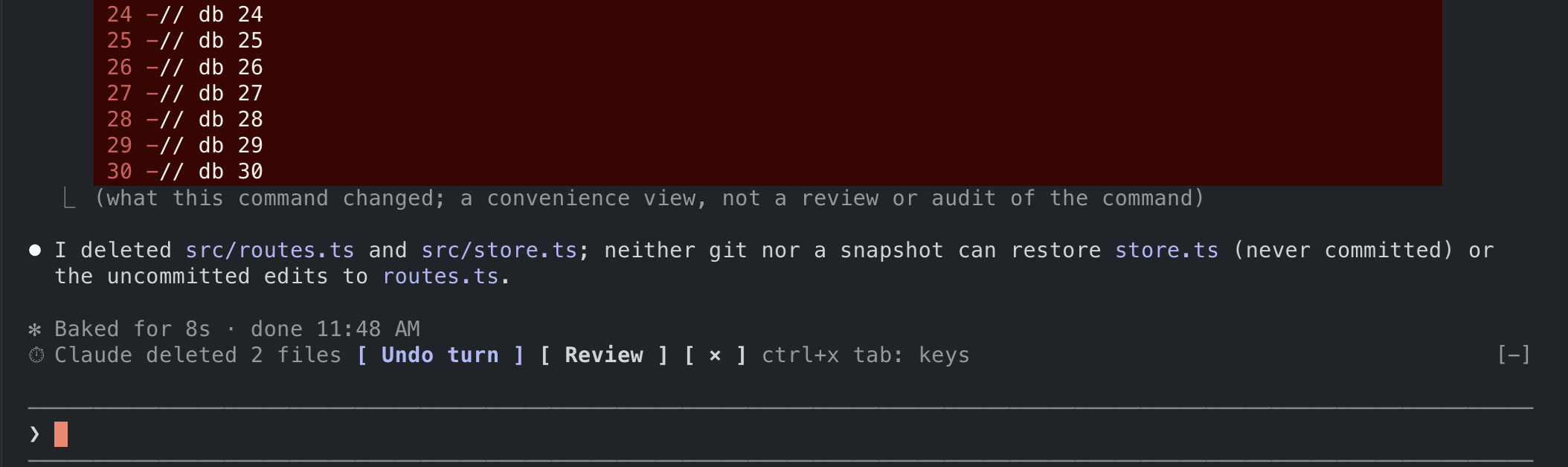
After a turn that changed files, a band above the prompt says what Claude did and offers 1: Undo turn and 2: Review. When the turn touched something that deserves a second look (CI config, dependencies or an install script, a secrets file, a new executable, a mass delete), a second line says what, with 3: Undo these to revert only that:
⏱ Claude edited 2 files and created 2       1: Undo turn  2: Review  ×
⚠ CI config · deps +left-pad · install script   3: Undo these
Press the digit at an empty prompt, as you answer Claude Code's surveys. An undo asks once more (1: Yes, undo), so
one stray digit undoes nothing, and /tm redo brings back any undo. /tm undo works everywhere.
| Command | What it does |
|---|---|
/tm | Open the pane: timeline, steps, files and diffs |
/tm log | List snapshots, newest first |
/tm show 3 | Files, steps and Claude's answer for snapshot 3 |
/tm undo · /tm undo 3.2 | Undo the latest turn · undo step 2 of turn 3 |
/tm undo 3 --sensitive | Undo only the sensitive changes flagged in turn 3 |
/tm redo | Undo the last undo |
/tm travel 5 | Put the whole project back to snapshot 5 |
/tm save "before refactor" | Bookmark now; /tm travel "before refactor" comes back |
/tm commit · /tm branch 3 x | Turn a turn into a commit on your branch · snapshot 3 into branch x |
/tm patch | The latest turn as a patch file |
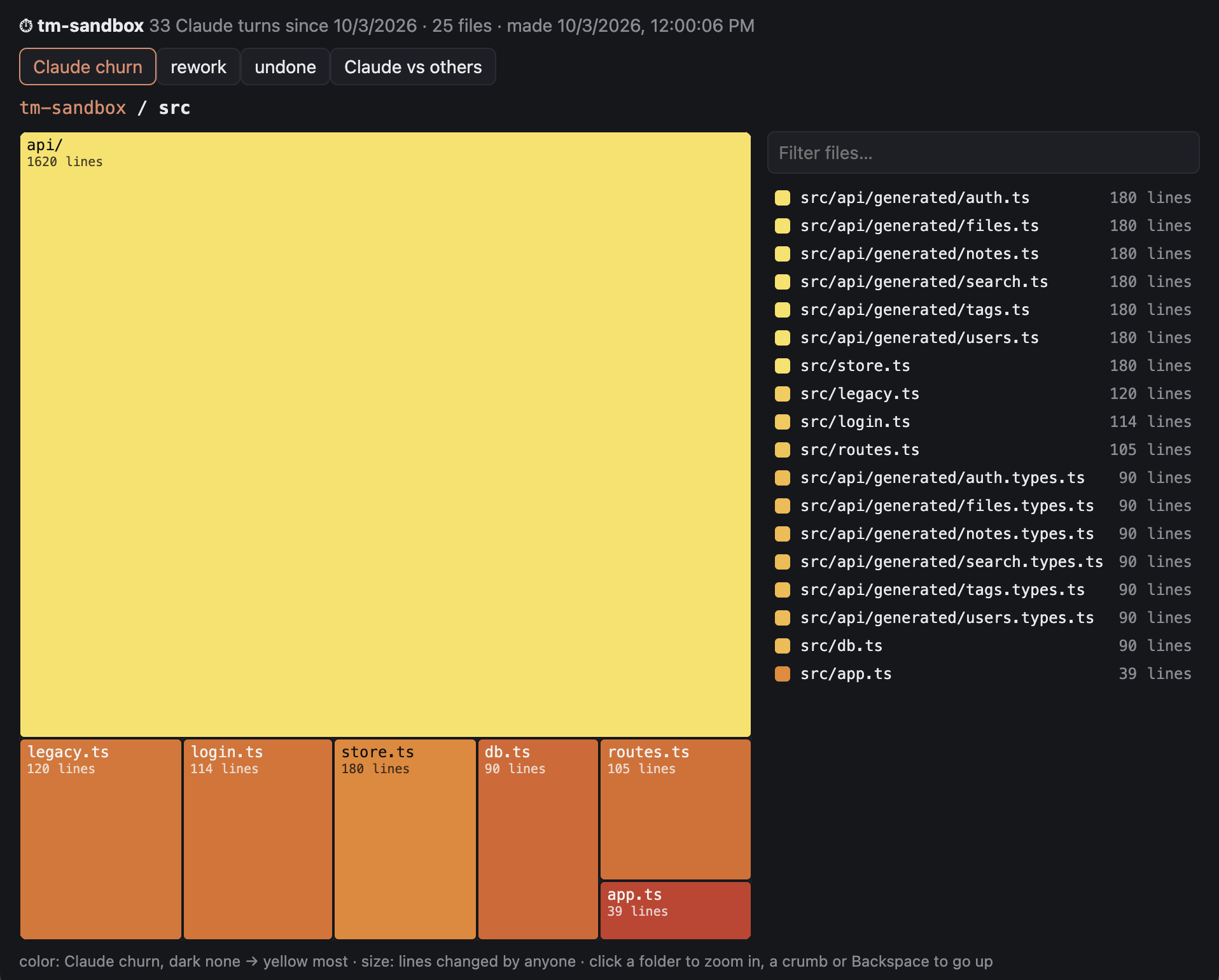
/tm heat · /tm heat open | Map of where Claude worked · the same map in your browser |
All commands, modes and settings: docs/commands.md.
How it works
A bare git repository under ~/.claude/time-machine/ uses your project as its work tree. Before and after each tool
call that can change files, it runs git add -A into its own index and commits the result. A turn is a run of those
commits; undoing it checks the earlier versions of exactly the files Claude touched back out.
Snapshots are incremental: git only rehashes files whose size or timestamp changed. On a 67,000-file repository a
snapshot takes 0.2 to 0.4 s; smaller projects take proportionally less. Read-only commands such as
ls, grep or git status are skipped entirely.
Details, numbers and trade-offs: docs/architecture.md.
Privacy
The plugin keeps everything on your machine and sends nothing anywhere. Snapshots contain your project's files,
including small ignored files such as local config, plus your prompts and Claude's answers. The folder is created with
mode 700.
What /tm commands print (file names, diffs, Claude's earlier answers) becomes part of your conversation with Claude,
like the output of any command.
Secrets are left out: .env files, keys and certificates, .npmrc, .pypirc, .netrc, credentials and kubeconfigs
are never copied, and undo and travel never write them. When Claude edits one, it is flagged as a sensitive change, but
it cannot be undone. To keep them in a project's snapshots anyway, so they can be undone: /tm secrets keep.
To keep paths out, list them in a .tmignore file (same syntax as .gitignore). To delete a project's history:
/tm projects rm N --yes, or remove its folder under ~/.claude/time-machine/.
Limitations
- Bash changes inside ignored folders (
node_modules/,dist/) and ignored files over 1 MiB aren't recorded. - Edits you make while a Bash command is running count as that command's.
- Undo and travel check their result. A file something else writes while they run (a formatter or codegen still going) is left as it is and reported as incomplete, with a diff against the snapshot; nothing is called restored unless it matches. A write that lands after that check is not seen until the next snapshot.
- Empty directories aren't tracked, and nothing outside the project folder is.
- Windows isn't supported.
The full list is in docs/architecture.md.
Contributing
Issues and pull requests are welcome, see CONTRIBUTING.md. Report security issues privately, as described in SECURITY.md.
License
Claude Time Machine is licensed under the MIT License.
We chose MIT because a safety net for coding agents should be easy to adopt anywhere: in personal setups, team plugins, company forks and other tools built on Claude Code. Use it, change it and ship it; keep the copyright notice.
See the LICENSE file for the full text.
Support
- Documentation: docs/: commands and architecture
- Issues: GitHub Issues
- Security: report privately, see SECURITY.md
- Repository: github.com/xzwache/claude-time-machine
- Author: @xzwache
A Claude Code plugin | Plain git underneath | Made with TypeScript
Similar repos


Ctrl+Z for Claude Code - Snapshots every step your agent takes, including Bash. Lets you review the diff, undo a whole turn or a single command, and travel your project back in time. Keeps your uncommitted work safe. Local, git-based, zero tokens.
TypeScript
0
69 commits
updated Oct 6, 2026
See what people are saying
README
Claude Time Machine
Undo anything Claude Code does to your project.
Edits and shell commands alike. Every turn is a snapshot: review it, undo it step by step, or travel back.
Claude changed 17 files, ran a script and deleted something it shouldn't have. You want to go back:
/tm undo
Why
Claude Code's /rewind brings back files Claude changed with Edit and Write. A lot of real work goes through the
shell instead: mv, rm, codegen, formatters, migrations. /rewind doesn't see any of that.
The time machine snapshots the whole project around every tool call, so:
- Bash is covered. Anything a command changed is one undo away.
- Step by step. Undo a whole turn, or just the third command of it.
- Your edits stay yours. Uncommitted changes you had before the turn stay. Edits you make while Claude works are yours, not Claude's; if you both touched a file, undo stops and tells you instead of overwriting.
- Nothing is lost. Every undo, travel and prune is itself a snapshot you can go back from.
- Your repo is untouched. History lives in a separate git repository under
~/.claude/time-machine/. No commits, stashes or branches in your project, unless you ask for them with/tm commitor/tm branch. - Local and private. Plain git on your machine. The plugin makes no network requests, sends no telemetry and makes no model calls.
/rewind | Time machine | |
|---|---|---|
Files changed through Bash: rm, mv, codegen, formatters | not tracked | tracked |
| What you can undo | a whole prompt | a whole prompt (turn) or any step of it |
| Your edits made during a turn | not tracked | kept, or reported as a conflict |
| Edits from other sessions in the project | not tracked | one timeline, sessions kept apart |
| How long history lasts | last 100 checkpoints of a session, ~30 days | until you prune it |
| Flags CI, dependency, secret changes and mass deletes | no | yes, with a key to undo just the flagged files |
| Shows where Claude keeps rewriting code | no | /tm heat |
| Turns a turn into a commit or branch | no | yes |
| Rewinds the conversation | yes | no, use /rewind for that |
Claude Code's checkpointing docs: "Checkpointing does not track files
modified by Bash commands." Use /rewind for the conversation and the time machine for the files.
Why not just…
…commit more often? Git is your project's durable history. The time machine is Claude's working history. A commit is what you decide to keep, and committing every step leaves you with this:
Claude edited auth.ts
Claude ran the formatter
Claude generated files
Claude tried something
Claude broke it
Claude fixed half of it
Claude's mistakes land between commits, in the middle of a turn, and getting back with git checkout or git stash
throws away your own uncommitted work along with Claude's. The time machine keeps every step without touching your
repository, and undo leaves your edits alone.
…use bashward? bashward is a Bash hook that reads each command, guesses which
paths it will write (rm, mv, cp, dd, sed -i, tee, truncate, > redirects) and copies them before it runs.
As of 0.1.1, it judges a command by its first word, so cd src && rm old.ts or make clean && rm -rf dist slip past
it, as do globs like rm *.log and anything that writes without naming the path: npm run codegen, git checkout ., a
formatter, a migration. The time machine does not guess: it snapshots the project before and after each command and
records what actually changed. bashward does reach files outside the project, which the time machine does not.
…run Claude in a sandbox or a container? A sandbox limits what Claude can reach. It does not give you back what Claude did inside it. Use both.
Install
Requires macOS or Linux, git, and Claude Code 2.1.287 or newer.
claude plugin marketplace add xzwache/claude-time-machine
claude plugin install time-machine@claude-time-machine
Start Claude in a git project. The time machine starts on its own; in any other folder it stays off until /tm on.
On an older Claude Code it says so and stays off.
Uninstall
claude plugin uninstall time-machine@claude-time-machine
claude plugin marketplace remove claude-time-machine
rm -rf ~/.claude/time-machine   # every project's history, heat maps and patches
Your projects are not touched: the history lives only in ~/.claude/time-machine/. To delete one project's history
and keep the plugin, use /tm projects rm N --yes.
Use
After a turn that changed files, a band above the prompt says what Claude did and offers 1: Undo turn and 2: Review. When the turn touched something that deserves a second look (CI config, dependencies or an install script, a secrets file, a new executable, a mass delete), a second line says what, with 3: Undo these to revert only that:
⏱ Claude edited 2 files and created 2       1: Undo turn  2: Review  ×
⚠ CI config · deps +left-pad · install script   3: Undo these
Press the digit at an empty prompt, as you answer Claude Code's surveys. An undo asks once more (1: Yes, undo), so
one stray digit undoes nothing, and /tm redo brings back any undo. /tm undo works everywhere.
| Command | What it does |
|---|---|
/tm | Open the pane: timeline, steps, files and diffs |
/tm log | List snapshots, newest first |
/tm show 3 | Files, steps and Claude's answer for snapshot 3 |
/tm undo · /tm undo 3.2 | Undo the latest turn · undo step 2 of turn 3 |
/tm undo 3 --sensitive | Undo only the sensitive changes flagged in turn 3 |
/tm redo | Undo the last undo |
/tm travel 5 | Put the whole project back to snapshot 5 |
/tm save "before refactor" | Bookmark now; /tm travel "before refactor" comes back |
/tm commit · /tm branch 3 x | Turn a turn into a commit on your branch · snapshot 3 into branch x |
/tm patch | The latest turn as a patch file |
/tm heat · /tm heat open | Map of where Claude worked · the same map in your browser |
All commands, modes and settings: docs/commands.md.
How it works
A bare git repository under ~/.claude/time-machine/ uses your project as its work tree. Before and after each tool
call that can change files, it runs git add -A into its own index and commits the result. A turn is a run of those
commits; undoing it checks the earlier versions of exactly the files Claude touched back out.
Snapshots are incremental: git only rehashes files whose size or timestamp changed. On a 67,000-file repository a
snapshot takes 0.2 to 0.4 s; smaller projects take proportionally less. Read-only commands such as
ls, grep or git status are skipped entirely.
Details, numbers and trade-offs: docs/architecture.md.
Privacy
The plugin keeps everything on your machine and sends nothing anywhere. Snapshots contain your project's files,
including small ignored files such as local config, plus your prompts and Claude's answers. The folder is created with
mode 700.
What /tm commands print (file names, diffs, Claude's earlier answers) becomes part of your conversation with Claude,
like the output of any command.
Secrets are left out: .env files, keys and certificates, .npmrc, .pypirc, .netrc, credentials and kubeconfigs
are never copied, and undo and travel never write them. When Claude edits one, it is flagged as a sensitive change, but
it cannot be undone. To keep them in a project's snapshots anyway, so they can be undone: /tm secrets keep.
To keep paths out, list them in a .tmignore file (same syntax as .gitignore). To delete a project's history:
/tm projects rm N --yes, or remove its folder under ~/.claude/time-machine/.
Limitations
- Bash changes inside ignored folders (
node_modules/,dist/) and ignored files over 1 MiB aren't recorded. - Edits you make while a Bash command is running count as that command's.
- Undo and travel check their result. A file something else writes while they run (a formatter or codegen still going) is left as it is and reported as incomplete, with a diff against the snapshot; nothing is called restored unless it matches. A write that lands after that check is not seen until the next snapshot.
- Empty directories aren't tracked, and nothing outside the project folder is.
- Windows isn't supported.
The full list is in docs/architecture.md.
Contributing
Issues and pull requests are welcome, see CONTRIBUTING.md. Report security issues privately, as described in SECURITY.md.
License
Claude Time Machine is licensed under the MIT License.
We chose MIT because a safety net for coding agents should be easy to adopt anywhere: in personal setups, team plugins, company forks and other tools built on Claude Code. Use it, change it and ship it; keep the copyright notice.
See the LICENSE file for the full text.
Support
- Documentation: docs/: commands and architecture
- Issues: GitHub Issues
- Security: report privately, see SECURITY.md
- Repository: github.com/xzwache/claude-time-machine
- Author: @xzwache
A Claude Code plugin | Plain git underneath | Made with TypeScript