
Koi is a program designed to provide the KDE Plasma Desktop functionality to automatically switch between light and dark themes. Koi is under semi-active development, and while it is stable enough to use daily, expect bugs. Koi is designed to be used with Plasma, and while some features may function under different desktop environments, they are untested and unlikely to work . . .
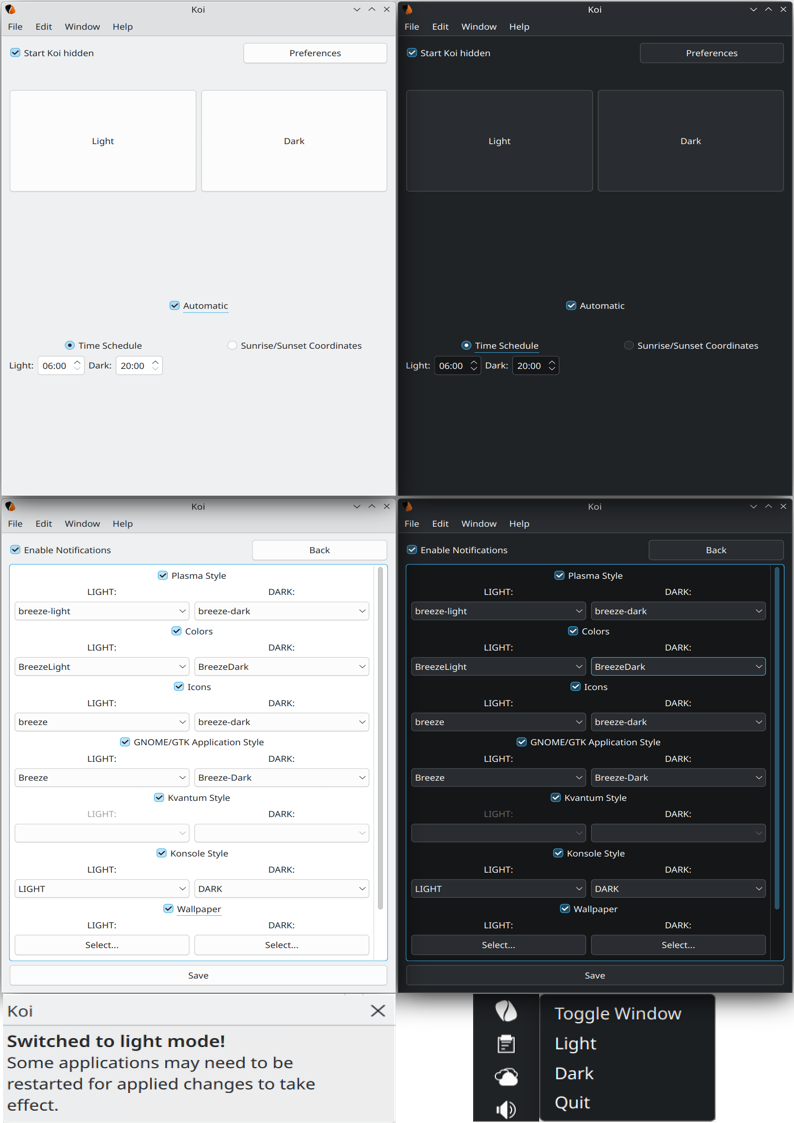
Koi is designed to be very simple to use. After the initial run of Koi, settings for the light and dark presets will be empty, all you need to do is select which themes you would like for Koi to manage and select your desired themes by clicking the Preferences button.
If you would like that Koi switch between your light and dark settings automatically, you can select this option in the main page of the program, and choose between following a user set schedule, or at sunrise and sunset (planned/scheduled feature). To switch between light and dark manually right click the tray icon and select the desired preset, or do so from Koi's main window.
After installation, Koi creates ~/.config/koirc file inside user's Home configuration directory with established theme presets . . .
In order to have Koi started at login, you can do so with the KDE Plasma System Settings.
Search for: Autostart
Plasma version 5 navigate to System Settings -> Startup and Shutdown -> Autostart; and select "+ Add... -> + Add Application -> Utilities -> Koi"
Plasma version 6 navigate to System Settings -> System -> Autostart, and select "+ Add... -> + Add Application -> Utilities -> Koi"
In addition, it is recommended having the option to Start Koi hidden checked, this will prevent Koi from popping up every time you start your operating system.
Latest version: 0.6
GENERIC Dependencies:
KDE Plasma Desktop Environment
KDE Frameworks [Development files]:
QT [Development files]:
Build Dependencies:
'gcc' 'qt6-base' 'qt6-tools' 'qt6-svg' 'cmake' 'extra-cmake-modules'
Run Dependencies:
'plasma-desktop' 'plasma-integration'
Build Dependencies:
'cmake' 'cmake-extras' 'kf6-kconfigwidgets-devel' 'kf6-kconfig-devel' 'kf6-kcoreaddons-devel' 'kf6-kdbusaddons-devel' 'qt6-base' 'qt6-dbus-devel' 'qt6-gui-devel' 'qt6-widgets-devel' 'qt6-xml-devel' 'hicolor-icon-theme'
Run Dependencies:
'plasma6-desktop' 'plasma6-workspace'
Build Dependencies:
'cmake' 'cmake-extras' 'kf5-kconfigwidgets-devel' 'kf5-kconfig-devel' 'kf5-kcoreaddons-devel' 'kf5-kdbusaddons-devel' 'qt5-dbus-devel' 'qt5-gui-devel' 'qt5-widgets-devel' 'qt5-xml-devel' 'hicolor-icon-theme'
Run Dependencies:
'plasma5-desktop' 'plasma5-workspace' 'plasma-framework'
Build Dependencies:
'cmake' 'extra-cmake-modules' 'kf6-kconfigwidgets-devel' 'kf6-kconfig-devel' 'kf6-kcoreaddons-devel' 'kf6-kwidgetsaddons-devel' 'qt6-qtbase-devel' 'hicolor-icon-theme'
Run Dependencies:
'plasma-desktop' 'plasma-integration' 'plasma-workspace'
Build Dependencies:
'g++' 'cmake' 'cmake-extras' 'extra-cmake-modules' 'libkf5config-dev' 'libkf5coreaddons-dev' 'libkf5dbusaddons-dev' 'libkf5widgetsaddons-dev' 'qtbase5-dev'
Run Dependencies:
'plasma-desktop' 'plasma-framework' 'plasma-integration' 'plasma-workspace'
Build Dependencies:
'g++' 'cmake' 'cmake-extras' 'extra-cmake-modules' 'libkf6config-dev' 'libkf6coreaddons-dev' 'libkf6dbusaddons-dev' 'libkf6widgetsaddons-dev' 'qt6-base-dev'
Run Dependencies:
'plasma-desktop' 'plasma-integration' 'plasma-workspace'
Build Dependencies:
'gcc' 'cmake' 'extra-cmake-modules' 'qt6-base-devel' 'kf6-kcoreaddons-devel' 'kf6-kconfig-devel' 'kf6-kwidgetsaddons-devel'
Run Dependencies:
'kf6-kcoreaddons' 'kf6-kconfig' 'kf6-kconfigwidgets' 'kf6-kdbusaddons' 'plasma-desktop' 'plasma-integration' 'plasma-workspace' 'qt6-base' 'qt6-core'
Install Directly from NixPKGs to your NIX Profile with: nix-env -iA nixpkgs.koi ;
Using NixOS Configuration (configuration.nix):
environment.systemPackages = with pkgs; [koi];
Or Compile Manually Using nix-build https://github.com/NixOS/nixpkgs/blob/master/pkgs/kde/third-party/koi/default.nix
Install Directly from Guix Package Database with: guix install koi or guix install [email protected]
You might need / want to use customized environmental variables when BUILDing from SOURCE:
They should already be a part of the CMakeLists.txt file - Check it out . . .
  src/plugins/colorscheme.cpp
    QDir colorsNixDir("/var/run/current-system/sw/share/color-schemes");
  src/plugins/kvantumstyle.cpp
    QDir kvantumStyleNixDir("/var/run/current-system/sw/Kvantum");
  src/plugins/icons.cpp
    QDir iconsNixDir("/var/run/current-system/sw/share/icons");
  src/plugins/plasmastyle.cpp
    QDir stylesNixDir("/var/run/current-system/sw/share/plasma/desktoptheme");
  src/plugins/gtk.cpp
    QDir gtkNixDir("/var/run/current-system/sw/share/themes");
Copy all:
# 1.  CLONE Koi Repository
# a)
  git clone 'https://github.com/baduhai/Koi.git'  # Using [git] Command
# b)
# gh repo clone 'baduhai/Koi'  # Using [gh]  Command

# 2.  CHANGE to Koi Directory
  cd ./Koi/

# 3.  MAKE from SOURCE to BUILD Directory; Using CMake
# a)  DEFAULT (SYSTEM-WIDE) Configuration Location:
  cmake -S "." -B "./build/" -DCMAKE_INSTALL_PREFIX="/usr/local/"  # This is the DEFAULT Configuration Location
# b)  STANDART (SYSTEM-WIDE) Configuration Location:
# cmake -S "." -B "./build/" -DCMAKE_INSTALL_PREFIX="/usr/"  # This is the STANDART Configuration Location
# c)  USER-SPECIFIC Configuration Location:
# cmake -S "." -B "./build/" -DCMAKE_INSTALL_PREFIX="$HOME/.local/"  # This is the per-user USER-SPECIFIC Configuration Location

# 4.  BUILD Koi BINARY from SOURCE
  cmake --build "./build/" --parallel  # Remove [--parallel] Option on Weaker Hardware

# 5.  INSTALL Koi into the SYSTEM
# a)  DEFAULT (SYSTEM-WIDE) Installation Location:
  sudo cmake --install "./build/" --prefix="/usr/local/"  # This Will, by Default, Install Koi into [/usr/local/bin/] Directory
# b)  STANDART (SYSTEM-WIDE) Installation Location:
# sudo cmake --install "./build/" --prefix="/usr/"  # This Will Install Koi into [/usr/bin/] Directory
# c)  USER-SPECIFIC Installation Location:
#      cmake --install "./build/" --prefix="$HOME/.local/"  # This Will Install Koi into [/home/$USER/.local/bin/] Directory

# (6.)
# sudo make uninstall -C "./build/"
The following is a list of resources that was used as reference and inspiration for writing Koi.
Koi was written as a project to practice QT by a novice programmer, expect code to be written sloppily.
157 followers · starred Aug 2023
40 followers · starred Jul 2020
81 followers · starred May 2023
225 followers · starred Feb 2022
Koi is a program designed to provide the KDE Plasma Desktop functionality to automatically switch between light and dark themes. Koi is under semi-active development, and while it is stable enough to use daily, expect bugs. Koi is designed to be used with Plasma, and while some features may function under different desktop environments, they are untested and unlikely to work . . .
Koi is designed to be very simple to use. After the initial run of Koi, settings for the light and dark presets will be empty, all you need to do is select which themes you would like for Koi to manage and select your desired themes by clicking the Preferences button.
If you would like that Koi switch between your light and dark settings automatically, you can select this option in the main page of the program, and choose between following a user set schedule, or at sunrise and sunset (planned/scheduled feature). To switch between light and dark manually right click the tray icon and select the desired preset, or do so from Koi's main window.
After installation, Koi creates ~/.config/koirc file inside user's Home configuration directory with established theme presets . . .
In order to have Koi started at login, you can do so with the KDE Plasma System Settings.
Search for: Autostart
Plasma version 5 navigate to System Settings -> Startup and Shutdown -> Autostart; and select "+ Add... -> + Add Application -> Utilities -> Koi"
Plasma version 6 navigate to System Settings -> System -> Autostart, and select "+ Add... -> + Add Application -> Utilities -> Koi"
In addition, it is recommended having the option to Start Koi hidden checked, this will prevent Koi from popping up every time you start your operating system.
Latest version: 0.6
GENERIC Dependencies:
KDE Plasma Desktop Environment
KDE Frameworks [Development files]:
QT [Development files]:
Build Dependencies:
'gcc' 'qt6-base' 'qt6-tools' 'qt6-svg' 'cmake' 'extra-cmake-modules'
Run Dependencies:
'plasma-desktop' 'plasma-integration'
Build Dependencies:
'cmake' 'cmake-extras' 'kf6-kconfigwidgets-devel' 'kf6-kconfig-devel' 'kf6-kcoreaddons-devel' 'kf6-kdbusaddons-devel' 'qt6-base' 'qt6-dbus-devel' 'qt6-gui-devel' 'qt6-widgets-devel' 'qt6-xml-devel' 'hicolor-icon-theme'
Run Dependencies:
'plasma6-desktop' 'plasma6-workspace'
Build Dependencies:
'cmake' 'cmake-extras' 'kf5-kconfigwidgets-devel' 'kf5-kconfig-devel' 'kf5-kcoreaddons-devel' 'kf5-kdbusaddons-devel' 'qt5-dbus-devel' 'qt5-gui-devel' 'qt5-widgets-devel' 'qt5-xml-devel' 'hicolor-icon-theme'
Run Dependencies:
'plasma5-desktop' 'plasma5-workspace' 'plasma-framework'
Build Dependencies:
'cmake' 'extra-cmake-modules' 'kf6-kconfigwidgets-devel' 'kf6-kconfig-devel' 'kf6-kcoreaddons-devel' 'kf6-kwidgetsaddons-devel' 'qt6-qtbase-devel' 'hicolor-icon-theme'
Run Dependencies:
'plasma-desktop' 'plasma-integration' 'plasma-workspace'
Build Dependencies:
'g++' 'cmake' 'cmake-extras' 'extra-cmake-modules' 'libkf5config-dev' 'libkf5coreaddons-dev' 'libkf5dbusaddons-dev' 'libkf5widgetsaddons-dev' 'qtbase5-dev'
Run Dependencies:
'plasma-desktop' 'plasma-framework' 'plasma-integration' 'plasma-workspace'
Build Dependencies:
'g++' 'cmake' 'cmake-extras' 'extra-cmake-modules' 'libkf6config-dev' 'libkf6coreaddons-dev' 'libkf6dbusaddons-dev' 'libkf6widgetsaddons-dev' 'qt6-base-dev'
Run Dependencies:
'plasma-desktop' 'plasma-integration' 'plasma-workspace'
Build Dependencies:
'gcc' 'cmake' 'extra-cmake-modules' 'qt6-base-devel' 'kf6-kcoreaddons-devel' 'kf6-kconfig-devel' 'kf6-kwidgetsaddons-devel'
Run Dependencies:
'kf6-kcoreaddons' 'kf6-kconfig' 'kf6-kconfigwidgets' 'kf6-kdbusaddons' 'plasma-desktop' 'plasma-integration' 'plasma-workspace' 'qt6-base' 'qt6-core'
Install Directly from NixPKGs to your NIX Profile with: nix-env -iA nixpkgs.koi ;
Using NixOS Configuration (configuration.nix):
environment.systemPackages = with pkgs; [koi];
Or Compile Manually Using nix-build https://github.com/NixOS/nixpkgs/blob/master/pkgs/kde/third-party/koi/default.nix
Install Directly from Guix Package Database with: guix install koi or guix install [email protected]
You might need / want to use customized environmental variables when BUILDing from SOURCE:
They should already be a part of the CMakeLists.txt file - Check it out . . .
  src/plugins/colorscheme.cpp
    QDir colorsNixDir("/var/run/current-system/sw/share/color-schemes");
  src/plugins/kvantumstyle.cpp
    QDir kvantumStyleNixDir("/var/run/current-system/sw/Kvantum");
  src/plugins/icons.cpp
    QDir iconsNixDir("/var/run/current-system/sw/share/icons");
  src/plugins/plasmastyle.cpp
    QDir stylesNixDir("/var/run/current-system/sw/share/plasma/desktoptheme");
  src/plugins/gtk.cpp
    QDir gtkNixDir("/var/run/current-system/sw/share/themes");
Copy all:
# 1.  CLONE Koi Repository
# a)
  git clone 'https://github.com/baduhai/Koi.git'  # Using [git] Command
# b)
# gh repo clone 'baduhai/Koi'  # Using [gh]  Command

# 2.  CHANGE to Koi Directory
  cd ./Koi/

# 3.  MAKE from SOURCE to BUILD Directory; Using CMake
# a)  DEFAULT (SYSTEM-WIDE) Configuration Location:
  cmake -S "." -B "./build/" -DCMAKE_INSTALL_PREFIX="/usr/local/"  # This is the DEFAULT Configuration Location
# b)  STANDART (SYSTEM-WIDE) Configuration Location:
# cmake -S "." -B "./build/" -DCMAKE_INSTALL_PREFIX="/usr/"  # This is the STANDART Configuration Location
# c)  USER-SPECIFIC Configuration Location:
# cmake -S "." -B "./build/" -DCMAKE_INSTALL_PREFIX="$HOME/.local/"  # This is the per-user USER-SPECIFIC Configuration Location

# 4.  BUILD Koi BINARY from SOURCE
  cmake --build "./build/" --parallel  # Remove [--parallel] Option on Weaker Hardware

# 5.  INSTALL Koi into the SYSTEM
# a)  DEFAULT (SYSTEM-WIDE) Installation Location:
  sudo cmake --install "./build/" --prefix="/usr/local/"  # This Will, by Default, Install Koi into [/usr/local/bin/] Directory
# b)  STANDART (SYSTEM-WIDE) Installation Location:
# sudo cmake --install "./build/" --prefix="/usr/"  # This Will Install Koi into [/usr/bin/] Directory
# c)  USER-SPECIFIC Installation Location:
#      cmake --install "./build/" --prefix="$HOME/.local/"  # This Will Install Koi into [/home/$USER/.local/bin/] Directory

# (6.)
# sudo make uninstall -C "./build/"
The following is a list of resources that was used as reference and inspiration for writing Koi.
Koi was written as a project to practice QT by a novice programmer, expect code to be written sloppily.
157 followers · starred Aug 2023
40 followers · starred Jul 2020
81 followers · starred May 2023
225 followers · starred Feb 2022



