NextKde (KOS Desktop Shell) is a modern desktop shell project.It replaces or enhances parts of Plasma's native interface, providing an integrated user interface that combines a top panel, application dock, launcher, global search, notification center, and system settings.
QML
382
671 commits
updated Oct 16, 2026

A Quickshell desktop for KDE Plasma.
Liquid glass, a floating dock, and a workspace you can make your own.
Get started · Explore · Develop · 简体中文
Plasma 6 / Wayland Quickshell 0.3.x Qt 6
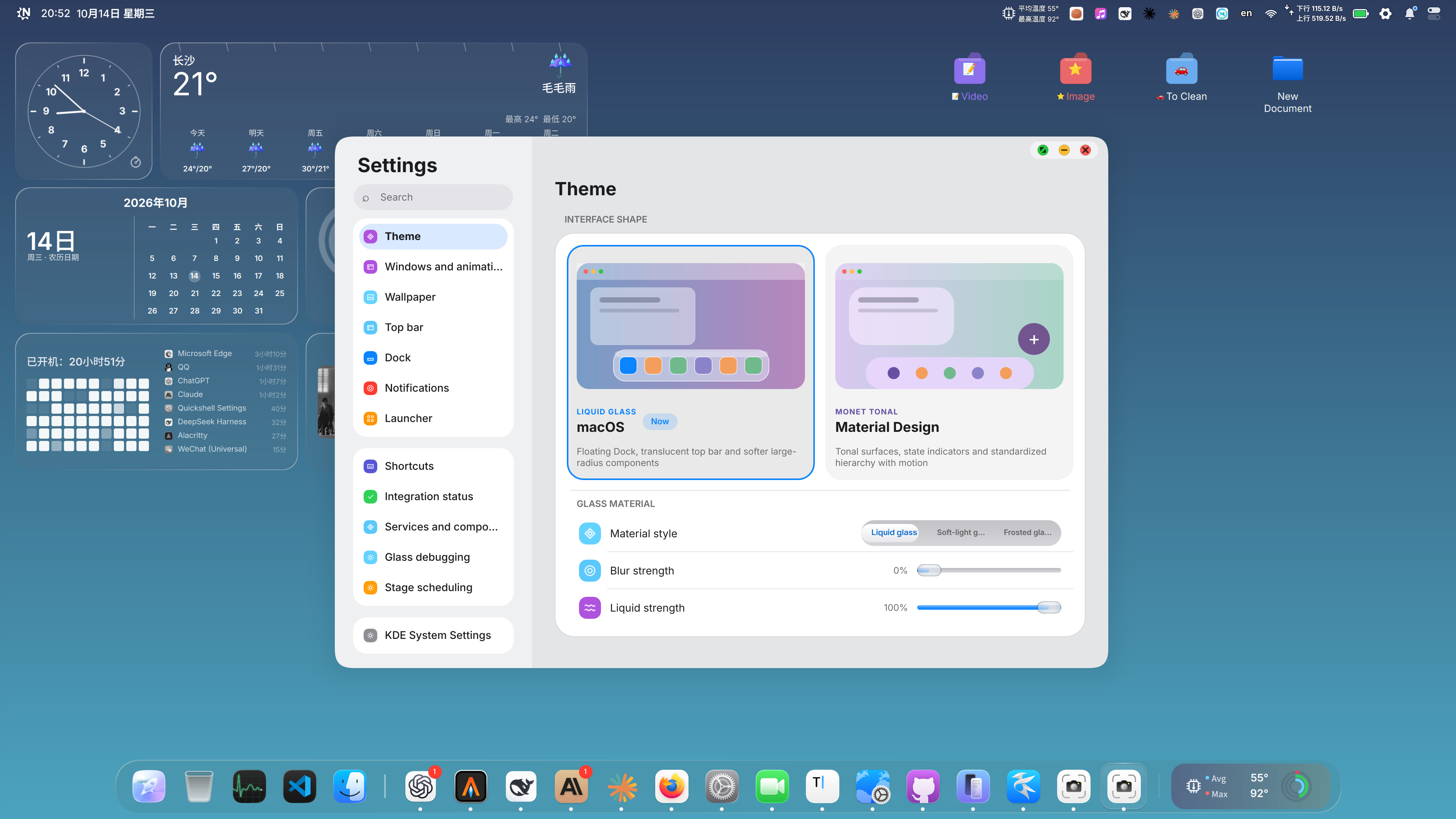
The NextKDE desktop · macOS appearance · Theme settings
NextKDE's KOS Desktop Shell brings the bar, dock, launcher, search, notifications, and settings together on KDE Plasma 6 Wayland. It works with KWin, NetworkManager, PipeWire, BlueZ, and systemd.
| A workspace at a glance | A desktop in motion | Your choice of appearance |
|---|---|---|
| Clock, weather, calendar, system metrics, app usage, and media widgets. | A floating dock, window previews, app search, and a fullscreen launcher. | Liquid glass, soft-light and frosted materials, or a tonal Material Design interface. |
Calendar, Todo, Weather, and ListenFree are available as optional standalone applications.
Use a KDE Plasma 6 Wayland session with KWin 6.6+, Quickshell 0.3.x, and Qt 6.6+. Installation builds the platform service, Settings, KWin effects, and window decoration.
After preparing the dependencies for your distribution:
git clone https://github.com/SuceV587/NextKde.git
cd NextKde
./tools/kosctl doctor
./tools/kosctl install
./tools/kosctl start
| Distribution | Installation guide |
|---|---|
| Arch Linux | Dependencies and setup |
| Debian 13 | Installer and manual setup |
| Ubuntu 26.04 | Packages and setup |
| NixOS | Flake quick start |
Read the installation guide for desktop takeover, optional lock screen setup, first-login notes, updating, and uninstalling.
Update and apply:
git pull
./tools/kosctl install
./tools/kosctl start
Check services:
systemctl --user status kos-platform.service kos-data.service kos-shell.service
Uninstall:
./tools/kosctl uninstall
Updated KWin effect binaries load after your next logout/login or reboot. See the daily-use guide for details.
Quickshell Shell ──► kos-platform ──────► KWin / network / audio / Bluetooth
                 └─► kos-data-service ─► metrics / desktop data / weather
| Explore the project | Guide |
|---|---|
| How the pieces fit together | Project architecture |
| Glass, color, and appearance | Appearance architecture |
| Dock behavior and configuration | Dock architecture |
| Desktop icon layout | Desktop icons |
| Spatial wallpapers | Depth engine |
| Source sessions, builds, and debugging | Development guide |
| Changes and pull requests | Contributing |
Next steps include per-screen layouts, consistent widgets across displays, expanded settings and applications, and better keyboard navigation and accessibility.
See LICENSE for the project license. The bundled Glass effect has its own license.
NextKde (KOS Desktop Shell) is a modern desktop shell project.It replaces or enhances parts of Plasma's native interface, providing an integrated user interface that combines a top panel, application dock, launcher, global search, notification center, and system settings.
QML
382
671 commits
updated Oct 16, 2026
A Quickshell desktop for KDE Plasma.
Liquid glass, a floating dock, and a workspace you can make your own.
Get started · Explore · Develop · 简体中文
Plasma 6 / Wayland Quickshell 0.3.x Qt 6
The NextKDE desktop · macOS appearance · Theme settings
NextKDE's KOS Desktop Shell brings the bar, dock, launcher, search, notifications, and settings together on KDE Plasma 6 Wayland. It works with KWin, NetworkManager, PipeWire, BlueZ, and systemd.
| A workspace at a glance | A desktop in motion | Your choice of appearance |
|---|---|---|
| Clock, weather, calendar, system metrics, app usage, and media widgets. | A floating dock, window previews, app search, and a fullscreen launcher. | Liquid glass, soft-light and frosted materials, or a tonal Material Design interface. |
Calendar, Todo, Weather, and ListenFree are available as optional standalone applications.
Use a KDE Plasma 6 Wayland session with KWin 6.6+, Quickshell 0.3.x, and Qt 6.6+. Installation builds the platform service, Settings, KWin effects, and window decoration.
After preparing the dependencies for your distribution:
git clone https://github.com/SuceV587/NextKde.git
cd NextKde
./tools/kosctl doctor
./tools/kosctl install
./tools/kosctl start
| Distribution | Installation guide |
|---|---|
| Arch Linux | Dependencies and setup |
| Debian 13 | Installer and manual setup |
| Ubuntu 26.04 | Packages and setup |
| NixOS | Flake quick start |
Read the installation guide for desktop takeover, optional lock screen setup, first-login notes, updating, and uninstalling.
Update and apply:
git pull
./tools/kosctl install
./tools/kosctl start
Check services:
systemctl --user status kos-platform.service kos-data.service kos-shell.service
Uninstall:
./tools/kosctl uninstall
Updated KWin effect binaries load after your next logout/login or reboot. See the daily-use guide for details.
Quickshell Shell ──► kos-platform ──────► KWin / network / audio / Bluetooth
                 └─► kos-data-service ─► metrics / desktop data / weather
| Explore the project | Guide |
|---|---|
| How the pieces fit together | Project architecture |
| Glass, color, and appearance | Appearance architecture |
| Dock behavior and configuration | Dock architecture |
| Desktop icon layout | Desktop icons |
| Spatial wallpapers | Depth engine |
| Source sessions, builds, and debugging | Development guide |
| Changes and pull requests | Contributing |
Next steps include per-screen layouts, consistent widgets across displays, expanded settings and applications, and better keyboard navigation and accessibility.
See LICENSE for the project license. The bundled Glass effect has its own license.



