🐍 CLI tool to analyze and report TODO comments in JavaScript and TypeScript Git repositories
See the code


Todoctor is a powerful tool for analyzing, tracking, and visualizing technical debt in your codebase using Git.
It collects and monitors TODO/FIXME comments in your code, allowing you to
observe changes over time.
Developers often leave TODO comments in the code to highlight areas that need
improvement or refactoring. However, these comments are rarely converted into
tasks in tracking systems.
As a result, todos remain hidden in the codebase and can sit there for years without attention, leading to a hidden backlog of work. This tool tracks these todo comments and prevents them from being forgotten.
TODO, FIXME, and other tags from your codebase.git blame to track the authorship and timing of changes.Run the tool in the root directory of your project:
npx todoctor
The program will automatically collect data and display the history of TODO /
FIXME comments across commits.
See an example report.
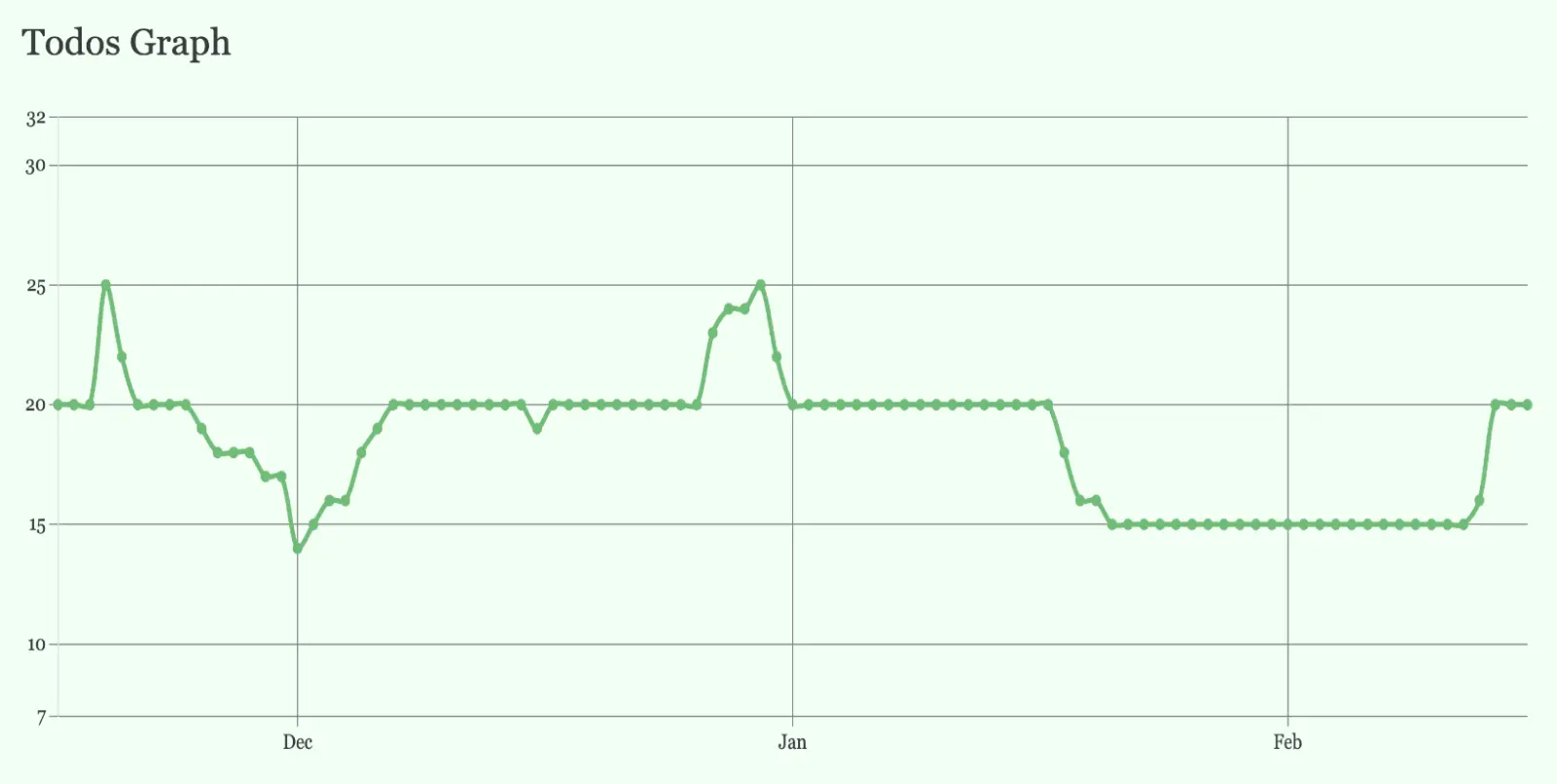
After running the tool, it generates a detailed graph showing the evolution of TODO comments over time. The graph visualizes how many todo comments were added, resolved, or modified across the project's history.
This helps you track the technical debt and maintenance progress at a glance.
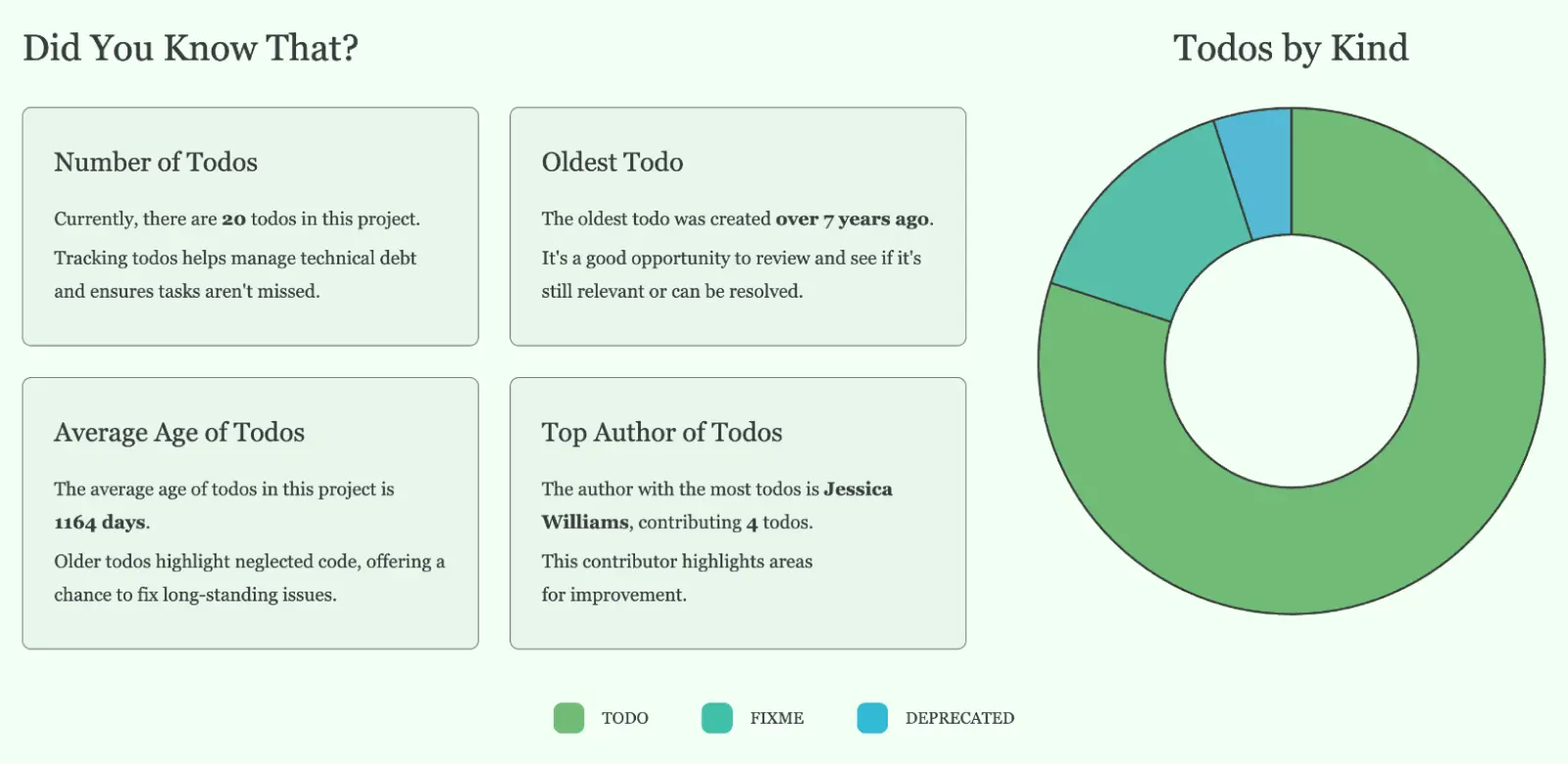
In addition to the graph, the tool provides insightful statistics, such as:
These insights help you better understand the state of your codebase and prioritize refactoring efforts.
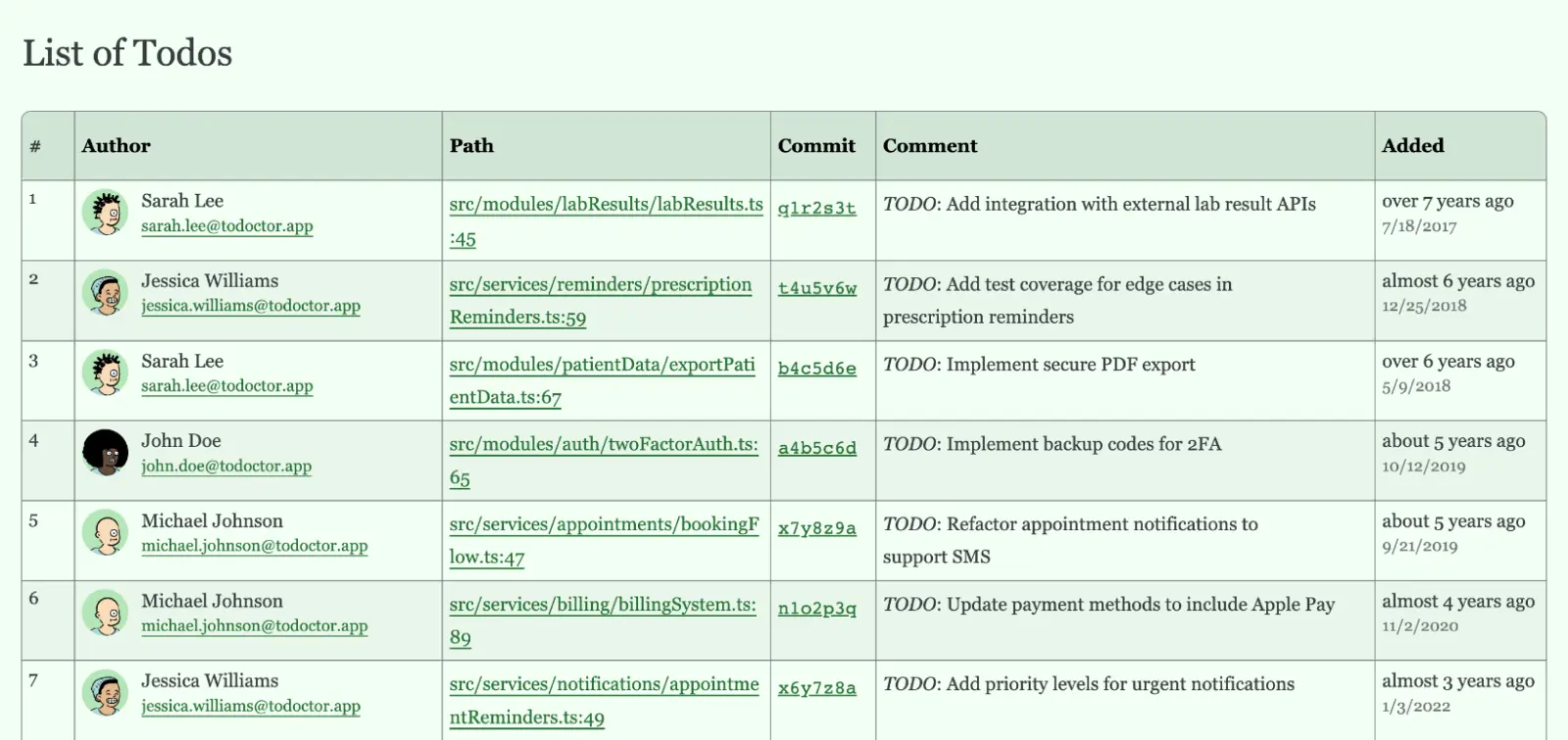
Finally, the tool generates a detailed list of all todo comments in your project in a tabular format.
The list includes the comment text, the file path, and additional metadata, such as line numbers and authorship information. This list helps you identify, review, and manage unresolved tasks more effectively.
Todoctor supports the following command-line options:
Specifies the number of months to include when tracking TODOs in the repository. If not provided, defaults to 3 months.
Example:
todoctor --months 6
Allows you to specify files or directories to ignore during the analysis. The
files in your .gitignore are ignored by default, you don't need to ignore them
additionally. This option can be used multiple times.
Example:
todoctor --ignore src/deprecated/ --ignore tests/legacy.test.js
Allows you to specify additional keywords in comments that will be treated as technical debt. This option can be used multiple times.
Example:
todoctor --include-keywords eslint-disable-next-line
Allows you to exclude keywords from the report. By default, the following keywords are used to define the technical debt comment:
TODOFIXMEXXXHACKBUGOPTIMIZEREFACTORTEMPCHANGEDIDEANOTEREVIEWNBQUESTIONDEBUGKLUDGECOMPATWARNINGDANGERINFODEPRECATEDCOMBAKExample:
todoctor --exclude-keywords WARNING --exclude-keywords DEPRECATED
You can specify the format of the report. Possible options are html, json
and csv. The default value is html.
Example:
todoctor --output-format json
You can define the folder where the report file will be saved. By default it is
todoctor folder in the project root.
Example:
todoctor --output report
Displays this help message with available options.
Displays the current version of Todoctor.
MIT © Azat S.
2,223 followers · starred Oct 2024
1,119 followers · starred Oct 2024
665 followers · starred Oct 2024
925 followers · starred Nov 2024
🐍 CLI tool to analyze and report TODO comments in JavaScript and TypeScript Git repositories
See the code
Todoctor is a powerful tool for analyzing, tracking, and visualizing technical debt in your codebase using Git.
It collects and monitors TODO/FIXME comments in your code, allowing you to
observe changes over time.
Developers often leave TODO comments in the code to highlight areas that need
improvement or refactoring. However, these comments are rarely converted into
tasks in tracking systems.
As a result, todos remain hidden in the codebase and can sit there for years without attention, leading to a hidden backlog of work. This tool tracks these todo comments and prevents them from being forgotten.
TODO, FIXME, and other tags from your codebase.git blame to track the authorship and timing of changes.Run the tool in the root directory of your project:
npx todoctor
The program will automatically collect data and display the history of TODO /
FIXME comments across commits.
See an example report.
After running the tool, it generates a detailed graph showing the evolution of TODO comments over time. The graph visualizes how many todo comments were added, resolved, or modified across the project's history.
This helps you track the technical debt and maintenance progress at a glance.
In addition to the graph, the tool provides insightful statistics, such as:
These insights help you better understand the state of your codebase and prioritize refactoring efforts.
Finally, the tool generates a detailed list of all todo comments in your project in a tabular format.
The list includes the comment text, the file path, and additional metadata, such as line numbers and authorship information. This list helps you identify, review, and manage unresolved tasks more effectively.
Todoctor supports the following command-line options:
Specifies the number of months to include when tracking TODOs in the repository. If not provided, defaults to 3 months.
Example:
todoctor --months 6
Allows you to specify files or directories to ignore during the analysis. The
files in your .gitignore are ignored by default, you don't need to ignore them
additionally. This option can be used multiple times.
Example:
todoctor --ignore src/deprecated/ --ignore tests/legacy.test.js
Allows you to specify additional keywords in comments that will be treated as technical debt. This option can be used multiple times.
Example:
todoctor --include-keywords eslint-disable-next-line
Allows you to exclude keywords from the report. By default, the following keywords are used to define the technical debt comment:
TODOFIXMEXXXHACKBUGOPTIMIZEREFACTORTEMPCHANGEDIDEANOTEREVIEWNBQUESTIONDEBUGKLUDGECOMPATWARNINGDANGERINFODEPRECATEDCOMBAKExample:
todoctor --exclude-keywords WARNING --exclude-keywords DEPRECATED
You can specify the format of the report. Possible options are html, json
and csv. The default value is html.
Example:
todoctor --output-format json
You can define the folder where the report file will be saved. By default it is
todoctor folder in the project root.
Example:
todoctor --output report
Displays this help message with available options.
Displays the current version of Todoctor.
MIT © Azat S.
2,223 followers · starred Oct 2024
1,119 followers · starred Oct 2024
665 followers · starred Oct 2024
925 followers · starred Nov 2024



