Parse and output TODOs and FIXMEs from comments in your files
See the code
Intelligently parse and output TODOs and FIXMEs from comments in your files



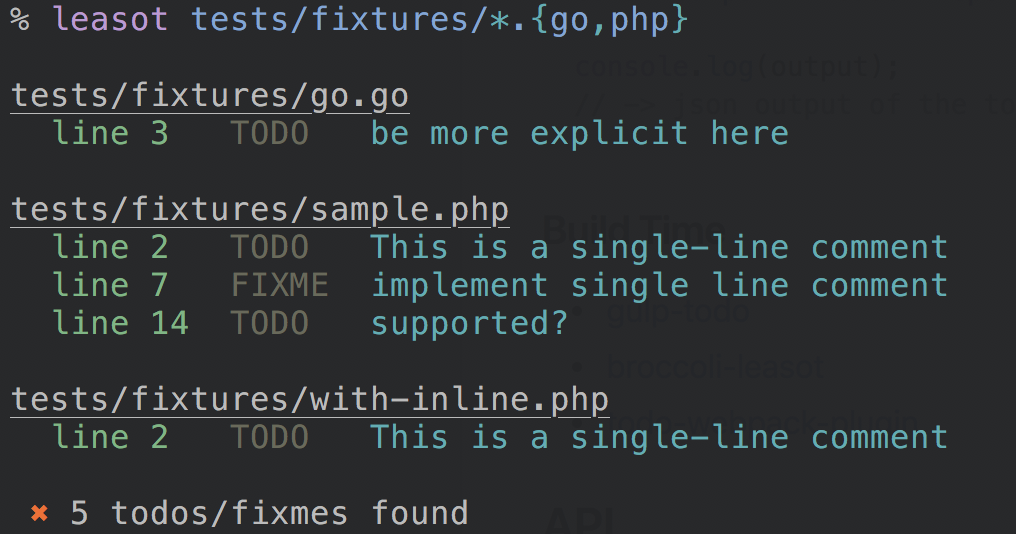
Easily extract, collect and report TODOs and FIXMEs in your code. This project uses regex in order to extract your todos from comments.
TODO: add some info
some code(); //TODO: do something is not supported).TODO and FIXME - case-insensitive.tags in cli and customTags in leasot.parse)// TODO(tregusti): Make this better// TODO: Text /tregusti49+ languages are supported, pull requests for additional language support is most welcomed!
npm install --global leasot
$ leasot --help

Usage: leasot [options] <file ...>

Parse and output TODOs and FIXMEs from comments in your files

Options:
  -V, --version                        output the version number
  -A, --associate-parser [ext,parser]  associate unknown extensions with bundled parsers (parser optional / default: defaultParser) (default: {})
  -i, --ignore <patterns>              add ignore patterns (default: [])
  -I, --inline-files                   parse possible inline files (default: false)
  -r, --reporter [reporter]            use reporter (table|json|xml|markdown|vscode|gitlab|raw) (default: table) (default: "table")
  -S, --skip-unsupported               skip unsupported filetypes (default: false)
  -t, --filetype [filetype]            force the filetype to parse. Useful for streams (default: .js)
  -T, --tags <tags>                    add additional comment types to find (alongside todo & fixme) (default: [])
  -x, --exit-nicely                    exit with exit code 0 even if todos/fixmes are found (default: false)
  -h, --help                           output usage information

Examples:
    # Check a specific file
    $ leasot index.js

    # Check php files with glob
    $ leasot '**/*.php'

    # Check multiple different filetypes
    $ leasot 'app/**/*.js' test.rb

    # Use the json reporter
    $ leasot --reporter json index.js

    # Search for REVIEW comments as well
    $ leasot --tags review index.js

    # Add ignore pattern to filter matches
    $ leasot 'app/**/*.js' --ignore '**/custom.js'

    # Search for REVIEW comments as well
    $ leasot --tags review index.js

    # Check a stream specifying the filetype as coffee
    $ cat index.coffee | leasot --filetype .coffee

    # Report from leasot parsing and filter todos using `jq`
    $ leasot 'tests/**/*.styl' --reporter json | jq 'map(select(.tag == "TODO"))' | leasot-reporter

    # Associate a parser for an unknown extension`
    $ leasot -A '.svelte,twigParser' -A '.svelte,defaultParser' 'frontend/*.svelte'
Use leasot -x in order to prevent exiting with a non-zero exit code. This is a good solution if you plan to
run leasot in a CI tool to generate todos.
{
    "scripts": {
        "todo": "leasot 'src/**/*.js'",
        "todo-ci": "leasot -x --reporter markdown 'src/**/*.js' > TODO.md"
    },
    "devDependencies": {
        "leasot": "^7.0.0"
    }
}
npm install --save-dev leasot
const fs = require('fs');
const leasot = require('leasot');

const contents = fs.readFileSync('./contents.js', 'utf8');
// get the filetype of the file, or force a special parser
const filetype = path.extname('./contents.js');
// add file for better reporting
const file = 'contents.js';
const todos = leasot.parse(contents, { extension: filetype, filename: file });

// -> todos now contains the array of todos/fixme parsed

const output = leasot.report(todos, 'json', { spacing: 2 });

console.log(output);
// -> json output of the todos
const leasot = require('leasot');
Mainly, you should be using 2 functions:
MIT © Gilad Peleg
Overall
Maintained
Code review
npm
Latest release
Releases this year
1,078 followers · starred May 2017
1,012 followers · starred Jun 2016
1,186 followers · starred May 2015
71 followers · starred May 2015
Parse and output TODOs and FIXMEs from comments in your files
See the code
Intelligently parse and output TODOs and FIXMEs from comments in your files
Easily extract, collect and report TODOs and FIXMEs in your code. This project uses regex in order to extract your todos from comments.
TODO: add some info
some code(); //TODO: do something is not supported).TODO and FIXME - case-insensitive.tags in cli and customTags in leasot.parse)// TODO(tregusti): Make this better// TODO: Text /tregusti49+ languages are supported, pull requests for additional language support is most welcomed!
npm install --global leasot
$ leasot --help

Usage: leasot [options] <file ...>

Parse and output TODOs and FIXMEs from comments in your files

Options:
  -V, --version                        output the version number
  -A, --associate-parser [ext,parser]  associate unknown extensions with bundled parsers (parser optional / default: defaultParser) (default: {})
  -i, --ignore <patterns>              add ignore patterns (default: [])
  -I, --inline-files                   parse possible inline files (default: false)
  -r, --reporter [reporter]            use reporter (table|json|xml|markdown|vscode|gitlab|raw) (default: table) (default: "table")
  -S, --skip-unsupported               skip unsupported filetypes (default: false)
  -t, --filetype [filetype]            force the filetype to parse. Useful for streams (default: .js)
  -T, --tags <tags>                    add additional comment types to find (alongside todo & fixme) (default: [])
  -x, --exit-nicely                    exit with exit code 0 even if todos/fixmes are found (default: false)
  -h, --help                           output usage information

Examples:
    # Check a specific file
    $ leasot index.js

    # Check php files with glob
    $ leasot '**/*.php'

    # Check multiple different filetypes
    $ leasot 'app/**/*.js' test.rb

    # Use the json reporter
    $ leasot --reporter json index.js

    # Search for REVIEW comments as well
    $ leasot --tags review index.js

    # Add ignore pattern to filter matches
    $ leasot 'app/**/*.js' --ignore '**/custom.js'

    # Search for REVIEW comments as well
    $ leasot --tags review index.js

    # Check a stream specifying the filetype as coffee
    $ cat index.coffee | leasot --filetype .coffee

    # Report from leasot parsing and filter todos using `jq`
    $ leasot 'tests/**/*.styl' --reporter json | jq 'map(select(.tag == "TODO"))' | leasot-reporter

    # Associate a parser for an unknown extension`
    $ leasot -A '.svelte,twigParser' -A '.svelte,defaultParser' 'frontend/*.svelte'
Use leasot -x in order to prevent exiting with a non-zero exit code. This is a good solution if you plan to
run leasot in a CI tool to generate todos.
{
    "scripts": {
        "todo": "leasot 'src/**/*.js'",
        "todo-ci": "leasot -x --reporter markdown 'src/**/*.js' > TODO.md"
    },
    "devDependencies": {
        "leasot": "^7.0.0"
    }
}
npm install --save-dev leasot
const fs = require('fs');
const leasot = require('leasot');

const contents = fs.readFileSync('./contents.js', 'utf8');
// get the filetype of the file, or force a special parser
const filetype = path.extname('./contents.js');
// add file for better reporting
const file = 'contents.js';
const todos = leasot.parse(contents, { extension: filetype, filename: file });

// -> todos now contains the array of todos/fixme parsed

const output = leasot.report(todos, 'json', { spacing: 2 });

console.log(output);
// -> json output of the todos
const leasot = require('leasot');
Mainly, you should be using 2 functions:
MIT © Gilad Peleg
Overall
Maintained
Code review
npm
Latest release
Releases this year
1,078 followers · starred May 2017
1,012 followers · starred Jun 2016
1,186 followers · starred May 2015
71 followers · starred May 2015