
Creates an HTML-report with analysis of commit statistics
See the codeREADME
English | Español | Français | Português | Deutsch | 中文 | 日本語 | 한국어 | العربية | हिन्दी | Русский
Assayo
Creates an HTML-report with analysis of commit statistics:
- the work pace and number of overtime hours;
- zones of responsibility, number of features and bugs;
- colleagues working style;
- the rate of employee turnover and the makeup of the team;
- location of developers;
- release schedule and vacation calendar;
- cost of features and project as a whole;
- places for refactoring, deleted files, etc.
Links: demo, online version, docker, reddit, habr
Video: english, español, русский
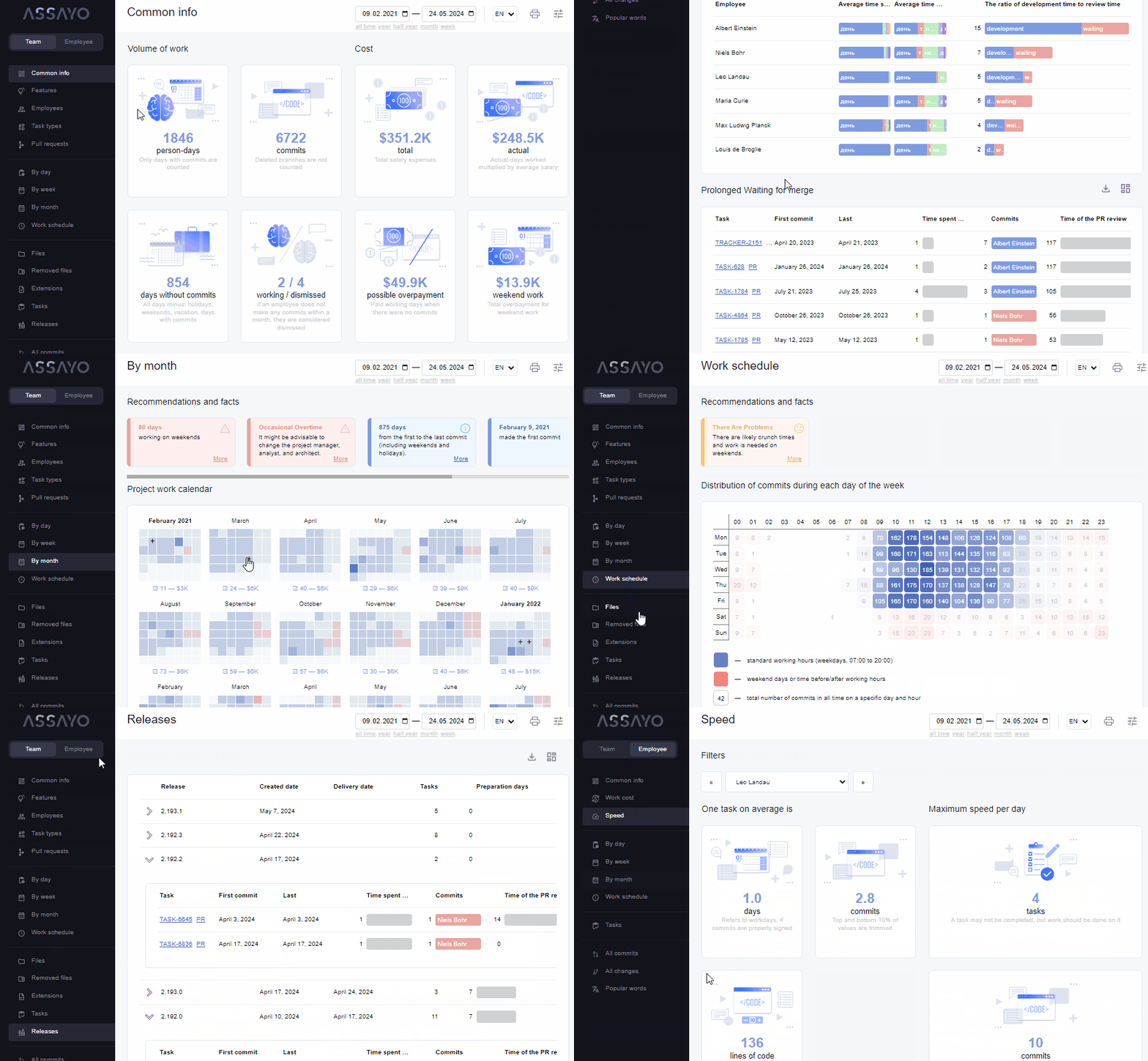
Table of contents
COMMIT STATISTICS REPORT
📈 How to create and view the report?
Using public server
- go to the website
- follow the instructions
Use the library NodeJS
- run
npx assayo - open
./assayo/index.html
Use the library PHP
- run
composer require bakhirev/assayo - run
vendor/bin/assayo - open
./assayo/index.html
Use the library Python
- run
pipx install assayo - run
assayo - open
./assayo/index.html
Use the library Ruby
- run
gem install assayo - run
assayo - open
./assayo/index.html
Use the library Go
- run
go get github.com/bakhirev/assayo - run
go install github.com/bakhirev/assayo - run
assayo - open
./assayo/index.html
Use source code
- download this repository
- drop the
log.txtfile to the/build - open
/build/index.html - or drop the
/buildfolder to your repository (where thelog.txtis located). You can change the name. For example, from/buildto/report.
In this case, it is important that the log.txt file is generated by the command for offline viewing.
Use github actions
Add script in folder .github/workflows/ or use this action from the marketplace. A ready, fresh report will be saved in the artifacts.
Use private server
- download the docker image;
- run it on your local network;
- use the web interface to view the reports, set the URL of the data in the URL parameter
dump:
http://assayo_url/?dump=//you_url/some/log.txt
assayo_url - URL of the assayo container, it listens on port 80;
you_url    - URL of your container with git logs;
By default, the image will run at http://127.0.0.1:80/. If it doesn't work, check if port 80 is free.
🎭 How to concat authors?
In the root directory of your project, you need to create a .mailmap file.
Example of the contents of the file:
Alex B <alex@mail.uk>
Alex B <alex@mail.uk> <alex@gov.tk>
Alex B <alex@mail.uk> <bakhirev@ya.kz>
Alex B <alex@mail.uk> <man64@yahoo.com>
Read more about the format of this file you can here.
📤 How to export data from git to txt file?
For online viewing
In the root directory of your project run:
git --no-pager log --raw --numstat --oneline --all --reverse --date=iso-strict --pretty=format:"%ad>%aN>%aE>%s" > log.txt
For offline viewing
git --no-pager log --raw --numstat --oneline --all --reverse --date=iso-strict --pretty=format:"%ad>%aN>%aE>%s" | sed -e 's/\\/\\\\/g' | sed -e 's/`/"/g' | sed -e 's/\$/S/g' | sed -e '1s/^/R(f\`/' | sed -e '$s/$/\`\);/' > log.txt
Git will create a file log.txt. This file contains data for show a report. The difference between the online and offline format is the presence of a wrapper for strings. The offline format will be pulled up like a js file if you just opened /build/index.html
If you use PowerShell in Windows
By default, the output encoding may not match UTF-8 and the resulting log file will be unreadable. Before saving the log, you can change the encoding with the command.
[Console]::OutputEncoding = [System.Text.Encoding]::UTF8
Or open a saved file and manually change the encoding to UTF-8.
🗃️ How to view a report on a group of microservices?
- Generate for each microservice a
log.txtfile (log-1.txt,log-2.txt,log-3.txt, etc.). You can do this manually, or use the Assayo Crawler module for automatic log collection; - See "How to view an online report?". At the last step, drag all files at once into the browser window.
- See "How to see a report offline?". At the second step, drag all microservice files (
log-1.txt,log-2.txt,log-3.txt, etc.) to the report folder (/build).
THE BEST PRACTICES IN THE PROJECT
📝 How to sign commits?
Follow the Conventional Commits 1.0.0. Example:
JIRA-1234 feat(profile): Added avatar for user
- task number in the task tracker
(JIRA-1234) - type of work
(feat, fix, style, refactor, test, doc, etc.) - feature
(profile - new page on site or new function, use one (two) short word or an abbreviation) - what problem were solved
(Added avatar for user)
👮 How to add checking for commit message?
Use file commit-msg
- Create file
commit-msgin folder.git/hooks/ - Add this text in file:
#!/usr/bin/env bash
if ! grep -iqE "(JIRA-[0-9]{1,5})(s)(feat|fix|docs|style|refactor|test|chore)((([a-z0-9_-]{1,})){0,})(:s)([a-z]{1,})" "$1"; then
   echo "Need commit message like: JIRA-12 fix(profile): some text. Read Semantic Commit Messages" >&2
   exit 1
fi
Use package pre-commit
- Add in file
package.jsonpropertycommit-msg:
...
"commit-msg": {
  "regex": "(JIRA-[0-9]{1,5})(\s)(feat|fix|docs|style|refactor|test|chore)((\([a-z0-9_-]{1,}\)){0,})(:\s)([a-z]{1,})",
    "error-message": "Need commit message like: JIRA-12 fix(profile): some text Read Semantic Commit Messages"
},
...
- Run command
npm install pre-commit
ABOUT THIS APP
🛠️ How to rebuild the report file from source code?
- download this repository
git clone https://github.com/bakhirev/assayo.git - run
npm install - run
npm run build:local - the new HTML build will be in the
/buildfolder
🎨 How to brand the interface?
You can write your own theme for the report. Example: demo
🈯 How to add or edit a translation?
You can add a new translation or correct an existing one in the **/translations/** folder.
Instruction
⚙️ Configuration
The application can be customized via a configuration file. You can specify the actual configuration file in the page URL address. For example:
./assayo/index.html?config=you_custom_config.json
Parameters
| Code | Type | Description | Default value |
|---|---|---|---|
| title | string | Browser tab name (document.title) | |
| logo | string | path to the logo | "./assets/logo.svg" |
| language | string | interface language | |
| languages | object[] | available languages | |
| languages[].id | string | language ID | |
| languages[].currency | string | currency | |
| languages[].title | string | language name in the interface (top right corner) | |
| urlForCss | string | path to the CSS file for overriding styles. You can create your own visual theme. Example: demo | |
| urlForGitLog | string | path to the GIT logs file | "./log.txt" |
| prefixForTask | string | prefix for task links | "https://jira.com/secure/RapidBoard.jspa?task=" |
| prefixForPR | string | prefix for Pull Request links | "https://bitbucket.com/projects/assayo/repos/frontend/pull-requests/" |
| middleSalaryInMonth | number | average salary per month in USD | 3000 |
| workDays | boolean[] | which days to consider "working", where 0 is Monday and 6 is Sunday | [true, true, true, true, true, false, false] |
| currency | string | current currency | "RUB" |
| exchangeRate | object<string, number> | exchange rate in the format "key: value", to USD. Example: { USD: 1 } | { USD: 1, EUR: 0.9, RUB: 82, CNY: 7, JPY: 160, KRW: 1500, CAD: 1.4, INR: 92, ILS: 3.1, AED: 3.6} |
| permissions | string[] | array of available permissions | |
| disabledPermissions | string[] | array of unavailable permissions | |
| plugins | string[] | array of enabled plugins | |
| disabledPlugins | string[] | array of disabled plugins |
URL parameters
Some parameters are used more often than others. Therefore, they can be set in the URL, without a configuration file.
| Code | Description | Example |
|---|---|---|
| title | Browser tab name (document.title) | ?title=Company_Name |
| lang | interface language | ?lang=es |
| theme | path to the CSS file for overriding styles. You can create your own visual theme. Example: demo | ?theme=//company.com/some.css |
Default configuration file
See src\ts\helpers\ApplicationConfig\getDefaultConfig.ts
Example configuration file
{
  title: '',
  logo: 'https://yousite.com/yousite.svg',
  urlForCss: 'https://yousite.com/themes/white.css',
  urlForGitLog: 'https://yousite.com/logs/team.txt',
  prefixForTask: 'https://yousite.com/?task=',
  prefixForPR: 'https://yousite.com/?pullRequests=',
  middleSalaryInMonth: 4000,
  currency: 'RUB',
  exchangeRate: {
    RUB: 90,
  },
  disabledPlugins: ['print'],
}
📐 ️Architecture
General architecture of microservices

- Reports showcase UI displays a list of available reports. Each report consists of a title, description, and a list of repositories.
- Crawler service collects repository logs for the report.
- Log visualization UI (you here) displays report. Needs a log file for work.
📧 Feedback, comments, roadmap
Roadmap and plans: TODO.md
- 📱 https://t.me/bakhirev (priority method of communication)
- 📧 alexey-bakhirev@yandex.ru
- 🌐 https://bakhirev.github.io/
Contributors


Similar repos


Languages
HTML
52.1%
TypeScript
44.3%
SCSS
3.3%
Creates an HTML-report with analysis of commit statistics
See the codeREADME
English | Español | Français | Português | Deutsch | 中文 | 日本語 | 한국어 | العربية | हिन्दी | Русский
Assayo
Creates an HTML-report with analysis of commit statistics:
- the work pace and number of overtime hours;
- zones of responsibility, number of features and bugs;
- colleagues working style;
- the rate of employee turnover and the makeup of the team;
- location of developers;
- release schedule and vacation calendar;
- cost of features and project as a whole;
- places for refactoring, deleted files, etc.
Links: demo, online version, docker, reddit, habr
Video: english, español, русский
Table of contents
COMMIT STATISTICS REPORT
📈 How to create and view the report?
Using public server
- go to the website
- follow the instructions
Use the library NodeJS
- run
npx assayo - open
./assayo/index.html
Use the library PHP
- run
composer require bakhirev/assayo - run
vendor/bin/assayo - open
./assayo/index.html
Use the library Python
- run
pipx install assayo - run
assayo - open
./assayo/index.html
Use the library Ruby
- run
gem install assayo - run
assayo - open
./assayo/index.html
Use the library Go
- run
go get github.com/bakhirev/assayo - run
go install github.com/bakhirev/assayo - run
assayo - open
./assayo/index.html
Use source code
- download this repository
- drop the
log.txtfile to the/build - open
/build/index.html - or drop the
/buildfolder to your repository (where thelog.txtis located). You can change the name. For example, from/buildto/report.
In this case, it is important that the log.txt file is generated by the command for offline viewing.
Use github actions
Add script in folder .github/workflows/ or use this action from the marketplace. A ready, fresh report will be saved in the artifacts.
Use private server
- download the docker image;
- run it on your local network;
- use the web interface to view the reports, set the URL of the data in the URL parameter
dump:
http://assayo_url/?dump=//you_url/some/log.txt
assayo_url - URL of the assayo container, it listens on port 80;
you_url    - URL of your container with git logs;
By default, the image will run at http://127.0.0.1:80/. If it doesn't work, check if port 80 is free.
🎭 How to concat authors?
In the root directory of your project, you need to create a .mailmap file.
Example of the contents of the file:
Alex B <alex@mail.uk>
Alex B <alex@mail.uk> <alex@gov.tk>
Alex B <alex@mail.uk> <bakhirev@ya.kz>
Alex B <alex@mail.uk> <man64@yahoo.com>
Read more about the format of this file you can here.
📤 How to export data from git to txt file?
For online viewing
In the root directory of your project run:
git --no-pager log --raw --numstat --oneline --all --reverse --date=iso-strict --pretty=format:"%ad>%aN>%aE>%s" > log.txt
For offline viewing
git --no-pager log --raw --numstat --oneline --all --reverse --date=iso-strict --pretty=format:"%ad>%aN>%aE>%s" | sed -e 's/\\/\\\\/g' | sed -e 's/`/"/g' | sed -e 's/\$/S/g' | sed -e '1s/^/R(f\`/' | sed -e '$s/$/\`\);/' > log.txt
Git will create a file log.txt. This file contains data for show a report. The difference between the online and offline format is the presence of a wrapper for strings. The offline format will be pulled up like a js file if you just opened /build/index.html
If you use PowerShell in Windows
By default, the output encoding may not match UTF-8 and the resulting log file will be unreadable. Before saving the log, you can change the encoding with the command.
[Console]::OutputEncoding = [System.Text.Encoding]::UTF8
Or open a saved file and manually change the encoding to UTF-8.
🗃️ How to view a report on a group of microservices?
- Generate for each microservice a
log.txtfile (log-1.txt,log-2.txt,log-3.txt, etc.). You can do this manually, or use the Assayo Crawler module for automatic log collection; - See "How to view an online report?". At the last step, drag all files at once into the browser window.
- See "How to see a report offline?". At the second step, drag all microservice files (
log-1.txt,log-2.txt,log-3.txt, etc.) to the report folder (/build).
THE BEST PRACTICES IN THE PROJECT
📝 How to sign commits?
Follow the Conventional Commits 1.0.0. Example:
JIRA-1234 feat(profile): Added avatar for user
- task number in the task tracker
(JIRA-1234) - type of work
(feat, fix, style, refactor, test, doc, etc.) - feature
(profile - new page on site or new function, use one (two) short word or an abbreviation) - what problem were solved
(Added avatar for user)
👮 How to add checking for commit message?
Use file commit-msg
- Create file
commit-msgin folder.git/hooks/ - Add this text in file:
#!/usr/bin/env bash
if ! grep -iqE "(JIRA-[0-9]{1,5})(s)(feat|fix|docs|style|refactor|test|chore)((([a-z0-9_-]{1,})){0,})(:s)([a-z]{1,})" "$1"; then
   echo "Need commit message like: JIRA-12 fix(profile): some text. Read Semantic Commit Messages" >&2
   exit 1
fi
Use package pre-commit
- Add in file
package.jsonpropertycommit-msg:
...
"commit-msg": {
  "regex": "(JIRA-[0-9]{1,5})(\s)(feat|fix|docs|style|refactor|test|chore)((\([a-z0-9_-]{1,}\)){0,})(:\s)([a-z]{1,})",
    "error-message": "Need commit message like: JIRA-12 fix(profile): some text Read Semantic Commit Messages"
},
...
- Run command
npm install pre-commit
ABOUT THIS APP
🛠️ How to rebuild the report file from source code?
- download this repository
git clone https://github.com/bakhirev/assayo.git - run
npm install - run
npm run build:local - the new HTML build will be in the
/buildfolder
🎨 How to brand the interface?
You can write your own theme for the report. Example: demo
🈯 How to add or edit a translation?
You can add a new translation or correct an existing one in the **/translations/** folder.
Instruction
⚙️ Configuration
The application can be customized via a configuration file. You can specify the actual configuration file in the page URL address. For example:
./assayo/index.html?config=you_custom_config.json
Parameters
| Code | Type | Description | Default value |
|---|---|---|---|
| title | string | Browser tab name (document.title) | |
| logo | string | path to the logo | "./assets/logo.svg" |
| language | string | interface language | |
| languages | object[] | available languages | |
| languages[].id | string | language ID | |
| languages[].currency | string | currency | |
| languages[].title | string | language name in the interface (top right corner) | |
| urlForCss | string | path to the CSS file for overriding styles. You can create your own visual theme. Example: demo | |
| urlForGitLog | string | path to the GIT logs file | "./log.txt" |
| prefixForTask | string | prefix for task links | "https://jira.com/secure/RapidBoard.jspa?task=" |
| prefixForPR | string | prefix for Pull Request links | "https://bitbucket.com/projects/assayo/repos/frontend/pull-requests/" |
| middleSalaryInMonth | number | average salary per month in USD | 3000 |
| workDays | boolean[] | which days to consider "working", where 0 is Monday and 6 is Sunday | [true, true, true, true, true, false, false] |
| currency | string | current currency | "RUB" |
| exchangeRate | object<string, number> | exchange rate in the format "key: value", to USD. Example: { USD: 1 } | { USD: 1, EUR: 0.9, RUB: 82, CNY: 7, JPY: 160, KRW: 1500, CAD: 1.4, INR: 92, ILS: 3.1, AED: 3.6} |
| permissions | string[] | array of available permissions | |
| disabledPermissions | string[] | array of unavailable permissions | |
| plugins | string[] | array of enabled plugins | |
| disabledPlugins | string[] | array of disabled plugins |
URL parameters
Some parameters are used more often than others. Therefore, they can be set in the URL, without a configuration file.
| Code | Description | Example |
|---|---|---|
| title | Browser tab name (document.title) | ?title=Company_Name |
| lang | interface language | ?lang=es |
| theme | path to the CSS file for overriding styles. You can create your own visual theme. Example: demo | ?theme=//company.com/some.css |
Default configuration file
See src\ts\helpers\ApplicationConfig\getDefaultConfig.ts
Example configuration file
{
  title: '',
  logo: 'https://yousite.com/yousite.svg',
  urlForCss: 'https://yousite.com/themes/white.css',
  urlForGitLog: 'https://yousite.com/logs/team.txt',
  prefixForTask: 'https://yousite.com/?task=',
  prefixForPR: 'https://yousite.com/?pullRequests=',
  middleSalaryInMonth: 4000,
  currency: 'RUB',
  exchangeRate: {
    RUB: 90,
  },
  disabledPlugins: ['print'],
}
📐 ️Architecture
General architecture of microservices
- Reports showcase UI displays a list of available reports. Each report consists of a title, description, and a list of repositories.
- Crawler service collects repository logs for the report.
- Log visualization UI (you here) displays report. Needs a log file for work.
📧 Feedback, comments, roadmap
Roadmap and plans: TODO.md
- 📱 https://t.me/bakhirev (priority method of communication)
- 📧 alexey-bakhirev@yandex.ru
- 🌐 https://bakhirev.github.io/
Similar repos
Contributors
Languages
HTML
52.1%
TypeScript
44.3%
SCSS
3.3%