Node command tool to generate TypeScript coverage report
TypeScript
524
278 commits
updated Oct 1, 2026





Node command line tool for generating TypeScript coverage reports ✨
This package fills the gap of a missing type coverage reporting tool which is present in the Flow ecosystem, strongly inspired by the amazing work done by flow-coverage-report and using data generated by type-coverage.
See an example of the coverage report.
To learn more about the reasoning behind this project and its roadmap, please refer to the following article: How I built a TS coverage report tool
typescript-coverage-report can be installed locally or globally.
Users are advised to install it as a project (dev) dependency and create a script in package.json.
$ yarn add --dev typescript-coverage-report

# OR

$ npm install --save-dev typescript-coverage-report
If installed locally, add the following to the scripts section of package.json.
"scripts": {
  "ts-coverage": "typescript-coverage-report"
}
Then run:
$ yarn ts-coverage

# OR

$ npm run ts-coverage
To set the minimum threshold (80% by default), use the --threshold option.
$ yarn ts-coverage --threshold=99
As an alternative, options may be provided through the type-coverage configuration, specified in package.json.
"typeCoverage": {
  "atLeast": 90
}
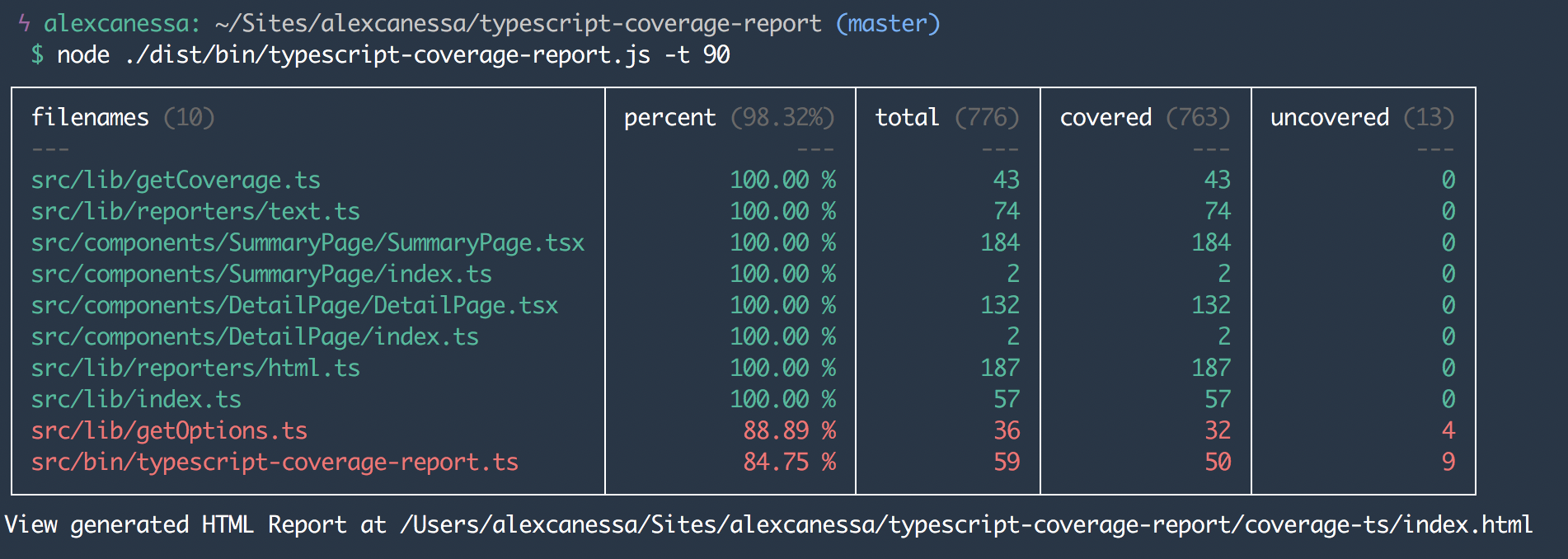
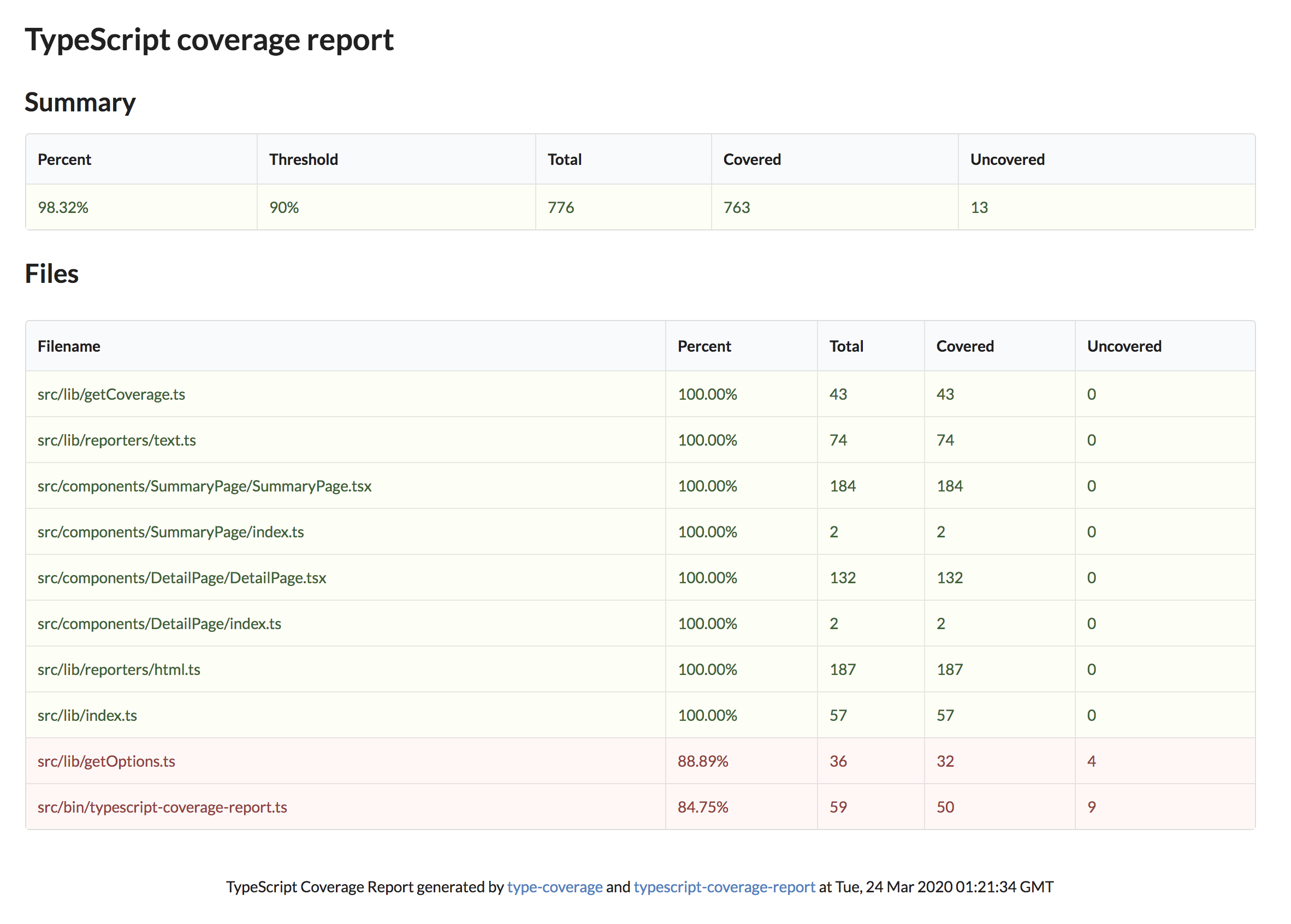
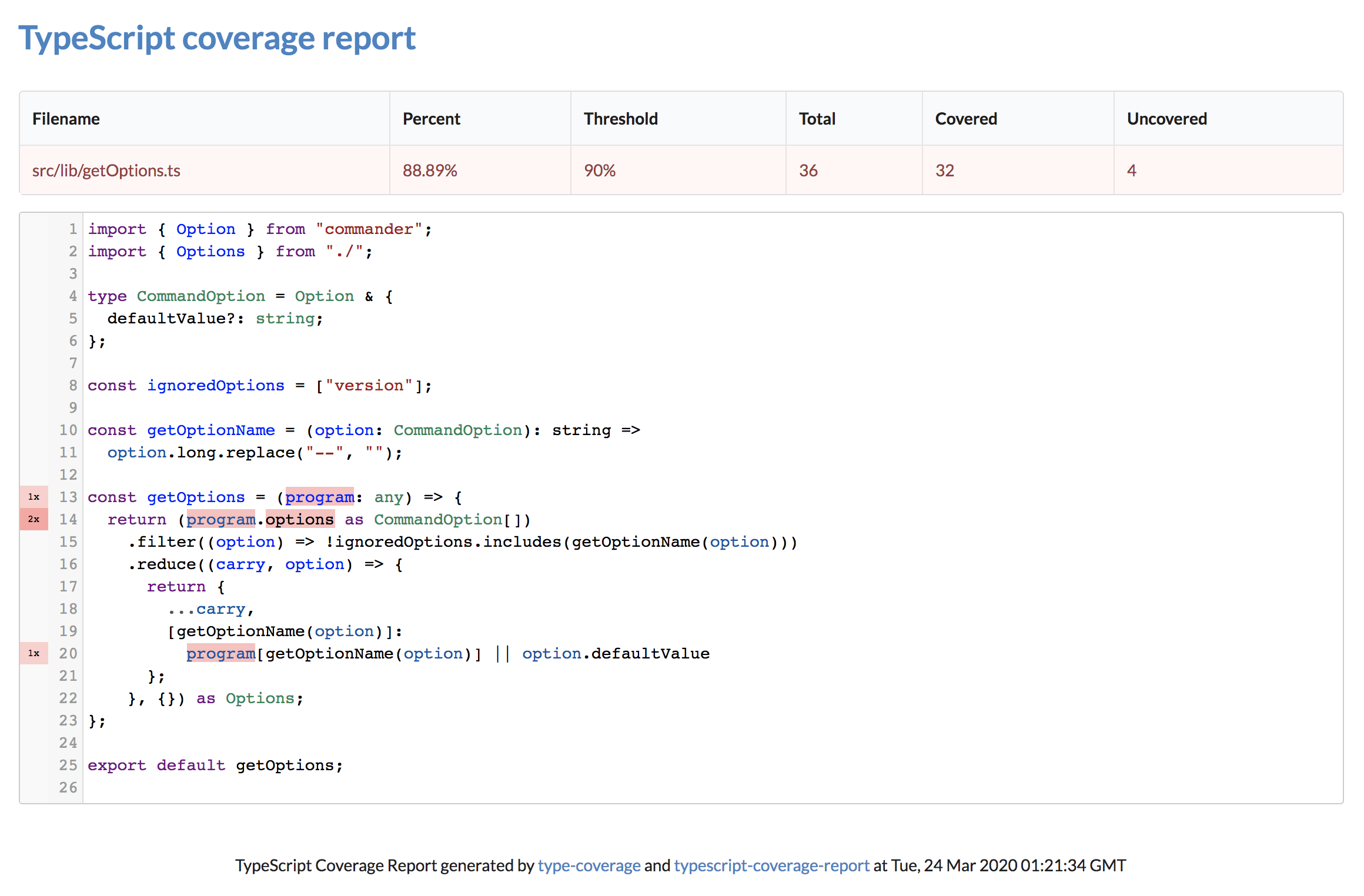
The CLI accepts a list of arguments:
| Option | Description | Default value |
|---|---|---|
-t, --threshold <number> | The minimum percentage of coverage required. | 80 |
-o, --outputDir <path> | The output directory where to generate the report. | coverage-ts |
-s, --strict | Run the check in strict mode. | false |
-d, --debug | Show debug information. | false |
-c, --cache | Save and reuse type check result from cache. | false |
-p, --project <path> | File path to the tsconfig file, eg: --project "./app/tsconfig.app.json" | . |
-i, --ignore-files <glob> | Ignore files matching a glob. Repeatable: -i "demo1/*.ts" -i "demo2/foo.ts" | none |
--ignore-catch | Ignore type any for (try-)catch clause variables. | false |
-u, --ignore-unread | Allow writes to variables with implicit any types. | false |
-r, --reporters <list> | Which reporters to run: text, html, json, lcov, cobertura. | text,html,json |
--config <path> | Path to a config file. | auto-detected |
--allow-empty | Succeed when no files were analysed. | false |
--respect-gitignore | Exclude files that git ignores. | false |
--compare <path> | Exit 3 if any file decreased versus an earlier report. | none |
--history-file <path> | Append this run’s totals to a JSON file. | none |
--ignore-nested | Ignore nested anys, such as Promise<any>. | false |
--ignore-as-assertion | Ignore assertions such as foo as string. | false |
--ignore-type-assertion | Ignore assertions such as <string>foo. | false |
--ignore-non-null-assertion | Ignore non-null assertions such as foo!. | false |
--ignore-object | Ignore the Object type. | false |
--ignore-empty-type | Ignore the empty type {}. | false |
--report-semantic-error | Count TypeScript semantic errors as uncovered. | false |
--report-unused-ignore | Flag type-coverage:ignore-line comments that suppress nothing. | false |
--cache-directory <path> | Where to store the cache, with --cache. | default |
--not-only-in-cwd | Include files outside the working directory. | false |
-v, --version | Print the version. | |
-h, --help | Print the usage information. |
Any trailing arguments are treated as the only files to check, which is useful with tools like lint-staged:
$ typescript-coverage-report src/one.ts src/two.ts
Options can live in a config file instead of being repeated on the command line. Any of these is picked up automatically, in order:
.typecoveragerc
.typecoveragerc.json
typescript-coverage-report.config.json
{
  "atLeast": 90,
  "outputDir": "coverage-ts",
  "reporters": ["text", "html", "lcov"],
  "ignoreFiles": ["vendor/**", "generated/**"],
  "strict": true
}
Or point at one explicitly with --config ./config/coverage.json.
The typeCoverage block in package.json still works and is unchanged. A dedicated config file takes precedence over it, and only the first file found is used — they are not merged, so it is never ambiguous where a setting came from.
Precedence is defaults → config file → command line flags, so a flag always wins.
The CLI exits 2 when coverage is below the threshold, so gating a build needs nothing more than running it:
- run: npx typescript-coverage-report --threshold 90
For CI systems that render coverage themselves, pick the reporters you want with --reporters. Running only the artifact you need also skips the terminal table, which on a large project takes a while to print:
# Codecov, Coveralls, SonarQube, GitHub annotations
$ typescript-coverage-report --reporters lcov --threshold 90

# Azure Pipelines, Jenkins, GitLab
$ typescript-coverage-report --reporters cobertura --threshold 90

# everything, including the browsable HTML report
$ typescript-coverage-report --reporters text,html,json,lcov,cobertura
| Reporter | Output | Read by |
|---|---|---|
text | the terminal table | humans |
html | index.html and a page per file | humans |
json | typescript-coverage.json | scripts |
lcov | lcov.info | Codecov, Coveralls, SonarQube, genhtml |
cobertura | cobertura-coverage.xml | Azure Pipelines, Jenkins, GitLab |
The default stays text,html,json, so upgrading changes nothing unless you ask it to.
Uploading lcov.info is what lets Codecov, Coveralls or SonarQube tell you that a pull request lowered coverage on a particular file — this tool does not need to know anything about git for that to work:
- run: npx typescript-coverage-report --reporters lcov --threshold 90
- uses: codecov/codecov-action@v7
  with:
    files: coverage-ts/lcov.info
A root tsconfig.json that only lists references compiles nothing itself, and project references are not followed. Running from such a root used to report 100% over zero files, which silently satisfied any threshold.
It now fails instead:
No files were analysed, so there is nothing to report.
Point --project at a package's own tsconfig, and run it once per package:
$ typescript-coverage-report --project packages/api/tsconfig.json
Pass --allow-empty if an empty result really is expected.
--respect-gitignore drops files that git ignores, even when your tsconfig.json compiles them:
$ typescript-coverage-report --respect-gitignore
This is off by default, because the report is meant to reflect what TypeScript actually compiled. It is useful when tsconfig.json has no exclude and a build directory ends up in the program.
git check-ignore is asked rather than .gitignore being parsed, so negation, nested .gitignore files, precedence and directory rules all behave exactly as git does. Outside a git repository the flag warns and changes nothing, rather than silently dropping files.
--compare checks this run against an earlier report and exits 3 if any individual file's coverage dropped — even when the overall threshold still passes.
# on the base branch
- run: npx typescript-coverage-report --reporters json --outputDir base

# on the pull request
- run: npx typescript-coverage-report --reporters json --compare base/typescript-coverage.json
Type coverage went from 92.31% to 88.46%.

1 file decreased:
  src/parser.ts: 100.00% -> 62.50% (-37.50)
Percentages are compared rather than raw counts, so adding covered code to a file is never a regression. Files that are new since the baseline are ignored — the overall --threshold is what guards those.
Exit codes:
| Code | Meaning |
|---|---|
0 | fine |
1 | a usage problem: a bad config file, or no files were analysed |
2 | coverage is below --threshold |
3 | a file decreased against --compare |
255 | something went wrong |
3 is checked before 2, so a run that is both below threshold and regressed reports the regression.
The tool deliberately knows nothing about git. You supply the baseline however suits you — a base-branch checkout, a stored CI artifact, or a committed file — which keeps this usable outside CI too.
Type coverage counts identifiers, but lcov and Cobertura are line-based. A line is reported as covered when it contains no uncovered identifier, and uncovered when it contains at least one. Blank and comment-only lines are left out of the denominator.
This means the line rate in those artifacts is not identical to the identifier percentage in the terminal table. The identifier-level numbers are the authoritative ones, and they are what the exit code and typescript-coverage.json use.
--history-file appends each run's totals to a JSON array, which is useful for charting a trend or for a simple "did it go down" check:
$ typescript-coverage-report --history-file coverage-history.json
[
  {
    "timestamp": "2026-09-24T13:26:31.915Z",
    "percentage": 76.1905,
    "total": 21,
    "covered": 16,
    "uncovered": 5
  }
]
2.0 is mostly a repair release: 1.1.0 and 1.1.1 were broken on npm, and this is the first version in eighteen months that installs and runs correctly. If you are pinned to ^0.8.0 because of that, this is the upgrade that unpins you.
| Change | Do you need to act? |
|---|---|
| Node 22.12 or newer required | Only if you run Node 20 or older |
-V no longer prints the version | Only if you scripted -V |
| Boolean flags take no value | Only if you pass --strict false or similar |
--ignore-files repeats now accumulate | Check your reports — more files are ignored now |
Invalid --threshold is an error | Only if it was already silently broken |
| The report excludes its own output | Your percentage may change, for the better |
| TypeScript 7 unsupported | Stay on TypeScript 6 or older |
See MIGRATING.md for the detail on each, including two that are worth checking even though they look cosmetic: --strict false used to turn strict mode on, and an invalid --threshold used to exit 0 however low the coverage was.
Feel free to dive in! Open an issue or submit a pull request.
See CONTRIBUTING.md for how to get set up, what the checks are, and how commit messages and releases work.
This project follows the Contributor Covenant Code of Conduct.
Thanks goes to these wonderful people (emoji key):
This project follows the all-contributors specification. Contributions of any kind welcome!
MIT @ Alessandro Canessa

Overall
Maintained
Code review
Latest release
Releases this year
8,905 followers · starred Mar 2020
1,316 followers · starred May 2023
490 followers · starred May 2022
117 followers · starred Jul 2026
Node command tool to generate TypeScript coverage report
TypeScript
524
278 commits
updated Oct 1, 2026
Node command line tool for generating TypeScript coverage reports ✨
This package fills the gap of a missing type coverage reporting tool which is present in the Flow ecosystem, strongly inspired by the amazing work done by flow-coverage-report and using data generated by type-coverage.
See an example of the coverage report.
To learn more about the reasoning behind this project and its roadmap, please refer to the following article: How I built a TS coverage report tool
typescript-coverage-report can be installed locally or globally.
Users are advised to install it as a project (dev) dependency and create a script in package.json.
$ yarn add --dev typescript-coverage-report

# OR

$ npm install --save-dev typescript-coverage-report
If installed locally, add the following to the scripts section of package.json.
"scripts": {
  "ts-coverage": "typescript-coverage-report"
}
Then run:
$ yarn ts-coverage

# OR

$ npm run ts-coverage
To set the minimum threshold (80% by default), use the --threshold option.
$ yarn ts-coverage --threshold=99
As an alternative, options may be provided through the type-coverage configuration, specified in package.json.
"typeCoverage": {
  "atLeast": 90
}
The CLI accepts a list of arguments:
| Option | Description | Default value |
|---|---|---|
-t, --threshold <number> | The minimum percentage of coverage required. | 80 |
-o, --outputDir <path> | The output directory where to generate the report. | coverage-ts |
-s, --strict | Run the check in strict mode. | false |
-d, --debug | Show debug information. | false |
-c, --cache | Save and reuse type check result from cache. | false |
-p, --project <path> | File path to the tsconfig file, eg: --project "./app/tsconfig.app.json" | . |
-i, --ignore-files <glob> | Ignore files matching a glob. Repeatable: -i "demo1/*.ts" -i "demo2/foo.ts" | none |
--ignore-catch | Ignore type any for (try-)catch clause variables. | false |
-u, --ignore-unread | Allow writes to variables with implicit any types. | false |
-r, --reporters <list> | Which reporters to run: text, html, json, lcov, cobertura. | text,html,json |
--config <path> | Path to a config file. | auto-detected |
--allow-empty | Succeed when no files were analysed. | false |
--respect-gitignore | Exclude files that git ignores. | false |
--compare <path> | Exit 3 if any file decreased versus an earlier report. | none |
--history-file <path> | Append this run’s totals to a JSON file. | none |
--ignore-nested | Ignore nested anys, such as Promise<any>. | false |
--ignore-as-assertion | Ignore assertions such as foo as string. | false |
--ignore-type-assertion | Ignore assertions such as <string>foo. | false |
--ignore-non-null-assertion | Ignore non-null assertions such as foo!. | false |
--ignore-object | Ignore the Object type. | false |
--ignore-empty-type | Ignore the empty type {}. | false |
--report-semantic-error | Count TypeScript semantic errors as uncovered. | false |
--report-unused-ignore | Flag type-coverage:ignore-line comments that suppress nothing. | false |
--cache-directory <path> | Where to store the cache, with --cache. | default |
--not-only-in-cwd | Include files outside the working directory. | false |
-v, --version | Print the version. | |
-h, --help | Print the usage information. |
Any trailing arguments are treated as the only files to check, which is useful with tools like lint-staged:
$ typescript-coverage-report src/one.ts src/two.ts
Options can live in a config file instead of being repeated on the command line. Any of these is picked up automatically, in order:
.typecoveragerc
.typecoveragerc.json
typescript-coverage-report.config.json
{
  "atLeast": 90,
  "outputDir": "coverage-ts",
  "reporters": ["text", "html", "lcov"],
  "ignoreFiles": ["vendor/**", "generated/**"],
  "strict": true
}
Or point at one explicitly with --config ./config/coverage.json.
The typeCoverage block in package.json still works and is unchanged. A dedicated config file takes precedence over it, and only the first file found is used — they are not merged, so it is never ambiguous where a setting came from.
Precedence is defaults → config file → command line flags, so a flag always wins.
The CLI exits 2 when coverage is below the threshold, so gating a build needs nothing more than running it:
- run: npx typescript-coverage-report --threshold 90
For CI systems that render coverage themselves, pick the reporters you want with --reporters. Running only the artifact you need also skips the terminal table, which on a large project takes a while to print:
# Codecov, Coveralls, SonarQube, GitHub annotations
$ typescript-coverage-report --reporters lcov --threshold 90

# Azure Pipelines, Jenkins, GitLab
$ typescript-coverage-report --reporters cobertura --threshold 90

# everything, including the browsable HTML report
$ typescript-coverage-report --reporters text,html,json,lcov,cobertura
| Reporter | Output | Read by |
|---|---|---|
text | the terminal table | humans |
html | index.html and a page per file | humans |
json | typescript-coverage.json | scripts |
lcov | lcov.info | Codecov, Coveralls, SonarQube, genhtml |
cobertura | cobertura-coverage.xml | Azure Pipelines, Jenkins, GitLab |
The default stays text,html,json, so upgrading changes nothing unless you ask it to.
Uploading lcov.info is what lets Codecov, Coveralls or SonarQube tell you that a pull request lowered coverage on a particular file — this tool does not need to know anything about git for that to work:
- run: npx typescript-coverage-report --reporters lcov --threshold 90
- uses: codecov/codecov-action@v7
  with:
    files: coverage-ts/lcov.info
A root tsconfig.json that only lists references compiles nothing itself, and project references are not followed. Running from such a root used to report 100% over zero files, which silently satisfied any threshold.
It now fails instead:
No files were analysed, so there is nothing to report.
Point --project at a package's own tsconfig, and run it once per package:
$ typescript-coverage-report --project packages/api/tsconfig.json
Pass --allow-empty if an empty result really is expected.
--respect-gitignore drops files that git ignores, even when your tsconfig.json compiles them:
$ typescript-coverage-report --respect-gitignore
This is off by default, because the report is meant to reflect what TypeScript actually compiled. It is useful when tsconfig.json has no exclude and a build directory ends up in the program.
git check-ignore is asked rather than .gitignore being parsed, so negation, nested .gitignore files, precedence and directory rules all behave exactly as git does. Outside a git repository the flag warns and changes nothing, rather than silently dropping files.
--compare checks this run against an earlier report and exits 3 if any individual file's coverage dropped — even when the overall threshold still passes.
# on the base branch
- run: npx typescript-coverage-report --reporters json --outputDir base

# on the pull request
- run: npx typescript-coverage-report --reporters json --compare base/typescript-coverage.json
Type coverage went from 92.31% to 88.46%.

1 file decreased:
  src/parser.ts: 100.00% -> 62.50% (-37.50)
Percentages are compared rather than raw counts, so adding covered code to a file is never a regression. Files that are new since the baseline are ignored — the overall --threshold is what guards those.
Exit codes:
| Code | Meaning |
|---|---|
0 | fine |
1 | a usage problem: a bad config file, or no files were analysed |
2 | coverage is below --threshold |
3 | a file decreased against --compare |
255 | something went wrong |
3 is checked before 2, so a run that is both below threshold and regressed reports the regression.
The tool deliberately knows nothing about git. You supply the baseline however suits you — a base-branch checkout, a stored CI artifact, or a committed file — which keeps this usable outside CI too.
Type coverage counts identifiers, but lcov and Cobertura are line-based. A line is reported as covered when it contains no uncovered identifier, and uncovered when it contains at least one. Blank and comment-only lines are left out of the denominator.
This means the line rate in those artifacts is not identical to the identifier percentage in the terminal table. The identifier-level numbers are the authoritative ones, and they are what the exit code and typescript-coverage.json use.
--history-file appends each run's totals to a JSON array, which is useful for charting a trend or for a simple "did it go down" check:
$ typescript-coverage-report --history-file coverage-history.json
[
  {
    "timestamp": "2026-09-24T13:26:31.915Z",
    "percentage": 76.1905,
    "total": 21,
    "covered": 16,
    "uncovered": 5
  }
]
2.0 is mostly a repair release: 1.1.0 and 1.1.1 were broken on npm, and this is the first version in eighteen months that installs and runs correctly. If you are pinned to ^0.8.0 because of that, this is the upgrade that unpins you.
| Change | Do you need to act? |
|---|---|
| Node 22.12 or newer required | Only if you run Node 20 or older |
-V no longer prints the version | Only if you scripted -V |
| Boolean flags take no value | Only if you pass --strict false or similar |
--ignore-files repeats now accumulate | Check your reports — more files are ignored now |
Invalid --threshold is an error | Only if it was already silently broken |
| The report excludes its own output | Your percentage may change, for the better |
| TypeScript 7 unsupported | Stay on TypeScript 6 or older |
See MIGRATING.md for the detail on each, including two that are worth checking even though they look cosmetic: --strict false used to turn strict mode on, and an invalid --threshold used to exit 0 however low the coverage was.
Feel free to dive in! Open an issue or submit a pull request.
See CONTRIBUTING.md for how to get set up, what the checks are, and how commit messages and releases work.
This project follows the Contributor Covenant Code of Conduct.
Thanks goes to these wonderful people (emoji key):
This project follows the all-contributors specification. Contributions of any kind welcome!
MIT @ Alessandro Canessa
Overall
Maintained
Code review
Latest release
Releases this year
8,905 followers · starred Mar 2020
1,316 followers · starred May 2023
490 followers · starred May 2022
117 followers · starred Jul 2026



