A code coverage tool to generate native V8 reports or Istanbul reports.
JavaScript
156
1,328 commits
updated Oct 7, 2026



🌐 English | 简体中文
A JavaScript code coverage tool to generate native V8 reports or Istanbul reports.
sourcePath for the Source FilesNode.js 22+ is recommended and is the actively maintained target.
npm install monocart-coverage-reports
const MCR = require('monocart-coverage-reports');
const mcr = MCR({
    name: 'My Coverage Report - 2024-02-28',
    outputDir: './coverage-reports',
    reports: ["v8", "console-details"],
    cleanCache: true
});
await mcr.add(coverageData);
await mcr.generate();
Using import and load options from config file
import { CoverageReport } from 'monocart-coverage-reports';
const mcr = new CoverageReport();
await mcr.loadConfig();
Both
MCR({...})andnew CoverageReport()create the same instance.MCR()is a shorthand factory function; usenew CoverageReport()when you prefer class instantiation or need to callloadConfig()separately.
For more information, see Multiprocessing Support
mcr node my-app.js -r v8,console-details
For more information, see Command Line
CoverageReportOptions lib/index.d.ts| Option | Type | Default | Description |
|---|---|---|---|
logging | "off" | "error" | "info" | "debug" | "info" | Logging level. Use "debug" to keep raw cache and dump sourcemaps for troubleshooting. See Debug for Coverage and Sourcemap. |
name | string | "Coverage Report" | Report title shown in the UI and summary reports. |
reports | string | (string | ReportDescription)[] | "" (auto) | Reports to generate. Defaults to "v8" for V8 data and "html" for Istanbul data. See Available Reports. |
outputDir | string | "./coverage-reports" | Output directory for all reports and the .cache folder. |
inputDir | string | string[] | null | Input directories of raw coverage data for merging. |
baseDir | string | process.cwd() | Base dir used to normalize relative source paths. Set when the report is generated from a different working directory than the sources. |
dataDir | string | null | Coverage data directory loaded automatically in generate() — alternative to addFromDir(). |
entryFilter | string | object | function | null | (V8 only) Filter V8 entries by url. See Filtering Results. |
sourceFilter | string | object | function | null | (V8 only) Filter sources unpacked from sourcemaps. |
filter | string | object | function | null | Combined filter replacing both entryFilter and sourceFilter. |
sourcePath | object | function | null | Rewrite source paths; see Resolve sourcePath. |
all | string | string[] | object | null | Include untested files as empty coverage. See Adding Empty Coverage. |
outputFile | string | "index.html" | (V8 only) Output [sub dir/]filename for the V8 report. |
inline | boolean | false | (V8 only) Inline all assets into a single HTML file. |
assetsPath | string | "./assets" | (V8 only) Assets directory when inline is false. |
lcov | boolean | false | Also generate lcov.info (equivalent to adding the lcovonly report). |
v8Ignore | boolean | true | (V8 only) Enable/disable comment-based ignoring (v8 ignore …). See Ignoring Uncovered Codes. |
reportPath | string | () => string | null | Override the report entry path (defaults to outputDir/index.html). Useful when multiple reports share an outputDir. |
watermarks | [number, number] | object | [50, 80] | Low/high thresholds (percent). Accepts per-metric object like { bytes:[50,80], lines:[50,80] }. |
clean | boolean | true | Clean previous reports in outputDir before generating (the .cache dir is preserved unless cleanCache is also true). |
cleanCache | boolean | false | Clean the cache dir on start. When both clean and cleanCache are false, cached coverage data from previous runs is preserved and can be reused across processes. |
gc | number | null | Memory threshold in MB; force GC at critical stages when RSS exceeds it. Useful for very large data sets, see JavaScript heap out of memory. |
sourceMap | boolean | false | Save source/sourcemap files to cache for debugging (requires logging: "debug"). |
sourceMapResolver | (url, defaultResolver) => Promise<string | object> | null | Custom sourcemap loader (e.g. from a build cache). Call defaultResolver(url) to fall back. |
onEntry | (entry) => void | Promise<void> | null | (V8 only) Per-entry hook; see Hooks. |
onEnd | (coverageResults) => void | Promise<void> | null | Hook invoked after report generation; see Hooks. |
V8 built-in reports (V8 data only):
v8
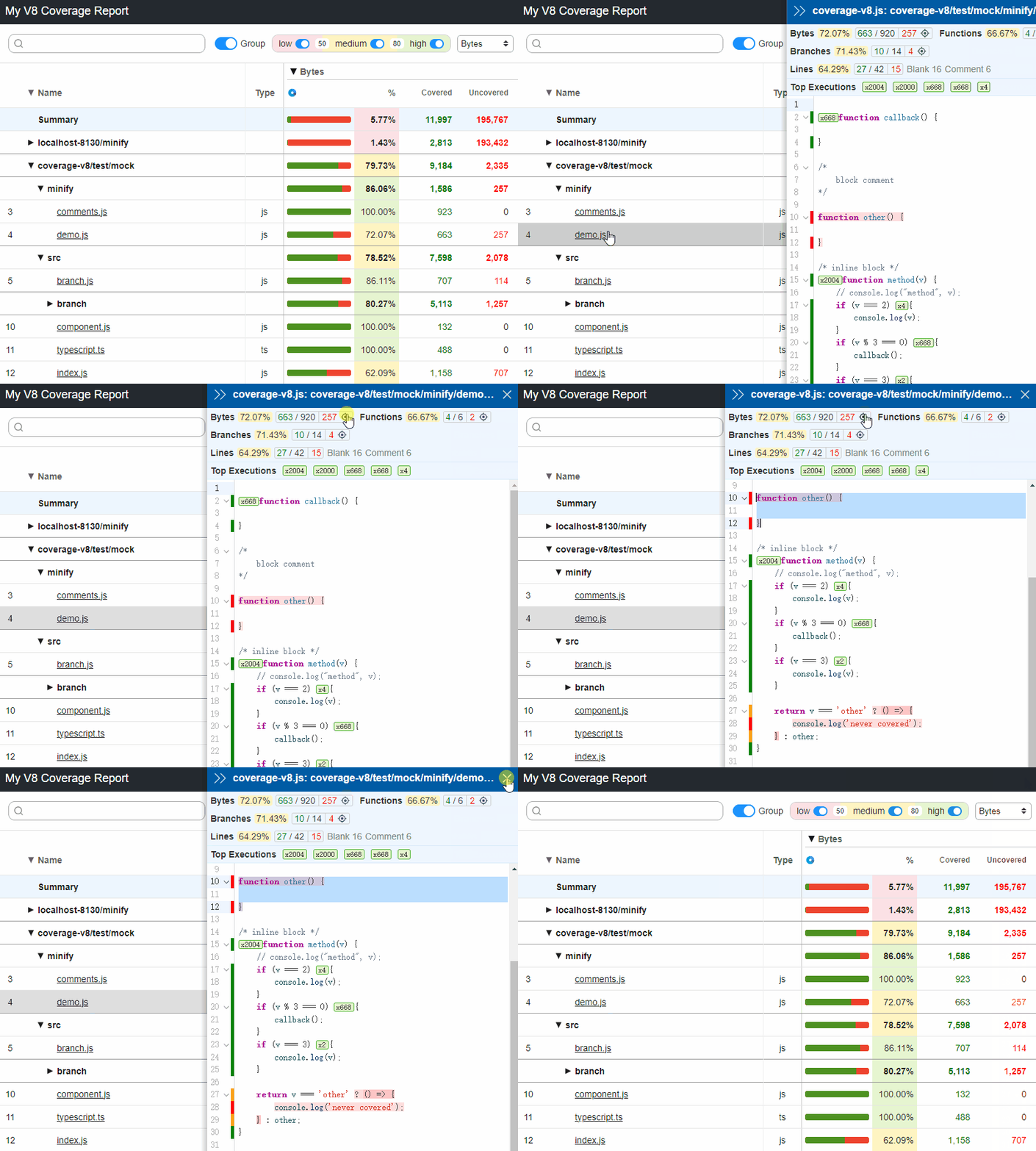
v8-json
CoverageResults to a json file (defaults to coverage-report.json).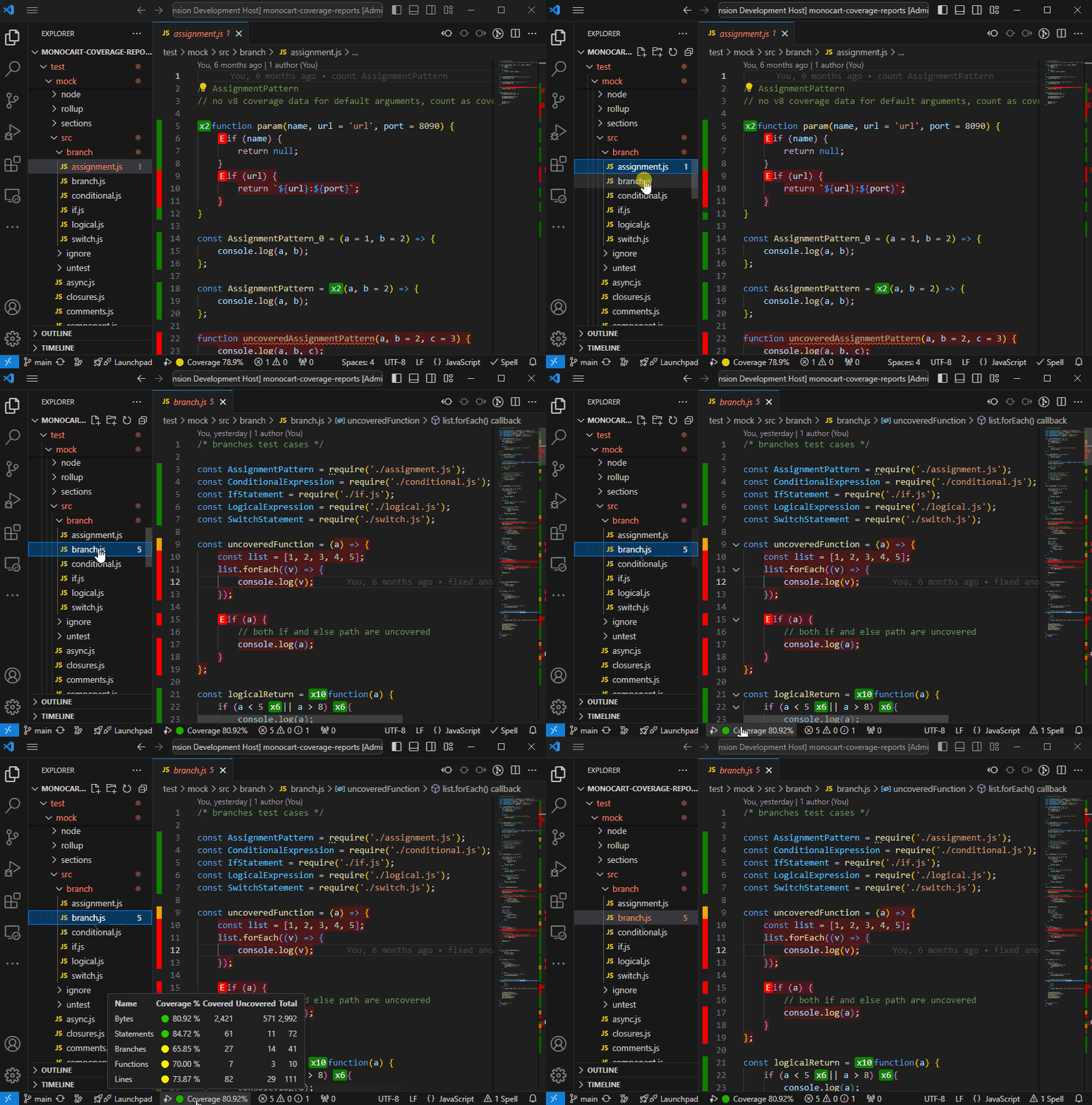
Istanbul built-in reports (both V8 and Istanbul data):
clovercoberturahtml
html-spajsonjson-summarylcovlcovonly
noneteamcitytexttext-lcovtext-summaryOther built-in reports (both V8 and Istanbul data):
codecov Save coverage data to a json file with Codecov format (defaults to codecov.json), see example.
codacy Save coverage data to a json file with Codacy API format (defaults to codacy.json).
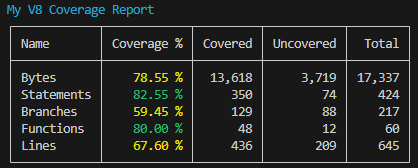
console-summary shows coverage summary in the console.
console-details Show coverage details in the console. Like text, but for V8. For Github actions, we can enforce color with env: FORCE_COLOR: true.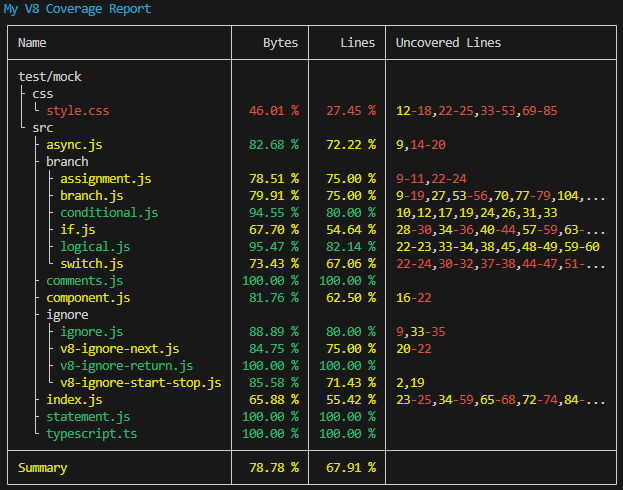
markdown-summary Save coverage summary to a markdown file (defaults to coverage-summary.md). For Github actions, we can show the markdown content to a job summarycat path-to/coverage-summary.md >> $GITHUB_STEP_SUMMARY
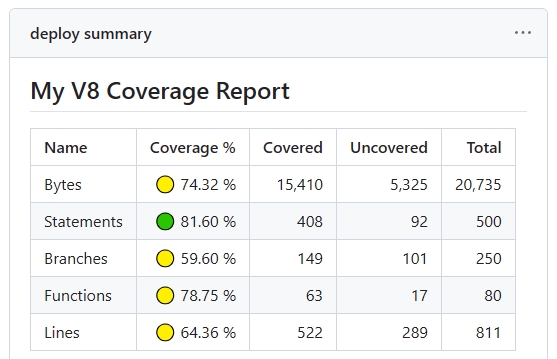
markdown-details Save coverage details to a markdown file (defaults to coverage-details.md).
raw only keep all original data, which can be used for other reports input with inputDir. see Merge Coverage Reports
Custom Reporter
{
    reports: [
        [path.resolve('./test/custom-istanbul-reporter.js'), {
            type: 'istanbul',
            file: 'custom-istanbul-coverage.text'
        }],
        [path.resolve('./test/custom-v8-reporter.js'), {
            type: 'v8',
            outputFile: 'custom-v8-coverage.json'
        }],
        [path.resolve('./test/custom-v8-reporter.mjs'), {
            type: 'both'
        }]
    ]
}
example: ./test/custom-istanbul-reporter.js, see istanbul built-in reporters' implementation for reference.
example: ./test/custom-v8-reporter.js
The type option determines which coverage format the reporter receives:
'istanbul' — the reporter receives Istanbul-format coverage data (coverageResults.istanbulData).'v8' — the reporter receives native V8-format coverage data (coverageResults.v8Data).'both' — the reporter receives both formats, accessible via coverageResults.v8Data and coverageResults.istanbulData.const MCR = require('monocart-coverage-reports');
const coverageOptions = {
outputDir: './coverage-reports',
reports: [
// built-in reports
['console-summary'],
['v8'],
['html', {
subdir: 'istanbul'
}],
['json', {
file: 'my-json-file.json'
}],
'lcovonly',
// custom reports
// Specify reporter name with the NPM package
["custom-reporter-1"],
["custom-reporter-2", {
type: "istanbul",
key: "value"
}],
// Specify reporter name with local path
['/absolute/path/to/custom-reporter.js']
]
}
const mcr = MCR(coverageOptions);
If the V8 data format is used for Istanbul reports, it will be automatically converted from V8 to Istanbul.
| Istanbul | V8 | V8 to Istanbul | |
|---|---|---|---|
| Coverage data | Istanbul (Object) | V8 (Array) | V8 (Array) |
| Output | Istanbul reports | V8 reports | Istanbul reports |
| - Bytes | ❌ | ✅ | ❌ |
| - Statements | ✅ | ✅ | ✅ |
| - Branches | ✅ | ✅ | ✅ |
| - Functions | ✅ | ✅ | ✅ |
| - Lines | ✅ | ✅ | ✅ |
| - Execution counts | ✅ | ✅ | ✅ |
| CSS coverage | ❌ | ✅ | ✅ |
| Minified code | ❌ | ✅ | ❌ |
Before coverage collection: Instrumenting source code with Istanbul
Browser
window.__coverage__, example: test-istanbul.jsNode.js
global.__coverage__CDP
getIstanbulCoverage() see CDPClient APIBefore coverage collection: Enabling sourcemap for source code
devtool: source-map and mode: development, example webpack.config-v8.jssourcemap: true and treeshake: falsesourcemap: true, treeShaking: false and minify: falsesourcemap: true and minify: falseBrowser (Chromium-based Only)
Node.js
CDP
await Promise.all([
    page.coverage.startJSCoverage({
        // reportAnonymousScripts: true,
        resetOnNavigation: false
    }),
    page.coverage.startCSSCoverage({
        // Note, anonymous styles (without sourceURLs) are not supported, alternatively, you can use CDPClient
        resetOnNavigation: false
    })
]);

await page.goto("your page url");

const [jsCoverage, cssCoverage] = await Promise.all([
    page.coverage.stopJSCoverage(),
    page.coverage.stopCSSCoverage()
]);

const coverageData = [... jsCoverage, ... cssCoverage];
Collect coverage with @playwright/test Automatic fixtures, see example: fixtures.ts
For more examples, see ./test/test-v8.js, css
await Promise.all([
    page.coverage.startJSCoverage({
        // reportAnonymousScripts: true,
        resetOnNavigation: false,
        // provide raw v8 coverage data
        includeRawScriptCoverage: true
    }),
    page.coverage.startCSSCoverage({
        resetOnNavigation: false
    })
]);

await page.goto("your page url");

const [jsCoverage, cssCoverage] = await Promise.all([
    page.coverage.stopJSCoverage(),
    page.coverage.stopCSSCoverage()
]);

// to raw V8 script coverage
const coverageData = [... jsCoverage.map((it) => {
    return {
        source: it.text,
        ... it.rawScriptCoverage
    };
}), ... cssCoverage];
Example: ./test/test-puppeteer.js
Possible solutions:
NODE_V8_COVERAGE=dir
NODE_V8_COVERAGE=dir before the program running, the coverage data will be saved to the dir after the program exits gracefully.dir and generate coverage report.cross-env NODE_V8_COVERAGE=
.temp/v8-coverage-envnode ./test/test-node-env.js && node ./test/generate-report.js
V8 API + NODE_V8_COVERAGE
v8.takeCoverage(), it does not require waiting until the program exits gracefully.cross-env NODE_V8_COVERAGE=
.temp/v8-coverage-apinode ./test/test-node-api.js
Inspector API
CDP API
node --inspect=9229 ./test/test-node-cdp.js
Node Debugging + CDP + NODE_V8_COVERAGE + V8 API
v8.takeCoverage() interface to manually collect coverage data. Remote invocation of the v8.takeCoverage() interface can be accomplished through the Runtime.evaluate of the CDP.Child Process + NODE_V8_COVERAGE
CDPClient APICDPClient available APIsstartJSCoverage: () => Promise<void>;
stopJSCoverage: () => Promise<V8CoverageEntry[]>;
startCSSCoverage: () => Promise<void>;
stopCSSCoverage: () => Promise<V8CoverageEntry[]>;
/** start both js and css coverage */
startCoverage: () => Promise<void>;
/** stop and return both js and css coverage */
stopCoverage: () => Promise<V8CoverageEntry[]>;
/** write the coverage started by NODE_V8_COVERAGE to disk on demand, returns v8 coverage dir */
writeCoverage: () => Promise<string>;
/** get istanbul coverage data */
getIstanbulCoverage: (coverageKey?: string) => Promise<any>;
--inspect=9229 or browser debugging port --remote-debugging-port=9229const MCR = require('monocart-coverage-reports');
const client = await MCR.CDPClient({
port: 9229
});
await client.startJSCoverage();
// run your test here
const coverageData = await client.stopJSCoverage();
const { chromium } = require('playwright');
const MCR = require('monocart-coverage-reports');
const browser = await chromium.launch();
const page = await browser.newPage();
const session = await page.context().newCDPSession(page);
const client = await MCR.CDPClient({
    session
});
// both js and css coverage
await client.startCoverage();
// run your test page here
await page.goto("your page url");
const coverageData = await client.stopCoverage();
const puppeteer = require('puppeteer');
const MCR = require('monocart-coverage-reports');
const browser = await puppeteer.launch({});
const page = await browser.newPage();
const session = await page.target().createCDPSession();
const client = await MCR.CDPClient({
    session
});
// both js and css coverage
await client.startCoverage();
// run your test page here
await page.goto("your page url");
const coverageData = await client.stopCoverage();
const { Builder, Browser } = require('selenium-webdriver');
const MCR = require('monocart-coverage-reports');
const driver = await new Builder().forBrowser(Browser.CHROME).build();
const pageCdpConnection = await driver.createCDPConnection('page');
const session = new MCR.WSSession(pageCdpConnection._wsConnection);
const client = await MCR.CDPClient({
    session
})
// Coverage data for a source range.
export interface CoverageRange {
    // JavaScript script source offset for the range start.
    startOffset: integer;
    // JavaScript script source offset for the range end.
    endOffset: integer;
    // Collected execution count of the source range.
    count: integer;
}
// Coverage data for a JavaScript function.
/**
 * @functionName can be an empty string.
 * @ranges is always non-empty. The first range is called the "root range".
 * @isBlockCoverage indicates if the function has block coverage information.
    If this is false, it usually means that the function was never called.
    It seems to be equivalent to ranges.length === 1 && ranges[0].count === 0.
*/
export interface FunctionCoverage {
    // JavaScript function name.
    functionName: string;
    // Source ranges inside the function with coverage data.
    ranges: CoverageRange[];
    // Whether coverage data for this function has block granularity.
    isBlockCoverage: boolean;
}
// Coverage data for a JavaScript script.
export interface ScriptCoverage {
    // JavaScript script id.
    scriptId: Runtime.ScriptId;
    // JavaScript script name or url.
    url: string;
    // Functions contained in the script that has coverage data.
    functions: FunctionCoverage[];
}
export type V8CoverageData = ScriptCoverage[];
| JavaScript Runtime | V8 Coverage | |
|---|---|---|
| Chrome (65%) | ✅ | Chromium-based |
| Safari (18%) | ❌ | |
| Edge (5%) | ✅ | Chromium-based |
| Firefox (2%) | ❌ | |
| Node.js | ✅ | |
| Deno | ❌ | issue |
| Bun | ❌ | issue |
MCR extends each V8 coverage entry with additional fields:
| Field | Type | Description |
|---|---|---|
url | string | Script URL or file path |
type | "js" | "css" | Entry type |
source | string | (JS) Source code text |
sourceMap | object | (JS) Parsed sourcemap object |
scriptOffset | number | (JS) Byte offset for the script wrapper (e.g. in vm modules). This offset is automatically added to all range start/end values |
distFile | string | (JS) The dist bundle file this source was unpacked from |
empty | boolean | Marked as true when this entry was added via the all option (no real coverage data), showing 0% coverage |
fake | boolean | Marked as true when the source code is not original (e.g. compiled from .ts/.jsx). The AST parser skips coverage extraction for fake sources |
These fields can be read/mutated in onEntry hooks.
entryFilter and sourceFilter to filter the results for V8 reportWhen V8 coverage data collected, it actually contains the data of all entry files, for example:
We can use entryFilter to filter the entry files. For example, we should remove vendor.js and something-else.js if they are not in our coverage scope.
When inline or linked sourcemap exists to the entry file, the source files will be extracted from the sourcemap for the entry file, and the entry file will be removed if logging is not debug.
We can use sourceFilter to filter the source files. For example, we should remove dependency.js if it is not in our coverage scope.
For example:
const coverageOptions = {
    entryFilter: (entry) => entry.url.indexOf("main.js") !== -1,
    sourceFilter: (sourcePath) => sourcePath.search(/src\//) !== -1
};
Or using minimatch pattern:
const coverageOptions = {
    entryFilter: "**/main.js",
    sourceFilter: "**/src/**"
};
Support multiple patterns:
const coverageOptions = {
    entryFilter: {
        '**/node_modules/**': false,
        '**/vendor.js': false,
        '**/src/**': true
    },
    sourceFilter: {
        '**/node_modules/**': false,
        '**/**': true
    }
};
As CLI args (JSON-like string. Added in: v2.8):
mcr --sourceFilter "{'**/node_modules/**':false,'**/**':true}"
Note, those patterns will be transformed to a function, and the order of the patterns will impact the results:
const coverageOptions = {
    entryFilter: (entry) => {
        if (minimatch(entry.url, '**/node_modules/**')) { return false; }
        if (minimatch(entry.url, '**/vendor.js')) { return false; }
        if (minimatch(entry.url, '**/src/**')) { return true; }
        return false; // else unmatched
    }
};
filter instead of entryFilter and sourceFilterIf you don't want to define both entryFilter and sourceFilter, you can use filter instead. (Added in: v2.8)
const coverageOptions = {
    // combined patterns
    filter: {
        '**/node_modules/**': false,
        '**/vendor.js': false,
        '**/src/**': true,
        '**/**': true
    }
};
sourcePath for the Source FilesIf the source file comes from the sourcemap, then its path is a virtual path. Using the sourcePath option to resolve a custom path.
For example, we have tested multiple dist files, which contain some common files. We hope to merge the coverage of the same files, so we need to unify the sourcePath in order to be able to merge the coverage data.
const coverageOptions = {
    sourcePath: (filePath) => {
        // Remove the virtual prefix
        const list = ['my-dist-file1/', 'my-dist-file2/'];
        for (const str of list) {
            if (filePath.startsWith(str)) {
                return filePath.slice(str.length);
            }
        }
        return filePath;
    }
};
It also supports simple key/value replacement:
const coverageOptions = {
    sourcePath: {
        'my-dist-file1/': '',
        'my-dist-file2/': ''
    }
};
Normalize the full path of the file:
const path = require("path")

// MCR coverage options
const coverageOptions = {
    sourcePath: (filePath, info)=> {
        if (!filePath.includes('/') && info.distFile) {
            return `${path.dirname(info.distFile)}/${filePath}`;
        }
        return filePath;
    }
}
By default the untested files will not be included in the coverage report. Use all to include them with 0% coverage. This also works when no coverage data has been collected: a V8 report is generated from the matching untested files.
const coverageOptions = {
    all: './src',

    // or multiple dirs
    all: ['./src', './lib'],
};
The untested files will apply to the sourceFilter. And it also supports additional filter (return the file type for js or css coverage):
const coverageOptions = {
    all: {
        dir: ['./src'],
        filter: {
            // exclude files
            '**/ignored-*.js': false,
            '**/*.html': false,
            // empty css coverage
            '**/*.scss': "css",
            '**/*': true
        }
    }
};
We can also compile these untested files, such as .ts, .jsx, or .vue, etc., so that they can be analyzed by the default AST parser, thus get more coverage metric data.
const path = require("path");
const swc = require("@swc/core");
const coverageOptions = {
    all: {
        dir: ['./src'],
        transformer: async (entry) => {
            const { code, map } = await swc.transform(entry.source, {
                filename: path.basename(entry.url),
                sourceMaps: true,
                isModule: true,
                jsc: {
                    parser: {
                        syntax: "typescript",
                        jsx: true
                    },
                    transform: {}
                }
            });
            entry.source = code;
            entry.sourceMap = JSON.parse(map);
        }
    }
};
onEnd — after the report is generatedTypical use case: enforce coverage thresholds.
const EC = require('eight-colors');
const coverageOptions = {
    name: 'My Coverage Report',
    outputDir: './coverage-reports',
    onEnd: (coverageResults) => {
        const thresholds = {
            bytes: 80,
            lines: 60
        };
        console.log('check thresholds ...', thresholds);
        const errors = [];
        const { summary } = coverageResults;
        Object.keys(thresholds).forEach((k) => {
            const pct = summary[k].pct;
            if (pct < thresholds[k]) {
                errors.push(`Coverage threshold for ${k} (${pct} %) not met: ${thresholds[k]} %`);
            }
        });
        if (errors.length) {
            const errMsg = errors.join('\n');
            console.log(EC.red(errMsg));
            // throw new Error(errMsg);
            // process.exit(1);
        }
    }
}
onEntry — before each V8 entry is processed (V8 only)Use this to mutate the entry (for example, transform non-standard sources into valid ECMAScript before the AST parser runs). See Unparsable source.
const coverageOptions = {
    onEntry: async (entry) => {
        // entry.source, entry.sourceMap, entry.fake, ...
    }
};
onStart / onReady — CLI-onlyOnly available when using mcr <command>:
onStart(coverageReport) — runs before the child process is spawned.onReady(coverageReport, nodeV8CoverageDir, subprocess) — runs after the child exits, before MCR reads coverage from nodeV8CoverageDir. Useful when the child hasn't finished flushing coverage data and needs to be waited on.// mcr.config.js
module.exports = {
onReady: async (coverageReport, nodeV8CoverageDir, subprocess) => {
// wait for something, or pre-process the raw files
}
};
To ignore codes, use the special comment which starts with v8 ignore :
/* v8 ignore start */
function uncovered() {
}
/* v8 ignore stop */
/* v8 ignore next */
const os = platform === 'win32' ? 'Windows' : 'Other';

const os = platform === 'win32' ? 'Windows' /* v8 ignore next */ : 'Other';

// v8 ignore next 3
if (platform === 'linux') {
    console.log('hello linux');
}
/* c8 ignore start */
function uncovered() {
}
/* c8 ignore stop */

/* node:coverage disable */
function uncovered() {
}
/* node:coverage enable */
v8Ignore: false.The data will be added to
[outputDir]/.cache, After the generation of the report, this data will be removed unless debugging has been enabled or a raw report has been used, see Debug for Coverage and Sourcemap
const MCR = require('monocart-coverage-reports');
const coverageOptions = require('path-to/same-options.js');
const mcr = MCR(coverageOptions);
// clean previous cache before the start of testing
// unless the running environment is new and no cache
mcr.cleanCache();
const MCR = require('monocart-coverage-reports');
const coverageOptions = require('path-to/same-options.js');
const mcr = MCR(coverageOptions);
await mcr.add(coverageData1);
const MCR = require('monocart-coverage-reports');
const coverageOptions = require('path-to/same-options.js');
const mcr = MCR(coverageOptions);
await mcr.add(coverageData2);
// generate coverage reports after the completion of testing
const MCR = require('monocart-coverage-reports');
const coverageOptions = require('path-to/same-options.js');
const mcr = MCR(coverageOptions);
await mcr.generate();
The CLI will run the program as a child process with
NODE_V8_COVERAGE=diruntil it exits gracefully, and generate the coverage report with the coverage data from thedir.
npm i monocart-coverage-reports -g
mcr node ./test/specs/node.test.js -r v8,console-details --lcov
npm i monocart-coverage-reports
npx mcr node ./test/specs/node.test.js -r v8,console-details --lcov
The options below are only available when using the CLI (mcr <command>):
| Option | Type | Default | Description |
|---|---|---|---|
-c, --config | string | — | Custom config file path |
--import | string | null | Preload ESM module via NODE_OPTIONS, e.g. tsx for TypeScript. Requires Node.js >= 18.19 |
--require | string | null | Preload CJS module via NODE_OPTIONS |
--env | string | null | Load environment variables from a dotenv file (defaults to .env). Requires Node.js >= 20.6 |
onStart | (coverageReport) => Promise<void> | null | Runs before the child process is spawned; see Hooks |
onReady | (coverageReport, nodeV8CoverageDir, subprocess) => Promise<void> | null | Runs after the child exits, before MCR reads coverage; see Hooks |
For other options (e.g. --name, --reports, --outputDir, --lcov, etc.), see the Options table — they work the same way in CLI.
-- to separate sub CLI argsmcr -c mcr.config.js -- sub-cli -c sub-cli.config.js
--import <module> / --require <module>: forward a preload module to the child process via NODE_OPTIONS. Use this for TypeScript/JSX runtimes (tsx, ts-node, etc.) and also when loading a mcr.config.ts. Requires Node.js >= 18.19.mcr --import tsx node ./test.ts
--env [path]: load environment variables from a dotenv file before the child starts (defaults to .env). Requires process.loadEnvFile, added in Node.js 20.6.mcr --env .env.test node ./test.js
merge: merge raw coverage data from inputDir(s) and generate merged reports directly, without running a child process.mcr merge -r v8,console-details --inputDir ./coverage-reports/unit/raw,./coverage-reports/e2e/raw --outputDir ./coverage-reports/merged
Loading config file by priority:
mcr --config <my-config-file-path>await mcr.loadConfig("my-config-file-path")mcr.config.jsmcr.config.cjsmcr.config.mjsmcr.config.json - json formatmcr.config.ts (requires preloading the TypeScript execution module, for example with tsx):mcr --import tsx -c mcr.config.ts node ./test.js
If no custom path is given, MCR walks up from the current working directory to find the default config file (via
find-up). Files outside the search path will be ignored.
The following usage scenarios may require merging coverage reports:
server side and browser client side (Next.js for instance). Each environment may generate its own coverage report. Merging them can give a more comprehensive view of the test coverage.unit tests with Jest might cover certain parts of the code, while end-to-end tests with Playwright might cover other parts. Merging these different coverage reports can provide a holistic view of what code has been tested.MCR will automatically merge all the added coverage data when executing generate(). And it supports adding coverage data asynchronously across processes, see Multiprocessing SupportNext.js, it can actually add coverage data including both server side and client side before executing generate(), see example nextjs-with-playwrightCodecov, a popular online code coverage service, which supports automatic merging of reports. Please use report codecov, it will generate report file codecov.json. If multiple codecov.json files are generated, upload all these files, they will be automatically merged. see Codecov and merging reportsIf the reports cannot be merged automatically, then here is how to manually merge the reports.
First, using the raw report to export the original coverage data to the specified directory.
raw coverage data from unit test, which is output to ./coverage-reports/unit/raw. Unit test examples:
Jest + jest-monocart-coverageVitest + vitest-monocart-coverageconst coverageOptions = {
name: 'My Unit Test Coverage Report',
outputDir: "./coverage-reports/unit",
reports: [
['raw', {
// relative path will be "./coverage-reports/unit/raw"
// defaults to raw
outputDir: "raw"
}],
['v8'],
['console-details']
]
};
We also have raw coverage data from e2e test, which is output to ./coverage-reports/e2e/raw. E2E test examples:
Playwright + monocart-reporter with coverage APIPlaywright + MCR, see playwright-coverageThen create a script merge-coverage.js to generate a merged report with option inputDir.
// merge-coverage.js
const fs = require('fs');
const { CoverageReport } = require('monocart-coverage-reports');
const inputDir = [
    './coverage-reports/unit/raw',
    './coverage-reports/e2e/raw'
];
const coverageOptions = {
    name: 'My Merged Coverage Report',
    inputDir,
    outputDir: './coverage-reports/merged',

    // filter for both unit and e2e
    entryFilter: {
        '**/node_modules/**': false,
        '**/*': true
    },
    sourceFilter: {
        '**/node_modules/**': false,
        '**/src/**': true
    },

    sourcePath: (filePath, info) => {
        // Unify the file path for the same files
        // For example, the file index.js has different paths:
        // unit: unit-dist/src/index.js
        // e2e: e2e-dist/src/index.js
        // return filePath.replace("unit-dist/", "").replace("e2e-dist/", "")
        return filePath;
    },

    reports: [
        ['v8'],
        ['console-details']
    ],

    onEnd: () => {
        // remove the raw files if no longer needed
        // inputDir.forEach((p) => {
        //     fs.rmSync(p, {
        //         recursive: true,
        //         force: true
        //     });
        // });
    }
};
await new CoverageReport(coverageOptions).generate();
node path/to/merge-coverage.js after all the tests are completed. All the command scripts are probably like following:{
"scripts": {
"test:unit": "jest",
"test:e2e": "playwright test",
"merge-coverage": "node path/to/merge-coverage.js",
"test": "npm run test:unit && npm run test:e2e && npm run merge-coverage"
}
}
see example: merge-code-coverage
In most cases, it happens when the coverage of the generated code is converted to the coverage of the original code through a sourcemap. In other words, it's an issue with the sourcemap. Most of the time, we can solve this by setting minify to false in the configuration of build tools. Let's take a look at an example:
const a = tf ? 'true' : 'false';
               ^     ^  ^
              m1     p  m2
In the generated code, there is a position p, and we need to find out its corresponding position in the original code. Unfortunately, there is no matched mapping for the position p. Instead, it has two adjacent upstream and downstream mappings m1 and m2, so, the original position of p that we are looking for, might not be able to be precisely located. Especially, the generated code is different from the original code, such as the code was minified, compressed or converted, it is difficult to find the exact original position without matched mapping.
How MCR Works:
diff-sequences. However, for non-JS code such as Vue templates or JSX, a perfect solution may not always be possible.AssignmentPattern.)It happens during the parsing of the source code into AST, if the source code is not in the standard ECMAScript. For example ts, jsx and so on. There is a option to fix it, which is to manually compile the source code for these files.
import * as fs from "fs";
import * as path from "path";
import { fileURLToPath } from "url";
import * as TsNode from 'ts-node';
const coverageOptions = {
    onEntry: async (entry) => {
        const filePath = fileURLToPath(entry.url)
        const originalSource = fs.readFileSync(filePath).toString("utf-8");
        const fileName = path.basename(filePath);
        const tn = TsNode.create({});
        const source = tn.compile(originalSource, fileName);
        entry.fake = false;
        entry.source = source;
    }
}
When there are a lot of raw v8 coverage files to process, it may cause OOM. We can try the following Node.js options:
- run: npm run test:coverage
    env:
        NODE_OPTIONS: --max-old-space-size=8192
Sometimes, the coverage is not what we expect. The next step is to figure out why, and we can easily find out the answer step by step through debugging.
logging: 'debug'const coverageOptions = {
logging: 'debug',
reports: [
['v8'],
['console-details']
]
};
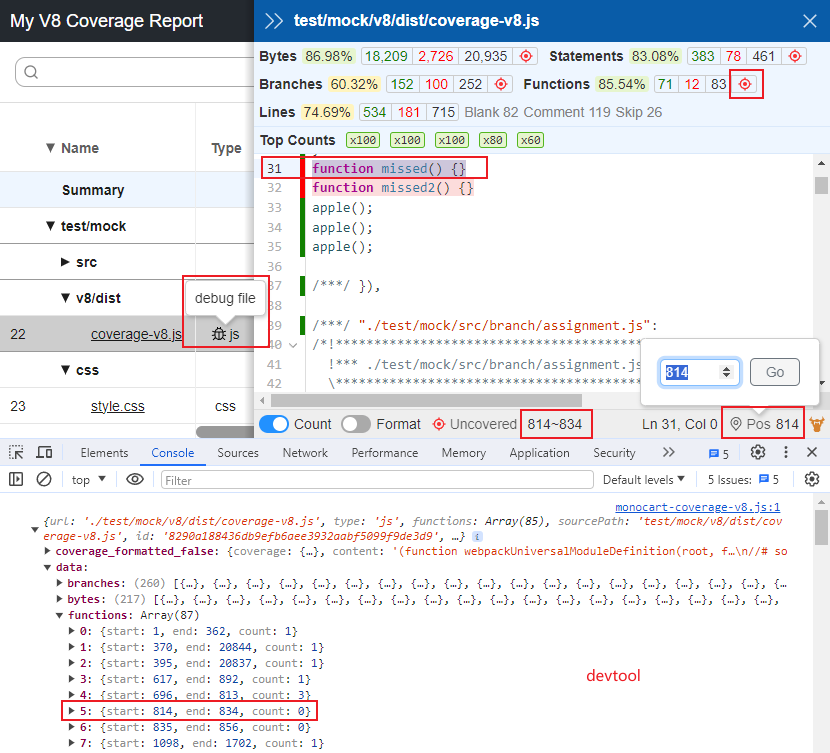
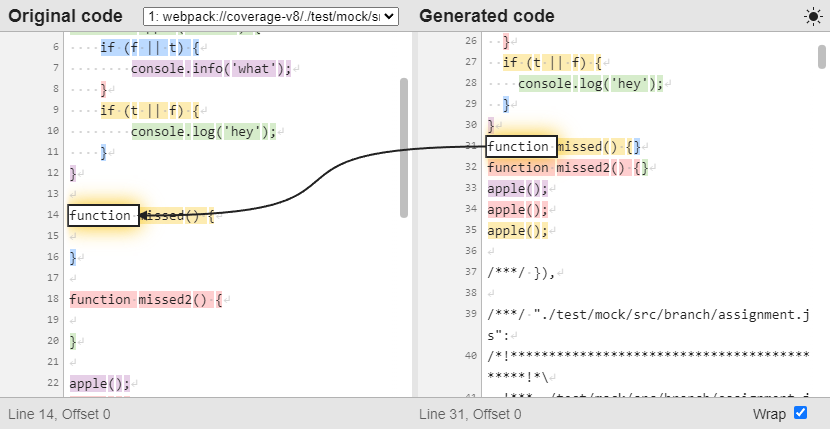
When logging is debug, the raw report data is preserved in [outputDir]/.cache (or [outputDir]/raw if the raw report is used). The dist file is also kept in the V8 list, so you can open the browser's devtools and visually verify the coverage data.
const coverageOptions = {
    logging: 'debug',
    sourceMap: true
};
MCR_LOG_TIMEprocess.env.MCR_LOG_TIME = true
await mcr.add(coverageData)await mcr.generate()mcr your-cli --your-argumentsmonocart-reporter:
MCR as an experimental feature since v10.1.0c8 --experimental-monocart --reporter=v8 --reporter=console-details node foo.js
MCR since v3.5.15, see plugins/coveragemcr mocha ./test/**/*.js
cross-env NODE_OPTIONS="--import tsx" npx mcr tsx ./src/example.ts
cross-env NODE_OPTIONS="--import tsx" npx mcr mocha ./test/**/*.ts
# Node.js v18.19.0 +
mcr --import tsx tsx ./src/example.ts
mcr --import tsx mocha ./test/**/*.ts
cross-env NODE_OPTIONS="--loader ts-node/esm --no-warnings" npx mcr ts-node ./src/example.ts
cross-env NODE_OPTIONS="--loader ts-node/esm --no-warnings" npx mcr mocha ./test/**/*.ts
mcr ava

codecov built-in report (specification)const coverageOptions = {
outputDir: "./coverage-reports",
reports: [
['codecov']
]
};
- name: Codecov
    uses: codecov/codecov-action@v4
    with:
        token: ${{ secrets.CODECOV_TOKEN }}
        files: ./coverage-reports/codecov.json
lcov report:const coverageOptions = {
outputDir: "./coverage-reports",
lcov: true
};
- name: Codacy Coverage Reporter
    uses: codacy/codacy-coverage-reporter-action@v1
    with:
        project-token: ${{ secrets.CODACY_PROJECT_TOKEN }}
        coverage-reports: ./docs/mcr/lcov.info

lcov report:const coverageOptions = {
outputDir: "./coverage-reports",
lcov: true
};
- name: Coveralls
    uses: coverallsapp/github-action@v2
    with:
        files: ./coverage-reports/lcov.info
lcov report. Github actions example:- name: Analyze with SonarCloud
uses: sonarsource/sonarcloud-github-action@master
env:
SONAR_TOKEN: ${{ secrets.SONAR_TOKEN }}
with:
projectBaseDir: ./
args: >
-Dsonar.organization=cenfun
-Dsonar.projectKey=monocart-coverage-reports
-Dsonar.projectName=monocart-coverage-reports
-Dsonar.javascript.lcov.reportPaths=docs/mcr/lcov.info
-Dsonar.sources=lib
-Dsonar.tests=test
-Dsonar.exclusions=dist/*,packages/*
npm install
npx playwright install --with-deps

npm run build
npm run test

npm run dev
eol=lf for snapshot of test (Windows)git add . -u
git commit -m "Saving files before refreshing line endings"
npm run eol
1,724 followers · starred Jun 2024
142 followers · starred May 2024
205 followers · starred Aug 2025
15 followers · starred Mar 2024
A code coverage tool to generate native V8 reports or Istanbul reports.
JavaScript
156
1,328 commits
updated Oct 7, 2026
🌐 English | 简体中文
A JavaScript code coverage tool to generate native V8 reports or Istanbul reports.
sourcePath for the Source FilesNode.js 22+ is recommended and is the actively maintained target.
npm install monocart-coverage-reports
const MCR = require('monocart-coverage-reports');
const mcr = MCR({
    name: 'My Coverage Report - 2024-02-28',
    outputDir: './coverage-reports',
    reports: ["v8", "console-details"],
    cleanCache: true
});
await mcr.add(coverageData);
await mcr.generate();
Using import and load options from config file
import { CoverageReport } from 'monocart-coverage-reports';
const mcr = new CoverageReport();
await mcr.loadConfig();
Both
MCR({...})andnew CoverageReport()create the same instance.MCR()is a shorthand factory function; usenew CoverageReport()when you prefer class instantiation or need to callloadConfig()separately.
For more information, see Multiprocessing Support
mcr node my-app.js -r v8,console-details
For more information, see Command Line
CoverageReportOptions lib/index.d.ts| Option | Type | Default | Description |
|---|---|---|---|
logging | "off" | "error" | "info" | "debug" | "info" | Logging level. Use "debug" to keep raw cache and dump sourcemaps for troubleshooting. See Debug for Coverage and Sourcemap. |
name | string | "Coverage Report" | Report title shown in the UI and summary reports. |
reports | string | (string | ReportDescription)[] | "" (auto) | Reports to generate. Defaults to "v8" for V8 data and "html" for Istanbul data. See Available Reports. |
outputDir | string | "./coverage-reports" | Output directory for all reports and the .cache folder. |
inputDir | string | string[] | null | Input directories of raw coverage data for merging. |
baseDir | string | process.cwd() | Base dir used to normalize relative source paths. Set when the report is generated from a different working directory than the sources. |
dataDir | string | null | Coverage data directory loaded automatically in generate() — alternative to addFromDir(). |
entryFilter | string | object | function | null | (V8 only) Filter V8 entries by url. See Filtering Results. |
sourceFilter | string | object | function | null | (V8 only) Filter sources unpacked from sourcemaps. |
filter | string | object | function | null | Combined filter replacing both entryFilter and sourceFilter. |
sourcePath | object | function | null | Rewrite source paths; see Resolve sourcePath. |
all | string | string[] | object | null | Include untested files as empty coverage. See Adding Empty Coverage. |
outputFile | string | "index.html" | (V8 only) Output [sub dir/]filename for the V8 report. |
inline | boolean | false | (V8 only) Inline all assets into a single HTML file. |
assetsPath | string | "./assets" | (V8 only) Assets directory when inline is false. |
lcov | boolean | false | Also generate lcov.info (equivalent to adding the lcovonly report). |
v8Ignore | boolean | true | (V8 only) Enable/disable comment-based ignoring (v8 ignore …). See Ignoring Uncovered Codes. |
reportPath | string | () => string | null | Override the report entry path (defaults to outputDir/index.html). Useful when multiple reports share an outputDir. |
watermarks | [number, number] | object | [50, 80] | Low/high thresholds (percent). Accepts per-metric object like { bytes:[50,80], lines:[50,80] }. |
clean | boolean | true | Clean previous reports in outputDir before generating (the .cache dir is preserved unless cleanCache is also true). |
cleanCache | boolean | false | Clean the cache dir on start. When both clean and cleanCache are false, cached coverage data from previous runs is preserved and can be reused across processes. |
gc | number | null | Memory threshold in MB; force GC at critical stages when RSS exceeds it. Useful for very large data sets, see JavaScript heap out of memory. |
sourceMap | boolean | false | Save source/sourcemap files to cache for debugging (requires logging: "debug"). |
sourceMapResolver | (url, defaultResolver) => Promise<string | object> | null | Custom sourcemap loader (e.g. from a build cache). Call defaultResolver(url) to fall back. |
onEntry | (entry) => void | Promise<void> | null | (V8 only) Per-entry hook; see Hooks. |
onEnd | (coverageResults) => void | Promise<void> | null | Hook invoked after report generation; see Hooks. |
V8 built-in reports (V8 data only):
v8
v8-json
CoverageResults to a json file (defaults to coverage-report.json).
Istanbul built-in reports (both V8 and Istanbul data):
clovercoberturahtml
html-spajsonjson-summarylcovlcovonly
noneteamcitytexttext-lcovtext-summaryOther built-in reports (both V8 and Istanbul data):
codecov Save coverage data to a json file with Codecov format (defaults to codecov.json), see example.
codacy Save coverage data to a json file with Codacy API format (defaults to codacy.json).
console-summary shows coverage summary in the console.
console-details Show coverage details in the console. Like text, but for V8. For Github actions, we can enforce color with env: FORCE_COLOR: true.
markdown-summary Save coverage summary to a markdown file (defaults to coverage-summary.md). For Github actions, we can show the markdown content to a job summarycat path-to/coverage-summary.md >> $GITHUB_STEP_SUMMARY
markdown-details Save coverage details to a markdown file (defaults to coverage-details.md).
raw only keep all original data, which can be used for other reports input with inputDir. see Merge Coverage Reports
Custom Reporter
{
    reports: [
        [path.resolve('./test/custom-istanbul-reporter.js'), {
            type: 'istanbul',
            file: 'custom-istanbul-coverage.text'
        }],
        [path.resolve('./test/custom-v8-reporter.js'), {
            type: 'v8',
            outputFile: 'custom-v8-coverage.json'
        }],
        [path.resolve('./test/custom-v8-reporter.mjs'), {
            type: 'both'
        }]
    ]
}
example: ./test/custom-istanbul-reporter.js, see istanbul built-in reporters' implementation for reference.
example: ./test/custom-v8-reporter.js
The type option determines which coverage format the reporter receives:
'istanbul' — the reporter receives Istanbul-format coverage data (coverageResults.istanbulData).'v8' — the reporter receives native V8-format coverage data (coverageResults.v8Data).'both' — the reporter receives both formats, accessible via coverageResults.v8Data and coverageResults.istanbulData.const MCR = require('monocart-coverage-reports');
const coverageOptions = {
outputDir: './coverage-reports',
reports: [
// built-in reports
['console-summary'],
['v8'],
['html', {
subdir: 'istanbul'
}],
['json', {
file: 'my-json-file.json'
}],
'lcovonly',
// custom reports
// Specify reporter name with the NPM package
["custom-reporter-1"],
["custom-reporter-2", {
type: "istanbul",
key: "value"
}],
// Specify reporter name with local path
['/absolute/path/to/custom-reporter.js']
]
}
const mcr = MCR(coverageOptions);
If the V8 data format is used for Istanbul reports, it will be automatically converted from V8 to Istanbul.
| Istanbul | V8 | V8 to Istanbul | |
|---|---|---|---|
| Coverage data | Istanbul (Object) | V8 (Array) | V8 (Array) |
| Output | Istanbul reports | V8 reports | Istanbul reports |
| - Bytes | ❌ | ✅ | ❌ |
| - Statements | ✅ | ✅ | ✅ |
| - Branches | ✅ | ✅ | ✅ |
| - Functions | ✅ | ✅ | ✅ |
| - Lines | ✅ | ✅ | ✅ |
| - Execution counts | ✅ | ✅ | ✅ |
| CSS coverage | ❌ | ✅ | ✅ |
| Minified code | ❌ | ✅ | ❌ |
Before coverage collection: Instrumenting source code with Istanbul
Browser
window.__coverage__, example: test-istanbul.jsNode.js
global.__coverage__CDP
getIstanbulCoverage() see CDPClient APIBefore coverage collection: Enabling sourcemap for source code
devtool: source-map and mode: development, example webpack.config-v8.jssourcemap: true and treeshake: falsesourcemap: true, treeShaking: false and minify: falsesourcemap: true and minify: falseBrowser (Chromium-based Only)
Node.js
CDP
await Promise.all([
    page.coverage.startJSCoverage({
        // reportAnonymousScripts: true,
        resetOnNavigation: false
    }),
    page.coverage.startCSSCoverage({
        // Note, anonymous styles (without sourceURLs) are not supported, alternatively, you can use CDPClient
        resetOnNavigation: false
    })
]);

await page.goto("your page url");

const [jsCoverage, cssCoverage] = await Promise.all([
    page.coverage.stopJSCoverage(),
    page.coverage.stopCSSCoverage()
]);

const coverageData = [... jsCoverage, ... cssCoverage];
Collect coverage with @playwright/test Automatic fixtures, see example: fixtures.ts
For more examples, see ./test/test-v8.js, css
await Promise.all([
    page.coverage.startJSCoverage({
        // reportAnonymousScripts: true,
        resetOnNavigation: false,
        // provide raw v8 coverage data
        includeRawScriptCoverage: true
    }),
    page.coverage.startCSSCoverage({
        resetOnNavigation: false
    })
]);

await page.goto("your page url");

const [jsCoverage, cssCoverage] = await Promise.all([
    page.coverage.stopJSCoverage(),
    page.coverage.stopCSSCoverage()
]);

// to raw V8 script coverage
const coverageData = [... jsCoverage.map((it) => {
    return {
        source: it.text,
        ... it.rawScriptCoverage
    };
}), ... cssCoverage];
Example: ./test/test-puppeteer.js
Possible solutions:
NODE_V8_COVERAGE=dir
NODE_V8_COVERAGE=dir before the program running, the coverage data will be saved to the dir after the program exits gracefully.dir and generate coverage report.cross-env NODE_V8_COVERAGE=
.temp/v8-coverage-envnode ./test/test-node-env.js && node ./test/generate-report.js
V8 API + NODE_V8_COVERAGE
v8.takeCoverage(), it does not require waiting until the program exits gracefully.cross-env NODE_V8_COVERAGE=
.temp/v8-coverage-apinode ./test/test-node-api.js
Inspector API
CDP API
node --inspect=9229 ./test/test-node-cdp.js
Node Debugging + CDP + NODE_V8_COVERAGE + V8 API
v8.takeCoverage() interface to manually collect coverage data. Remote invocation of the v8.takeCoverage() interface can be accomplished through the Runtime.evaluate of the CDP.Child Process + NODE_V8_COVERAGE
CDPClient APICDPClient available APIsstartJSCoverage: () => Promise<void>;
stopJSCoverage: () => Promise<V8CoverageEntry[]>;
startCSSCoverage: () => Promise<void>;
stopCSSCoverage: () => Promise<V8CoverageEntry[]>;
/** start both js and css coverage */
startCoverage: () => Promise<void>;
/** stop and return both js and css coverage */
stopCoverage: () => Promise<V8CoverageEntry[]>;
/** write the coverage started by NODE_V8_COVERAGE to disk on demand, returns v8 coverage dir */
writeCoverage: () => Promise<string>;
/** get istanbul coverage data */
getIstanbulCoverage: (coverageKey?: string) => Promise<any>;
--inspect=9229 or browser debugging port --remote-debugging-port=9229const MCR = require('monocart-coverage-reports');
const client = await MCR.CDPClient({
port: 9229
});
await client.startJSCoverage();
// run your test here
const coverageData = await client.stopJSCoverage();
const { chromium } = require('playwright');
const MCR = require('monocart-coverage-reports');
const browser = await chromium.launch();
const page = await browser.newPage();
const session = await page.context().newCDPSession(page);
const client = await MCR.CDPClient({
    session
});
// both js and css coverage
await client.startCoverage();
// run your test page here
await page.goto("your page url");
const coverageData = await client.stopCoverage();
const puppeteer = require('puppeteer');
const MCR = require('monocart-coverage-reports');
const browser = await puppeteer.launch({});
const page = await browser.newPage();
const session = await page.target().createCDPSession();
const client = await MCR.CDPClient({
    session
});
// both js and css coverage
await client.startCoverage();
// run your test page here
await page.goto("your page url");
const coverageData = await client.stopCoverage();
const { Builder, Browser } = require('selenium-webdriver');
const MCR = require('monocart-coverage-reports');
const driver = await new Builder().forBrowser(Browser.CHROME).build();
const pageCdpConnection = await driver.createCDPConnection('page');
const session = new MCR.WSSession(pageCdpConnection._wsConnection);
const client = await MCR.CDPClient({
    session
})
// Coverage data for a source range.
export interface CoverageRange {
    // JavaScript script source offset for the range start.
    startOffset: integer;
    // JavaScript script source offset for the range end.
    endOffset: integer;
    // Collected execution count of the source range.
    count: integer;
}
// Coverage data for a JavaScript function.
/**
 * @functionName can be an empty string.
 * @ranges is always non-empty. The first range is called the "root range".
 * @isBlockCoverage indicates if the function has block coverage information.
    If this is false, it usually means that the function was never called.
    It seems to be equivalent to ranges.length === 1 && ranges[0].count === 0.
*/
export interface FunctionCoverage {
    // JavaScript function name.
    functionName: string;
    // Source ranges inside the function with coverage data.
    ranges: CoverageRange[];
    // Whether coverage data for this function has block granularity.
    isBlockCoverage: boolean;
}
// Coverage data for a JavaScript script.
export interface ScriptCoverage {
    // JavaScript script id.
    scriptId: Runtime.ScriptId;
    // JavaScript script name or url.
    url: string;
    // Functions contained in the script that has coverage data.
    functions: FunctionCoverage[];
}
export type V8CoverageData = ScriptCoverage[];
| JavaScript Runtime | V8 Coverage | |
|---|---|---|
| Chrome (65%) | ✅ | Chromium-based |
| Safari (18%) | ❌ | |
| Edge (5%) | ✅ | Chromium-based |
| Firefox (2%) | ❌ | |
| Node.js | ✅ | |
| Deno | ❌ | issue |
| Bun | ❌ | issue |
MCR extends each V8 coverage entry with additional fields:
| Field | Type | Description |
|---|---|---|
url | string | Script URL or file path |
type | "js" | "css" | Entry type |
source | string | (JS) Source code text |
sourceMap | object | (JS) Parsed sourcemap object |
scriptOffset | number | (JS) Byte offset for the script wrapper (e.g. in vm modules). This offset is automatically added to all range start/end values |
distFile | string | (JS) The dist bundle file this source was unpacked from |
empty | boolean | Marked as true when this entry was added via the all option (no real coverage data), showing 0% coverage |
fake | boolean | Marked as true when the source code is not original (e.g. compiled from .ts/.jsx). The AST parser skips coverage extraction for fake sources |
These fields can be read/mutated in onEntry hooks.
entryFilter and sourceFilter to filter the results for V8 reportWhen V8 coverage data collected, it actually contains the data of all entry files, for example:
We can use entryFilter to filter the entry files. For example, we should remove vendor.js and something-else.js if they are not in our coverage scope.
When inline or linked sourcemap exists to the entry file, the source files will be extracted from the sourcemap for the entry file, and the entry file will be removed if logging is not debug.
We can use sourceFilter to filter the source files. For example, we should remove dependency.js if it is not in our coverage scope.
For example:
const coverageOptions = {
    entryFilter: (entry) => entry.url.indexOf("main.js") !== -1,
    sourceFilter: (sourcePath) => sourcePath.search(/src\//) !== -1
};
Or using minimatch pattern:
const coverageOptions = {
    entryFilter: "**/main.js",
    sourceFilter: "**/src/**"
};
Support multiple patterns:
const coverageOptions = {
    entryFilter: {
        '**/node_modules/**': false,
        '**/vendor.js': false,
        '**/src/**': true
    },
    sourceFilter: {
        '**/node_modules/**': false,
        '**/**': true
    }
};
As CLI args (JSON-like string. Added in: v2.8):
mcr --sourceFilter "{'**/node_modules/**':false,'**/**':true}"
Note, those patterns will be transformed to a function, and the order of the patterns will impact the results:
const coverageOptions = {
    entryFilter: (entry) => {
        if (minimatch(entry.url, '**/node_modules/**')) { return false; }
        if (minimatch(entry.url, '**/vendor.js')) { return false; }
        if (minimatch(entry.url, '**/src/**')) { return true; }
        return false; // else unmatched
    }
};
filter instead of entryFilter and sourceFilterIf you don't want to define both entryFilter and sourceFilter, you can use filter instead. (Added in: v2.8)
const coverageOptions = {
    // combined patterns
    filter: {
        '**/node_modules/**': false,
        '**/vendor.js': false,
        '**/src/**': true,
        '**/**': true
    }
};
sourcePath for the Source FilesIf the source file comes from the sourcemap, then its path is a virtual path. Using the sourcePath option to resolve a custom path.
For example, we have tested multiple dist files, which contain some common files. We hope to merge the coverage of the same files, so we need to unify the sourcePath in order to be able to merge the coverage data.
const coverageOptions = {
    sourcePath: (filePath) => {
        // Remove the virtual prefix
        const list = ['my-dist-file1/', 'my-dist-file2/'];
        for (const str of list) {
            if (filePath.startsWith(str)) {
                return filePath.slice(str.length);
            }
        }
        return filePath;
    }
};
It also supports simple key/value replacement:
const coverageOptions = {
    sourcePath: {
        'my-dist-file1/': '',
        'my-dist-file2/': ''
    }
};
Normalize the full path of the file:
const path = require("path")

// MCR coverage options
const coverageOptions = {
    sourcePath: (filePath, info)=> {
        if (!filePath.includes('/') && info.distFile) {
            return `${path.dirname(info.distFile)}/${filePath}`;
        }
        return filePath;
    }
}
By default the untested files will not be included in the coverage report. Use all to include them with 0% coverage. This also works when no coverage data has been collected: a V8 report is generated from the matching untested files.
const coverageOptions = {
    all: './src',

    // or multiple dirs
    all: ['./src', './lib'],
};
The untested files will apply to the sourceFilter. And it also supports additional filter (return the file type for js or css coverage):
const coverageOptions = {
    all: {
        dir: ['./src'],
        filter: {
            // exclude files
            '**/ignored-*.js': false,
            '**/*.html': false,
            // empty css coverage
            '**/*.scss': "css",
            '**/*': true
        }
    }
};
We can also compile these untested files, such as .ts, .jsx, or .vue, etc., so that they can be analyzed by the default AST parser, thus get more coverage metric data.
const path = require("path");
const swc = require("@swc/core");
const coverageOptions = {
    all: {
        dir: ['./src'],
        transformer: async (entry) => {
            const { code, map } = await swc.transform(entry.source, {
                filename: path.basename(entry.url),
                sourceMaps: true,
                isModule: true,
                jsc: {
                    parser: {
                        syntax: "typescript",
                        jsx: true
                    },
                    transform: {}
                }
            });
            entry.source = code;
            entry.sourceMap = JSON.parse(map);
        }
    }
};
onEnd — after the report is generatedTypical use case: enforce coverage thresholds.
const EC = require('eight-colors');
const coverageOptions = {
    name: 'My Coverage Report',
    outputDir: './coverage-reports',
    onEnd: (coverageResults) => {
        const thresholds = {
            bytes: 80,
            lines: 60
        };
        console.log('check thresholds ...', thresholds);
        const errors = [];
        const { summary } = coverageResults;
        Object.keys(thresholds).forEach((k) => {
            const pct = summary[k].pct;
            if (pct < thresholds[k]) {
                errors.push(`Coverage threshold for ${k} (${pct} %) not met: ${thresholds[k]} %`);
            }
        });
        if (errors.length) {
            const errMsg = errors.join('\n');
            console.log(EC.red(errMsg));
            // throw new Error(errMsg);
            // process.exit(1);
        }
    }
}
onEntry — before each V8 entry is processed (V8 only)Use this to mutate the entry (for example, transform non-standard sources into valid ECMAScript before the AST parser runs). See Unparsable source.
const coverageOptions = {
    onEntry: async (entry) => {
        // entry.source, entry.sourceMap, entry.fake, ...
    }
};
onStart / onReady — CLI-onlyOnly available when using mcr <command>:
onStart(coverageReport) — runs before the child process is spawned.onReady(coverageReport, nodeV8CoverageDir, subprocess) — runs after the child exits, before MCR reads coverage from nodeV8CoverageDir. Useful when the child hasn't finished flushing coverage data and needs to be waited on.// mcr.config.js
module.exports = {
onReady: async (coverageReport, nodeV8CoverageDir, subprocess) => {
// wait for something, or pre-process the raw files
}
};
To ignore codes, use the special comment which starts with v8 ignore :
/* v8 ignore start */
function uncovered() {
}
/* v8 ignore stop */
/* v8 ignore next */
const os = platform === 'win32' ? 'Windows' : 'Other';

const os = platform === 'win32' ? 'Windows' /* v8 ignore next */ : 'Other';

// v8 ignore next 3
if (platform === 'linux') {
    console.log('hello linux');
}
/* c8 ignore start */
function uncovered() {
}
/* c8 ignore stop */

/* node:coverage disable */
function uncovered() {
}
/* node:coverage enable */
v8Ignore: false.The data will be added to
[outputDir]/.cache, After the generation of the report, this data will be removed unless debugging has been enabled or a raw report has been used, see Debug for Coverage and Sourcemap
const MCR = require('monocart-coverage-reports');
const coverageOptions = require('path-to/same-options.js');
const mcr = MCR(coverageOptions);
// clean previous cache before the start of testing
// unless the running environment is new and no cache
mcr.cleanCache();
const MCR = require('monocart-coverage-reports');
const coverageOptions = require('path-to/same-options.js');
const mcr = MCR(coverageOptions);
await mcr.add(coverageData1);
const MCR = require('monocart-coverage-reports');
const coverageOptions = require('path-to/same-options.js');
const mcr = MCR(coverageOptions);
await mcr.add(coverageData2);
// generate coverage reports after the completion of testing
const MCR = require('monocart-coverage-reports');
const coverageOptions = require('path-to/same-options.js');
const mcr = MCR(coverageOptions);
await mcr.generate();
The CLI will run the program as a child process with
NODE_V8_COVERAGE=diruntil it exits gracefully, and generate the coverage report with the coverage data from thedir.
npm i monocart-coverage-reports -g
mcr node ./test/specs/node.test.js -r v8,console-details --lcov
npm i monocart-coverage-reports
npx mcr node ./test/specs/node.test.js -r v8,console-details --lcov
The options below are only available when using the CLI (mcr <command>):
| Option | Type | Default | Description |
|---|---|---|---|
-c, --config | string | — | Custom config file path |
--import | string | null | Preload ESM module via NODE_OPTIONS, e.g. tsx for TypeScript. Requires Node.js >= 18.19 |
--require | string | null | Preload CJS module via NODE_OPTIONS |
--env | string | null | Load environment variables from a dotenv file (defaults to .env). Requires Node.js >= 20.6 |
onStart | (coverageReport) => Promise<void> | null | Runs before the child process is spawned; see Hooks |
onReady | (coverageReport, nodeV8CoverageDir, subprocess) => Promise<void> | null | Runs after the child exits, before MCR reads coverage; see Hooks |
For other options (e.g. --name, --reports, --outputDir, --lcov, etc.), see the Options table — they work the same way in CLI.
-- to separate sub CLI argsmcr -c mcr.config.js -- sub-cli -c sub-cli.config.js
--import <module> / --require <module>: forward a preload module to the child process via NODE_OPTIONS. Use this for TypeScript/JSX runtimes (tsx, ts-node, etc.) and also when loading a mcr.config.ts. Requires Node.js >= 18.19.mcr --import tsx node ./test.ts
--env [path]: load environment variables from a dotenv file before the child starts (defaults to .env). Requires process.loadEnvFile, added in Node.js 20.6.mcr --env .env.test node ./test.js
merge: merge raw coverage data from inputDir(s) and generate merged reports directly, without running a child process.mcr merge -r v8,console-details --inputDir ./coverage-reports/unit/raw,./coverage-reports/e2e/raw --outputDir ./coverage-reports/merged
Loading config file by priority:
mcr --config <my-config-file-path>await mcr.loadConfig("my-config-file-path")mcr.config.jsmcr.config.cjsmcr.config.mjsmcr.config.json - json formatmcr.config.ts (requires preloading the TypeScript execution module, for example with tsx):mcr --import tsx -c mcr.config.ts node ./test.js
If no custom path is given, MCR walks up from the current working directory to find the default config file (via
find-up). Files outside the search path will be ignored.
The following usage scenarios may require merging coverage reports:
server side and browser client side (Next.js for instance). Each environment may generate its own coverage report. Merging them can give a more comprehensive view of the test coverage.unit tests with Jest might cover certain parts of the code, while end-to-end tests with Playwright might cover other parts. Merging these different coverage reports can provide a holistic view of what code has been tested.MCR will automatically merge all the added coverage data when executing generate(). And it supports adding coverage data asynchronously across processes, see Multiprocessing SupportNext.js, it can actually add coverage data including both server side and client side before executing generate(), see example nextjs-with-playwrightCodecov, a popular online code coverage service, which supports automatic merging of reports. Please use report codecov, it will generate report file codecov.json. If multiple codecov.json files are generated, upload all these files, they will be automatically merged. see Codecov and merging reportsIf the reports cannot be merged automatically, then here is how to manually merge the reports.
First, using the raw report to export the original coverage data to the specified directory.
raw coverage data from unit test, which is output to ./coverage-reports/unit/raw. Unit test examples:
Jest + jest-monocart-coverageVitest + vitest-monocart-coverageconst coverageOptions = {
name: 'My Unit Test Coverage Report',
outputDir: "./coverage-reports/unit",
reports: [
['raw', {
// relative path will be "./coverage-reports/unit/raw"
// defaults to raw
outputDir: "raw"
}],
['v8'],
['console-details']
]
};
We also have raw coverage data from e2e test, which is output to ./coverage-reports/e2e/raw. E2E test examples:
Playwright + monocart-reporter with coverage APIPlaywright + MCR, see playwright-coverageThen create a script merge-coverage.js to generate a merged report with option inputDir.
// merge-coverage.js
const fs = require('fs');
const { CoverageReport } = require('monocart-coverage-reports');
const inputDir = [
    './coverage-reports/unit/raw',
    './coverage-reports/e2e/raw'
];
const coverageOptions = {
    name: 'My Merged Coverage Report',
    inputDir,
    outputDir: './coverage-reports/merged',

    // filter for both unit and e2e
    entryFilter: {
        '**/node_modules/**': false,
        '**/*': true
    },
    sourceFilter: {
        '**/node_modules/**': false,
        '**/src/**': true
    },

    sourcePath: (filePath, info) => {
        // Unify the file path for the same files
        // For example, the file index.js has different paths:
        // unit: unit-dist/src/index.js
        // e2e: e2e-dist/src/index.js
        // return filePath.replace("unit-dist/", "").replace("e2e-dist/", "")
        return filePath;
    },

    reports: [
        ['v8'],
        ['console-details']
    ],

    onEnd: () => {
        // remove the raw files if no longer needed
        // inputDir.forEach((p) => {
        //     fs.rmSync(p, {
        //         recursive: true,
        //         force: true
        //     });
        // });
    }
};
await new CoverageReport(coverageOptions).generate();
node path/to/merge-coverage.js after all the tests are completed. All the command scripts are probably like following:{
"scripts": {
"test:unit": "jest",
"test:e2e": "playwright test",
"merge-coverage": "node path/to/merge-coverage.js",
"test": "npm run test:unit && npm run test:e2e && npm run merge-coverage"
}
}
see example: merge-code-coverage
In most cases, it happens when the coverage of the generated code is converted to the coverage of the original code through a sourcemap. In other words, it's an issue with the sourcemap. Most of the time, we can solve this by setting minify to false in the configuration of build tools. Let's take a look at an example:
const a = tf ? 'true' : 'false';
               ^     ^  ^
              m1     p  m2
In the generated code, there is a position p, and we need to find out its corresponding position in the original code. Unfortunately, there is no matched mapping for the position p. Instead, it has two adjacent upstream and downstream mappings m1 and m2, so, the original position of p that we are looking for, might not be able to be precisely located. Especially, the generated code is different from the original code, such as the code was minified, compressed or converted, it is difficult to find the exact original position without matched mapping.
How MCR Works:
diff-sequences. However, for non-JS code such as Vue templates or JSX, a perfect solution may not always be possible.AssignmentPattern.)It happens during the parsing of the source code into AST, if the source code is not in the standard ECMAScript. For example ts, jsx and so on. There is a option to fix it, which is to manually compile the source code for these files.
import * as fs from "fs";
import * as path from "path";
import { fileURLToPath } from "url";
import * as TsNode from 'ts-node';
const coverageOptions = {
    onEntry: async (entry) => {
        const filePath = fileURLToPath(entry.url)
        const originalSource = fs.readFileSync(filePath).toString("utf-8");
        const fileName = path.basename(filePath);
        const tn = TsNode.create({});
        const source = tn.compile(originalSource, fileName);
        entry.fake = false;
        entry.source = source;
    }
}
When there are a lot of raw v8 coverage files to process, it may cause OOM. We can try the following Node.js options:
- run: npm run test:coverage
    env:
        NODE_OPTIONS: --max-old-space-size=8192
Sometimes, the coverage is not what we expect. The next step is to figure out why, and we can easily find out the answer step by step through debugging.
logging: 'debug'const coverageOptions = {
logging: 'debug',
reports: [
['v8'],
['console-details']
]
};
When logging is debug, the raw report data is preserved in [outputDir]/.cache (or [outputDir]/raw if the raw report is used). The dist file is also kept in the V8 list, so you can open the browser's devtools and visually verify the coverage data.
const coverageOptions = {
    logging: 'debug',
    sourceMap: true
};
MCR_LOG_TIMEprocess.env.MCR_LOG_TIME = true
await mcr.add(coverageData)await mcr.generate()mcr your-cli --your-argumentsmonocart-reporter:
MCR as an experimental feature since v10.1.0c8 --experimental-monocart --reporter=v8 --reporter=console-details node foo.js
MCR since v3.5.15, see plugins/coveragemcr mocha ./test/**/*.js
cross-env NODE_OPTIONS="--import tsx" npx mcr tsx ./src/example.ts
cross-env NODE_OPTIONS="--import tsx" npx mcr mocha ./test/**/*.ts
# Node.js v18.19.0 +
mcr --import tsx tsx ./src/example.ts
mcr --import tsx mocha ./test/**/*.ts
cross-env NODE_OPTIONS="--loader ts-node/esm --no-warnings" npx mcr ts-node ./src/example.ts
cross-env NODE_OPTIONS="--loader ts-node/esm --no-warnings" npx mcr mocha ./test/**/*.ts
mcr ava
codecov built-in report (specification)const coverageOptions = {
outputDir: "./coverage-reports",
reports: [
['codecov']
]
};
- name: Codecov
    uses: codecov/codecov-action@v4
    with:
        token: ${{ secrets.CODECOV_TOKEN }}
        files: ./coverage-reports/codecov.json
lcov report:const coverageOptions = {
outputDir: "./coverage-reports",
lcov: true
};
- name: Codacy Coverage Reporter
    uses: codacy/codacy-coverage-reporter-action@v1
    with:
        project-token: ${{ secrets.CODACY_PROJECT_TOKEN }}
        coverage-reports: ./docs/mcr/lcov.info
lcov report:const coverageOptions = {
outputDir: "./coverage-reports",
lcov: true
};
- name: Coveralls
    uses: coverallsapp/github-action@v2
    with:
        files: ./coverage-reports/lcov.info
lcov report. Github actions example:- name: Analyze with SonarCloud
uses: sonarsource/sonarcloud-github-action@master
env:
SONAR_TOKEN: ${{ secrets.SONAR_TOKEN }}
with:
projectBaseDir: ./
args: >
-Dsonar.organization=cenfun
-Dsonar.projectKey=monocart-coverage-reports
-Dsonar.projectName=monocart-coverage-reports
-Dsonar.javascript.lcov.reportPaths=docs/mcr/lcov.info
-Dsonar.sources=lib
-Dsonar.tests=test
-Dsonar.exclusions=dist/*,packages/*
npm install
npx playwright install --with-deps

npm run build
npm run test

npm run dev
eol=lf for snapshot of test (Windows)git add . -u
git commit -m "Saving files before refreshing line endings"
npm run eol
1,724 followers · starred Jun 2024
142 followers · starred May 2024
205 followers · starred Aug 2025
15 followers · starred Mar 2024