A pixel-perfect, open-source recreation of the classic Borland Turbo C 3.0 IDE aesthetic,
built with modern WinUI 3 and .NET 8.
⚠️ Disclaimer: This project is not affiliated with, endorsed by, or associated with Borland International, Embarcadero Technologies, or Idera, Inc. "Turbo C" is a trademark of Embarcadero Technologies. This is an independent open-source project inspired by the visual design and UX of the original Turbo C 3.0 IDE (1991).



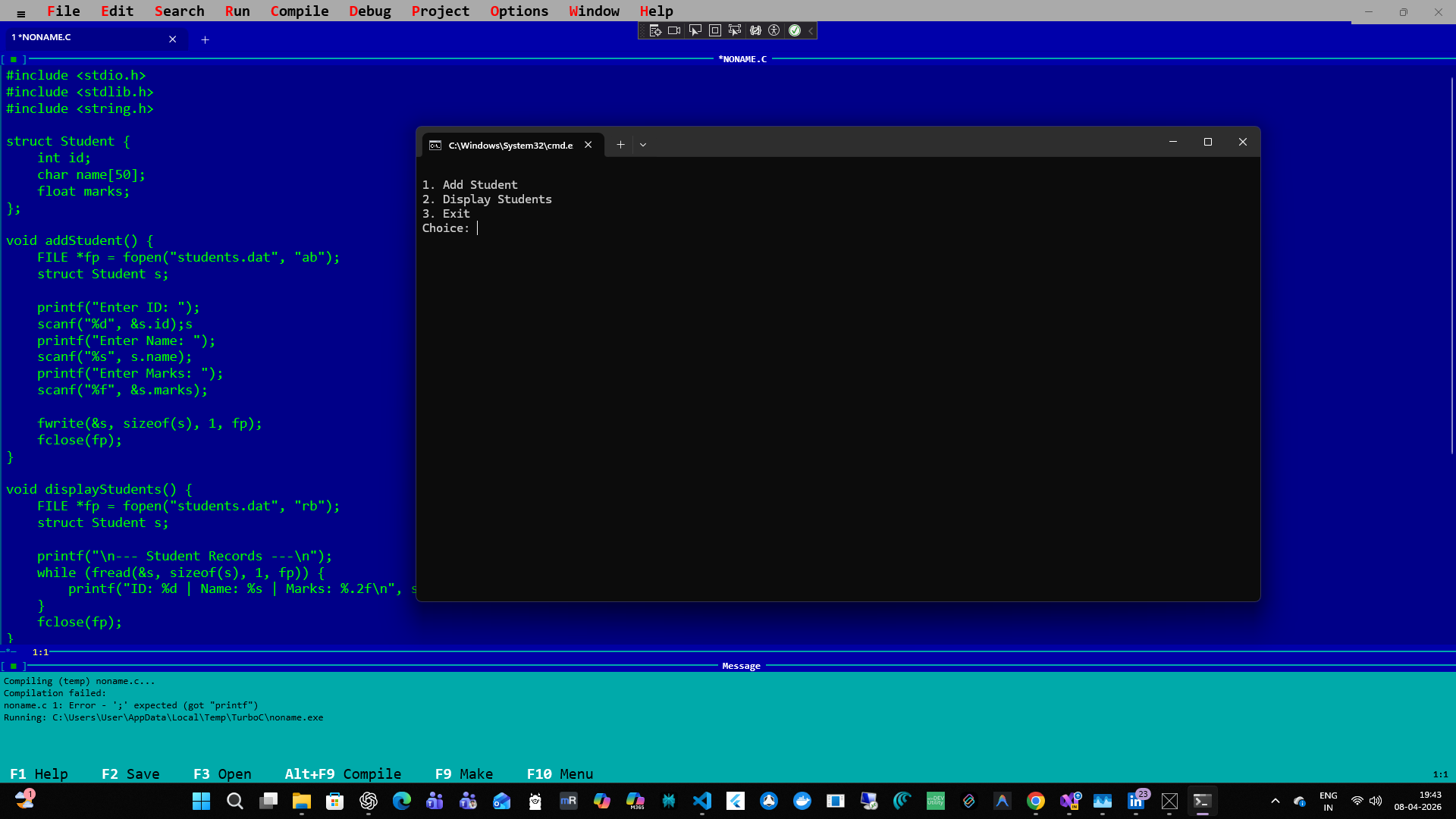
Main editor with syntax highlighting, multi-tab support, and message panel
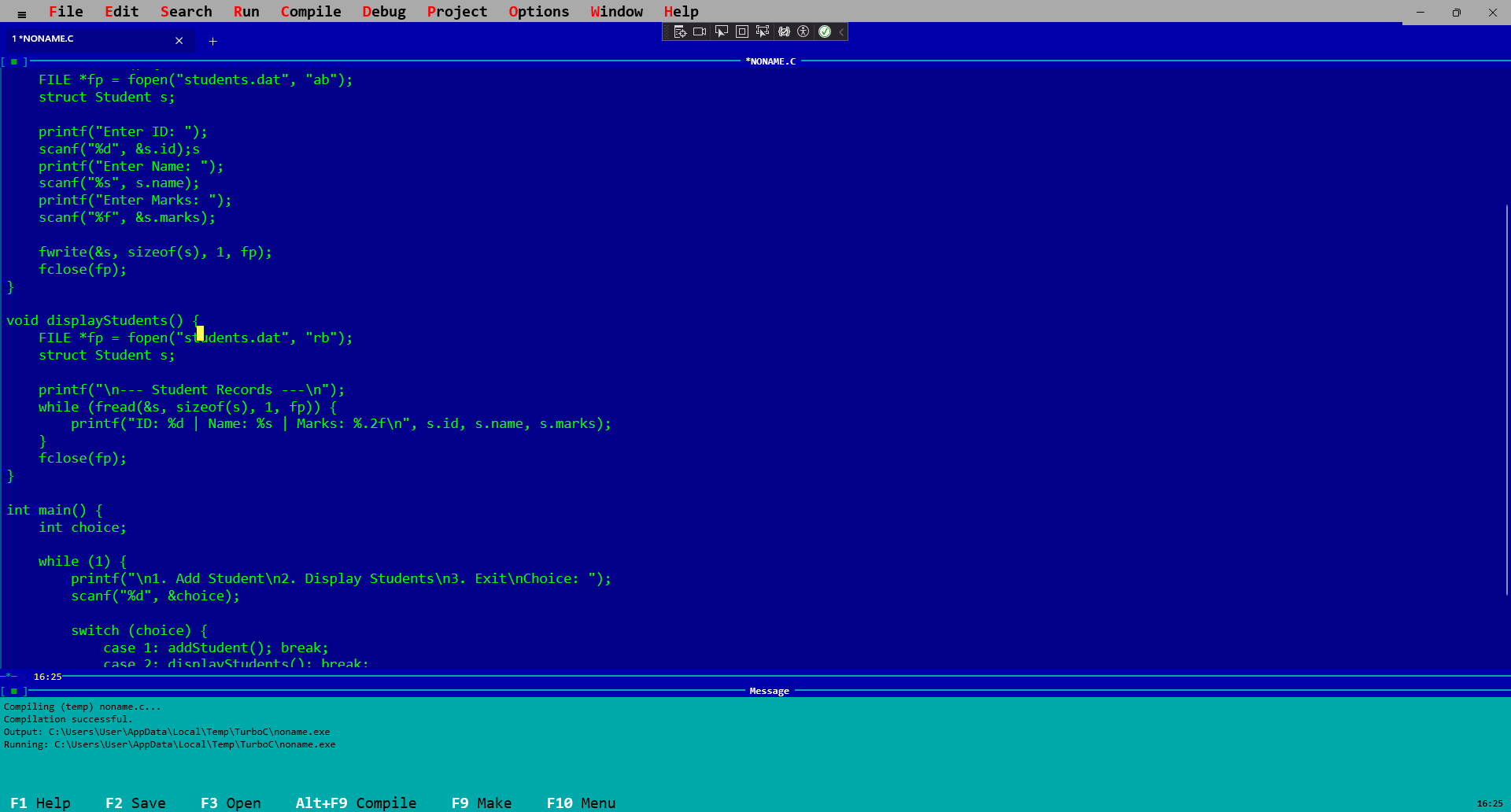
Compile and run without saving — output appears in a separate console window
#0000AA), cyan borders (#00AAAA)█ cursor with 530ms animation cycleF6 or Alt+1..9Ctrl+G* in tab title for unsaved changesAlt+F9 Compile, F9 Make, Ctrl+F9 RunAlt+F7/Alt+F8 cycle through📖 See AI-GUIDE.md for detailed usage instructions.
git clone https://github.com/yourusername/retroc-ide.git
cd retroc-ide/src/C.Compiler

# Build x64
dotnet build -p:Platform=x64

# Run
dotnet run -p:Platform=x64
Download the latest release from Releases, extract, and run C.Compiler.exe.
| Key | Action |
|---|---|
F2 | Save file |
F3 | Open file |
F9 | Make (compile + link) |
Alt+F9 | Compile to OBJ only |
Ctrl+F9 | Run program |
Alt+F5 | User screen |
F6 | Next editor tab |
Alt+1..9 | Switch to tab N |
Alt+F3 | Close tab |
Alt+F7 / Alt+F8 | Previous/Next error |
Ctrl+G | Go to line |
Ctrl+F | Find |
Ctrl+H | Find & Replace |
Ctrl+Z / Ctrl+Y | Undo / Redo |
Alt+X | Exit |
F1 | Help |
Ctrl+F1 | Topic Search |
Escape | Close menu / dialog |
Ctrl+I | Toggle AI panel |
Ctrl+Enter | Send AI message |
src/
├── C.Compiler/                      # Main IDE application
│   ├── Controls/
│   │   ├── EditorControl.xaml(.cs)  # Rich editor with syntax highlighting & block cursor
│   │   └── AIChatPanel.xaml(.cs)    # AI side panel with Ask/Agent modes
│   ├── Models/
│   │   ├── EditorDocument.cs        # File state & selection tracking
│   │   ├── CompilerSettings.cs      # TCC configuration (path, flags, timeout, linker...)
│   │   ├── CompilerError.cs         # Parsed compiler diagnostics
│   │   └── AISettings.cs            # AI model & inference settings
│   ├── Services/
│   │   ├── CompilerService.cs       # TCC/GCC/MSVC process management
│   │   ├── FileService.cs           # File I/O
│   │   ├── ProcessRunner.cs         # Async process execution with timeout
│   │   ├── SettingsService.cs       # JSON persistence (LocalAppData)
│   │   ├── SyntaxHighlighter.cs     # C tokenizer & coloring
│   │   └── TccManager.cs            # TCC auto-download & discovery
│   ├── Dialogs/                     # CompilerOptions, FindReplace, GoToLine, About, AISettings
│   ├── MainWindow.xaml(.cs)         # Shell: menus, tabs, overlays, AI integration
│   └── App.xaml(.cs)                # Entry point, theme
│
└── C.Compiler.AI/                   # AI feature library (conditionally referenced via BUILD_AI)
    ├── Models/
    │   ├── ChatMessage.cs           # ChatRole, ChatMessage, ChatConversation
    │   ├── AIChatMode.cs            # Ask / Agent enum
    │   └── EditorContext.cs         # Code context passed to AI
    └── Services/
        ├── IAIChatService.cs        # AI service interface
        ├── LocalAIChatService.cs    # LLamaSharp-based local inference
        ├── LlamaModelManager.cs     # Model download, discovery & deletion
        ├── CodeContextBuilder.cs    # System prompts & context formatting
        ├── AgentEditParser.cs       # Parses edit/create blocks from Agent responses
        └── MarkdownRenderer.cs      # Renders markdown, code blocks, diff views
Settings are persisted automatically to %LOCALAPPDATA%\TurboC-IDE\settings.json.
| Field | Description |
|---|---|
| Compiler path | Path to tcc.exe, gcc.exe, or cl.exe (blank = auto-detect) |
| Include dirs | ;-separated include paths |
| Lib dirs | ;-separated library search paths |
| Output dir | Where .obj / .exe are written |
| Flags | Extra compiler flags (e.g. -Wall -g) |
| Timeout | Max seconds before killing a hung compile (default: 30) |
| Field | Description |
|---|---|
| Linker flags | Extra flags passed at link step (e.g. -lm) |
| Generate map file | yes / no |
| Field | Description |
|---|---|
| Primary source file | Override for multi-file projects |
| Warnings as errors | yes / no |
| Feature | Status | Notes |
|---|---|---|
| ANSI C (C89/C90) | ✅ Full | TCC fully supports |
| C99 | ⚠️ Partial | TCC has limited C99 |
| GCC / MinGW | ✅ Supported | Auto-detected on PATH |
MSVC (cl.exe) | ✅ Supported | Auto-detected on PATH |
| Multi-file projects | ⏳ Planned | Currently single-file |
| GDB debugging | ❌ Not planned | Use external GDB |
.PRJ multi-file project format not yet implemented%LOCALAPPDATA%\RetroC-IDE\models\Contributions are welcome!
git checkout -b feature/my-featuregit commit -m 'Add my feature'git push origin feature/my-featureGood first issues:
.PRJ project file supportCompilerService and SyntaxHighlighterMIT License — see LICENSE for details.
Copyright (c) 2026 Contributors

Permission is hereby granted, free of charge, to any person obtaining a copy
of this software and associated documentation files (the "Software"), to deal
in the Software without restriction, including without limitation the rights
to use, copy, modify, merge, publish, distribute, sublicense, and/or sell
copies of the Software...
Last Updated: April 2026 | Version: 1.0.0
#0000AA), cyan message panel (#00AAAA)█ cursor with TC3-style animation (530ms cycle)F6 or Alt+1..9Ctrl+G* in tabAlt+F9 Compile, F9 Make, Ctrl+F9 RunAlt+F7/Alt+F8 cycleDownload the latest release from Releases:
# Extract and run
.\C.Compiler.exe
git clone https://github.com/yourusername/Compiler.git
cd Compiler/src/C.Compiler

# Build x64 Debug
dotnet build -p:Platform=x64

# Or x86/ARM64
dotnet build -p:Platform=x86
dotnet build -p:Platform=arm64

# Run
dotnet run -p:Platform=x64
| Key | Action |
|---|---|
F2 | Save file |
F3 | Open file |
F9 | Make (compile + link) |
Alt+F9 | Compile only |
Ctrl+F9 | Run program |
Alt+F5 | User screen (show output) |
F6 | Next editor window |
Alt+F7 / Alt+F8 | Previous/Next error |
Ctrl+G | Go to line |
Ctrl+F | Find |
Ctrl+H | Find & Replace |
Ctrl+Z | Undo |
Ctrl+Y | Redo |
Alt+X | Exit |
F1 | Help |
File
Edit
Search
Run
Compile
Debug (stubs)
Options
Window
Help
src/C.Compiler/
├── Controls/
│   └── EditorControl.xaml(.cs)     # Multi-line editor with syntax highlighting
├── Models/
│   ├── EditorDocument.cs            # File metadata & state
│   ├── CompilerSettings.cs          # TCC configuration
│   └── CompilerResult.cs            # Compilation output
├── Services/
│   ├── CompilerService.cs           # TCC process management
│   ├── FileService.cs               # File I/O (Open, Save, New)
│   ├── ProcessRunner.cs             # Execute EXE in console
│   ├── SyntaxHighlighter.cs         # C tokenization & coloring
│   └── TccManager.cs                # TCC bundling & discovery
├── MainWindow.xaml(.cs)             # Main UI, menu system, tab management
└── App.xaml(.cs)                    # Application entry point
EditorControl — WinUI 3 UserControl
MainWindow — Multi-tab IDE shell
CompilerService — TCC wrapper
AppContext.BaseDirectory\tcc\tcc.exe-I (include) and -o (output) flagsProcessRunner — Console executor
cmd.exe to run compiled EXE& pause to keep console openSupported TCC.exe flags:
-I <path>     # Include directory (comma-separated)
-o <output>   # Output file path
-E            # Preprocess only
-Wall         # Enable all warnings
Example project setup:
Compiler: C:\path\to\tcc\tcc.exe
Include:  C:\Program Files\tcc\include
Output:   .\bin\
Set before launching to override defaults:
$env:TCC_PATH = "C:\Custom\tcc\tcc.exe"
.\C.Compiler.exe
| Feature | Status | Notes |
|---|---|---|
| ANSI C (C89/C90) | ✅ Full | TCC fully supports |
| C99 | ⚠️ Partial | TCC has limited C99 support |
| Windows API | ✅ Full | Via windows.h includes |
| POSIX | ✅ Partial | Via compatibility mode |
| Multi-file projects | ⚠️ Planned | Currently single-file focus |
| Debugging (GDB) | ❌ Not planned | Output panel only |
.PRJ format not implemented (todo).PRJ format)# Restore NuGet packages
dotnet restore
# Build for x64 Debug
dotnet build -c Debug -p:Platform=x64
# Build for Release (optimized)
dotnet build -c Release -p:Platform=x64
# Run unit tests (if added)
dotnet test
C.Compiler.slnF5 to debugContributions welcome! Please:
git checkout -b feature/amazing-feature)git commit -m 'Add amazing feature')git push origin feature/amazing-feature)MIT License — See LICENSE file for details.
Copyright (c) 2024 Your Name

Permission is hereby granted, free of charge, to any person obtaining a copy of this software...
Issues? Open a GitHub Issue
Questions? Start a Discussion
Want to chat? Find me on Twitter/Discord: @yourhandle
This IDE replica compiles and runs the same C source files as the original Turbo C 3.0 from 1991. No joke — it's retro-compatible by design!
Try compiling a classic old-school main.c:
#include <stdio.h>

int main() {
    printf("Hello, Turbo C!\n");
    return 0;
}
Press F9 and watch the 1991 magic still work in 2024. 🚀
Last Updated: March 2024 | Version: 1.0.0-beta
A pixel-perfect, open-source recreation of the classic Borland Turbo C 3.0 IDE aesthetic,
built with modern WinUI 3 and .NET 8.
⚠️ Disclaimer: This project is not affiliated with, endorsed by, or associated with Borland International, Embarcadero Technologies, or Idera, Inc. "Turbo C" is a trademark of Embarcadero Technologies. This is an independent open-source project inspired by the visual design and UX of the original Turbo C 3.0 IDE (1991).
Main editor with syntax highlighting, multi-tab support, and message panel
Compile and run without saving — output appears in a separate console window
#0000AA), cyan borders (#00AAAA)█ cursor with 530ms animation cycleF6 or Alt+1..9Ctrl+G* in tab title for unsaved changesAlt+F9 Compile, F9 Make, Ctrl+F9 RunAlt+F7/Alt+F8 cycle through📖 See AI-GUIDE.md for detailed usage instructions.
git clone https://github.com/yourusername/retroc-ide.git
cd retroc-ide/src/C.Compiler

# Build x64
dotnet build -p:Platform=x64

# Run
dotnet run -p:Platform=x64
Download the latest release from Releases, extract, and run C.Compiler.exe.
| Key | Action |
|---|---|
F2 | Save file |
F3 | Open file |
F9 | Make (compile + link) |
Alt+F9 | Compile to OBJ only |
Ctrl+F9 | Run program |
Alt+F5 | User screen |
F6 | Next editor tab |
Alt+1..9 | Switch to tab N |
Alt+F3 | Close tab |
Alt+F7 / Alt+F8 | Previous/Next error |
Ctrl+G | Go to line |
Ctrl+F | Find |
Ctrl+H | Find & Replace |
Ctrl+Z / Ctrl+Y | Undo / Redo |
Alt+X | Exit |
F1 | Help |
Ctrl+F1 | Topic Search |
Escape | Close menu / dialog |
Ctrl+I | Toggle AI panel |
Ctrl+Enter | Send AI message |
src/
├── C.Compiler/                      # Main IDE application
│   ├── Controls/
│   │   ├── EditorControl.xaml(.cs)  # Rich editor with syntax highlighting & block cursor
│   │   └── AIChatPanel.xaml(.cs)    # AI side panel with Ask/Agent modes
│   ├── Models/
│   │   ├── EditorDocument.cs        # File state & selection tracking
│   │   ├── CompilerSettings.cs      # TCC configuration (path, flags, timeout, linker...)
│   │   ├── CompilerError.cs         # Parsed compiler diagnostics
│   │   └── AISettings.cs            # AI model & inference settings
│   ├── Services/
│   │   ├── CompilerService.cs       # TCC/GCC/MSVC process management
│   │   ├── FileService.cs           # File I/O
│   │   ├── ProcessRunner.cs         # Async process execution with timeout
│   │   ├── SettingsService.cs       # JSON persistence (LocalAppData)
│   │   ├── SyntaxHighlighter.cs     # C tokenizer & coloring
│   │   └── TccManager.cs            # TCC auto-download & discovery
│   ├── Dialogs/                     # CompilerOptions, FindReplace, GoToLine, About, AISettings
│   ├── MainWindow.xaml(.cs)         # Shell: menus, tabs, overlays, AI integration
│   └── App.xaml(.cs)                # Entry point, theme
│
└── C.Compiler.AI/                   # AI feature library (conditionally referenced via BUILD_AI)
    ├── Models/
    │   ├── ChatMessage.cs           # ChatRole, ChatMessage, ChatConversation
    │   ├── AIChatMode.cs            # Ask / Agent enum
    │   └── EditorContext.cs         # Code context passed to AI
    └── Services/
        ├── IAIChatService.cs        # AI service interface
        ├── LocalAIChatService.cs    # LLamaSharp-based local inference
        ├── LlamaModelManager.cs     # Model download, discovery & deletion
        ├── CodeContextBuilder.cs    # System prompts & context formatting
        ├── AgentEditParser.cs       # Parses edit/create blocks from Agent responses
        └── MarkdownRenderer.cs      # Renders markdown, code blocks, diff views
Settings are persisted automatically to %LOCALAPPDATA%\TurboC-IDE\settings.json.
| Field | Description |
|---|---|
| Compiler path | Path to tcc.exe, gcc.exe, or cl.exe (blank = auto-detect) |
| Include dirs | ;-separated include paths |
| Lib dirs | ;-separated library search paths |
| Output dir | Where .obj / .exe are written |
| Flags | Extra compiler flags (e.g. -Wall -g) |
| Timeout | Max seconds before killing a hung compile (default: 30) |
| Field | Description |
|---|---|
| Linker flags | Extra flags passed at link step (e.g. -lm) |
| Generate map file | yes / no |
| Field | Description |
|---|---|
| Primary source file | Override for multi-file projects |
| Warnings as errors | yes / no |
| Feature | Status | Notes |
|---|---|---|
| ANSI C (C89/C90) | ✅ Full | TCC fully supports |
| C99 | ⚠️ Partial | TCC has limited C99 |
| GCC / MinGW | ✅ Supported | Auto-detected on PATH |
MSVC (cl.exe) | ✅ Supported | Auto-detected on PATH |
| Multi-file projects | ⏳ Planned | Currently single-file |
| GDB debugging | ❌ Not planned | Use external GDB |
.PRJ multi-file project format not yet implemented%LOCALAPPDATA%\RetroC-IDE\models\Contributions are welcome!
git checkout -b feature/my-featuregit commit -m 'Add my feature'git push origin feature/my-featureGood first issues:
.PRJ project file supportCompilerService and SyntaxHighlighterMIT License — see LICENSE for details.
Copyright (c) 2026 Contributors

Permission is hereby granted, free of charge, to any person obtaining a copy
of this software and associated documentation files (the "Software"), to deal
in the Software without restriction, including without limitation the rights
to use, copy, modify, merge, publish, distribute, sublicense, and/or sell
copies of the Software...
Last Updated: April 2026 | Version: 1.0.0
#0000AA), cyan message panel (#00AAAA)█ cursor with TC3-style animation (530ms cycle)F6 or Alt+1..9Ctrl+G* in tabAlt+F9 Compile, F9 Make, Ctrl+F9 RunAlt+F7/Alt+F8 cycleDownload the latest release from Releases:
# Extract and run
.\C.Compiler.exe
git clone https://github.com/yourusername/Compiler.git
cd Compiler/src/C.Compiler

# Build x64 Debug
dotnet build -p:Platform=x64

# Or x86/ARM64
dotnet build -p:Platform=x86
dotnet build -p:Platform=arm64

# Run
dotnet run -p:Platform=x64
| Key | Action |
|---|---|
F2 | Save file |
F3 | Open file |
F9 | Make (compile + link) |
Alt+F9 | Compile only |
Ctrl+F9 | Run program |
Alt+F5 | User screen (show output) |
F6 | Next editor window |
Alt+F7 / Alt+F8 | Previous/Next error |
Ctrl+G | Go to line |
Ctrl+F | Find |
Ctrl+H | Find & Replace |
Ctrl+Z | Undo |
Ctrl+Y | Redo |
Alt+X | Exit |
F1 | Help |
File
Edit
Search
Run
Compile
Debug (stubs)
Options
Window
Help
src/C.Compiler/
├── Controls/
│   └── EditorControl.xaml(.cs)     # Multi-line editor with syntax highlighting
├── Models/
│   ├── EditorDocument.cs            # File metadata & state
│   ├── CompilerSettings.cs          # TCC configuration
│   └── CompilerResult.cs            # Compilation output
├── Services/
│   ├── CompilerService.cs           # TCC process management
│   ├── FileService.cs               # File I/O (Open, Save, New)
│   ├── ProcessRunner.cs             # Execute EXE in console
│   ├── SyntaxHighlighter.cs         # C tokenization & coloring
│   └── TccManager.cs                # TCC bundling & discovery
├── MainWindow.xaml(.cs)             # Main UI, menu system, tab management
└── App.xaml(.cs)                    # Application entry point
EditorControl — WinUI 3 UserControl
MainWindow — Multi-tab IDE shell
CompilerService — TCC wrapper
AppContext.BaseDirectory\tcc\tcc.exe-I (include) and -o (output) flagsProcessRunner — Console executor
cmd.exe to run compiled EXE& pause to keep console openSupported TCC.exe flags:
-I <path>     # Include directory (comma-separated)
-o <output>   # Output file path
-E            # Preprocess only
-Wall         # Enable all warnings
Example project setup:
Compiler: C:\path\to\tcc\tcc.exe
Include:  C:\Program Files\tcc\include
Output:   .\bin\
Set before launching to override defaults:
$env:TCC_PATH = "C:\Custom\tcc\tcc.exe"
.\C.Compiler.exe
| Feature | Status | Notes |
|---|---|---|
| ANSI C (C89/C90) | ✅ Full | TCC fully supports |
| C99 | ⚠️ Partial | TCC has limited C99 support |
| Windows API | ✅ Full | Via windows.h includes |
| POSIX | ✅ Partial | Via compatibility mode |
| Multi-file projects | ⚠️ Planned | Currently single-file focus |
| Debugging (GDB) | ❌ Not planned | Output panel only |
.PRJ format not implemented (todo).PRJ format)# Restore NuGet packages
dotnet restore
# Build for x64 Debug
dotnet build -c Debug -p:Platform=x64
# Build for Release (optimized)
dotnet build -c Release -p:Platform=x64
# Run unit tests (if added)
dotnet test
C.Compiler.slnF5 to debugContributions welcome! Please:
git checkout -b feature/amazing-feature)git commit -m 'Add amazing feature')git push origin feature/amazing-feature)MIT License — See LICENSE file for details.
Copyright (c) 2024 Your Name

Permission is hereby granted, free of charge, to any person obtaining a copy of this software...
Issues? Open a GitHub Issue
Questions? Start a Discussion
Want to chat? Find me on Twitter/Discord: @yourhandle
This IDE replica compiles and runs the same C source files as the original Turbo C 3.0 from 1991. No joke — it's retro-compatible by design!
Try compiling a classic old-school main.c:
#include <stdio.h>

int main() {
    printf("Hello, Turbo C!\n");
    return 0;
}
Press F9 and watch the 1991 magic still work in 2024. 🚀
Last Updated: March 2024 | Version: 1.0.0-beta



