
Native WinUI 3 RTF editor for Windows — ribbon UI, macros, multi-window editing and an on-device AI sidebar. .NET 8.
See the codeREADME
SmrtPad






Status: released and actively developed · Latest: v0.9.6 · Requires: Windows 10 1809 (build 17763) or later
A modern WordPad-inspired rich text editor built with WinUI 3 and .NET 8, featuring a Microsoft WordPad-style ribbon interface, tabbed documents, macro recording, a full suite of export options, and an on-device AI writing assistant powered by ONNX Runtime GenAI (CUDA/CPU) / Windows AI APIs.
Download
Grab the latest portable build from Releases — unzip and run SmrtPad.exe. Self-contained, so no .NET runtime is needed.
Builds are currently unsigned; Windows SmartScreen will warn on first run. Choose More info → Run anyway if you trust the source.
Features
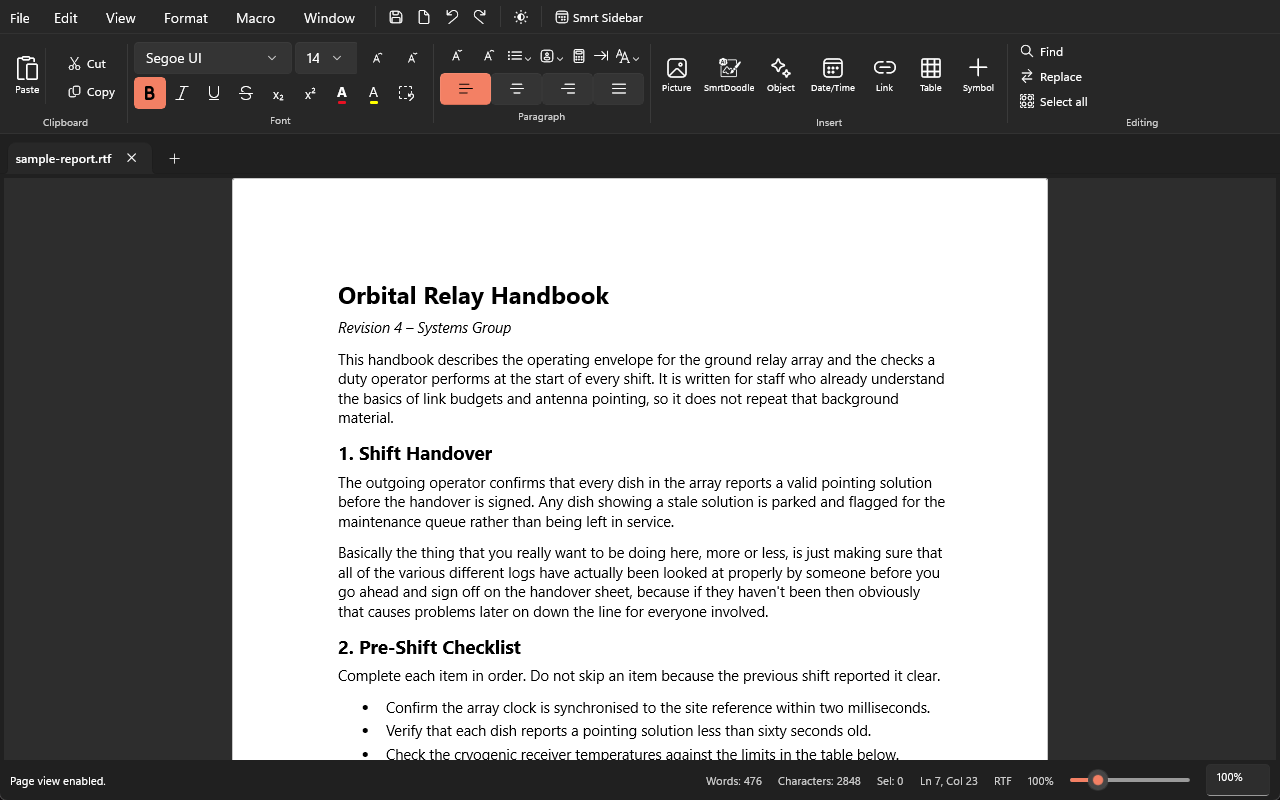
Ribbon Toolbar
- Clipboard — Large Paste button with stacked Cut/Copy and Paste Special (plain text)
- Font — Font family picker, size selector, grow/shrink buttons, Bold/Italic/Underline/Strikethrough/Subscript/Superscript toggles, font color and text highlight color swatch grids
- Paragraph — Indent increase/decrease, list type dropdown (None, Bullet, Numbers, Lowercase/Uppercase Letters, Lowercase/Uppercase Roman numerals), line spacing selector (1.0, 1.15, 1.5, 2.0), alignment toggle buttons (Left, Center, Right, Justify)
- Insert — Picture, SmrtDoodle drawing, Insert Object (images), Date/Time — all with large icon + label buttons
- Editing — Find and Replace with flyout dialogs, Select All
Editor
- Rich text editing via WinUI 3
RichEditBox(RTF and TXT open/save) - Tabbed documents — multiple documents open simultaneously; per-tab file, modified, encoding and zoom state
- Undo/Redo, Word wrap toggle, spell check toggle (persisted in settings)
- True visual zoom via
ScaleTransform— Ctrl+Plus/Minus and Ctrl+Scroll; per-tab zoom level - Horizontal and vertical rulers (inches and centimetres)
- Page view mode (US Letter with 1-inch margins)
- Focus mode (hides ribbon and status bar)
- Drag-and-drop open (RTF, TXT, DOCX, HTML, ODT) and inline image insert
File Operations
- New, Open (RTF, TXT, DOCX, HTML, ODT), Save, Save As, Print
- Export to PDF — multi-page PDF 1.4 (Helvetica, A4, 72 pt margins)
- Export to DOCX — valid OOXML
.docxviaZipArchive+XDocument - Save to OneDrive — saves via standard file picker to the user's OneDrive folder; guarded with availability check
- Auto-save to recovery folder for unnamed documents; saves in-place for named documents
- Recent files list (MRU, max 10) in the backstage
File Backstage
- WordPad-style backstage for New, Templates, Open, Save, Save As, Print, Export PDF, Export DOCX, OneDrive, Options, and Exit
- Document Templates — 5 built-in templates (Blank, Letter, Meeting Notes, To-Do List, Report)
- Fully opaque overlay that covers the tab strip and editor when open
SmrtDoodle Integration
- SmrtDoodle ribbon button launches the SmrtDoodle companion drawing app via the
smrtdoodle://protocol; the current selection (if any) is sent as the initial canvas image over a per-session named pipe - When SmrtDoodle closes, the rendered drawing is returned to SmrtPad via the same named pipe and the user is prompted to Replace selection or Insert as new image
- Pre-launch installation check via
Launcher.QueryUriSupportAsync; if SmrtDoodle is not installed a dialog offers a Get from Store button that opens the Microsoft Store search for SmrtDoodle - Shared bridge contract and frame serialization live in the
SmrtAI.Corelibrary, reused by both apps
Smart Sidebar (on-device AI)
- Collapsible AI panel that operates entirely on-device using Windows AI APIs (Phi Silica NPU) or ONNX Runtime GenAI (GPU/CPU)
- Chat-bubble UI — user and assistant messages rendered as distinct bubbles in a scrollable history; responses stream token-by-token into the chat bubble in real time so the full output is always visible in the conversation
- Insert button — appears on assistant bubbles that contain insertable content (rewrites, summaries, drafts); clicking it inserts the AI-generated text directly into the active document at the cursor position
- Thinking/reasoning display — reasoning tokens emitted between
<think>…</think>tags (including implicit pre-</think>reasoning from phi-4-mini) shown in a collapsible expander labelled "Thinking…"; collapses automatically once reasoning is complete so the response is front and centre - Skill dropdown — one unified
ComboBoxselects the active skill (Summarize, Professional tone, Rewrite for clarity, Grammar fix, Shorten, Complete at cursor); single Apply button dispatches to the correct prompt template - Tone toggle shown only when the tone skill is active (professional / casual)
- Freeform chat — open-ended writing questions answered in plain text; document-drafting requests (letter, email, report, essay, story, press release, etc.) produce a full draft inserted via the Insert button
- Model catalogues —
GgufModelCatalogregisters 12 local GGUF entries for the LLamaSharp/llama.cpp runner, including Gemma 4, Gemma 3, Phi, Llama and Qwen variants, with Hugging Face repository/file metadata and approximate GPU footprints.ModelSizeSelectorseparately defines the ONNX GenAI aliases, GPU/CPU footprints and configured Hugging Face source directories. The defaultAIDispatcherFactory.Create()path is currently wired togemma-4-e2bwith an 8 192-token context;CreateFromLocalPathcan load either a local.gguffile or an ONNX GenAI directory containinggenai_config.json - Model selection order —
ModelSizeSelector.SelectBestAliasAsyncandGetBestAliasForCapabilityscan the hard-codedPreferredAliaseslist in declaration order and return the first eligible entry that fits the active budget and headroom. They do not search for the largest eligible model. If none fits, the selector falls back tophi-4-mini - Model acquisition and cache behavior —
ModelDownloadServiceacquires configured ONNX GenAI variants from Hugging Face into%LOCALAPPDATA%\SmrtPad\models\<alias>\<gpu|cpu>. Ifgenai_config.jsonalready exists, it accepts and reuses that cached model directory without rechecking file sizes or completeness. During download acquisition, it enumerates source file sizes, skips an existing file only when its byte length matches, and writes other files to.tmpbefore moving them into place; those per-file size/completion checks apply to acquisition, not as a universal cache-integrity guarantee. Automatic acquisition is available only for aliases and variants present in the selector's Hugging Face source map; catalog metadata by itself is not a download implementation, and the hard-coded Gemma 4 default is not separate proof of an available download source - Local inference — ORT GenAI loads a local model directory in-process, while LLamaSharp loads a local GGUF file and generates through llama.cpp. Network access belongs to model acquisition; token generation does not call a network service
- Live initialization progress — sidebar status text and app status bar both update in real time as the AI initializes: detecting hardware → selecting model → starting the local runner → acquiring or reusing a model → loading it into memory; download progress is emitted while source files are enumerated and streamed
- ResponseCleaner strips preamble lines, code-fence delimiters, closing remarks, and reasoning-leak fragments from model output before text is shown or inserted
- Prompt templates hardened with explicit, model-neutral output instructions (no persona dependency; consistent
<insert>…</insert>contract across all skills) - New-session button clears chat history
Licensing and Store entitlement
- The tracked repository license is the PolyForm Noncommercial License 1.0.0: SmrtPad is source-available, not open source. Reading, building and modifying it for noncommercial purposes is permitted; commercial use, including redistribution, resale or publication to an application store, is reserved to the licensor. See LICENSE for the complete terms
- The licensing code contains a
LicenseOrchestratorand anIStoreContextAdapterseam, with a local Ed25519 license-key fallback. The current dependency-injection registration usesStubStoreContextAdapterrather than a live Store client, and that stub currently returnstrue; Debug builds also enable Pro flags directly. These development/code paths are not proof of a paid Windows Store entitlement, product SKU or release-time Store integration
Macros
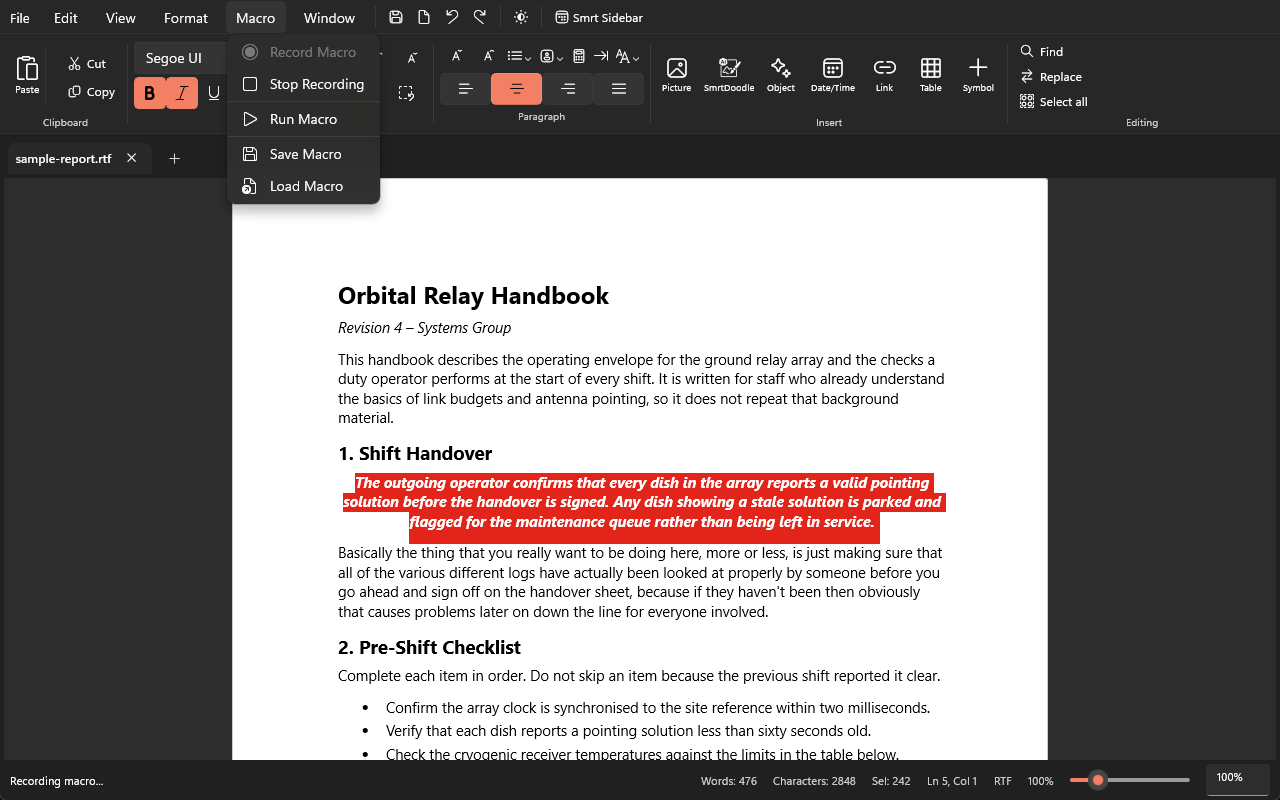
- Macro recording and playback — record a sequence of typing and formatting actions, then replay them; persisted in settings
Multi-Window
- Open multiple editor windows (
Ctrl+Shift+N/ Window menu); each window is fully independent
UI & Theming
- Mica backdrop for a modern Windows 11 appearance
- Light / Dark / System theme toggle (persisted in settings); theme-aware title bar caption button colours
- Segoe Fluent Icons throughout the ribbon
- App icon (
SmrtPad.ico) shown in the taskbar, title bar, and Alt-Tab thumbnail - Status bar — document status, word count, character count, selection length, line/column, encoding, and zoom level
- Localization in 9 languages — English, German, Spanish, French, Japanese, Simplified Chinese, Arabic, Russian, Urdu
Options
- Font, size, word wrap, save format, theme, auto-save interval, language, ruler units, and spell check — all persisted via
SettingsService(JSON at%LOCALAPPDATA%\SmrtPad\settings.json)
Requirements
- Windows 10 version 1809 (build 17763) or later
- .NET 8 SDK
- Windows App SDK 1.8+
- (Optional) SmrtDoodle for in-document drawing
- (Optional) A CUDA-capable GPU for on-device AI; CPU fallback is supported. The AI engine supports ONNX Runtime GenAI GPU/CPU execution and local GGUF inference through LLamaSharp / llama.cpp; configured model acquisition uses Hugging Face
Building
- Clone the repository:
git clone https://github.com/JAD-Apps/SmrtPad.git - Open
SmrtPad.slnxin Visual Studio 2022 or later. - Set the platform to x64 (or ARM64).
- Build and run the SmrtPad (Package) project for a fully packaged experience, or the SmrtPad project for unpackaged debug.
No configuration is required to build. .env.example documents optional local
toggles for the UI-test deploy script and the AI benchmark suite — copy it to
.env (gitignored) only if you need to change them.
Running Tests
dotnet test SmrtPad.Tests\SmrtPad.Tests.csproj -c Debug -p:Platform=x64
dotnet test SmrtPad.AI.Tests\SmrtPad.AI.Tests.csproj -c Debug -p:Platform=x64
AI benchmark UI tests
SmrtPad includes a local Appium-based benchmark suite for the Smart Sidebar AI models. The benchmark exercises all supported sidebar skills across a curated prompt set, records latency and throughput, applies rule-based scoring, estimates electricity cost, and generates report artifacts for qualitative review.
For models that support reasoning (Qwen3, Phi-4 Mini Reasoning, DeepSeek-R1), each model is benchmarked in both no-thinking and thinking modes. GPU runs execute first (both modes), followed by CPU runs (both modes where applicable).
Prerequisites
-
Build and deploy the packaged SmrtPad (Package) app so the local AUMID is registered.
-
Install Appium via npm.
-
Install the Appium Windows driver:
appium driver install --source=npm appium-windows-driver -
Install WinAppDriver 1.2.1.
-
Start the local benchmark infrastructure:
powershell -ExecutionPolicy Bypass -File .\SmrtPad.UITests\Scripts\start-benchmark.ps1
Benchmark tests
-
Smoke validation:
dotnet test .\SmrtPad.UITests\SmrtPad.UITests.csproj -c Debug -p:Platform=x64 --filter "FullyQualifiedName=SmrtPad.UITests.Tests.ModelBenchmarkTests.SmokeTest_SinglePrompt" -
Full benchmark:
dotnet test .\SmrtPad.UITests\SmrtPad.UITests.csproj -c Debug -p:Platform=x64 --filter "FullyQualifiedName=SmrtPad.UITests.Tests.ModelBenchmarkTests.RunFullBenchmark"
Environment variables
BENCHMARK_MODEL_FILTER— comma-separated model alias filter for subset runs, for examplephi-4-miniorphi-4-mini,qwen2.5-1.5bBENCHMARK_GPU_WATTS— GPU power draw override, default115BENCHMARK_CPU_WATTS— CPU power draw override, default105BENCHMARK_NPU_WATTS— NPU power draw override, default15BENCHMARK_ELECTRICITY_RATE— electricity cost in USD per kWh, default0.12SMRTPAD_BENCHMARK_MODE— set toCPUto skip GPU runs and only execute CPU runs; omit (or set toGPU) for the default GPU-first-then-CPU matrixSMRTPAD_LLAMA_BACKEND_DIR— absolute path to a custom llama.cpp backend directory (must containllama.dll+ggml.dll); used when the default CUDA 12 build does not support a required model architecture (e.g., Gemma 4)
Generated artifacts
Each benchmark run produces:
benchmark-report-*.md— Markdown summary report (includes Mode column distinguishing Think / NoThink runs)benchmark-dashboard-*.html— static Chart.js live dashboard (per-model series split by reasoning tag)benchmark-results-*.json— raw machine-readable resultsbench-*-responses.jsonl— per-case response log (JSONL)qualitative-assessment-prompt-*.md— prompt for chat-based qualitative review
Artifacts are written to BenchmarkResults\ at the solution root when discoverable. If the solution root cannot be resolved from the test host, the suite falls back to %TEMP%\SmrtPad-BenchmarkResults\.
The test suite covers:
- ViewModel default values and all property-change notifications
- All formatting toggle commands (Bold, Italic, Underline, Strikethrough, Subscript, Superscript)
- Alignment, list type, and line spacing for all defined values
- Zoom in/out with min/max clamping; word wrap; spell check settings
NewDocumentfull state resetColorHelperhex parsing (6-digit, 8-digit, error cases)- PDF generation (page count, header content, byte-array structure)
- DOCX generation (ZIP structure,
word/document.xmlcontent, paragraph mapping) - OneDrive availability detection
- Document import (DOCX, ODT text extraction)
- Macro recording and playback
- Settings persistence, concurrency, and recent-files MRU
- Localization — all 9 locales, all resource keys present and non-empty
- AI engine —
ModelSizeSelectoralias/budget logic,HardwareProbeServiceVRAM/RAM probing,PromptTemplatesoutput,AIDispatcherskill routing,ResponseCleaneroutput stripping - AI benchmark suite — Smart Sidebar Appium automation, per-model prompt execution, rule-based scoring, electricity cost estimation, Markdown/HTML/JSON report generation, and qualitative-assessment prompt generation
Project Structure
SmrtPad/
├── SmrtAI.Core/             # Shared AI abstractions and IPC contract (net8.0 library)
│   ├── IAIDispatcher.cs     # AI dispatcher interface (shared with SmrtPad.AI)
│   ├── AIDispatcherAvailability.cs  # Backend availability DTOs
│   ├── SemanticSearchModels.cs      # Semantic search records
│   ├── SmrtDoodleIpcContract.cs     # Protocol URI builder and pipe-name helpers
│   └── SmrtDoodleFrame.cs           # Length-prefixed JSON frame serializer
├── SmrtPad/
│   ├── Assets/              # App icon (SmrtPad.ico/.png), SmrtDoodle icons
│   ├── Controls/            # SmartSidebar, SidebarChatEntry, SidebarChatTemplateSelector
│   ├── Converters/          # NonEmptyStringToVisibilityConverter
│   ├── Helpers/             # ColorHelper, DocxExportHelper, DocumentImportHelper,
│   │                        # DocumentTemplates, MacroHelper, OneDriveHelper,
│   │                        # ParagraphStyleHelper, PdfHelper, ResourceHelper,
│   │                        # ResponseCleaner, RtfHelper, RulerHelper
│   ├── Models/              # DocumentTemplate
│   ├── Services/            # AIDispatcherProxy, DialogService, FileService,
│   │                        # SettingsService, SmrtDoodleIpcService
│   │                        # (+ IDialogService, IFileService, ISettingsService)
│   ├── Strings/             # 9 locale .resw files (en-US, de-DE, es-ES, fr-FR,
│   │                        # ja-JP, zh-Hans, ar-SA, ru-RU, ur-PK)
│   ├── ViewModels/          # EditorViewModel
│   ├── Views/               # FileBackstageView
│   ├── MainWindow.xaml      # Main window with ribbon UI
│   ├── MainWindow.xaml.cs   # Code-behind — editor logic, ribbon handlers
│   ├── App.xaml             # Application resources and ThemeDictionaries
│   └── App.xaml.cs          # Entry point, DI container, multi-window factory
├── SmrtPad.AI/
│   ├── Skills/              # AIRewriteSkill, AutoCompleteSkill, GrammarFixSkill,
│   │                        # ShortenSkill, SummarizerSkill, ToneShifterSkill
│   ├── AIDispatcher.cs      # Core streaming dispatcher with skill-key routing;
│   │                        # exposes PreferredReasoningMode / SetPreferredReasoningMode
│   ├── AIDispatcherFactory.cs # DI factory — hardware probing, model selection;
│   │                        # CreateFromLocalPath honours preferred reasoning mode
│   ├── ConcreteLlamaSharpModelAdapter.cs # LLamaSharp (llama.cpp) GGUF inference adapter;
│   │                        # CUDA 12 DLL pre-loading, ggml backend discovery,
│   │                        # reasoning-mode-aware chat templating
│   ├── ConcreteOrtGenAiModelAdapter.cs # ORT GenAI in-process inference adapter
│   ├── GgufModelCatalog.cs  # GGUF model registry (alias → HuggingFace repo + GPU size)
│   ├── ModelDownloadService.cs  # HuggingFace Hub model downloader
│   ├── HardwareProbeService.cs # DXGI VRAM + system RAM detection
│   ├── ModelPromptPolicy.cs # SupportsThinkingMode, NormalizeMode, BuildSystemPrompt,
│   │                        # ApplyPromptControls, DetectAliasFromPath
│   ├── ModelSizeSelector.cs # Hardware-budget → alias + context-token selection
│   └── PromptTemplates.cs   # Model-neutral per-skill prompt templates + FreeformChat
├── SmrtPad.AI.Tests/        # Unit tests for AI engine components
├── SmrtPad (Package)/       # MSIX packaging project
├── SmrtPad.Tests/
│   ├── EditorTests.cs       # ViewModel unit tests
│   ├── IntegrationTests.cs  # Helper + service integration tests
│   ├── LocalizationTests.cs # Locale completeness tests
│   └── ResponseCleanerTests.cs # ResponseCleaner unit tests
├── README.md
└── CHANGELOG.md
Acknowledgments
Ribbon design inspired by UltraPad, a modernized WordPad replacement for Windows 11.
License
SmrtPad is source-available, not open source, under the PolyForm Noncommercial License 1.0.0.
You may read, build and modify the source for any noncommercial purpose. Commercial use — including redistribution, resale, or publishing to an application store — is reserved to JAD Apps. For a commercial licence, get in touch via jadapps.app.
© 2026 John Donnelly, trading as JAD Apps.
Similar repos


Languages
C#
97.7%
PowerShell
2.3%
Native WinUI 3 RTF editor for Windows — ribbon UI, macros, multi-window editing and an on-device AI sidebar. .NET 8.
See the codeREADME
SmrtPad
Status: released and actively developed · Latest: v0.9.6 · Requires: Windows 10 1809 (build 17763) or later
A modern WordPad-inspired rich text editor built with WinUI 3 and .NET 8, featuring a Microsoft WordPad-style ribbon interface, tabbed documents, macro recording, a full suite of export options, and an on-device AI writing assistant powered by ONNX Runtime GenAI (CUDA/CPU) / Windows AI APIs.
Download
Grab the latest portable build from Releases — unzip and run SmrtPad.exe. Self-contained, so no .NET runtime is needed.
Builds are currently unsigned; Windows SmartScreen will warn on first run. Choose More info → Run anyway if you trust the source.
Features
Ribbon Toolbar
- Clipboard — Large Paste button with stacked Cut/Copy and Paste Special (plain text)
- Font — Font family picker, size selector, grow/shrink buttons, Bold/Italic/Underline/Strikethrough/Subscript/Superscript toggles, font color and text highlight color swatch grids
- Paragraph — Indent increase/decrease, list type dropdown (None, Bullet, Numbers, Lowercase/Uppercase Letters, Lowercase/Uppercase Roman numerals), line spacing selector (1.0, 1.15, 1.5, 2.0), alignment toggle buttons (Left, Center, Right, Justify)
- Insert — Picture, SmrtDoodle drawing, Insert Object (images), Date/Time — all with large icon + label buttons
- Editing — Find and Replace with flyout dialogs, Select All
Editor
- Rich text editing via WinUI 3
RichEditBox(RTF and TXT open/save) - Tabbed documents — multiple documents open simultaneously; per-tab file, modified, encoding and zoom state
- Undo/Redo, Word wrap toggle, spell check toggle (persisted in settings)
- True visual zoom via
ScaleTransform— Ctrl+Plus/Minus and Ctrl+Scroll; per-tab zoom level - Horizontal and vertical rulers (inches and centimetres)
- Page view mode (US Letter with 1-inch margins)
- Focus mode (hides ribbon and status bar)
- Drag-and-drop open (RTF, TXT, DOCX, HTML, ODT) and inline image insert
File Operations
- New, Open (RTF, TXT, DOCX, HTML, ODT), Save, Save As, Print
- Export to PDF — multi-page PDF 1.4 (Helvetica, A4, 72 pt margins)
- Export to DOCX — valid OOXML
.docxviaZipArchive+XDocument - Save to OneDrive — saves via standard file picker to the user's OneDrive folder; guarded with availability check
- Auto-save to recovery folder for unnamed documents; saves in-place for named documents
- Recent files list (MRU, max 10) in the backstage
File Backstage
- WordPad-style backstage for New, Templates, Open, Save, Save As, Print, Export PDF, Export DOCX, OneDrive, Options, and Exit
- Document Templates — 5 built-in templates (Blank, Letter, Meeting Notes, To-Do List, Report)
- Fully opaque overlay that covers the tab strip and editor when open
SmrtDoodle Integration
- SmrtDoodle ribbon button launches the SmrtDoodle companion drawing app via the
smrtdoodle://protocol; the current selection (if any) is sent as the initial canvas image over a per-session named pipe - When SmrtDoodle closes, the rendered drawing is returned to SmrtPad via the same named pipe and the user is prompted to Replace selection or Insert as new image
- Pre-launch installation check via
Launcher.QueryUriSupportAsync; if SmrtDoodle is not installed a dialog offers a Get from Store button that opens the Microsoft Store search for SmrtDoodle - Shared bridge contract and frame serialization live in the
SmrtAI.Corelibrary, reused by both apps
Smart Sidebar (on-device AI)
- Collapsible AI panel that operates entirely on-device using Windows AI APIs (Phi Silica NPU) or ONNX Runtime GenAI (GPU/CPU)
- Chat-bubble UI — user and assistant messages rendered as distinct bubbles in a scrollable history; responses stream token-by-token into the chat bubble in real time so the full output is always visible in the conversation
- Insert button — appears on assistant bubbles that contain insertable content (rewrites, summaries, drafts); clicking it inserts the AI-generated text directly into the active document at the cursor position
- Thinking/reasoning display — reasoning tokens emitted between
<think>…</think>tags (including implicit pre-</think>reasoning from phi-4-mini) shown in a collapsible expander labelled "Thinking…"; collapses automatically once reasoning is complete so the response is front and centre - Skill dropdown — one unified
ComboBoxselects the active skill (Summarize, Professional tone, Rewrite for clarity, Grammar fix, Shorten, Complete at cursor); single Apply button dispatches to the correct prompt template - Tone toggle shown only when the tone skill is active (professional / casual)
- Freeform chat — open-ended writing questions answered in plain text; document-drafting requests (letter, email, report, essay, story, press release, etc.) produce a full draft inserted via the Insert button
- Model catalogues —
GgufModelCatalogregisters 12 local GGUF entries for the LLamaSharp/llama.cpp runner, including Gemma 4, Gemma 3, Phi, Llama and Qwen variants, with Hugging Face repository/file metadata and approximate GPU footprints.ModelSizeSelectorseparately defines the ONNX GenAI aliases, GPU/CPU footprints and configured Hugging Face source directories. The defaultAIDispatcherFactory.Create()path is currently wired togemma-4-e2bwith an 8 192-token context;CreateFromLocalPathcan load either a local.gguffile or an ONNX GenAI directory containinggenai_config.json - Model selection order —
ModelSizeSelector.SelectBestAliasAsyncandGetBestAliasForCapabilityscan the hard-codedPreferredAliaseslist in declaration order and return the first eligible entry that fits the active budget and headroom. They do not search for the largest eligible model. If none fits, the selector falls back tophi-4-mini - Model acquisition and cache behavior —
ModelDownloadServiceacquires configured ONNX GenAI variants from Hugging Face into%LOCALAPPDATA%\SmrtPad\models\<alias>\<gpu|cpu>. Ifgenai_config.jsonalready exists, it accepts and reuses that cached model directory without rechecking file sizes or completeness. During download acquisition, it enumerates source file sizes, skips an existing file only when its byte length matches, and writes other files to.tmpbefore moving them into place; those per-file size/completion checks apply to acquisition, not as a universal cache-integrity guarantee. Automatic acquisition is available only for aliases and variants present in the selector's Hugging Face source map; catalog metadata by itself is not a download implementation, and the hard-coded Gemma 4 default is not separate proof of an available download source - Local inference — ORT GenAI loads a local model directory in-process, while LLamaSharp loads a local GGUF file and generates through llama.cpp. Network access belongs to model acquisition; token generation does not call a network service
- Live initialization progress — sidebar status text and app status bar both update in real time as the AI initializes: detecting hardware → selecting model → starting the local runner → acquiring or reusing a model → loading it into memory; download progress is emitted while source files are enumerated and streamed
- ResponseCleaner strips preamble lines, code-fence delimiters, closing remarks, and reasoning-leak fragments from model output before text is shown or inserted
- Prompt templates hardened with explicit, model-neutral output instructions (no persona dependency; consistent
<insert>…</insert>contract across all skills) - New-session button clears chat history
Licensing and Store entitlement
- The tracked repository license is the PolyForm Noncommercial License 1.0.0: SmrtPad is source-available, not open source. Reading, building and modifying it for noncommercial purposes is permitted; commercial use, including redistribution, resale or publication to an application store, is reserved to the licensor. See LICENSE for the complete terms
- The licensing code contains a
LicenseOrchestratorand anIStoreContextAdapterseam, with a local Ed25519 license-key fallback. The current dependency-injection registration usesStubStoreContextAdapterrather than a live Store client, and that stub currently returnstrue; Debug builds also enable Pro flags directly. These development/code paths are not proof of a paid Windows Store entitlement, product SKU or release-time Store integration
Macros
- Macro recording and playback — record a sequence of typing and formatting actions, then replay them; persisted in settings
Multi-Window
- Open multiple editor windows (
Ctrl+Shift+N/ Window menu); each window is fully independent
UI & Theming
- Mica backdrop for a modern Windows 11 appearance
- Light / Dark / System theme toggle (persisted in settings); theme-aware title bar caption button colours
- Segoe Fluent Icons throughout the ribbon
- App icon (
SmrtPad.ico) shown in the taskbar, title bar, and Alt-Tab thumbnail - Status bar — document status, word count, character count, selection length, line/column, encoding, and zoom level
- Localization in 9 languages — English, German, Spanish, French, Japanese, Simplified Chinese, Arabic, Russian, Urdu
Options
- Font, size, word wrap, save format, theme, auto-save interval, language, ruler units, and spell check — all persisted via
SettingsService(JSON at%LOCALAPPDATA%\SmrtPad\settings.json)
Requirements
- Windows 10 version 1809 (build 17763) or later
- .NET 8 SDK
- Windows App SDK 1.8+
- (Optional) SmrtDoodle for in-document drawing
- (Optional) A CUDA-capable GPU for on-device AI; CPU fallback is supported. The AI engine supports ONNX Runtime GenAI GPU/CPU execution and local GGUF inference through LLamaSharp / llama.cpp; configured model acquisition uses Hugging Face
Building
- Clone the repository:
git clone https://github.com/JAD-Apps/SmrtPad.git - Open
SmrtPad.slnxin Visual Studio 2022 or later. - Set the platform to x64 (or ARM64).
- Build and run the SmrtPad (Package) project for a fully packaged experience, or the SmrtPad project for unpackaged debug.
No configuration is required to build. .env.example documents optional local
toggles for the UI-test deploy script and the AI benchmark suite — copy it to
.env (gitignored) only if you need to change them.
Running Tests
dotnet test SmrtPad.Tests\SmrtPad.Tests.csproj -c Debug -p:Platform=x64
dotnet test SmrtPad.AI.Tests\SmrtPad.AI.Tests.csproj -c Debug -p:Platform=x64
AI benchmark UI tests
SmrtPad includes a local Appium-based benchmark suite for the Smart Sidebar AI models. The benchmark exercises all supported sidebar skills across a curated prompt set, records latency and throughput, applies rule-based scoring, estimates electricity cost, and generates report artifacts for qualitative review.
For models that support reasoning (Qwen3, Phi-4 Mini Reasoning, DeepSeek-R1), each model is benchmarked in both no-thinking and thinking modes. GPU runs execute first (both modes), followed by CPU runs (both modes where applicable).
Prerequisites
-
Build and deploy the packaged SmrtPad (Package) app so the local AUMID is registered.
-
Install Appium via npm.
-
Install the Appium Windows driver:
appium driver install --source=npm appium-windows-driver -
Install WinAppDriver 1.2.1.
-
Start the local benchmark infrastructure:
powershell -ExecutionPolicy Bypass -File .\SmrtPad.UITests\Scripts\start-benchmark.ps1
Benchmark tests
-
Smoke validation:
dotnet test .\SmrtPad.UITests\SmrtPad.UITests.csproj -c Debug -p:Platform=x64 --filter "FullyQualifiedName=SmrtPad.UITests.Tests.ModelBenchmarkTests.SmokeTest_SinglePrompt" -
Full benchmark:
dotnet test .\SmrtPad.UITests\SmrtPad.UITests.csproj -c Debug -p:Platform=x64 --filter "FullyQualifiedName=SmrtPad.UITests.Tests.ModelBenchmarkTests.RunFullBenchmark"
Environment variables
BENCHMARK_MODEL_FILTER— comma-separated model alias filter for subset runs, for examplephi-4-miniorphi-4-mini,qwen2.5-1.5bBENCHMARK_GPU_WATTS— GPU power draw override, default115BENCHMARK_CPU_WATTS— CPU power draw override, default105BENCHMARK_NPU_WATTS— NPU power draw override, default15BENCHMARK_ELECTRICITY_RATE— electricity cost in USD per kWh, default0.12SMRTPAD_BENCHMARK_MODE— set toCPUto skip GPU runs and only execute CPU runs; omit (or set toGPU) for the default GPU-first-then-CPU matrixSMRTPAD_LLAMA_BACKEND_DIR— absolute path to a custom llama.cpp backend directory (must containllama.dll+ggml.dll); used when the default CUDA 12 build does not support a required model architecture (e.g., Gemma 4)
Generated artifacts
Each benchmark run produces:
benchmark-report-*.md— Markdown summary report (includes Mode column distinguishing Think / NoThink runs)benchmark-dashboard-*.html— static Chart.js live dashboard (per-model series split by reasoning tag)benchmark-results-*.json— raw machine-readable resultsbench-*-responses.jsonl— per-case response log (JSONL)qualitative-assessment-prompt-*.md— prompt for chat-based qualitative review
Artifacts are written to BenchmarkResults\ at the solution root when discoverable. If the solution root cannot be resolved from the test host, the suite falls back to %TEMP%\SmrtPad-BenchmarkResults\.
The test suite covers:
- ViewModel default values and all property-change notifications
- All formatting toggle commands (Bold, Italic, Underline, Strikethrough, Subscript, Superscript)
- Alignment, list type, and line spacing for all defined values
- Zoom in/out with min/max clamping; word wrap; spell check settings
NewDocumentfull state resetColorHelperhex parsing (6-digit, 8-digit, error cases)- PDF generation (page count, header content, byte-array structure)
- DOCX generation (ZIP structure,
word/document.xmlcontent, paragraph mapping) - OneDrive availability detection
- Document import (DOCX, ODT text extraction)
- Macro recording and playback
- Settings persistence, concurrency, and recent-files MRU
- Localization — all 9 locales, all resource keys present and non-empty
- AI engine —
ModelSizeSelectoralias/budget logic,HardwareProbeServiceVRAM/RAM probing,PromptTemplatesoutput,AIDispatcherskill routing,ResponseCleaneroutput stripping - AI benchmark suite — Smart Sidebar Appium automation, per-model prompt execution, rule-based scoring, electricity cost estimation, Markdown/HTML/JSON report generation, and qualitative-assessment prompt generation
Project Structure
SmrtPad/
├── SmrtAI.Core/             # Shared AI abstractions and IPC contract (net8.0 library)
│   ├── IAIDispatcher.cs     # AI dispatcher interface (shared with SmrtPad.AI)
│   ├── AIDispatcherAvailability.cs  # Backend availability DTOs
│   ├── SemanticSearchModels.cs      # Semantic search records
│   ├── SmrtDoodleIpcContract.cs     # Protocol URI builder and pipe-name helpers
│   └── SmrtDoodleFrame.cs           # Length-prefixed JSON frame serializer
├── SmrtPad/
│   ├── Assets/              # App icon (SmrtPad.ico/.png), SmrtDoodle icons
│   ├── Controls/            # SmartSidebar, SidebarChatEntry, SidebarChatTemplateSelector
│   ├── Converters/          # NonEmptyStringToVisibilityConverter
│   ├── Helpers/             # ColorHelper, DocxExportHelper, DocumentImportHelper,
│   │                        # DocumentTemplates, MacroHelper, OneDriveHelper,
│   │                        # ParagraphStyleHelper, PdfHelper, ResourceHelper,
│   │                        # ResponseCleaner, RtfHelper, RulerHelper
│   ├── Models/              # DocumentTemplate
│   ├── Services/            # AIDispatcherProxy, DialogService, FileService,
│   │                        # SettingsService, SmrtDoodleIpcService
│   │                        # (+ IDialogService, IFileService, ISettingsService)
│   ├── Strings/             # 9 locale .resw files (en-US, de-DE, es-ES, fr-FR,
│   │                        # ja-JP, zh-Hans, ar-SA, ru-RU, ur-PK)
│   ├── ViewModels/          # EditorViewModel
│   ├── Views/               # FileBackstageView
│   ├── MainWindow.xaml      # Main window with ribbon UI
│   ├── MainWindow.xaml.cs   # Code-behind — editor logic, ribbon handlers
│   ├── App.xaml             # Application resources and ThemeDictionaries
│   └── App.xaml.cs          # Entry point, DI container, multi-window factory
├── SmrtPad.AI/
│   ├── Skills/              # AIRewriteSkill, AutoCompleteSkill, GrammarFixSkill,
│   │                        # ShortenSkill, SummarizerSkill, ToneShifterSkill
│   ├── AIDispatcher.cs      # Core streaming dispatcher with skill-key routing;
│   │                        # exposes PreferredReasoningMode / SetPreferredReasoningMode
│   ├── AIDispatcherFactory.cs # DI factory — hardware probing, model selection;
│   │                        # CreateFromLocalPath honours preferred reasoning mode
│   ├── ConcreteLlamaSharpModelAdapter.cs # LLamaSharp (llama.cpp) GGUF inference adapter;
│   │                        # CUDA 12 DLL pre-loading, ggml backend discovery,
│   │                        # reasoning-mode-aware chat templating
│   ├── ConcreteOrtGenAiModelAdapter.cs # ORT GenAI in-process inference adapter
│   ├── GgufModelCatalog.cs  # GGUF model registry (alias → HuggingFace repo + GPU size)
│   ├── ModelDownloadService.cs  # HuggingFace Hub model downloader
│   ├── HardwareProbeService.cs # DXGI VRAM + system RAM detection
│   ├── ModelPromptPolicy.cs # SupportsThinkingMode, NormalizeMode, BuildSystemPrompt,
│   │                        # ApplyPromptControls, DetectAliasFromPath
│   ├── ModelSizeSelector.cs # Hardware-budget → alias + context-token selection
│   └── PromptTemplates.cs   # Model-neutral per-skill prompt templates + FreeformChat
├── SmrtPad.AI.Tests/        # Unit tests for AI engine components
├── SmrtPad (Package)/       # MSIX packaging project
├── SmrtPad.Tests/
│   ├── EditorTests.cs       # ViewModel unit tests
│   ├── IntegrationTests.cs  # Helper + service integration tests
│   ├── LocalizationTests.cs # Locale completeness tests
│   └── ResponseCleanerTests.cs # ResponseCleaner unit tests
├── README.md
└── CHANGELOG.md
Acknowledgments
Ribbon design inspired by UltraPad, a modernized WordPad replacement for Windows 11.
License
SmrtPad is source-available, not open source, under the PolyForm Noncommercial License 1.0.0.
You may read, build and modify the source for any noncommercial purpose. Commercial use — including redistribution, resale, or publishing to an application store — is reserved to JAD Apps. For a commercial licence, get in touch via jadapps.app.
© 2026 John Donnelly, trading as JAD Apps.
Similar repos
Languages
C#
97.7%
PowerShell
2.3%