The best interface for working with your agents.
Website · Getting started · Extensions
Set PI_WEB_HOME to isolate pi-web's own state, independently of the agent's credentials, models and sessions (PI_CODING_AGENT_DIR):
PORT=8807 PI_WEB_HOME=/tmp/inst1/web PI_CODING_AGENT_DIR=/tmp/inst1/pi npm run dev
Existing per-file overrides take precedence. With PI_WEB_HOME unset (or empty), all existing locations remain unchanged; no files are moved.
| State | Path under PI_WEB_HOME | Existing override |
|---|---|---|
| Login/API token store | web/auth.json | PI_WEB_AUTH_STORE |
| Pins, markers and UI history | pi-web-session-ui-state.json (and sidecars) | PI_WEB_SESSION_UI_STATE_FILE |
| Push subscriptions | pi-web-push.json | PI_WEB_PUSH_FILE |
| Settings | pi-web-settings.json | PI_WEB_SETTINGS_FILE |
| Global web extensions | extensions/ | — |
| Example notepad | notepad.json, notepad-archive.jsonl, legacy notepad.md | PI_WEB_NOTEPAD_FILE (archive/markdown follow its location) |
Project extensions remain in <cwd>/.pi/web/extensions. This version's notepad has no separate database/vault, and the session orchestrator uses a ledger in agent session files rather than a delegation spool; those sessions remain under the agent home. Extensions with their own resolvable @ashwin-pc/pi-web dependency can import the shared resolveWebHomePath(file, legacyPath, override?) helper from @ashwin-pc/pi-web/extensions. Copied standalone extensions should keep runtime path helpers self-contained and package imports type-only: a global or npx install is not on their Node package resolution path.
npm run instance -- my-instance --mock
npm run instance -- my-instance --stop
npm run instance -- <name> [--mock] [--worktree] creates private state folders in ~/.pi/web-instances/<name>/{web,pi}, chooses a free public/child port pair, and starts pi-web-<name> in tmux. It clears inherited PI_WEB_* configuration (including PI_WEB_TOKEN), mints a stored API token with the auth CLI, waits for an authenticated API response, then prints the URL, token (shown once), and stop command. Use the UI's Set token action with that token. Logs are in ~/.pi/web-instances/<name>/server.log. Duplicate launches fail without stopping the existing session.
Without --mock, the launcher seeds missing auth.json and models.json from the current PI_CODING_AGENT_DIR (or ~/.pi/agent); it never overwrites existing instance files or copies settings or sessions. OAuth caveat: copied credentials can share rotating refresh tokens with the source install; refreshing in either instance can invalidate the other's login. Use API keys or log in separately in the instance to avoid sharing OAuth credentials. --mock skips that copy and uses the mock harness.
--worktree creates a detached Git worktree at ~/.pi/web-instances/<name>/worktree from the current committed HEAD, reuses it on subsequent launches, and runs both server and agent there. It shares the source checkout's node_modules installation via a symlink; uncommitted source changes are not copied. Without the flag, the current checkout is used. --stop stops the tmux session and its server, but preserves state and the worktree for reuse.
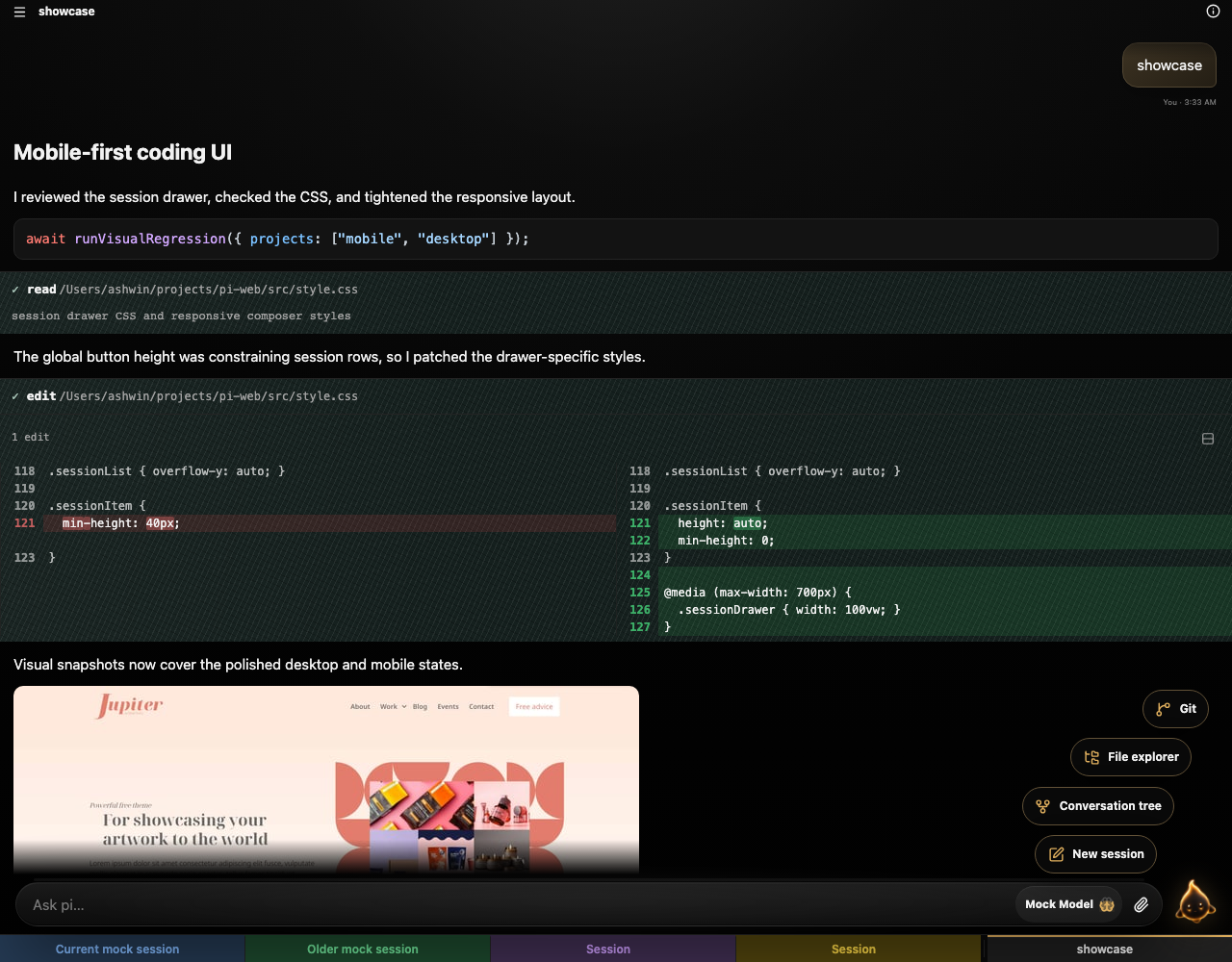
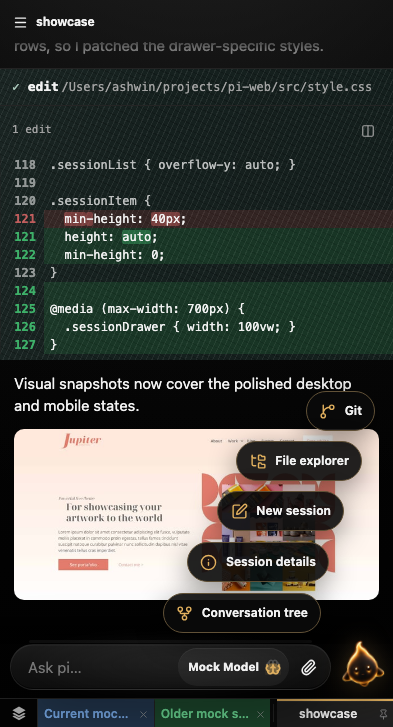
pi-web is a focused browser workspace for substantial, inspectable agent work across mobile, desktop, and tablet. pi is its current default and full-capability reference harness; the architecture is being designed to support additional harnesses without reducing what pi can do.
It keeps the surrounding work visible—sessions, rich artifacts, files, diagrams, tool output, diffs, and extension-built workflow UI—without trying to become a full IDE.
| Desktop | Mobile |
|---|---|
 |  |
0.6.1 updates pi-web's bundled Pi runtime to Pi 0.87.1. No separate global Pi installation is required.
See the 0.6.1 release notes. For the preceding feature release, see 0.6.0.
Requires Node.js 24 or newer. pi-web currently uses pi as its agent harness; pi-web 0.6.1 bundles Pi 0.87.1, so a separate global Pi install is not required.
Install and run pi-web from npm:
npm i -g @ashwin-pc/pi-web
pi-web
Or run pi-web without a global install:
npx -y @ashwin-pc/pi-web@latest
From a GitHub release asset:
# Download ashwin-pc-pi-web-<version>.tgz from the release page, then:
npm install -g ./ashwin-pc-pi-web-*.tgz
pi-web
pi-web starts on http://127.0.0.1:8787 and runs Pi in the directory where you invoke it; override that workspace with PI_WEB_CWD=/path/to/project pi-web. On a genuinely unconfigured installation, the terminal prints a single-use, ten-minute setup URL for enrolling a browser password or passkey.
Provider credentials and pi-web login serve different purposes. Configure model-provider credentials locally through Pi. For interactive provider login, install and launch the Pi terminal CLI:
npm install -g @earendil-works/pi-coding-agent
pi
Run /login inside that terminal CLI, complete provider authentication, then exit Pi. pi-web uses the same local provider credentials. Separately, use pi-web's browser sign-in and Settings → Security to control access to the web application. See authentication and recovery for browser setup, migration, and recovery.
Clone the repository and install its dependencies first:
git clone https://github.com/ashwin-pc/pi-web.git
cd pi-web
npm install
npm run dev
This starts a stable TypeScript supervisor on 8787 and a restartable child server on 8788. The public URL still serves:
/api/*/wsThe supervisor also exposes:
POST /api/restart - restart the child server safelyGET /__supervisor/status - inspect child PID/generationOpen:
http://127.0.0.1:8787
Edit files under src/ and Vite will update the UI live. If the agent edits server.ts, call POST /api/restart instead of killing the public server; the supervisor stays alive and the browser reconnects.
By default, Pi operates in the directory where you start this server. To point Pi at another project:
PI_WEB_CWD=/Users/ashwin/projects/comfy-lan-webapp npm run dev
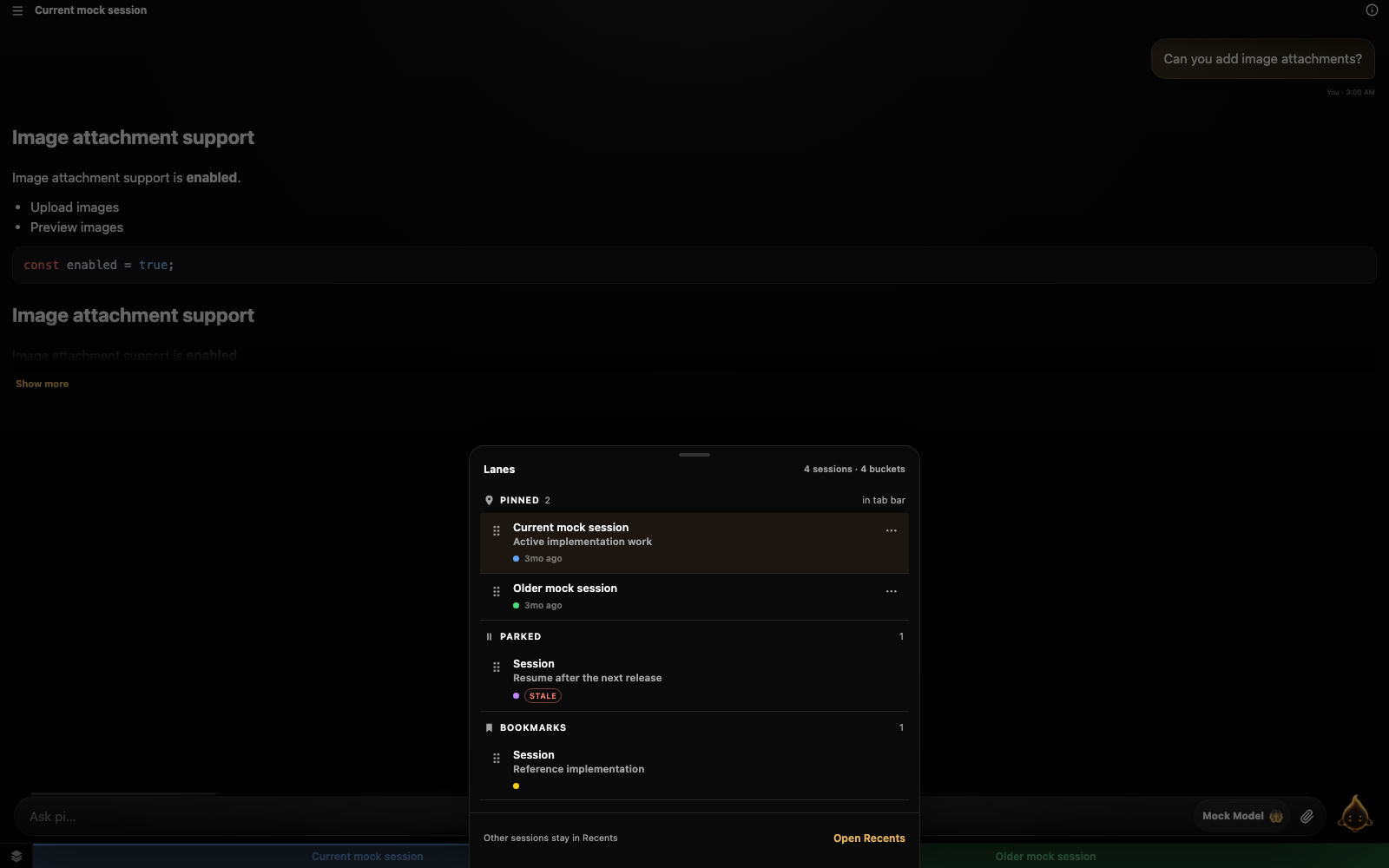
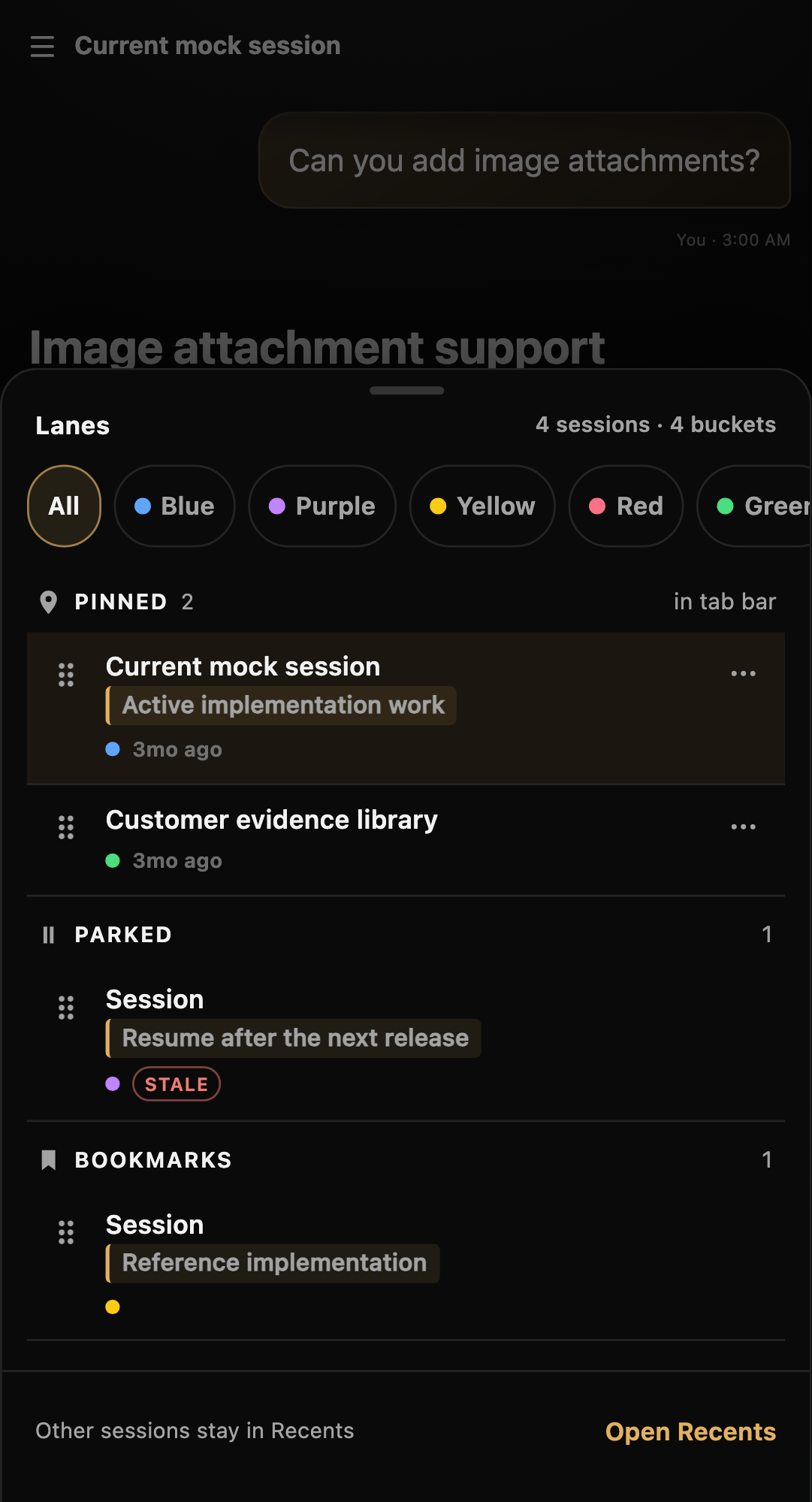
The session UI is built for small screens first, then scales up to desktop. Session lanes keep active work Pinned, paused work Parked, and useful references in Bookmarks. The dedicated lane drawer supports notes, bucket markers, stale parked-session badges, and drag-and-drop ordering within or across lanes, while pinned sessions remain immediately available in the tab bar.
Right-click a session—or long-press it on touch devices—to open the Inspector Card and change its lane, bucket, or optional note. Keyboard shortcuts cover pinning (Ctrl/Cmd+Shift+P), parking (Ctrl/Cmd+Shift+K), bookmarking (Ctrl/Cmd+Shift+B), and cycling through the focused lane (Ctrl/Cmd+Shift+←/→).
Copy a saved message or session link and paste it into another conversation. Markdown links such as [Decision](/?sessionId=<id>&entryId=<entry-id>) render as chat-icon citations and open the session at that message. If the message is outside the visible transcript, the UI shows a bounded read-only quote with links to the saved message and its session, without changing branches. The core sessions_read tool accepts a session ID or a copied link in its id argument, with optional tail for short session excerpts; links require the instance's usual access.
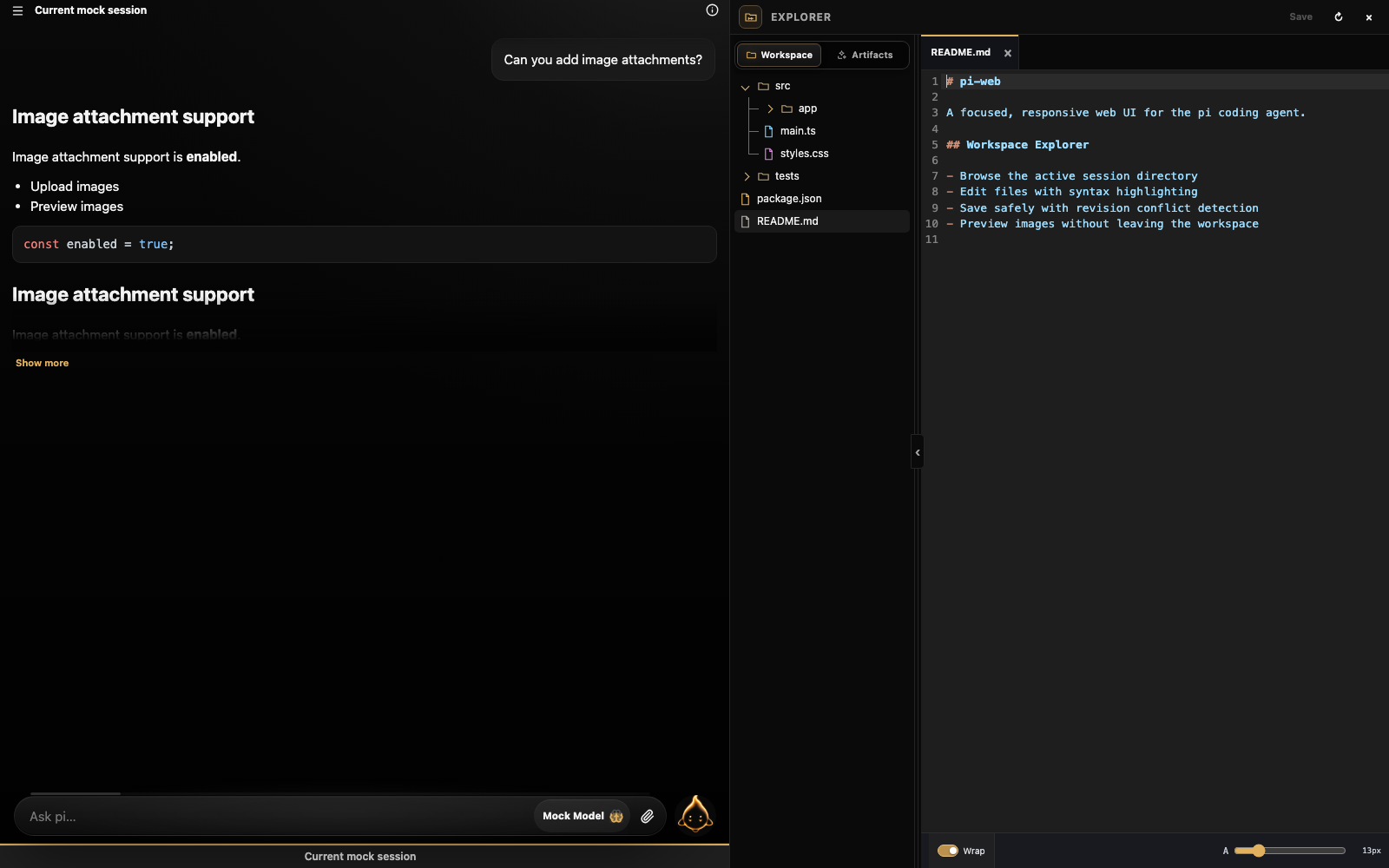
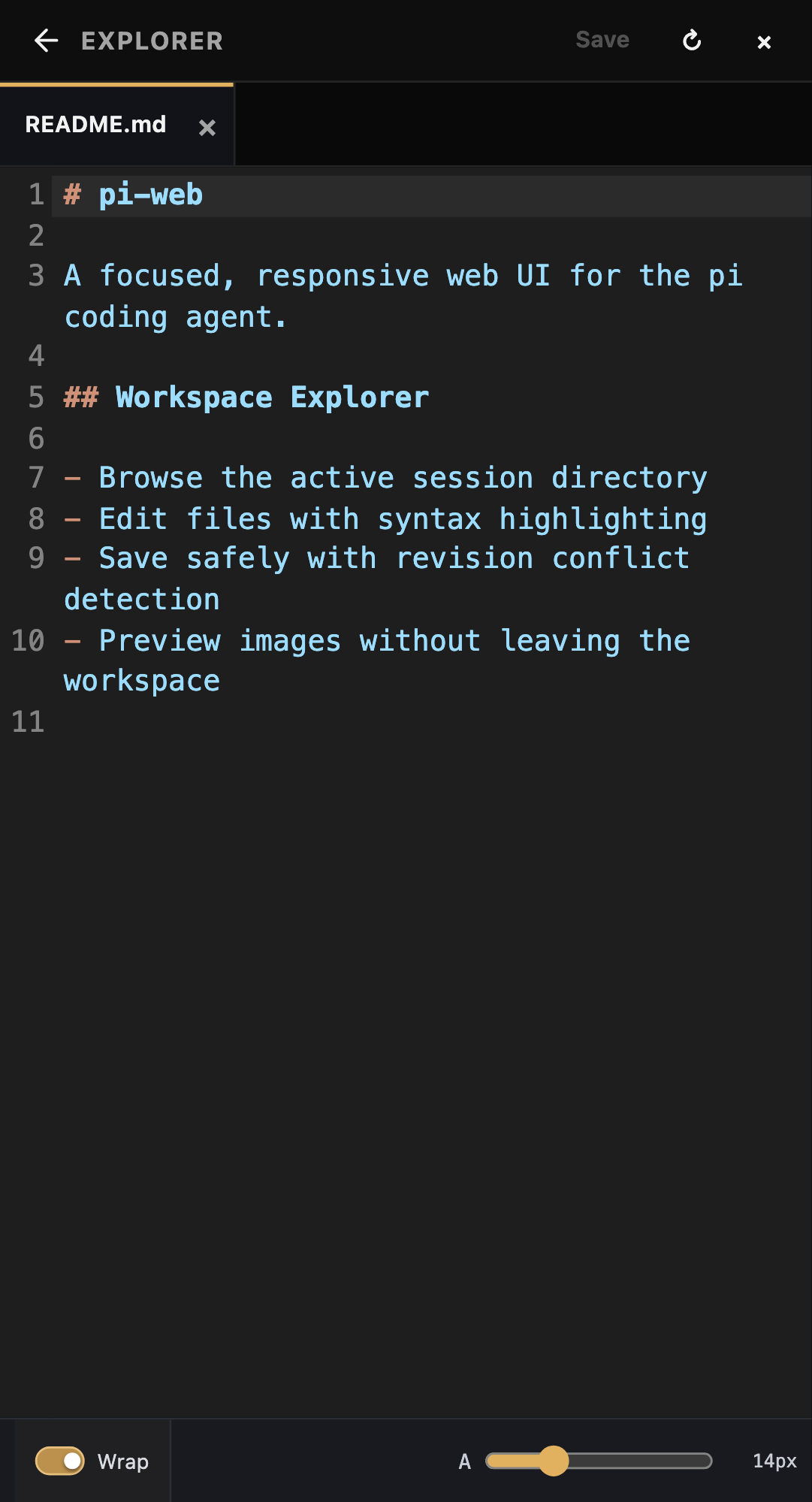
The responsive Explorer opens the active session's working directory as a lazy-loaded file tree and a full CodeMirror editor. A dedicated Artifacts scope presents generated project output as a visual gallery, with large interactive previews for images, sandboxed HTML, rendered Markdown, video, and PDFs—without digging through Pi's internal storage folders. Workspace and Artifacts each preserve their folder, scroll, and preview state when switching views or reopening the panel. Browser Back returns an open file or artifact to its prior tree or gallery before closing the panel on the next step. The Explorer supports syntax highlighting, multiple closeable tabs, conflict-aware saves, search and editor shortcuts, line wrapping, pinch or slider font resizing, and a resizable or collapsible tree. Desktop keeps chat, tree, and editor visible together; phones and touch-first foldables switch cleanly between the tree and editor without summoning the keyboard until the editor is tapped.
File access stays scoped to the session working directory. The server rejects path traversal and escaping symlinks, detects binary and oversized files, writes atomically, and uses revisions to prevent silently overwriting changes made elsewhere.
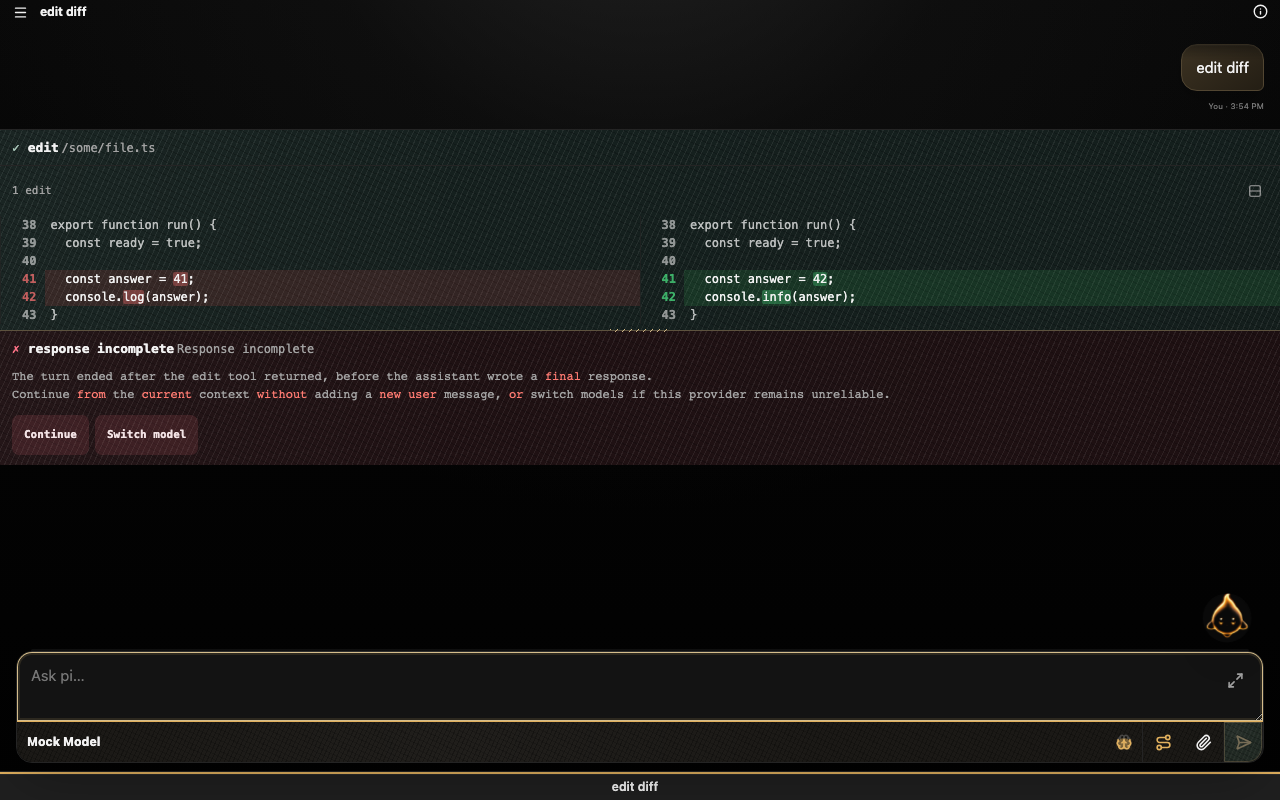
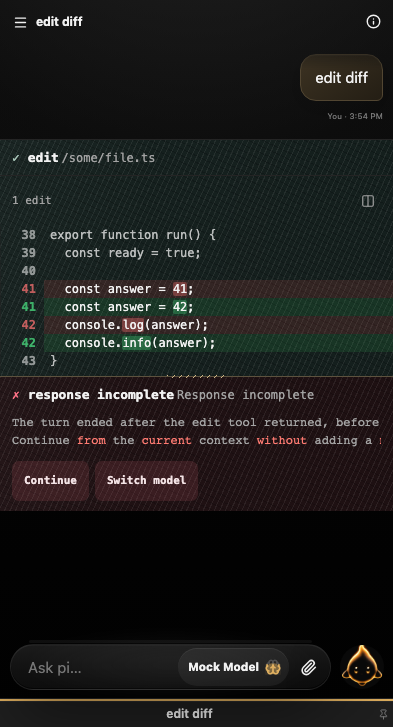
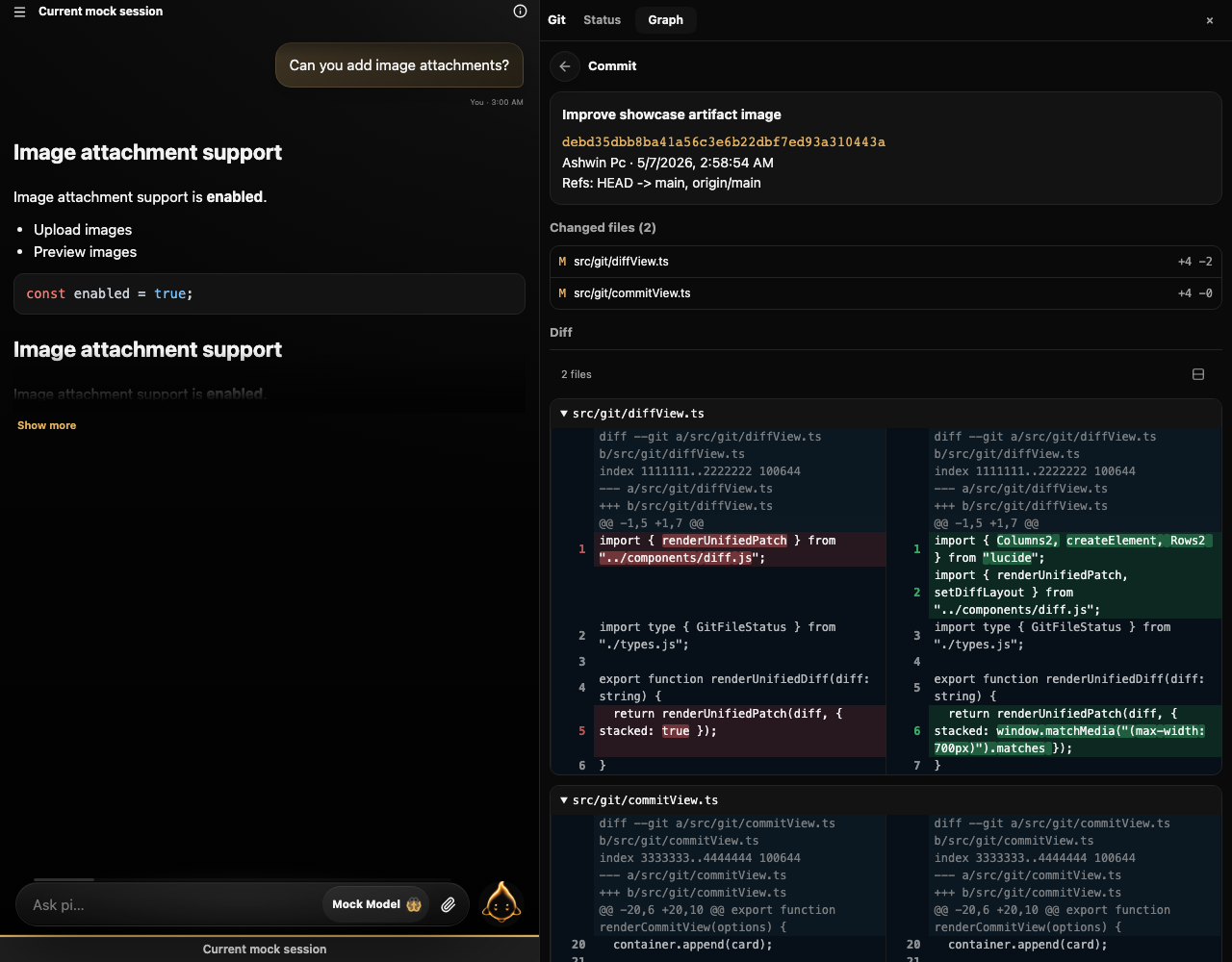
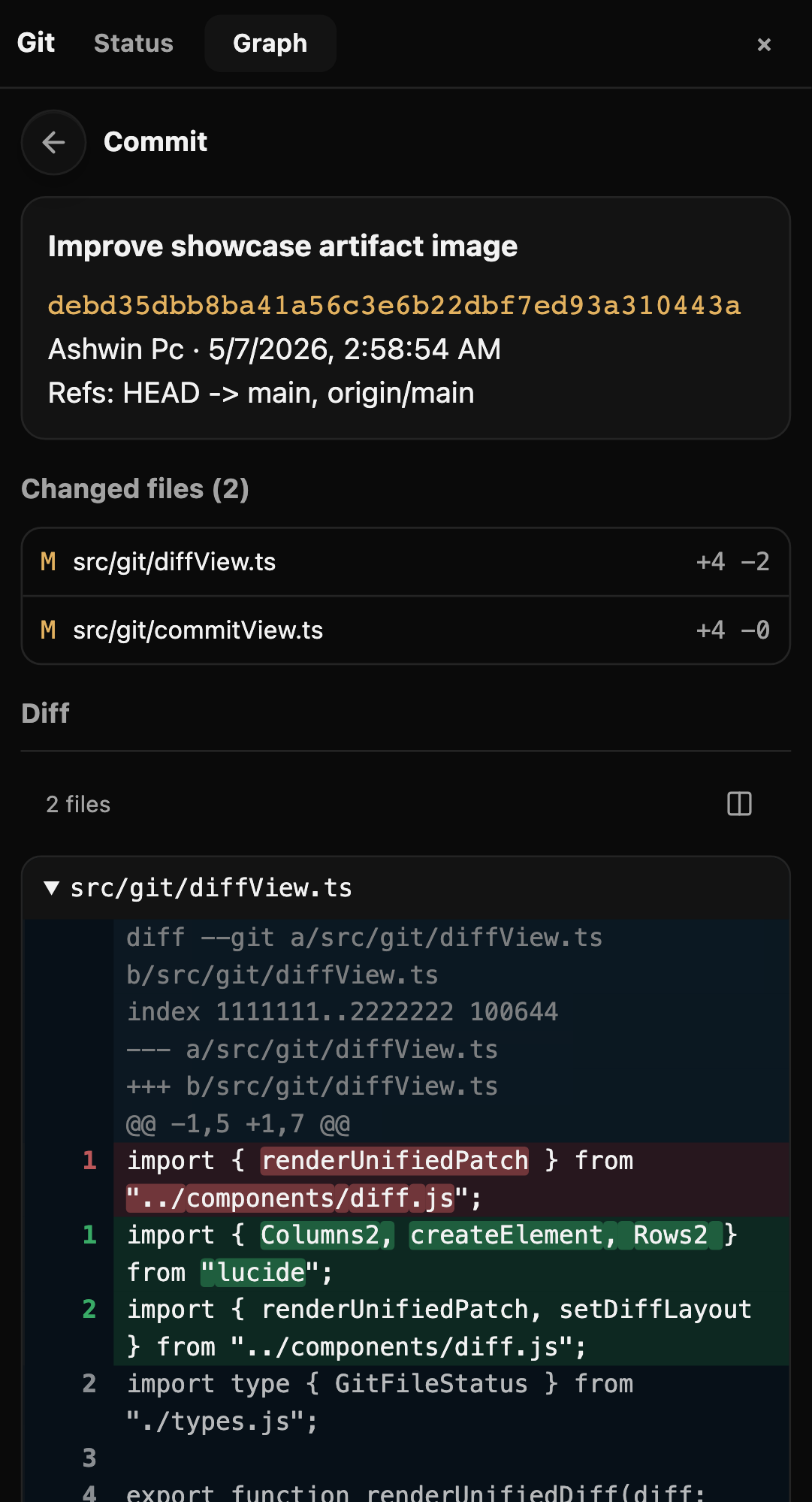
A shared diff viewer supports side-by-side or stacked layouts with intraline highlighting. It is used by both edit tool cards and Git diffs, so code review feels consistent across agent changes and repository history.
The Git button in the header opens a responsive Git panel for repo status, commit history, per-file diffs, per-commit diffs, and sync with fetch + rebase pull.
contexts/web-ui.md is injected into agent sessions so pi understands pi-web behavior such as artifact links, image rendering, and supervised restarts. Bundled pi extensions add pi-web defaults, including automatic session naming from the first prompt.
pi-web supports browser-specific extensions in .pi/web/extensions and ~/.pi/web/extensions. These use pi's extension runtime and a typed contribution API for footers, actions, panels, settings, artifact previews, and Git tabs.
Trusted server-side extensions can also use core-managed, short-lived HTTP clients whose routes and session targets are checked by pi-web. These capabilities reduce credential exposure but do not sandbox installed extension code. See pi-web extensions and scoped extension HTTP, including the bundled multi-agent session orchestrator.
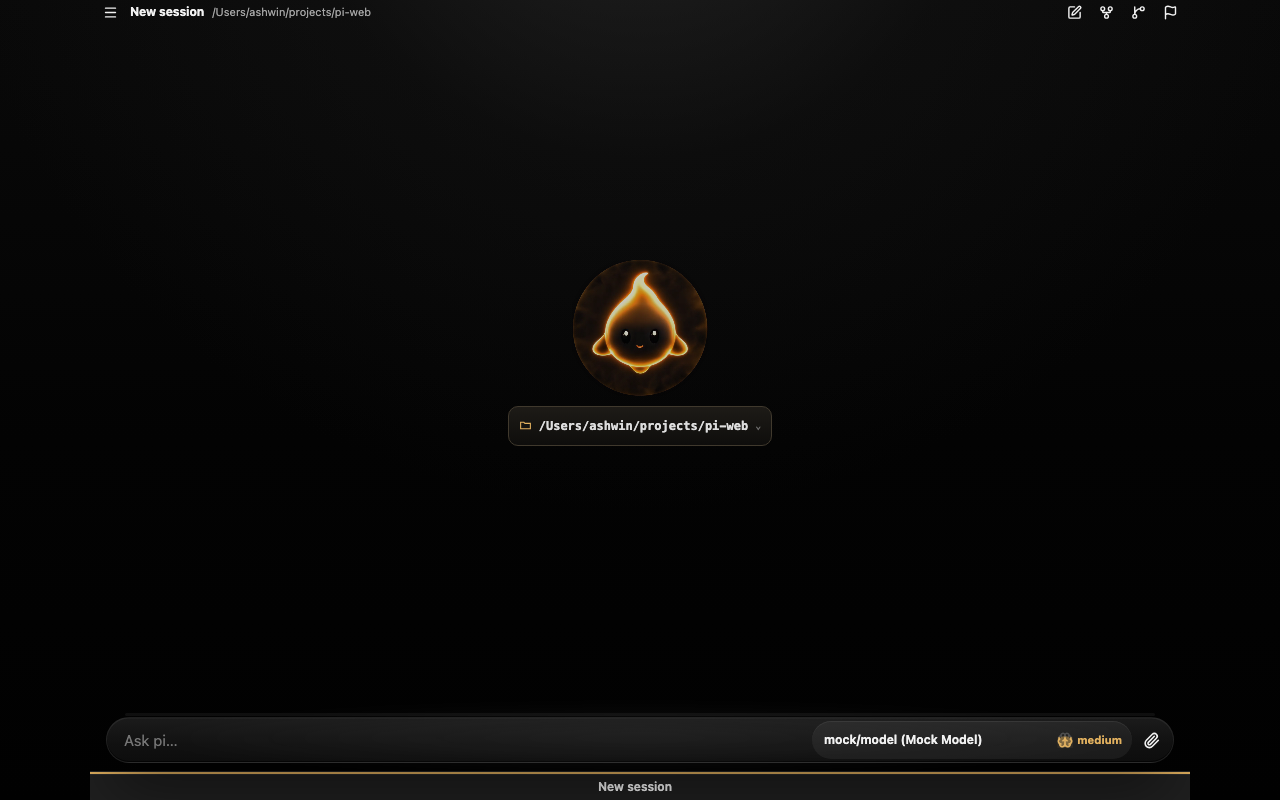
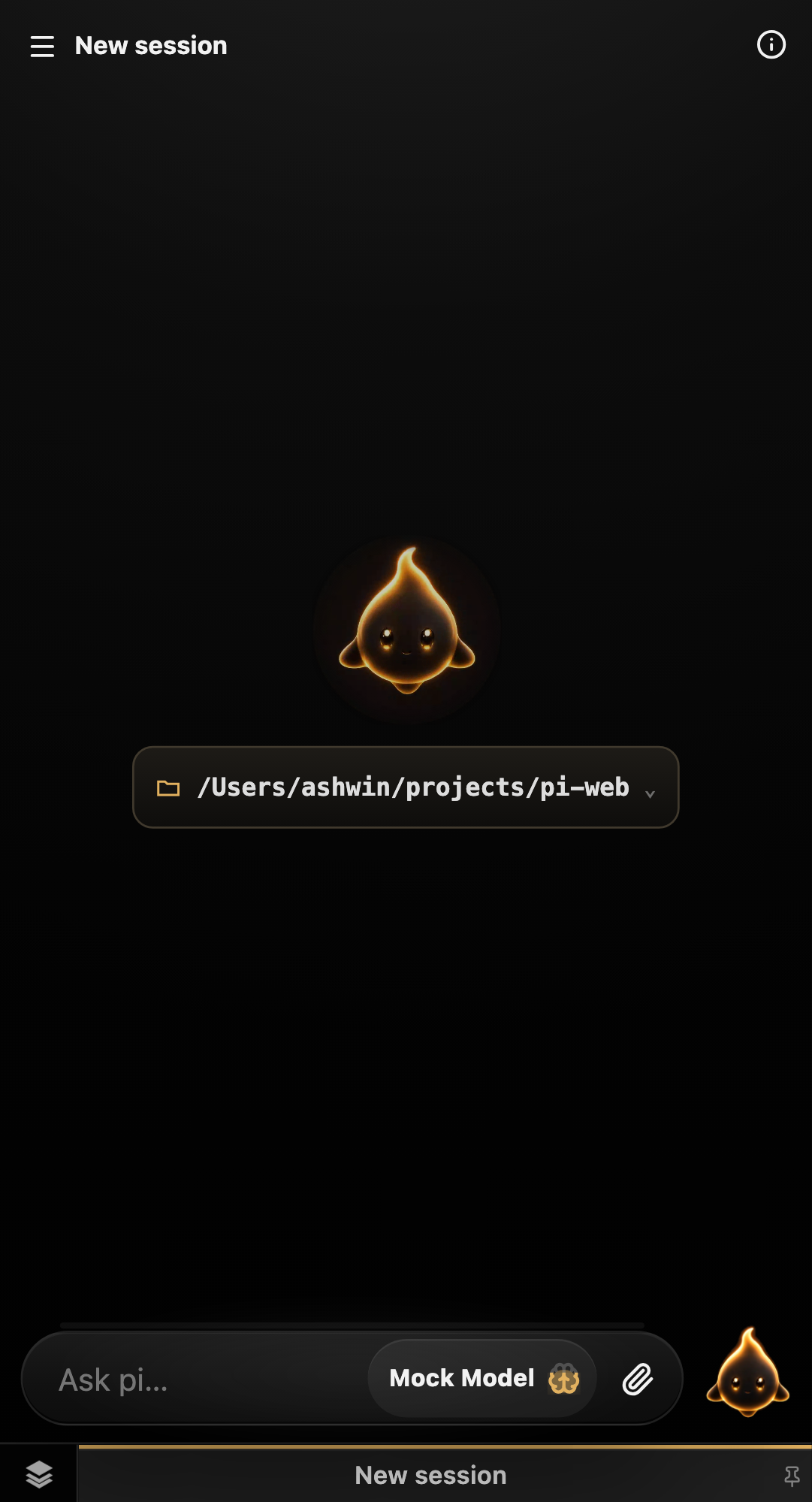
The README references the same deterministic Playwright visual snapshots used by tests/e2e/visual.spec.ts. Desktop and mobile captures are shown side by side, and when visual snapshots are intentionally updated, these images update with them.
New sessions open with a lightweight animated empty state and a compact working-directory control. The visual baseline waits for the animation’s settled final frame so screenshot comparisons stay deterministic.
| Desktop | Mobile |
|---|---|
 |  |
The Explorer uses the same session-scoped file tree and CodeMirror editor on every device. Desktop keeps the conversation and workspace side by side, while mobile switches to a focused editor view with a compact back control and touch-safe keyboard behavior.
| Desktop | Mobile |
|---|---|
 |  |
| Desktop | Mobile |
|---|---|
 |  |
Pinned, Parked, and Bookmarks form a persistent session workspace. The same lane manager becomes a desktop drawer or mobile bottom sheet, with flat session rows, optional notes, bucket markers, timestamps, drag handles, and quick access to the Inspector Card.
| Desktop | Mobile |
|---|---|
 |  |
Desktop uses a split master/detail layout; mobile switches between status, graph, diff, and commit detail views.
| Desktop | Mobile |
|---|---|
 |  |
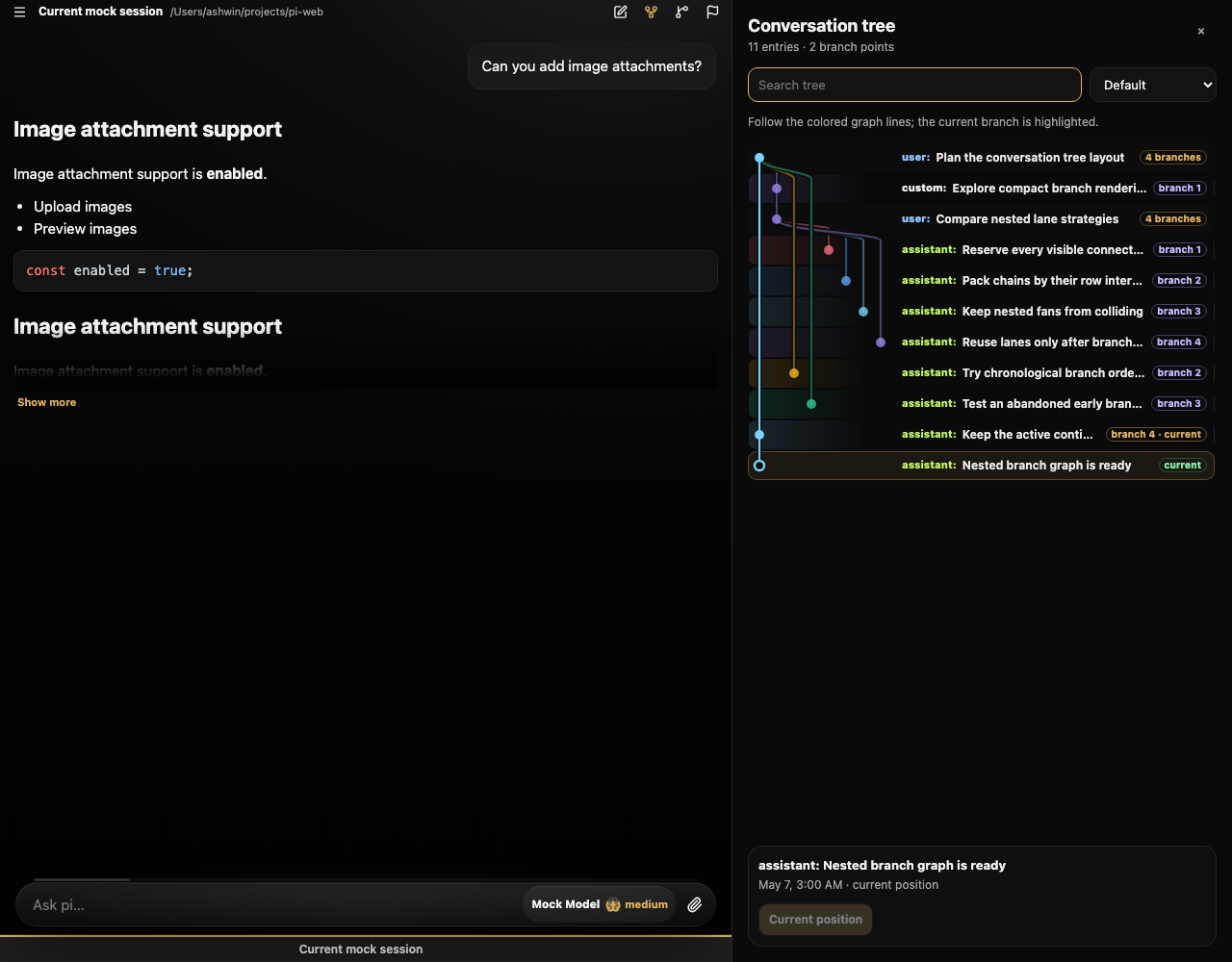
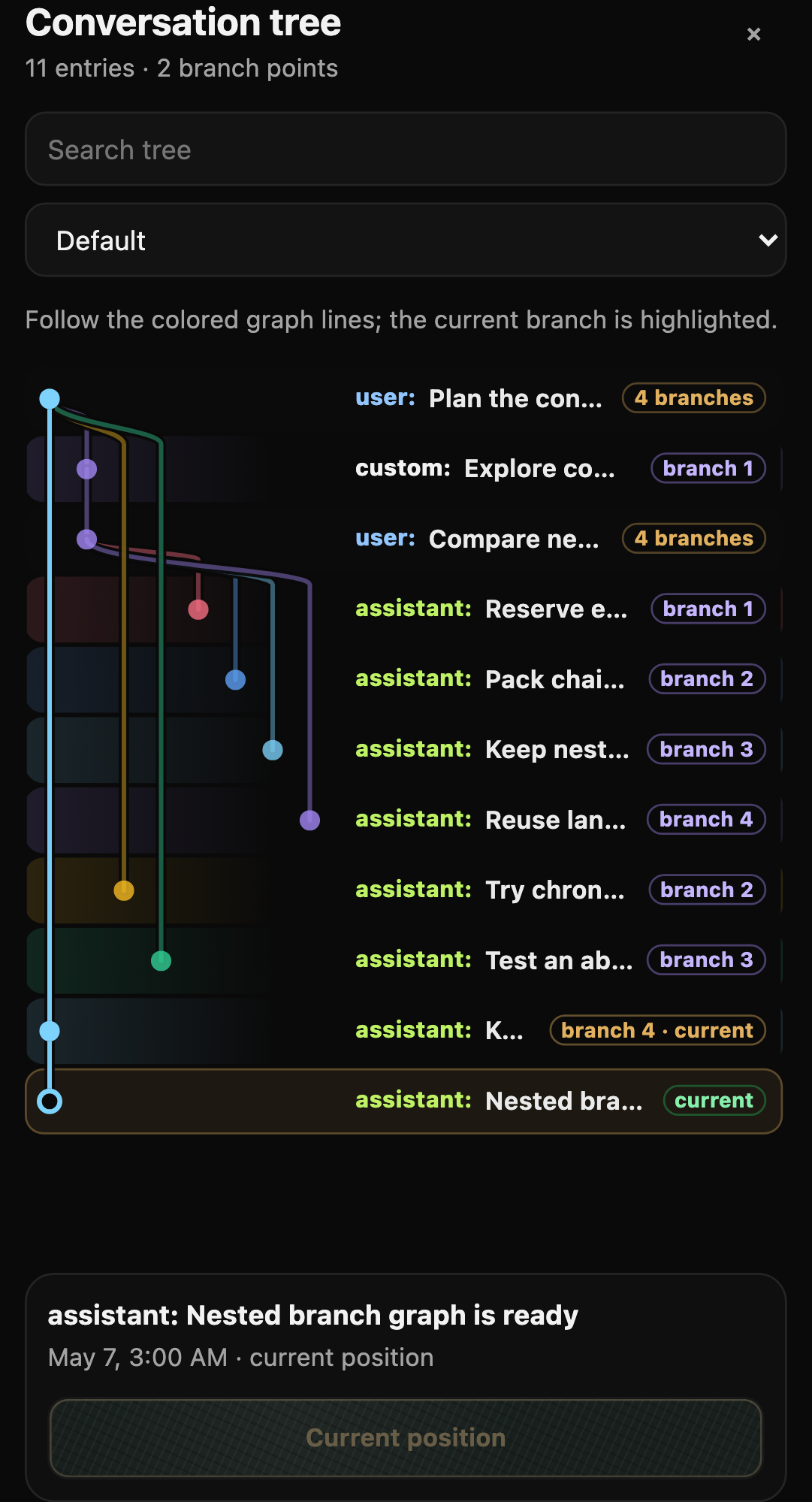
Navigate even elaborate, nested pi session branches with a compact tree drawer. Alternate paths stay grouped beside their fork, globally packed graph lanes keep nested branch fans from colliding, and the highlighted current path remains easy to follow. The default view keeps tool noise hidden, while the full session structure remains available from the filter.
| Nested branches · Desktop | Nested branches · Mobile |
|---|---|
 |  |
npm run build
npm start
npm start serves the compiled dist/ app and API from one process.
pi-web binds to localhost by default. Remote browser login—especially passkeys—needs a secure HTTPS origin. Keep the app on loopback behind a TLS-terminating reverse proxy or secure-networking proxy, set PI_WEB_AUTH_ORIGIN to the exact public origin, and restrict direct backend access. Keeping the application listener on loopback also supports the scoped HTTP client used by server-side extensions; a direct non-loopback-only bind does not.
For example, Tailscale Serve can provide HTTPS while Node remains localhost-only:
PI_WEB_AUTH_ORIGIN=https://your-machine.your-tailnet.ts.net \
PI_WEB_CWD=/path/to/project \
HOST=127.0.0.1 \
PORT=8787 \
pi-web
In another terminal:
tailscale serve --bg http://127.0.0.1:8787
Open the configured HTTPS origin. On a new installation, follow the single-use setup URL printed by pi-web; no legacy token is needed. Existing legacy installations should enroll and verify a replacement in Settings → Security before retiring legacy. For exact proxy-header requirements, authentication migration, recovery commands, and alternative methods, follow the authentication guide.
HOST - bind host, default 127.0.0.1PORT - bind port, default 8787PI_WEB_TOKEN - deprecated legacy credential; removable after replacement login is verifiedPI_WEB_AUTH_POLICY - authenticated or deliberately openPI_WEB_AUTH_METHODS - comma-separated passkey,password,legacy,external; saved Settings configuration takes precedence after enrollment/configurationPI_WEB_AUTH_MODE - compatibility preset translated into the canonical policy/method defaultsPI_WEB_AUTH_ORIGIN - exact public origin for login/WebAuthn/CSRF, including HTTPS and portPI_WEB_AUTH_RP_ID - WebAuthn RP ID, defaults to origin hostnamePI_WEB_AUTH_TRUSTED_HEADER - verified proxy identity header; requires a restricted backendPI_WEB_AUTH_STORE - authentication database path (default ~/.pi/agent/web/auth.json); independent dev/production instances must use different paths, otherwise policy and revocation changes are shared livePI_WEB_AUTH_PROXY_PEERS - exact socket IPs trusted to supply one strictly parsed X-Forwarded-Host and a sanitized single-IP X-Forwarded-For; the proxy must overwrite caller headers and backend access must be restricted (unset by default)PI_WEB_CWD - project directory Pi should operate in, default current directoryPI_WEB_NO_SESSION=1 - use in-memory sessions onlyPI_WEB_CHILD_HOST - supervised child bind host, default 127.0.0.1PI_WEB_CHILD_PORT - supervised child port, default PORT + 1 (for example 8788 when PORT=8787)PI_WEB_RESTART_GRACE_MS - delay between child stop/start, default 250The app is TypeScript end-to-end:
supervisor.ts is a small stable dev supervisor that owns the public port and restarts the app server safelyserver.ts is the restartable Pi API/WebSocket server, run directly with tsxsrc/main.ts bootstraps the modular Vite frontend with HMR; see docs/frontend-architecture.mdserver.ts embeds Vite middleware while supervisor.ts proxies API, WebSocket, and HMR trafficAGENTS.md provides normal project-specific pi instructions when the target cwd is this repoThis app can drive Pi tools such as bash, write, and edit. Restrict network access and use authenticated access over HTTPS. Human logins share revocable browser sessions; named API tokens are separate machine credentials. See security design, recovery, and migration.
457 followers · starred Jun 2026
52 followers · starred Jun 2026
The best interface for working with your agents.
Website · Getting started · Extensions
Set PI_WEB_HOME to isolate pi-web's own state, independently of the agent's credentials, models and sessions (PI_CODING_AGENT_DIR):
PORT=8807 PI_WEB_HOME=/tmp/inst1/web PI_CODING_AGENT_DIR=/tmp/inst1/pi npm run dev
Existing per-file overrides take precedence. With PI_WEB_HOME unset (or empty), all existing locations remain unchanged; no files are moved.
| State | Path under PI_WEB_HOME | Existing override |
|---|---|---|
| Login/API token store | web/auth.json | PI_WEB_AUTH_STORE |
| Pins, markers and UI history | pi-web-session-ui-state.json (and sidecars) | PI_WEB_SESSION_UI_STATE_FILE |
| Push subscriptions | pi-web-push.json | PI_WEB_PUSH_FILE |
| Settings | pi-web-settings.json | PI_WEB_SETTINGS_FILE |
| Global web extensions | extensions/ | — |
| Example notepad | notepad.json, notepad-archive.jsonl, legacy notepad.md | PI_WEB_NOTEPAD_FILE (archive/markdown follow its location) |
Project extensions remain in <cwd>/.pi/web/extensions. This version's notepad has no separate database/vault, and the session orchestrator uses a ledger in agent session files rather than a delegation spool; those sessions remain under the agent home. Extensions with their own resolvable @ashwin-pc/pi-web dependency can import the shared resolveWebHomePath(file, legacyPath, override?) helper from @ashwin-pc/pi-web/extensions. Copied standalone extensions should keep runtime path helpers self-contained and package imports type-only: a global or npx install is not on their Node package resolution path.
npm run instance -- my-instance --mock
npm run instance -- my-instance --stop
npm run instance -- <name> [--mock] [--worktree] creates private state folders in ~/.pi/web-instances/<name>/{web,pi}, chooses a free public/child port pair, and starts pi-web-<name> in tmux. It clears inherited PI_WEB_* configuration (including PI_WEB_TOKEN), mints a stored API token with the auth CLI, waits for an authenticated API response, then prints the URL, token (shown once), and stop command. Use the UI's Set token action with that token. Logs are in ~/.pi/web-instances/<name>/server.log. Duplicate launches fail without stopping the existing session.
Without --mock, the launcher seeds missing auth.json and models.json from the current PI_CODING_AGENT_DIR (or ~/.pi/agent); it never overwrites existing instance files or copies settings or sessions. OAuth caveat: copied credentials can share rotating refresh tokens with the source install; refreshing in either instance can invalidate the other's login. Use API keys or log in separately in the instance to avoid sharing OAuth credentials. --mock skips that copy and uses the mock harness.
--worktree creates a detached Git worktree at ~/.pi/web-instances/<name>/worktree from the current committed HEAD, reuses it on subsequent launches, and runs both server and agent there. It shares the source checkout's node_modules installation via a symlink; uncommitted source changes are not copied. Without the flag, the current checkout is used. --stop stops the tmux session and its server, but preserves state and the worktree for reuse.
pi-web is a focused browser workspace for substantial, inspectable agent work across mobile, desktop, and tablet. pi is its current default and full-capability reference harness; the architecture is being designed to support additional harnesses without reducing what pi can do.
It keeps the surrounding work visible—sessions, rich artifacts, files, diagrams, tool output, diffs, and extension-built workflow UI—without trying to become a full IDE.
| Desktop | Mobile |
|---|---|
| |
0.6.1 updates pi-web's bundled Pi runtime to Pi 0.87.1. No separate global Pi installation is required.
See the 0.6.1 release notes. For the preceding feature release, see 0.6.0.
Requires Node.js 24 or newer. pi-web currently uses pi as its agent harness; pi-web 0.6.1 bundles Pi 0.87.1, so a separate global Pi install is not required.
Install and run pi-web from npm:
npm i -g @ashwin-pc/pi-web
pi-web
Or run pi-web without a global install:
npx -y @ashwin-pc/pi-web@latest
From a GitHub release asset:
# Download ashwin-pc-pi-web-<version>.tgz from the release page, then:
npm install -g ./ashwin-pc-pi-web-*.tgz
pi-web
pi-web starts on http://127.0.0.1:8787 and runs Pi in the directory where you invoke it; override that workspace with PI_WEB_CWD=/path/to/project pi-web. On a genuinely unconfigured installation, the terminal prints a single-use, ten-minute setup URL for enrolling a browser password or passkey.
Provider credentials and pi-web login serve different purposes. Configure model-provider credentials locally through Pi. For interactive provider login, install and launch the Pi terminal CLI:
npm install -g @earendil-works/pi-coding-agent
pi
Run /login inside that terminal CLI, complete provider authentication, then exit Pi. pi-web uses the same local provider credentials. Separately, use pi-web's browser sign-in and Settings → Security to control access to the web application. See authentication and recovery for browser setup, migration, and recovery.
Clone the repository and install its dependencies first:
git clone https://github.com/ashwin-pc/pi-web.git
cd pi-web
npm install
npm run dev
This starts a stable TypeScript supervisor on 8787 and a restartable child server on 8788. The public URL still serves:
/api/*/wsThe supervisor also exposes:
POST /api/restart - restart the child server safelyGET /__supervisor/status - inspect child PID/generationOpen:
http://127.0.0.1:8787
Edit files under src/ and Vite will update the UI live. If the agent edits server.ts, call POST /api/restart instead of killing the public server; the supervisor stays alive and the browser reconnects.
By default, Pi operates in the directory where you start this server. To point Pi at another project:
PI_WEB_CWD=/Users/ashwin/projects/comfy-lan-webapp npm run dev
The session UI is built for small screens first, then scales up to desktop. Session lanes keep active work Pinned, paused work Parked, and useful references in Bookmarks. The dedicated lane drawer supports notes, bucket markers, stale parked-session badges, and drag-and-drop ordering within or across lanes, while pinned sessions remain immediately available in the tab bar.
Right-click a session—or long-press it on touch devices—to open the Inspector Card and change its lane, bucket, or optional note. Keyboard shortcuts cover pinning (Ctrl/Cmd+Shift+P), parking (Ctrl/Cmd+Shift+K), bookmarking (Ctrl/Cmd+Shift+B), and cycling through the focused lane (Ctrl/Cmd+Shift+←/→).
Copy a saved message or session link and paste it into another conversation. Markdown links such as [Decision](/?sessionId=<id>&entryId=<entry-id>) render as chat-icon citations and open the session at that message. If the message is outside the visible transcript, the UI shows a bounded read-only quote with links to the saved message and its session, without changing branches. The core sessions_read tool accepts a session ID or a copied link in its id argument, with optional tail for short session excerpts; links require the instance's usual access.
The responsive Explorer opens the active session's working directory as a lazy-loaded file tree and a full CodeMirror editor. A dedicated Artifacts scope presents generated project output as a visual gallery, with large interactive previews for images, sandboxed HTML, rendered Markdown, video, and PDFs—without digging through Pi's internal storage folders. Workspace and Artifacts each preserve their folder, scroll, and preview state when switching views or reopening the panel. Browser Back returns an open file or artifact to its prior tree or gallery before closing the panel on the next step. The Explorer supports syntax highlighting, multiple closeable tabs, conflict-aware saves, search and editor shortcuts, line wrapping, pinch or slider font resizing, and a resizable or collapsible tree. Desktop keeps chat, tree, and editor visible together; phones and touch-first foldables switch cleanly between the tree and editor without summoning the keyboard until the editor is tapped.
File access stays scoped to the session working directory. The server rejects path traversal and escaping symlinks, detects binary and oversized files, writes atomically, and uses revisions to prevent silently overwriting changes made elsewhere.
A shared diff viewer supports side-by-side or stacked layouts with intraline highlighting. It is used by both edit tool cards and Git diffs, so code review feels consistent across agent changes and repository history.
The Git button in the header opens a responsive Git panel for repo status, commit history, per-file diffs, per-commit diffs, and sync with fetch + rebase pull.
contexts/web-ui.md is injected into agent sessions so pi understands pi-web behavior such as artifact links, image rendering, and supervised restarts. Bundled pi extensions add pi-web defaults, including automatic session naming from the first prompt.
pi-web supports browser-specific extensions in .pi/web/extensions and ~/.pi/web/extensions. These use pi's extension runtime and a typed contribution API for footers, actions, panels, settings, artifact previews, and Git tabs.
Trusted server-side extensions can also use core-managed, short-lived HTTP clients whose routes and session targets are checked by pi-web. These capabilities reduce credential exposure but do not sandbox installed extension code. See pi-web extensions and scoped extension HTTP, including the bundled multi-agent session orchestrator.
The README references the same deterministic Playwright visual snapshots used by tests/e2e/visual.spec.ts. Desktop and mobile captures are shown side by side, and when visual snapshots are intentionally updated, these images update with them.
New sessions open with a lightweight animated empty state and a compact working-directory control. The visual baseline waits for the animation’s settled final frame so screenshot comparisons stay deterministic.
| Desktop | Mobile |
|---|---|
| |
The Explorer uses the same session-scoped file tree and CodeMirror editor on every device. Desktop keeps the conversation and workspace side by side, while mobile switches to a focused editor view with a compact back control and touch-safe keyboard behavior.
| Desktop | Mobile |
|---|---|
| |
| Desktop | Mobile |
|---|---|
| |
Pinned, Parked, and Bookmarks form a persistent session workspace. The same lane manager becomes a desktop drawer or mobile bottom sheet, with flat session rows, optional notes, bucket markers, timestamps, drag handles, and quick access to the Inspector Card.
| Desktop | Mobile |
|---|---|
| |
Desktop uses a split master/detail layout; mobile switches between status, graph, diff, and commit detail views.
| Desktop | Mobile |
|---|---|
| |
Navigate even elaborate, nested pi session branches with a compact tree drawer. Alternate paths stay grouped beside their fork, globally packed graph lanes keep nested branch fans from colliding, and the highlighted current path remains easy to follow. The default view keeps tool noise hidden, while the full session structure remains available from the filter.
| Nested branches · Desktop | Nested branches · Mobile |
|---|---|
| |
npm run build
npm start
npm start serves the compiled dist/ app and API from one process.
pi-web binds to localhost by default. Remote browser login—especially passkeys—needs a secure HTTPS origin. Keep the app on loopback behind a TLS-terminating reverse proxy or secure-networking proxy, set PI_WEB_AUTH_ORIGIN to the exact public origin, and restrict direct backend access. Keeping the application listener on loopback also supports the scoped HTTP client used by server-side extensions; a direct non-loopback-only bind does not.
For example, Tailscale Serve can provide HTTPS while Node remains localhost-only:
PI_WEB_AUTH_ORIGIN=https://your-machine.your-tailnet.ts.net \
PI_WEB_CWD=/path/to/project \
HOST=127.0.0.1 \
PORT=8787 \
pi-web
In another terminal:
tailscale serve --bg http://127.0.0.1:8787
Open the configured HTTPS origin. On a new installation, follow the single-use setup URL printed by pi-web; no legacy token is needed. Existing legacy installations should enroll and verify a replacement in Settings → Security before retiring legacy. For exact proxy-header requirements, authentication migration, recovery commands, and alternative methods, follow the authentication guide.
HOST - bind host, default 127.0.0.1PORT - bind port, default 8787PI_WEB_TOKEN - deprecated legacy credential; removable after replacement login is verifiedPI_WEB_AUTH_POLICY - authenticated or deliberately openPI_WEB_AUTH_METHODS - comma-separated passkey,password,legacy,external; saved Settings configuration takes precedence after enrollment/configurationPI_WEB_AUTH_MODE - compatibility preset translated into the canonical policy/method defaultsPI_WEB_AUTH_ORIGIN - exact public origin for login/WebAuthn/CSRF, including HTTPS and portPI_WEB_AUTH_RP_ID - WebAuthn RP ID, defaults to origin hostnamePI_WEB_AUTH_TRUSTED_HEADER - verified proxy identity header; requires a restricted backendPI_WEB_AUTH_STORE - authentication database path (default ~/.pi/agent/web/auth.json); independent dev/production instances must use different paths, otherwise policy and revocation changes are shared livePI_WEB_AUTH_PROXY_PEERS - exact socket IPs trusted to supply one strictly parsed X-Forwarded-Host and a sanitized single-IP X-Forwarded-For; the proxy must overwrite caller headers and backend access must be restricted (unset by default)PI_WEB_CWD - project directory Pi should operate in, default current directoryPI_WEB_NO_SESSION=1 - use in-memory sessions onlyPI_WEB_CHILD_HOST - supervised child bind host, default 127.0.0.1PI_WEB_CHILD_PORT - supervised child port, default PORT + 1 (for example 8788 when PORT=8787)PI_WEB_RESTART_GRACE_MS - delay between child stop/start, default 250The app is TypeScript end-to-end:
supervisor.ts is a small stable dev supervisor that owns the public port and restarts the app server safelyserver.ts is the restartable Pi API/WebSocket server, run directly with tsxsrc/main.ts bootstraps the modular Vite frontend with HMR; see docs/frontend-architecture.mdserver.ts embeds Vite middleware while supervisor.ts proxies API, WebSocket, and HMR trafficAGENTS.md provides normal project-specific pi instructions when the target cwd is this repoThis app can drive Pi tools such as bash, write, and edit. Restrict network access and use authenticated access over HTTPS. Human logins share revocable browser sessions; named API tokens are separate machine credentials. See security design, recovery, and migration.
457 followers · starred Jun 2026
52 followers · starred Jun 2026





