Pi — A cross-platform AI coding agent, bringing the Claude Code experience to your desktop. No environment setup, no terminal commands. Download and start coding right away.
See the codeEnglish | 简体中文
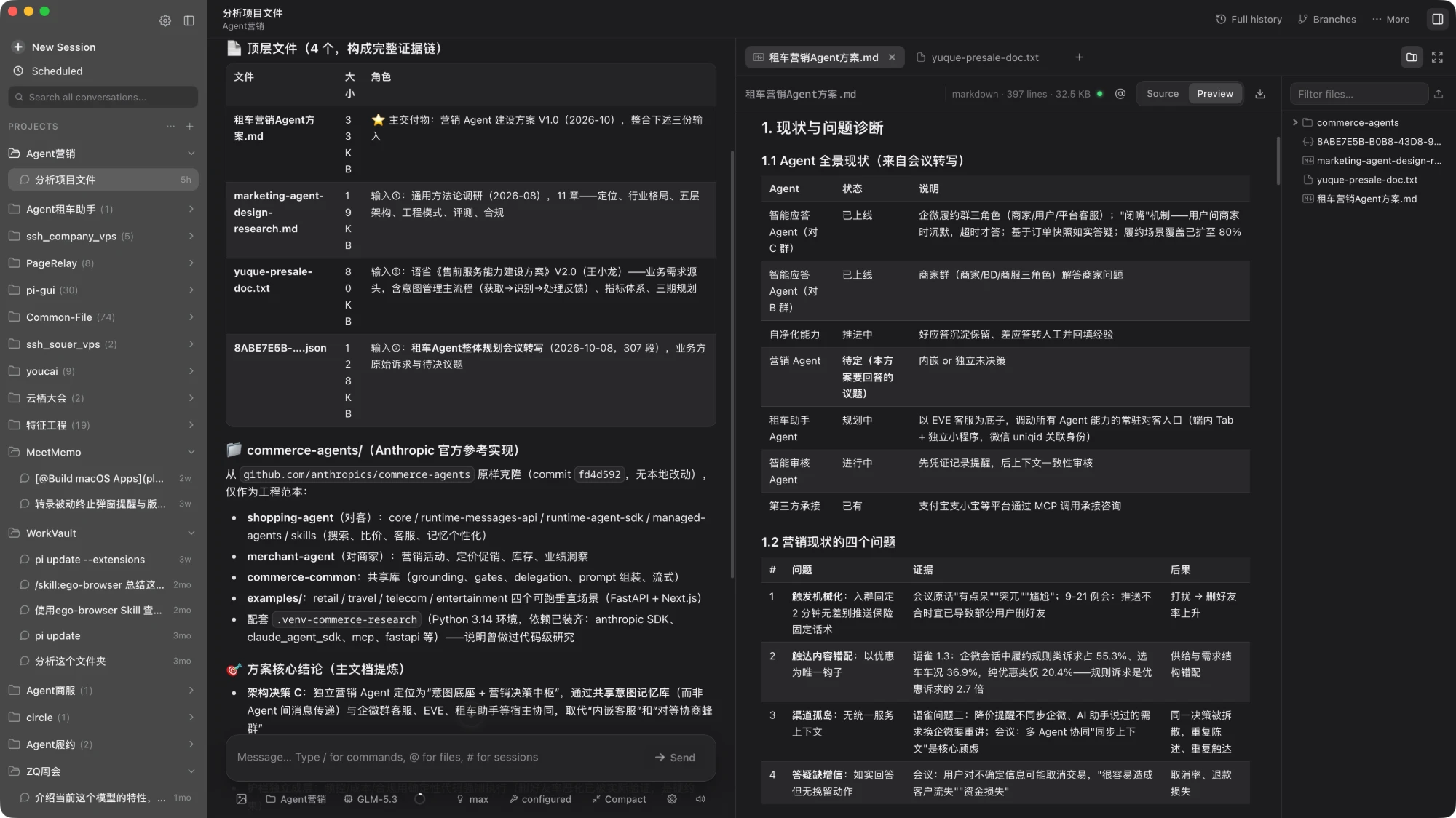
pi-agent-desktop is a local AI agent desktop app for macOS and Windows. It packages the agent capabilities of pi into a standalone, installable application.
.jsonl files.pi-agent-desktop GitHub Release, with an in-app notice only when the installed app is older.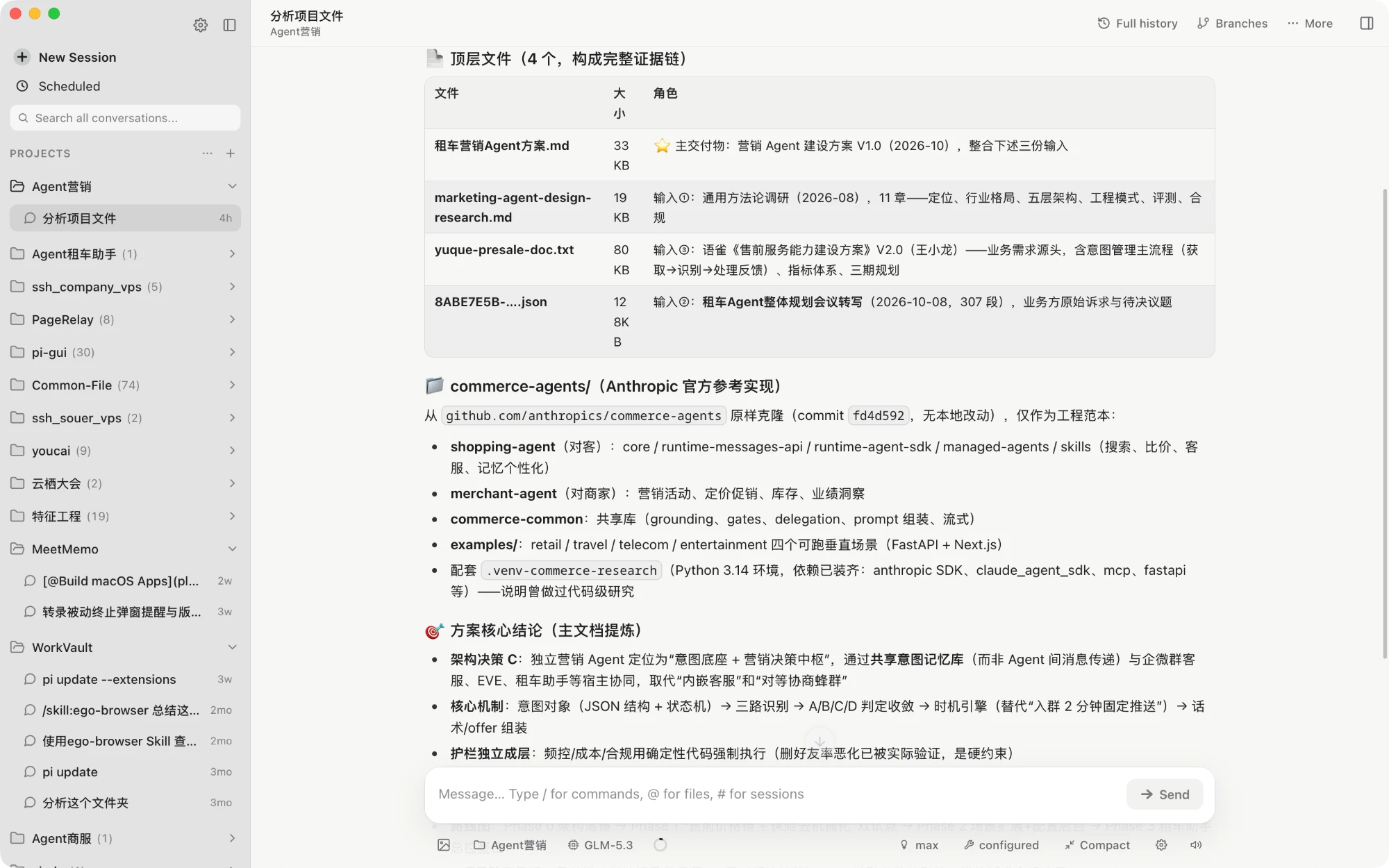
⬇️ Download Pi Agent (macOS / Windows)
Repository: abcwyc/pi-agent-desktop
Builds are available from GitHub Releases:
Apple Silicon Mac: download the aarch64.dmg, open it, and drag the app into Applications. Official releases do not build for Intel Macs.
Apple Silicon Mac with Homebrew: install from this repository's tap. The tap is added from the repo URL, so the first command is needed once:
brew tap abcwyc/pi-agent-desktop https://github.com/abcwyc/pi-agent-desktop
brew install --cask pi-agent
The app upgrades itself from Settings, so brew upgrade leaves it alone unless you pass --greedy. brew uninstall --cask --zap pi-agent removes the app and its window state but never ~/.pi, which the pi CLI shares.
Linux x64: download the .deb package and install it with your distribution's package manager. A community-maintained Flatpak is also available at flatpark.org — not an official release, but Flatpak works across most distributions and handles updates for you.
Windows x64: download the installer whose name ends in x64-setup.exe and run it. The installer pulls in Microsoft WebView2 when it is missing.
Official releases support Apple Silicon Macs running macOS 11 or later, Windows 10/11 x64, and Linux x64 distributions with WebKitGTK 4.1 and GTK 3. The desktop package bundles the Next.js server, the Node.js runtime, and the current Pi SDK, so the local server starts with the app — no separate terminal, Node.js installation, or manually started web server is required.
Installing Pi Agent gives you the agent inside the app, but it does not install a global
picommand. If you also want the Pi CLI in your terminal, install it separately by following the pi project instructions.
Before signed auto-updates can be used for the first time, an older build without the updater has to be replaced by manually installing a signed one. Upgrades then happen from Settings.
Pi Agent reads Pi's local data directory by default:
~/.pi/agent/
Sessions normally live under:
~/.pi/agent/sessions/<encoded-cwd>/<timestamp>_<uuid>.jsonl
If you have used Pi on this machine before, the app picks up your existing sessions, models, and authentication after installation. Set PI_CODING_AGENT_DIR to point at a different Pi agent data directory.
Model keys and session data stay on your machine. The file-browsing API only allows access to the current session, the selected project, and explicitly authorized working directories.
Pi Agent checks the latest stable release of abcwyc/pi-agent-desktop at most once every seven days:
abcwyc/pi-agent-desktopearendil-works/piagegr/pi-webThe versioning and upgrade rules are:
pi-agent-desktop release is the only source used for update reminders.pi → pi-web → pi-agent-desktop.This keeps the components in a desktop install consistent, and avoids the runtime incompatibilities that come from swapping pi or pi-web on their own.
If a new upstream version has been detected but the signed pi-agent-desktop release containing it is not published yet, Settings says that no signed complete build is installable for now. The app never falls back to downloading unsigned files or partially overwriting dependencies.
The full sync, signing, and release configuration is described in Desktop updates and releases.
Server-side model and API requests honor the standard HTTP_PROXY, HTTPS_PROXY, and NO_PROXY environment variables. For example, when starting the dev server from a terminal:
HTTP_PROXY=http://127.0.0.1:7890 \
HTTPS_PROXY=http://127.0.0.1:7890 \
NO_PROXY=localhost,127.0.0.1 \
npm run dev
npm install
npm run dev
The dev server runs at http://localhost:30141 and does not open a browser. npm run web starts the same loopback server and opens http://127.0.0.1:30141 in the desktop browser after it is ready. From WSL that is the Windows browser. See Web profile.
Do not run next build or npm run build during normal development. They write into .next/ and can disrupt a running dev server; production builds are done by the desktop preparation script or by CI.
npm run dev and npm start listen on 127.0.0.1 only. npm run dev:lan, npm run start:lan and pi-web -H 0.0.0.0 listen on every interface. Pi Agent can run shell commands (the terminal tab and the agent's own tools) and read files as you, so anyone who can reach the port gets the same access. Before using a LAN mode, set a password:
PI_WEB_PASSWORD='choose-a-long-passphrase' npm run dev:lan
With PI_WEB_PASSWORD set, the browser asks for it on first visit and failed attempts are throttled. The connection is still plain HTTP, so put it behind HTTPS or a trusted VPN, and use PI_WEB_ALLOWED_HOSTS (comma-separated) to allow a DNS name other than an IP address. The launcher prints a warning whenever it listens beyond loopback without a password. The packaged desktop app is unaffected: it binds to loopback and authenticates the WebView with a per-process token.
npm run desktop:dev
This starts the existing Next.js dev server and opens it in a native Tauri window, without producing an installer.
# Node tests (identical to the CI sync gate, including components/ tests)
npm test

# TypeScript
node_modules/.bin/tsc --noEmit

# ESLint and the branding protection test
npm run lint

# Divergence from pi-web upstream, split into "styling" and "structural" changes
npm run drift

# Rust/Tauri
cargo fmt --check --manifest-path src-tauri/Cargo.toml
cargo clippy --manifest-path src-tauri/Cargo.toml -- -D warnings

# Verify the bundled components match the latest stable releases
npm run release:verify
release:verify reaches GitHub and requires the bundled pi and pi-web to match their latest stable releases exactly, while also checking the component manifest against the actual dependencies.
npm run desktop:build
The desktop build:
.app, .dmg, and updater artifacts on Apple Silicon Macs; an NSIS -setup.exe plus updater artifacts on Windows x64; and a .deb package on Linux x64.On Linux, the package requires a WebKitGTK 4.1 runtime and GTK 3. It includes the Node.js runtime, so users do not need to install Node.js separately.
Local builds do not register the production updater and cannot accept official updates. Official releases must inject the updater public key through GitHub Actions and sign with the matching private key.
The repository contains two chained automation workflows:
component-updates.yml: checks the stable releases of pi and pi-web daily. When a new version appears, it first intersects the incoming upstream changeset with the "upstream files this fork has modified" recorded in scripts/fork-ownership.json, then merges the tag, updates dependencies and the component manifest, and runs the full gate (npm test, tsc, lint, a real standalone build).
main and triggers a release.sync/pi-web-<tag> branch and opens a PR with the boundary report, and does not trigger a release. Merging that PR is what ships a version.release.yml: after an explicit trigger from the component sync workflow, serially builds the Apple Silicon (aarch64) DMG, the Linux x64 .deb, and the Windows x64 NSIS -setup.exe. No Intel Mac build is produced. The release stays a draft until the updater signature files, latest.json, and the component manifest for all platforms are uploaded — the manifest job depends on the entire build matrix, so a failure on any platform keeps it from being published. Build failures create or update a release-failure issue.Upstream sync uses a Git merge, so this fork's Pi Agent branding, settings entry points, and upgrade logic survive as local modifications. Merge conflicts stop the workflow, which is the safe failure mode. The genuinely dangerous case is a conflict-free but semantically wrong merge: upstream changed a region this fork also changed, Git merged it cleanly, and the tests still pass. The boundary intersection above exists for exactly that case; the rules are in Ownership boundaries.
A failed sync creates or updates a component-sync-failure issue, so nothing piles up silently.
An official release additionally requires:
.exe can trigger SmartScreen warnings.app/
api/ Next.js APIs: agent, sessions, models, files, update checks
components/ Pages, chat, sidebar, settings, and version notices
hooks/ Client state: session streams, audio, drag and drop, theme
lib/ AgentSession, HTTP proxy, session reading, file security, upgrade logic
scripts/ Desktop packaging, component version sync, release verification
src-tauri/
capabilities/ Tauri permission configuration
resources/ Desktop resources and the component version manifest
src/ Desktop window, local server, and updater registration
.github/workflows/ Daily component sync and desktop release automation
instrumentation.ts Next.js server-side HTTP proxy initialization
pi-web upstream, the rules for editing shared files, and how the automated sync decidesThe desktop integration of Pi Agent is provided by pi-agent-desktop; the core capabilities and the web interface come from earendil-works/pi and agegr/pi-web respectively. Thanks to those projects and their contributors.
Code in the root of this repository is under the MIT License in LICENSE. The code and dependencies of the three component projects remain subject to the licenses of their own repositories; keep the corresponding copyright and license notices when copying, modifying, or redistributing.
282 followers · starred Aug 2026
15 followers · starred Sep 2026
Pi — A cross-platform AI coding agent, bringing the Claude Code experience to your desktop. No environment setup, no terminal commands. Download and start coding right away.
See the codeEnglish | 简体中文
pi-agent-desktop is a local AI agent desktop app for macOS and Windows. It packages the agent capabilities of pi into a standalone, installable application.
.jsonl files.pi-agent-desktop GitHub Release, with an in-app notice only when the installed app is older.
⬇️ Download Pi Agent (macOS / Windows)
Repository: abcwyc/pi-agent-desktop
Builds are available from GitHub Releases:
Apple Silicon Mac: download the aarch64.dmg, open it, and drag the app into Applications. Official releases do not build for Intel Macs.
Apple Silicon Mac with Homebrew: install from this repository's tap. The tap is added from the repo URL, so the first command is needed once:
brew tap abcwyc/pi-agent-desktop https://github.com/abcwyc/pi-agent-desktop
brew install --cask pi-agent
The app upgrades itself from Settings, so brew upgrade leaves it alone unless you pass --greedy. brew uninstall --cask --zap pi-agent removes the app and its window state but never ~/.pi, which the pi CLI shares.
Linux x64: download the .deb package and install it with your distribution's package manager. A community-maintained Flatpak is also available at flatpark.org — not an official release, but Flatpak works across most distributions and handles updates for you.
Windows x64: download the installer whose name ends in x64-setup.exe and run it. The installer pulls in Microsoft WebView2 when it is missing.
Official releases support Apple Silicon Macs running macOS 11 or later, Windows 10/11 x64, and Linux x64 distributions with WebKitGTK 4.1 and GTK 3. The desktop package bundles the Next.js server, the Node.js runtime, and the current Pi SDK, so the local server starts with the app — no separate terminal, Node.js installation, or manually started web server is required.
Installing Pi Agent gives you the agent inside the app, but it does not install a global
picommand. If you also want the Pi CLI in your terminal, install it separately by following the pi project instructions.
Before signed auto-updates can be used for the first time, an older build without the updater has to be replaced by manually installing a signed one. Upgrades then happen from Settings.
Pi Agent reads Pi's local data directory by default:
~/.pi/agent/
Sessions normally live under:
~/.pi/agent/sessions/<encoded-cwd>/<timestamp>_<uuid>.jsonl
If you have used Pi on this machine before, the app picks up your existing sessions, models, and authentication after installation. Set PI_CODING_AGENT_DIR to point at a different Pi agent data directory.
Model keys and session data stay on your machine. The file-browsing API only allows access to the current session, the selected project, and explicitly authorized working directories.
Pi Agent checks the latest stable release of abcwyc/pi-agent-desktop at most once every seven days:
abcwyc/pi-agent-desktopearendil-works/piagegr/pi-webThe versioning and upgrade rules are:
pi-agent-desktop release is the only source used for update reminders.pi → pi-web → pi-agent-desktop.This keeps the components in a desktop install consistent, and avoids the runtime incompatibilities that come from swapping pi or pi-web on their own.
If a new upstream version has been detected but the signed pi-agent-desktop release containing it is not published yet, Settings says that no signed complete build is installable for now. The app never falls back to downloading unsigned files or partially overwriting dependencies.
The full sync, signing, and release configuration is described in Desktop updates and releases.
Server-side model and API requests honor the standard HTTP_PROXY, HTTPS_PROXY, and NO_PROXY environment variables. For example, when starting the dev server from a terminal:
HTTP_PROXY=http://127.0.0.1:7890 \
HTTPS_PROXY=http://127.0.0.1:7890 \
NO_PROXY=localhost,127.0.0.1 \
npm run dev
npm install
npm run dev
The dev server runs at http://localhost:30141 and does not open a browser. npm run web starts the same loopback server and opens http://127.0.0.1:30141 in the desktop browser after it is ready. From WSL that is the Windows browser. See Web profile.
Do not run next build or npm run build during normal development. They write into .next/ and can disrupt a running dev server; production builds are done by the desktop preparation script or by CI.
npm run dev and npm start listen on 127.0.0.1 only. npm run dev:lan, npm run start:lan and pi-web -H 0.0.0.0 listen on every interface. Pi Agent can run shell commands (the terminal tab and the agent's own tools) and read files as you, so anyone who can reach the port gets the same access. Before using a LAN mode, set a password:
PI_WEB_PASSWORD='choose-a-long-passphrase' npm run dev:lan
With PI_WEB_PASSWORD set, the browser asks for it on first visit and failed attempts are throttled. The connection is still plain HTTP, so put it behind HTTPS or a trusted VPN, and use PI_WEB_ALLOWED_HOSTS (comma-separated) to allow a DNS name other than an IP address. The launcher prints a warning whenever it listens beyond loopback without a password. The packaged desktop app is unaffected: it binds to loopback and authenticates the WebView with a per-process token.
npm run desktop:dev
This starts the existing Next.js dev server and opens it in a native Tauri window, without producing an installer.
# Node tests (identical to the CI sync gate, including components/ tests)
npm test

# TypeScript
node_modules/.bin/tsc --noEmit

# ESLint and the branding protection test
npm run lint

# Divergence from pi-web upstream, split into "styling" and "structural" changes
npm run drift

# Rust/Tauri
cargo fmt --check --manifest-path src-tauri/Cargo.toml
cargo clippy --manifest-path src-tauri/Cargo.toml -- -D warnings

# Verify the bundled components match the latest stable releases
npm run release:verify
release:verify reaches GitHub and requires the bundled pi and pi-web to match their latest stable releases exactly, while also checking the component manifest against the actual dependencies.
npm run desktop:build
The desktop build:
.app, .dmg, and updater artifacts on Apple Silicon Macs; an NSIS -setup.exe plus updater artifacts on Windows x64; and a .deb package on Linux x64.On Linux, the package requires a WebKitGTK 4.1 runtime and GTK 3. It includes the Node.js runtime, so users do not need to install Node.js separately.
Local builds do not register the production updater and cannot accept official updates. Official releases must inject the updater public key through GitHub Actions and sign with the matching private key.
The repository contains two chained automation workflows:
component-updates.yml: checks the stable releases of pi and pi-web daily. When a new version appears, it first intersects the incoming upstream changeset with the "upstream files this fork has modified" recorded in scripts/fork-ownership.json, then merges the tag, updates dependencies and the component manifest, and runs the full gate (npm test, tsc, lint, a real standalone build).
main and triggers a release.sync/pi-web-<tag> branch and opens a PR with the boundary report, and does not trigger a release. Merging that PR is what ships a version.release.yml: after an explicit trigger from the component sync workflow, serially builds the Apple Silicon (aarch64) DMG, the Linux x64 .deb, and the Windows x64 NSIS -setup.exe. No Intel Mac build is produced. The release stays a draft until the updater signature files, latest.json, and the component manifest for all platforms are uploaded — the manifest job depends on the entire build matrix, so a failure on any platform keeps it from being published. Build failures create or update a release-failure issue.Upstream sync uses a Git merge, so this fork's Pi Agent branding, settings entry points, and upgrade logic survive as local modifications. Merge conflicts stop the workflow, which is the safe failure mode. The genuinely dangerous case is a conflict-free but semantically wrong merge: upstream changed a region this fork also changed, Git merged it cleanly, and the tests still pass. The boundary intersection above exists for exactly that case; the rules are in Ownership boundaries.
A failed sync creates or updates a component-sync-failure issue, so nothing piles up silently.
An official release additionally requires:
.exe can trigger SmartScreen warnings.app/
api/ Next.js APIs: agent, sessions, models, files, update checks
components/ Pages, chat, sidebar, settings, and version notices
hooks/ Client state: session streams, audio, drag and drop, theme
lib/ AgentSession, HTTP proxy, session reading, file security, upgrade logic
scripts/ Desktop packaging, component version sync, release verification
src-tauri/
capabilities/ Tauri permission configuration
resources/ Desktop resources and the component version manifest
src/ Desktop window, local server, and updater registration
.github/workflows/ Daily component sync and desktop release automation
instrumentation.ts Next.js server-side HTTP proxy initialization
pi-web upstream, the rules for editing shared files, and how the automated sync decidesThe desktop integration of Pi Agent is provided by pi-agent-desktop; the core capabilities and the web interface come from earendil-works/pi and agegr/pi-web respectively. Thanks to those projects and their contributors.
Code in the root of this repository is under the MIT License in LICENSE. The code and dependencies of the three component projects remain subject to the licenses of their own repositories; keep the corresponding copyright and license notices when copying, modifying, or redistributing.
282 followers · starred Aug 2026
15 followers · starred Sep 2026



