Open-source desktop AI coding assistant with agents, editor, terminal, git tools, and browser.
See the code

An open-source AI coding assistant that lives alongside your code.
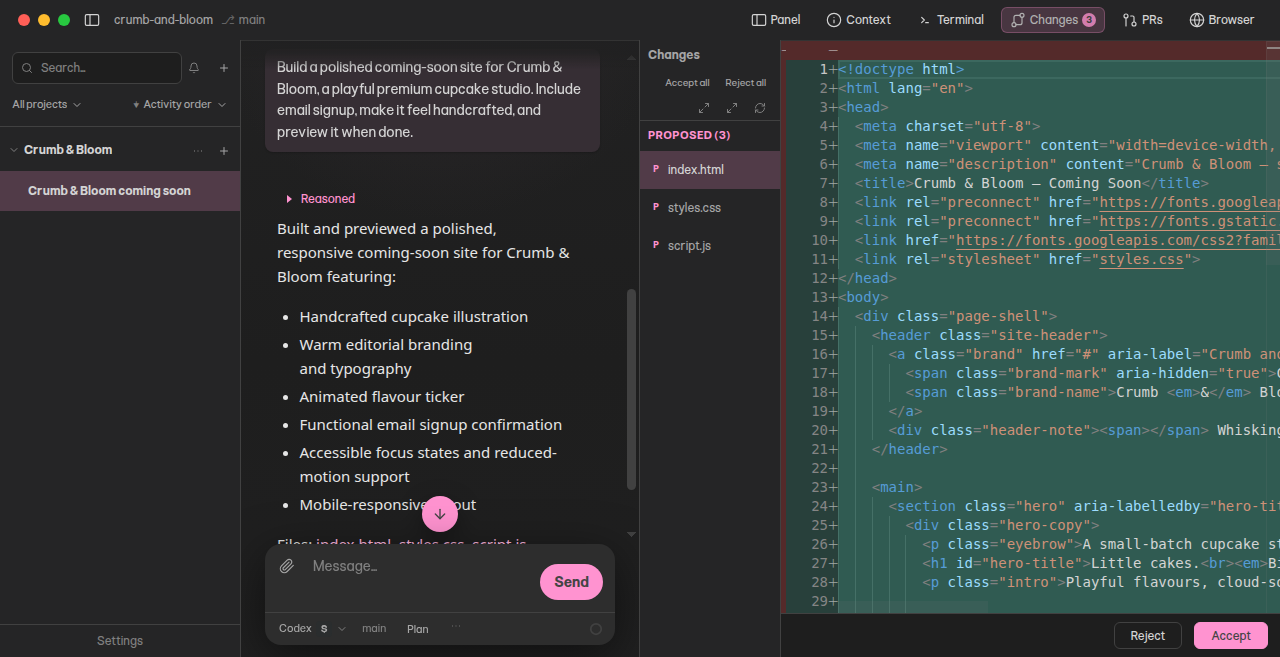
Copse brings agent chat, an editor, terminal, git tools, and a browser into one desktop app. Ask it to understand a codebase, make a change, run tests, or investigate a problem while you follow its work and stay in control of what it can do.
Copse has no hosted backend of its own. Connect your preferred cloud provider directly, use a local model, or combine the two.
Download for macOS · Website · Issues
Copse is in public beta. The signed, notarized app runs on macOS 26 or newer, on Apple Silicon and Intel Macs. Linux and Windows can be used for source development, but are not supported release targets yet.
Copse-<version>-arm64.dmg for Apple Silicon or Copse-<version>-x64.dmg for Intel.Copse checks for updates when it starts and asks before downloading one. The install guide covers choosing a download and what to do if it does not open.
You need Node.js 24 or newer, and on macOS the Xcode command-line tools (xcode-select --install) so the bundled terminal's native module can compile. Everything else is provisioned for you: make enables Corepack, which supplies the pinned [email protected] from packageManager. Both nvm use and fnm use select the exact LTS release pinned in .nvmrc.
git clone https://github.com/copse-dev/agent-pane.git
cd agent-pane
make run
make run checks your Node version, installs dependencies, builds dist/, and launches the app. It is idempotent and cheap to repeat: dependency inputs, build inputs, and the complete build output tree are content-addressed, so running it again after a branch switch or git pull does the minimum work needed without trusting filesystem timestamps. Run make on its own for the full target list.
make run builds once and starts. While actively editing the app, pnpm run dev (or make run-dev) is still the loop you want — it rebuilds and relaunches Electron on save, against its own persistent ~/.copse-dev profile so it never shares threads or settings with the app make run launches:
corepack enable
pnpm install
pnpm run dev
pnpm uses a content-addressable store with package-import-method=auto (clone on
APFS, then hardlink, then copy) so additional git worktrees reuse package bytes.
Electron’s extracted app bundle and the vendored gortex binary are shared under
~/.copse/cache/electron-dist/ and ~/.copse/cache/gortex/. Each worktree still
needs its own install — make run or pnpm install — to link node_modules and
those caches.
API keys entered in Copse are encrypted with the operating system's secure storage when it is available. Environment-only keys are not written to Copse's settings. See Privacy and data flow and Provider data policies before choosing a hosted provider.
| Area | Highlights |
|---|---|
| Agent | Multi-turn chat, plans, tool calls, message queueing, thread forks, and subagents |
| Code | Monaco editing, file, selection and video attachments, diffs, and semantic search |
| Workspace | Integrated terminal, git status and changes, file explorer, and web browser |
| Models | Direct cloud providers, OpenRouter, local servers, and ACP coding agents |
| Extensions | Skills, Cursor-compatible hooks and plugin sources, MCP, and JavaScript custom tools |
| Control | Edit review, permission prompts, macOS project sandboxing, and per-tool approvals |
Install, first run, approvals, and the project sandbox: docs/user/.
See CONTRIBUTING.md and the architecture map. No paid model key is required to explore the development build: connect a local model, or launch with COPSE_PANEL_MOCK_LLM=1 pnpm run dev to opt into the built-in mock agent.
Before submitting a change, run:
pnpm run check
For a localized low-risk PR backed by required CI, AGENTS.md defines
a narrower pnpm run check:local plus focused-test path. The full check remains the default.
Changes to the Electron UI should also be built and covered by a focused end-to-end visual test. See AGENTS.md and the testing strategy for the full contributor workflow.
| Command | Purpose |
|---|---|
make run | Sync deps, rebuild if source changed, then launch the app |
make build | Rebuild dist/ if source changed (deps first) |
make deps | Sync dependencies to their content fingerprint |
make clean | Remove dist/ and the dev-sync fingerprints |
pnpm run dev | Build in watch mode and launch Electron |
pnpm run build | Create the application bundle in dist/ |
pnpm start | Launch an existing build |
pnpm test | Run unit and component tests |
pnpm run test:e2e | Run Electron end-to-end tests headlessly |
pnpm run check:local | Run local static gates without the complete unit suite |
pnpm run check | Run typecheck, lint, formatting, dead-code checks, and tests |
Electron e2e and agent-eval runs are non-visible by default. They use Chromium headless on macOS and
Windows, and an isolated Xvfb on Linux because Electron still requires a display driver there. Set
COPSE_E2E_HEADLESS=0 when you intentionally want a visible window for local debugging.
Copse's postinstall prepares native Electron dependencies and downloads the bundled semantic-search engine. Project .npmrc sets ignore-scripts=false. An inherited npm_config_ignore_scripts=true still wins over .npmrc — make deps forces scripts on for that reason.
If electron-rebuild fails because a Homebrew Python cannot import
distutils, use the Python supplied with Xcode's command-line tools:
PYTHON=/usr/bin/python3 pnpm install
To install without scripts and finish natives manually:
pnpm install --config.ignore-scripts=true
SKIP_ELECTRON_REBUILD=1 node scripts/postinstall-native.mts
Or run the native setup alone after a normal install:
SKIP_ELECTRON_REBUILD=1 node scripts/postinstall-native.mts
Use SKIP_GORTEX_FETCH=1 if you intentionally do not want the bundled semantic-search binary.
make run provisions pnpm and every bundled dependency, but it does not install Node or a C++ toolchain. On macOS it first verifies that the selected Apple compiler can link against the selected SDK, so an incomplete or mismatched Xcode update reports the active developer directory and SDK plus recovery commands before node-gyp starts. SKIP_ELECTRON_REBUILD=1 skips this check along with the rebuild:
sudo xcode-select --switch /Applications/Xcode.app/Contents/Developer and sudo xcodebuild -runFirstLaunch, then retry. If you use only the standalone Command Line Tools, update them through System Settings → General → Software Update or run xcode-select --install when they are missing.node-gyp or clang error during install is a native build failure that passed this basic toolchain check; keep its full output when reporting the problem.node is not installed, or a version below 24, means Node itself needs installing or selecting. nvm use and fnm use both pick up the .nvmrc pin, and make run sources nvm automatically when it is present.EACCES from corepack enable means your node lives somewhere unwritable (typically a /usr/local package install). Run corepack enable once with sudo, or switch to an nvm-managed Node.If make run returns straight away without opening a window, another Copse instance already holds the single-instance lock and was focused instead. Quit it and re-run.
Copyright © 2026 Jonathan Kingston.
Copse is free software, available under the GNU Affero General Public License version 3. You may use, study, modify, and redistribute it. If you distribute a modified version, or make one available to users over a network, you must make the complete corresponding source available under the same license.
Commercial licences are also available for uses where the AGPL's conditions do not fit, such as shipping a modified Copse without publishing its source. See LICENSING.md.
Copse relicensed from Apache-2.0 to AGPL-3.0-only on 6 September 2026. Releases
up to and including 0.1.0-beta.8 were published under the Apache License 2.0,
and that grant remains in force for those versions. Everything from the
relicensing commit onward is AGPL-3.0-only.
Third-party components keep their own licenses; see THIRD_PARTY_NOTICES.md.
Open-source desktop AI coding assistant with agents, editor, terminal, git tools, and browser.
See the code
An open-source AI coding assistant that lives alongside your code.
Copse brings agent chat, an editor, terminal, git tools, and a browser into one desktop app. Ask it to understand a codebase, make a change, run tests, or investigate a problem while you follow its work and stay in control of what it can do.
Copse has no hosted backend of its own. Connect your preferred cloud provider directly, use a local model, or combine the two.
Download for macOS · Website · Issues
Copse is in public beta. The signed, notarized app runs on macOS 26 or newer, on Apple Silicon and Intel Macs. Linux and Windows can be used for source development, but are not supported release targets yet.
Copse-<version>-arm64.dmg for Apple Silicon or Copse-<version>-x64.dmg for Intel.Copse checks for updates when it starts and asks before downloading one. The install guide covers choosing a download and what to do if it does not open.
You need Node.js 24 or newer, and on macOS the Xcode command-line tools (xcode-select --install) so the bundled terminal's native module can compile. Everything else is provisioned for you: make enables Corepack, which supplies the pinned [email protected] from packageManager. Both nvm use and fnm use select the exact LTS release pinned in .nvmrc.
git clone https://github.com/copse-dev/agent-pane.git
cd agent-pane
make run
make run checks your Node version, installs dependencies, builds dist/, and launches the app. It is idempotent and cheap to repeat: dependency inputs, build inputs, and the complete build output tree are content-addressed, so running it again after a branch switch or git pull does the minimum work needed without trusting filesystem timestamps. Run make on its own for the full target list.
make run builds once and starts. While actively editing the app, pnpm run dev (or make run-dev) is still the loop you want — it rebuilds and relaunches Electron on save, against its own persistent ~/.copse-dev profile so it never shares threads or settings with the app make run launches:
corepack enable
pnpm install
pnpm run dev
pnpm uses a content-addressable store with package-import-method=auto (clone on
APFS, then hardlink, then copy) so additional git worktrees reuse package bytes.
Electron’s extracted app bundle and the vendored gortex binary are shared under
~/.copse/cache/electron-dist/ and ~/.copse/cache/gortex/. Each worktree still
needs its own install — make run or pnpm install — to link node_modules and
those caches.
API keys entered in Copse are encrypted with the operating system's secure storage when it is available. Environment-only keys are not written to Copse's settings. See Privacy and data flow and Provider data policies before choosing a hosted provider.
| Area | Highlights |
|---|---|
| Agent | Multi-turn chat, plans, tool calls, message queueing, thread forks, and subagents |
| Code | Monaco editing, file, selection and video attachments, diffs, and semantic search |
| Workspace | Integrated terminal, git status and changes, file explorer, and web browser |
| Models | Direct cloud providers, OpenRouter, local servers, and ACP coding agents |
| Extensions | Skills, Cursor-compatible hooks and plugin sources, MCP, and JavaScript custom tools |
| Control | Edit review, permission prompts, macOS project sandboxing, and per-tool approvals |
Install, first run, approvals, and the project sandbox: docs/user/.
See CONTRIBUTING.md and the architecture map. No paid model key is required to explore the development build: connect a local model, or launch with COPSE_PANEL_MOCK_LLM=1 pnpm run dev to opt into the built-in mock agent.
Before submitting a change, run:
pnpm run check
For a localized low-risk PR backed by required CI, AGENTS.md defines
a narrower pnpm run check:local plus focused-test path. The full check remains the default.
Changes to the Electron UI should also be built and covered by a focused end-to-end visual test. See AGENTS.md and the testing strategy for the full contributor workflow.
| Command | Purpose |
|---|---|
make run | Sync deps, rebuild if source changed, then launch the app |
make build | Rebuild dist/ if source changed (deps first) |
make deps | Sync dependencies to their content fingerprint |
make clean | Remove dist/ and the dev-sync fingerprints |
pnpm run dev | Build in watch mode and launch Electron |
pnpm run build | Create the application bundle in dist/ |
pnpm start | Launch an existing build |
pnpm test | Run unit and component tests |
pnpm run test:e2e | Run Electron end-to-end tests headlessly |
pnpm run check:local | Run local static gates without the complete unit suite |
pnpm run check | Run typecheck, lint, formatting, dead-code checks, and tests |
Electron e2e and agent-eval runs are non-visible by default. They use Chromium headless on macOS and
Windows, and an isolated Xvfb on Linux because Electron still requires a display driver there. Set
COPSE_E2E_HEADLESS=0 when you intentionally want a visible window for local debugging.
Copse's postinstall prepares native Electron dependencies and downloads the bundled semantic-search engine. Project .npmrc sets ignore-scripts=false. An inherited npm_config_ignore_scripts=true still wins over .npmrc — make deps forces scripts on for that reason.
If electron-rebuild fails because a Homebrew Python cannot import
distutils, use the Python supplied with Xcode's command-line tools:
PYTHON=/usr/bin/python3 pnpm install
To install without scripts and finish natives manually:
pnpm install --config.ignore-scripts=true
SKIP_ELECTRON_REBUILD=1 node scripts/postinstall-native.mts
Or run the native setup alone after a normal install:
SKIP_ELECTRON_REBUILD=1 node scripts/postinstall-native.mts
Use SKIP_GORTEX_FETCH=1 if you intentionally do not want the bundled semantic-search binary.
make run provisions pnpm and every bundled dependency, but it does not install Node or a C++ toolchain. On macOS it first verifies that the selected Apple compiler can link against the selected SDK, so an incomplete or mismatched Xcode update reports the active developer directory and SDK plus recovery commands before node-gyp starts. SKIP_ELECTRON_REBUILD=1 skips this check along with the rebuild:
sudo xcode-select --switch /Applications/Xcode.app/Contents/Developer and sudo xcodebuild -runFirstLaunch, then retry. If you use only the standalone Command Line Tools, update them through System Settings → General → Software Update or run xcode-select --install when they are missing.node-gyp or clang error during install is a native build failure that passed this basic toolchain check; keep its full output when reporting the problem.node is not installed, or a version below 24, means Node itself needs installing or selecting. nvm use and fnm use both pick up the .nvmrc pin, and make run sources nvm automatically when it is present.EACCES from corepack enable means your node lives somewhere unwritable (typically a /usr/local package install). Run corepack enable once with sudo, or switch to an nvm-managed Node.If make run returns straight away without opening a window, another Copse instance already holds the single-instance lock and was focused instead. Quit it and re-run.
Copyright © 2026 Jonathan Kingston.
Copse is free software, available under the GNU Affero General Public License version 3. You may use, study, modify, and redistribute it. If you distribute a modified version, or make one available to users over a network, you must make the complete corresponding source available under the same license.
Commercial licences are also available for uses where the AGPL's conditions do not fit, such as shipping a modified Copse without publishing its source. See LICENSING.md.
Copse relicensed from Apache-2.0 to AGPL-3.0-only on 6 September 2026. Releases
up to and including 0.1.0-beta.8 were published under the Apache License 2.0,
and that grant remains in force for those versions. Everything from the
relicensing commit onward is AGPL-3.0-only.
Third-party components keep their own licenses; see THIRD_PARTY_NOTICES.md.



