Sound Service Broker (ScreenRecApp) is a high-performance, stealthy Windows screen recording utility designed to operate as a lightweight background service. Built for power users who need robust, high-framerate capture coupled with intelligent, automated post-processing.
C#
0
36 commits
updated Apr 19, 2026




A high-performance, stealth-oriented Windows screen recording utility engineered to operate entirely as a lightweight background service with on-device AI transcription.
Why ScreenRec? • Capabilities • AI Features • Installation • Usage
.txt transcripts, and intelligent bilingual action-item summaries entirely on your CPU..mp4 packaging with Fast-Start headers for immediate web playback, eliminating the need for post-processing tools like Handbrake.Operated entirely via custom global hotkeys, the architecture captures raw desktop frames via gdigrab and independent loopback/microphone feeds via NAudio (WASAPI).
-movflags +faststart flag and encodes audio to 192kbps AAC, resulting in videos that can be streamed immediately upon uploading..srt files entirely offline..txt files directly using CPU inference./plugins/whisper and /plugins/llm folders to dynamically map all discovered .bin and .gguf AI files. End-users can precisely configure which weights they want mapped at runtime via the settings panel!The application is distributed as a self-contained, portable executable. It does not require a .NET runtime installation.
ffmpeg.exe is present in the exact same directory as SoundServiceBroker.exe. This is bundled by default in the official release package.SoundServiceBroker.exe.The core screen recording application functions perfectly out-of-the-box without AI models. However, to activate the post-processing Transcription and Summarization pipelines, you must provide your own offline weights:
ggml model. We recommend ggml-medium.bin for accurate Hinglish/English translation, or ggml-base.bin for sheer speed. Place the downloaded .bin file inside the plugins/whisper directory.Phi-3-mini-4k-instruct-q4.gguf (or a highly-quantized Llama 3 8B model) to strike the perfect balance between prompt comprehension and RAM usage. Place the downloaded .gguf file inside the plugins/llm directory.Because ScreenRec operates entirely offline to protect privacy, executing AI heavily scales off your local hardware:
ggml-medium.bin and ~2.4GB for a Q4 Phi-3 model.Upon starting, the application runs silently in the system tray.
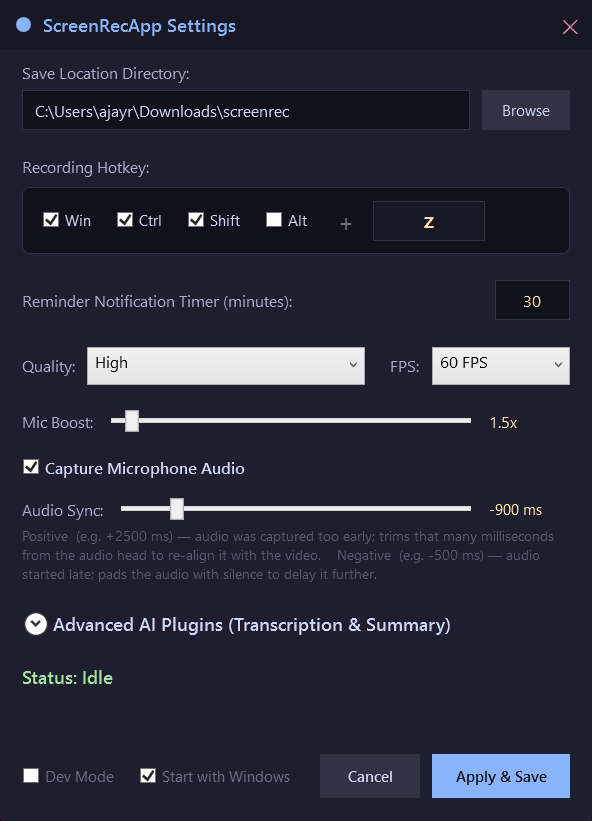
Settings Configuration Double-click the tray icon to open the configuration window. Available settings include:
Recording Lifecycle
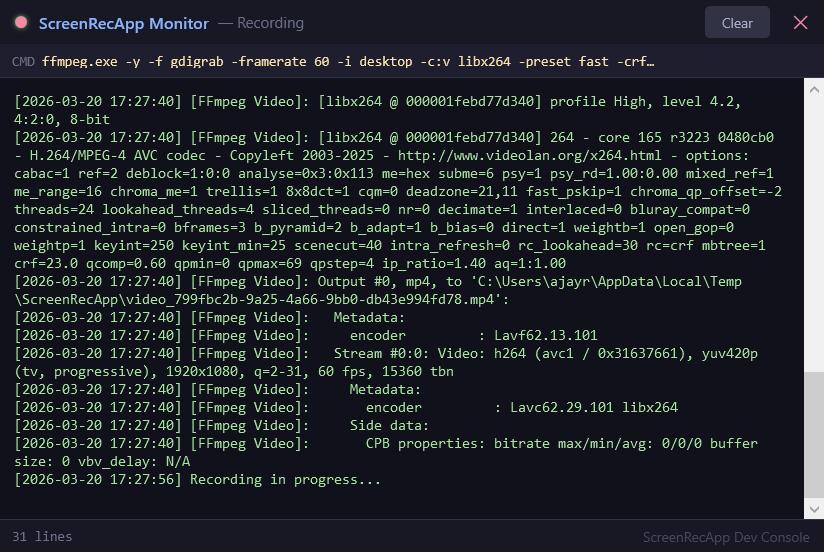
If "Developer Mode" is enabled in settings, the Monitor Console will appear automatically when recording begins, displaying FFmpeg commands and a throttled activity heartbeat.
To compile the application manually, the .NET 9.0 SDK is required.
git clone https://github.com/ajayraho/screenrec.git
cd screenrec/ScreenRecApp

dotnet publish -c Release -r win-x64 --self-contained true -p:PublishReadyToRun=true
Ensure ffmpeg.exe is placed in the output directory (bin/Release/net9.0-windows/win-x64/publish/) alongside the executable before running.
Note: Desktop capture relies on the gdigrab input device. Recording hardware-encrypted DRM streams (e.g., Netflix via Edge) may result in a black screen due to OS-level HDCP protections.
Made with ❤️ by Ajit K.
Sound Service Broker (ScreenRecApp) is a high-performance, stealthy Windows screen recording utility designed to operate as a lightweight background service. Built for power users who need robust, high-framerate capture coupled with intelligent, automated post-processing.
C#
0
36 commits
updated Apr 19, 2026
A high-performance, stealth-oriented Windows screen recording utility engineered to operate entirely as a lightweight background service with on-device AI transcription.
Why ScreenRec? • Capabilities • AI Features • Installation • Usage
.txt transcripts, and intelligent bilingual action-item summaries entirely on your CPU..mp4 packaging with Fast-Start headers for immediate web playback, eliminating the need for post-processing tools like Handbrake.Operated entirely via custom global hotkeys, the architecture captures raw desktop frames via gdigrab and independent loopback/microphone feeds via NAudio (WASAPI).
-movflags +faststart flag and encodes audio to 192kbps AAC, resulting in videos that can be streamed immediately upon uploading..srt files entirely offline..txt files directly using CPU inference./plugins/whisper and /plugins/llm folders to dynamically map all discovered .bin and .gguf AI files. End-users can precisely configure which weights they want mapped at runtime via the settings panel!The application is distributed as a self-contained, portable executable. It does not require a .NET runtime installation.
ffmpeg.exe is present in the exact same directory as SoundServiceBroker.exe. This is bundled by default in the official release package.SoundServiceBroker.exe.The core screen recording application functions perfectly out-of-the-box without AI models. However, to activate the post-processing Transcription and Summarization pipelines, you must provide your own offline weights:
ggml model. We recommend ggml-medium.bin for accurate Hinglish/English translation, or ggml-base.bin for sheer speed. Place the downloaded .bin file inside the plugins/whisper directory.Phi-3-mini-4k-instruct-q4.gguf (or a highly-quantized Llama 3 8B model) to strike the perfect balance between prompt comprehension and RAM usage. Place the downloaded .gguf file inside the plugins/llm directory.Because ScreenRec operates entirely offline to protect privacy, executing AI heavily scales off your local hardware:
ggml-medium.bin and ~2.4GB for a Q4 Phi-3 model.Upon starting, the application runs silently in the system tray.
Settings Configuration Double-click the tray icon to open the configuration window. Available settings include:
Recording Lifecycle
If "Developer Mode" is enabled in settings, the Monitor Console will appear automatically when recording begins, displaying FFmpeg commands and a throttled activity heartbeat.
To compile the application manually, the .NET 9.0 SDK is required.
git clone https://github.com/ajayraho/screenrec.git
cd screenrec/ScreenRecApp

dotnet publish -c Release -r win-x64 --self-contained true -p:PublishReadyToRun=true
Ensure ffmpeg.exe is placed in the output directory (bin/Release/net9.0-windows/win-x64/publish/) alongside the executable before running.
Note: Desktop capture relies on the gdigrab input device. Recording hardware-encrypted DRM streams (e.g., Netflix via Edge) may result in a black screen due to OS-level HDCP protections.
Made with ❤️ by Ajit K.



