
README
whisperMeOff
WhisperMeOff is a powerful, privacy-first voice-to-text app that runs entirely on your machine using cutting-edge AI. Built on whisper.cpp (the blazing-fast C++ port of OpenAI's Whisper) and powered by llama.cpp for intelligent text formatting, it delivers professional-quality transcription without ever sending your voice to the cloud.
Hold a hotkey, speak your mind, and watch your words appear — automatically pasted into whatever app you were using. No subscriptions, no account required, no data leaves your computer.
Features
- Voice Recording: Hold
Ctrl+Shift+Rto start recording, release to transcribe (or toggle mode) - Recording Overlay: Visual spectrum analyzer VU meter shows real-time audio levels during recording with colorful animated bars
- Session Stats: Today's and all-time transcription count, word count, audio duration, processing time, and words-per-minute (WPM) tracking (shown on separate lines)
- Auto-Paste: Automatically pastes transcribed text to the previously active window
- Whisper.cpp Powered: State-of-the-art local speech recognition using OpenAI's Whisper models (tiny to large)
- Whisper Translation: Translate non-English speech to English directly with Whisper (for supported languages)
- Llama.cpp Text Formatting: Optional AI-powered formatting cleans up your transcription with proper punctuation and paragraphs
- Llama Translation: Translate transcribed text to 27+ languages using Llama AI
- Cancellation Support: Long-running transcription can be cancelled (internal API support)
- Auto-Recovery: Automatic recovery from GPU hangs or native library errors with timeout protection
- 100% Offline: Works completely offline - no internet required after model download
- HuggingFace Integration: Download GGUF quantized models directly from HuggingFace
- 7 Visual Themes: Light, Dark, Nord, Dracula, Gruvbox, Monokai, and Synthwave themes
- System Tray: Run in background - record without the app being active
- Minimize to Tray: Option to minimize to system tray instead of taskbar
- Launch at Login: Automatically start the app when Windows boots
- Custom Vocabulary: Define word lists to improve recognition accuracy for domain-specific terminology
- Word Replacements: Automatically replace spoken phrases with different text after transcription
- History Management: Clear all transcriptions or filter by age (older than 1 hour/6 hours/24 hours/7 days/30 days/90 days)
- Model Validation: Visual badges showing valid/invalid model status with size and sample rate info
- Recording Modes: Support for push-to-talk, push-on talk, and push-off talk modes
- Download Progress: Real-time download progress with auto-select after completion
Top Benefits
- Boosts Productivity: Speak 3x faster than you type. Capture ideas instantly without breaking your workflow.
- Improves Accessibility: A voice-first interface makes content creation accessible to everyone, regardless of typing ability.
- Enables Hands-Free Use: Keep your hands on the keyboard or mouse while capturing your thoughts via voice.
- Reduces Typing Errors: Voice transcription eliminates typos and spelling mistakes from your workflow.
- Cuts Injury Risk: Reduce strain on your hands and wrists from excessive typing - ideal for those with RSI or carpal tunnel.
- Enhances Focus and Flow: Stay in the zone by capturing thoughts naturally without interrupting your creative process.
- Saves Time Overall: Less time typing means more time for what actually matters - creating and thinking.
- Adapts to Users: Choose from multiple Whisper model sizes and Llama formatting options to match your needs and hardware.
Screenshots
App Screens
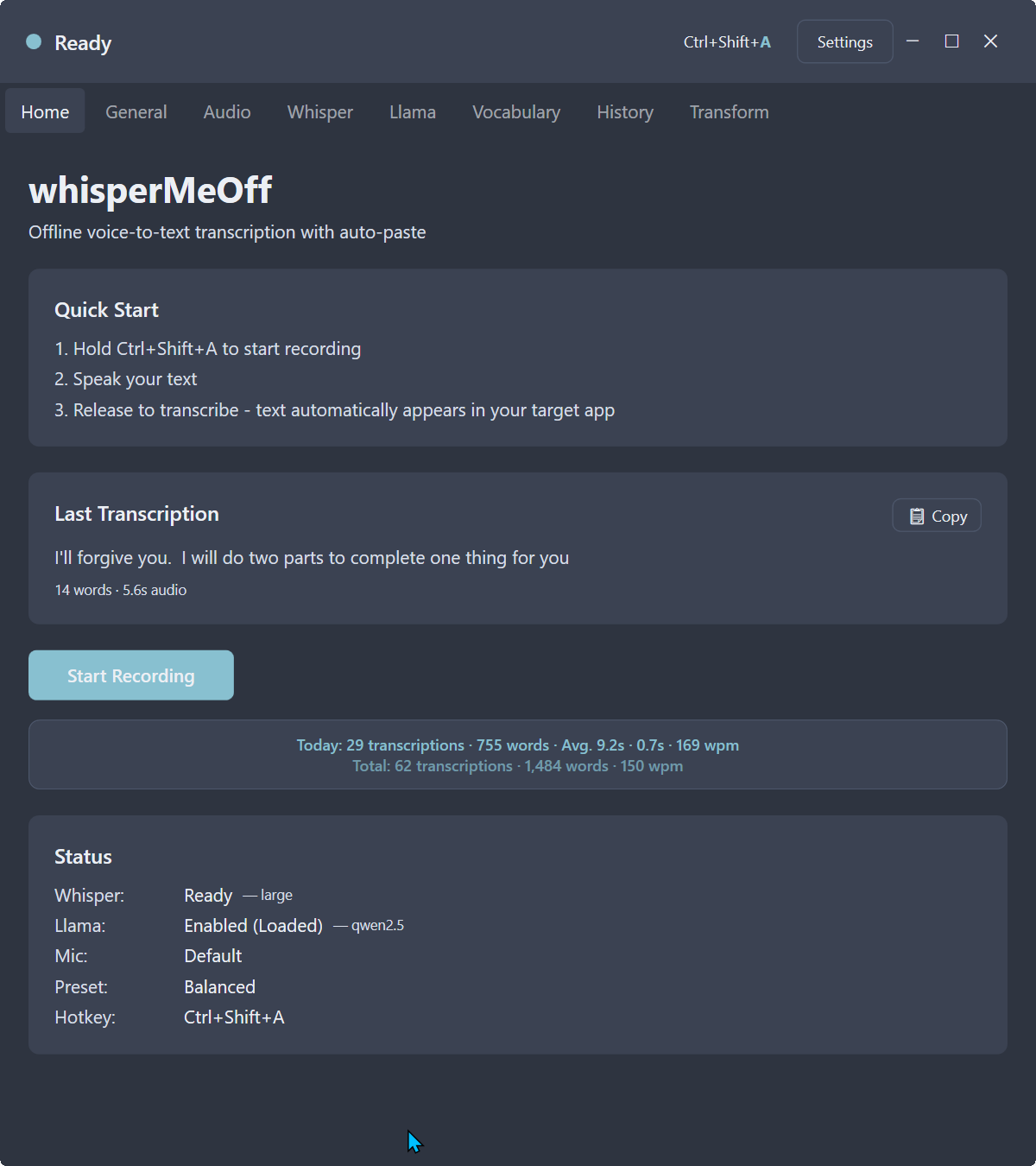 | |
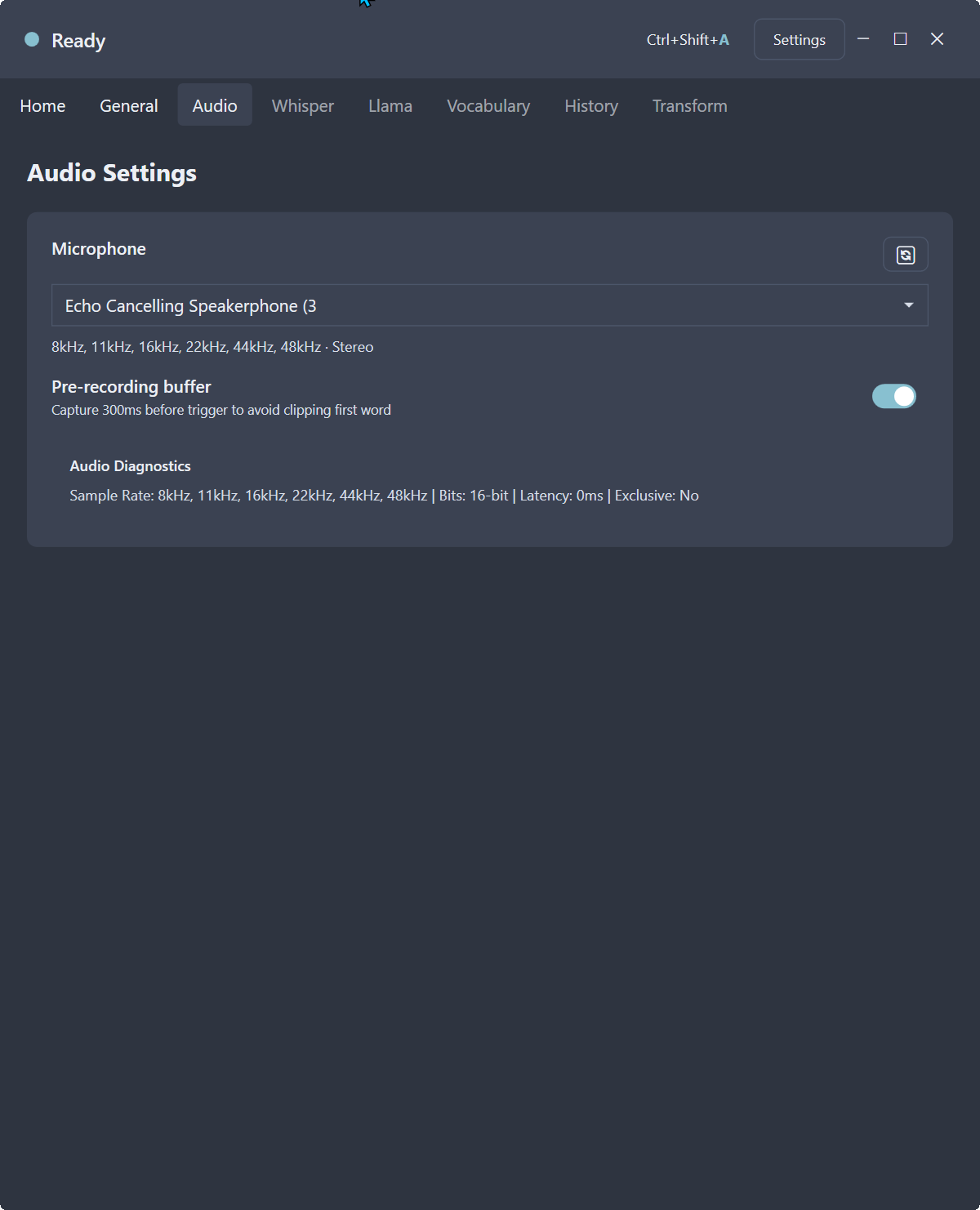 | 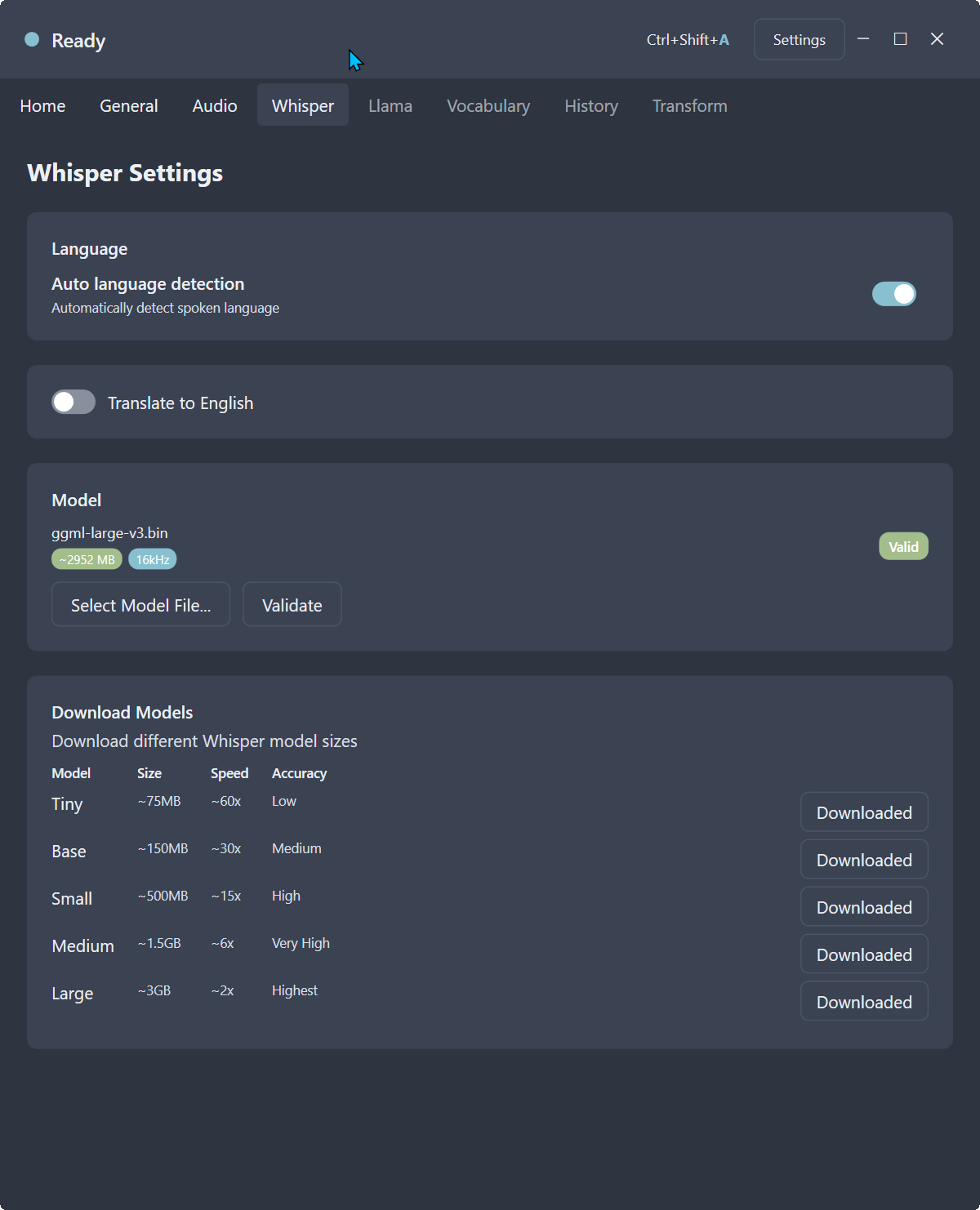 |
| Audio Settings | Whisper Settings |
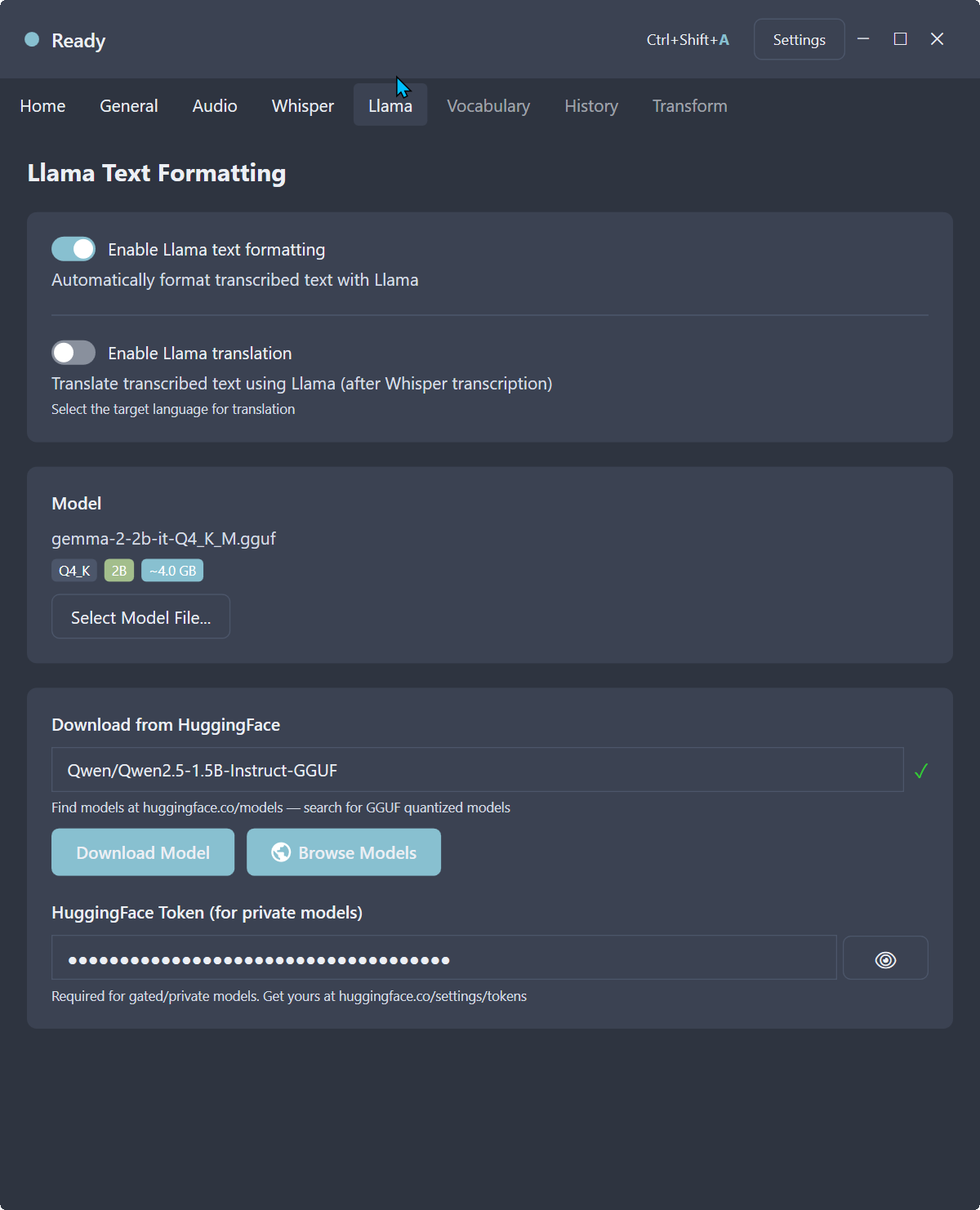 | 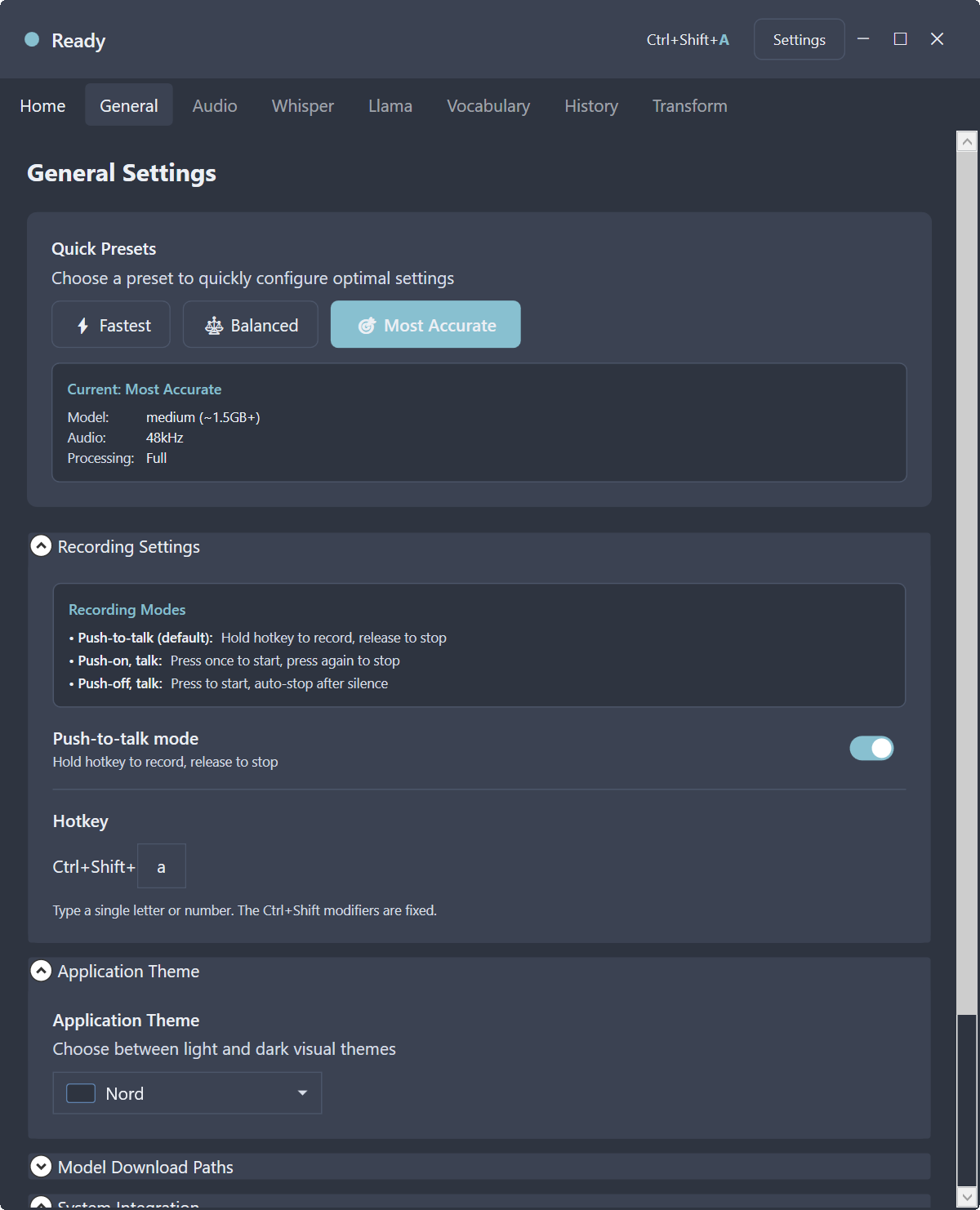 |
| Llama Settings | General Settings |
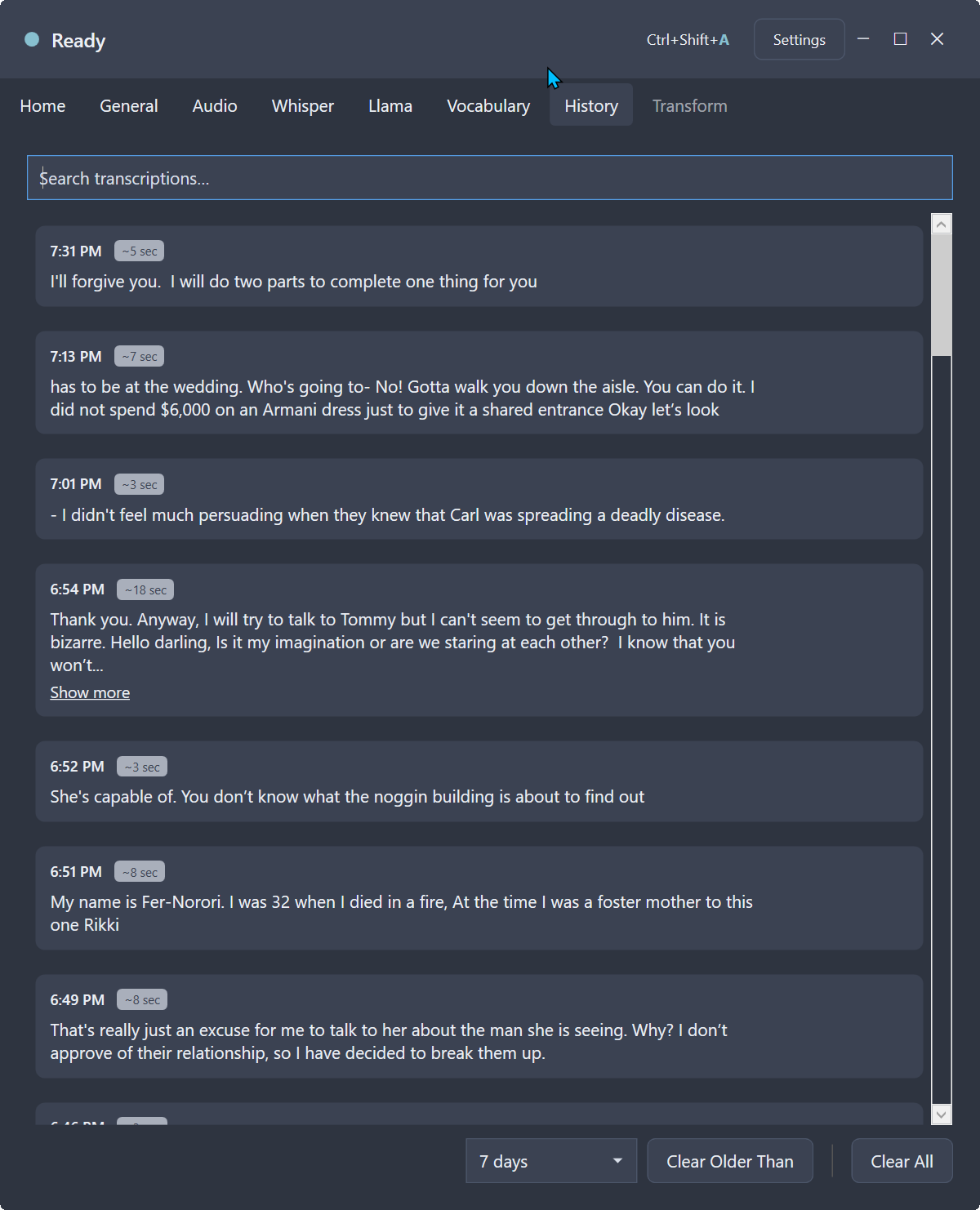 | |
| History | Home |
Requirements
- Windows 10/11
- .NET 10.0 Runtime
Dependencies & NuGet Packages
This project uses the following NuGet packages:
Audio & Transcription
| Package | Version | Description |
|---|---|---|
| NAudio | 2.2.1 | Audio capture and playback library for Windows |
| Whisper.net | 1.9.1-preview1 | .NET binding for Whisper.cpp |
| Whisper.net.Runtime | 1.9.1-preview1 | Runtime components for Whisper |
AI & ML
| Package | Version | Description |
|---|---|---|
| LLamaSharp | 0.26.0 | .NET binding for llama.cpp |
| LLamaSharp.Backend.Cpu | 0.26.0 | CPU backend for LLamaSharp |
| LLamaSharp.Backend.Vulkan | 0.26.0 | GPU (Vulkan) backend for LLamaSharp |
UI & Desktop
| Package | Version | Description |
|---|---|---|
| Hardcodet.NotifyIcon.Wpf | 1.1.0 | System tray icon support for WPF |
| CommunityToolkit.Mvvm | 8.4.0 | MVVM toolkit for WPF apps |
Data & Utilities
| Package | Version | Description |
|---|---|---|
| Microsoft.Data.Sqlite | 10.0.3 | SQLite database support |
| MathNet.Numerics | 5.0.0 | Numerical computing library |
| NLog | 5.2.8 | Structured logging framework |
Installation
- Download the latest release
- Run
whisperMeOff.exe - The app will guide you through initial setup
Usage
Quick Start
- Select a Whisper Model: Go to the Whisper tab and download a model
- Set Hotkey: The default is
Ctrl+Shift+R(you can change this in General settings) - Start Recording: Hold
Ctrl+Shift+Rto start recording - Release to Transcribe: Release the keys to stop recording and transcribe
- Auto-Paste: The transcribed text is automatically pasted to your previous window
Configuration
Whisper Settings
- Language: Select the language or use "Auto Detect"
- Translate: Enable to translate output to English
- Model: Select a Whisper model size (tiny, base, small, medium, large)
Llama Settings (Optional)
- Enable Llama text formatting for cleaner output
- Translation: Enable Llama translation to translate transcribed text to 27+ languages (English, Spanish, French, German, Italian, Portuguese, Russian, Chinese, Japanese, Korean, Arabic, Hindi, and more)
- Download models from HuggingFace (search for GGUF quantized models)
- Enter your HuggingFace token for private models
General Settings
- Hotkey: Change the trigger key (default: R)
- Launch at Login: Enable to automatically start the app when Windows boots
- Download Paths: Customize where models are saved
- Recording Mode: Choose Push-to-talk (hold to record) or Toggle (press to start/stop)
- Clipboard: Configure clipboard restore behavior
- Minimize to Tray: Minimize to system tray instead of taskbar
- Theme: Choose from 6 visual themes (Light, Dark, Nord, Dracula, Gruvbox, Monokai)
Model Sizes
| Model | Size | Accuracy |
|---|---|---|
| Tiny | ~75 MB | Low |
| Base | ~150 MB | Medium |
| Small | ~500 MB | Good |
| Medium | ~1.5 GB | Better |
| Large | ~3 GB | Best |
Keyboard Shortcuts
| Shortcut | Action |
|---|---|
| Ctrl+Shift+R | Start/Stop recording |
| F1 | Show keyboard shortcuts help |
Building from Source
dotnet build
License
MIT License
Similar repos


README
whisperMeOff
WhisperMeOff is a powerful, privacy-first voice-to-text app that runs entirely on your machine using cutting-edge AI. Built on whisper.cpp (the blazing-fast C++ port of OpenAI's Whisper) and powered by llama.cpp for intelligent text formatting, it delivers professional-quality transcription without ever sending your voice to the cloud.
Hold a hotkey, speak your mind, and watch your words appear — automatically pasted into whatever app you were using. No subscriptions, no account required, no data leaves your computer.
Features
- Voice Recording: Hold
Ctrl+Shift+Rto start recording, release to transcribe (or toggle mode) - Recording Overlay: Visual spectrum analyzer VU meter shows real-time audio levels during recording with colorful animated bars
- Session Stats: Today's and all-time transcription count, word count, audio duration, processing time, and words-per-minute (WPM) tracking (shown on separate lines)
- Auto-Paste: Automatically pastes transcribed text to the previously active window
- Whisper.cpp Powered: State-of-the-art local speech recognition using OpenAI's Whisper models (tiny to large)
- Whisper Translation: Translate non-English speech to English directly with Whisper (for supported languages)
- Llama.cpp Text Formatting: Optional AI-powered formatting cleans up your transcription with proper punctuation and paragraphs
- Llama Translation: Translate transcribed text to 27+ languages using Llama AI
- Cancellation Support: Long-running transcription can be cancelled (internal API support)
- Auto-Recovery: Automatic recovery from GPU hangs or native library errors with timeout protection
- 100% Offline: Works completely offline - no internet required after model download
- HuggingFace Integration: Download GGUF quantized models directly from HuggingFace
- 7 Visual Themes: Light, Dark, Nord, Dracula, Gruvbox, Monokai, and Synthwave themes
- System Tray: Run in background - record without the app being active
- Minimize to Tray: Option to minimize to system tray instead of taskbar
- Launch at Login: Automatically start the app when Windows boots
- Custom Vocabulary: Define word lists to improve recognition accuracy for domain-specific terminology
- Word Replacements: Automatically replace spoken phrases with different text after transcription
- History Management: Clear all transcriptions or filter by age (older than 1 hour/6 hours/24 hours/7 days/30 days/90 days)
- Model Validation: Visual badges showing valid/invalid model status with size and sample rate info
- Recording Modes: Support for push-to-talk, push-on talk, and push-off talk modes
- Download Progress: Real-time download progress with auto-select after completion
Top Benefits
- Boosts Productivity: Speak 3x faster than you type. Capture ideas instantly without breaking your workflow.
- Improves Accessibility: A voice-first interface makes content creation accessible to everyone, regardless of typing ability.
- Enables Hands-Free Use: Keep your hands on the keyboard or mouse while capturing your thoughts via voice.
- Reduces Typing Errors: Voice transcription eliminates typos and spelling mistakes from your workflow.
- Cuts Injury Risk: Reduce strain on your hands and wrists from excessive typing - ideal for those with RSI or carpal tunnel.
- Enhances Focus and Flow: Stay in the zone by capturing thoughts naturally without interrupting your creative process.
- Saves Time Overall: Less time typing means more time for what actually matters - creating and thinking.
- Adapts to Users: Choose from multiple Whisper model sizes and Llama formatting options to match your needs and hardware.
Screenshots
App Screens
| |
| |
| Audio Settings | Whisper Settings |
| |
| Llama Settings | General Settings |
| |
| History | Home |
Requirements
- Windows 10/11
- .NET 10.0 Runtime
Dependencies & NuGet Packages
This project uses the following NuGet packages:
Audio & Transcription
| Package | Version | Description |
|---|---|---|
| NAudio | 2.2.1 | Audio capture and playback library for Windows |
| Whisper.net | 1.9.1-preview1 | .NET binding for Whisper.cpp |
| Whisper.net.Runtime | 1.9.1-preview1 | Runtime components for Whisper |
AI & ML
| Package | Version | Description |
|---|---|---|
| LLamaSharp | 0.26.0 | .NET binding for llama.cpp |
| LLamaSharp.Backend.Cpu | 0.26.0 | CPU backend for LLamaSharp |
| LLamaSharp.Backend.Vulkan | 0.26.0 | GPU (Vulkan) backend for LLamaSharp |
UI & Desktop
| Package | Version | Description |
|---|---|---|
| Hardcodet.NotifyIcon.Wpf | 1.1.0 | System tray icon support for WPF |
| CommunityToolkit.Mvvm | 8.4.0 | MVVM toolkit for WPF apps |
Data & Utilities
| Package | Version | Description |
|---|---|---|
| Microsoft.Data.Sqlite | 10.0.3 | SQLite database support |
| MathNet.Numerics | 5.0.0 | Numerical computing library |
| NLog | 5.2.8 | Structured logging framework |
Installation
- Download the latest release
- Run
whisperMeOff.exe - The app will guide you through initial setup
Usage
Quick Start
- Select a Whisper Model: Go to the Whisper tab and download a model
- Set Hotkey: The default is
Ctrl+Shift+R(you can change this in General settings) - Start Recording: Hold
Ctrl+Shift+Rto start recording - Release to Transcribe: Release the keys to stop recording and transcribe
- Auto-Paste: The transcribed text is automatically pasted to your previous window
Configuration
Whisper Settings
- Language: Select the language or use "Auto Detect"
- Translate: Enable to translate output to English
- Model: Select a Whisper model size (tiny, base, small, medium, large)
Llama Settings (Optional)
- Enable Llama text formatting for cleaner output
- Translation: Enable Llama translation to translate transcribed text to 27+ languages (English, Spanish, French, German, Italian, Portuguese, Russian, Chinese, Japanese, Korean, Arabic, Hindi, and more)
- Download models from HuggingFace (search for GGUF quantized models)
- Enter your HuggingFace token for private models
General Settings
- Hotkey: Change the trigger key (default: R)
- Launch at Login: Enable to automatically start the app when Windows boots
- Download Paths: Customize where models are saved
- Recording Mode: Choose Push-to-talk (hold to record) or Toggle (press to start/stop)
- Clipboard: Configure clipboard restore behavior
- Minimize to Tray: Minimize to system tray instead of taskbar
- Theme: Choose from 6 visual themes (Light, Dark, Nord, Dracula, Gruvbox, Monokai)
Model Sizes
| Model | Size | Accuracy |
|---|---|---|
| Tiny | ~75 MB | Low |
| Base | ~150 MB | Medium |
| Small | ~500 MB | Good |
| Medium | ~1.5 GB | Better |
| Large | ~3 GB | Best |
Keyboard Shortcuts
| Shortcut | Action |
|---|---|
| Ctrl+Shift+R | Start/Stop recording |
| F1 | Show keyboard shortcuts help |
Building from Source
dotnet build
License
MIT License