
Open-source and private speech-to-text for Windows with GPU acceleration and LLM enhancement
C#
0
228 commits
updated Apr 21, 2026
README
VoxScript
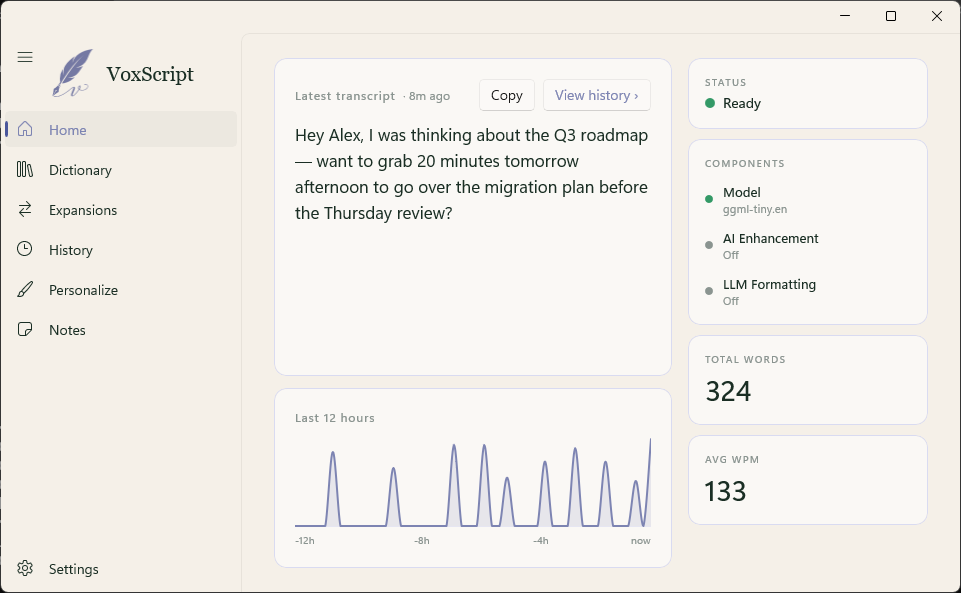
Local, private voice-to-text for Windows. Press and hold, speak, release — your words appear at the cursor.




Status: Early-adopter release (v0.x). Feature-complete for daily use, but unsigned and not yet battle-tested on every machine. x64 Windows only (ARM64 planned for a later release).
Background
VoxScript started as a personal project — I wanted premium speech-to-text on Windows and couldn't find one that was free to use. Slowly evolved to be more privacy-focused and hotkey-first the way I liked. It's open-sourced so others with the same itch can skip the ground-up build; expect a focused feature set that reflects one person's workflow rather than a fully general-purpose app.
Features
- Dictate anywhere — global hotkey (Ctrl+Win) pastes into any app
- Local by default — whisper.cpp runs on your machine, not in the cloud
- Vulkan GPU acceleration — ships bundled; runs on any modern GPU
- Smart formatting — spoken punctuation, number conversion, lists, emails, URLs
- Optional AI enhancement — OpenAI, Anthropic, or local Ollama; per-app context modes
- Custom dictionary + corrections — teach VoxScript your jargon
- History, Notes, Expansions — full-featured app, not just a dictation box
Install
Requires Windows 10 20H1+ (build 19041+) or Windows 11.
- Download
VoxScript-Setup-v{latest}.exefrom the latest release. - Double-click to install. The installer is currently unsigned — Windows SmartScreen will show a "Windows protected your PC" warning. Click More info, then Run anyway to proceed.
- VoxScript launches, walks you through a one-time setup (mic check + model download ~140 MB), then lives in your system tray.
Prefer portable? Grab VoxScript-Portable-v{latest}.zip from the same release, extract anywhere, run VoxScript.exe.
Quick Start
| Hotkey | Action |
|---|---|
Ctrl + Win (hold) | Hold-to-dictate — release to paste |
Ctrl + Win, tap Space | Toggle-lock recording — tap again to stop |
Alt + Shift + Z | Paste last transcript |
All hotkeys are configurable in Settings → Keybinds.
Privacy
- Transcription runs locally via whisper.cpp. No audio leaves your machine.
- AI Enhancement is opt-in. When enabled, the transcribed text (not audio) is sent to your chosen provider (OpenAI, Anthropic, or local Ollama). API keys are stored in Windows Credential Manager — never in plain text.
- No telemetry. VoxScript makes no analytics or crash-reporting network calls.
Building from source
Requirements: Windows 10 20H1+ (build 19041+), .NET 10 SDK.
git clone https://github.com/rohilrs/VoxScript.git
cd VoxScript
dotnet build VoxScript.slnx
dotnet test VoxScript.Tests
dotnet run --project VoxScript
Pre-built whisper + ggml DLLs (including Vulkan-enabled) live in VoxScript/NativeBinaries/x64/. To rebuild them from source with Vulkan support, install the Vulkan SDK and see native/whisper/build.ps1.
License
MIT — see LICENSE.
Acknowledgments
- whisper.cpp — local transcription engine
- VoiceInk — the macOS app VoxScript was ported from
- NAudio — audio capture
- WinUI 3 + Windows App SDK
- Velopack — installer and auto-update framework
Similar repos


Open-source and private speech-to-text for Windows with GPU acceleration and LLM enhancement
C#
0
228 commits
updated Apr 21, 2026
README
VoxScript
Local, private voice-to-text for Windows. Press and hold, speak, release — your words appear at the cursor.
Status: Early-adopter release (v0.x). Feature-complete for daily use, but unsigned and not yet battle-tested on every machine. x64 Windows only (ARM64 planned for a later release).
Background
VoxScript started as a personal project — I wanted premium speech-to-text on Windows and couldn't find one that was free to use. Slowly evolved to be more privacy-focused and hotkey-first the way I liked. It's open-sourced so others with the same itch can skip the ground-up build; expect a focused feature set that reflects one person's workflow rather than a fully general-purpose app.
Features
- Dictate anywhere — global hotkey (Ctrl+Win) pastes into any app
- Local by default — whisper.cpp runs on your machine, not in the cloud
- Vulkan GPU acceleration — ships bundled; runs on any modern GPU
- Smart formatting — spoken punctuation, number conversion, lists, emails, URLs
- Optional AI enhancement — OpenAI, Anthropic, or local Ollama; per-app context modes
- Custom dictionary + corrections — teach VoxScript your jargon
- History, Notes, Expansions — full-featured app, not just a dictation box
Install
Requires Windows 10 20H1+ (build 19041+) or Windows 11.
- Download
VoxScript-Setup-v{latest}.exefrom the latest release. - Double-click to install. The installer is currently unsigned — Windows SmartScreen will show a "Windows protected your PC" warning. Click More info, then Run anyway to proceed.
- VoxScript launches, walks you through a one-time setup (mic check + model download ~140 MB), then lives in your system tray.
Prefer portable? Grab VoxScript-Portable-v{latest}.zip from the same release, extract anywhere, run VoxScript.exe.
Quick Start
| Hotkey | Action |
|---|---|
Ctrl + Win (hold) | Hold-to-dictate — release to paste |
Ctrl + Win, tap Space | Toggle-lock recording — tap again to stop |
Alt + Shift + Z | Paste last transcript |
All hotkeys are configurable in Settings → Keybinds.
Privacy
- Transcription runs locally via whisper.cpp. No audio leaves your machine.
- AI Enhancement is opt-in. When enabled, the transcribed text (not audio) is sent to your chosen provider (OpenAI, Anthropic, or local Ollama). API keys are stored in Windows Credential Manager — never in plain text.
- No telemetry. VoxScript makes no analytics or crash-reporting network calls.
Building from source
Requirements: Windows 10 20H1+ (build 19041+), .NET 10 SDK.
git clone https://github.com/rohilrs/VoxScript.git
cd VoxScript
dotnet build VoxScript.slnx
dotnet test VoxScript.Tests
dotnet run --project VoxScript
Pre-built whisper + ggml DLLs (including Vulkan-enabled) live in VoxScript/NativeBinaries/x64/. To rebuild them from source with Vulkan support, install the Vulkan SDK and see native/whisper/build.ps1.
License
MIT — see LICENSE.
Acknowledgments
- whisper.cpp — local transcription engine
- VoiceInk — the macOS app VoxScript was ported from
- NAudio — audio capture
- WinUI 3 + Windows App SDK
- Velopack — installer and auto-update framework