
Recording Windows output plus the microphone and turning that audio into local transcripts
C#
0
8 commits
updated Apr 1, 2026
README
Voice Transcriber
Voice Transcriber is a native Windows desktop app for recording Windows output plus the default microphone and turning that audio into local transcripts.
It captures both sources with native WASAPI, mixes them into one local WAV, transcribes locally with Whisper, stores transcript history in SQLite, and can optionally generate OpenAI summaries or run local speaker separation after transcription.
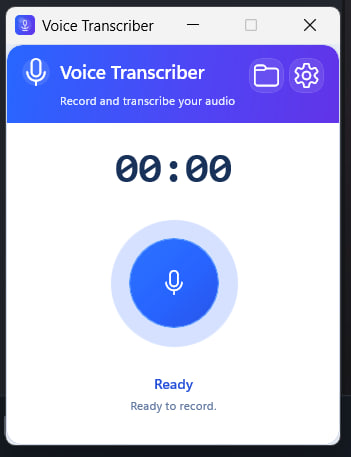
Highlights
- One-click recording for Windows output plus microphone
- Tray-first workflow with close-to-tray behavior, tray recording controls, and startup-to-tray launch
- Native WinUI 3 desktop UI with no browser shell and no localhost behavior
- Local Whisper transcription with selectable Tiny / Base / Small models
- Long-session transcript-first flow with background speaker separation
- Local Silero VAD, speech-aware chunk planning, and deterministic merge cleanup for longer sessions
- Transcript history, session detail, copy, and export flow
- Optional OpenAI summaries
- Self-contained Windows publish flow
Current Stack
- WinUI 3
- C# / .NET 8
- MVVM
- NAudio for WASAPI loopback and microphone capture
- SQLite for settings and session history
- Whisper.net / whisper.cpp as the default shipped transcription backend
- Optional pyannote-based speaker separation
- Optional OpenAI Responses API for transcript-only summaries
Recognition Path
- The shipped default backend is
Whisper.net/whisper.cpp. - The default quality path stays local and uses:
- Silero VAD before long-session chunk planning when available
- speech-aware chunk boundaries with overlap-aware merge
- dominant-language lock on longer sessions when early speech is confident
- hidden
.enmodel preference when the session is confidently English and a compatible English-only model is already installed - deterministic cleanup for duplicate joins, repeated fragments, punctuation joins, and whitespace
- An experimental
faster-whisperbackend exists only for internal/config/smoke evaluation. - The experimental backend is not the default shipped path and is not included in the standard release folder.
Privacy And Network Behavior
- Recording, mixdown, storage, and transcription run locally by default.
- OpenAI is used only when you explicitly configure summaries and provide an API key.
- Additional Whisper models are downloaded only when requested in Settings.
- Optional speaker separation may download local dependencies and models during setup.
- The standard app flow does not require Python, npm, localhost, or a browser shell.
Active App vs Legacy Code
The active product path is the native Windows app in native/VoiceRecorder.Native.
This repository still contains src/, src-tauri/, and backend/ from the earlier Tauri/Web direction. Those folders remain only for migration context and older tooling.
Requirements
- Windows 10/11 x64
- .NET 8 SDK for local development/builds
- A working default Windows audio output device for loopback capture
- Optional: OpenAI API key for summaries
- Optional: Hugging Face access token for speaker separation
The published release folder does not require the .NET SDK for end users.
Quick Start
Build the native app:
dotnet build native\VoiceRecorder.Native\VoiceRecorder.Native.csproj
Run the native app:
dotnet run --project native\VoiceRecorder.Native\VoiceRecorder.Native.csproj
Normal launches open the main recorder window. If you enable Run on Windows startup in Settings, the app registers a startup launch that opens hidden in the tray instead.
Run the native smoke validation:
powershell -ExecutionPolicy Bypass -File scripts\run_native_smoke.ps1 -ProjectRoot $PWD
Publish a self-contained Windows build:
powershell -ExecutionPolicy Bypass -File scripts\publish_native_app.ps1 -ProjectRoot $PWD -Configuration Release
Build a Microsoft Store upload package:
powershell -ExecutionPolicy Bypass -File scripts\build_store_upload.ps1 -ProjectRoot $PWD -Configuration Release
Store packaging details are documented in docs/store-upload.md.
Typical Flow
- Press
Record. - The app captures Windows output and the default microphone into one final WAV.
- Press
Stop. - The transcript is generated locally and saved to history.
- On longer sessions, the plain transcript can appear first while background speaker separation continues.
- If speaker separation is enabled and succeeds, the preferred transcript is later replaced with the diarized transcript.
- Optionally generate a summary from the saved transcript.
- You can close the main window to keep the app running in the tray, then use the tray menu for
Record/Stop,Open,Sessions,Settings, orExit.
Repository Layout
native/VoiceRecorder.Native- active WinUI desktop appnative/VoiceRecorder.Smoke- smoke and validation toolnative/VoiceRecorder.Tests- regression testsscripts/- publish and smoke helpersdocs/images/- README assetssrc/,src-tauri/,backend/- legacy or transitional code paths
Current Status
- The native Windows rewrite is active and usable.
- The default shipped backend remains
Whisper.net. - Longer recordings use a chunked local Whisper path with VAD, speech-aware boundaries, language-stability handling, and timing logs.
- Background diarization is owned by an app service so history/detail window navigation does not cancel or lose it.
- Settings now surface clearer Hugging Face token guidance for speaker separation and include a credits panel.
- Packaging works as a self-contained WinUI folder build.
- Store upload packaging is scripted and produces a
.msixuploadartifact for submission prep. faster-whisperremains experimental only.
Known Gaps
- UI automation coverage is still limited.
- Live OpenAI summary validation depends on a configured API key.
- Live speaker-separation validation depends on a configured token and model setup.
- Live loopback validation still depends on a machine with an active default Windows render endpoint.
- The experimental
faster-whisperpath needs stronger real-world fixture coverage before any promotion decision. - The legacy Tauri/Web path is still present in the repository and has not been fully removed.
Support
If this project is useful, Buy me an apple.
Similar repos


Languages
C#
69.1%
TypeScript
12.6%
Python
9.2%
Rust
4.1%
PowerShell
2.9%
CSS
2.0%
Recording Windows output plus the microphone and turning that audio into local transcripts
C#
0
8 commits
updated Apr 1, 2026
README
Voice Transcriber
Voice Transcriber is a native Windows desktop app for recording Windows output plus the default microphone and turning that audio into local transcripts.
It captures both sources with native WASAPI, mixes them into one local WAV, transcribes locally with Whisper, stores transcript history in SQLite, and can optionally generate OpenAI summaries or run local speaker separation after transcription.
Highlights
- One-click recording for Windows output plus microphone
- Tray-first workflow with close-to-tray behavior, tray recording controls, and startup-to-tray launch
- Native WinUI 3 desktop UI with no browser shell and no localhost behavior
- Local Whisper transcription with selectable Tiny / Base / Small models
- Long-session transcript-first flow with background speaker separation
- Local Silero VAD, speech-aware chunk planning, and deterministic merge cleanup for longer sessions
- Transcript history, session detail, copy, and export flow
- Optional OpenAI summaries
- Self-contained Windows publish flow
Current Stack
- WinUI 3
- C# / .NET 8
- MVVM
- NAudio for WASAPI loopback and microphone capture
- SQLite for settings and session history
- Whisper.net / whisper.cpp as the default shipped transcription backend
- Optional pyannote-based speaker separation
- Optional OpenAI Responses API for transcript-only summaries
Recognition Path
- The shipped default backend is
Whisper.net/whisper.cpp. - The default quality path stays local and uses:
- Silero VAD before long-session chunk planning when available
- speech-aware chunk boundaries with overlap-aware merge
- dominant-language lock on longer sessions when early speech is confident
- hidden
.enmodel preference when the session is confidently English and a compatible English-only model is already installed - deterministic cleanup for duplicate joins, repeated fragments, punctuation joins, and whitespace
- An experimental
faster-whisperbackend exists only for internal/config/smoke evaluation. - The experimental backend is not the default shipped path and is not included in the standard release folder.
Privacy And Network Behavior
- Recording, mixdown, storage, and transcription run locally by default.
- OpenAI is used only when you explicitly configure summaries and provide an API key.
- Additional Whisper models are downloaded only when requested in Settings.
- Optional speaker separation may download local dependencies and models during setup.
- The standard app flow does not require Python, npm, localhost, or a browser shell.
Active App vs Legacy Code
The active product path is the native Windows app in native/VoiceRecorder.Native.
This repository still contains src/, src-tauri/, and backend/ from the earlier Tauri/Web direction. Those folders remain only for migration context and older tooling.
Requirements
- Windows 10/11 x64
- .NET 8 SDK for local development/builds
- A working default Windows audio output device for loopback capture
- Optional: OpenAI API key for summaries
- Optional: Hugging Face access token for speaker separation
The published release folder does not require the .NET SDK for end users.
Quick Start
Build the native app:
dotnet build native\VoiceRecorder.Native\VoiceRecorder.Native.csproj
Run the native app:
dotnet run --project native\VoiceRecorder.Native\VoiceRecorder.Native.csproj
Normal launches open the main recorder window. If you enable Run on Windows startup in Settings, the app registers a startup launch that opens hidden in the tray instead.
Run the native smoke validation:
powershell -ExecutionPolicy Bypass -File scripts\run_native_smoke.ps1 -ProjectRoot $PWD
Publish a self-contained Windows build:
powershell -ExecutionPolicy Bypass -File scripts\publish_native_app.ps1 -ProjectRoot $PWD -Configuration Release
Build a Microsoft Store upload package:
powershell -ExecutionPolicy Bypass -File scripts\build_store_upload.ps1 -ProjectRoot $PWD -Configuration Release
Store packaging details are documented in docs/store-upload.md.
Typical Flow
- Press
Record. - The app captures Windows output and the default microphone into one final WAV.
- Press
Stop. - The transcript is generated locally and saved to history.
- On longer sessions, the plain transcript can appear first while background speaker separation continues.
- If speaker separation is enabled and succeeds, the preferred transcript is later replaced with the diarized transcript.
- Optionally generate a summary from the saved transcript.
- You can close the main window to keep the app running in the tray, then use the tray menu for
Record/Stop,Open,Sessions,Settings, orExit.
Repository Layout
native/VoiceRecorder.Native- active WinUI desktop appnative/VoiceRecorder.Smoke- smoke and validation toolnative/VoiceRecorder.Tests- regression testsscripts/- publish and smoke helpersdocs/images/- README assetssrc/,src-tauri/,backend/- legacy or transitional code paths
Current Status
- The native Windows rewrite is active and usable.
- The default shipped backend remains
Whisper.net. - Longer recordings use a chunked local Whisper path with VAD, speech-aware boundaries, language-stability handling, and timing logs.
- Background diarization is owned by an app service so history/detail window navigation does not cancel or lose it.
- Settings now surface clearer Hugging Face token guidance for speaker separation and include a credits panel.
- Packaging works as a self-contained WinUI folder build.
- Store upload packaging is scripted and produces a
.msixuploadartifact for submission prep. faster-whisperremains experimental only.
Known Gaps
- UI automation coverage is still limited.
- Live OpenAI summary validation depends on a configured API key.
- Live speaker-separation validation depends on a configured token and model setup.
- Live loopback validation still depends on a machine with an active default Windows render endpoint.
- The experimental
faster-whisperpath needs stronger real-world fixture coverage before any promotion decision. - The legacy Tauri/Web path is still present in the repository and has not been fully removed.
Support
If this project is useful, Buy me an apple.
Similar repos
Languages
C#
69.1%
TypeScript
12.6%
Python
9.2%
Rust
4.1%
PowerShell
2.9%
CSS
2.0%