Access your personal AI agents and workstation data anywhere, anytime through MindFS.
See the codeEnglish | 简体中文 | Official Site | Discord | Twitter | 【wechat group】 | Competitive Analysis | Competitive Analysis PPT
AI Agent Remote Access Gateway · Result Visualization
Access your personal AI agents and workstation data anywhere, anytime through MindFS.
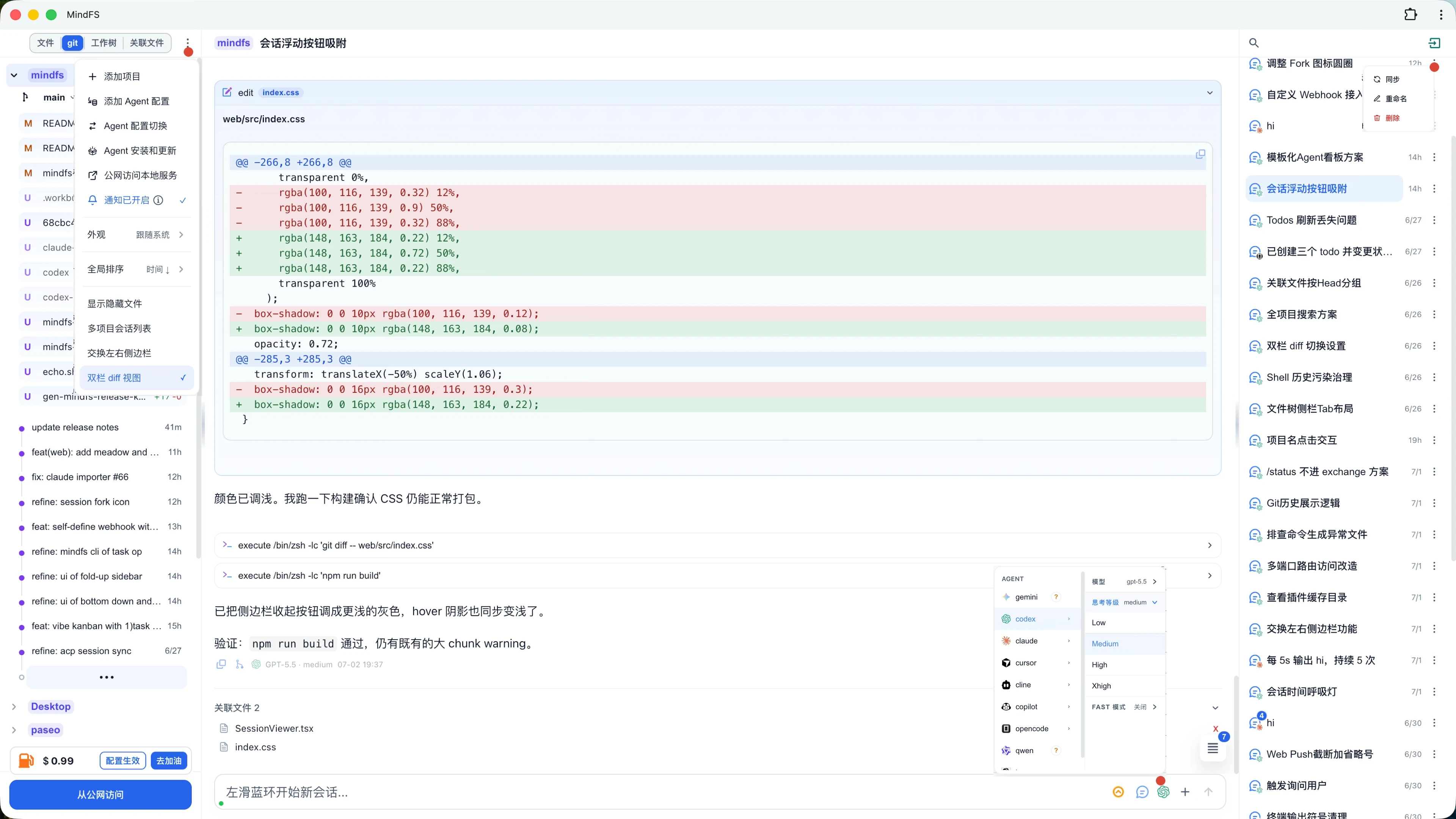
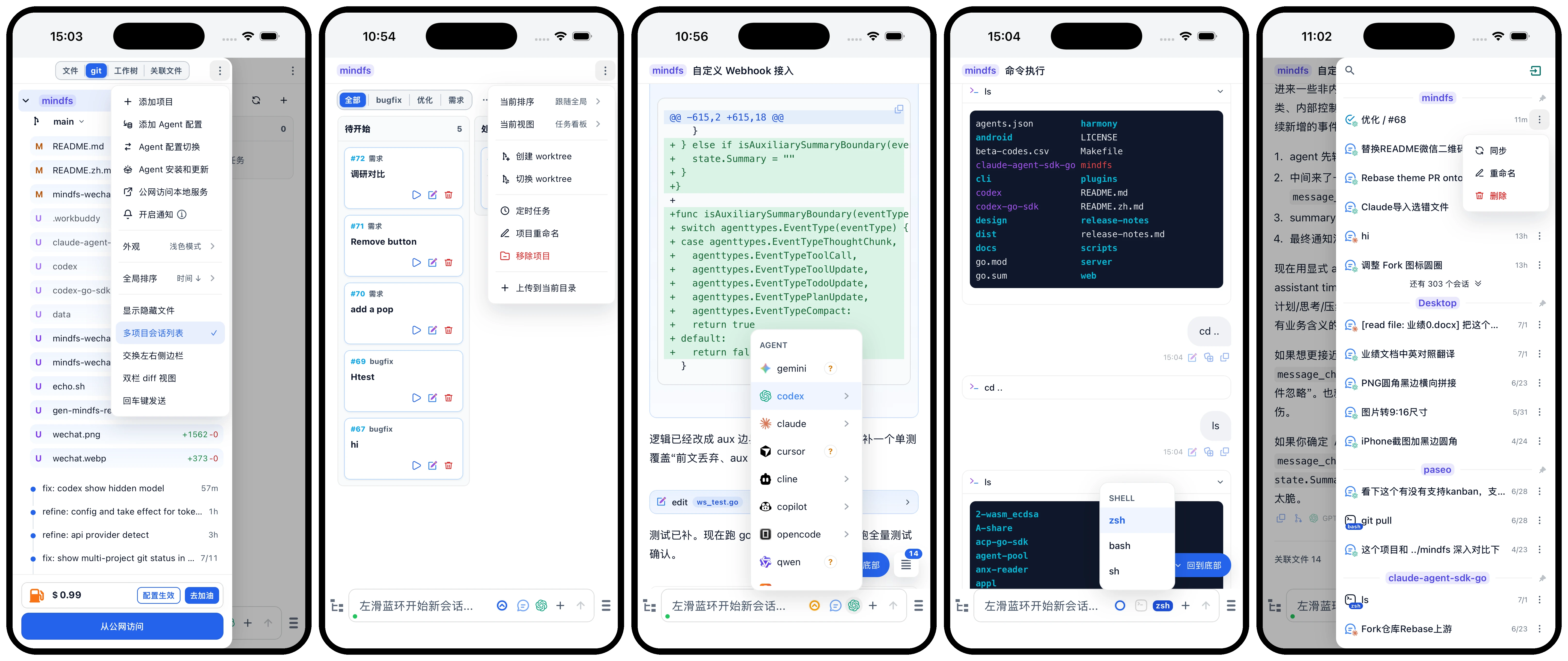
.mindfs/ by default. The sidebar menu can place metadata for new projects under ~/.mindfs/<rootId>/; an existing project-local .mindfs/ is always reused./ slash commands: Type / to trigger a command palette and quickly run preset operations.@ file references: Type @ to trigger path completion and attach any file as context for the agent.# quick prompts: Type # to trigger your saved prompt shortcuts inline.ip:port.MindFS does not include any AI model — you need at least one Agent CLI installed locally. Choose what works for you:
MindFS also collects commonly used agents in the local UI. Open the file-tree menu, choose Agent Install & Update, then use the generated install/update commands for your platform. The commands are launched in MindFS command mode so you can review and run them from the same workspace.
For DSH, the generated commands install the OpenMA ACP adapter into a dedicated mindfs-acp profile. Configure the provider, API key, and default model in dsh web; MindFS uses the same per-user $DSH_HOME/settings.yaml and $DSH_HOME/.credentials.yaml. The dedicated profile isolates the ACP composition only—it does not replace or hard-code the user's DSH Web configuration.
Once an agent is installed, start MindFS and interact with it through the browser.
macOS / Linux
curl -fsSL https://raw.githubusercontent.com/a9gent/mindfs/main/scripts/install.sh | bash
Custom install path:
curl -fsSL https://raw.githubusercontent.com/a9gent/mindfs/main/scripts/install.sh | bash -s -- --prefix your/path
Windows (PowerShell)
irm https://raw.githubusercontent.com/a9gent/mindfs/main/scripts/install.ps1 | iex
The install script auto-detects your OS and architecture, reads the latest version from the first line of release-notes.md, then downloads the matching binary from GitHub Releases. release-notes.md keeps release history with the newest entry at the top; make release TAG=v1.2.3 commits and pushes it when changed, then uses only the top entry as the GitHub release notes.
The uninstall command removes the installed binary, bundled web assets, bundled default agents.json, and the PATH entry added by the installer. User config and project .mindfs/ data are kept by default.
macOS / Linux
installer="${TMPDIR:-/tmp}/mindfs-install.sh"
curl -fsSL https://raw.githubusercontent.com/a9gent/mindfs/main/scripts/install.sh -o "$installer"
bash "$installer" --uninstall
Windows (PowerShell)
$Installer = Join-Path $env:TEMP "mindfs-install.ps1"
Invoke-WebRequest -Uri "https://raw.githubusercontent.com/a9gent/mindfs/main/scripts/install.ps1" -OutFile $Installer
& $Installer -Uninstall
To also remove user-level MindFS config and logs, add --purge on macOS/Linux or -Purge on Windows. Project .mindfs/ directories are never removed automatically.
Build from source (requires Go 1.22+, Node.js 20+)
git clone https://github.com/a9gent/mindfs.git
cd mindfs
make build      # output: ./mindfs
mindfs                        # manage current directory
mindfs /path/to/your/project  # manage a specific directory
mindfs -addr :9000 /path/to/your/project  # custom port
Open http://localhost:7331 in your browser.
Enable HTTPS with a self-signed certificate (auto-generated and reused across restarts):
mindfs -tls
mindfs -tls -addr :9000 /path/to/your/project
Open https://localhost:7331 in your browser. The auto-generated certificate includes SANs for localhost, 127.0.0.1, ::1, and all non-loopback interface IPs, so LAN clients can connect without certificate name mismatches. Certificates are stored under the user config directory (e.g., ~/.config/mindfs/ on Linux).
Use custom certificate and key files:
mindfs -tls -cert /path/to/cert.pem -key /path/to/key.pem
MindFS automatically detects the availability of installed agents. This usually takes about one minute.
MindFS can load an extra agents.json for agent CLIs that speak the ACP protocol. This is useful when you are testing a new agent or want to keep project-specific agent definitions outside the bundled defaults.
{
  "agents": [
    {
      "name": "my-agent",
      "brief": "Short description shown in the install/update list.",
      "command": "my-agent",
      "protocol": "acp",
      "args": ["--acp"]
    }
  ]
}
Start MindFS with the extra config:
mindfs -agent-config /path/to/agents.json
The extra file can add new agents or override a bundled definition with the same name.
mindfs [flags] [root]
root is the directory to manage. If omitted, MindFS opens without adding a directory.
By default, mindfs starts or reuses a background service and opens the browser without registering automatic startup. Run mindfs -autostart once to enable it for the current user. Once enabled, normal terminal launches refresh a private snapshot of the visible environment and the existing startup entry. At automatic startup, MindFS restores that snapshot and then loads the recorded shell's rc/profile so newer shell values take precedence. Pass -autostart=false to remove the startup entry and environment snapshot.
MindFS uses a launch agent on macOS, a systemd user service on Linux, and the current user's startup registry entry on Windows. The environment snapshot can contain credentials and is stored under the platform user config directory (os.UserConfigDir()/mindfs) with user-only permissions.
mindfs
mindfs /path/to/project
mindfs -addr :9000 /path/to/project
mindfs -foreground /path/to/project
mindfs -status
mindfs -version
mindfs -update
mindfs -uninstall
mindfs -stop
mindfs -restart
mindfs -remove /path/to/project
mindfs -agent-config /path/to/agents.json
| Flag | Default | Description |
|---|---|---|
-addr string | 127.0.0.1:7331 | Listen address. Use :7331 or 0.0.0.0:7331 to allow LAN access. |
-foreground | false | Run the server in the foreground instead of starting a background service. |
-autostart | false | Register or refresh automatic startup and the environment snapshot. Pass -autostart=false to disable an existing entry. |
-status | false | Show background service status, PID, URL, and log file path. |
-version | false | Show the current MindFS version. |
-update | false | Check for and install the latest MindFS release. Restart MindFS manually after updating. |
-uninstall | false | Print the uninstall command for the current platform. |
-stop | false | Stop the background service for the selected address. |
-restart | false | Stop the background service if present, then start it again. |
-remove | false | Remove root from the managed directory list. If the server is running, it is removed through the local API; otherwise it is removed from the local registry. |
-config string | empty | Read startup options from a JSON file. See config.json for a template. Explicit command-line flags override file values. |
-agent-config string | empty | Load one extra agents.json file. |
-no-relayer | false | Disable relay integration. Local and private-network access still work. |
-e2ee | false | Enable end-to-end encryption for sensitive data. The pairing code can also be used as an authentication mechanism: unpaired frontends cannot access node content. LAN access requires -tls to work correctly. On first enablement, the CLI prints the pairing secret. |
-web-push | true | Enable PWA Web Push notifications. VAPID keys are generated automatically on first start. |
-notify-script string | empty | Executable script for notification events. MindFS passes the JSON payload on stdin. |
-tls | false | Enable HTTPS. If -cert and -key are not provided, MindFS generates and reuses a local self-signed certificate. |
-cert string | empty | TLS certificate file in PEM format. Used with -tls; auto-generated when empty. |
-key string | empty | TLS private key file in PEM format. Used with -tls; auto-generated when empty. |
Pull requests are welcome. For larger changes, please open an issue first to discuss the approach.

4,155 followers · starred Apr 2026
536 followers · starred May 2026
3,067 followers · starred May 2026
18 followers · starred May 2026
Access your personal AI agents and workstation data anywhere, anytime through MindFS.
See the codeEnglish | 简体中文 | Official Site | Discord | Twitter | 【wechat group】 | Competitive Analysis | Competitive Analysis PPT
AI Agent Remote Access Gateway · Result Visualization
Access your personal AI agents and workstation data anywhere, anytime through MindFS.
.mindfs/ by default. The sidebar menu can place metadata for new projects under ~/.mindfs/<rootId>/; an existing project-local .mindfs/ is always reused./ slash commands: Type / to trigger a command palette and quickly run preset operations.@ file references: Type @ to trigger path completion and attach any file as context for the agent.# quick prompts: Type # to trigger your saved prompt shortcuts inline.ip:port.MindFS does not include any AI model — you need at least one Agent CLI installed locally. Choose what works for you:
MindFS also collects commonly used agents in the local UI. Open the file-tree menu, choose Agent Install & Update, then use the generated install/update commands for your platform. The commands are launched in MindFS command mode so you can review and run them from the same workspace.
For DSH, the generated commands install the OpenMA ACP adapter into a dedicated mindfs-acp profile. Configure the provider, API key, and default model in dsh web; MindFS uses the same per-user $DSH_HOME/settings.yaml and $DSH_HOME/.credentials.yaml. The dedicated profile isolates the ACP composition only—it does not replace or hard-code the user's DSH Web configuration.
Once an agent is installed, start MindFS and interact with it through the browser.
macOS / Linux
curl -fsSL https://raw.githubusercontent.com/a9gent/mindfs/main/scripts/install.sh | bash
Custom install path:
curl -fsSL https://raw.githubusercontent.com/a9gent/mindfs/main/scripts/install.sh | bash -s -- --prefix your/path
Windows (PowerShell)
irm https://raw.githubusercontent.com/a9gent/mindfs/main/scripts/install.ps1 | iex
The install script auto-detects your OS and architecture, reads the latest version from the first line of release-notes.md, then downloads the matching binary from GitHub Releases. release-notes.md keeps release history with the newest entry at the top; make release TAG=v1.2.3 commits and pushes it when changed, then uses only the top entry as the GitHub release notes.
The uninstall command removes the installed binary, bundled web assets, bundled default agents.json, and the PATH entry added by the installer. User config and project .mindfs/ data are kept by default.
macOS / Linux
installer="${TMPDIR:-/tmp}/mindfs-install.sh"
curl -fsSL https://raw.githubusercontent.com/a9gent/mindfs/main/scripts/install.sh -o "$installer"
bash "$installer" --uninstall
Windows (PowerShell)
$Installer = Join-Path $env:TEMP "mindfs-install.ps1"
Invoke-WebRequest -Uri "https://raw.githubusercontent.com/a9gent/mindfs/main/scripts/install.ps1" -OutFile $Installer
& $Installer -Uninstall
To also remove user-level MindFS config and logs, add --purge on macOS/Linux or -Purge on Windows. Project .mindfs/ directories are never removed automatically.
Build from source (requires Go 1.22+, Node.js 20+)
git clone https://github.com/a9gent/mindfs.git
cd mindfs
make build      # output: ./mindfs
mindfs                        # manage current directory
mindfs /path/to/your/project  # manage a specific directory
mindfs -addr :9000 /path/to/your/project  # custom port
Open http://localhost:7331 in your browser.
Enable HTTPS with a self-signed certificate (auto-generated and reused across restarts):
mindfs -tls
mindfs -tls -addr :9000 /path/to/your/project
Open https://localhost:7331 in your browser. The auto-generated certificate includes SANs for localhost, 127.0.0.1, ::1, and all non-loopback interface IPs, so LAN clients can connect without certificate name mismatches. Certificates are stored under the user config directory (e.g., ~/.config/mindfs/ on Linux).
Use custom certificate and key files:
mindfs -tls -cert /path/to/cert.pem -key /path/to/key.pem
MindFS automatically detects the availability of installed agents. This usually takes about one minute.
MindFS can load an extra agents.json for agent CLIs that speak the ACP protocol. This is useful when you are testing a new agent or want to keep project-specific agent definitions outside the bundled defaults.
{
  "agents": [
    {
      "name": "my-agent",
      "brief": "Short description shown in the install/update list.",
      "command": "my-agent",
      "protocol": "acp",
      "args": ["--acp"]
    }
  ]
}
Start MindFS with the extra config:
mindfs -agent-config /path/to/agents.json
The extra file can add new agents or override a bundled definition with the same name.
mindfs [flags] [root]
root is the directory to manage. If omitted, MindFS opens without adding a directory.
By default, mindfs starts or reuses a background service and opens the browser without registering automatic startup. Run mindfs -autostart once to enable it for the current user. Once enabled, normal terminal launches refresh a private snapshot of the visible environment and the existing startup entry. At automatic startup, MindFS restores that snapshot and then loads the recorded shell's rc/profile so newer shell values take precedence. Pass -autostart=false to remove the startup entry and environment snapshot.
MindFS uses a launch agent on macOS, a systemd user service on Linux, and the current user's startup registry entry on Windows. The environment snapshot can contain credentials and is stored under the platform user config directory (os.UserConfigDir()/mindfs) with user-only permissions.
mindfs
mindfs /path/to/project
mindfs -addr :9000 /path/to/project
mindfs -foreground /path/to/project
mindfs -status
mindfs -version
mindfs -update
mindfs -uninstall
mindfs -stop
mindfs -restart
mindfs -remove /path/to/project
mindfs -agent-config /path/to/agents.json
| Flag | Default | Description |
|---|---|---|
-addr string | 127.0.0.1:7331 | Listen address. Use :7331 or 0.0.0.0:7331 to allow LAN access. |
-foreground | false | Run the server in the foreground instead of starting a background service. |
-autostart | false | Register or refresh automatic startup and the environment snapshot. Pass -autostart=false to disable an existing entry. |
-status | false | Show background service status, PID, URL, and log file path. |
-version | false | Show the current MindFS version. |
-update | false | Check for and install the latest MindFS release. Restart MindFS manually after updating. |
-uninstall | false | Print the uninstall command for the current platform. |
-stop | false | Stop the background service for the selected address. |
-restart | false | Stop the background service if present, then start it again. |
-remove | false | Remove root from the managed directory list. If the server is running, it is removed through the local API; otherwise it is removed from the local registry. |
-config string | empty | Read startup options from a JSON file. See config.json for a template. Explicit command-line flags override file values. |
-agent-config string | empty | Load one extra agents.json file. |
-no-relayer | false | Disable relay integration. Local and private-network access still work. |
-e2ee | false | Enable end-to-end encryption for sensitive data. The pairing code can also be used as an authentication mechanism: unpaired frontends cannot access node content. LAN access requires -tls to work correctly. On first enablement, the CLI prints the pairing secret. |
-web-push | true | Enable PWA Web Push notifications. VAPID keys are generated automatically on first start. |
-notify-script string | empty | Executable script for notification events. MindFS passes the JSON payload on stdin. |
-tls | false | Enable HTTPS. If -cert and -key are not provided, MindFS generates and reuses a local self-signed certificate. |
-cert string | empty | TLS certificate file in PEM format. Used with -tls; auto-generated when empty. |
-key string | empty | TLS private key file in PEM format. Used with -tls; auto-generated when empty. |
Pull requests are welcome. For larger changes, please open an issue first to discuss the approach.
4,155 followers · starred Apr 2026
536 followers · starred May 2026
3,067 followers · starred May 2026
18 followers · starred May 2026