
Mobile-first web UI for managing AI coding sessions (Claude Code, Codex, Aider, Gemini CLI, Amp, Pi). Self-hosted with multi-pane terminals, git integration, and session orchestration.
See the codeSee what people are saying
README
AgentOS
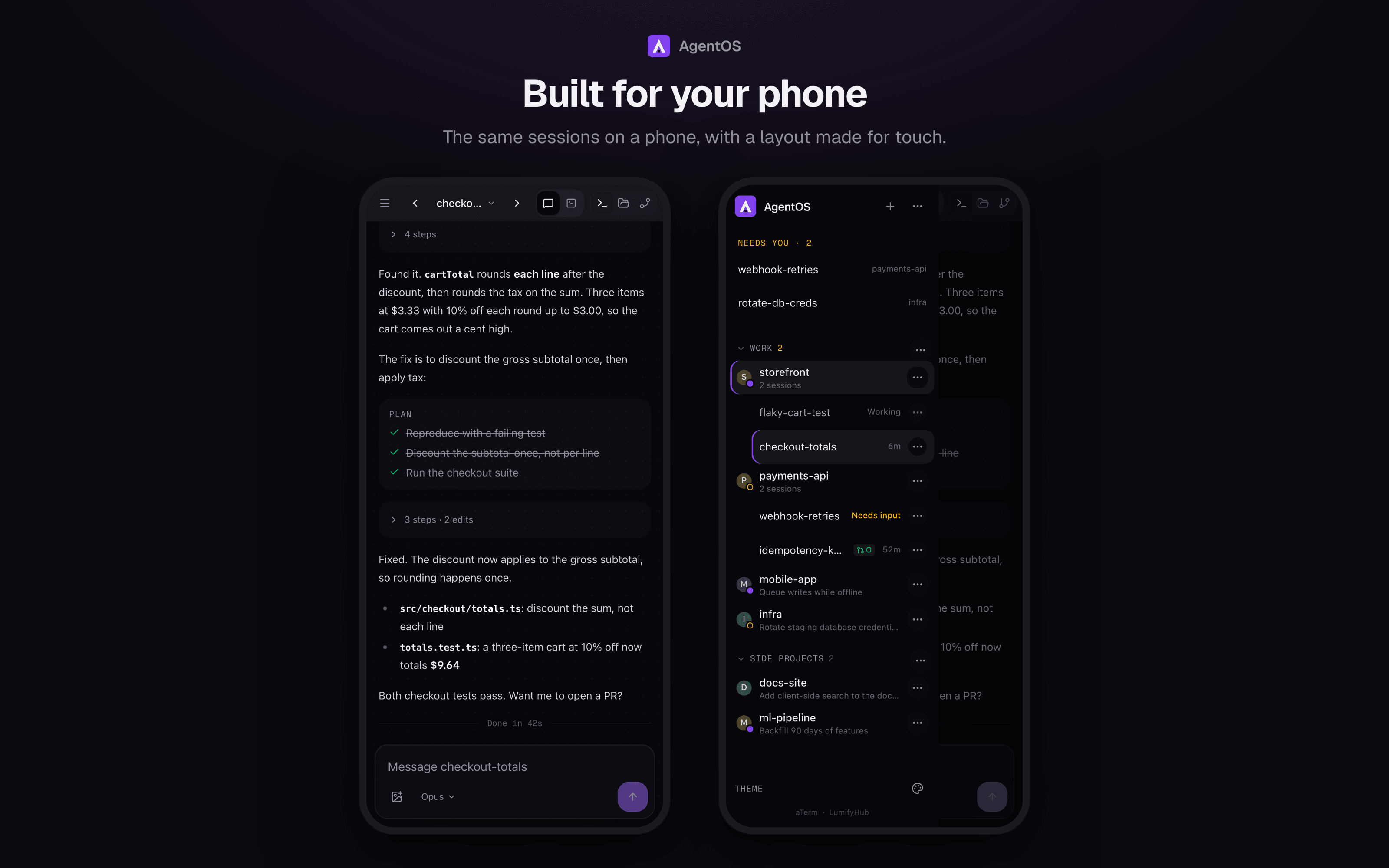
A self-hosted, mobile-first home for your AI coding agents. Run Claude Code, Codex, Gemini CLI and others side by side, chat with them or drop into their terminal, hand off tasks that end in a pull request, and check on all of it from your phone.

Demo video: https://github.com/user-attachments/assets/0e2e66f7-037e-4739-99ec-608d1840df0a
Installation
Via npm (Recommended)
If you already have Node.js 20+ installed:
# Install globally
npm install -g @saadnvd1/agent-os

# Run setup (checks/installs tmux, ripgrep, builds app)
agent-os install

# Start the server
agent-os start
Via curl (Installs everything)
For fresh installs without Node.js:
curl -fsSL https://raw.githubusercontent.com/saadnvd1/agent-os/main/scripts/install.sh | bash
agent-os start
Desktop App
Download native desktop apps from Releases:
- macOS (Apple Silicon):
.dmg - Linux:
.debor.AppImage
Note: The desktop app is a native wrapper around the web UI. You still need to install and run AgentOS (via the installer script above) for the backend server. The desktop app just provides a convenient native window instead of using your browser.
Don't want to self-host? Try AgentOS Cloud - pre-configured cloud VMs for AI coding.
Manual Install
git clone https://github.com/saadnvd1/agent-os
cd agent-os
npm install
npm run dev  # http://localhost:3011
Prerequisites
- Node.js 20+
- tmux
- ripgrep (for code search - auto-installed by installer script, or run
agent-os update) - At least one AI CLI: Claude Code, Codex, OpenCode, Kilo Code CLI, Gemini CLI, Aider, or Cursor CLI
Supported Agents
| Agent | Resume | Fork | Auto-Approve |
|---|---|---|---|
| Claude Code | ✅ | ✅ | --dangerously-skip-permissions |
| Codex | ❌ | ❌ | --approval-mode full-auto |
| OpenCode | ❌ | ❌ | Config file |
| Kilo Code | ✅ | ✅ | Config file |
| Gemini CLI | ❌ | ❌ | --yolomode |
| Aider | ❌ | ❌ | --yes |
| Cursor CLI | ❌ | ❌ | N/A |
| Amp | ❌ | ❌ | --dangerously-allow-all |
| Pi | ❌ | ❌ | N/A |
| Oh My Pi | ❌ | ❌ | N/A |
Features
- Mobile-first - Full functionality from your phone, not a dumbed-down responsive view
- Voice-to-text - Dictate prompts to your coding sessions hands-free
- Multi-pane layout - Run up to 4 sessions side-by-side
- tmux by default - Every session lives in tmux, so closing the browser never kills your work
- Multiple machines - Run sessions on any machine you can reach with ssh keys, side by side with local ones
- Session discovery - tmux sessions you started yourself, on any machine, show up under the project whose folder they run in
- Code search - Fast codebase search with syntax-highlighted results (Cmd+K)
- File picker - Browse and attach files to sessions, with direct upload from mobile
- Clone from GitHub - Clone repos directly from the UI when creating projects
- Git integration - Status, diffs, commits, PRs from the UI
- Git worktrees - Isolated branches with auto-setup
- Dev servers - Start/stop Node.js and Docker servers
- Session orchestration - Conductor/worker model via MCP
Chat
Sessions open as a chat by default: streaming replies, tool calls folded into
expandable steps, inline diffs for edits, a plan checklist, highlighted code
and mermaid diagrams, subagent cards, image attachments (pick, paste or drag
them in) and a Stop button, all readable on a phone. Chat drives the same
agent as the terminal (Claude Code through the Agent SDK, with your own Claude
login). The Chat /
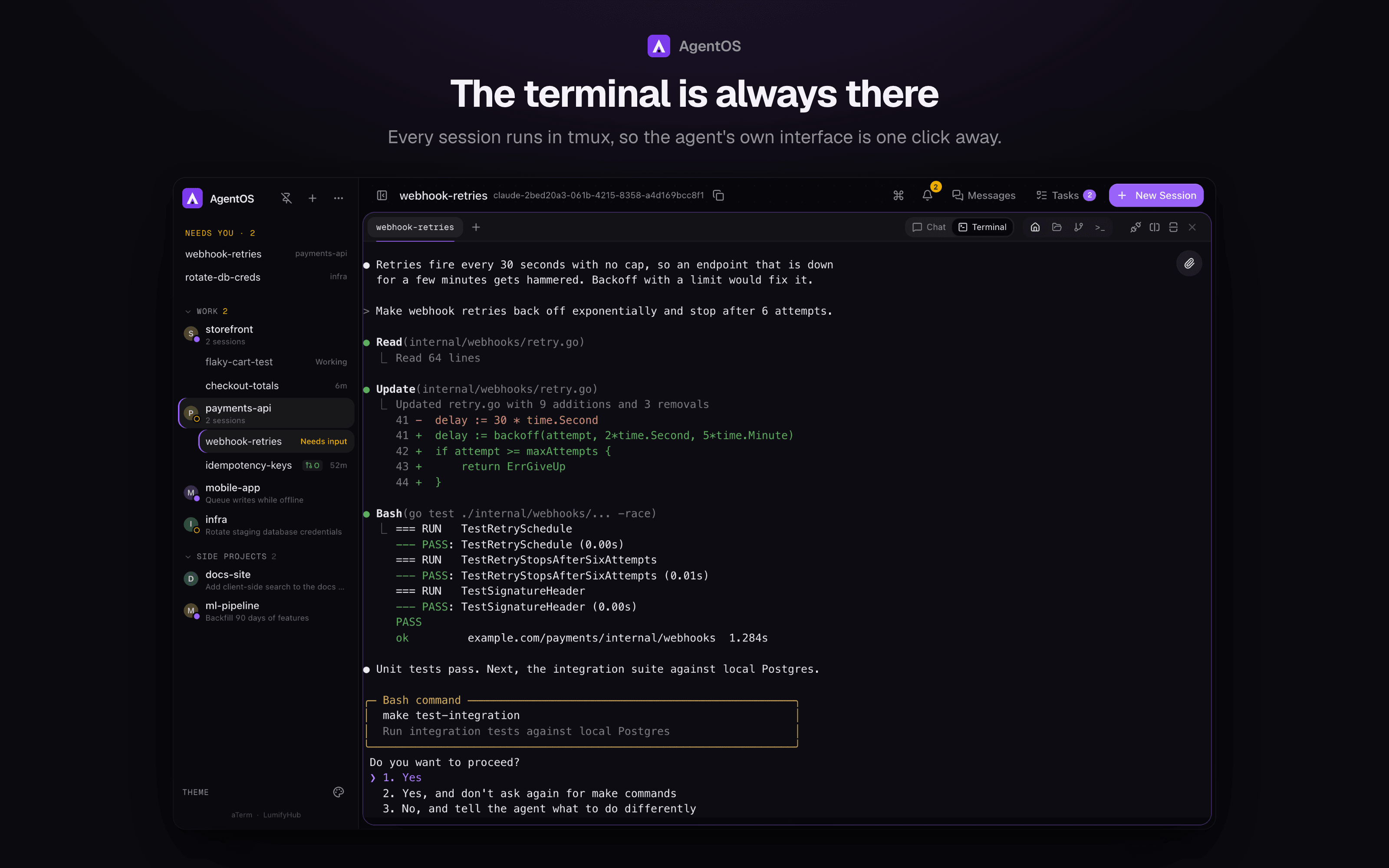
Terminal switch in the tab bar hands the same conversation between the two:
the terminal resumes it with claude --resume, and switching back closes the
terminal so only one side drives it. Each chat conversation runs in its own
worker process (in tmux, like terminal sessions), so restarting or updating
AgentOS never cuts off a turn: the server reconnects to running workers when
it starts. History is kept in AgentOS.
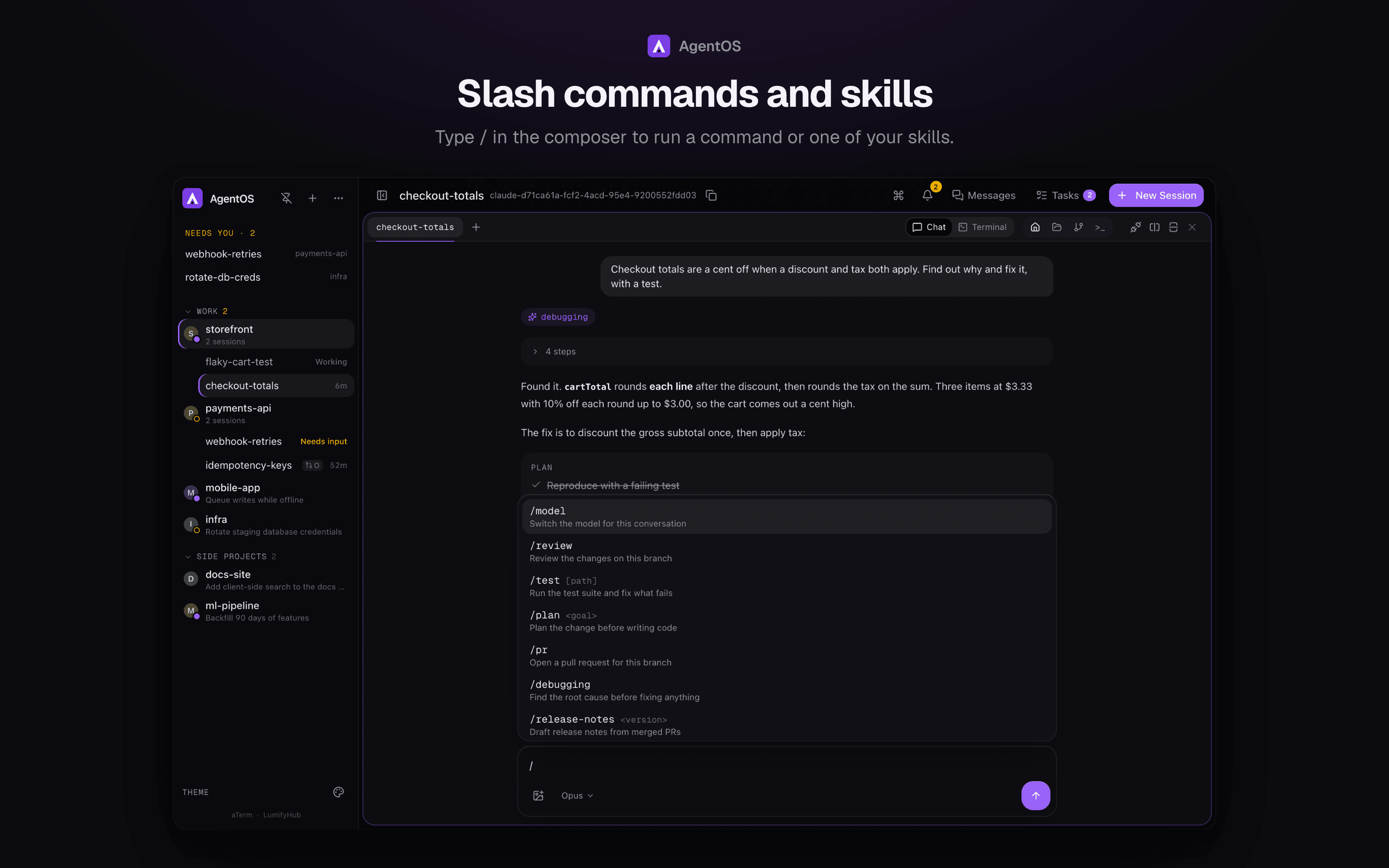
Type / in the composer for every slash command and skill the agent knows,
yours included, filtered as you type. Commands such as /compact, /usage
and /context run in chat and show their output inline; skills the agent
invokes on its own appear as a chip. /model (or the picker under the
composer) switches the model mid-conversation. Commands that only make sense
in a terminal, such as /vim, are left out.
The access picker under the composer sets what the agent may do on its own: Ask first (an approval card in the chat for anything not already allowed), Accept edits (edits files, asks before other commands) or Full access (the default, like running with permissions skipped). Questions the agent asks you come up as cards to answer. Undo on a message puts back the files the agent edited since, rewinds the conversation to before it, and returns the message to the composer to edit and resend. Changes made by shell commands aren't tracked, so they stay.
Chat runs on this machine; sessions on other machines use the terminal.
Drivers for other agent CLIs plug into lib/chat/drivers.
Tasks
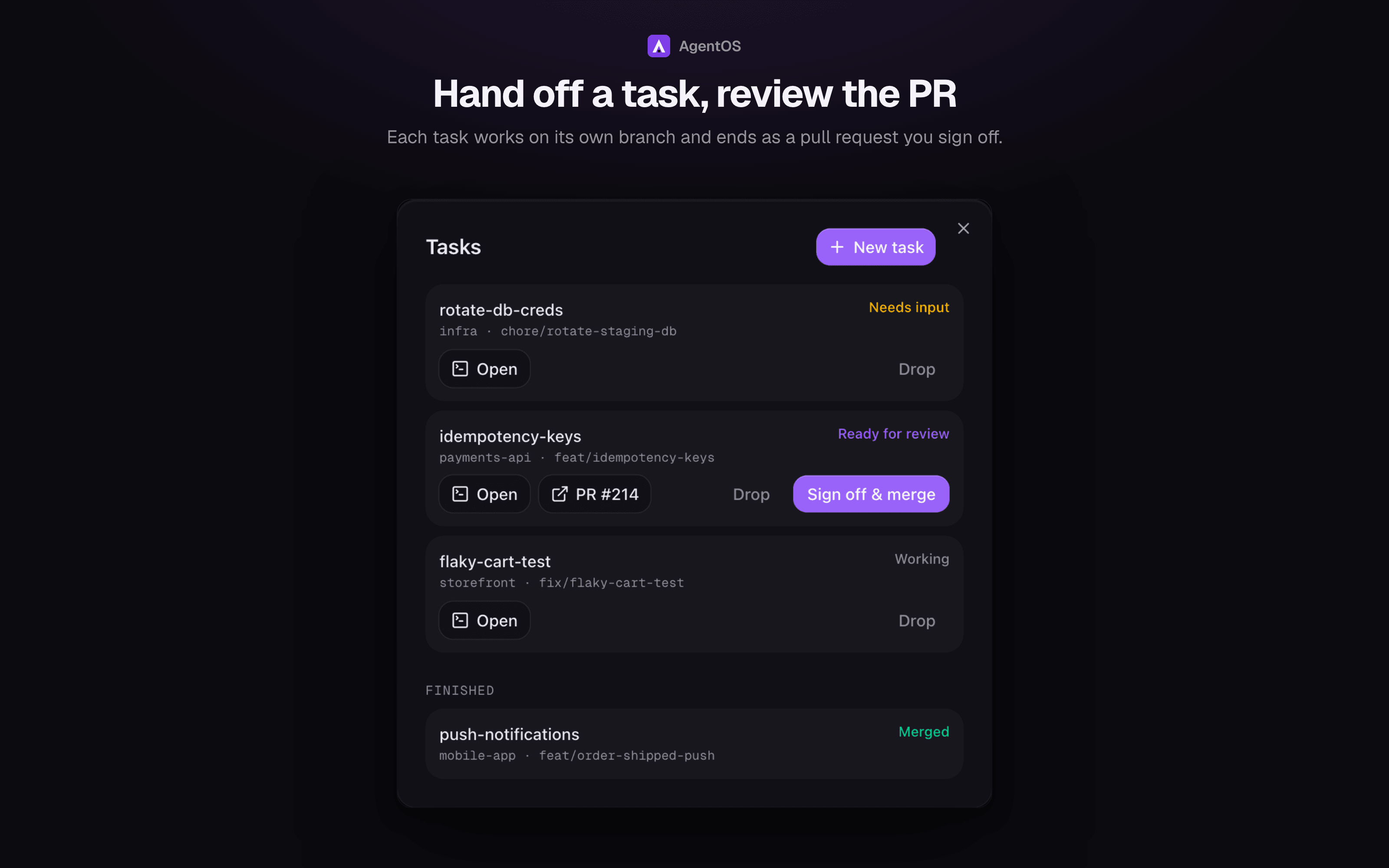
Hand off work and keep going. Tasks → New task takes a project and a prompt. AgentOS creates a git worktree and branch, starts Claude there in tmux with a brief to finish by pushing and opening a pull request, and tracks it: Working, Needs input, Blocked, Ready for review, Checks failing or Agent exited. Sign off & merge squash-merges the PR (refused while CI is failing or pending), then removes the session, worktree and branches. Drop closes the PR and removes everything. Agents never merge their own work.
Requires the GitHub CLI (gh) signed in, and a project with a GitHub remote.
Agent network
Sessions started by AgentOS can find and talk to each other without you,
through the aos command on their PATH (any agent CLI can use it; Claude is
also briefed on it):
aos peers                         # sessions, their project, what each is doing
aos send <session> "message"      # wakes the other session with the message
aos inbox                         # read messages sent to you
aos history <session>             # your conversation with a session
aos spawn <project> "prompt"      # start a new agent session in a project
aos task <project> "prompt"       # start a background task that ends in a PR
aos docs [query]                  # LumifyHub pages, when the workspace is linked
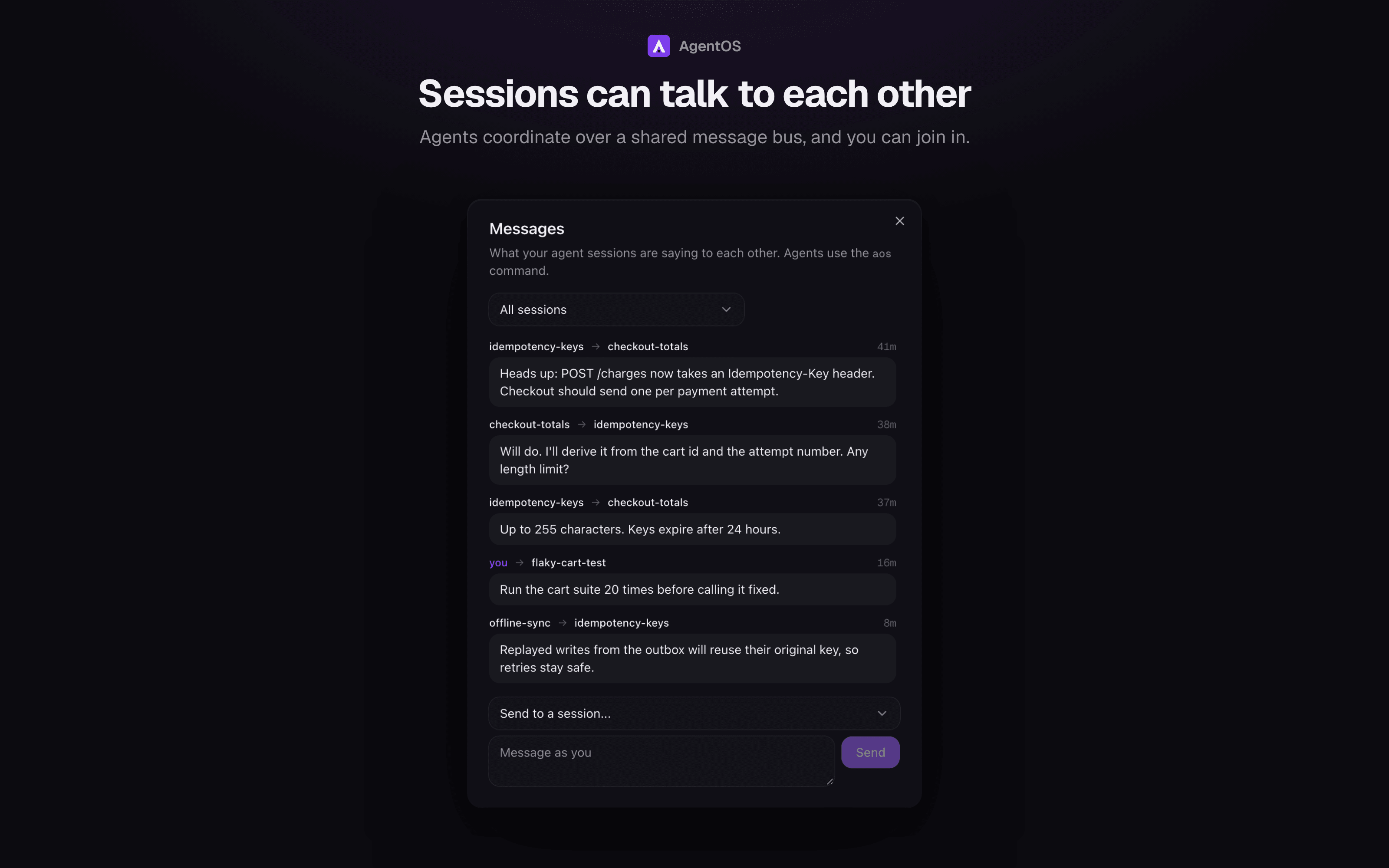
Messages are delivered by typing them into the recipient's terminal, labelled as coming from another agent, and a rate limit stops two agents looping. The Messages panel shows every conversation and lets you message any session. Sessions on other machines can receive messages but not yet send them.
Workspaces
Group projects into workspaces (e.g. Work, Personal) from the + menu. Each workspace is a collapsible sidebar section showing how many sessions need you; move a project in from its menu. Deleting a workspace keeps its projects.
LumifyHub (optional)
AgentOS works fully without a LumifyHub account. Connecting one, from a workspace's menu, gives its docs and boards a home you can open anywhere and share with anyone:
- A workspace links to a LumifyHub workspace, and a project to a board in it. Tasks get a card on the project's board that moves as the task runs, and a card in To Do can be started as a task.
- Docs lists the linked workspace's pages and reads them; editing happens in LumifyHub.
- A markdown file open in the file explorer can be published as a page marked as coming from the repo. Publishing again updates the same page, and so does merging a task that changed the file. It goes one way: edits made in LumifyHub are overwritten.
- Agents can list, read and create those pages with
aos docs,aos doc <id>andaos doc new "<title>" --file <path>. The token stays in AgentOS.
What maps to what, and the API it uses: docs/lumifyhub.md.
Machines
Open the sidebar menu (⋯) → Machines and add one with a name and an ssh
target (user@host or an alias from ~/.ssh/config). Requirements: key-based
ssh from the machine running AgentOS (no password prompts), and tmux on the
remote machine. Test connection checks both.
New projects can then pick a machine. Their sessions run in tmux there and
attach over one reused ssh connection per machine. Folders match across
machines relative to ~, so ~/dev/app on your laptop and on a server are
the same project.
On other machines, files, git, worktrees, dev servers and summarize are not available yet; the terminal, status, rename and send-keys are.
Security
AgentOS has no login: whoever can reach it gets a terminal as you. So by default it listens only on localhost and your Tailscale address, never on Wi-Fi or other networks, and it refuses:
- requests addressed to any other host name (DNS rebinding), and
- API calls or terminal connections made by another website's page.
Reach it from your phone over Tailscale. To listen elsewhere, set
AGENTOS_BIND (e.g. 0.0.0.0) and put your own authentication in front of
it; AGENTOS_ALLOWED_HOSTS adds host names it should answer to.
Development
npm run screenshots  # regenerate screenshots/ from a demo instance with fake data
npm run dev          # http://localhost:3011
npm test             # vitest
npm run lint         # eslint
npm run check        # typecheck, lint, format and tests: what CI runs
scripts/redeploy     # pull, install, build; restarts via $AGENTOS_RESTART only if all of it worked
A pre-commit hook formats and lints staged files, then typechecks and runs the
tests. CI runs scripts/check --build on every pull request and push to main.
CLI Commands
agent-os run       # Start and open browser
agent-os start     # Start in background
agent-os stop      # Stop server
agent-os status    # Show URLs
agent-os logs      # Tail logs
agent-os update    # Update to latest
Mobile Access
Use Tailscale for secure access from your phone:
- Install Tailscale on your dev machine and phone
- Sign in with the same account
- Access
http://100.x.x.x:3011from your phone
Documentation
For configuration and advanced usage, see the docs.
Related Projects
- aTerm - A Tauri-based desktop terminal workspace for AI-assisted coding. While AgentOS is a mobile-first web UI, aTerm is a native desktop app with multi-pane layouts optimized for running AI coding agents (Claude Code, Aider, OpenCode) alongside shells, dev servers, and a built-in git panel. Choose AgentOS for mobile access and browser-based workflows, or aTerm for a native desktop terminal experience.
- LumifyHub - A place to keep docs, boards and notes, and share them with anyone. AgentOS can link a workspace to it: tasks become cards on a board, and plans and docs live where you can read and share them.
License
MIT License - Free and open source.
See LICENSE for full terms.
Similar repos


Mobile-first web UI for managing AI coding sessions (Claude Code, Codex, Aider, Gemini CLI, Amp, Pi). Self-hosted with multi-pane terminals, git integration, and session orchestration.
See the codeSee what people are saying
README
AgentOS
A self-hosted, mobile-first home for your AI coding agents. Run Claude Code, Codex, Gemini CLI and others side by side, chat with them or drop into their terminal, hand off tasks that end in a pull request, and check on all of it from your phone.
Demo video: https://github.com/user-attachments/assets/0e2e66f7-037e-4739-99ec-608d1840df0a
Installation
Via npm (Recommended)
If you already have Node.js 20+ installed:
# Install globally
npm install -g @saadnvd1/agent-os

# Run setup (checks/installs tmux, ripgrep, builds app)
agent-os install

# Start the server
agent-os start
Via curl (Installs everything)
For fresh installs without Node.js:
curl -fsSL https://raw.githubusercontent.com/saadnvd1/agent-os/main/scripts/install.sh | bash
agent-os start
Desktop App
Download native desktop apps from Releases:
- macOS (Apple Silicon):
.dmg - Linux:
.debor.AppImage
Note: The desktop app is a native wrapper around the web UI. You still need to install and run AgentOS (via the installer script above) for the backend server. The desktop app just provides a convenient native window instead of using your browser.
Don't want to self-host? Try AgentOS Cloud - pre-configured cloud VMs for AI coding.
Manual Install
git clone https://github.com/saadnvd1/agent-os
cd agent-os
npm install
npm run dev  # http://localhost:3011
Prerequisites
- Node.js 20+
- tmux
- ripgrep (for code search - auto-installed by installer script, or run
agent-os update) - At least one AI CLI: Claude Code, Codex, OpenCode, Kilo Code CLI, Gemini CLI, Aider, or Cursor CLI
Supported Agents
| Agent | Resume | Fork | Auto-Approve |
|---|---|---|---|
| Claude Code | ✅ | ✅ | --dangerously-skip-permissions |
| Codex | ❌ | ❌ | --approval-mode full-auto |
| OpenCode | ❌ | ❌ | Config file |
| Kilo Code | ✅ | ✅ | Config file |
| Gemini CLI | ❌ | ❌ | --yolomode |
| Aider | ❌ | ❌ | --yes |
| Cursor CLI | ❌ | ❌ | N/A |
| Amp | ❌ | ❌ | --dangerously-allow-all |
| Pi | ❌ | ❌ | N/A |
| Oh My Pi | ❌ | ❌ | N/A |
Features
- Mobile-first - Full functionality from your phone, not a dumbed-down responsive view
- Voice-to-text - Dictate prompts to your coding sessions hands-free
- Multi-pane layout - Run up to 4 sessions side-by-side
- tmux by default - Every session lives in tmux, so closing the browser never kills your work
- Multiple machines - Run sessions on any machine you can reach with ssh keys, side by side with local ones
- Session discovery - tmux sessions you started yourself, on any machine, show up under the project whose folder they run in
- Code search - Fast codebase search with syntax-highlighted results (Cmd+K)
- File picker - Browse and attach files to sessions, with direct upload from mobile
- Clone from GitHub - Clone repos directly from the UI when creating projects
- Git integration - Status, diffs, commits, PRs from the UI
- Git worktrees - Isolated branches with auto-setup
- Dev servers - Start/stop Node.js and Docker servers
- Session orchestration - Conductor/worker model via MCP
Chat
Sessions open as a chat by default: streaming replies, tool calls folded into
expandable steps, inline diffs for edits, a plan checklist, highlighted code
and mermaid diagrams, subagent cards, image attachments (pick, paste or drag
them in) and a Stop button, all readable on a phone. Chat drives the same
agent as the terminal (Claude Code through the Agent SDK, with your own Claude
login). The Chat /
Terminal switch in the tab bar hands the same conversation between the two:
the terminal resumes it with claude --resume, and switching back closes the
terminal so only one side drives it. Each chat conversation runs in its own
worker process (in tmux, like terminal sessions), so restarting or updating
AgentOS never cuts off a turn: the server reconnects to running workers when
it starts. History is kept in AgentOS.
Type / in the composer for every slash command and skill the agent knows,
yours included, filtered as you type. Commands such as /compact, /usage
and /context run in chat and show their output inline; skills the agent
invokes on its own appear as a chip. /model (or the picker under the
composer) switches the model mid-conversation. Commands that only make sense
in a terminal, such as /vim, are left out.
The access picker under the composer sets what the agent may do on its own: Ask first (an approval card in the chat for anything not already allowed), Accept edits (edits files, asks before other commands) or Full access (the default, like running with permissions skipped). Questions the agent asks you come up as cards to answer. Undo on a message puts back the files the agent edited since, rewinds the conversation to before it, and returns the message to the composer to edit and resend. Changes made by shell commands aren't tracked, so they stay.
Chat runs on this machine; sessions on other machines use the terminal.
Drivers for other agent CLIs plug into lib/chat/drivers.
Tasks
Hand off work and keep going. Tasks → New task takes a project and a prompt. AgentOS creates a git worktree and branch, starts Claude there in tmux with a brief to finish by pushing and opening a pull request, and tracks it: Working, Needs input, Blocked, Ready for review, Checks failing or Agent exited. Sign off & merge squash-merges the PR (refused while CI is failing or pending), then removes the session, worktree and branches. Drop closes the PR and removes everything. Agents never merge their own work.
Requires the GitHub CLI (gh) signed in, and a project with a GitHub remote.
Agent network
Sessions started by AgentOS can find and talk to each other without you,
through the aos command on their PATH (any agent CLI can use it; Claude is
also briefed on it):
aos peers                         # sessions, their project, what each is doing
aos send <session> "message"      # wakes the other session with the message
aos inbox                         # read messages sent to you
aos history <session>             # your conversation with a session
aos spawn <project> "prompt"      # start a new agent session in a project
aos task <project> "prompt"       # start a background task that ends in a PR
aos docs [query]                  # LumifyHub pages, when the workspace is linked
Messages are delivered by typing them into the recipient's terminal, labelled as coming from another agent, and a rate limit stops two agents looping. The Messages panel shows every conversation and lets you message any session. Sessions on other machines can receive messages but not yet send them.
Workspaces
Group projects into workspaces (e.g. Work, Personal) from the + menu. Each workspace is a collapsible sidebar section showing how many sessions need you; move a project in from its menu. Deleting a workspace keeps its projects.
LumifyHub (optional)
AgentOS works fully without a LumifyHub account. Connecting one, from a workspace's menu, gives its docs and boards a home you can open anywhere and share with anyone:
- A workspace links to a LumifyHub workspace, and a project to a board in it. Tasks get a card on the project's board that moves as the task runs, and a card in To Do can be started as a task.
- Docs lists the linked workspace's pages and reads them; editing happens in LumifyHub.
- A markdown file open in the file explorer can be published as a page marked as coming from the repo. Publishing again updates the same page, and so does merging a task that changed the file. It goes one way: edits made in LumifyHub are overwritten.
- Agents can list, read and create those pages with
aos docs,aos doc <id>andaos doc new "<title>" --file <path>. The token stays in AgentOS.
What maps to what, and the API it uses: docs/lumifyhub.md.
Machines
Open the sidebar menu (⋯) → Machines and add one with a name and an ssh
target (user@host or an alias from ~/.ssh/config). Requirements: key-based
ssh from the machine running AgentOS (no password prompts), and tmux on the
remote machine. Test connection checks both.
New projects can then pick a machine. Their sessions run in tmux there and
attach over one reused ssh connection per machine. Folders match across
machines relative to ~, so ~/dev/app on your laptop and on a server are
the same project.
On other machines, files, git, worktrees, dev servers and summarize are not available yet; the terminal, status, rename and send-keys are.
Security
AgentOS has no login: whoever can reach it gets a terminal as you. So by default it listens only on localhost and your Tailscale address, never on Wi-Fi or other networks, and it refuses:
- requests addressed to any other host name (DNS rebinding), and
- API calls or terminal connections made by another website's page.
Reach it from your phone over Tailscale. To listen elsewhere, set
AGENTOS_BIND (e.g. 0.0.0.0) and put your own authentication in front of
it; AGENTOS_ALLOWED_HOSTS adds host names it should answer to.
Development
npm run screenshots  # regenerate screenshots/ from a demo instance with fake data
npm run dev          # http://localhost:3011
npm test             # vitest
npm run lint         # eslint
npm run check        # typecheck, lint, format and tests: what CI runs
scripts/redeploy     # pull, install, build; restarts via $AGENTOS_RESTART only if all of it worked
A pre-commit hook formats and lints staged files, then typechecks and runs the
tests. CI runs scripts/check --build on every pull request and push to main.
CLI Commands
agent-os run       # Start and open browser
agent-os start     # Start in background
agent-os stop      # Stop server
agent-os status    # Show URLs
agent-os logs      # Tail logs
agent-os update    # Update to latest
Mobile Access
Use Tailscale for secure access from your phone:
- Install Tailscale on your dev machine and phone
- Sign in with the same account
- Access
http://100.x.x.x:3011from your phone
Documentation
For configuration and advanced usage, see the docs.
Related Projects
- aTerm - A Tauri-based desktop terminal workspace for AI-assisted coding. While AgentOS is a mobile-first web UI, aTerm is a native desktop app with multi-pane layouts optimized for running AI coding agents (Claude Code, Aider, OpenCode) alongside shells, dev servers, and a built-in git panel. Choose AgentOS for mobile access and browser-based workflows, or aTerm for a native desktop terminal experience.
- LumifyHub - A place to keep docs, boards and notes, and share them with anyone. AgentOS can link a workspace to it: tasks become cards on a board, and plans and docs live where you can read and share them.
License
MIT License - Free and open source.
See LICENSE for full terms.