
[ICCV2025] TextSSR: Diffusion-based Data Synthesis for Scene Text Recognition
Python
92
19 commits
updated Mar 6, 2026
README
🎰TextSSR: Diffusion-based Data Synthesis for Scene Text Recognition






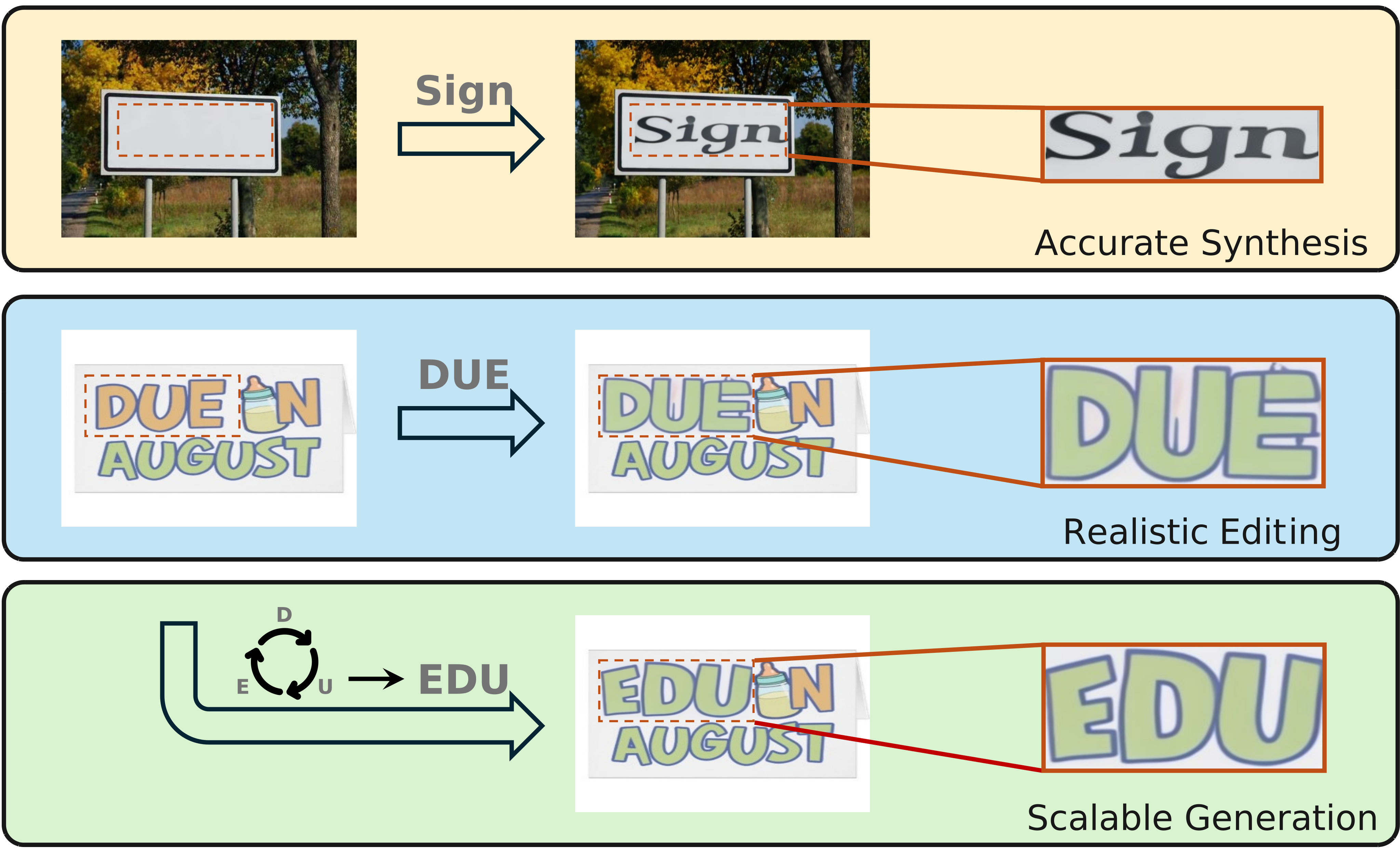
$$ TextSSR ~ Capability ~ Showcase. $$
📢News
[2025.06.26] - This paper has been accepted by ICCV2025 🎉!
[2025.02.13] - The benchmark and evaluation code are available!
[2024.12.05] - The training dataset and generative dataset(v1: 0.43m and v2: 3.55m) are released!
[2024.12.04] - We released the latest model and online demo, check on ModelScope.
[2024.12.03] - Our paper is available at here.
📝TODOs
- Upload the new revised version of the manuscript
- Release the expanded large-scale synthetic dataset TextSSR-F, which contains 3.55M text instances.
- Provide publicly checkpoints and gradio demo
- Release TextSSR-benchmark dataset and evaluation code
- Release processed AnyWord-lmdb dataset
- Release our scene text synthesis dataset, TextSSR-F
- Release training and inference code
💎Visualization
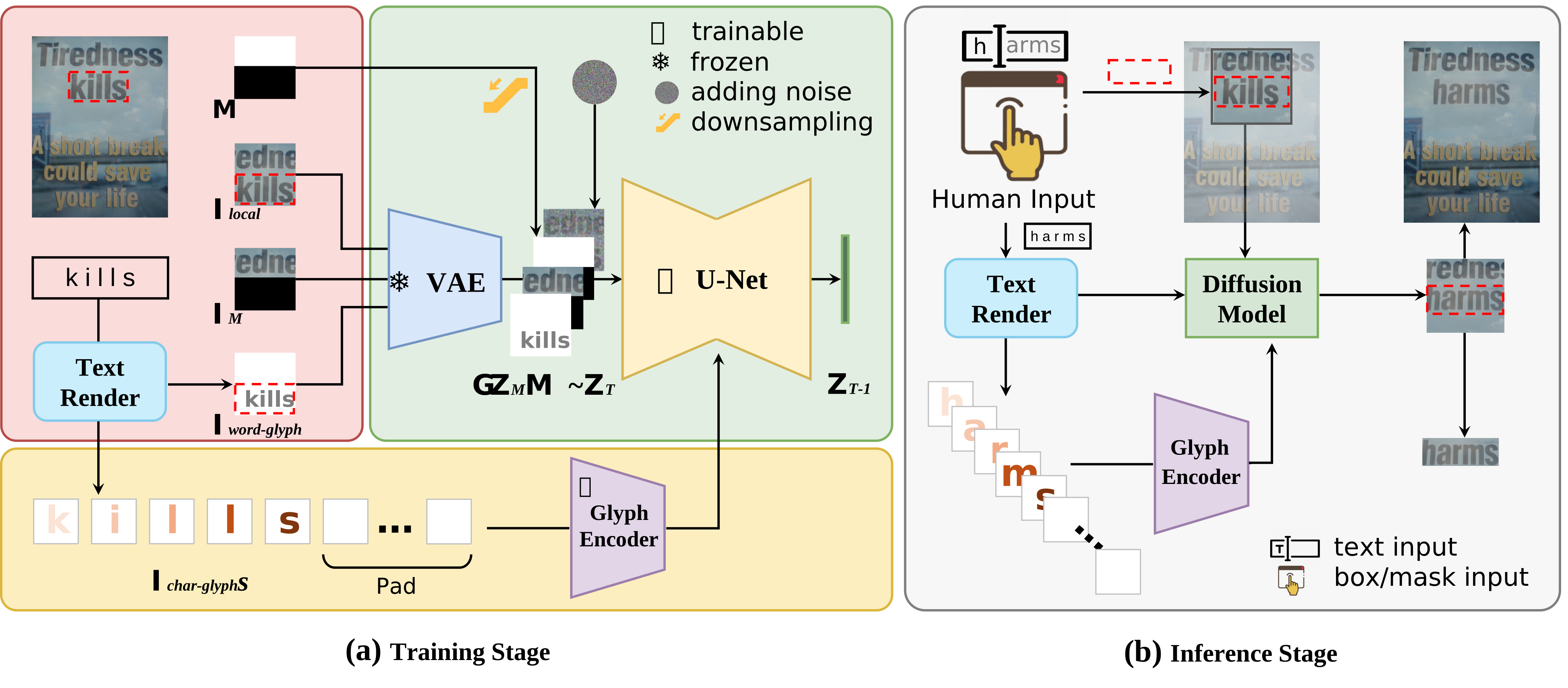
$$ Model ~ Architecture ~ Display. $$
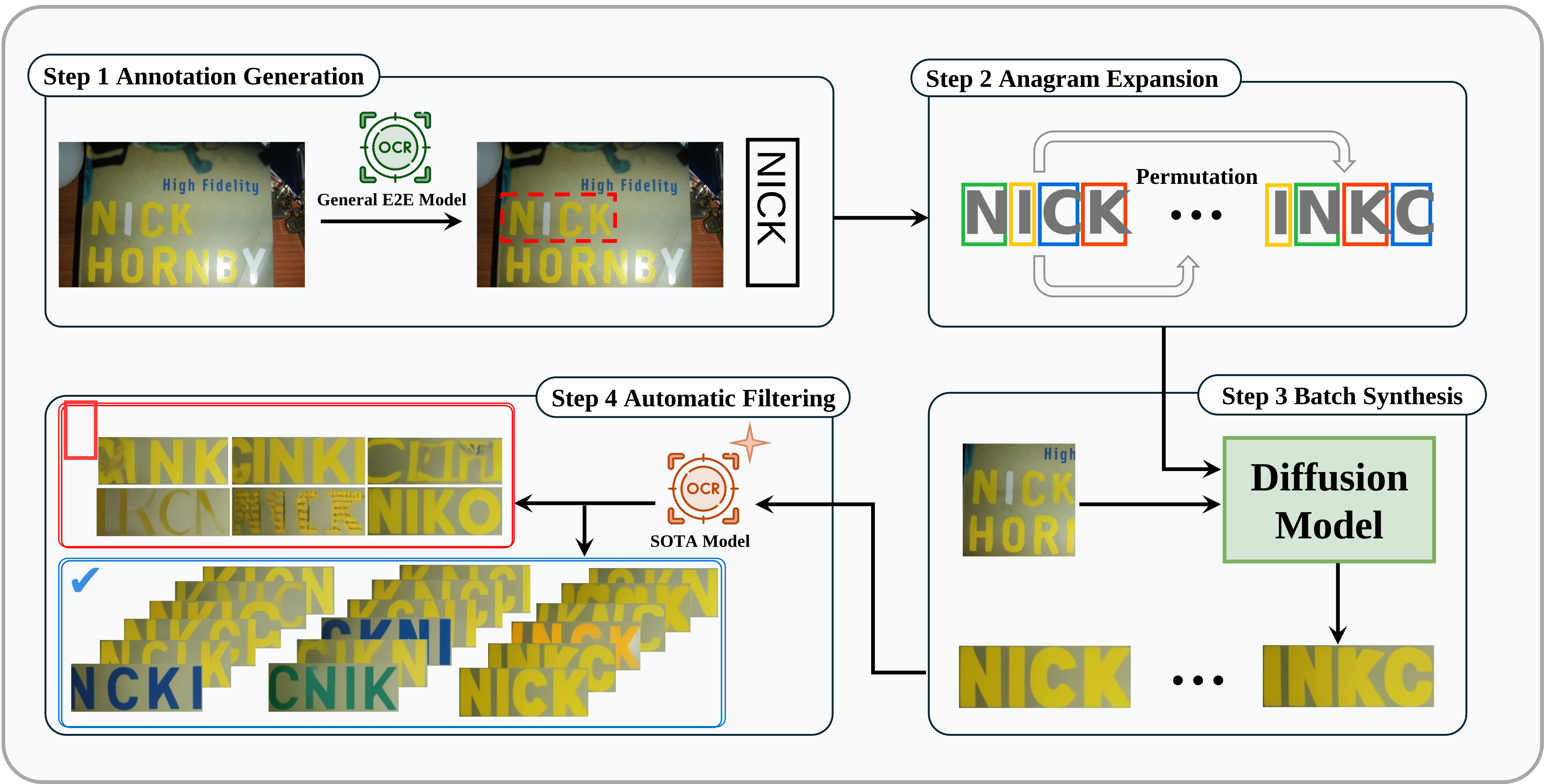
$$ Data ~ Synthesis ~ Pipeline. $$
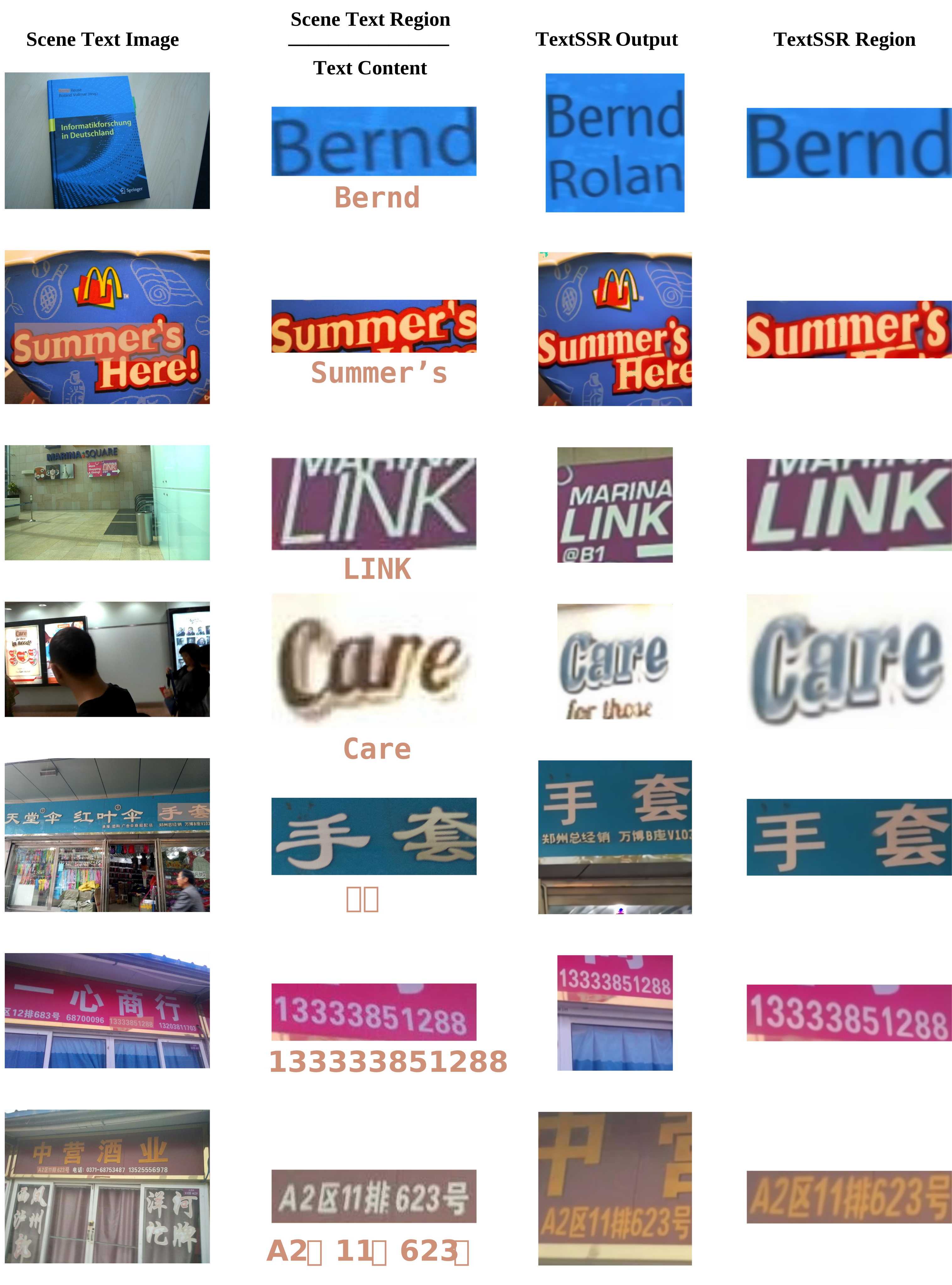
$$ Results ~ Presentation. $$
🛠Installation
Environment Settings
-
Clone the TextSSR Repository:
git clone https://github.com/YesianRohn/TextSSR.git cd TextSSR -
Create a New Environment for TextSSR:
conda create -n textssr python=3.10 conda activate textssr -
Install Required Dependencies:
- Install PyTorch, TorchVision, Torchaudio, and the necessary CUDA version:
conda install pytorch==2.1.0 torchvision==0.16.0 torchaudio==2.1.0 pytorch-cuda=11.8 -c pytorch -c nvidia- Install the rest of the dependencies listed in the
requirements.txtfile:
pip install -r requirements.txt- Install our modified diffusers:
cd diffusers
pip install -e .
cd ..
Checkpoints/Data Preparation
-
Data Preparation:
- You can use the
Anyword-3Mdataset provided by Anytext. However, you will need to modify the data loading code to useAnyWordDatasetinstead ofAnyWordLmdbDataset. - If you have obtained our
AnyWord-lmdbdataset, simply place it in theTextSSRfolder.
- You can use the
-
Font File Preparation:
- You can either download the Alibaba PuHuiTi font from here, which should be named
AlibabaPuHuiTi-3-85-Bold.ttf, or you can use your own custom font file. - Place your font file in the
TextSSRfolder.
- You can either download the Alibaba PuHuiTi font from here, which should be named
-
Model Preparation:
- If you want to train the model from scratch, first download the SD2-1 model from Hugging Face.
- Place the downloaded model in the
modelfolder. - During the training process, you will obtain several model checkpoints. These should be placed sequentially in the
modelfolder as follows:vae_ft(trained VAE model)step1(trained CDM after step 1)step2(trained CDM after step 2)
- Place the downloaded model in the
After the preparations outlined above, you will have the following file structure:
TextSSR/
├── model/
│   ├── stable-diffusion-v2-1
│   ├── vae_ft
│       ├── checkpoint-x/
│       	├── vae/
│       	└── ...
│   ├── step1
│       ├── checkpoint-x/
│       	├── unet/
│       	└── ...
│   ├── step2
│       ├── checkpoint-x/
│       	├── unet/
│       	└── ...
│   └── AnyWord-lmdb/
│       ├── step1_lmdb/
│       ├── step2-lmdb/
├── AlibabaPuHuiTi-3-85-Bold.ttf
├── ...(the same as the GitHub code)
🚂 Training
-
Step 1: Fine-tune the VAE:
accelerate launch --num_processes 8 train_vae.py --config configs/train_vae_cfg.py -
Step 2: First stage of CDM training:
accelerate launch --num_processes 8 train_diff.py --config configs/train_diff_step1_cfg.py -
Step 3: Second stage of CDM training:
accelerate launch --num_processes 8 train_diff.py --config configs/train_diff_step2_cfg.py
🔍 Inference
- Ensure the
benchmarkpath is correctly set ininfer.py. - Run the inference process with:
python infer.py
This will start the inference and generate the results.
📊Evaluation
See here.
🔗Citation
@InProceedings{Ye_2025_ICCV,
    author    = {Ye, Xingsong and Du, Yongkun and Tao, Yunbo and Chen, Zhineng},
    title     = {TextSSR: Diffusion-based Data Synthesis for Scene Text Recognition},
    booktitle = {Proceedings of the IEEE/CVF International Conference on Computer Vision (ICCV)},
    month     = {October},
    year      = {2025},
    pages     = {17464-17473}
}
🌟 Acknowledgements
Many thanks to these great projects for their contributions, which have influenced and supported our work in various ways: SynthText, TextOCR, DiffUTE, Textdiffuser & Textdiffuser-2, AnyText, UDiffText, SceneVTG, and SVTRv2.
Special thanks also go to the training frameworks: STR-Fewer-Labels and OpenOCR.
Similar repos


Languages
Python
98.8%
Jupyter Notebook
1.1%
[ICCV2025] TextSSR: Diffusion-based Data Synthesis for Scene Text Recognition
Python
92
19 commits
updated Mar 6, 2026
README
🎰TextSSR: Diffusion-based Data Synthesis for Scene Text Recognition
$$ TextSSR ~ Capability ~ Showcase. $$
📢News
[2025.06.26] - This paper has been accepted by ICCV2025 🎉!
[2025.02.13] - The benchmark and evaluation code are available!
[2024.12.05] - The training dataset and generative dataset(v1: 0.43m and v2: 3.55m) are released!
[2024.12.04] - We released the latest model and online demo, check on ModelScope.
[2024.12.03] - Our paper is available at here.
📝TODOs
- Upload the new revised version of the manuscript
- Release the expanded large-scale synthetic dataset TextSSR-F, which contains 3.55M text instances.
- Provide publicly checkpoints and gradio demo
- Release TextSSR-benchmark dataset and evaluation code
- Release processed AnyWord-lmdb dataset
- Release our scene text synthesis dataset, TextSSR-F
- Release training and inference code
💎Visualization
$$ Model ~ Architecture ~ Display. $$
$$ Data ~ Synthesis ~ Pipeline. $$
$$ Results ~ Presentation. $$
🛠Installation
Environment Settings
-
Clone the TextSSR Repository:
git clone https://github.com/YesianRohn/TextSSR.git cd TextSSR -
Create a New Environment for TextSSR:
conda create -n textssr python=3.10 conda activate textssr -
Install Required Dependencies:
- Install PyTorch, TorchVision, Torchaudio, and the necessary CUDA version:
conda install pytorch==2.1.0 torchvision==0.16.0 torchaudio==2.1.0 pytorch-cuda=11.8 -c pytorch -c nvidia- Install the rest of the dependencies listed in the
requirements.txtfile:
pip install -r requirements.txt- Install our modified diffusers:
cd diffusers
pip install -e .
cd ..
Checkpoints/Data Preparation
-
Data Preparation:
- You can use the
Anyword-3Mdataset provided by Anytext. However, you will need to modify the data loading code to useAnyWordDatasetinstead ofAnyWordLmdbDataset. - If you have obtained our
AnyWord-lmdbdataset, simply place it in theTextSSRfolder.
- You can use the
-
Font File Preparation:
- You can either download the Alibaba PuHuiTi font from here, which should be named
AlibabaPuHuiTi-3-85-Bold.ttf, or you can use your own custom font file. - Place your font file in the
TextSSRfolder.
- You can either download the Alibaba PuHuiTi font from here, which should be named
-
Model Preparation:
- If you want to train the model from scratch, first download the SD2-1 model from Hugging Face.
- Place the downloaded model in the
modelfolder. - During the training process, you will obtain several model checkpoints. These should be placed sequentially in the
modelfolder as follows:vae_ft(trained VAE model)step1(trained CDM after step 1)step2(trained CDM after step 2)
- Place the downloaded model in the
After the preparations outlined above, you will have the following file structure:
TextSSR/
├── model/
│   ├── stable-diffusion-v2-1
│   ├── vae_ft
│       ├── checkpoint-x/
│       	├── vae/
│       	└── ...
│   ├── step1
│       ├── checkpoint-x/
│       	├── unet/
│       	└── ...
│   ├── step2
│       ├── checkpoint-x/
│       	├── unet/
│       	└── ...
│   └── AnyWord-lmdb/
│       ├── step1_lmdb/
│       ├── step2-lmdb/
├── AlibabaPuHuiTi-3-85-Bold.ttf
├── ...(the same as the GitHub code)
🚂 Training
-
Step 1: Fine-tune the VAE:
accelerate launch --num_processes 8 train_vae.py --config configs/train_vae_cfg.py -
Step 2: First stage of CDM training:
accelerate launch --num_processes 8 train_diff.py --config configs/train_diff_step1_cfg.py -
Step 3: Second stage of CDM training:
accelerate launch --num_processes 8 train_diff.py --config configs/train_diff_step2_cfg.py
🔍 Inference
- Ensure the
benchmarkpath is correctly set ininfer.py. - Run the inference process with:
python infer.py
This will start the inference and generate the results.
📊Evaluation
See here.
🔗Citation
@InProceedings{Ye_2025_ICCV,
    author    = {Ye, Xingsong and Du, Yongkun and Tao, Yunbo and Chen, Zhineng},
    title     = {TextSSR: Diffusion-based Data Synthesis for Scene Text Recognition},
    booktitle = {Proceedings of the IEEE/CVF International Conference on Computer Vision (ICCV)},
    month     = {October},
    year      = {2025},
    pages     = {17464-17473}
}
🌟 Acknowledgements
Many thanks to these great projects for their contributions, which have influenced and supported our work in various ways: SynthText, TextOCR, DiffUTE, Textdiffuser & Textdiffuser-2, AnyText, UDiffText, SceneVTG, and SVTRv2.
Special thanks also go to the training frameworks: STR-Fewer-Labels and OpenOCR.
Similar repos
Languages
Python
98.8%
Jupyter Notebook
1.1%