
README
🖼️ Sorterz — AI Image Organizer
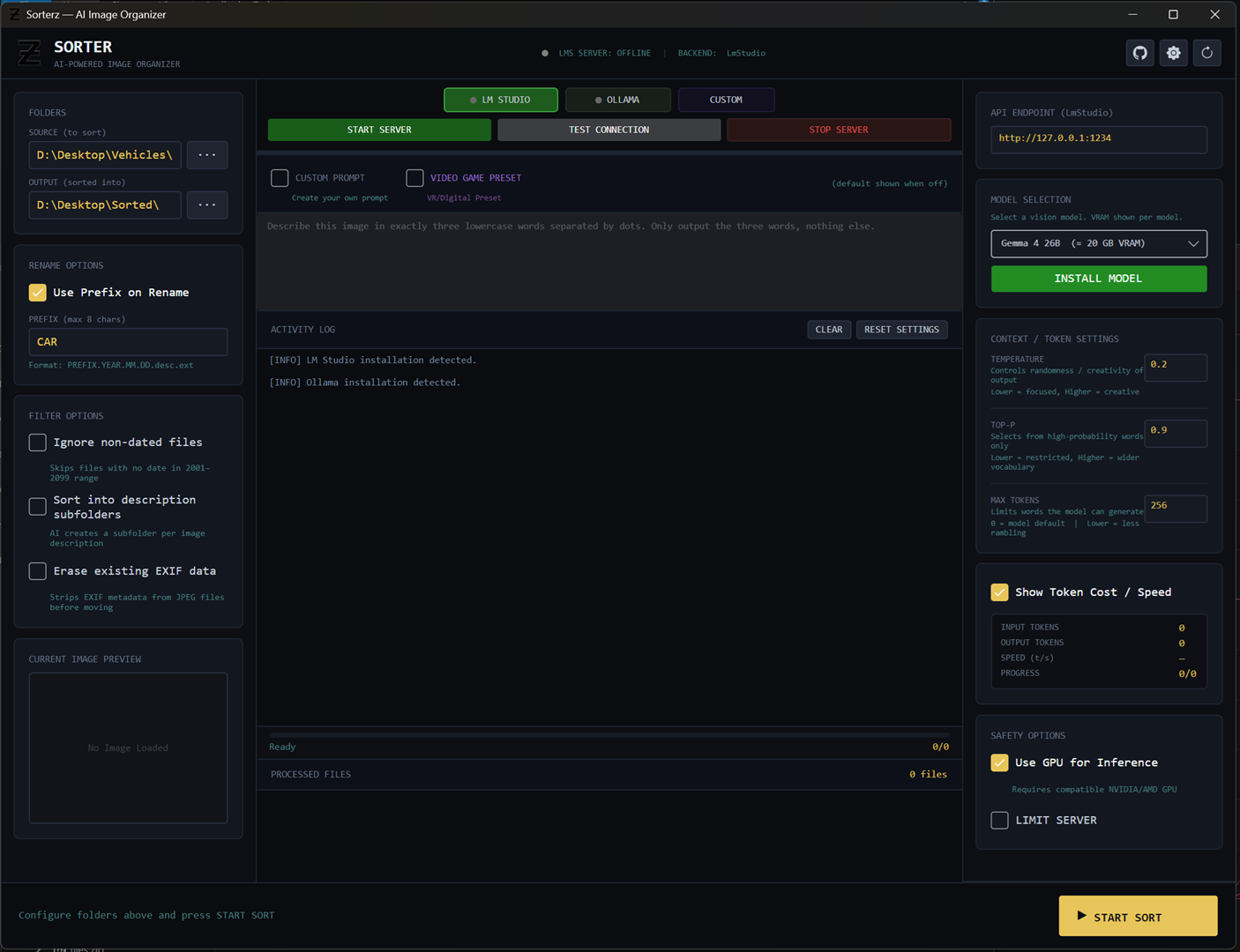 Harness the power of Local Vision LLMs to intelligently categorize, rename, and organize your image library—100% offline and completely private.



Sorterz is a desktop application that uses open-source Vision Language Models (VLMs) to automatically understand the contents of your photos, extract EXIF data, and sort them into a clean, human-readable directory structure.
Instead of relying on cloud services that compromise your privacy and charge monthly fees, Sorterz runs entirely on your own hardware.
🔒 The Offline Advantage (Why Local AI?)
Organizing a lifetime of personal photos shouldn't mean uploading your private memories to a corporate cloud. Sorterz was built with a strict Offline-First philosophy:
- Absolute Privacy: Your images never leave your computer. Processing happens in your own GPU/CPU.
- Zero Recurring Costs: No API tokens to buy, no monthly cloud subscriptions. Sort 10 or 10,000 images for free.
- No Internet Required: Works beautifully whether you are on an airplane, off the grid, or just dealing with an internet outage.
- Total Control: You choose the model, the temperature, the limits, and the exact naming conventions.
✨ Key Features
- 🤖 AI Vision Processing: Generates context-aware descriptions for your images (e.g., "sunset.beach.friends", "red.sports.car").
- 📂 Smart Sorting & Renaming: Automatically renames files based on EXIF creation dates and AI descriptions (
YYYY.MM.DD.three.word.desc.ext) and moves them into categorized subfolders. - 🔌 Seamless Local Backends: Native integrations for LM Studio and Ollama.
- Don't have them installed? Sorterz will auto-detect their absence and offer a 1-click install right from the UI.
- 💾 One-Click Model Management: Download and load vision models (like LLaVA, Qwen-VL, or Gemma) without touching a command line.
- 📅 Deep Metadata Extraction: Reads EXIF data (Original, Digitized) or falls back to filesystem creation/modification dates.
- 🕵️ Privacy Tools (EXIF Eraser): Optional feature to securely strip location and metadata from JPEGs before moving them.
- 🎮 Custom Prompts & Presets: Create your own prompting logic, or use built-in presets (like the Video Game / VRChat preset).
- ⚡ Live Telemetry: Watch the AI work in real-time with an integrated live image preview, activity log, and token processing speed (t/s) metrics.
🛠️ Supported AI Backends
Sorterz doesn't lock you into a single ecosystem. It supports:
- LM Studio: Full CLI integration. Sorterz can start/stop the server, load models into VRAM, and unload them to free up memory.
- Ollama: Directly pull tags and serve models via the Ollama local API.
- Custom Endpoints: Connect to any external or custom OpenAI-compatible vision endpoint on your local network.
Recommended Vision Models
Sorterz provides built-in drop-downs for highly capable local VLMs with their approximate VRAM requirements:
Gemma 4 E4B(~8 GB VRAM) — Great balance of speed and accuracy.Qwen 2.5-VL 7B(~6 GB VRAM) — Excellent at text recognition and precise details.LLaVA 13B(~9 GB VRAM) — A classic, highly capable vision model.- ...or type in any custom HuggingFace / Ollama tag!
🚀 Getting Started
Prerequisites
- .NET 8.0 SDK
- A dedicated GPU (NVIDIA/AMD) or Apple Silicon is highly recommended for reasonable AI generation speeds.
Installation & Build
-
Clone the repository:
git clone https://github.com/your-username/sorterz.git cd sorterz -
Build and Run:
dotnet build
dotnet run --project Sorter
(Note: Sorterz is built using Avalonia UI and is fully cross-platform compatible across Windows, macOS, and Linux).
📖 How to Use Sorterz
- Set Your Folders: Select the Source folder (where your messy images are) and an Output folder.
- Choose a Backend: Select LM Studio or Ollama from the middle panel. If the indicator light is gray, click the button to install it.
- Load a Model: Pick a model from the right panel and click Install Model / Start Server.
- Tip: Enable "Limit Server" to automatically shut down any background models taking up VRAM.
- Tweak Settings (Optional): Check "Erase EXIF" for privacy, or toggle "Custom Prompt" if you want the AI to format names differently.
- Start Sorting! Press the big primary button at the bottom right. Sit back and watch the live preview and activity log as your library is perfectly organized.
🏗️ Technical Stack
- C# / .NET 8: Core application logic.
- Avalonia UI: Modern, cross-platform UI framework utilizing a dark industrial, terminal-inspired aesthetic.
- CommunityToolkit.Mvvm: Clean, efficient MVVM architecture.
- MetadataExtractor: Robust EXIF parsing across multiple file formats.
- Newtonsoft.Json: Payload serialization for local API communication.
🤝 Contributing
Contributions are welcome! If you want to add support for new backends, refine the UI, or improve the prompt logic:
- Fork the repository
- Create a feature branch (
git checkout -b feature/amazing-feature) - Commit your changes (
git commit -m 'Add amazing feature') - Push to the branch (
git push origin feature/amazing-feature) - Open a Pull Request
📄 License
This project is open-source. (Please add your specific license here, e.g., MIT License).
Similar repos


Languages
C#
82.6%
Python
16.3%
Batchfile
1.0%
README
🖼️ Sorterz — AI Image Organizer
Harness the power of Local Vision LLMs to intelligently categorize, rename, and organize your image library—100% offline and completely private.
Sorterz is a desktop application that uses open-source Vision Language Models (VLMs) to automatically understand the contents of your photos, extract EXIF data, and sort them into a clean, human-readable directory structure.
Instead of relying on cloud services that compromise your privacy and charge monthly fees, Sorterz runs entirely on your own hardware.
🔒 The Offline Advantage (Why Local AI?)
Organizing a lifetime of personal photos shouldn't mean uploading your private memories to a corporate cloud. Sorterz was built with a strict Offline-First philosophy:
- Absolute Privacy: Your images never leave your computer. Processing happens in your own GPU/CPU.
- Zero Recurring Costs: No API tokens to buy, no monthly cloud subscriptions. Sort 10 or 10,000 images for free.
- No Internet Required: Works beautifully whether you are on an airplane, off the grid, or just dealing with an internet outage.
- Total Control: You choose the model, the temperature, the limits, and the exact naming conventions.
✨ Key Features
- 🤖 AI Vision Processing: Generates context-aware descriptions for your images (e.g., "sunset.beach.friends", "red.sports.car").
- 📂 Smart Sorting & Renaming: Automatically renames files based on EXIF creation dates and AI descriptions (
YYYY.MM.DD.three.word.desc.ext) and moves them into categorized subfolders. - 🔌 Seamless Local Backends: Native integrations for LM Studio and Ollama.
- Don't have them installed? Sorterz will auto-detect their absence and offer a 1-click install right from the UI.
- 💾 One-Click Model Management: Download and load vision models (like LLaVA, Qwen-VL, or Gemma) without touching a command line.
- 📅 Deep Metadata Extraction: Reads EXIF data (Original, Digitized) or falls back to filesystem creation/modification dates.
- 🕵️ Privacy Tools (EXIF Eraser): Optional feature to securely strip location and metadata from JPEGs before moving them.
- 🎮 Custom Prompts & Presets: Create your own prompting logic, or use built-in presets (like the Video Game / VRChat preset).
- ⚡ Live Telemetry: Watch the AI work in real-time with an integrated live image preview, activity log, and token processing speed (t/s) metrics.
🛠️ Supported AI Backends
Sorterz doesn't lock you into a single ecosystem. It supports:
- LM Studio: Full CLI integration. Sorterz can start/stop the server, load models into VRAM, and unload them to free up memory.
- Ollama: Directly pull tags and serve models via the Ollama local API.
- Custom Endpoints: Connect to any external or custom OpenAI-compatible vision endpoint on your local network.
Recommended Vision Models
Sorterz provides built-in drop-downs for highly capable local VLMs with their approximate VRAM requirements:
Gemma 4 E4B(~8 GB VRAM) — Great balance of speed and accuracy.Qwen 2.5-VL 7B(~6 GB VRAM) — Excellent at text recognition and precise details.LLaVA 13B(~9 GB VRAM) — A classic, highly capable vision model.- ...or type in any custom HuggingFace / Ollama tag!
🚀 Getting Started
Prerequisites
- .NET 8.0 SDK
- A dedicated GPU (NVIDIA/AMD) or Apple Silicon is highly recommended for reasonable AI generation speeds.
Installation & Build
-
Clone the repository:
git clone https://github.com/your-username/sorterz.git cd sorterz -
Build and Run:
dotnet build
dotnet run --project Sorter
(Note: Sorterz is built using Avalonia UI and is fully cross-platform compatible across Windows, macOS, and Linux).
📖 How to Use Sorterz
- Set Your Folders: Select the Source folder (where your messy images are) and an Output folder.
- Choose a Backend: Select LM Studio or Ollama from the middle panel. If the indicator light is gray, click the button to install it.
- Load a Model: Pick a model from the right panel and click Install Model / Start Server.
- Tip: Enable "Limit Server" to automatically shut down any background models taking up VRAM.
- Tweak Settings (Optional): Check "Erase EXIF" for privacy, or toggle "Custom Prompt" if you want the AI to format names differently.
- Start Sorting! Press the big primary button at the bottom right. Sit back and watch the live preview and activity log as your library is perfectly organized.
🏗️ Technical Stack
- C# / .NET 8: Core application logic.
- Avalonia UI: Modern, cross-platform UI framework utilizing a dark industrial, terminal-inspired aesthetic.
- CommunityToolkit.Mvvm: Clean, efficient MVVM architecture.
- MetadataExtractor: Robust EXIF parsing across multiple file formats.
- Newtonsoft.Json: Payload serialization for local API communication.
🤝 Contributing
Contributions are welcome! If you want to add support for new backends, refine the UI, or improve the prompt logic:
- Fork the repository
- Create a feature branch (
git checkout -b feature/amazing-feature) - Commit your changes (
git commit -m 'Add amazing feature') - Push to the branch (
git push origin feature/amazing-feature) - Open a Pull Request
📄 License
This project is open-source. (Please add your specific license here, e.g., MIT License).
Similar repos
Languages
C#
82.6%
Python
16.3%
Batchfile
1.0%