
See what people are saying
README
Sortlens
Fast, local photo management for photographers who shoot thousands of images.
Sort, rate, tag, and organize your photo library — entirely offline, no subscriptions, no cloud.



What is Sortlens?
Sortlens is a desktop photo management tool built for photographers who need to quickly review, rate, tag, and organize large batches of images. It runs 100% locally on your machine — your photos never leave your computer.
Whether you're coming back from a shoot with 2,000 images or managing a growing library of 50,000+, Sortlens helps you sort the keepers from the rejects fast.
Screenshots
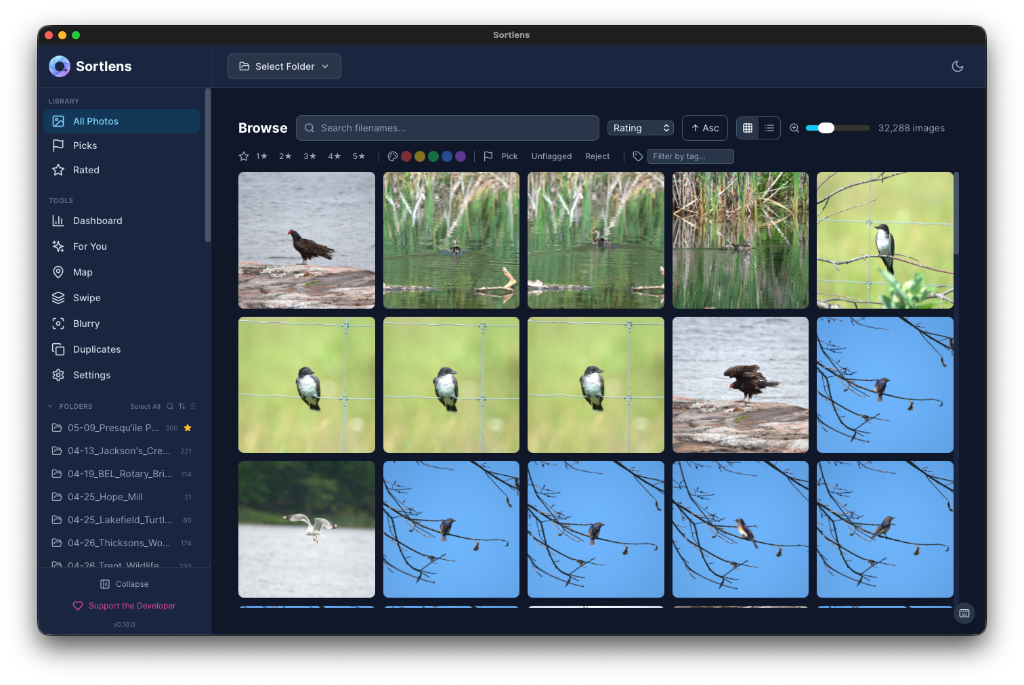
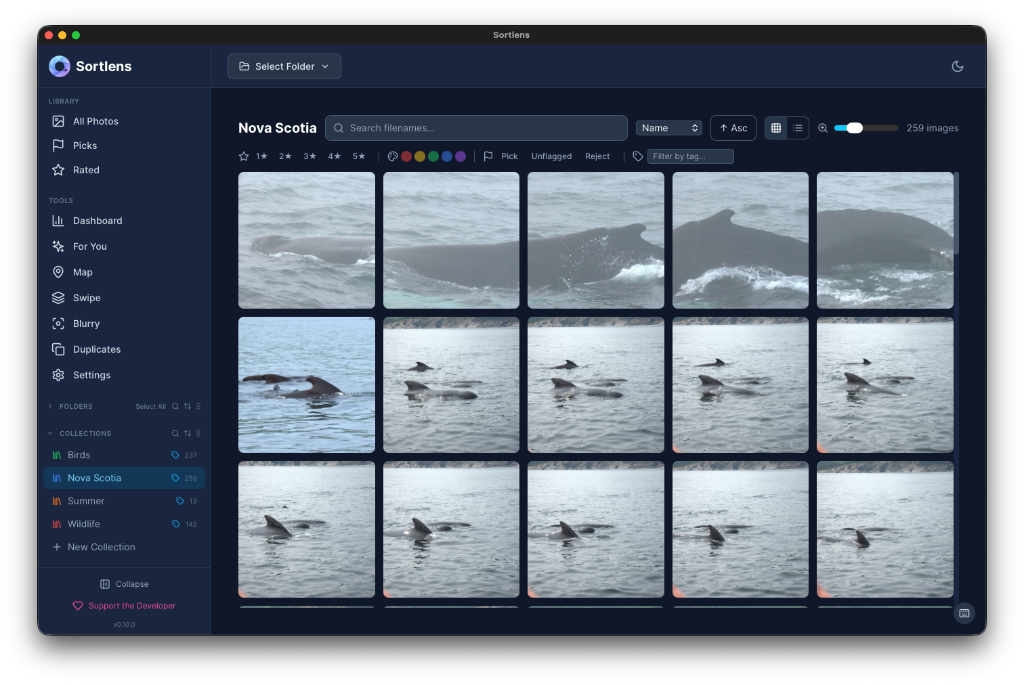
Browse
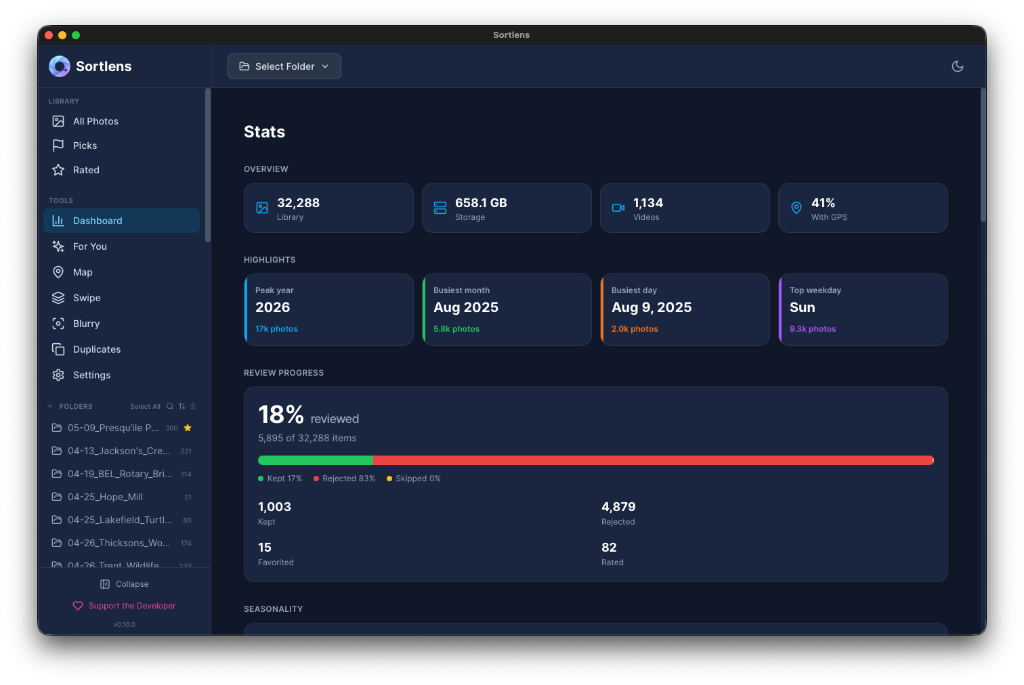
Dashboard
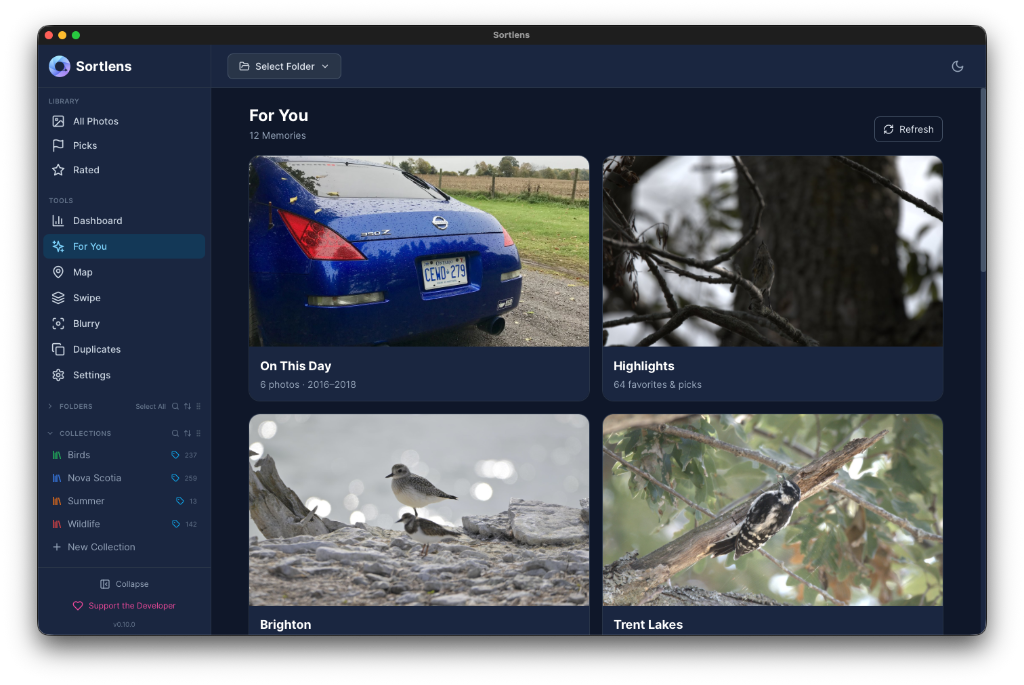
For You
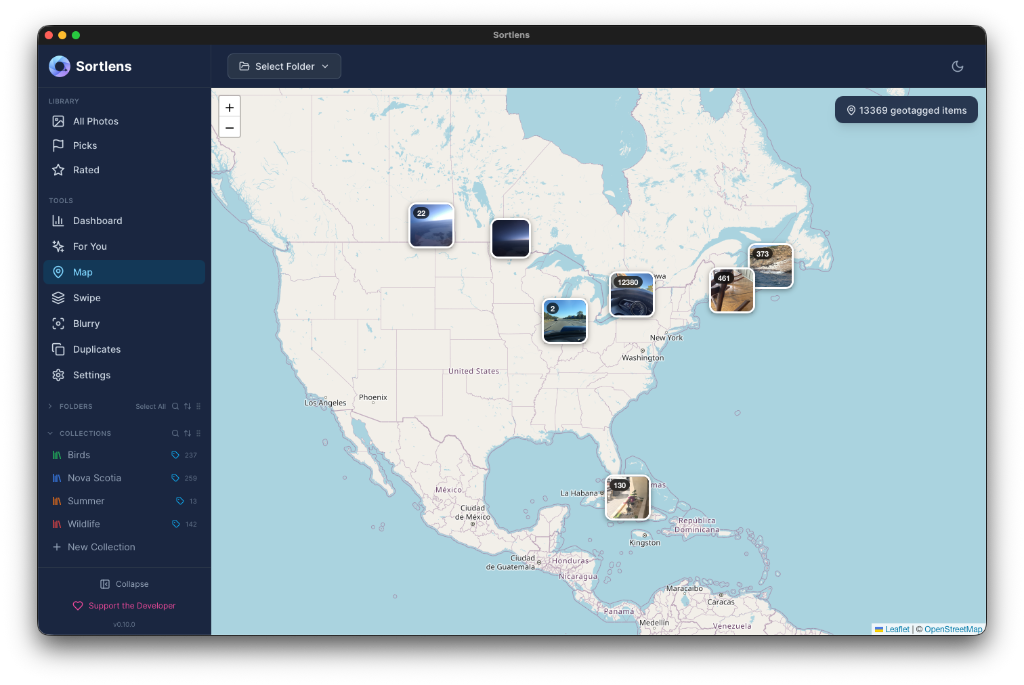
Map
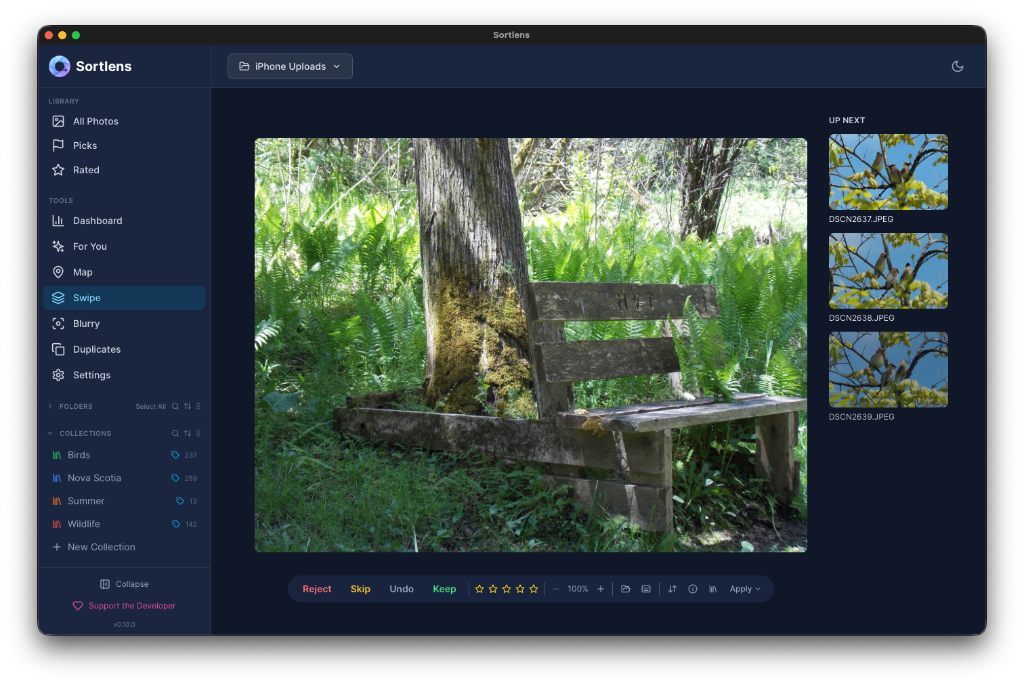
Swipe
AI & Tagging

Collections
Installation
Windows
- Download the latest
SortlensSetup-x.x.x.zipfrom the Releases page - Extract the zip to get the installer exe
- Run
SortlensSetup-x.x.x.exeand follow the setup wizard - Launch Sortlens from the Start Menu or desktop shortcut
- Add a folder — click the ➕ in the sidebar to add a folder of photos
- Start sorting!
The Windows installer includes the VC++ Redistributable and WebView2 Runtime if they are not already on the computer.
macOS (Apple Silicon)
- Download the latest
Sortlens-x.x.x-macOS.dmgfrom the Releases page - Open the disk image
- Drag Sortlens into Applications
- Open Sortlens. The first time, if macOS blocks the app, right-click it, choose Open, then Open again
- Add a folder and start sorting
The macOS download is built for Apple Silicon (M1 or later).
Moving A Library From Windows To macOS
- On Windows, open Settings > Library Data and export the database
- On macOS, import that JSON backup from Settings > Library Data
- Open Settings > Library Health and remap each missing folder to its new macOS location
- Review the external editor setting, since a Windows
.exepath will not carry over to macOS
System Requirements
- Windows 10 or later (64-bit), or macOS 12 or later on Apple Silicon
- 4 GB RAM minimum (8 GB recommended for large libraries)
- No internet connection required (except for optional AI model downloads)
Features
⚡ Swipe Mode — Rapid Photo Review
Review photos fast with a Tinder-style swipe interface. Swipe right to keep, left to reject, down to skip. Use keyboard shortcuts for even faster culling:
| Action | Keyboard | Gesture |
|---|---|---|
| Keep | → or K | Swipe right |
| Reject | ← or X | Swipe left |
| Skip | ↓ or S | Swipe down |
| Undo | Backspace | Swipe up |
| Favorite | F | — |
| Zoom | 1–4 | — |
- Resume sessions exactly where you left off
- Sort by filename or capture date
- Prefetches the next 3 images for instant loading
- All reject decisions are staged — nothing is deleted until you explicitly apply actions
🖼️ Browse Mode — Grid & List View
View your entire library in a resizable grid or detailed list. Click any image to open the full-resolution lightbox.
- Search by filename
- Filter by star rating, color label, flag, or tags (with ANY / ALL matching)
- Sort by name, size, date, rating, dimensions, or EXIF date
- Batch select with Ctrl+Click, Shift+Click, or Ctrl+A
- Batch operations — delete or move multiple selected images at once via right-click menu or batch toolbar
- Lightbox with full EXIF metadata panel (camera, ISO, aperture, shutter speed, dimensions, GPS)
- Lightbox position counter — see where you are in the library (e.g. "42 / 1,203")
- Seamless pagination — lightbox pre-fetches the next page as you approach the boundary, no blank screens
⌨️ Keyboard Shortcuts
Full keyboard-driven workflow in Browse mode. Press ? or click the keyboard icon to see all shortcuts:
| Action | Shortcut |
|---|---|
| Navigate images | ← → |
| Star rating | 0–5 |
| Color labels | 6–9 |
| Pick / Unflag / Reject | P / U / X |
| Delete | Delete or Backspace |
| Open in editor | E |
| Reveal in Explorer | R |
| Open lightbox | Enter |
| Close / deselect | Escape |
| Select all | Ctrl+A |
| Deselect all | Ctrl+D |
| Show shortcuts help | ? |
⭐ Rating, Labels & Flags
Organize images your way with three independent annotation systems:
- Star Rating — 1 to 5 stars
- Color Labels — Red, Yellow, Green, Blue, Purple
- Flags — Pick, Reject, or Unflagged
All annotations are saved locally and persist across sessions. Apply to single images or batch-apply to selections.
🏷️ Tagging
Add descriptive tags to your images for powerful organization and filtering.
- Manual tags with autocomplete from your tag history
- Batch tagging — apply tags to multiple selected images at once
- Re-apply last tags — one click to carry over all tags from the previous image, perfect for similar shots in a series
- Tag filters — filter your library by tags with comma-separated ANY or ALL matching modes
- XMP sidecar write-back — tags are written to standard XMP sidecar files for Lightroom / Capture One compatibility
🤖 AI Tag Suggestions
Sortlens includes optional AI-powered tag suggestions that run entirely on your local machine:
- YOLO object detection — automatically detects objects in your images (people, animals, vehicles, etc.)
- CLIP visual classification — downloadable model with domain-specific vocabulary packs:
- Photography, Wildlife, Food, Scene, Event
- EXIF-based hints — intelligent suggestions derived from camera metadata (camera model, lens, GPS location context)
All three sources are combined into a unified suggestion panel. AI features are optional and can be enabled/disabled in Settings.
📦 Collections
Group images into custom collections for projects, client deliveries, or personal favorites.
- Create unlimited named collections
- Add images from any folder
- Quick-access from the sidebar
📁 Folder Management
- Folder favorites — pin frequently used folders with custom color accents
- External device awareness — USB drives, SD cards, and mounted phones are detected automatically
- Offline handling — images stay in your library even when the source device is disconnected, with offline indicators
🔍 Blurry Detection
Automatically scan your library for out-of-focus images using Laplacian variance analysis.
- Adjustable sensitivity threshold
- Review detected images before taking action
- Batch scan entire folders
👯 Duplicate Finder
Find visually similar images using perceptual hashing — catches near-duplicates that pixel-perfect comparison would miss.
- Adjustable similarity threshold
- Groups duplicates together with a recommended "best" pick
- Batch select and delete duplicates
🗺️ Map View
See where your photos were taken on an interactive map. Requires GPS data in EXIF (most cameras and phones include this).
📊 Dashboard
At-a-glance stats about your library:
- Total images and library size
- Images reviewed, kept, rejected, skipped
- Rated and flagged counts
- Space freed from deletions
🏥 Library Health
Monitor the health of your library:
- Detect missing or moved files
- Track folder status
- Re-map folders if drives change
⚙️ Settings
- Deletion mode — Move to Trash (default & recoverable), move to a rejected folder, or permanent delete
- Sidecar handling — Optionally include XMP/JSON sidecars when deleting
- Performance tuning — Preview size, prefetch count, scan batch size
- External editor — Open images in your preferred editor
- AI tags — Enable/disable YOLO detection, download/remove CLIP model, toggle vocabulary packs
- Themes — Light, Dark, and Dark+ modes
- Accounts — Each person can keep a separate library and a Tailscale address. This computer’s original library stays in place
- Setup — First launch walks through the library, an optional photo folder, and a Tailscale connection test
- Release history — Check for updates and view release notes from within the app
Supported File Formats
| Format | Type | Support |
|---|---|---|
| JPEG / JPG | Standard | ✅ Full |
| PNG | Standard | ✅ Full |
| WebP | Standard | ✅ Full |
| TIFF / TIF | Standard | ✅ Full |
| HEIC / HEIF | Standard | ✅ With system codec |
| NEF | RAW (Nikon) | ✅ Preview & EXIF |
| CR2 / CR3 | RAW (Canon) | ✅ Preview & EXIF |
| ARW | RAW (Sony) | ✅ Preview & EXIF |
| RAF | RAW (Fujifilm) | ✅ Preview & EXIF |
| ORF | RAW (Olympus) | ✅ Preview & EXIF |
| RW2 | RAW (Panasonic) | ✅ Preview & EXIF |
| DNG | RAW (Adobe) | ✅ Preview & EXIF |
Privacy & Security
- 100% Local — No data leaves your machine. Ever.
- No Account Required — No sign-up, no login, no cloud.
- No Telemetry — Zero tracking or analytics.
- AI runs locally — YOLO and CLIP models run on your CPU, no images are sent anywhere.
- Portable Data — Your library database is a single file at
~/.sortlens/sortlens.dbthat you can back up or move.
Safety
Sortlens is built with safety-first defaults:
- All deletions are staged — nothing happens until you confirm
- Confirmation dialogs show exactly what will be affected (file count, total size, file list)
- Undo support — undo up to 20 actions
- Trash by default — rejected files go to your OS recycling bin, not permanent delete
- Audit log — every destructive operation is logged to
~/.sortlens/audit.log
FAQ
Q: Do I need to install anything else? On Windows, no. The installer bundles the VC++ Redistributable and WebView2 Runtime. On macOS, open the disk image and drag Sortlens to Applications.
Q: Where is my data stored?
Your library database and settings are stored in C:\Users\<YourName>\.sortlens\ on Windows and ~/.sortlens/ on macOS. Your actual photos are never moved or modified unless you explicitly choose to delete, move, or copy them.
Q: Can I use this with RAW files? Yes. Sortlens supports NEF, CR2, CR3, ARW, RAF, ORF, RW2, and DNG. It reads the embedded preview and full EXIF data from RAW files.
Q: Will my images be uploaded anywhere? No. Sortlens is completely offline. There is no internet connectivity, no cloud storage, no telemetry. The only optional download is the CLIP AI model (one-time, ~150 MB), and once downloaded it runs entirely on your machine.
Q: Can I use multiple folders? Yes. Add as many source folders as you want from the sidebar. Switch between them or browse all at once.
Q: Are tags compatible with Lightroom / Capture One? Yes. Sortlens writes tags to standard XMP sidecar files that can be read by Lightroom, Capture One, and other tools that support XMP metadata.
Q: Do I need a GPU for AI tagging? No. The AI models (YOLO and CLIP) run on your CPU. A modern multi-core processor is recommended for faster results, but no GPU is required.
Version
Current Release: v0.10.0
Release history
| Version | Notes |
|---|---|
| v0.10.0 | Separate libraries for each account, first-run setup, and a Tailscale connection test. The original library on this computer stays in place. |
| v0.9.0 | Official macOS download for Apple Silicon, rebuilt Windows installer, and removal of machine-specific network settings from the desktop app. |
| v0.8.1 | Fixed folder scans and rescans failing after media metadata fields were expanded. |
| v0.8.0 | Video support, tagging, AI suggestions, and library organization. |
| Earlier | See the Releases page. |
Made for photographers, by a photographer.
Similar repos


See what people are saying
README
Sortlens
Fast, local photo management for photographers who shoot thousands of images.
Sort, rate, tag, and organize your photo library — entirely offline, no subscriptions, no cloud.
What is Sortlens?
Sortlens is a desktop photo management tool built for photographers who need to quickly review, rate, tag, and organize large batches of images. It runs 100% locally on your machine — your photos never leave your computer.
Whether you're coming back from a shoot with 2,000 images or managing a growing library of 50,000+, Sortlens helps you sort the keepers from the rejects fast.
Screenshots
Browse
Dashboard
For You
Map
Swipe
AI & Tagging
Collections
Installation
Windows
- Download the latest
SortlensSetup-x.x.x.zipfrom the Releases page - Extract the zip to get the installer exe
- Run
SortlensSetup-x.x.x.exeand follow the setup wizard - Launch Sortlens from the Start Menu or desktop shortcut
- Add a folder — click the ➕ in the sidebar to add a folder of photos
- Start sorting!
The Windows installer includes the VC++ Redistributable and WebView2 Runtime if they are not already on the computer.
macOS (Apple Silicon)
- Download the latest
Sortlens-x.x.x-macOS.dmgfrom the Releases page - Open the disk image
- Drag Sortlens into Applications
- Open Sortlens. The first time, if macOS blocks the app, right-click it, choose Open, then Open again
- Add a folder and start sorting
The macOS download is built for Apple Silicon (M1 or later).
Moving A Library From Windows To macOS
- On Windows, open Settings > Library Data and export the database
- On macOS, import that JSON backup from Settings > Library Data
- Open Settings > Library Health and remap each missing folder to its new macOS location
- Review the external editor setting, since a Windows
.exepath will not carry over to macOS
System Requirements
- Windows 10 or later (64-bit), or macOS 12 or later on Apple Silicon
- 4 GB RAM minimum (8 GB recommended for large libraries)
- No internet connection required (except for optional AI model downloads)
Features
⚡ Swipe Mode — Rapid Photo Review
Review photos fast with a Tinder-style swipe interface. Swipe right to keep, left to reject, down to skip. Use keyboard shortcuts for even faster culling:
| Action | Keyboard | Gesture |
|---|---|---|
| Keep | → or K | Swipe right |
| Reject | ← or X | Swipe left |
| Skip | ↓ or S | Swipe down |
| Undo | Backspace | Swipe up |
| Favorite | F | — |
| Zoom | 1–4 | — |
- Resume sessions exactly where you left off
- Sort by filename or capture date
- Prefetches the next 3 images for instant loading
- All reject decisions are staged — nothing is deleted until you explicitly apply actions
🖼️ Browse Mode — Grid & List View
View your entire library in a resizable grid or detailed list. Click any image to open the full-resolution lightbox.
- Search by filename
- Filter by star rating, color label, flag, or tags (with ANY / ALL matching)
- Sort by name, size, date, rating, dimensions, or EXIF date
- Batch select with Ctrl+Click, Shift+Click, or Ctrl+A
- Batch operations — delete or move multiple selected images at once via right-click menu or batch toolbar
- Lightbox with full EXIF metadata panel (camera, ISO, aperture, shutter speed, dimensions, GPS)
- Lightbox position counter — see where you are in the library (e.g. "42 / 1,203")
- Seamless pagination — lightbox pre-fetches the next page as you approach the boundary, no blank screens
⌨️ Keyboard Shortcuts
Full keyboard-driven workflow in Browse mode. Press ? or click the keyboard icon to see all shortcuts:
| Action | Shortcut |
|---|---|
| Navigate images | ← → |
| Star rating | 0–5 |
| Color labels | 6–9 |
| Pick / Unflag / Reject | P / U / X |
| Delete | Delete or Backspace |
| Open in editor | E |
| Reveal in Explorer | R |
| Open lightbox | Enter |
| Close / deselect | Escape |
| Select all | Ctrl+A |
| Deselect all | Ctrl+D |
| Show shortcuts help | ? |
⭐ Rating, Labels & Flags
Organize images your way with three independent annotation systems:
- Star Rating — 1 to 5 stars
- Color Labels — Red, Yellow, Green, Blue, Purple
- Flags — Pick, Reject, or Unflagged
All annotations are saved locally and persist across sessions. Apply to single images or batch-apply to selections.
🏷️ Tagging
Add descriptive tags to your images for powerful organization and filtering.
- Manual tags with autocomplete from your tag history
- Batch tagging — apply tags to multiple selected images at once
- Re-apply last tags — one click to carry over all tags from the previous image, perfect for similar shots in a series
- Tag filters — filter your library by tags with comma-separated ANY or ALL matching modes
- XMP sidecar write-back — tags are written to standard XMP sidecar files for Lightroom / Capture One compatibility
🤖 AI Tag Suggestions
Sortlens includes optional AI-powered tag suggestions that run entirely on your local machine:
- YOLO object detection — automatically detects objects in your images (people, animals, vehicles, etc.)
- CLIP visual classification — downloadable model with domain-specific vocabulary packs:
- Photography, Wildlife, Food, Scene, Event
- EXIF-based hints — intelligent suggestions derived from camera metadata (camera model, lens, GPS location context)
All three sources are combined into a unified suggestion panel. AI features are optional and can be enabled/disabled in Settings.
📦 Collections
Group images into custom collections for projects, client deliveries, or personal favorites.
- Create unlimited named collections
- Add images from any folder
- Quick-access from the sidebar
📁 Folder Management
- Folder favorites — pin frequently used folders with custom color accents
- External device awareness — USB drives, SD cards, and mounted phones are detected automatically
- Offline handling — images stay in your library even when the source device is disconnected, with offline indicators
🔍 Blurry Detection
Automatically scan your library for out-of-focus images using Laplacian variance analysis.
- Adjustable sensitivity threshold
- Review detected images before taking action
- Batch scan entire folders
👯 Duplicate Finder
Find visually similar images using perceptual hashing — catches near-duplicates that pixel-perfect comparison would miss.
- Adjustable similarity threshold
- Groups duplicates together with a recommended "best" pick
- Batch select and delete duplicates
🗺️ Map View
See where your photos were taken on an interactive map. Requires GPS data in EXIF (most cameras and phones include this).
📊 Dashboard
At-a-glance stats about your library:
- Total images and library size
- Images reviewed, kept, rejected, skipped
- Rated and flagged counts
- Space freed from deletions
🏥 Library Health
Monitor the health of your library:
- Detect missing or moved files
- Track folder status
- Re-map folders if drives change
⚙️ Settings
- Deletion mode — Move to Trash (default & recoverable), move to a rejected folder, or permanent delete
- Sidecar handling — Optionally include XMP/JSON sidecars when deleting
- Performance tuning — Preview size, prefetch count, scan batch size
- External editor — Open images in your preferred editor
- AI tags — Enable/disable YOLO detection, download/remove CLIP model, toggle vocabulary packs
- Themes — Light, Dark, and Dark+ modes
- Accounts — Each person can keep a separate library and a Tailscale address. This computer’s original library stays in place
- Setup — First launch walks through the library, an optional photo folder, and a Tailscale connection test
- Release history — Check for updates and view release notes from within the app
Supported File Formats
| Format | Type | Support |
|---|---|---|
| JPEG / JPG | Standard | ✅ Full |
| PNG | Standard | ✅ Full |
| WebP | Standard | ✅ Full |
| TIFF / TIF | Standard | ✅ Full |
| HEIC / HEIF | Standard | ✅ With system codec |
| NEF | RAW (Nikon) | ✅ Preview & EXIF |
| CR2 / CR3 | RAW (Canon) | ✅ Preview & EXIF |
| ARW | RAW (Sony) | ✅ Preview & EXIF |
| RAF | RAW (Fujifilm) | ✅ Preview & EXIF |
| ORF | RAW (Olympus) | ✅ Preview & EXIF |
| RW2 | RAW (Panasonic) | ✅ Preview & EXIF |
| DNG | RAW (Adobe) | ✅ Preview & EXIF |
Privacy & Security
- 100% Local — No data leaves your machine. Ever.
- No Account Required — No sign-up, no login, no cloud.
- No Telemetry — Zero tracking or analytics.
- AI runs locally — YOLO and CLIP models run on your CPU, no images are sent anywhere.
- Portable Data — Your library database is a single file at
~/.sortlens/sortlens.dbthat you can back up or move.
Safety
Sortlens is built with safety-first defaults:
- All deletions are staged — nothing happens until you confirm
- Confirmation dialogs show exactly what will be affected (file count, total size, file list)
- Undo support — undo up to 20 actions
- Trash by default — rejected files go to your OS recycling bin, not permanent delete
- Audit log — every destructive operation is logged to
~/.sortlens/audit.log
FAQ
Q: Do I need to install anything else? On Windows, no. The installer bundles the VC++ Redistributable and WebView2 Runtime. On macOS, open the disk image and drag Sortlens to Applications.
Q: Where is my data stored?
Your library database and settings are stored in C:\Users\<YourName>\.sortlens\ on Windows and ~/.sortlens/ on macOS. Your actual photos are never moved or modified unless you explicitly choose to delete, move, or copy them.
Q: Can I use this with RAW files? Yes. Sortlens supports NEF, CR2, CR3, ARW, RAF, ORF, RW2, and DNG. It reads the embedded preview and full EXIF data from RAW files.
Q: Will my images be uploaded anywhere? No. Sortlens is completely offline. There is no internet connectivity, no cloud storage, no telemetry. The only optional download is the CLIP AI model (one-time, ~150 MB), and once downloaded it runs entirely on your machine.
Q: Can I use multiple folders? Yes. Add as many source folders as you want from the sidebar. Switch between them or browse all at once.
Q: Are tags compatible with Lightroom / Capture One? Yes. Sortlens writes tags to standard XMP sidecar files that can be read by Lightroom, Capture One, and other tools that support XMP metadata.
Q: Do I need a GPU for AI tagging? No. The AI models (YOLO and CLIP) run on your CPU. A modern multi-core processor is recommended for faster results, but no GPU is required.
Version
Current Release: v0.10.0
Release history
| Version | Notes |
|---|---|
| v0.10.0 | Separate libraries for each account, first-run setup, and a Tailscale connection test. The original library on this computer stays in place. |
| v0.9.0 | Official macOS download for Apple Silicon, rebuilt Windows installer, and removal of machine-specific network settings from the desktop app. |
| v0.8.1 | Fixed folder scans and rescans failing after media metadata fields were expanded. |
| v0.8.0 | Video support, tagging, AI suggestions, and library organization. |
| Earlier | See the Releases page. |
Made for photographers, by a photographer.