
Sort a photo library into categories with local vision and text models (Ollama)
Python
0
34 commits
updated Sep 29, 2026
See what people are saying
README
Image Categorizer
Sorts a folder of photos into categories using local AI models served by Ollama. A vision model describes every photo and flags accidental shots; a text model sorts the photos into categories you keep and refine across runs. You review the result in a browser report and export a script that moves the files into folders, writes each category into the photo's caption, or both. No photo leaves your network.
Built for camera rolls full of accidental shots, near-duplicates and screenshots, where reviewing every photo by hand is not practical.
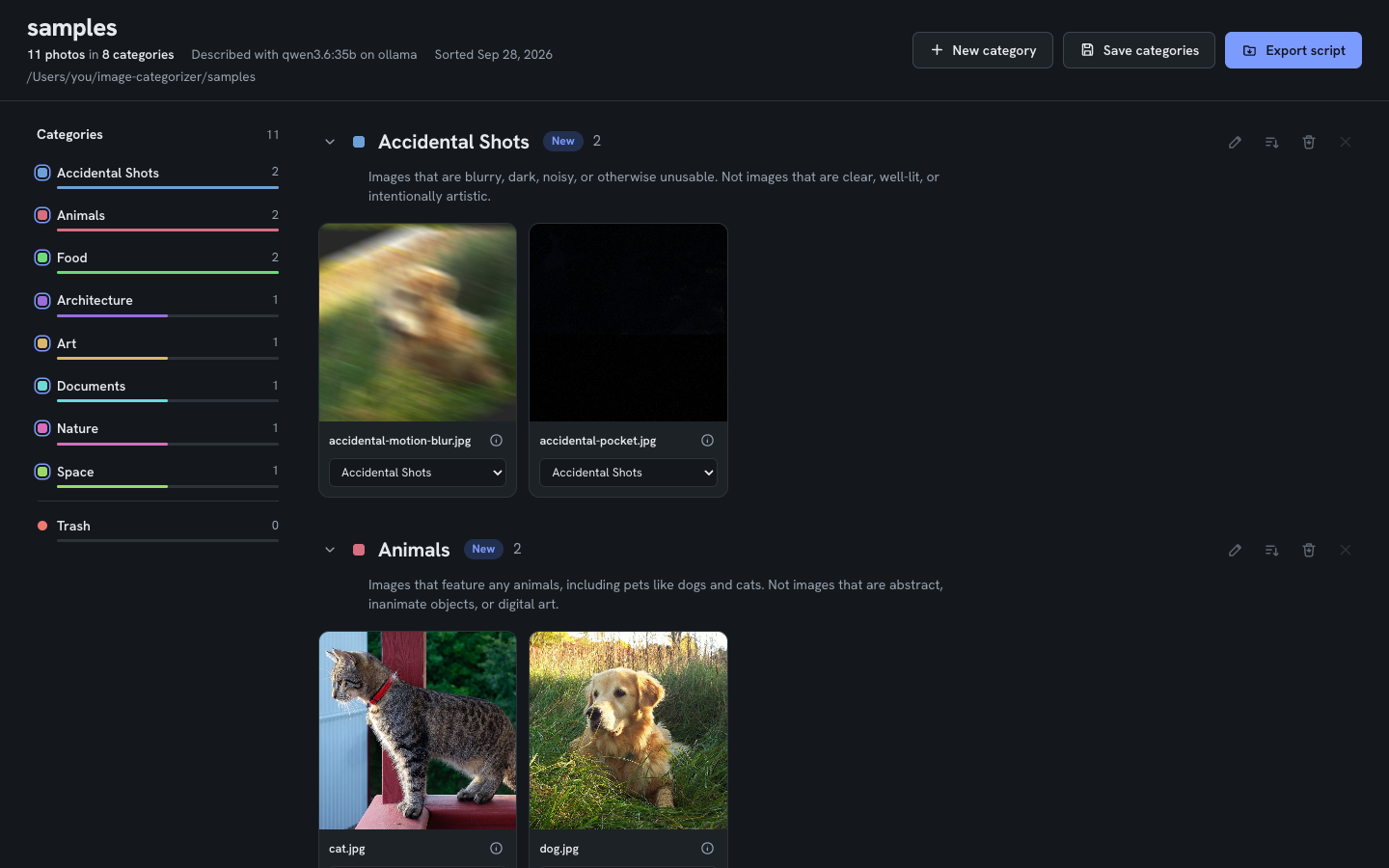



How it works
- Describe. A vision model looks at each photo, writes a short description,
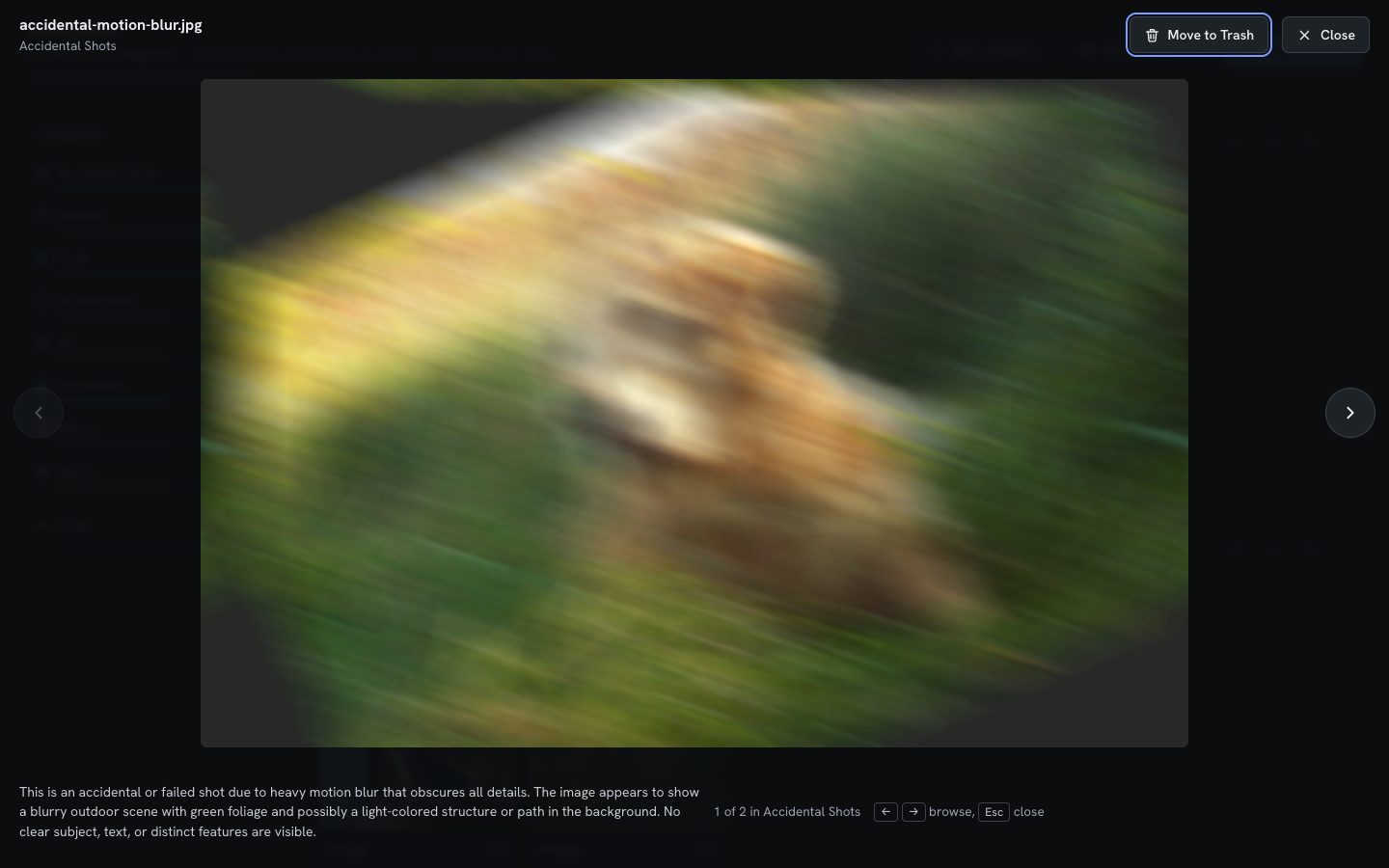
and decides whether it is an accidental or failed shot (motion blur, pocket
shot, no subject). With
--describe-only(see below), descriptions are saved as they go and an interrupted run resumes where it stopped. - Sort. A text model assigns every photo to a category using the descriptions only, so re-sorting takes minutes and never looks at the images again. Each category has a rule describing what belongs in it, and the list is saved and reused for every library.
- Review. A report in the browser lets you move photos between categories, trash them, and rename, merge or create categories.
- Apply. The report exports a bash script: move each photo into a folder named
after its category, write
Category: <name>into its caption (searchable in the Photos app on Mac and iPhone), or both. Nothing is deleted.
The tool itself never moves, renames or deletes a photo.
Quick start
With an AI coding agent. Open the repository in Claude Code (or a similar
agent) and ask it to follow SETUP.md. It checks the machine, installs
what is missing, configures Ollama and the models, and runs a smoke test on the
images in samples/.
By hand. You need uv and an Ollama server, on this machine or another one on your network.
git clone https://github.com/DrBenedictPorkins/image-categorizer.git
cd image-categorizer
uv sync

ollama pull qwen3.6:35b            # vision model (describe)
ollama pull mistral-small3.2:24b   # text model (sort)
cp .env.example .env               # set OLLAMA_HOST if Ollama runs elsewhere

uv run python main.py samples --provider ollama
The last command sorts the eleven sample images and opens the report. Smaller model pairs for 8-16 GB GPUs are listed in SETUP.md.
Sorting a large library
Describe once, then sort as often as you like:
# Describe every photo (hours for thousands; rerun the same command to resume)
uv run python main.py "/path/to/photos" --description-provider ollama --describe-only

# Optional: build the category list and stop, to edit it before sorting
uv run python main.py "/path/to/photos" --categorization-provider ollama \
    --categorize-from "/path/to/photos/descriptions_only.json" --plan-categories --max-categories 12

# Sort and open the report (minutes)
uv run python main.py "/path/to/photos" --categorization-provider ollama \
    --categorize-from "/path/to/photos/descriptions_only.json" --max-categories 12
For reference: 1,195 photos took about 80 minutes to describe and 8 minutes to
sort with qwen3.6:35b and mistral-small3.2:24b on an RTX 4090.
The report
- Photos grouped by category; the rail on the left shows counts and accepts drops
- Move a photo by dragging it or with its category menu, which also offers the model's suggested categories
- Rename, merge (rename to an existing name), create and remove categories; edit each category's rule
- Trash with restore; move a whole category to Trash in one step
- Full-size preview with the model's description; arrow keys browse the category
- Save categories downloads the category list, with your edits, for future runs
- Export script writes the organize script
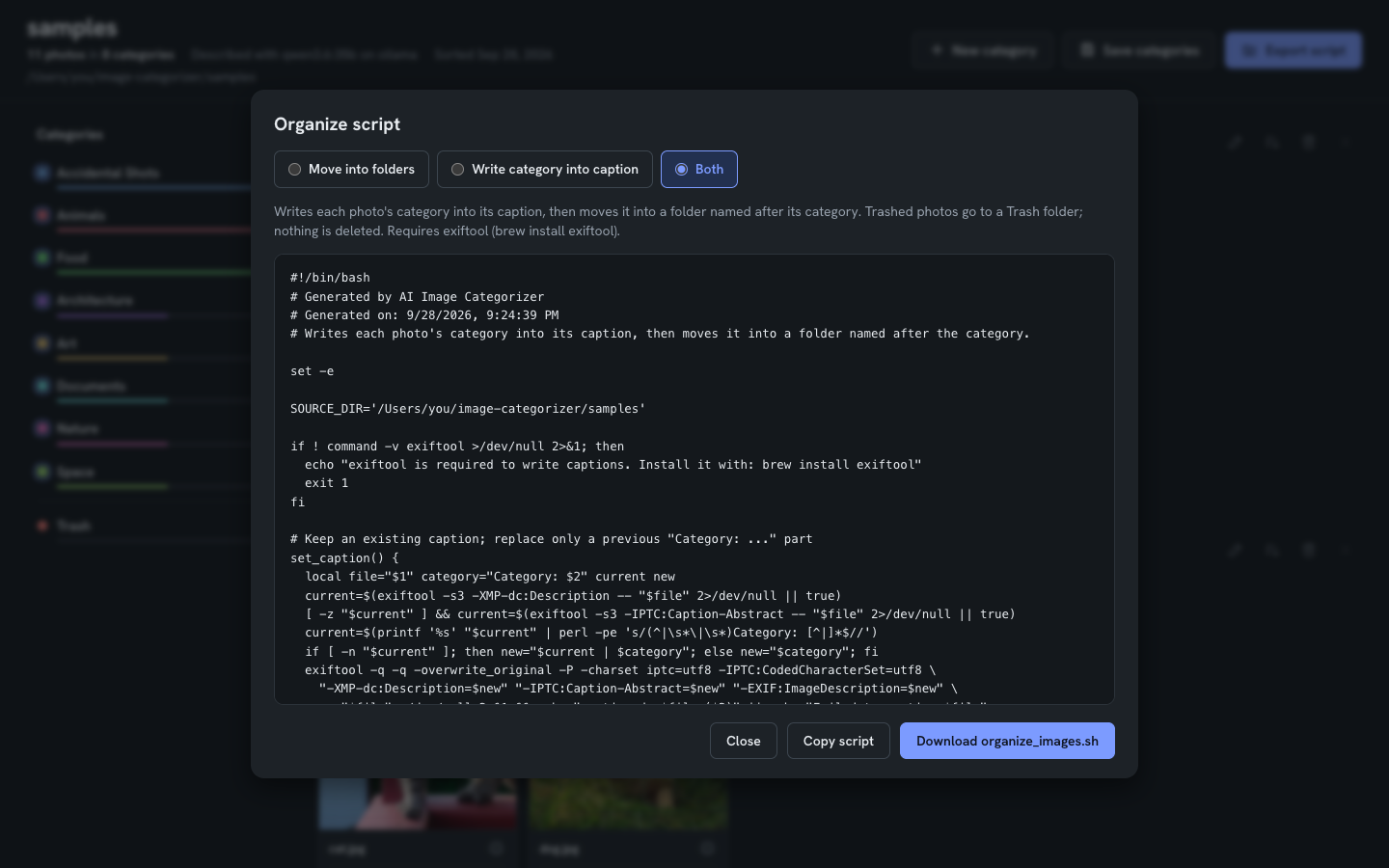
Writing captions requires exiftool. An existing caption is
kept; a previous Category: part is replaced, so the script can be run again.
Categories that carry over
Categories are saved in ~/.config/image-categorizer/categories.yaml (override
with CATEGORIES_FILE) and reused for every library:
categories:
  - name: Portraits
    rule: Photos of people looking at the camera, including selfies. Not group photos.
    status: kept
The first run builds the list from the photos. Later runs sort into the saved
list; only when enough photos fit none of the rules does the model propose a new
category, marked new in the report until you save the list. --max-categories
caps the list: once it is full, photos that fit nothing go to Unsorted.
Re-sorting a category
When a category holds photos that belong elsewhere, click the re-sort button on that category and describe what went wrong.
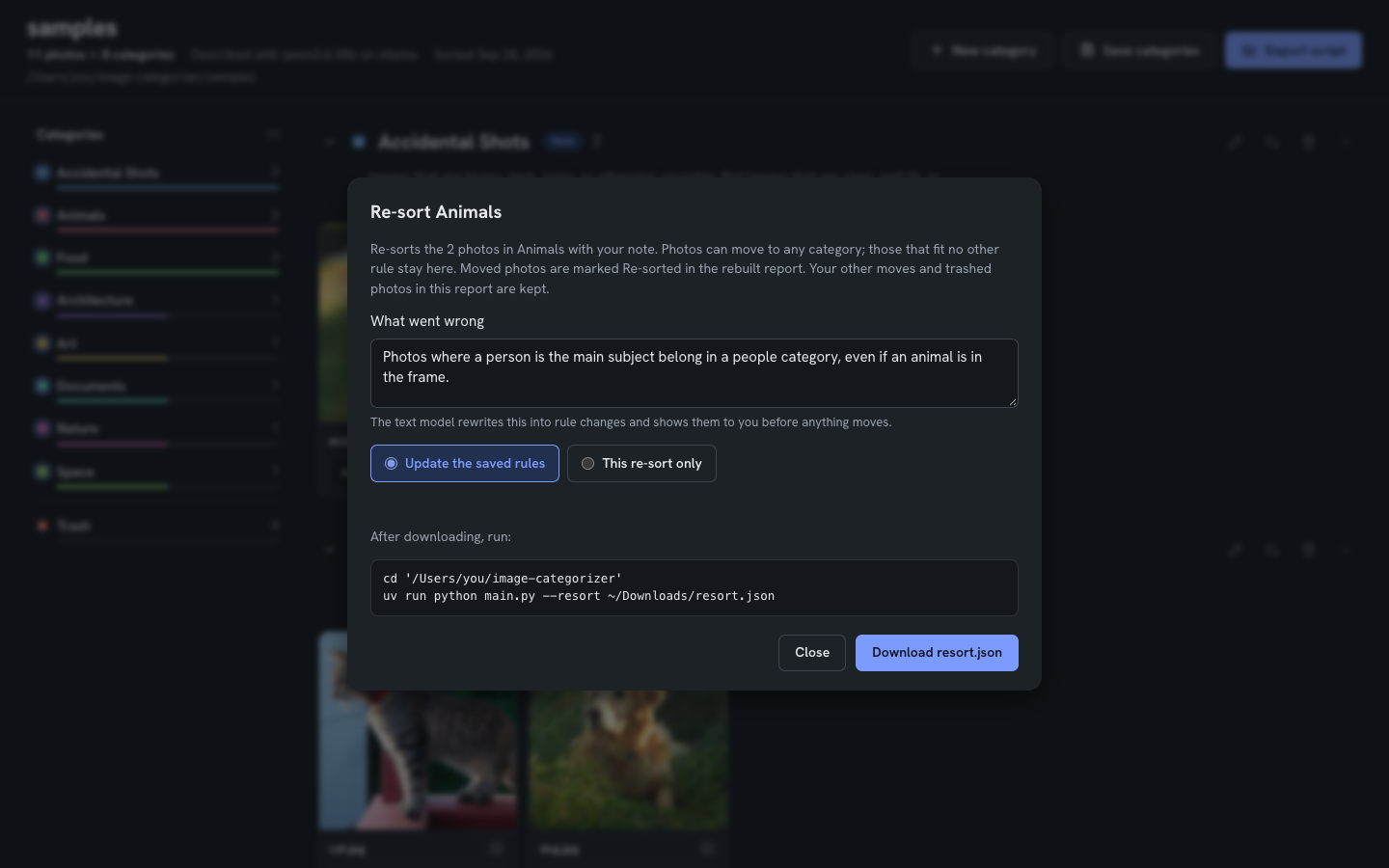
uv run python main.py --resort ~/Downloads/resort.json
The text model turns the note into rule changes and asks you to approve them, shows how 10 sample photos would move, then re-sorts only that category. Photos that fit no other category stay put. Moved photos are marked Re-sorted in the rebuilt report, and edits made in the report before exporting are kept.
Configuration
Settings live in .env; .env.example lists them.
| Variable | Purpose |
|---|---|
OLLAMA_HOST | Ollama server, default http://localhost:11434 |
OLLAMA_MODEL | Vision model for describing |
OLLAMA_TEXT_MODEL | Text model for sorting and re-sorting |
CATEGORIES_FILE | Saved category list |
MAX_CATEGORIES | Category cap |
All command-line options: uv run python main.py --help and
SETUP.md. Supported formats: .jpg, .jpeg, .png,
.gif, .bmp, .webp, .heic, .heif; videos are skipped. The report shows HEIC
photos through JPEG previews kept in a hidden .image-categorizer-previews folder.
Other providers
--provider huggingface runs BLIP-2, LLaVA or Flan-T5 in-process without Ollama
(docs/HUGGINGFACE_PROVIDER.md), and
--categorization-provider keyword sorts by keyword matching. Both predate the
saved categories and re-sort features, and are less maintained.
Project layout
| Path | Contents |
|---|---|
main.py | Command line, workflows, re-sort |
providers/ollama_provider.py | Describing, sorting, category proposals, rule rewrites |
core/categories.py | Saved category list |
core/html_generator.py, template.html | Report |
models/image_data.py | Result data model |
SETUP.md | Install and first run, written for AI coding agents |
samples/ | Public-domain sample images (sources) |
docs/ | Provider guides, dependency audit, design notes, README images |
sundry/ | Archive of one-off scripts, not used by the app |
License
MIT. See LICENSE.
Similar repos


Languages
Python
60.8%
HTML
39.2%
Sort a photo library into categories with local vision and text models (Ollama)
Python
0
34 commits
updated Sep 29, 2026
See what people are saying
README
Image Categorizer
Sorts a folder of photos into categories using local AI models served by Ollama. A vision model describes every photo and flags accidental shots; a text model sorts the photos into categories you keep and refine across runs. You review the result in a browser report and export a script that moves the files into folders, writes each category into the photo's caption, or both. No photo leaves your network.
Built for camera rolls full of accidental shots, near-duplicates and screenshots, where reviewing every photo by hand is not practical.
How it works
- Describe. A vision model looks at each photo, writes a short description,
and decides whether it is an accidental or failed shot (motion blur, pocket
shot, no subject). With
--describe-only(see below), descriptions are saved as they go and an interrupted run resumes where it stopped. - Sort. A text model assigns every photo to a category using the descriptions only, so re-sorting takes minutes and never looks at the images again. Each category has a rule describing what belongs in it, and the list is saved and reused for every library.
- Review. A report in the browser lets you move photos between categories, trash them, and rename, merge or create categories.
- Apply. The report exports a bash script: move each photo into a folder named
after its category, write
Category: <name>into its caption (searchable in the Photos app on Mac and iPhone), or both. Nothing is deleted.
The tool itself never moves, renames or deletes a photo.
Quick start
With an AI coding agent. Open the repository in Claude Code (or a similar
agent) and ask it to follow SETUP.md. It checks the machine, installs
what is missing, configures Ollama and the models, and runs a smoke test on the
images in samples/.
By hand. You need uv and an Ollama server, on this machine or another one on your network.
git clone https://github.com/DrBenedictPorkins/image-categorizer.git
cd image-categorizer
uv sync

ollama pull qwen3.6:35b            # vision model (describe)
ollama pull mistral-small3.2:24b   # text model (sort)
cp .env.example .env               # set OLLAMA_HOST if Ollama runs elsewhere

uv run python main.py samples --provider ollama
The last command sorts the eleven sample images and opens the report. Smaller model pairs for 8-16 GB GPUs are listed in SETUP.md.
Sorting a large library
Describe once, then sort as often as you like:
# Describe every photo (hours for thousands; rerun the same command to resume)
uv run python main.py "/path/to/photos" --description-provider ollama --describe-only

# Optional: build the category list and stop, to edit it before sorting
uv run python main.py "/path/to/photos" --categorization-provider ollama \
    --categorize-from "/path/to/photos/descriptions_only.json" --plan-categories --max-categories 12

# Sort and open the report (minutes)
uv run python main.py "/path/to/photos" --categorization-provider ollama \
    --categorize-from "/path/to/photos/descriptions_only.json" --max-categories 12
For reference: 1,195 photos took about 80 minutes to describe and 8 minutes to
sort with qwen3.6:35b and mistral-small3.2:24b on an RTX 4090.
The report
- Photos grouped by category; the rail on the left shows counts and accepts drops
- Move a photo by dragging it or with its category menu, which also offers the model's suggested categories
- Rename, merge (rename to an existing name), create and remove categories; edit each category's rule
- Trash with restore; move a whole category to Trash in one step
- Full-size preview with the model's description; arrow keys browse the category
- Save categories downloads the category list, with your edits, for future runs
- Export script writes the organize script
Writing captions requires exiftool. An existing caption is
kept; a previous Category: part is replaced, so the script can be run again.
Categories that carry over
Categories are saved in ~/.config/image-categorizer/categories.yaml (override
with CATEGORIES_FILE) and reused for every library:
categories:
  - name: Portraits
    rule: Photos of people looking at the camera, including selfies. Not group photos.
    status: kept
The first run builds the list from the photos. Later runs sort into the saved
list; only when enough photos fit none of the rules does the model propose a new
category, marked new in the report until you save the list. --max-categories
caps the list: once it is full, photos that fit nothing go to Unsorted.
Re-sorting a category
When a category holds photos that belong elsewhere, click the re-sort button on that category and describe what went wrong.
uv run python main.py --resort ~/Downloads/resort.json
The text model turns the note into rule changes and asks you to approve them, shows how 10 sample photos would move, then re-sorts only that category. Photos that fit no other category stay put. Moved photos are marked Re-sorted in the rebuilt report, and edits made in the report before exporting are kept.
Configuration
Settings live in .env; .env.example lists them.
| Variable | Purpose |
|---|---|
OLLAMA_HOST | Ollama server, default http://localhost:11434 |
OLLAMA_MODEL | Vision model for describing |
OLLAMA_TEXT_MODEL | Text model for sorting and re-sorting |
CATEGORIES_FILE | Saved category list |
MAX_CATEGORIES | Category cap |
All command-line options: uv run python main.py --help and
SETUP.md. Supported formats: .jpg, .jpeg, .png,
.gif, .bmp, .webp, .heic, .heif; videos are skipped. The report shows HEIC
photos through JPEG previews kept in a hidden .image-categorizer-previews folder.
Other providers
--provider huggingface runs BLIP-2, LLaVA or Flan-T5 in-process without Ollama
(docs/HUGGINGFACE_PROVIDER.md), and
--categorization-provider keyword sorts by keyword matching. Both predate the
saved categories and re-sort features, and are less maintained.
Project layout
| Path | Contents |
|---|---|
main.py | Command line, workflows, re-sort |
providers/ollama_provider.py | Describing, sorting, category proposals, rule rewrites |
core/categories.py | Saved category list |
core/html_generator.py, template.html | Report |
models/image_data.py | Result data model |
SETUP.md | Install and first run, written for AI coding agents |
samples/ | Public-domain sample images (sources) |
docs/ | Provider guides, dependency audit, design notes, README images |
sundry/ | Archive of one-off scripts, not used by the app |
License
MIT. See LICENSE.
Similar repos
Languages
Python
60.8%
HTML
39.2%