Modern Windows observability app with real-time system insights.
See the code

See what Windows is really doing.
A modern, read-only diagnostics platform for Windows — events you can understand, not logs you decode.







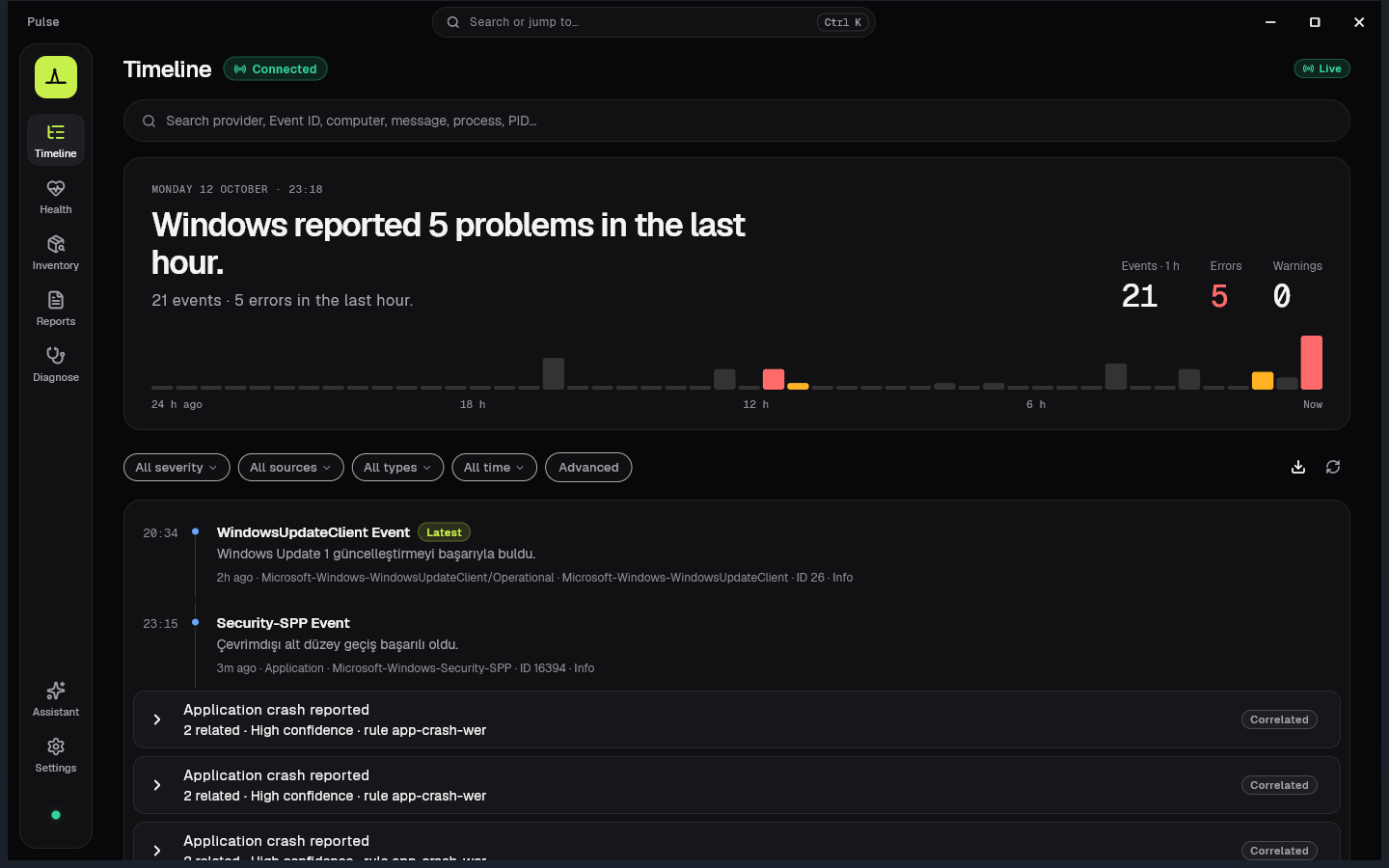
Timeline — live Event Log events in plain language
Windows already knows everything about itself — crashes, service starts, explorer restarts, boot failures. The problem is how that knowledge is presented: Event Viewer IDs, opaque XML, and tools that feel like they were built for another decade.
Pulse observes. Pulse explains. Pulse visualizes. Pulse never changes Windows.
It turns raw system activity into a readable timeline:
| Instead of… | Pulse shows… |
|---|---|
| Application Error · Event ID 1000 | Explorer unexpectedly closed. Windows restarted Explorer. |
| Service Control Manager · 7036 | Windows Update service entered the running state. |
| Kernel-Power · 41 | The system restarted without a clean shutdown. |
Designed in Midnight, Pulse's dark-first visual identity: near-black panels, one lime accent for what is live, and plain language before technical detail.
Philosophy: Observation only. No injection. No hooks. No patches. No telemetry. No cloud.
EvtSubscribe, pushed over named-pipe IPCSharedPreferences) — no account, no sync
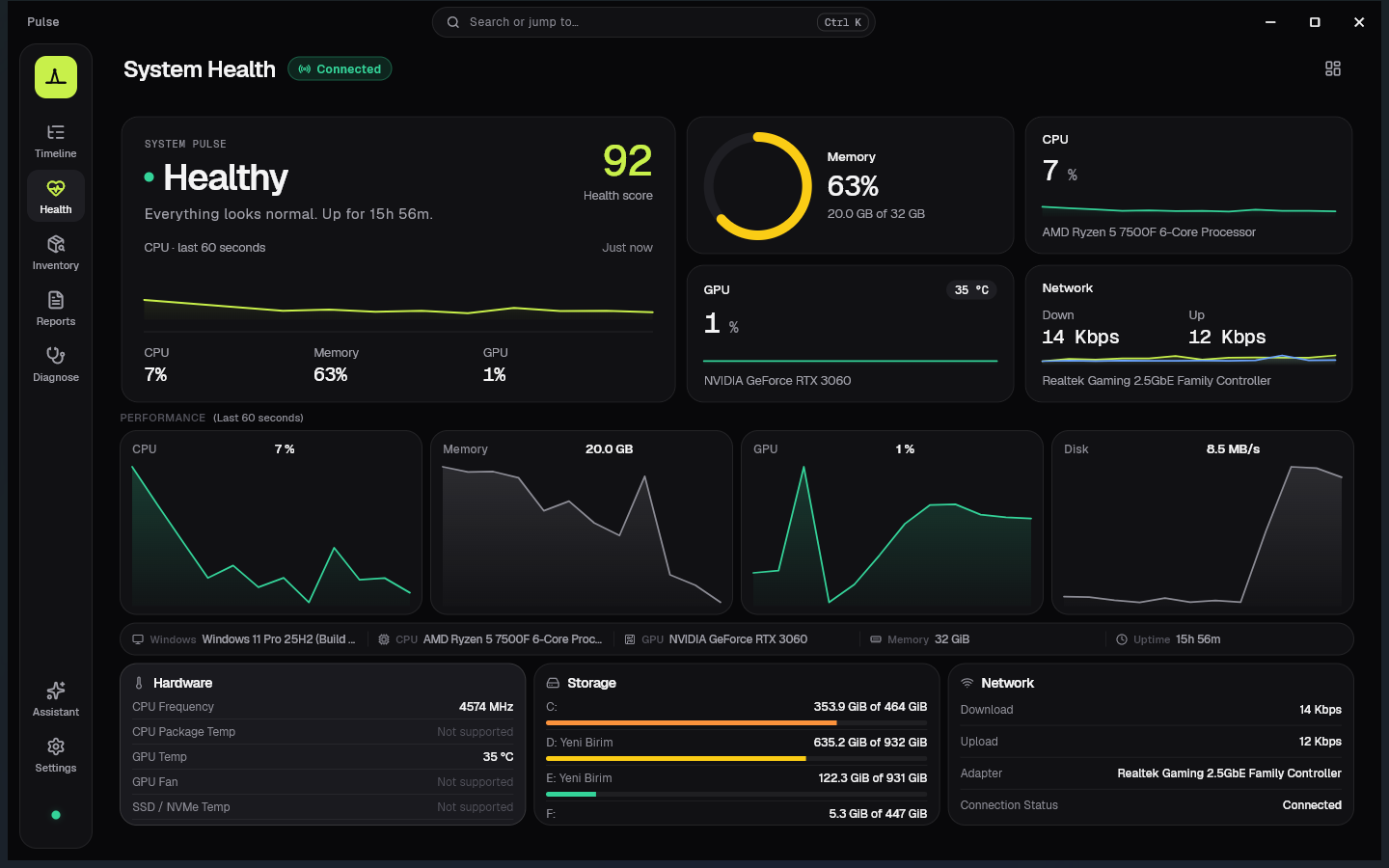
Timeline — live humanized events · System Health — CPU, memory, GPU, disk, network
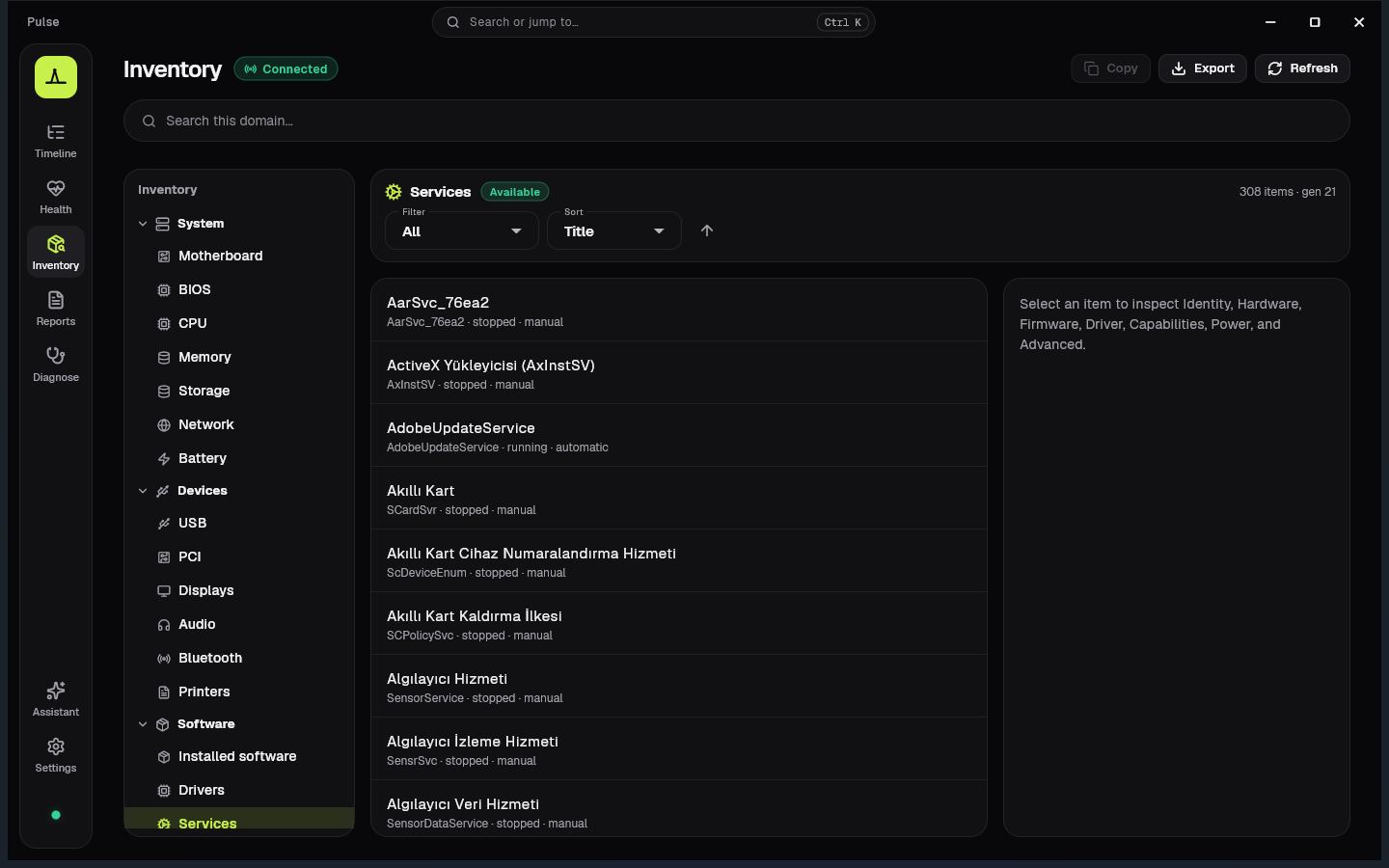
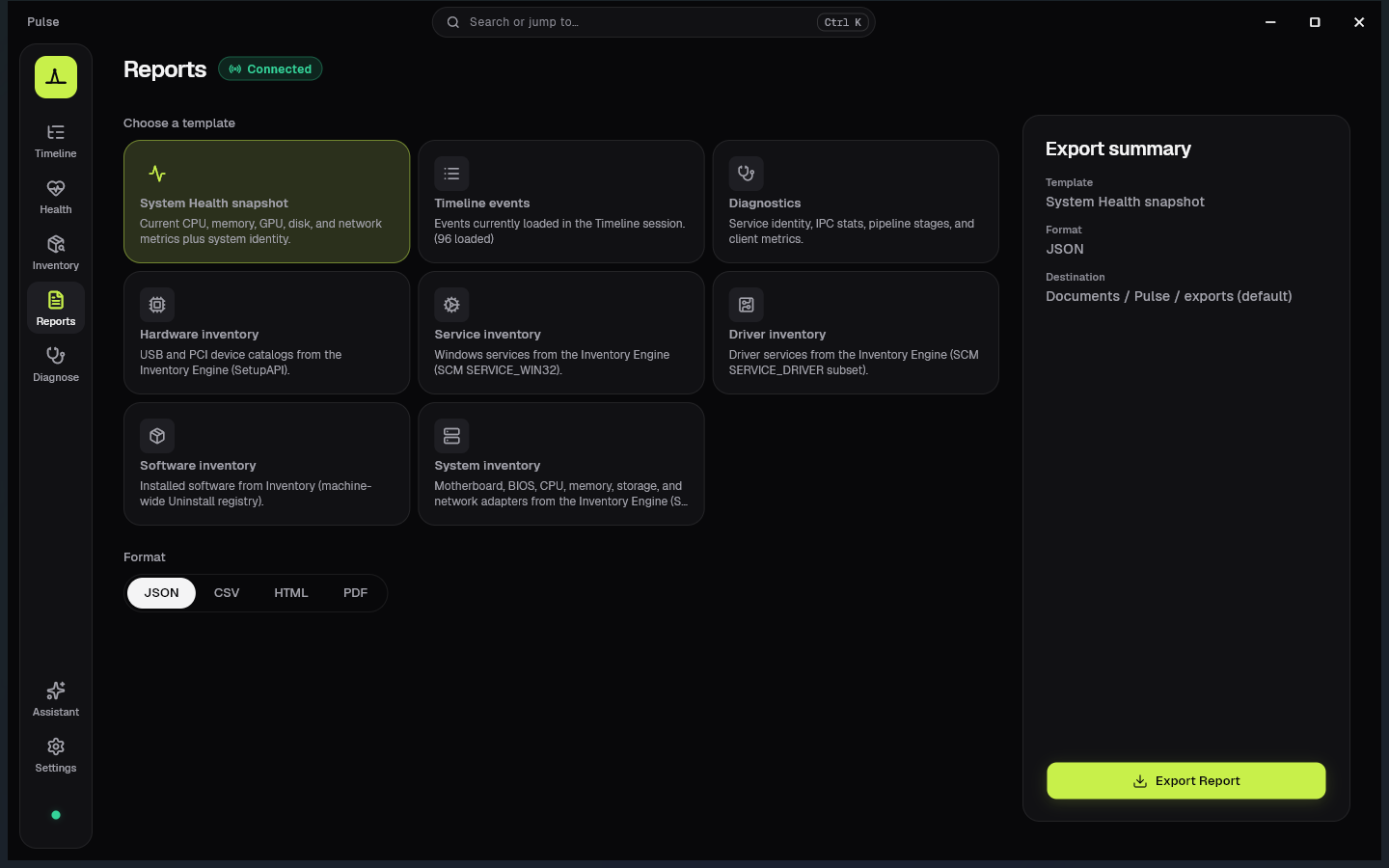
Inventory — hardware & software catalog · Reports — local JSON / CSV / HTML / PDF export
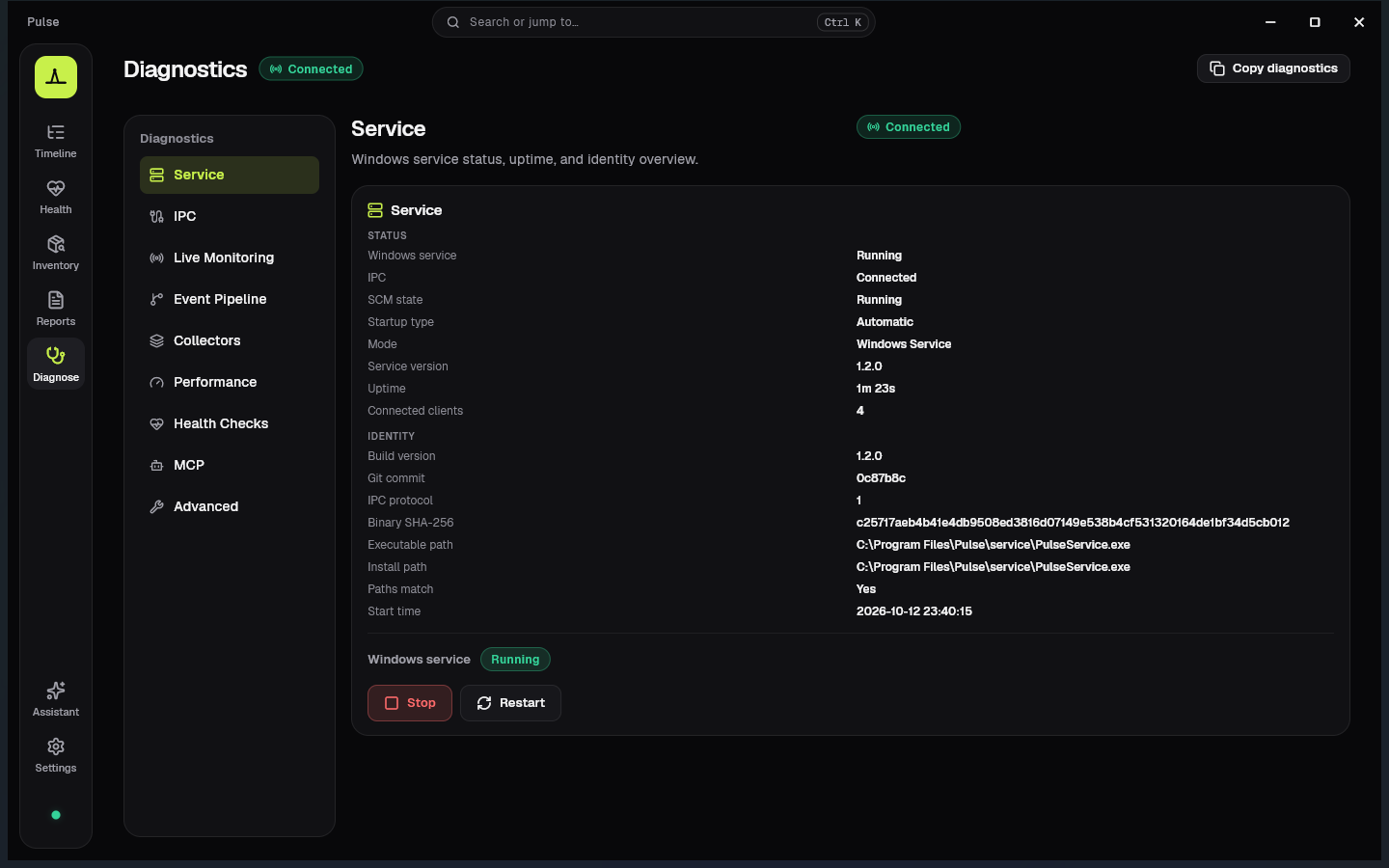
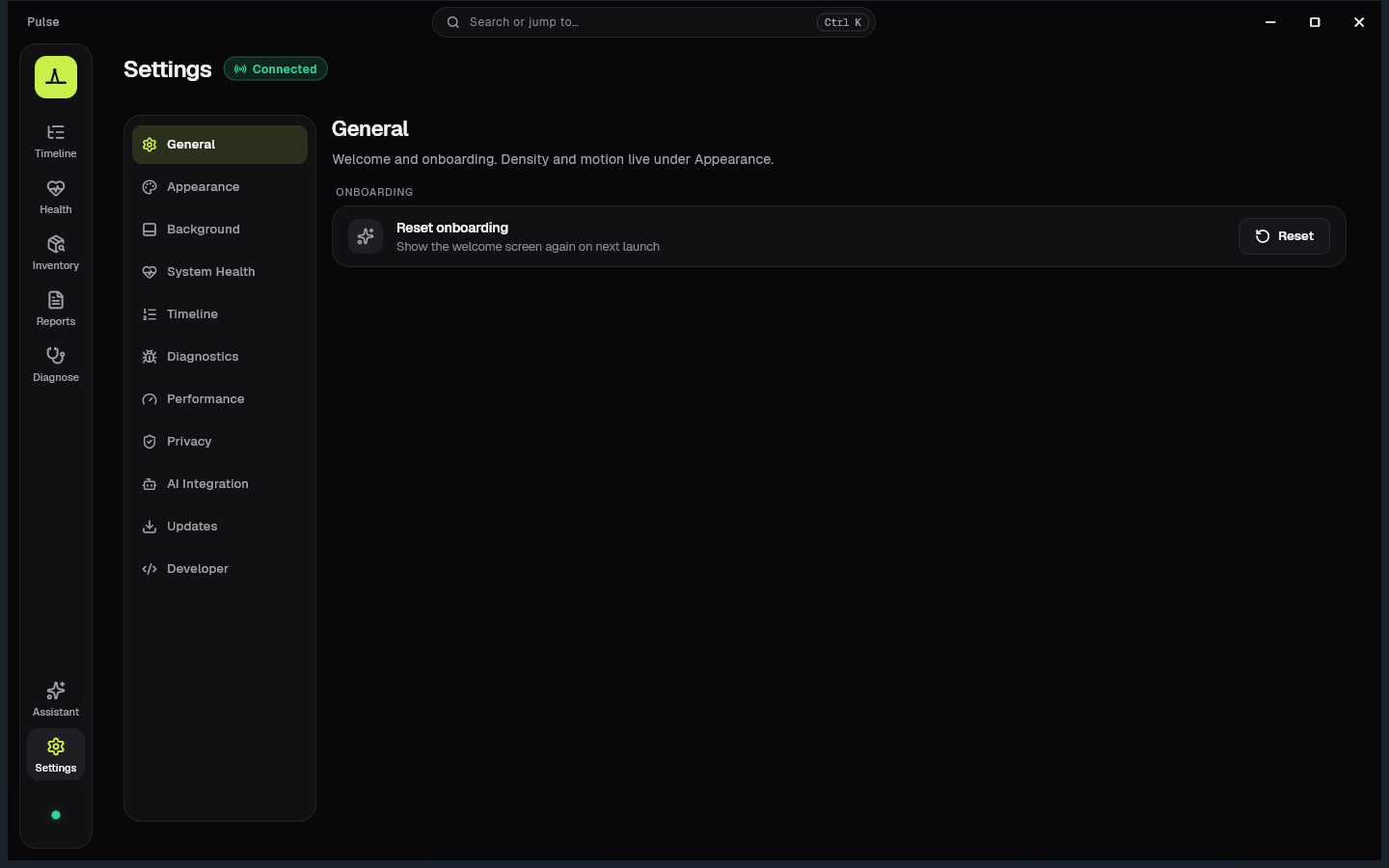
Diagnostics — service, IPC, pipeline · Settings — local preferences & AI Integration
┌──────────────────────────────────────────────────────────┐
│                         Windows                          │
│   Event Log · PDH · DXGI · IP Helper · Process APIs      │
└────────────────────────────┬─────────────────────────────┘
                             │ read-only APIs
┌────────────────────────────▼─────────────────────────────┐
│                      PulseService                        │
│  Collector · Humanizer · Health · Inventory · IPC server │
│              (native C++ Windows service)                │
└────────────────────────────┬─────────────────────────────┘
                             │ named pipe (framed binary)
┌────────────────────────────▼─────────────────────────────┐
│                       Pulse App                          │
│   Flutter · Timeline · Health · Inventory · Reports      │
└──────────────────────────────────────────────────────────┘
v1 pipeline
Windows Event Log → Collector → Humanizer → IPC → Timeline UI
PulseService is required (installer or elevated --install-start). A ZIP payload is not a true portable edition — see portable vs service.
ETW, WMI, and plugins are intentional future milestones — see docs/architecture.
Pulse-Setup-1.2.0-windows-x64.exe from GitHub ReleasesTip: for troubleshooting without the SCM service, run service\PulseService.exe --console from a payload folder.
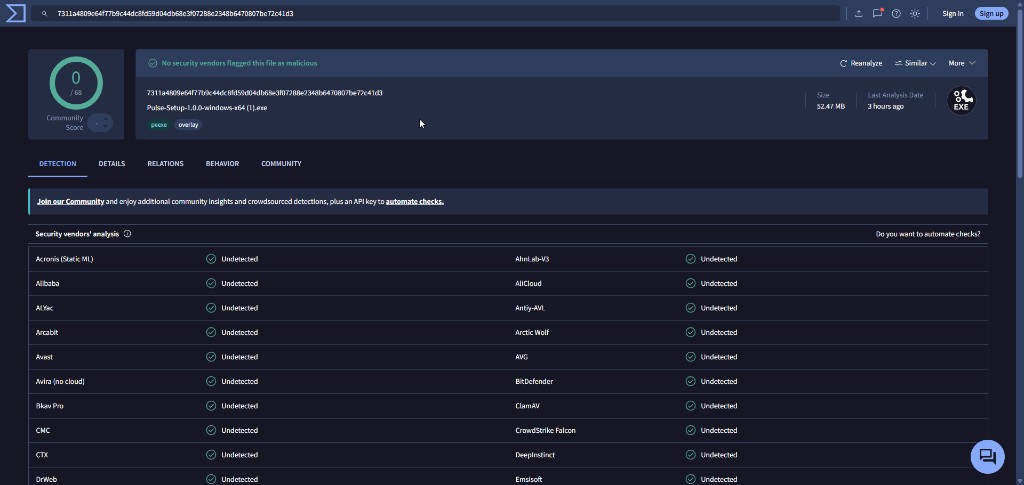
Pulse-Setup-1.0.0-windows-x64.exe was scanned on VirusTotal — 0 / 68 security vendors flagged the installer. Clean result across the board.
SHA-256:
7311a4809e64f77b9c44dc8fd59d04db68e3f07288e2348b6470807be72c41d3
Developers can also build a local package:
.\tools\scripts\package_beta.ps1
Output: dist\Pulse-Setup-1.2.0-windows-x64.exe, dist\Pulse\, and dist\Pulse-1.2.0-windows-x64.zip
# 1) Build & run the service (console mode — preferred while developing)
.\tools\scripts\run_service_console.ps1

# 2) In another terminal — run the Flutter app
.\tools\scripts\run_app.ps1
Or step by step:
# Service
cmake -S service/pulse_service -B build/service -G Ninja -DCMAKE_BUILD_TYPE=Debug
cmake --build build/service
.\build\service\PulseService.exe --console

# App
cd apps\pulse_app
flutter pub get
flutter run -d windows
Optional SCM install (elevated):
.\build\service\PulseService.exe --install
Start-Service PulseService
Full prerequisites and flags: BUILD.md · DEVELOPMENT.md
Pulse ships PulseMCP — a read-only Model Context Protocol server for Cursor, Claude Desktop, and future clients.
~\.cursor\mcp.json) with backup + safe merge| Command | Description |
|---|---|
.\tools\scripts\run_service_console.ps1 | Build (if needed) + run PulseService in console |
.\tools\scripts\run_app.ps1 | flutter run -d windows |
cmake --build build/service | Rebuild native service |
.\build\service\pulse_wire_tests.exe | Wire codec unit tests |
.\tools\scripts\run_ipc_ping.ps1 | IPC Ping/Pong smoke |
.\tools\scripts\run_diagnostics_ping.ps1 | Diagnostics + inject-event smoke |
.\tools\scripts\package_beta.ps1 | Build release installer + payload (dist\) |
cd apps\pulse_app; flutter test | Flutter unit / widget tests |
| Layer | Stack |
|---|---|
| UI | Flutter Desktop · Provider · window_manager · Geist / Geist Mono · Lucide icons |
| Service | C++20 · CMake · Win32 · Wevtapi · PDH · DXGI · IP Helper · SetupAPI / SMBIOS |
| IPC | Named pipes · framed binary protocol (pulse_wire) · shared Dart/C++ codec |
| Protocol | shared/pulse_protocol (C++ + Dart) · Protobuf schema for FastMCP tools |
| AI | PulseMCP (Node) — read-only tools/resources over the same named pipe |
| Persistence (app) | SharedPreferences for settings · local reports & diagnostics export |
| CI | GitHub Actions — Windows service build/tests + Flutter analyze/test |
Pulse/
├── apps/pulse_app/          Flutter Desktop UI (Timeline, Health, Inventory, Reports, …)
├── service/pulse_service/   Native Windows service (collector, humanizer, health, IPC)
├── apps/pulse_mcp/          PulseMCP bridge (private Node runtime)
├── shared/
│   ├── pulse_common/        Version, errors, constants
│   └── pulse_protocol/      Wire codec (C++ + Dart) + proto
├── tools/
│   ├── ipc_ping/            Smoke clients (IPC / health / diagnostics)
│   └── scripts/             Dev launch + packaging helpers
├── docs/architecture/       ADRs + system design (source of truth)
├── docs/readme/             README screenshots
├── branding/                Logo source (Telemetry Peak)
├── tests/                   Fixtures / integration (expanding)
├── AGENTS.md                Product constitution
└── BUILD.md                 Build & install instructions
package_beta.ps1 → Inno Setup)Every feature should answer one question: "What is Windows doing right now?"
VirusTotal — Pulse-Setup-1.0.0-windows-x64.exe · 0/68
| Doc | Purpose |
|---|---|
| AGENTS.md | Product vision, principles, AI / development rules |
| CHANGELOG.md | Release history |
| docs/releases/v1.2.0.md | v1.2.0 release notes (Midnight) |
| docs/releases/v1.1.0.md | v1.1.0 release notes |
| docs/releases/v1.0.0.md | v1.0.0 release notes |
| docs/architecture/README.md | Full architecture package + ADRs |
| docs/architecture/24-health-metrics-task-manager.md | Health metrics vs Task Manager |
| docs/guides/ai-integration.md | PulseMCP setup |
| BUILD.md | Prerequisites & build |
| DEVELOPMENT.md | Local workflow |
| IMPLEMENTATION_GUIDE.md | Implementation notes |
| CONTRIBUTING.md | How to contribute |
Issues and pull requests are welcome.
pulse_wire_tests and flutter analyze / flutter test before opening a PRdocs/architecture/decisions/MIT © Regncreative
Modern Windows observability app with real-time system insights.
See the code
See what Windows is really doing.
A modern, read-only diagnostics platform for Windows — events you can understand, not logs you decode.
Timeline — live Event Log events in plain language
Windows already knows everything about itself — crashes, service starts, explorer restarts, boot failures. The problem is how that knowledge is presented: Event Viewer IDs, opaque XML, and tools that feel like they were built for another decade.
Pulse observes. Pulse explains. Pulse visualizes. Pulse never changes Windows.
It turns raw system activity into a readable timeline:
| Instead of… | Pulse shows… |
|---|---|
| Application Error · Event ID 1000 | Explorer unexpectedly closed. Windows restarted Explorer. |
| Service Control Manager · 7036 | Windows Update service entered the running state. |
| Kernel-Power · 41 | The system restarted without a clean shutdown. |
Designed in Midnight, Pulse's dark-first visual identity: near-black panels, one lime accent for what is live, and plain language before technical detail.
Philosophy: Observation only. No injection. No hooks. No patches. No telemetry. No cloud.
EvtSubscribe, pushed over named-pipe IPCSharedPreferences) — no account, no sync
Timeline — live humanized events · System Health — CPU, memory, GPU, disk, network
Inventory — hardware & software catalog · Reports — local JSON / CSV / HTML / PDF export
Diagnostics — service, IPC, pipeline · Settings — local preferences & AI Integration
┌──────────────────────────────────────────────────────────┐
│                         Windows                          │
│   Event Log · PDH · DXGI · IP Helper · Process APIs      │
└────────────────────────────┬─────────────────────────────┘
                             │ read-only APIs
┌────────────────────────────▼─────────────────────────────┐
│                      PulseService                        │
│  Collector · Humanizer · Health · Inventory · IPC server │
│              (native C++ Windows service)                │
└────────────────────────────┬─────────────────────────────┘
                             │ named pipe (framed binary)
┌────────────────────────────▼─────────────────────────────┐
│                       Pulse App                          │
│   Flutter · Timeline · Health · Inventory · Reports      │
└──────────────────────────────────────────────────────────┘
v1 pipeline
Windows Event Log → Collector → Humanizer → IPC → Timeline UI
PulseService is required (installer or elevated --install-start). A ZIP payload is not a true portable edition — see portable vs service.
ETW, WMI, and plugins are intentional future milestones — see docs/architecture.
Pulse-Setup-1.2.0-windows-x64.exe from GitHub ReleasesTip: for troubleshooting without the SCM service, run service\PulseService.exe --console from a payload folder.
Pulse-Setup-1.0.0-windows-x64.exe was scanned on VirusTotal — 0 / 68 security vendors flagged the installer. Clean result across the board.
SHA-256:
7311a4809e64f77b9c44dc8fd59d04db68e3f07288e2348b6470807be72c41d3
Developers can also build a local package:
.\tools\scripts\package_beta.ps1
Output: dist\Pulse-Setup-1.2.0-windows-x64.exe, dist\Pulse\, and dist\Pulse-1.2.0-windows-x64.zip
# 1) Build & run the service (console mode — preferred while developing)
.\tools\scripts\run_service_console.ps1

# 2) In another terminal — run the Flutter app
.\tools\scripts\run_app.ps1
Or step by step:
# Service
cmake -S service/pulse_service -B build/service -G Ninja -DCMAKE_BUILD_TYPE=Debug
cmake --build build/service
.\build\service\PulseService.exe --console

# App
cd apps\pulse_app
flutter pub get
flutter run -d windows
Optional SCM install (elevated):
.\build\service\PulseService.exe --install
Start-Service PulseService
Full prerequisites and flags: BUILD.md · DEVELOPMENT.md
Pulse ships PulseMCP — a read-only Model Context Protocol server for Cursor, Claude Desktop, and future clients.
~\.cursor\mcp.json) with backup + safe merge| Command | Description |
|---|---|
.\tools\scripts\run_service_console.ps1 | Build (if needed) + run PulseService in console |
.\tools\scripts\run_app.ps1 | flutter run -d windows |
cmake --build build/service | Rebuild native service |
.\build\service\pulse_wire_tests.exe | Wire codec unit tests |
.\tools\scripts\run_ipc_ping.ps1 | IPC Ping/Pong smoke |
.\tools\scripts\run_diagnostics_ping.ps1 | Diagnostics + inject-event smoke |
.\tools\scripts\package_beta.ps1 | Build release installer + payload (dist\) |
cd apps\pulse_app; flutter test | Flutter unit / widget tests |
| Layer | Stack |
|---|---|
| UI | Flutter Desktop · Provider · window_manager · Geist / Geist Mono · Lucide icons |
| Service | C++20 · CMake · Win32 · Wevtapi · PDH · DXGI · IP Helper · SetupAPI / SMBIOS |
| IPC | Named pipes · framed binary protocol (pulse_wire) · shared Dart/C++ codec |
| Protocol | shared/pulse_protocol (C++ + Dart) · Protobuf schema for FastMCP tools |
| AI | PulseMCP (Node) — read-only tools/resources over the same named pipe |
| Persistence (app) | SharedPreferences for settings · local reports & diagnostics export |
| CI | GitHub Actions — Windows service build/tests + Flutter analyze/test |
Pulse/
├── apps/pulse_app/          Flutter Desktop UI (Timeline, Health, Inventory, Reports, …)
├── service/pulse_service/   Native Windows service (collector, humanizer, health, IPC)
├── apps/pulse_mcp/          PulseMCP bridge (private Node runtime)
├── shared/
│   ├── pulse_common/        Version, errors, constants
│   └── pulse_protocol/      Wire codec (C++ + Dart) + proto
├── tools/
│   ├── ipc_ping/            Smoke clients (IPC / health / diagnostics)
│   └── scripts/             Dev launch + packaging helpers
├── docs/architecture/       ADRs + system design (source of truth)
├── docs/readme/             README screenshots
├── branding/                Logo source (Telemetry Peak)
├── tests/                   Fixtures / integration (expanding)
├── AGENTS.md                Product constitution
└── BUILD.md                 Build & install instructions
package_beta.ps1 → Inno Setup)Every feature should answer one question: "What is Windows doing right now?"
VirusTotal — Pulse-Setup-1.0.0-windows-x64.exe · 0/68
| Doc | Purpose |
|---|---|
| AGENTS.md | Product vision, principles, AI / development rules |
| CHANGELOG.md | Release history |
| docs/releases/v1.2.0.md | v1.2.0 release notes (Midnight) |
| docs/releases/v1.1.0.md | v1.1.0 release notes |
| docs/releases/v1.0.0.md | v1.0.0 release notes |
| docs/architecture/README.md | Full architecture package + ADRs |
| docs/architecture/24-health-metrics-task-manager.md | Health metrics vs Task Manager |
| docs/guides/ai-integration.md | PulseMCP setup |
| BUILD.md | Prerequisites & build |
| DEVELOPMENT.md | Local workflow |
| IMPLEMENTATION_GUIDE.md | Implementation notes |
| CONTRIBUTING.md | How to contribute |
Issues and pull requests are welcome.
pulse_wire_tests and flutter analyze / flutter test before opening a PRdocs/architecture/decisions/MIT © Regncreative



