
A unified system monitoring and management tool for Linux
Rust
63
125 commits
updated Sep 20, 2026
See what people are saying (1)
README
Languages: English | Türkçe | Français | Deutsch | Español | Italiano | Русский

PULS
A unified system monitoring and management tool for Linux
PULS combines high-fidelity resource monitoring with native Linux system administration capabilities. It allows you to monitor hardware telemetry, manage systemd services, inspect journal logs, analyze hierarchical process trees, send POSIX signals, edit boot configurations safely, and monitor container lifecycles directly from an interactive Terminal User Interface (TUI).
Screenshots
| Dashboard & System Overview | Hierarchical Process Tree |
|---|---|
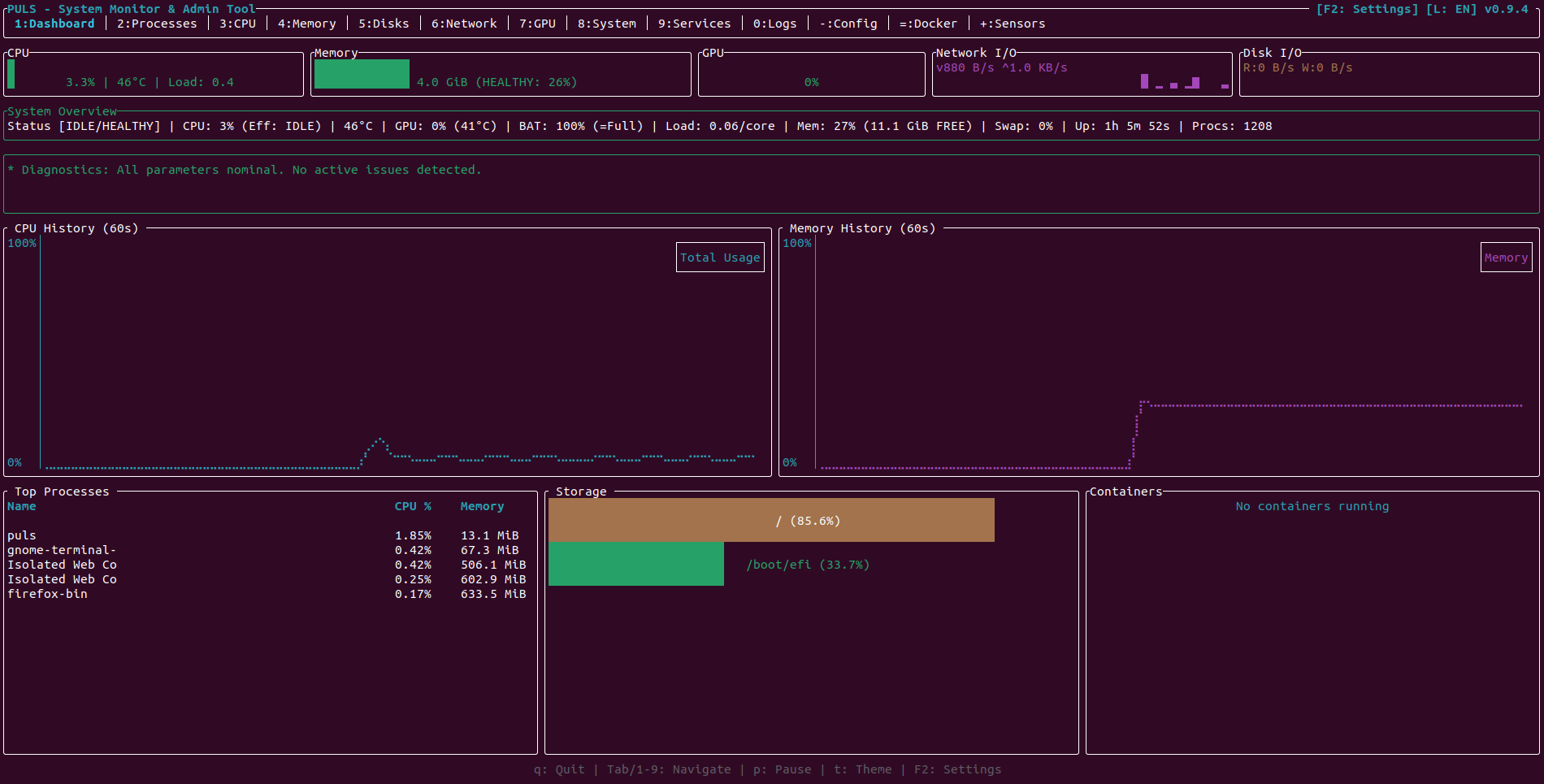 | 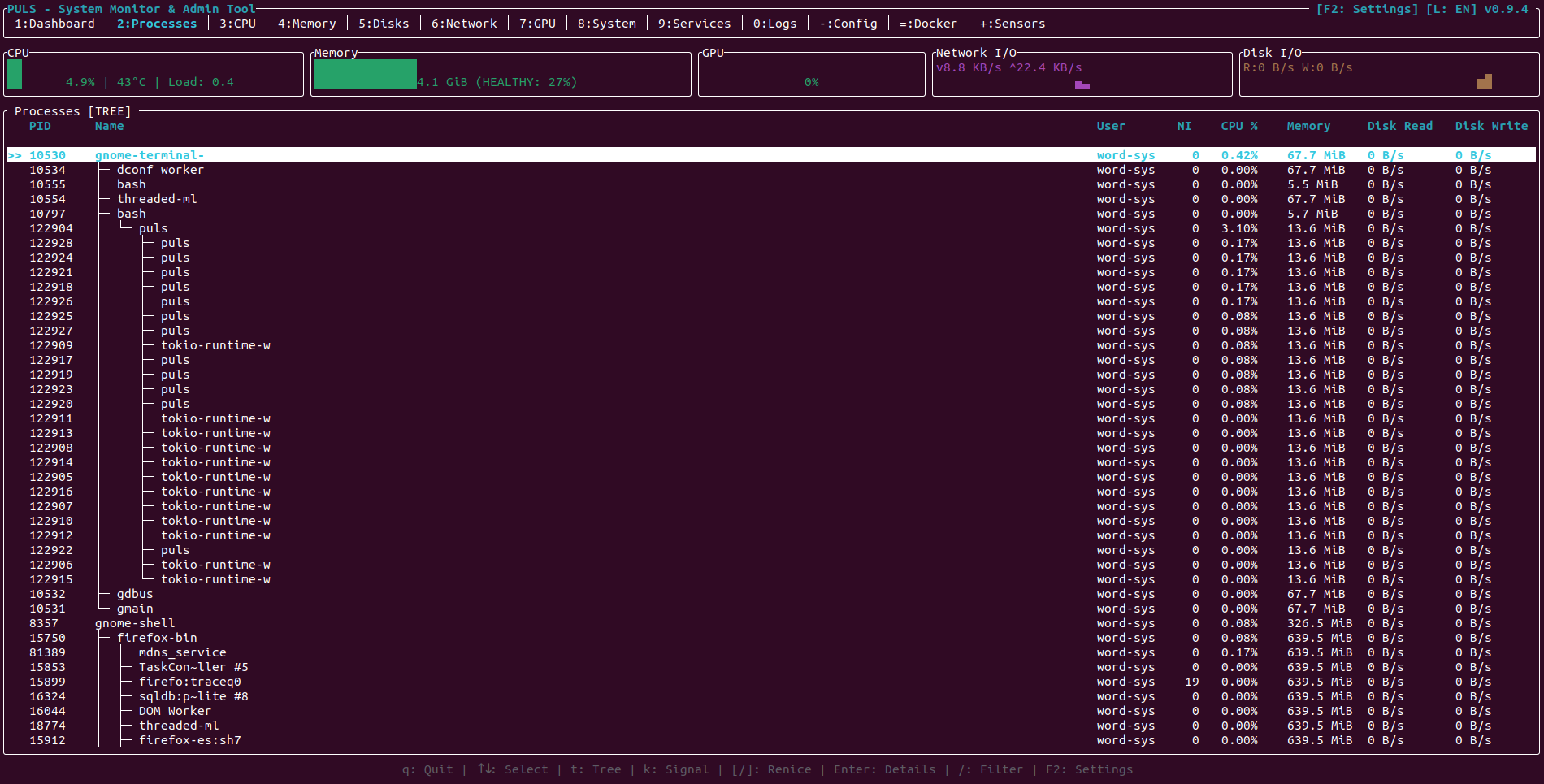 |
| CPU & NUMA Architecture | Memory & Swap Allocation |
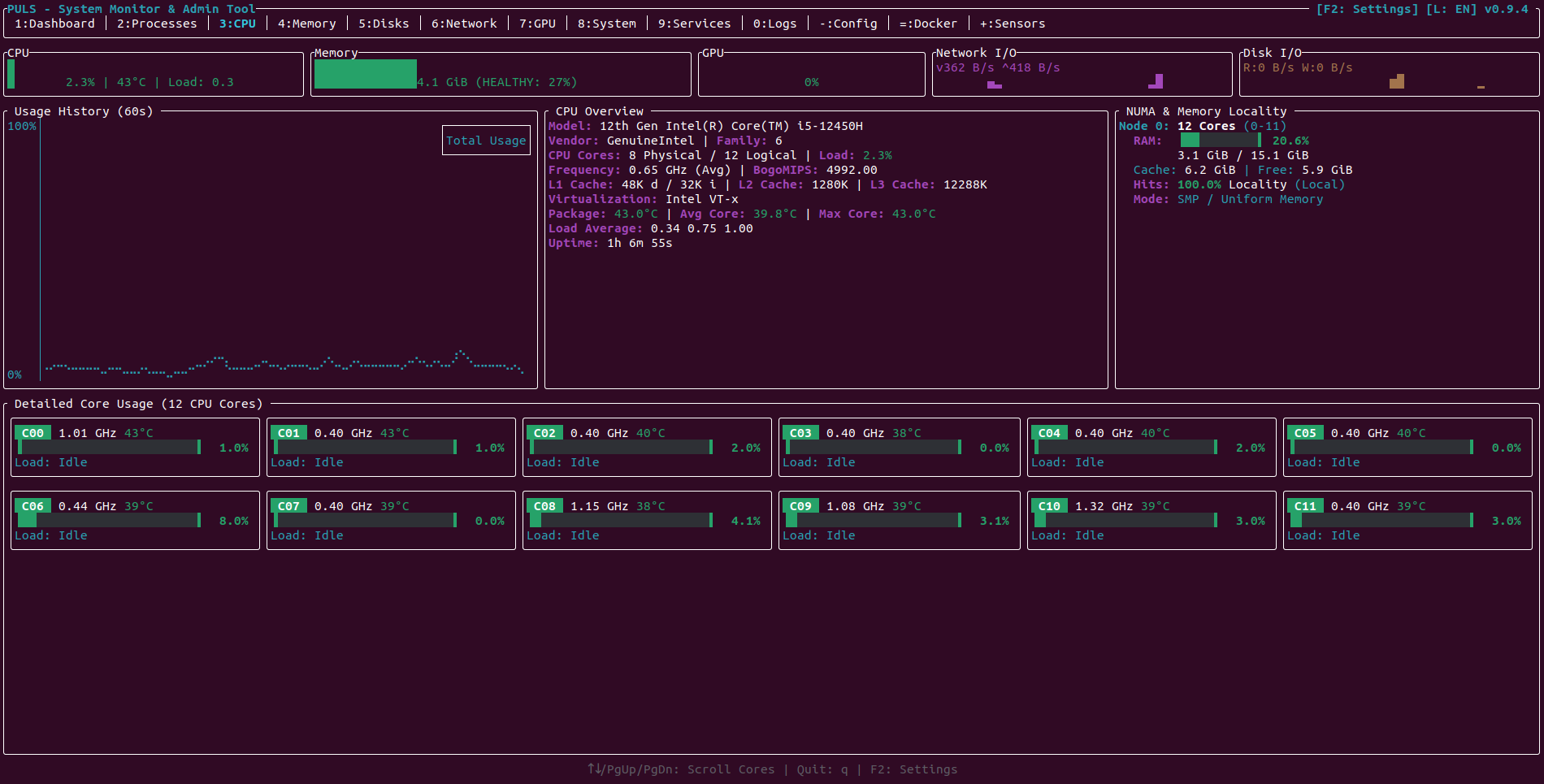 | 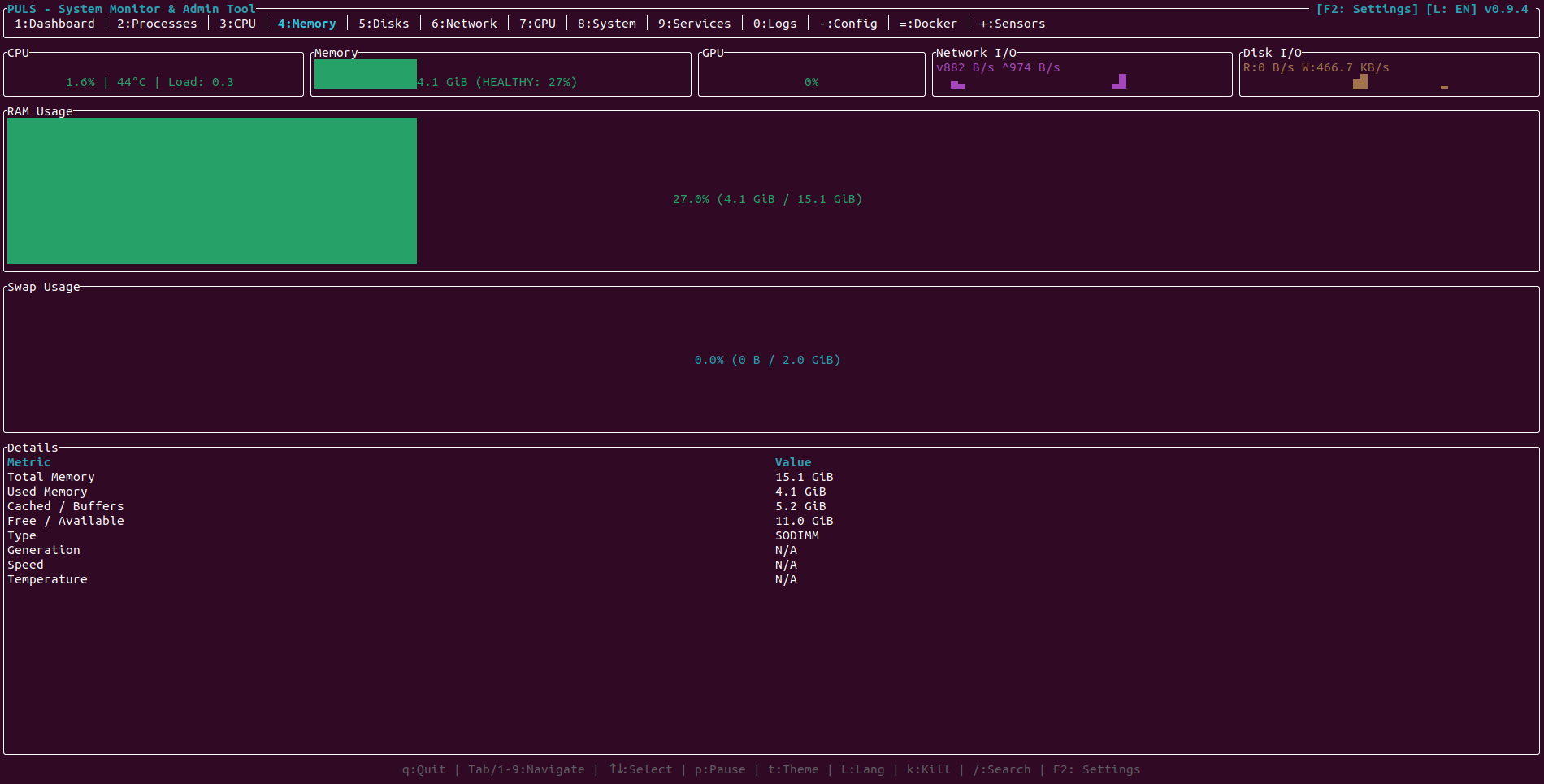 |
| Storage, Inodes & Mount Options | Network Interfaces & Active Sockets |
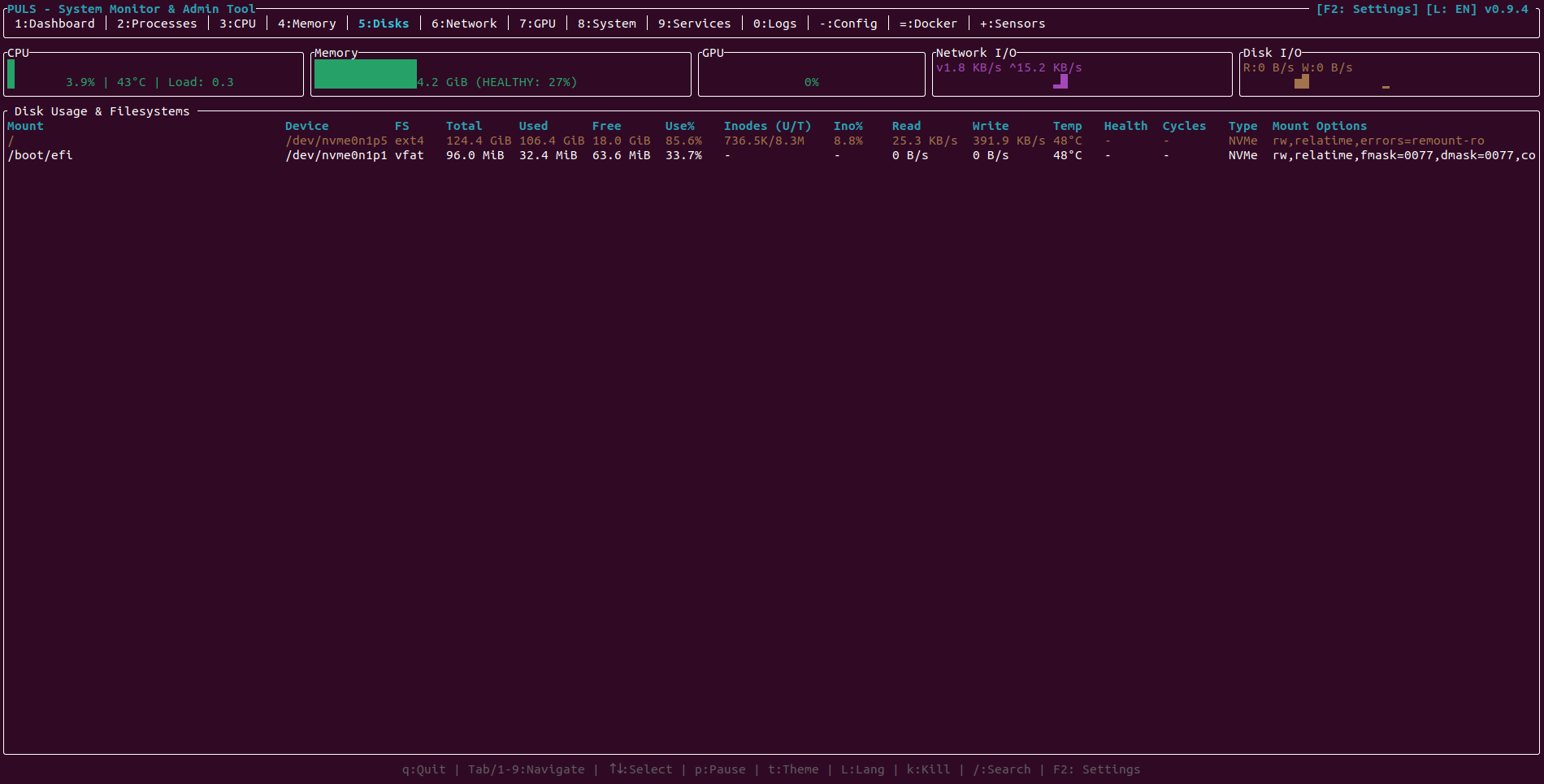 | 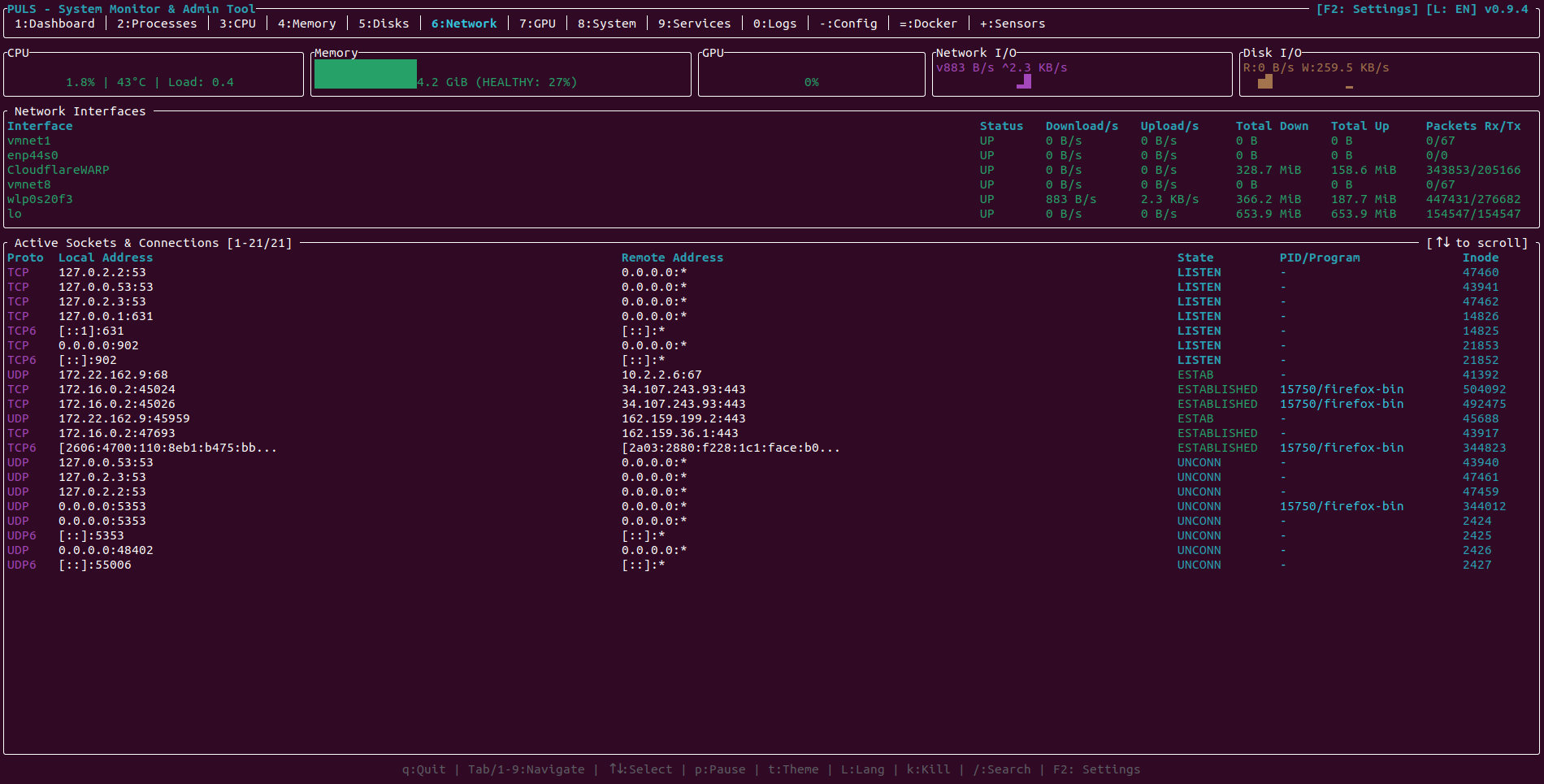 |
| Multi-GPU Monitoring (NVIDIA & Intel) | System Info, Sessions & Diagnostics |
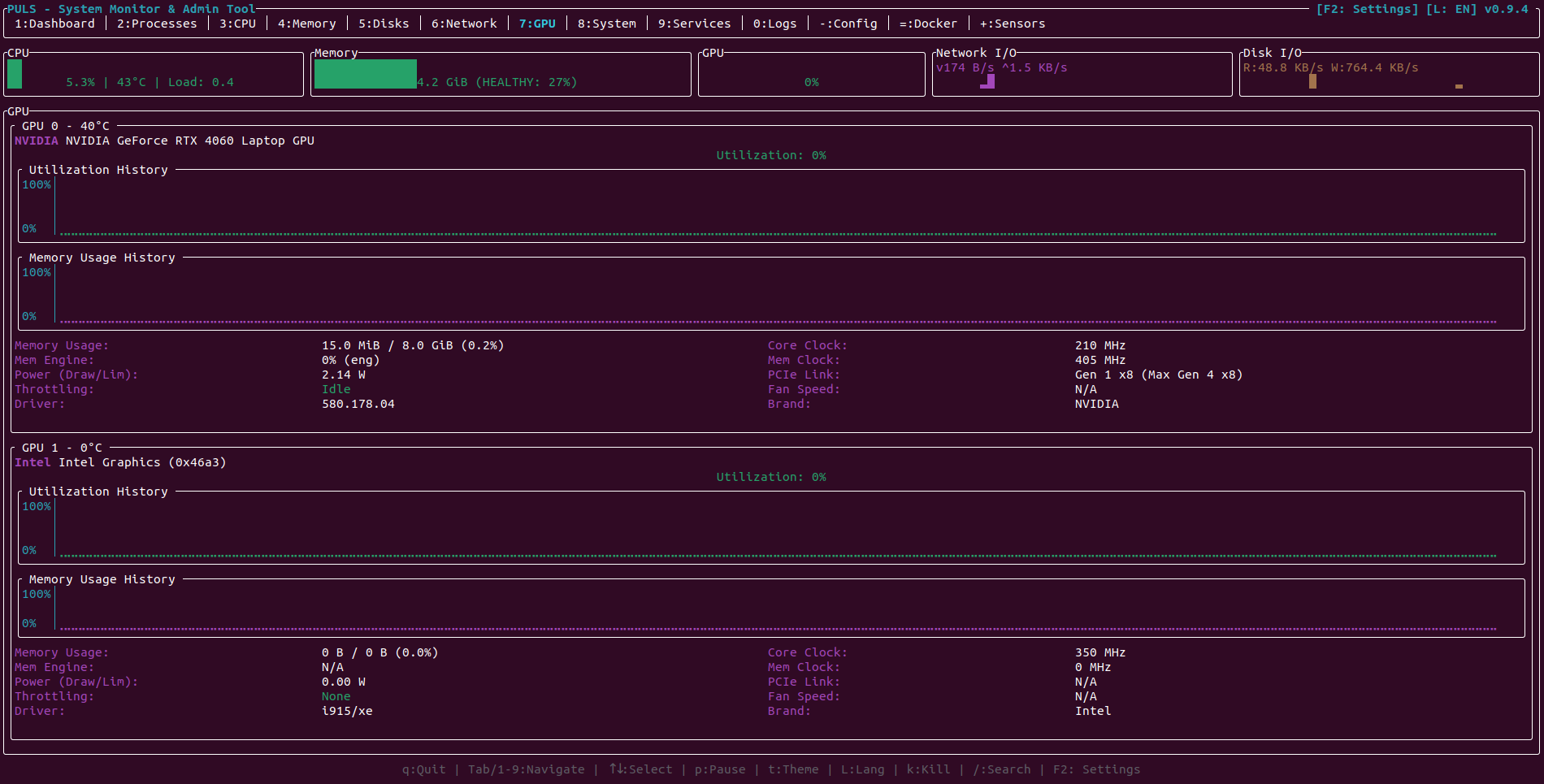 | 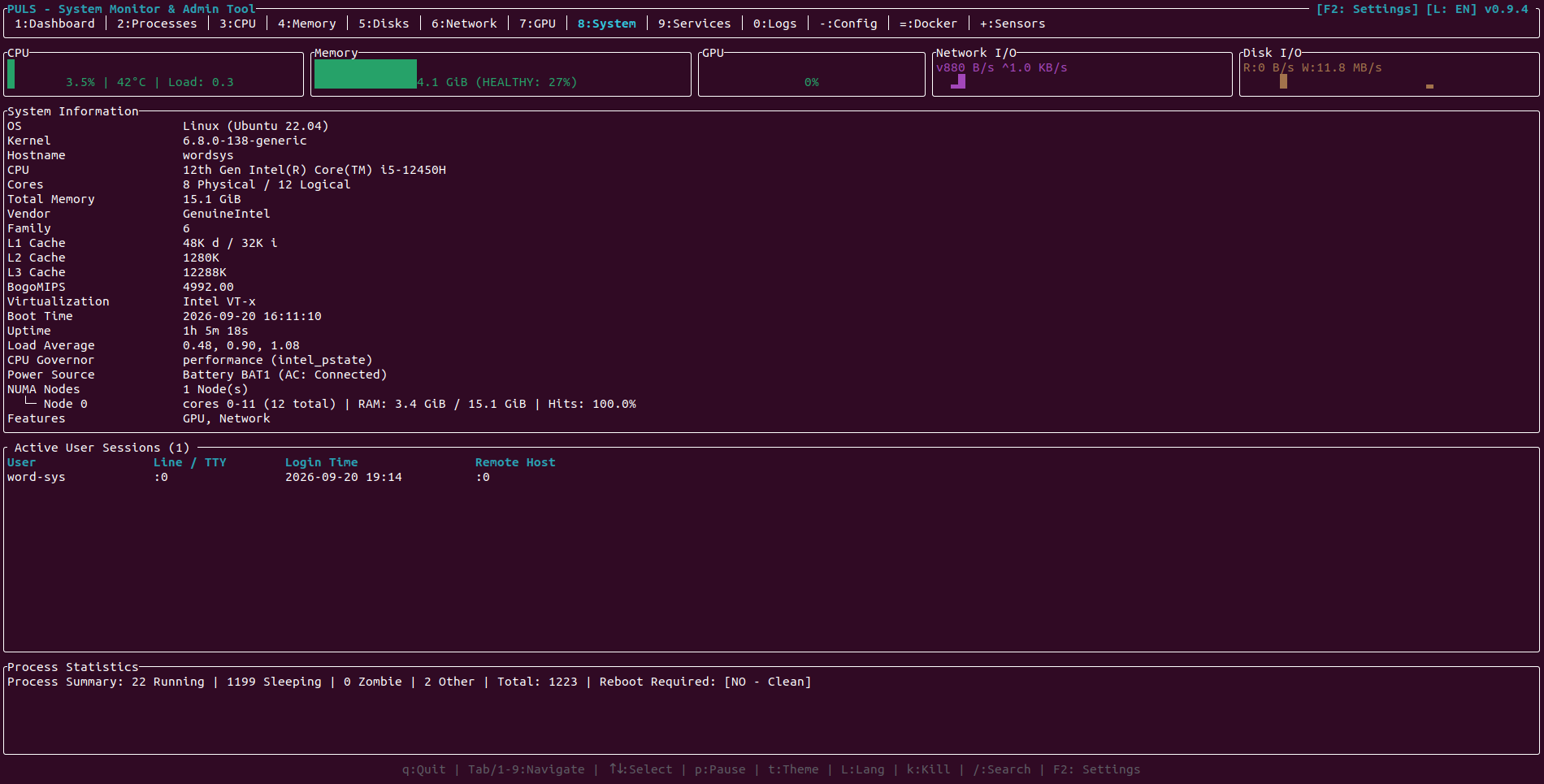 |
| Systemd Services & Timers | System Journal Logs & Boot History |
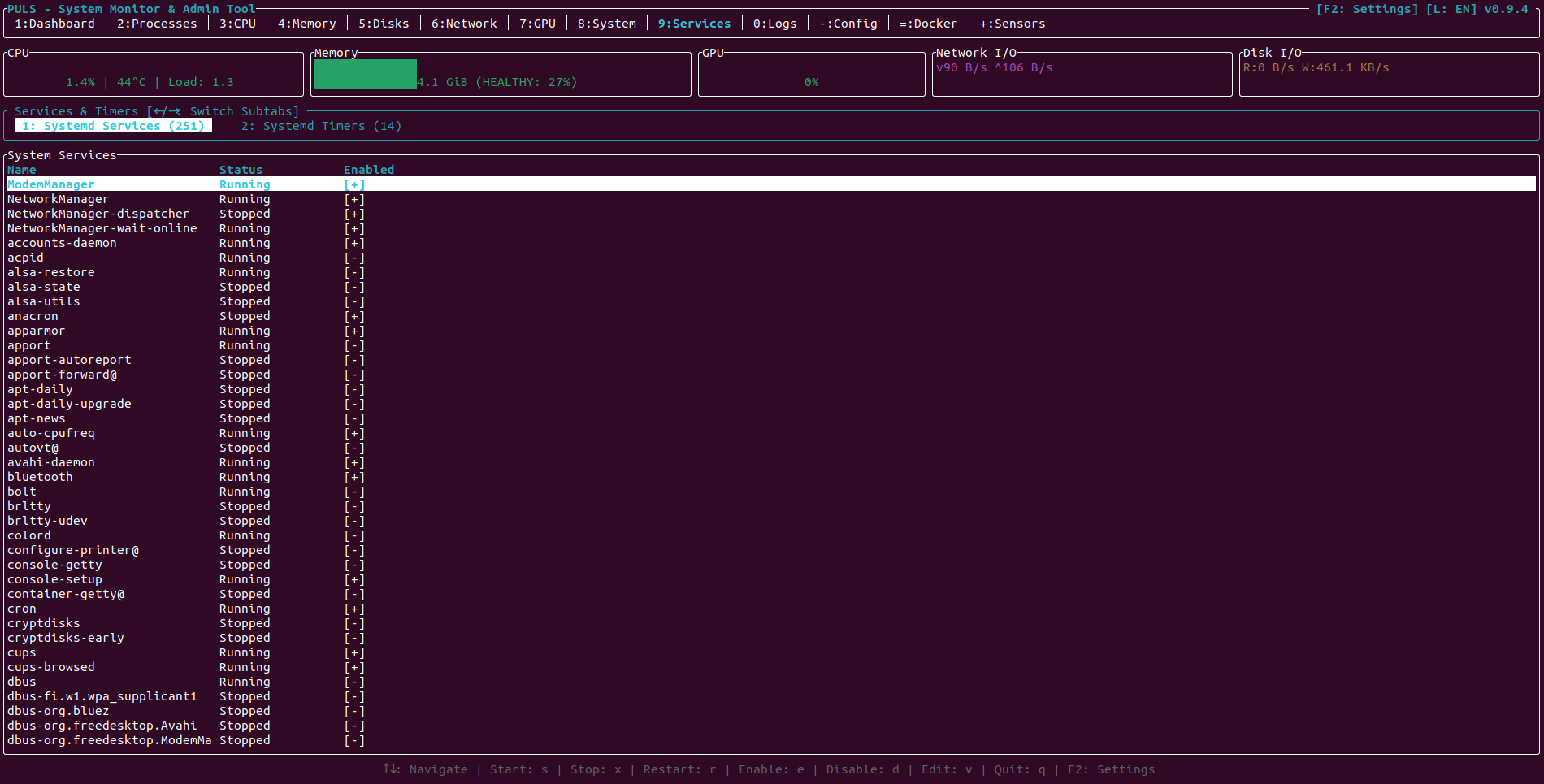 | 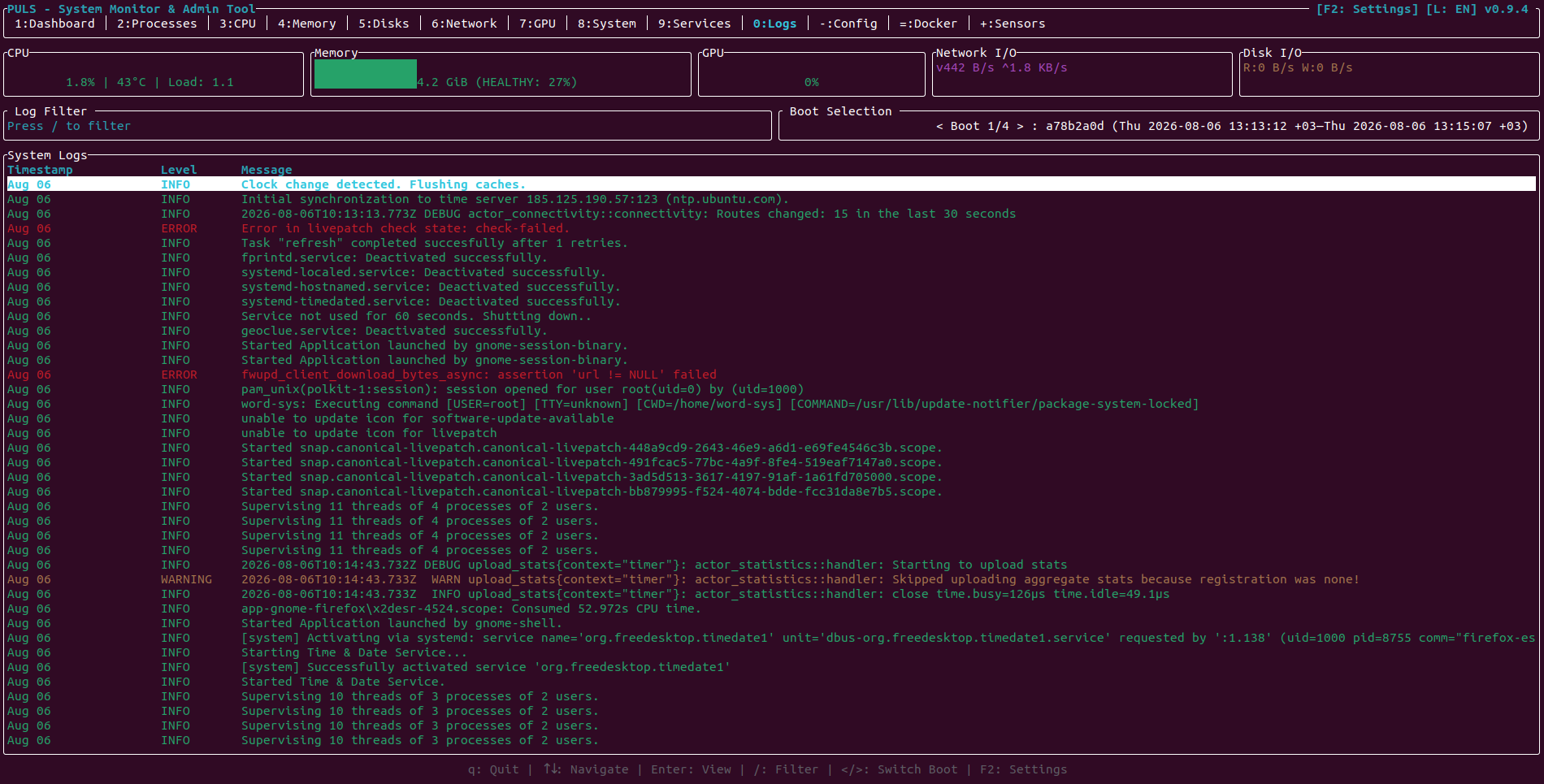 |
| GRUB & Bootloader Configuration | Hardware Sensors, Power & Fans |
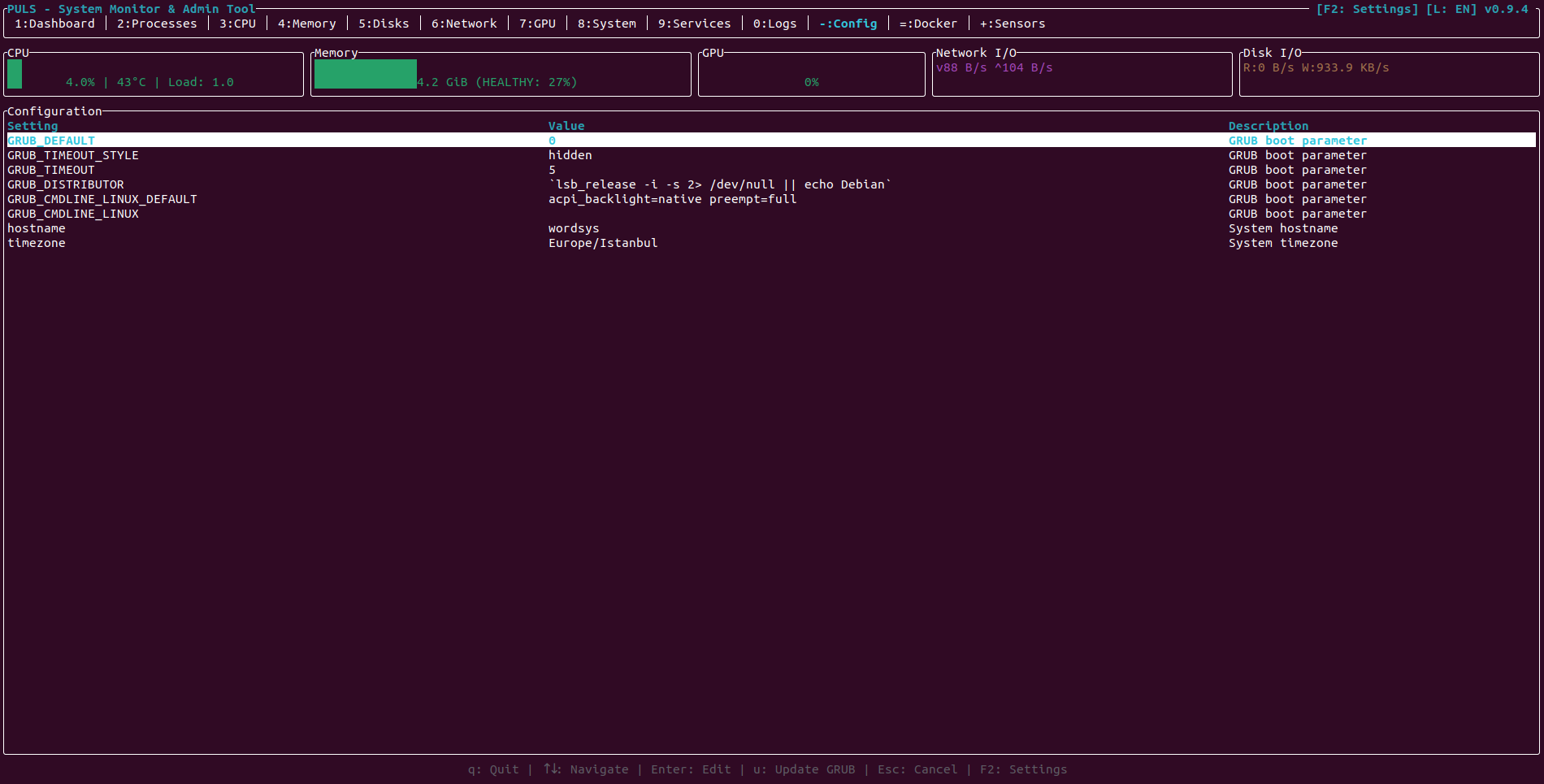 | 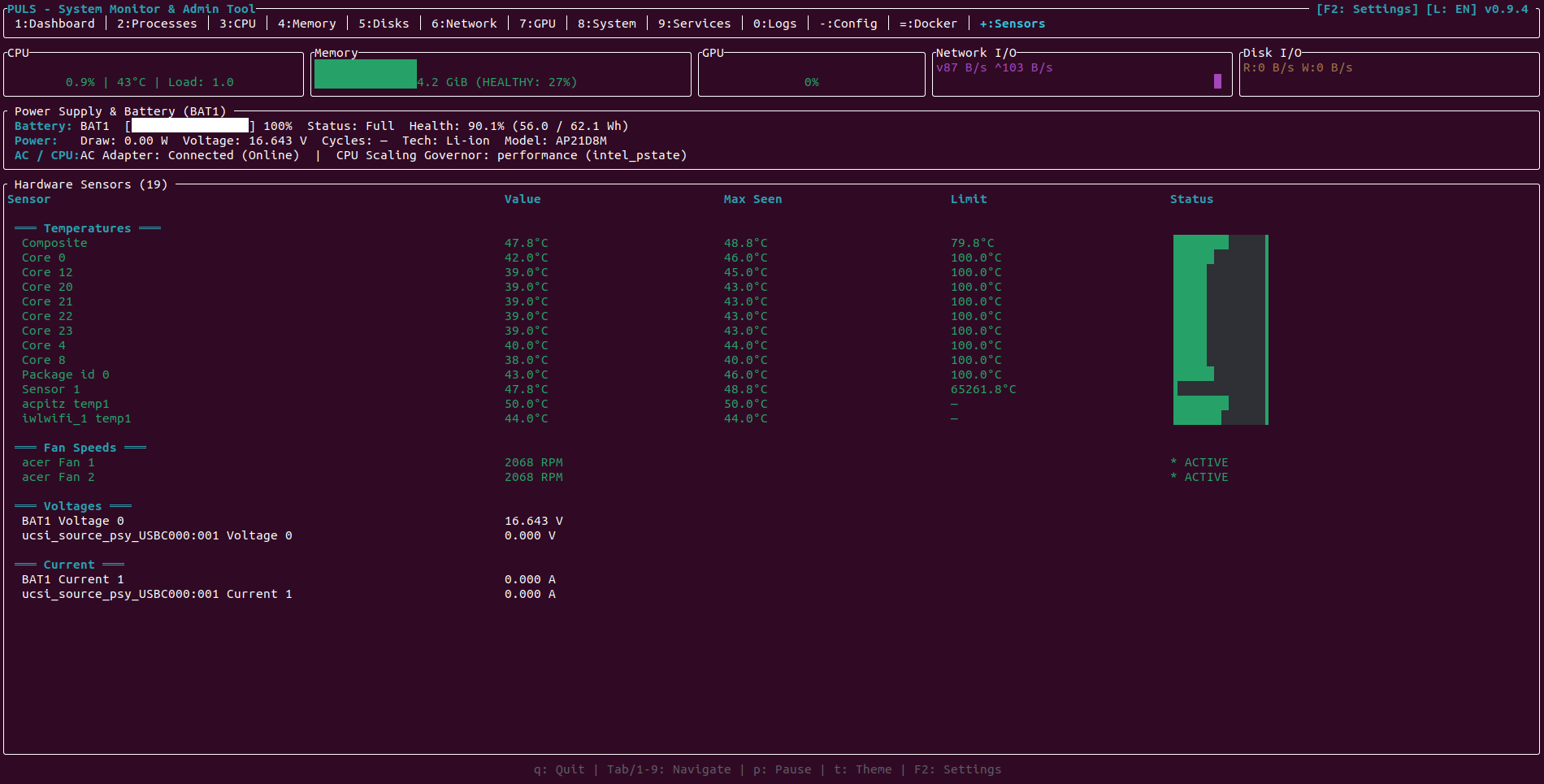 |
Architecture & Design Principles
PULS is written in Rust, leveraging ratatui and crossterm for UI rendering while communicating directly with the Linux kernel and native system tools:
- Less Dependencies: Eliminates unnecessary external crates by relying on standard library primitives, custom Unix FFI calls, and direct kernel virtual filesystems (
/proc,/sys). - Deep Hardware Telemetry: Native parsing for CPU topology (L1/L2/L3 cache, NUMA node affinities, scaling governors), memory page breakdown, filesystem inode statistics (
statvfs), and battery power telemetry (/sys/class/power_supply/). - Multi-Vendor GPU Support: Native sysfs/DRM and hwmon driver parsers for AMD and Intel graphics, coupled with NVML/
nvidia-smiqueries for NVIDIA GPUs. Tracks VRAM utilization, PCIe link generation and width, fan RPM, power draw against power limits, and hardware thermal throttling flags. - Transactional Boot Editor: Edit
/etc/default/grubin memory. Review a colorized diff modal (u) before any change is committed to disk, backed up automatically with timestamped snapshots. - Resilient Terminal Control: Terminal mouse capture (
EnableMouseCapture) for direct tab clicks and table scrolling, protected with a panic hook that safely restores standard terminal state upon termination.
Features
1. Resource & Hardware Monitoring
- CPU & NUMA Architecture: Real-time per-core utilization bar charts, adaptive high-core grid layouts (up to 128+ cores), L1/L2/L3 cache statistics, frequency scaling governors, and NUMA node core affinity and memory distribution.
- Memory & Swap: Visual breakdown of total, used, free, available, cached, and swap buffers. Supports temperature units in Celsius and Fahrenheit.
- Storage & Inodes: Per-partition read/write throughput rates, storage usage, filesystem mount flags, and inode allocation percentages (
statvfs). - Network & Sockets: Real-time interface upload (
^) and download (v) bandwidth rates. Active TCP/UDP socket inspector mapping local/remote IP endpoints, connection states (ESTABLISHED, LISTEN, etc.), and owning process PIDs. - NVIDIA, AMD & Intel GPUs: Multi-GPU monitoring showing compute utilization, VRAM usage, core/memory clocks, temperatures, fan speeds (RPM), PCIe generation/width, power limits, and thermal throttling status.
- Power & Battery: Battery health, charging wattage, cycle counts, percentage bars, and AC adapter connectivity.
2. Process & Container Management
- Hierarchical Process Tree: Toggle between flat sortable list and parent-child tree view (
t) with tree glyphs (├─,└─). - POSIX Signal Selector: Send Unix signals directly to processes via modal (
korF9) supportingSIGTERM,SIGKILL,SIGHUP,SIGSTOP,SIGCONT, andSIGINT. - Process Priority Renice: Adjust process scheduling niceness dynamically (
[to increase priority / lower nice value,]to decrease priority / raise nice value). - Deep-Dive Process Inspector: Press
Enteron any process to view its open file descriptor count (/proc/[pid]/fd), active socket count, thread count, and thread-level CPU utilization (/proc/[pid]/task). - Interactive Search: Press
/in the Processes tab to filter running processes by name in real time;Escclears the filter. - Docker & Podman Containers: Connects to Docker daemon socket or user Podman sockets (
/run/user/$UID/podman/podman.sock). Start (s), Stop (x), Restart (r), Pause (p) containers, and view live streaming container logs (Enterorl).
3. Service Management Subsystem
Direct integration with systemd (systemctl):
- State Control: Start (
s), Stop (x), and Restart (r) services. - Boot Persistence: Enable (
e) or Disable (d) system services at startup. - Service Definition: Inspect full systemd unit configuration, dependencies, and validation states.
- Log Viewer: Press
gto display the last 50journaldlog entries for the selected service. - Scheduled Timers: Overview of active systemd timers (
systemctl list-timers) with next trigger and last trigger elapsed times.
4. System Administration & Diagnostics
- System Diagnostics: Dashboard anomaly detection highlights high CPU temperatures, memory pressure, and critical disk capacity.
- Boot & User Sessions: Active user sessions (
who//var/run/utmp) and pending system reboot warnings (/var/run/reboot-required). - Aggregated Journald Logs: Filter system logs by priority (Error/Warning), unit, or boot session. Constrained to
--boot=0for instant queries.
5. Customization & Internationalization
- 7 Languages Supported: Complete localization for English (default), Türkçe, Français, Deutsch, Español, Italiano, and Русский. Automatically detected from
LANG/LC_ALLor cycled at runtime (L/l). - Settings Modal (
F2/Shift+S): Interactive configuration modal to adjust Language, Color Theme, Default Startup Tab, Temperature Units (Celsius / Fahrenheit), Refresh Rate (500ms to 5000ms), and Process Tree View default. Persisted to~/.config/puls/config.ini. - 6 Curated Color Themes: Default, Dark Blue, Light, Dracula, Solarized Dark, and High Contrast.
- Mouse Capture: Full mouse click tab navigation, settings dialog toggle, and smooth mouse wheel scrolling.
Keybindings & Controls
Global Navigation
| Key | Action |
|---|---|
q / Esc | Quit PULS (or close open modal dialog) |
Tab / 1..9, 0, -, = | Switch active tabs (0: Dashboard, 1: CPU, 2: Memory, 3: Processes, 4: Disks, 5: Network, 6: GPU, 7: Sensors, 8: Services, 9: Logs, 10: GRUB, 11: Containers, 12: System Info) |
Left Click | Click header tab to navigate or click Settings badge |
F2 / Shift+S / s | Open / Close Settings Configuration Modal |
L / l | Cycle interface language (EN -> TR -> FR -> DE -> ES -> IT -> RU) |
t / T | Cycle UI color theme (outside Processes tab) |
p | Pause / resume background metric collection |
? | Toggle Help & Keybindings Modal |
Up / Down / j / k / Scroll Wheel | Navigate list items and scroll modal contents |
Processes Tab (Tab 3)
| Key | Action |
|---|---|
t | Toggle between Flat List and Hierarchical Process Tree View |
k / F9 | Open POSIX Signal Selector Modal (SIGTERM, SIGKILL, SIGHUP, SIGSTOP, SIGCONT, SIGINT) |
[ | Increase process priority (renice -1, higher priority) |
] | Decrease process priority (renice +1, lower priority) |
Enter | Open Detailed Process Inspector (File Descriptors, Sockets, Threads) |
/ | Filter processes by name |
Services Tab (Tab 8)
| Key | Action |
|---|---|
s | Start selected service |
x | Stop selected service |
r | Restart selected service |
e | Enable selected service at boot |
d | Disable selected service at boot |
g | View last 50 journald log lines for service |
Containers Tab (Tab 11)
| Key | Action |
|---|---|
s | Start container |
x | Stop container |
r | Restart container |
p | Pause / Unpause container |
Enter / l | Open streaming container logs modal |
GRUB Config Tab (Tab 10)
| Key | Action |
|---|---|
Enter | Edit selected configuration parameter |
u | Open transactional diff review modal before saving |
Installation
Static Binary (Portable)
The recommended portable installation uses the statically linked MUSL binary, requiring no runtime dependencies or specific glibc versions. Available for AMD64 (x86_64) and ARM64 (aarch64):
# For x86_64 (AMD64)
wget https://github.com/word-sys/puls/releases/latest/download/puls-0.9.4-x86_64-linux-musl.tar.gz
tar -xzf puls-0.9.4-x86_64-linux-musl.tar.gz
sudo mv puls /usr/local/bin/puls

# For aarch64 (ARM64)
wget https://github.com/word-sys/puls/releases/latest/download/puls-0.9.4-aarch64-linux-musl.tar.gz
tar -xzf puls-0.9.4-aarch64-linux-musl.tar.gz
sudo mv puls /usr/local/bin/puls
Debian / Ubuntu Package (.deb)
Install the standalone .deb package on Debian, Ubuntu, Linux Mint, or Pop!_OS:
# Download and install AMD64 package
wget https://github.com/word-sys/puls/releases/latest/download/puls_0.9.4_amd64.deb
sudo apt install ./puls_0.9.4_amd64.deb

# For ARM64 systems
wget https://github.com/word-sys/puls/releases/latest/download/puls_0.9.4_arm64.deb
sudo apt install ./puls_0.9.4_arm64.deb
If package dependencies need resolution:
sudo apt --fix-broken install
Build from Source
To compile PULS locally:
-
Prerequisites:
- Rust toolchain (1.70+ recommended):
curl --proto '=https' --tlsv1.2 -sSf https://sh.rustup.rs | sh - Musl compiler tools:
sudo apt install musl-tools(Debian/Ubuntu) orsudo dnf install musl-gcc(Fedora) orsudo pacman -S musl(Arch) - Add musl target:
rustup target add x86_64-unknown-linux-musl
- Rust toolchain (1.70+ recommended):
-
Compilation:
cargo build --release --target x86_64-unknown-linux-muslThe binary is generated at
target/x86_64-unknown-linux-musl/release/puls.
Usage
PULS adapts its features according to the permissions granted:
| Command | Operating Mode |
|---|---|
puls | Standard Mode: Full monitoring of user processes, CPU, memory, disks, network, GPUs, and containers. |
sudo puls | Administrator Mode: Unrestricted access to Systemd service controls, journal logs, and GRUB editing. |
puls --safe | Safety Mode: Disables all administrative write actions (service controls, process kills, GRUB saves) to prevent accidental changes. |
puls --telemetry | Telemetry Mode: Prints diagnostic startup timing measurements to standard output during initialization. |
License
PULS is licensed under the GNU General Public License v3.0.
Contributors

125 commits
Similar repos


Languages
Rust
100.0%
A unified system monitoring and management tool for Linux
Rust
63
125 commits
updated Sep 20, 2026
See what people are saying (1)
README
Languages: English | Türkçe | Français | Deutsch | Español | Italiano | Русский
PULS
A unified system monitoring and management tool for Linux
PULS combines high-fidelity resource monitoring with native Linux system administration capabilities. It allows you to monitor hardware telemetry, manage systemd services, inspect journal logs, analyze hierarchical process trees, send POSIX signals, edit boot configurations safely, and monitor container lifecycles directly from an interactive Terminal User Interface (TUI).
Screenshots
| Dashboard & System Overview | Hierarchical Process Tree |
|---|---|
| |
| CPU & NUMA Architecture | Memory & Swap Allocation |
| |
| Storage, Inodes & Mount Options | Network Interfaces & Active Sockets |
| |
| Multi-GPU Monitoring (NVIDIA & Intel) | System Info, Sessions & Diagnostics |
| |
| Systemd Services & Timers | System Journal Logs & Boot History |
| |
| GRUB & Bootloader Configuration | Hardware Sensors, Power & Fans |
| |
Architecture & Design Principles
PULS is written in Rust, leveraging ratatui and crossterm for UI rendering while communicating directly with the Linux kernel and native system tools:
- Less Dependencies: Eliminates unnecessary external crates by relying on standard library primitives, custom Unix FFI calls, and direct kernel virtual filesystems (
/proc,/sys). - Deep Hardware Telemetry: Native parsing for CPU topology (L1/L2/L3 cache, NUMA node affinities, scaling governors), memory page breakdown, filesystem inode statistics (
statvfs), and battery power telemetry (/sys/class/power_supply/). - Multi-Vendor GPU Support: Native sysfs/DRM and hwmon driver parsers for AMD and Intel graphics, coupled with NVML/
nvidia-smiqueries for NVIDIA GPUs. Tracks VRAM utilization, PCIe link generation and width, fan RPM, power draw against power limits, and hardware thermal throttling flags. - Transactional Boot Editor: Edit
/etc/default/grubin memory. Review a colorized diff modal (u) before any change is committed to disk, backed up automatically with timestamped snapshots. - Resilient Terminal Control: Terminal mouse capture (
EnableMouseCapture) for direct tab clicks and table scrolling, protected with a panic hook that safely restores standard terminal state upon termination.
Features
1. Resource & Hardware Monitoring
- CPU & NUMA Architecture: Real-time per-core utilization bar charts, adaptive high-core grid layouts (up to 128+ cores), L1/L2/L3 cache statistics, frequency scaling governors, and NUMA node core affinity and memory distribution.
- Memory & Swap: Visual breakdown of total, used, free, available, cached, and swap buffers. Supports temperature units in Celsius and Fahrenheit.
- Storage & Inodes: Per-partition read/write throughput rates, storage usage, filesystem mount flags, and inode allocation percentages (
statvfs). - Network & Sockets: Real-time interface upload (
^) and download (v) bandwidth rates. Active TCP/UDP socket inspector mapping local/remote IP endpoints, connection states (ESTABLISHED, LISTEN, etc.), and owning process PIDs. - NVIDIA, AMD & Intel GPUs: Multi-GPU monitoring showing compute utilization, VRAM usage, core/memory clocks, temperatures, fan speeds (RPM), PCIe generation/width, power limits, and thermal throttling status.
- Power & Battery: Battery health, charging wattage, cycle counts, percentage bars, and AC adapter connectivity.
2. Process & Container Management
- Hierarchical Process Tree: Toggle between flat sortable list and parent-child tree view (
t) with tree glyphs (├─,└─). - POSIX Signal Selector: Send Unix signals directly to processes via modal (
korF9) supportingSIGTERM,SIGKILL,SIGHUP,SIGSTOP,SIGCONT, andSIGINT. - Process Priority Renice: Adjust process scheduling niceness dynamically (
[to increase priority / lower nice value,]to decrease priority / raise nice value). - Deep-Dive Process Inspector: Press
Enteron any process to view its open file descriptor count (/proc/[pid]/fd), active socket count, thread count, and thread-level CPU utilization (/proc/[pid]/task). - Interactive Search: Press
/in the Processes tab to filter running processes by name in real time;Escclears the filter. - Docker & Podman Containers: Connects to Docker daemon socket or user Podman sockets (
/run/user/$UID/podman/podman.sock). Start (s), Stop (x), Restart (r), Pause (p) containers, and view live streaming container logs (Enterorl).
3. Service Management Subsystem
Direct integration with systemd (systemctl):
- State Control: Start (
s), Stop (x), and Restart (r) services. - Boot Persistence: Enable (
e) or Disable (d) system services at startup. - Service Definition: Inspect full systemd unit configuration, dependencies, and validation states.
- Log Viewer: Press
gto display the last 50journaldlog entries for the selected service. - Scheduled Timers: Overview of active systemd timers (
systemctl list-timers) with next trigger and last trigger elapsed times.
4. System Administration & Diagnostics
- System Diagnostics: Dashboard anomaly detection highlights high CPU temperatures, memory pressure, and critical disk capacity.
- Boot & User Sessions: Active user sessions (
who//var/run/utmp) and pending system reboot warnings (/var/run/reboot-required). - Aggregated Journald Logs: Filter system logs by priority (Error/Warning), unit, or boot session. Constrained to
--boot=0for instant queries.
5. Customization & Internationalization
- 7 Languages Supported: Complete localization for English (default), Türkçe, Français, Deutsch, Español, Italiano, and Русский. Automatically detected from
LANG/LC_ALLor cycled at runtime (L/l). - Settings Modal (
F2/Shift+S): Interactive configuration modal to adjust Language, Color Theme, Default Startup Tab, Temperature Units (Celsius / Fahrenheit), Refresh Rate (500ms to 5000ms), and Process Tree View default. Persisted to~/.config/puls/config.ini. - 6 Curated Color Themes: Default, Dark Blue, Light, Dracula, Solarized Dark, and High Contrast.
- Mouse Capture: Full mouse click tab navigation, settings dialog toggle, and smooth mouse wheel scrolling.
Keybindings & Controls
Global Navigation
| Key | Action |
|---|---|
q / Esc | Quit PULS (or close open modal dialog) |
Tab / 1..9, 0, -, = | Switch active tabs (0: Dashboard, 1: CPU, 2: Memory, 3: Processes, 4: Disks, 5: Network, 6: GPU, 7: Sensors, 8: Services, 9: Logs, 10: GRUB, 11: Containers, 12: System Info) |
Left Click | Click header tab to navigate or click Settings badge |
F2 / Shift+S / s | Open / Close Settings Configuration Modal |
L / l | Cycle interface language (EN -> TR -> FR -> DE -> ES -> IT -> RU) |
t / T | Cycle UI color theme (outside Processes tab) |
p | Pause / resume background metric collection |
? | Toggle Help & Keybindings Modal |
Up / Down / j / k / Scroll Wheel | Navigate list items and scroll modal contents |
Processes Tab (Tab 3)
| Key | Action |
|---|---|
t | Toggle between Flat List and Hierarchical Process Tree View |
k / F9 | Open POSIX Signal Selector Modal (SIGTERM, SIGKILL, SIGHUP, SIGSTOP, SIGCONT, SIGINT) |
[ | Increase process priority (renice -1, higher priority) |
] | Decrease process priority (renice +1, lower priority) |
Enter | Open Detailed Process Inspector (File Descriptors, Sockets, Threads) |
/ | Filter processes by name |
Services Tab (Tab 8)
| Key | Action |
|---|---|
s | Start selected service |
x | Stop selected service |
r | Restart selected service |
e | Enable selected service at boot |
d | Disable selected service at boot |
g | View last 50 journald log lines for service |
Containers Tab (Tab 11)
| Key | Action |
|---|---|
s | Start container |
x | Stop container |
r | Restart container |
p | Pause / Unpause container |
Enter / l | Open streaming container logs modal |
GRUB Config Tab (Tab 10)
| Key | Action |
|---|---|
Enter | Edit selected configuration parameter |
u | Open transactional diff review modal before saving |
Installation
Static Binary (Portable)
The recommended portable installation uses the statically linked MUSL binary, requiring no runtime dependencies or specific glibc versions. Available for AMD64 (x86_64) and ARM64 (aarch64):
# For x86_64 (AMD64)
wget https://github.com/word-sys/puls/releases/latest/download/puls-0.9.4-x86_64-linux-musl.tar.gz
tar -xzf puls-0.9.4-x86_64-linux-musl.tar.gz
sudo mv puls /usr/local/bin/puls

# For aarch64 (ARM64)
wget https://github.com/word-sys/puls/releases/latest/download/puls-0.9.4-aarch64-linux-musl.tar.gz
tar -xzf puls-0.9.4-aarch64-linux-musl.tar.gz
sudo mv puls /usr/local/bin/puls
Debian / Ubuntu Package (.deb)
Install the standalone .deb package on Debian, Ubuntu, Linux Mint, or Pop!_OS:
# Download and install AMD64 package
wget https://github.com/word-sys/puls/releases/latest/download/puls_0.9.4_amd64.deb
sudo apt install ./puls_0.9.4_amd64.deb

# For ARM64 systems
wget https://github.com/word-sys/puls/releases/latest/download/puls_0.9.4_arm64.deb
sudo apt install ./puls_0.9.4_arm64.deb
If package dependencies need resolution:
sudo apt --fix-broken install
Build from Source
To compile PULS locally:
-
Prerequisites:
- Rust toolchain (1.70+ recommended):
curl --proto '=https' --tlsv1.2 -sSf https://sh.rustup.rs | sh - Musl compiler tools:
sudo apt install musl-tools(Debian/Ubuntu) orsudo dnf install musl-gcc(Fedora) orsudo pacman -S musl(Arch) - Add musl target:
rustup target add x86_64-unknown-linux-musl
- Rust toolchain (1.70+ recommended):
-
Compilation:
cargo build --release --target x86_64-unknown-linux-muslThe binary is generated at
target/x86_64-unknown-linux-musl/release/puls.
Usage
PULS adapts its features according to the permissions granted:
| Command | Operating Mode |
|---|---|
puls | Standard Mode: Full monitoring of user processes, CPU, memory, disks, network, GPUs, and containers. |
sudo puls | Administrator Mode: Unrestricted access to Systemd service controls, journal logs, and GRUB editing. |
puls --safe | Safety Mode: Disables all administrative write actions (service controls, process kills, GRUB saves) to prevent accidental changes. |
puls --telemetry | Telemetry Mode: Prints diagnostic startup timing measurements to standard output during initialization. |
License
PULS is licensed under the GNU General Public License v3.0.
Similar repos
Contributors
125 commits
Languages
Rust
100.0%