
README
🩺 Linux Doctor




Linux diagnostics that explain the problem — and remember what changed.
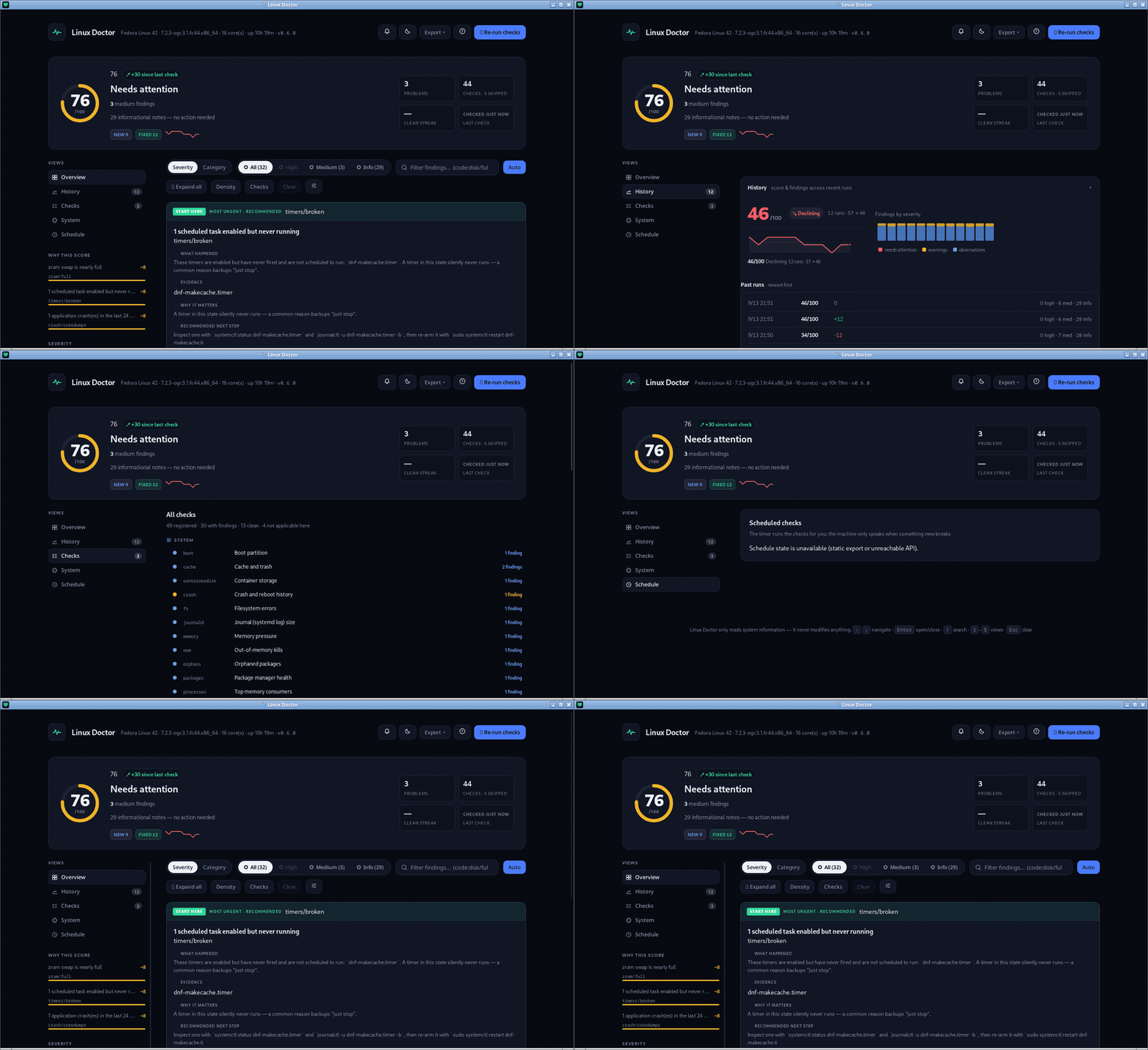
Linux Doctor runs safe, read-only checks and surfaces only the issues that actually matter. Each finding comes with a clear explanation and a copy-paste fix. It remembers your last run, so every report tells you what's new, what got fixed, and what stayed the same.
Its own code never modifies your system. Drop-in checks (
~/.config/linux-doctor/checks/) and the Pro add-on are code that you install and run with your own privileges — see docs/configuration.md.
- 🎯 One clear next step — every report leads with ▶ START HERE, the single most useful action, not a wall of graphs
- 🧠 Memory built in — health score (0–100), trend sparkline, and a plain-language NEW/FIXED diff on every run
- 🔒 Read-only by construction — it never changes your system; fixes are suggestions you run yourself (the optional
--fixshows a dry run first, and running it takes a second opt-in) - 🖥️ CLI + desktop app — terminal report, web dashboard, and a Tauri desktop app (AppImage / deb / rpm) sharing the exact same checks
- 📦 Runs anywhere —
npx, npm, AUR, RPM spec,.deb, AppImage; works gracefully on immutable distros (Silverblue, Bazzite)

Why Linux Doctor?
Linux already has the data — journalctl, systemctl --failed, df, free,
smartctl — but not the answer. It hands you raw output and leaves you to find
the line that matters. Linux Doctor reads the same sources and returns the
conclusion: what is wrong, why it matters, and the one command to fix it.
It is deliberately a doctor, not a monitor. It does not stream metrics, manage processes, or sit in the background waiting to page you. It answers "what's wrong right now?" in seconds, remembers the previous answer, and tells you what changed. That is a different job from a monitoring stack:
| Tool | Job |
|---|---|
| Uptime Kuma, Beszel, Netdata | always-on metrics, uptime, alerting |
| Cockpit | interactive server administration |
inxi / neofetch | hardware and system inventory |
| Linux Doctor | diagnose → explain → suggest a fix → remember what changed |
Run it when something feels off, before filing a bug report, or daily from a
systemd timer — and get one clear next step instead of a wall of graphs. Use
it alongside your monitoring stack, not instead of it.
Download the app (recommended)
Desktop app — no install, no package manager:
- Latest release — grab
linux-doctor-<version>-x86_64.AppImage
chmod +x linux-doctor-*-x86_64.AppImage
./linux-doctor-*-x86_64.AppImage
Also attached to each release: .deb (Debian/Ubuntu), .rpm
(Fedora/RHEL/openSUSE) and the CLI tarball.
AppImage runs on most distributions (glibc-based); on immutable systems
(Fedora Silverblue, Bazzite) it works out of the box. Nothing needs to be
installed — the desktop packages embed their own Node.js 22 runtime
(<resources>/runtime/node), so the app's checks run even on a machine with
no Node on PATH. LINUX_DOCTOR_NODE=/path/to/node still overrides it.
Installed size: the bundled runtime adds roughly 130 MB to the package.
Troubleshooting: blank/white window or EGL errors (AppImage, very new Mesa)
The bundle's WebKitGTK comes from an older LTS base; its accelerated paths can
abort against bleeding-edge host Mesa (Could not create default EGL display)
or paint a blank/white webview. This is about the host's driver stack, not the
GPU brand: AMD and Intel graphics (and nouveau) all run on Mesa and are
equally exposed; NVIDIA's proprietary driver ships its own stack.
Current builds handle both automatically before any GTK/WebKit code runs:
- the AppImage defaults to software GL (a diagnostics dashboard does not need
GPU anyway) — set
LINUX_DOCTOR_HARDWARE_GL=1to force hardware rendering; - WebKit's DMA-BUF renderer is disabled (the usual cause of a white window) —
set
WEBKIT_DISABLE_DMABUF_RENDERER=0to opt back in.
On older builds, launch with either (or both):
WEBKIT_DISABLE_DMABUF_RENDERER=1 ./linux-doctor-*-x86_64.AppImage
# still blank? also try:
LIBGL_ALWAYS_SOFTWARE=1 WEBKIT_DISABLE_COMPOSITING_MODE=1 ./linux-doctor-*-x86_64.AppImage
If it is still blank, the AppImage's bundled WebKitGTK is incompatible
with your host's driver stack (seen on very new Mesa and NVIDIA). Install the
.deb/.rpm — or the OBS package — instead: those
use the WebKitGTK shipped by your distribution, which matches the host.
Install & first run (CLI)
Needs Node.js ≥ 20.
npx github:zShaD0w7x/linux-doctor     # no install, straight from GitHub
# or:
npm install -g linux-doctor && linux-doctor
Prefer a native CLI package?
- Arch / AUR:
makepkg -sifrom the PKGBUILD (AUR packagelinux-doctor) - Fedora / RHEL / Bazzite / openSUSE: add the OBS repository and
sudo dnf install linux-doctor, or build with the linux-doctor.spec - Debian / Ubuntu:
.debfrom Latest release - Any glibc distro: AppImage or
npx github:zShaD0w7x/linux-doctor
STATUS   0 high, 2 medium, 19 info · health 74/100
TREND    ▄▅▅▆▆▇  last 6 run(s) · 61 → 74 ▲

▶ START HERE   #1 System is low on usable memory
               Close apps you are not using, then re-run this check.

Your system is low on usable memory: 9.4 GB of 15 GB is in use and 2.2 GB is
being pushed to swap. This is the most common cause of a sluggish desktop.
How to fix: close unused browser tabs, then re-run this check.

Since last run: 2 new · 1 fixed · 19 unchanged
The report leads with a ▶ START HERE line (the single most useful
action) and a TREND sparkline, and every run is diffed against the
previous one. Read-only by default: --fix prints a dry-run plan of
commands sourced only from a small built-in safe-fix catalog — running it
needs a second opt-in (--fix --yes), and [manual] items always stay
yours to run.
What it checks
Every finding carries a stable identity: a code (check/reason), a
severity decided against the severity rubric, human
detail, evidence from the system, and a suggested fix. Codes are the join
key for history diffing (NEW/FIXED) and for --ignore-code, so they never
change silently.
| ID | What it checks |
|---|---|
memory | RAM pressure, swap usage |
load | CPU load vs core count |
disk | Real partitions near full (ignores virtual/immutable roots) |
inodes | Inode usage — “No space left” with free space showing in df -h |
fs | Filesystem errors (btrfs, read-only remounts) |
raid | Software RAID health (mdadm/ZFS) — degraded arrays, resync in progress |
oom | Out-of-memory kills |
zram | Swap/zram health — compressed swap near full, swappiness |
locales | System locale — missing/broken locale generation |
services | Failed systemd services (system + user); services stuck in a restart loop |
certs | TLS certificate expiry (certbot state + actually-deployed certs on local TLS ports) |
ports | Risky services (databases, FTP/Telnet) listening outside localhost without a firewall |
fds | File-descriptor pressure (/proc/sys/fs/file-nr near the kernel limit) |
timers | Scheduled tasks — enabled systemd timers that never run |
journal | Error log, with known-benign noise filtered out |
journald | System journal (log) disk usage |
suspend | Failed suspend/resume hooks (laptops) |
containers | Container runtimes — podman/docker installed and usable; dead, OOM-killed (exit 137), or restart-looping containers |
containerdisk | Container image storage (podman/docker) — hidden disk usage |
crash | Crash and reboot history (coredumps + unexpected restarts, correlated with automatic-update mechanisms) |
security | Firewall, SELinux, update services |
ssh | SSH server posture — root login, password authentication |
autologin | Automatic login enabled in the display manager |
secureboot | UEFI boot mode, Secure Boot state, TPM presence |
network | Default route and DNS resolution |
ntp | Clock synchronization (time sync daemon state) |
wifi | WiFi — rfkill blocked, NetworkManager disabled, adapter presence |
updates | Pending package updates (dnf/apt/pacman) |
snap | Pending snap refreshes and the snapd auto-refresh timer |
firmware | Pending firmware (BIOS/UEFI) updates via fwupd |
flatpak | Pending Flatpak app updates + unused runtimes (flatpak uninstall --unused) |
reboot | Newer kernel installed but not booted, pending restart |
processes | Top memory consumers, with friendly names |
thermal | CPU temperatures and thermal-throttling events |
battery | Laptop battery level and capacity wear (skipped on desktops) |
gpu | Graphics driver health (NVIDIA proprietary vs nouveau vs missing, software rendering) |
gpu-usage | GPU VRAM pressure (NVIDIA/AMD) — nearly-full VRAM flagged (AI/ML OOM risk) |
bluetooth | Bluetooth controller presence and daemon state |
wayland | Display session type, running compositor, software rendering |
audio | Sound server (PipeWire/PulseAudio) and output device (desktop/laptop) |
backup | Backup/snapshot tools installed, scheduled, and actually running (stale backups flagged) |
fstrim | SSD TRIM — weekly fstrim.timer enabled or continuous discard mounting |
hardware | Machine check exceptions and corrected ECC memory errors |
smart | Disk SMART health (needs root or smartmontools) |
luks | Full-disk encryption (LUKS) presence |
boot | Boot partition space and bootloader config (/boot full, missing grub.cfg) |
cache | User cache and trash bloat (~/.cache, ~/.local/share/Trash) |
packages | Package manager health — broken/locked apt/dnf/pacman database |
orphans | Orphaned packages (pacman -Qtd, apt autoremove, dnf autoremove) |
Checks that don't apply to your machine — battery on a desktop, reboot
on immutable systems — are skipped automatically and reported honestly in a
Skipped section instead of producing misleading findings.
Health score & history
Every run is saved to ~/.local/share/linux-doctor/history.json (override
with LINUX_DOCTOR_HISTORY). From that history you get a health score
(0–100) with an auditable breakdown (100 − Σpenalties), a TREND
sparkline of your last runs, and a plain-language diff per run — new,
fixed, unchanged. Findings that share a root cause are collapsed before
scoring, so one problem never counts twice. History is a bonus, never a
dependency: --no-history disables it, and if it cannot be written the
report still works.
Documentation
| Doc | Contents |
|---|---|
| docs/cli.md | every flag, --fix, --interactive, --notify, --plain, exit codes, shell completions, systemd timer |
| docs/dashboard.md | the --web dashboard and the desktop app, in detail |
| docs/configuration.md | ignore list, thresholds, plugins, caching, immutable-distro behavior |
| docs/integrations.md | JSON schema v1, --support bundles, optional AI summary, fleet reporting |
| docs/severity.md | how severities are decided |
| docs/monitoring.md | watching for clones and impersonation (scripts/check-clones.mjs) |
| docs/trademark.md | the name/logo vs. the code license |
| CHANGELOG.md | every release, Keep-a-Changelog style |
Roadmap
GUI with a one-click report— shipped: a Tauri desktop appReport history and change detection— shipped: health score, NEW/FIXED diffMore checks: Bluetooth, Wayland, backup, hardware errors, LUKS— shipped- Auto-generated, distro-specific fix instructions
- Signed packages on AUR/COPR and AppStream metadata in every package (Flatpak is not a fit — see packaging/README.md)
- Maintenance: single maintainer, AI-assisted. Roadmap lives in CHANGELOG [Unreleased] and in GitHub issues — security fixes within days, contributions welcome.
Transparency
Development is AI-assisted, and every decision is the author's. Accountability is by artifacts: 600+ automated tests (golden snapshots, shell-safety, output-parity), CI on Fedora + Node 20/22/24, read-only by construction with a pinned safe-fix catalog. Judge it by those artifacts.
Editions
This repository is the Free edition — the whole product for everyday users, GPL-3.0-or-later, forever. Optional paid tiers for power users and companies are strictly additive and described in COMMERCIAL-LICENSE.md.
Licensing & brand
Dual-licensed.
- GPL-3.0-or-later — free for individuals and open-source projects. You may copy, modify and redistribute it, but any derivative work you distribute must stay open-source under the same terms.
- Commercial license — for companies that need to use Linux Doctor inside proprietary products.
What that means in practice:
- Copying the Free edition is allowed — that is the point of the GPL. Forks are welcome as long as they keep the license and the notices.
- It is still not a free-for-all: a distributed derivative must stay GPL, and shipping the code inside a closed product requires the commercial license. That obligation is enforceable copyright, not a polite request.
- The paid tiers' code is not here. Pro/Business/Enterprise live in private repositories; this edition is, and stays, the whole product for everyday users.
- The name and logo are not covered by the code license. If you fork, ship it under your own name — see docs/trademark.md.
Every source file carries an SPDX-License-Identifier: GPL-3.0-or-later header. By contributing, you agree your contributions are offered under both licenses (see CONTRIBUTING.md).
Contributors

159 commits
See what people are saying
Similar repos


Languages
JavaScript
76.2%
HTML
14.8%
CSS
4.3%
Rust
3.2%
README
🩺 Linux Doctor
Linux diagnostics that explain the problem — and remember what changed.
Linux Doctor runs safe, read-only checks and surfaces only the issues that actually matter. Each finding comes with a clear explanation and a copy-paste fix. It remembers your last run, so every report tells you what's new, what got fixed, and what stayed the same.
Its own code never modifies your system. Drop-in checks (
~/.config/linux-doctor/checks/) and the Pro add-on are code that you install and run with your own privileges — see docs/configuration.md.
- 🎯 One clear next step — every report leads with ▶ START HERE, the single most useful action, not a wall of graphs
- 🧠 Memory built in — health score (0–100), trend sparkline, and a plain-language NEW/FIXED diff on every run
- 🔒 Read-only by construction — it never changes your system; fixes are suggestions you run yourself (the optional
--fixshows a dry run first, and running it takes a second opt-in) - 🖥️ CLI + desktop app — terminal report, web dashboard, and a Tauri desktop app (AppImage / deb / rpm) sharing the exact same checks
- 📦 Runs anywhere —
npx, npm, AUR, RPM spec,.deb, AppImage; works gracefully on immutable distros (Silverblue, Bazzite)
Why Linux Doctor?
Linux already has the data — journalctl, systemctl --failed, df, free,
smartctl — but not the answer. It hands you raw output and leaves you to find
the line that matters. Linux Doctor reads the same sources and returns the
conclusion: what is wrong, why it matters, and the one command to fix it.
It is deliberately a doctor, not a monitor. It does not stream metrics, manage processes, or sit in the background waiting to page you. It answers "what's wrong right now?" in seconds, remembers the previous answer, and tells you what changed. That is a different job from a monitoring stack:
| Tool | Job |
|---|---|
| Uptime Kuma, Beszel, Netdata | always-on metrics, uptime, alerting |
| Cockpit | interactive server administration |
inxi / neofetch | hardware and system inventory |
| Linux Doctor | diagnose → explain → suggest a fix → remember what changed |
Run it when something feels off, before filing a bug report, or daily from a
systemd timer — and get one clear next step instead of a wall of graphs. Use
it alongside your monitoring stack, not instead of it.
Download the app (recommended)
Desktop app — no install, no package manager:
- Latest release — grab
linux-doctor-<version>-x86_64.AppImage
chmod +x linux-doctor-*-x86_64.AppImage
./linux-doctor-*-x86_64.AppImage
Also attached to each release: .deb (Debian/Ubuntu), .rpm
(Fedora/RHEL/openSUSE) and the CLI tarball.
AppImage runs on most distributions (glibc-based); on immutable systems
(Fedora Silverblue, Bazzite) it works out of the box. Nothing needs to be
installed — the desktop packages embed their own Node.js 22 runtime
(<resources>/runtime/node), so the app's checks run even on a machine with
no Node on PATH. LINUX_DOCTOR_NODE=/path/to/node still overrides it.
Installed size: the bundled runtime adds roughly 130 MB to the package.
Troubleshooting: blank/white window or EGL errors (AppImage, very new Mesa)
The bundle's WebKitGTK comes from an older LTS base; its accelerated paths can
abort against bleeding-edge host Mesa (Could not create default EGL display)
or paint a blank/white webview. This is about the host's driver stack, not the
GPU brand: AMD and Intel graphics (and nouveau) all run on Mesa and are
equally exposed; NVIDIA's proprietary driver ships its own stack.
Current builds handle both automatically before any GTK/WebKit code runs:
- the AppImage defaults to software GL (a diagnostics dashboard does not need
GPU anyway) — set
LINUX_DOCTOR_HARDWARE_GL=1to force hardware rendering; - WebKit's DMA-BUF renderer is disabled (the usual cause of a white window) —
set
WEBKIT_DISABLE_DMABUF_RENDERER=0to opt back in.
On older builds, launch with either (or both):
WEBKIT_DISABLE_DMABUF_RENDERER=1 ./linux-doctor-*-x86_64.AppImage
# still blank? also try:
LIBGL_ALWAYS_SOFTWARE=1 WEBKIT_DISABLE_COMPOSITING_MODE=1 ./linux-doctor-*-x86_64.AppImage
If it is still blank, the AppImage's bundled WebKitGTK is incompatible
with your host's driver stack (seen on very new Mesa and NVIDIA). Install the
.deb/.rpm — or the OBS package — instead: those
use the WebKitGTK shipped by your distribution, which matches the host.
Install & first run (CLI)
Needs Node.js ≥ 20.
npx github:zShaD0w7x/linux-doctor     # no install, straight from GitHub
# or:
npm install -g linux-doctor && linux-doctor
Prefer a native CLI package?
- Arch / AUR:
makepkg -sifrom the PKGBUILD (AUR packagelinux-doctor) - Fedora / RHEL / Bazzite / openSUSE: add the OBS repository and
sudo dnf install linux-doctor, or build with the linux-doctor.spec - Debian / Ubuntu:
.debfrom Latest release - Any glibc distro: AppImage or
npx github:zShaD0w7x/linux-doctor
STATUS   0 high, 2 medium, 19 info · health 74/100
TREND    ▄▅▅▆▆▇  last 6 run(s) · 61 → 74 ▲

▶ START HERE   #1 System is low on usable memory
               Close apps you are not using, then re-run this check.

Your system is low on usable memory: 9.4 GB of 15 GB is in use and 2.2 GB is
being pushed to swap. This is the most common cause of a sluggish desktop.
How to fix: close unused browser tabs, then re-run this check.

Since last run: 2 new · 1 fixed · 19 unchanged
The report leads with a ▶ START HERE line (the single most useful
action) and a TREND sparkline, and every run is diffed against the
previous one. Read-only by default: --fix prints a dry-run plan of
commands sourced only from a small built-in safe-fix catalog — running it
needs a second opt-in (--fix --yes), and [manual] items always stay
yours to run.
What it checks
Every finding carries a stable identity: a code (check/reason), a
severity decided against the severity rubric, human
detail, evidence from the system, and a suggested fix. Codes are the join
key for history diffing (NEW/FIXED) and for --ignore-code, so they never
change silently.
| ID | What it checks |
|---|---|
memory | RAM pressure, swap usage |
load | CPU load vs core count |
disk | Real partitions near full (ignores virtual/immutable roots) |
inodes | Inode usage — “No space left” with free space showing in df -h |
fs | Filesystem errors (btrfs, read-only remounts) |
raid | Software RAID health (mdadm/ZFS) — degraded arrays, resync in progress |
oom | Out-of-memory kills |
zram | Swap/zram health — compressed swap near full, swappiness |
locales | System locale — missing/broken locale generation |
services | Failed systemd services (system + user); services stuck in a restart loop |
certs | TLS certificate expiry (certbot state + actually-deployed certs on local TLS ports) |
ports | Risky services (databases, FTP/Telnet) listening outside localhost without a firewall |
fds | File-descriptor pressure (/proc/sys/fs/file-nr near the kernel limit) |
timers | Scheduled tasks — enabled systemd timers that never run |
journal | Error log, with known-benign noise filtered out |
journald | System journal (log) disk usage |
suspend | Failed suspend/resume hooks (laptops) |
containers | Container runtimes — podman/docker installed and usable; dead, OOM-killed (exit 137), or restart-looping containers |
containerdisk | Container image storage (podman/docker) — hidden disk usage |
crash | Crash and reboot history (coredumps + unexpected restarts, correlated with automatic-update mechanisms) |
security | Firewall, SELinux, update services |
ssh | SSH server posture — root login, password authentication |
autologin | Automatic login enabled in the display manager |
secureboot | UEFI boot mode, Secure Boot state, TPM presence |
network | Default route and DNS resolution |
ntp | Clock synchronization (time sync daemon state) |
wifi | WiFi — rfkill blocked, NetworkManager disabled, adapter presence |
updates | Pending package updates (dnf/apt/pacman) |
snap | Pending snap refreshes and the snapd auto-refresh timer |
firmware | Pending firmware (BIOS/UEFI) updates via fwupd |
flatpak | Pending Flatpak app updates + unused runtimes (flatpak uninstall --unused) |
reboot | Newer kernel installed but not booted, pending restart |
processes | Top memory consumers, with friendly names |
thermal | CPU temperatures and thermal-throttling events |
battery | Laptop battery level and capacity wear (skipped on desktops) |
gpu | Graphics driver health (NVIDIA proprietary vs nouveau vs missing, software rendering) |
gpu-usage | GPU VRAM pressure (NVIDIA/AMD) — nearly-full VRAM flagged (AI/ML OOM risk) |
bluetooth | Bluetooth controller presence and daemon state |
wayland | Display session type, running compositor, software rendering |
audio | Sound server (PipeWire/PulseAudio) and output device (desktop/laptop) |
backup | Backup/snapshot tools installed, scheduled, and actually running (stale backups flagged) |
fstrim | SSD TRIM — weekly fstrim.timer enabled or continuous discard mounting |
hardware | Machine check exceptions and corrected ECC memory errors |
smart | Disk SMART health (needs root or smartmontools) |
luks | Full-disk encryption (LUKS) presence |
boot | Boot partition space and bootloader config (/boot full, missing grub.cfg) |
cache | User cache and trash bloat (~/.cache, ~/.local/share/Trash) |
packages | Package manager health — broken/locked apt/dnf/pacman database |
orphans | Orphaned packages (pacman -Qtd, apt autoremove, dnf autoremove) |
Checks that don't apply to your machine — battery on a desktop, reboot
on immutable systems — are skipped automatically and reported honestly in a
Skipped section instead of producing misleading findings.
Health score & history
Every run is saved to ~/.local/share/linux-doctor/history.json (override
with LINUX_DOCTOR_HISTORY). From that history you get a health score
(0–100) with an auditable breakdown (100 − Σpenalties), a TREND
sparkline of your last runs, and a plain-language diff per run — new,
fixed, unchanged. Findings that share a root cause are collapsed before
scoring, so one problem never counts twice. History is a bonus, never a
dependency: --no-history disables it, and if it cannot be written the
report still works.
Documentation
| Doc | Contents |
|---|---|
| docs/cli.md | every flag, --fix, --interactive, --notify, --plain, exit codes, shell completions, systemd timer |
| docs/dashboard.md | the --web dashboard and the desktop app, in detail |
| docs/configuration.md | ignore list, thresholds, plugins, caching, immutable-distro behavior |
| docs/integrations.md | JSON schema v1, --support bundles, optional AI summary, fleet reporting |
| docs/severity.md | how severities are decided |
| docs/monitoring.md | watching for clones and impersonation (scripts/check-clones.mjs) |
| docs/trademark.md | the name/logo vs. the code license |
| CHANGELOG.md | every release, Keep-a-Changelog style |
Roadmap
GUI with a one-click report— shipped: a Tauri desktop appReport history and change detection— shipped: health score, NEW/FIXED diffMore checks: Bluetooth, Wayland, backup, hardware errors, LUKS— shipped- Auto-generated, distro-specific fix instructions
- Signed packages on AUR/COPR and AppStream metadata in every package (Flatpak is not a fit — see packaging/README.md)
- Maintenance: single maintainer, AI-assisted. Roadmap lives in CHANGELOG [Unreleased] and in GitHub issues — security fixes within days, contributions welcome.
Transparency
Development is AI-assisted, and every decision is the author's. Accountability is by artifacts: 600+ automated tests (golden snapshots, shell-safety, output-parity), CI on Fedora + Node 20/22/24, read-only by construction with a pinned safe-fix catalog. Judge it by those artifacts.
Editions
This repository is the Free edition — the whole product for everyday users, GPL-3.0-or-later, forever. Optional paid tiers for power users and companies are strictly additive and described in COMMERCIAL-LICENSE.md.
Licensing & brand
Dual-licensed.
- GPL-3.0-or-later — free for individuals and open-source projects. You may copy, modify and redistribute it, but any derivative work you distribute must stay open-source under the same terms.
- Commercial license — for companies that need to use Linux Doctor inside proprietary products.
What that means in practice:
- Copying the Free edition is allowed — that is the point of the GPL. Forks are welcome as long as they keep the license and the notices.
- It is still not a free-for-all: a distributed derivative must stay GPL, and shipping the code inside a closed product requires the commercial license. That obligation is enforceable copyright, not a polite request.
- The paid tiers' code is not here. Pro/Business/Enterprise live in private repositories; this edition is, and stays, the whole product for everyday users.
- The name and logo are not covered by the code license. If you fork, ship it under your own name — see docs/trademark.md.
Every source file carries an SPDX-License-Identifier: GPL-3.0-or-later header. By contributing, you agree your contributions are offered under both licenses (see CONTRIBUTING.md).
See what people are saying
Similar repos
Contributors
159 commits
Languages
JavaScript
76.2%
HTML
14.8%
CSS
4.3%
Rust
3.2%