
Modern Windows PC monitoring, diagnostics, maintenance and system tools in one desktop application.
Python
0
33 commits
updated Sep 18, 2026
See what people are saying (1)
README
🖥️ PC Control Center Pro
Modern Windows PC Monitoring, Diagnostics & System Tools
PC Control Center Pro is a modern Windows 11 PC monitoring and diagnostics utility for monitoring CPU, GPU, RAM and disk usage, viewing hardware information, managing startup applications, performing PC maintenance, and accessing essential Windows system tools from one convenient desktop application.
It combines system monitoring, hardware monitoring, PC diagnostics, startup management, maintenance tools, and system utilities in a single Windows desktop interface.
Monitor. Diagnose. Maintain.
One control center for your Windows PC.





✨ Features
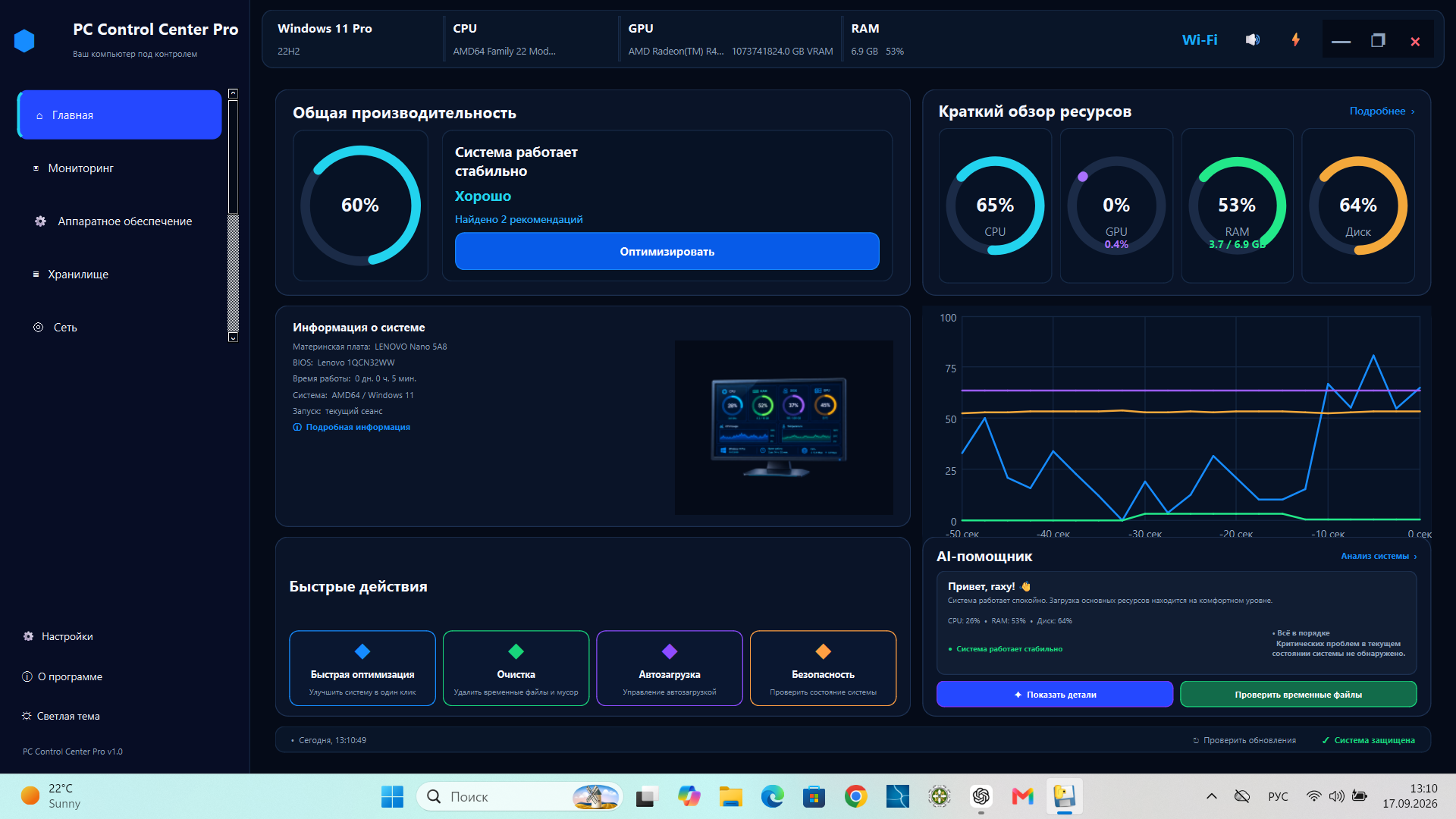
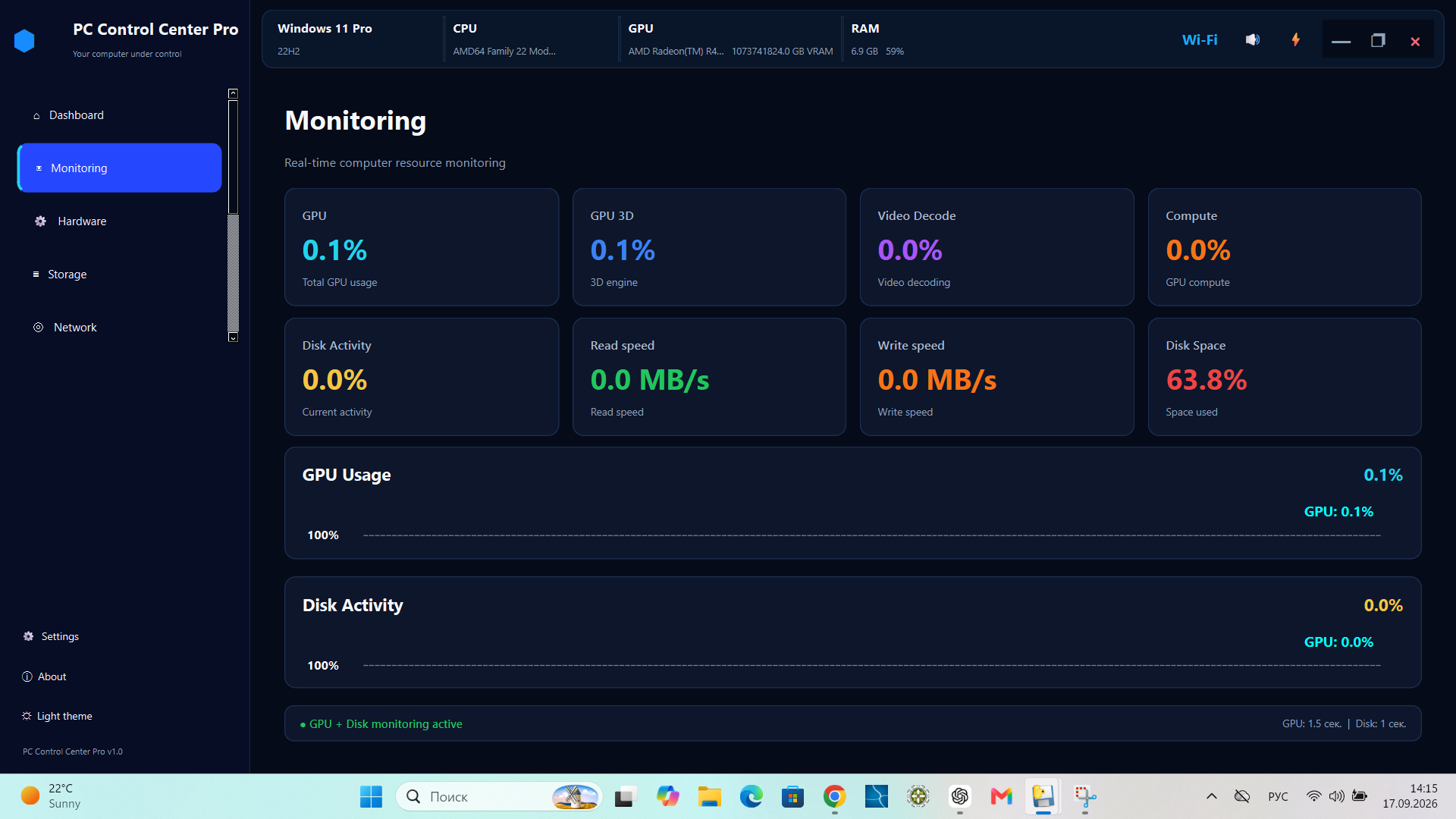
📊 Monitoring Dashboard
Get a quick overview of your Windows PC performance with real-time system monitoring.
- Real-time CPU monitoring
- Real-time GPU monitoring
- RAM usage monitoring
- Disk usage monitoring
- Circular performance gauges
- Real-time performance graph
- System information overview
- Visual system status indicators
Monitor CPU, GPU, RAM and disk usage in one convenient Windows desktop dashboard.
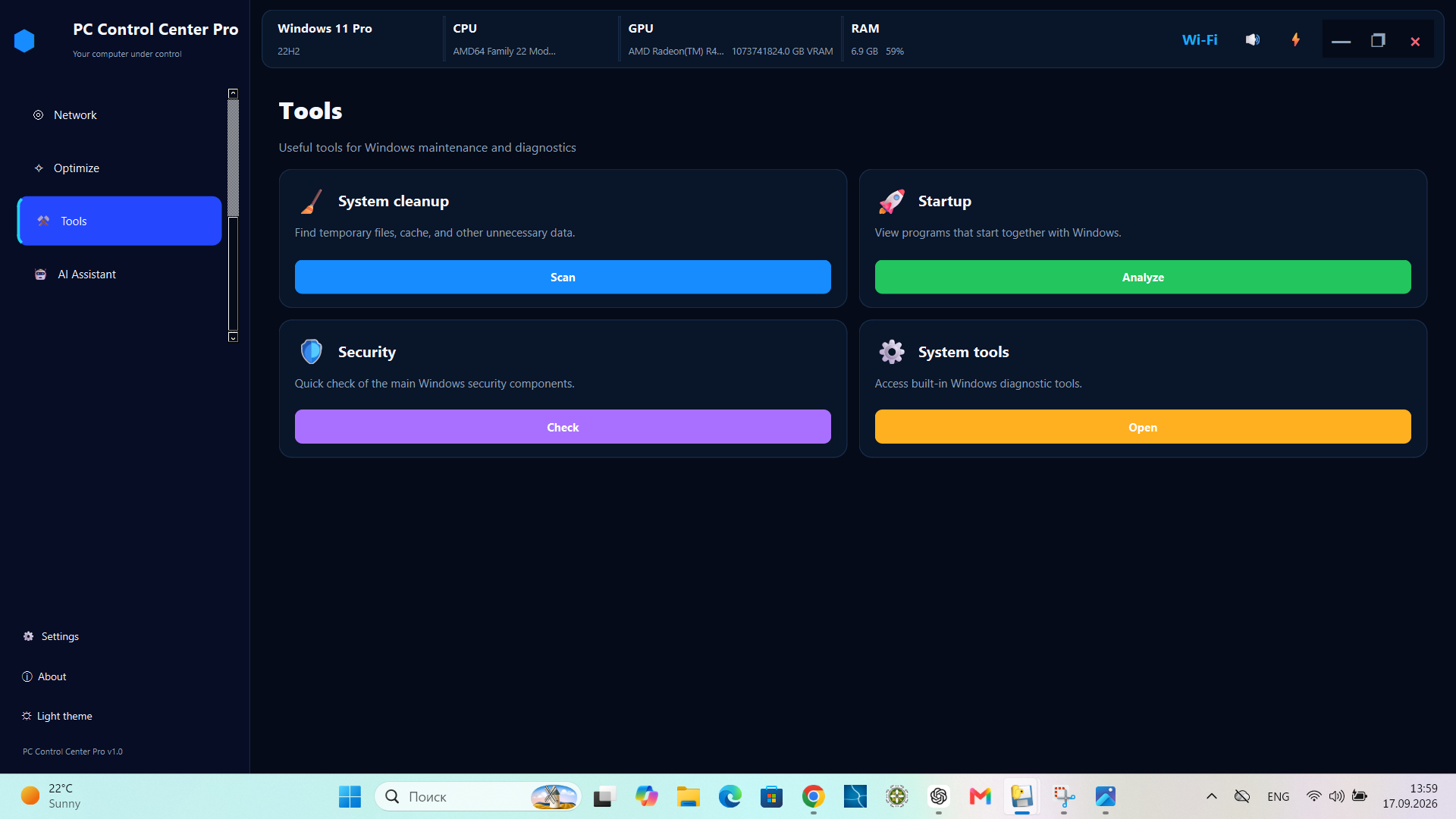
🛠️ System Tools
Access commonly used Windows system tools and utilities from one convenient interface.
- Windows system tools
- Maintenance utilities
- Security-related tools
- System management shortcuts
Quickly access essential Windows utilities, system management tools, maintenance tools, and security tools without searching through multiple Windows menus.
⚡ Startup Manager
Manage and analyze Windows startup applications from one convenient interface.
- View startup applications
- Inspect startup entries
- Enable or disable startup items
- Startup analysis
Use the Windows startup manager to review applications that launch automatically, identify unnecessary startup items, and manage startup entries.
🧹 PC Maintenance
Tools designed to help keep Windows clean and responsive.
- System cleanup
- Temporary file cleanup
- Maintenance operations
- Quick optimization
Some maintenance operations may require administrator privileges.
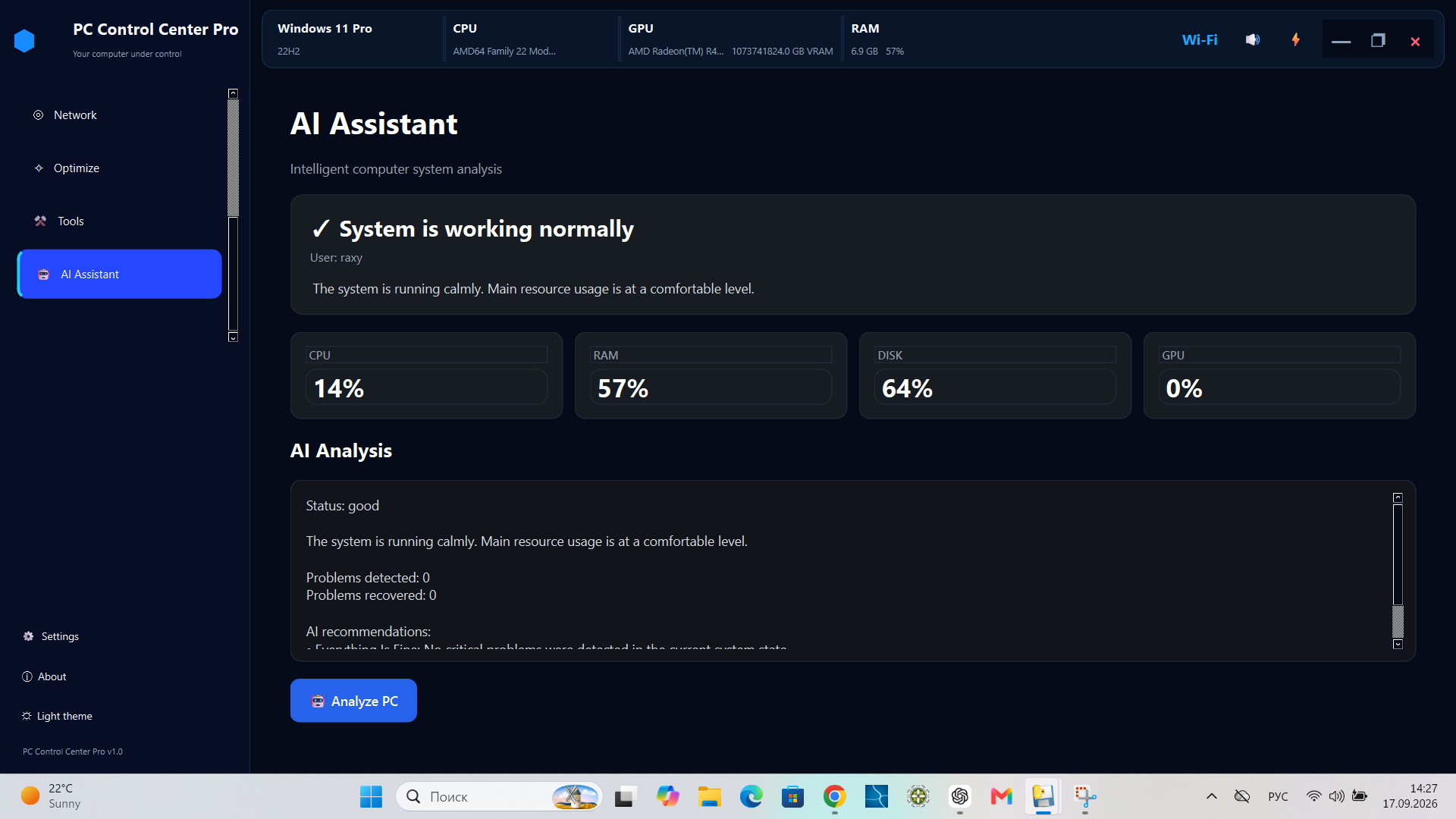
🤖 AI Assistant & Diagnostics
Analyze system conditions and identify potential performance problems.
The diagnostic system can evaluate:
- CPU load
- RAM usage
- Disk activity
- GPU activity
- System stability
- Detected performance problems
AI-related functionality may require an Internet connection.
🖥️ Hardware Information
View important information about your computer and installed hardware.
- Processor information
- CPU cores
- Memory information
- Graphics hardware
- Storage information
- Windows information
- System model
🌍 Multilingual Interface
The application currently supports:
- 🇷🇺 Russian
- 🇺🇦 Ukrainian
- 🇬🇧 English
- 🇩🇪 German
- 🇮🇹 Italian
- 🇪🇸 Spanish
- 🇫🇷 French
🎨 Themes
Choose the interface style that works best for you.
- 🌙 Dark theme
- ☀️ Light theme
The interface is designed for a modern Windows desktop experience.
🔒 Local PC Utility
PC Control Center Pro is designed primarily as a local Windows desktop application.
The application can interact directly with Windows system components when required for monitoring, diagnostics, or maintenance operations.
📸 Screenshots
🛠️ System Tools
📊 Monitoring
🤖 AI Assistant
🖥️ System Requirements
Supported Platform
- Windows 11
- 64-bit system
- Python is not required for the packaged Windows release
Recommended
- Windows 11 64-bit
- Modern multi-core CPU
- At least 4 GB RAM
- Administrator privileges for some system maintenance operations
AI Features
An Internet connection may be required for AI-related functionality.
Distribution
The Windows release is available in two formats:
- Installer — recommended for most users
- Portable ZIP — extract and run without a traditional installation
📦 Download
🪟 Windows 11 — 64-bit
The easiest way to get started is to download the latest Windows release.
👉 ⬇️ Download PC Control Center Pro 2.0.0
No Python installation is required.
Available packages
Installer — recommended
PC_Control_Center_Pro_2.0_Setup.exe
Use the installer for the easiest installation experience.
Portable ZIP
PC_Control_Center_Pro_2.0.zip
Download and extract the ZIP package if you prefer to run the application without using the installer.
⚠️ Some system maintenance and management operations may require administrator privileges.
📌 Important
Download PC Control Center Pro only from the official GitHub Releases page.
▶️ Running from Source
Developers can run PC Control Center Pro directly from the Python source code.
Requirements
- Windows 11 64-bit
- Python 3.13 or compatible version
- Git
- Internet connection for installing dependencies and AI-related functionality
Installation
Clone the repository:
git clone https://github.com/viktorasdf/PC_Control_Center_Pro.git
cd PC_Control_Center_Pro
Install the required dependencies:
pip install -r requirements.txt
Run the application
python main.py
The project uses Python and PySide6 for the Windows desktop interface.
Some application features may require administrator privileges.
🔧 Project Structure
The project is organized into separate modules for the user interface, system monitoring, diagnostics, and supporting services.
PC_Control_Center_Pro/
│
├── app/
│   ├── core/          # Application core and main window
│   ├── pages/         # Dashboard and application pages
│   ├── services/      # Monitoring, diagnostics and system services
│   └── ...
│
├── docs/              # Project documentation
│
├── main.py            # Application entry point
├── requirements.txt   # Python dependencies
├── run.bat            # Windows launcher
├── PC_Control_Center_Pro_2.0.spec
└── README.md
The Windows release also includes packaged versions of the application, so end users do not need to install Python.
🔐 Security & Privacy
PC Control Center Pro is designed as a local Windows desktop utility.
The application may interact directly with Windows system components for monitoring, diagnostics, maintenance, and system management.
Administrator Privileges
Some features may require administrator privileges to perform system-level operations.
Windows may display a User Account Control (UAC) prompt when elevated permissions are required.
User Responsibility
Before performing maintenance or system-management operations:
- Review the selected operation
- Keep important files backed up
- Use administrator privileges only when required
- Download the application from the official GitHub Releases page
PC Control Center Pro does not replace Windows security software or system backup solutions.
🚧 Development Status
Current version: 2.0.0
PC Control Center Pro is actively evolving.
The current public release provides:
- PC performance monitoring
- Hardware information
- System diagnostics
- Windows system tools
- Startup management
- PC maintenance utilities
- AI-assisted analysis
- Multilingual interface
- Light and Dark themes
Future Development
Planned improvements may include:
- Additional monitoring capabilities
- More diagnostic features
- Additional Windows utilities
- Further interface improvements
- Additional language support
- Performance and stability improvements
🐛 Bug Reports & Suggestions
Found a bug or have an idea for improving PC Control Center Pro?
Please open an Issue in the GitHub repository.
When reporting a problem, include as much of the following information as possible:
- Windows version
- Application version
- Description of the problem
- Steps to reproduce the issue
- Relevant error messages
- Screenshots, if available
Clear reports help make it easier to investigate and improve the application.
🤝 Contributing
Contributions and feedback are welcome.
You can help improve PC Control Center Pro by:
- Reporting bugs
- Suggesting new features
- Testing new releases
- Improving documentation
- Submitting Pull Requests
Getting Started
- Fork the repository
- Create a feature branch
- Make your changes
- Test the application
- Submit a Pull Request
For larger changes, opening an Issue first is recommended so the proposed improvement can be discussed.
⭐ Support the Project
If you find PC Control Center Pro useful, you can support the project by:
- ⭐ Starring the repository
- 🐛 Reporting bugs
- 💡 Suggesting improvements
- 🧪 Testing new releases
- 📢 Sharing the project with other Windows users
Every star, report, and piece of feedback helps the project grow.
🔗 Project
📌 Release
PC Control Center Pro 2.0.0
First public release — September 2026
The current release is available for Windows 11 64-bit as:
- 🧩 Windows Installer
- 📦 Portable ZIP package
👉 Download PC Control Center Pro 2.0.0
🖥️ PC Control Center Pro
Monitor. Diagnose. Maintain.
One control center for your Windows PC.
Contributors

33 commits
Similar repos


Languages
Python
99.9%
Modern Windows PC monitoring, diagnostics, maintenance and system tools in one desktop application.
Python
0
33 commits
updated Sep 18, 2026
See what people are saying (1)
README
🖥️ PC Control Center Pro
Modern Windows PC Monitoring, Diagnostics & System Tools
PC Control Center Pro is a modern Windows 11 PC monitoring and diagnostics utility for monitoring CPU, GPU, RAM and disk usage, viewing hardware information, managing startup applications, performing PC maintenance, and accessing essential Windows system tools from one convenient desktop application.
It combines system monitoring, hardware monitoring, PC diagnostics, startup management, maintenance tools, and system utilities in a single Windows desktop interface.
Monitor. Diagnose. Maintain.
One control center for your Windows PC.
✨ Features
📊 Monitoring Dashboard
Get a quick overview of your Windows PC performance with real-time system monitoring.
- Real-time CPU monitoring
- Real-time GPU monitoring
- RAM usage monitoring
- Disk usage monitoring
- Circular performance gauges
- Real-time performance graph
- System information overview
- Visual system status indicators
Monitor CPU, GPU, RAM and disk usage in one convenient Windows desktop dashboard.
🛠️ System Tools
Access commonly used Windows system tools and utilities from one convenient interface.
- Windows system tools
- Maintenance utilities
- Security-related tools
- System management shortcuts
Quickly access essential Windows utilities, system management tools, maintenance tools, and security tools without searching through multiple Windows menus.
⚡ Startup Manager
Manage and analyze Windows startup applications from one convenient interface.
- View startup applications
- Inspect startup entries
- Enable or disable startup items
- Startup analysis
Use the Windows startup manager to review applications that launch automatically, identify unnecessary startup items, and manage startup entries.
🧹 PC Maintenance
Tools designed to help keep Windows clean and responsive.
- System cleanup
- Temporary file cleanup
- Maintenance operations
- Quick optimization
Some maintenance operations may require administrator privileges.
🤖 AI Assistant & Diagnostics
Analyze system conditions and identify potential performance problems.
The diagnostic system can evaluate:
- CPU load
- RAM usage
- Disk activity
- GPU activity
- System stability
- Detected performance problems
AI-related functionality may require an Internet connection.
🖥️ Hardware Information
View important information about your computer and installed hardware.
- Processor information
- CPU cores
- Memory information
- Graphics hardware
- Storage information
- Windows information
- System model
🌍 Multilingual Interface
The application currently supports:
- 🇷🇺 Russian
- 🇺🇦 Ukrainian
- 🇬🇧 English
- 🇩🇪 German
- 🇮🇹 Italian
- 🇪🇸 Spanish
- 🇫🇷 French
🎨 Themes
Choose the interface style that works best for you.
- 🌙 Dark theme
- ☀️ Light theme
The interface is designed for a modern Windows desktop experience.
🔒 Local PC Utility
PC Control Center Pro is designed primarily as a local Windows desktop application.
The application can interact directly with Windows system components when required for monitoring, diagnostics, or maintenance operations.
📸 Screenshots
🛠️ System Tools
📊 Monitoring
🤖 AI Assistant
🖥️ System Requirements
Supported Platform
- Windows 11
- 64-bit system
- Python is not required for the packaged Windows release
Recommended
- Windows 11 64-bit
- Modern multi-core CPU
- At least 4 GB RAM
- Administrator privileges for some system maintenance operations
AI Features
An Internet connection may be required for AI-related functionality.
Distribution
The Windows release is available in two formats:
- Installer — recommended for most users
- Portable ZIP — extract and run without a traditional installation
📦 Download
🪟 Windows 11 — 64-bit
The easiest way to get started is to download the latest Windows release.
👉 ⬇️ Download PC Control Center Pro 2.0.0
No Python installation is required.
Available packages
Installer — recommended
PC_Control_Center_Pro_2.0_Setup.exe
Use the installer for the easiest installation experience.
Portable ZIP
PC_Control_Center_Pro_2.0.zip
Download and extract the ZIP package if you prefer to run the application without using the installer.
⚠️ Some system maintenance and management operations may require administrator privileges.
📌 Important
Download PC Control Center Pro only from the official GitHub Releases page.
▶️ Running from Source
Developers can run PC Control Center Pro directly from the Python source code.
Requirements
- Windows 11 64-bit
- Python 3.13 or compatible version
- Git
- Internet connection for installing dependencies and AI-related functionality
Installation
Clone the repository:
git clone https://github.com/viktorasdf/PC_Control_Center_Pro.git
cd PC_Control_Center_Pro
Install the required dependencies:
pip install -r requirements.txt
Run the application
python main.py
The project uses Python and PySide6 for the Windows desktop interface.
Some application features may require administrator privileges.
🔧 Project Structure
The project is organized into separate modules for the user interface, system monitoring, diagnostics, and supporting services.
PC_Control_Center_Pro/
│
├── app/
│   ├── core/          # Application core and main window
│   ├── pages/         # Dashboard and application pages
│   ├── services/      # Monitoring, diagnostics and system services
│   └── ...
│
├── docs/              # Project documentation
│
├── main.py            # Application entry point
├── requirements.txt   # Python dependencies
├── run.bat            # Windows launcher
├── PC_Control_Center_Pro_2.0.spec
└── README.md
The Windows release also includes packaged versions of the application, so end users do not need to install Python.
🔐 Security & Privacy
PC Control Center Pro is designed as a local Windows desktop utility.
The application may interact directly with Windows system components for monitoring, diagnostics, maintenance, and system management.
Administrator Privileges
Some features may require administrator privileges to perform system-level operations.
Windows may display a User Account Control (UAC) prompt when elevated permissions are required.
User Responsibility
Before performing maintenance or system-management operations:
- Review the selected operation
- Keep important files backed up
- Use administrator privileges only when required
- Download the application from the official GitHub Releases page
PC Control Center Pro does not replace Windows security software or system backup solutions.
🚧 Development Status
Current version: 2.0.0
PC Control Center Pro is actively evolving.
The current public release provides:
- PC performance monitoring
- Hardware information
- System diagnostics
- Windows system tools
- Startup management
- PC maintenance utilities
- AI-assisted analysis
- Multilingual interface
- Light and Dark themes
Future Development
Planned improvements may include:
- Additional monitoring capabilities
- More diagnostic features
- Additional Windows utilities
- Further interface improvements
- Additional language support
- Performance and stability improvements
🐛 Bug Reports & Suggestions
Found a bug or have an idea for improving PC Control Center Pro?
Please open an Issue in the GitHub repository.
When reporting a problem, include as much of the following information as possible:
- Windows version
- Application version
- Description of the problem
- Steps to reproduce the issue
- Relevant error messages
- Screenshots, if available
Clear reports help make it easier to investigate and improve the application.
🤝 Contributing
Contributions and feedback are welcome.
You can help improve PC Control Center Pro by:
- Reporting bugs
- Suggesting new features
- Testing new releases
- Improving documentation
- Submitting Pull Requests
Getting Started
- Fork the repository
- Create a feature branch
- Make your changes
- Test the application
- Submit a Pull Request
For larger changes, opening an Issue first is recommended so the proposed improvement can be discussed.
⭐ Support the Project
If you find PC Control Center Pro useful, you can support the project by:
- ⭐ Starring the repository
- 🐛 Reporting bugs
- 💡 Suggesting improvements
- 🧪 Testing new releases
- 📢 Sharing the project with other Windows users
Every star, report, and piece of feedback helps the project grow.
🔗 Project
📌 Release
PC Control Center Pro 2.0.0
First public release — September 2026
The current release is available for Windows 11 64-bit as:
- 🧩 Windows Installer
- 📦 Portable ZIP package
👉 Download PC Control Center Pro 2.0.0
🖥️ PC Control Center Pro
Monitor. Diagnose. Maintain.
One control center for your Windows PC.
Similar repos
Contributors
33 commits
Languages
Python
99.9%