Monolith — a personal workspace for projects, knowledge and connected databases
See the code
Make space for what matters.
Your pages, projects and everyday tools in one self-hosted workspace.
Use the web, Windows or macOS. Connect your agents. Add the tools that fit your day.


Website · Documentation · Quickstart · Addons and Widgets · Releases
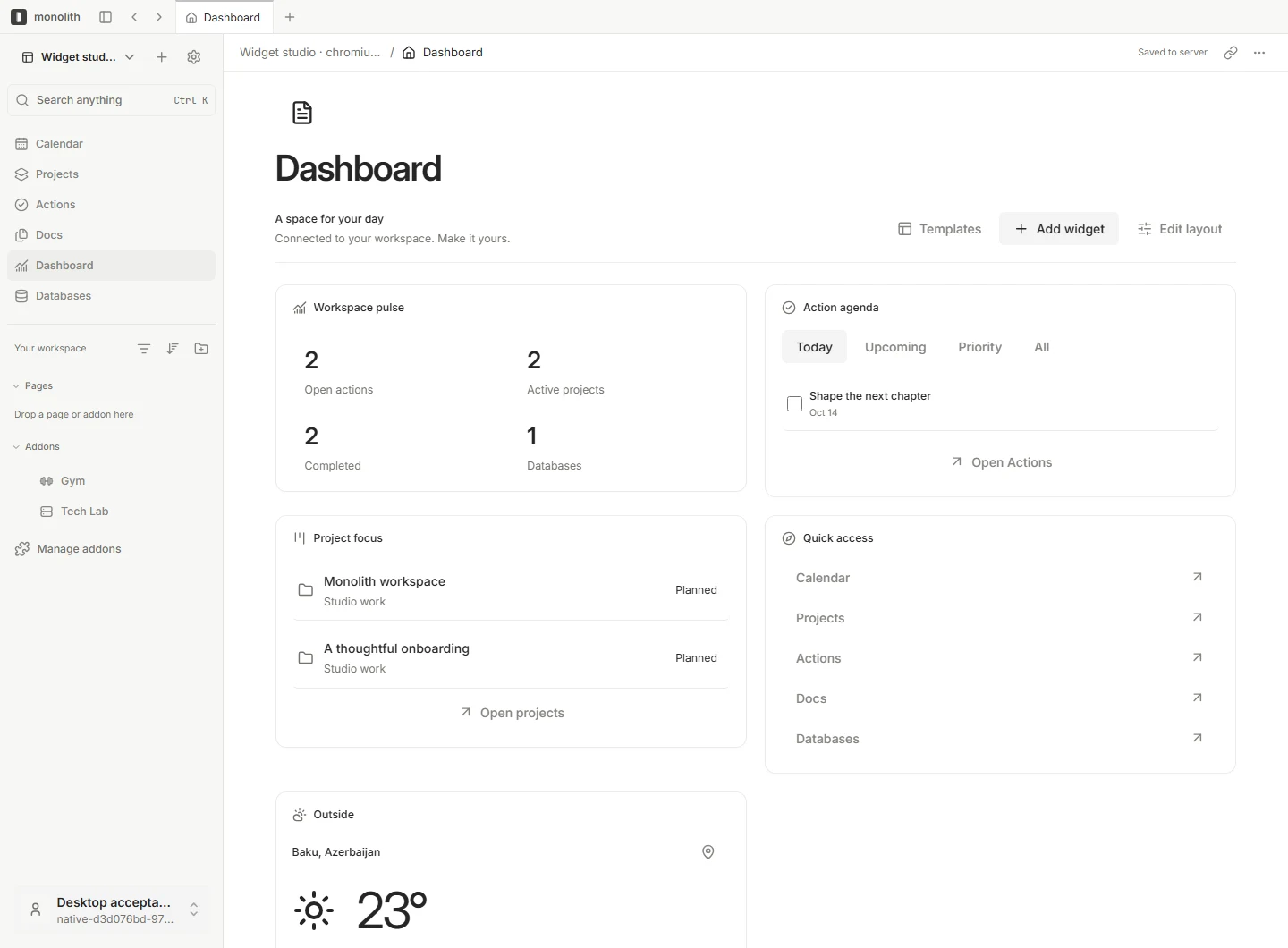
A connected workspace, shaped around your day. Screenshots use synthetic data.
An idea becomes a page. A page becomes a project. Tasks need dates, records need context, and useful tools should be close to the work.
Monolith brings those pieces together. Write rich documents, organize structured information, plan projects and build a dashboard around what matters to you. Connected views use the same underlying records, so your calendar, project board and dashboard can show different perspectives on the same work.
Run it on your own infrastructure, connect browser and desktop clients, and extend it with optional addons, widgets and agent integrations.
Start with seven native sections: Calendar, Projects, Actions, Rooms, Docs, Dashboard and Databases. Reorder navigation, choose light or dark appearance and add the tools you need.
| Layer | What it brings | Examples |
|---|---|---|
| Native features | The shared workspace foundation | Pages, projects, calendar, databases |
| Addons | Optional tools with their own workspace surfaces | Atlas, Automations, Agents, Journal, Wallet, Gym |
| Widgets | Compact views with configuration overlays | Achievements, Code Time, Flashcards, Pomodoro, Idea Box |
Addons and Widgets separates installing a package on the host from enabling it in a workspace. Filter the shop by type, category and installation state; configure widgets in an overlay, add them to the dashboard or pin supported widgets to the sidebar.
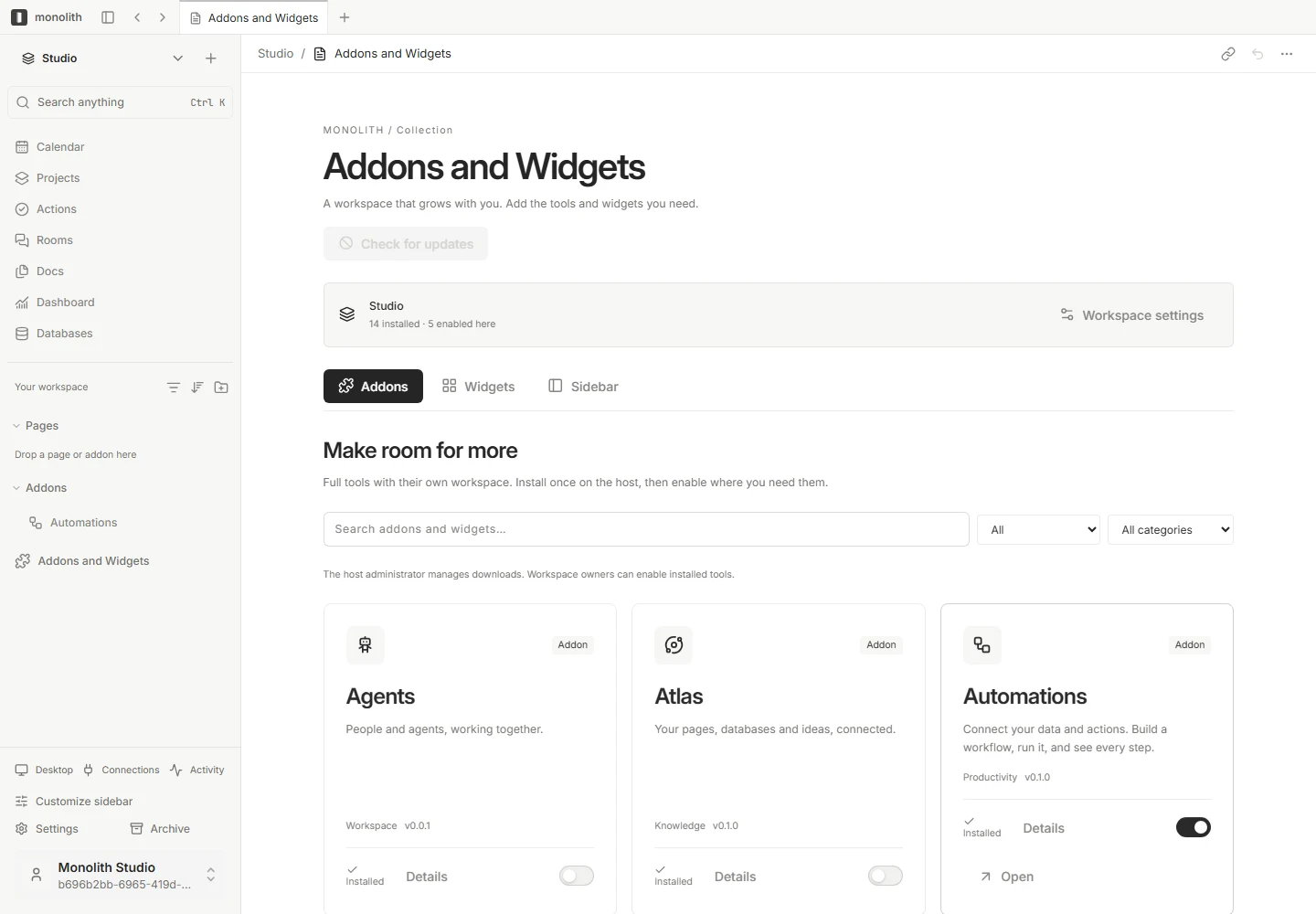
Configured hosts can use a signed GitHub Releases catalog for versioned downloads, progress, compatibility checks and package recovery. Packages can have independent versions while sharing a repository. The public website is a catalog; installation happens inside your Monolith host.
Connect Codex, Claude Code, OpenClaw, Cursor or another stdio MCP client to your workspace. Monolith’s MCP bridge and JSON CLI expose tools for pages, canonical documents, databases, records, projects, tasks and calendar events.
The bridge starts in read mode. Enable writes deliberately; your account permissions and document revision checks still apply. The separate Agents addon organizes worker-backed assignments and is not required to use MCP.
| Client | Configuration generator |
|---|---|
| Codex | pnpm --silent agent config --client codex |
| Claude Code / Claude Desktop | pnpm --silent agent config --client claude |
| OpenClaw | pnpm --silent agent config --client openclaw |
| Cursor | pnpm --silent agent config --client cursor |
| VS Code | pnpm --silent agent config --client vscode |
| Other stdio MCP clients | pnpm --silent agent config --client generic |
Build and sign in before generating configuration. Follow the MCP and CLI guide for authentication, permissions and client setup.
Download 0.1.9: Windows, macOS, Linux x64/ARM64, 14 addon and widget packages, and the CLI/MCP bridge. This release adds a polished calendar event popover and consistent controls, improves download progress, and fixes Windows rollback when installation paths are redirected. Automatic updates use authenticated downloads, progress and rollback. Windows installers remain unsigned and macOS is not notarized. Clients from 0.1.3 and preview builds need this installer once; 0.1.7 and 0.1.8 clients update automatically. Servers upgrading from before 0.1.8 need the calendar schema migration first. See installation instructions and checksums.
Use a checkout containing the matching Monolith implementation, Node.js 22.23+, pnpm 11.21.0 and PostgreSQL 17. Set POSTGRES_BIN to your PostgreSQL bin directory when needed.
pnpm install --frozen-lockfile
pnpm build
pnpm local:setup
pnpm db:push
pnpm dev
Open http://localhost:5173 and complete onboarding. The development API uses port 3636; the isolated local database uses 55432. local:setup creates ignored configuration and separate administrative and application database roles. pnpm local:stop stops the database while preserving its files.
Full setup and troubleshooting: Installation.
Follow the first-workspace walkthrough for the next steps.
Windows, macOS and the single-host Docker server have a GitHub Releases update system with notifications, download progress, signed package verification and recovery to a previous runtime.
Automatic downloads and automatic installation are separate settings. Desktop updates respect saved-work checks; server installation uses a UTC maintenance window and health checks. Schema-changing releases require a planned migration: runtime rollback does not reverse database changes.
Automatic downloads and installation are enabled by default in updater-enabled clients. The hosted server requires the external supervisor. Update authentication uses Monolith’s release key independently of optional OS publisher signing. Read the update guide.
| I want to… | Start here |
|---|---|
| Understand the product | Meet Monolith |
| Set up my first workspace | Installation · Quickstart |
| Write and connect knowledge | Pages · Databases · Atlas |
| Plan my day | Projects and Calendar · Widgets |
| Extend the workspace | Addon installation · Collection |
| Connect AI tools | MCP and CLI · Agents addon |
| Run and update a host | Self-hosting · Updates and recovery |
| Understand the implementation | Architecture · Development |
| Resolve a problem | Troubleshooting · FAQ |
The workspace maintains English, Malay, Simplified Chinese and Traditional Chinese locale packs. The public docs are currently in English.
 Browser          Windows / macOS          Agent clients
    |                    |                       |
    |                    |                 MCP / JSON CLI
    +--------------------+-----------------------+
                         | HTTPS
                   Monolith gateway
                    /            \
          Canonical documents   Domain API
                    \            /
                     PostgreSQL
| Layer | Implementation |
|---|---|
| Workspace | React 19, shared Monolith UI and API contracts |
| Documents | BlockSuite and Yjs, persisted through revision-checked gateway operations |
| Windows | Tauri and WebView2 |
| macOS | AppKit and WKWebView |
| Host | Public Go gateway and private TypeScript domain API |
| Storage | PostgreSQL 17 and persistent uploaded files |
| Extensions | Independently versioned addons and registered widgets |
| Product website | Static Astro site deployed to Vercel |
See Architecture for repository paths and the boundaries between clients, host services and optional workers.
Use the pinned pnpm version and follow the development guide. Run checks appropriate to your change:
pnpm core:check
pnpm typecheck
pnpm build
pnpm gateway:test
pnpm agent:test
Native packaging requires the matching platform. OS signing credentials are optional in the explicit unsigned installer mode; update manifests still require the release key. The public website has its own build and checks:
pnpm site:build
pnpm site:check
pnpm site:test
For contributions, describe the problem in a GitHub issue, make a focused change and include relevant validation. Keep addon secrets on the host and user data outside replaceable application packages.
pnpm monolith addons create yourname--reading-list
pnpm install
pnpm --filter @monolith/yourname--reading-list build
pnpm release:addons yourname--reading-list
Each addon has a manifest, an independent version and four locale files. Runtime releases contain compiled files and a checksum-verified manifest. Source-sharing tarballs are produced separately with pnpm monolith addons pack yourname--reading-list.
Addons execute trusted application code; they are not sandboxed. See addon installation and development and releases for compatibility, signing and migration requirements.
Maintained by Monolith contributors. See LICENSE and the licenses and notices shipped with each package. Source and license information is included in the documentation.
BlockSuite, Yjs and other dependencies retain their own notices. The Monolith mark and cover are original project assets.
Monolith — a personal workspace for projects, knowledge and connected databases
See the code
Make space for what matters.
Your pages, projects and everyday tools in one self-hosted workspace.
Use the web, Windows or macOS. Connect your agents. Add the tools that fit your day.
Website · Documentation · Quickstart · Addons and Widgets · Releases
A connected workspace, shaped around your day. Screenshots use synthetic data.
An idea becomes a page. A page becomes a project. Tasks need dates, records need context, and useful tools should be close to the work.
Monolith brings those pieces together. Write rich documents, organize structured information, plan projects and build a dashboard around what matters to you. Connected views use the same underlying records, so your calendar, project board and dashboard can show different perspectives on the same work.
Run it on your own infrastructure, connect browser and desktop clients, and extend it with optional addons, widgets and agent integrations.
Start with seven native sections: Calendar, Projects, Actions, Rooms, Docs, Dashboard and Databases. Reorder navigation, choose light or dark appearance and add the tools you need.
| Layer | What it brings | Examples |
|---|---|---|
| Native features | The shared workspace foundation | Pages, projects, calendar, databases |
| Addons | Optional tools with their own workspace surfaces | Atlas, Automations, Agents, Journal, Wallet, Gym |
| Widgets | Compact views with configuration overlays | Achievements, Code Time, Flashcards, Pomodoro, Idea Box |
Addons and Widgets separates installing a package on the host from enabling it in a workspace. Filter the shop by type, category and installation state; configure widgets in an overlay, add them to the dashboard or pin supported widgets to the sidebar.
Configured hosts can use a signed GitHub Releases catalog for versioned downloads, progress, compatibility checks and package recovery. Packages can have independent versions while sharing a repository. The public website is a catalog; installation happens inside your Monolith host.
Connect Codex, Claude Code, OpenClaw, Cursor or another stdio MCP client to your workspace. Monolith’s MCP bridge and JSON CLI expose tools for pages, canonical documents, databases, records, projects, tasks and calendar events.
The bridge starts in read mode. Enable writes deliberately; your account permissions and document revision checks still apply. The separate Agents addon organizes worker-backed assignments and is not required to use MCP.
| Client | Configuration generator |
|---|---|
| Codex | pnpm --silent agent config --client codex |
| Claude Code / Claude Desktop | pnpm --silent agent config --client claude |
| OpenClaw | pnpm --silent agent config --client openclaw |
| Cursor | pnpm --silent agent config --client cursor |
| VS Code | pnpm --silent agent config --client vscode |
| Other stdio MCP clients | pnpm --silent agent config --client generic |
Build and sign in before generating configuration. Follow the MCP and CLI guide for authentication, permissions and client setup.
Download 0.1.9: Windows, macOS, Linux x64/ARM64, 14 addon and widget packages, and the CLI/MCP bridge. This release adds a polished calendar event popover and consistent controls, improves download progress, and fixes Windows rollback when installation paths are redirected. Automatic updates use authenticated downloads, progress and rollback. Windows installers remain unsigned and macOS is not notarized. Clients from 0.1.3 and preview builds need this installer once; 0.1.7 and 0.1.8 clients update automatically. Servers upgrading from before 0.1.8 need the calendar schema migration first. See installation instructions and checksums.
Use a checkout containing the matching Monolith implementation, Node.js 22.23+, pnpm 11.21.0 and PostgreSQL 17. Set POSTGRES_BIN to your PostgreSQL bin directory when needed.
pnpm install --frozen-lockfile
pnpm build
pnpm local:setup
pnpm db:push
pnpm dev
Open http://localhost:5173 and complete onboarding. The development API uses port 3636; the isolated local database uses 55432. local:setup creates ignored configuration and separate administrative and application database roles. pnpm local:stop stops the database while preserving its files.
Full setup and troubleshooting: Installation.
Follow the first-workspace walkthrough for the next steps.
Windows, macOS and the single-host Docker server have a GitHub Releases update system with notifications, download progress, signed package verification and recovery to a previous runtime.
Automatic downloads and automatic installation are separate settings. Desktop updates respect saved-work checks; server installation uses a UTC maintenance window and health checks. Schema-changing releases require a planned migration: runtime rollback does not reverse database changes.
Automatic downloads and installation are enabled by default in updater-enabled clients. The hosted server requires the external supervisor. Update authentication uses Monolith’s release key independently of optional OS publisher signing. Read the update guide.
| I want to… | Start here |
|---|---|
| Understand the product | Meet Monolith |
| Set up my first workspace | Installation · Quickstart |
| Write and connect knowledge | Pages · Databases · Atlas |
| Plan my day | Projects and Calendar · Widgets |
| Extend the workspace | Addon installation · Collection |
| Connect AI tools | MCP and CLI · Agents addon |
| Run and update a host | Self-hosting · Updates and recovery |
| Understand the implementation | Architecture · Development |
| Resolve a problem | Troubleshooting · FAQ |
The workspace maintains English, Malay, Simplified Chinese and Traditional Chinese locale packs. The public docs are currently in English.
 Browser          Windows / macOS          Agent clients
    |                    |                       |
    |                    |                 MCP / JSON CLI
    +--------------------+-----------------------+
                         | HTTPS
                   Monolith gateway
                    /            \
          Canonical documents   Domain API
                    \            /
                     PostgreSQL
| Layer | Implementation |
|---|---|
| Workspace | React 19, shared Monolith UI and API contracts |
| Documents | BlockSuite and Yjs, persisted through revision-checked gateway operations |
| Windows | Tauri and WebView2 |
| macOS | AppKit and WKWebView |
| Host | Public Go gateway and private TypeScript domain API |
| Storage | PostgreSQL 17 and persistent uploaded files |
| Extensions | Independently versioned addons and registered widgets |
| Product website | Static Astro site deployed to Vercel |
See Architecture for repository paths and the boundaries between clients, host services and optional workers.
Use the pinned pnpm version and follow the development guide. Run checks appropriate to your change:
pnpm core:check
pnpm typecheck
pnpm build
pnpm gateway:test
pnpm agent:test
Native packaging requires the matching platform. OS signing credentials are optional in the explicit unsigned installer mode; update manifests still require the release key. The public website has its own build and checks:
pnpm site:build
pnpm site:check
pnpm site:test
For contributions, describe the problem in a GitHub issue, make a focused change and include relevant validation. Keep addon secrets on the host and user data outside replaceable application packages.
pnpm monolith addons create yourname--reading-list
pnpm install
pnpm --filter @monolith/yourname--reading-list build
pnpm release:addons yourname--reading-list
Each addon has a manifest, an independent version and four locale files. Runtime releases contain compiled files and a checksum-verified manifest. Source-sharing tarballs are produced separately with pnpm monolith addons pack yourname--reading-list.
Addons execute trusted application code; they are not sandboxed. See addon installation and development and releases for compatibility, signing and migration requirements.
Maintained by Monolith contributors. See LICENSE and the licenses and notices shipped with each package. Source and license information is included in the documentation.
BlockSuite, Yjs and other dependencies retain their own notices. The Monolith mark and cover are original project assets.





