mosaic is a local, widget-based personal dashboard — you build boards out of 17+ widget types (tasks, notes, calendar, tables, weather, timer, water tracker, drawboard, PDF/e-book reader, and more), fully customizable with themes, your own fonts, and layouts. Everything runs locally in the browser or as an Electron desktop app.
See the code

A local-first, widget-based personal dashboard. Boards full of tasks, notes, calendars, trackers, and more — in your browser or as a desktop app. No account. No server. Your data stays on your device.



Download · Features · Getting started · Contributing · Support the project
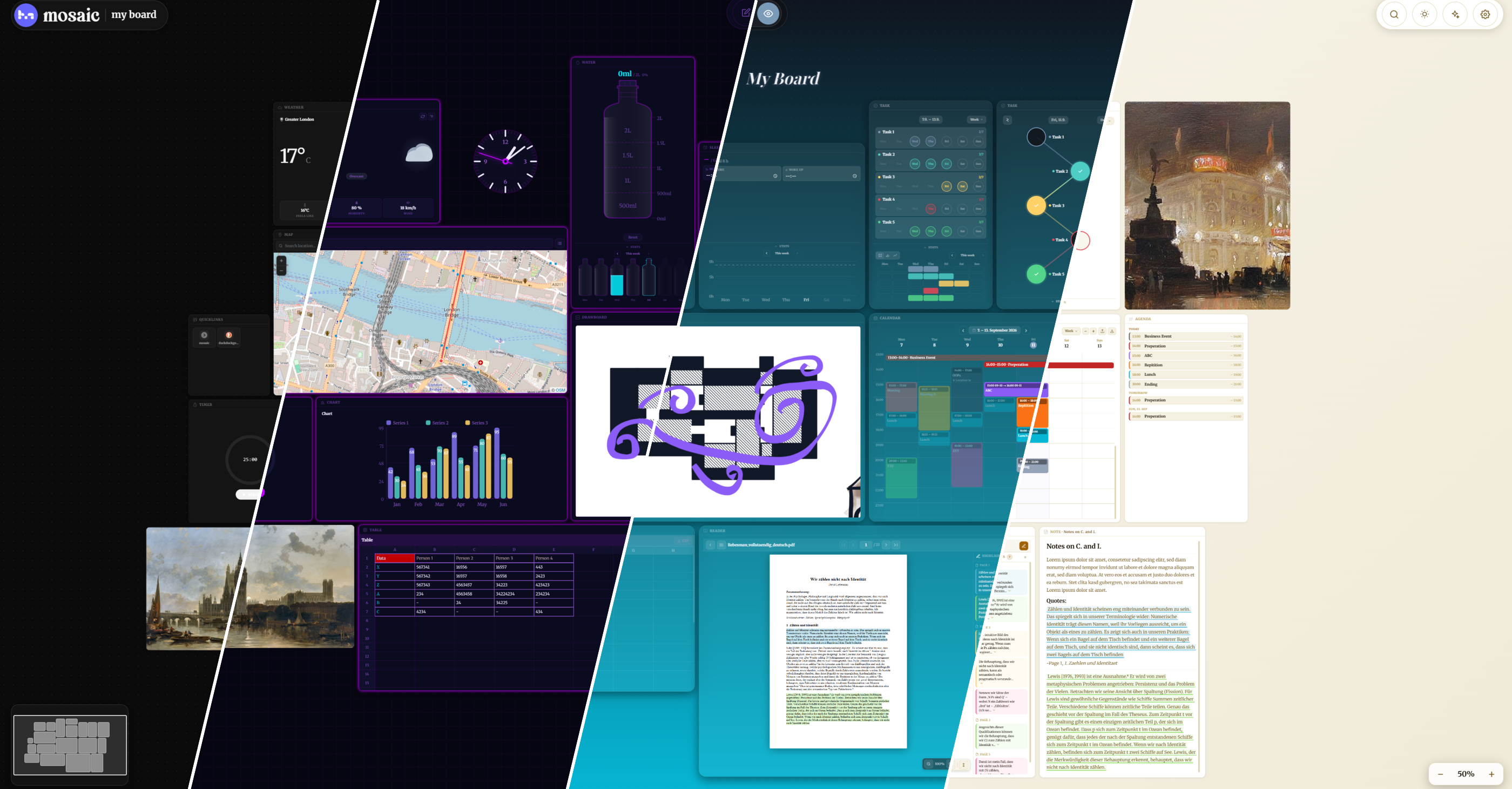
mosaic is a dashboard you actually own. Instead of a wall of unrelated apps and tabs, you arrange widgets — tasks, a calendar, notes, trackers, a reader, a spreadsheet, and more — onto boards that look and behave exactly the way you want. Everything lives in your browser's IndexedDB; there is no mosaic server and no account, so there's nothing to sign up for and nothing that can lock you out of your own data.
| Platform | Download |
|---|---|
| Windows | Latest .exe installer |
| macOS | Latest .dmg |
| Linux | Latest .AppImage / .deb |
| Browser | No install — run it locally or host it yourself |
Each link opens the release page; download the asset for your platform from the list of files attached to it. The desktop app checks for updates automatically and installs them in the background — you'll always be on the latest version.
[!WARNING] Windows and macOS will warn about an "unknown publisher" on first launch. The builds aren't code-signed — a Windows certificate costs $70–400/year and a macOS one requires a paid Apple Developer account, both from a registered business/identity (see GITHUB_SETUP.md for exactly what that involves) — so this isn't something a single-developer project can just turn off. The warning means "this publisher isn't verified," not "this file is malware." Nothing in mosaic phones home or reads files outside your own boards (see Privacy & data); the source is fully in this repo and the build pipeline is the public
release.ymlworkflow, so the.exe/.dmgyou download is exactly what that workflow produced from this code, nothing more. To proceed anyway:
- Windows: click "More info", then "Run anyway" in the SmartScreen dialog.
- macOS: current macOS versions usually skip the old "unidentified developer" dialog entirely and instead say "'mosaic' is damaged and can't be opened. You should move it to the Trash." — despite the wording, the download isn't actually corrupted; that's just Gatekeeper's generic message for any app without a paid Developer ID signature. Right-click → "Open" alone no longer clears it on current macOS. Move
mosaic.appto/Applications, then in Terminal run:and launch it normally.xattr -cr /Applications/mosaic.appIf you'd rather not click through a warning at all, the Linux install below and running from source don't trigger this, since neither goes through Gatekeeper/SmartScreen.
Only .deb and .AppImage are published — no native .rpm or Arch package — so Debian-based
distros get a real package install, everyone else runs the portable .AppImage. Each command
below looks up the current release's exact asset URL itself (via the GitHub API) and pipes it
into a plain sh -c, so there's no version number to edit and nothing that depends on which
shell you're pasting into — it works the same in bash, zsh, and fish.
Debian-based (Debian, Ubuntu, Linux Mint, Pop!_OS, elementary OS, ...):
curl -s https://api.github.com/repos/Aetherion7/mosaic/releases/latest | grep browser_download_url | grep '\.deb"' | cut -d '"' -f4 \
  | xargs -I{} sh -c 'wget "$1" && sudo apt install "./$(basename "$1")"' _ {}
apt install ./file.deb (not dpkg -i) resolves and pulls in missing dependencies automatically.
Arch-based (Arch, Manjaro, EndeavourOS, CachyOS, ...) — no AUR package (yet), run the .AppImage:
sudo pacman -S --needed fuse2
curl -s https://api.github.com/repos/Aetherion7/mosaic/releases/latest | grep browser_download_url | grep '\.AppImage"' | cut -d '"' -f4 \
  | xargs -I{} sh -c 'wget "$1" && chmod +x "$(basename "$1")" && "./$(basename "$1")"' _ {}
Fedora-based (Fedora, Nobara, RHEL, ...) — no .rpm (yet), same .AppImage:
sudo dnf install -y fuse
curl -s https://api.github.com/repos/Aetherion7/mosaic/releases/latest | grep browser_download_url | grep '\.AppImage"' | cut -d '"' -f4 \
  | xargs -I{} sh -c 'wget "$1" && chmod +x "$(basename "$1")" && "./$(basename "$1")"' _ {}
AppImages need the FUSE2 runtime (libfuse.so.2), which many current distros — including Arch
and Fedora — no longer install by default (only FUSE3). Without it you'll get dlopen(): error loading libfuse.so.2; the pacman/dnf line above installs the missing compat library. Debian-
based systems don't need this at all since they use the .deb package, not the AppImage.
Any other distro (openSUSE, NixOS, ...) — same idea: install a fuse2/libfuse2 compat package
if it's missing, then run the same .AppImage command as above.
The commands above run the AppImage directly from your Downloads folder — that first run is also
all it takes to install it properly: mosaic adds itself to your applications menu with a proper
icon (writes a .desktop entry + icon under ~/.local/share, picked up automatically by GNOME,
KDE, XFCE, ...), so after that you can launch it like any other installed app instead of digging
the file back out of a terminal every time. The .deb install gets this the normal way, via apt.
|
Boards & widgets
|
|
|
Themes & appearance
|
|
AI assistant (bring your own key)
|
|
A few things that aren't obvious from a feature list:
=SUM(A1:A5), IF, COUNTIF, TEXTJOIN, and 40+ other functions, backed by a hand-written parser (no eval, no arbitrary code execution) — safe to open boards you didn't build yourself..ttf/.otf/.woff2 — it becomes selectable everywhere a font picker shows up, including per-note overrides..ics file into a Calendar widget, or export your events back out as one — recurrence rules, colors, and all..html file and it renders live in a sandboxed iframe — no external URL, no server, no install step. Flip to a built-in code view anytime to see or edit the exact source, or hit reload to restart it. Scripts run, but with no access to cookies/storage from any real origin and no way to reach the rest of the page.Run mosaic locally in about a minute:
git clone https://github.com/Aetherion7/mosaic.git
cd mosaic
npm install
npm run dev
Open http://localhost:3001. That's it — no database, no .env file, no account.
Prefer the packaged desktop app? Grab it from Download, or build it yourself:
npm run electron:dev     # dev mode — hot reload, same as `npm run dev` in an Electron window
npm run electron:pack    # unpacked build for your current OS (for testing)
npm run electron:dist    # installer for your current OS
Cross-platform installers (Windows/macOS/Linux, code-signed if you've set up certificates) are built
automatically by .github/workflows/release.yml whenever a v* tag
is pushed — see GITHUB_SETUP.md for the full release process.
npm ci/package-lock.json)| Command | What it does |
|---|---|
npm run dev | Start the dev server on port 3001 |
npm run build | Production build |
npm start | Run the production build |
npm test | Run the unit test suite (Vitest) |
npm run lint | Lint the codebase |
npm run electron:dev | Run the desktop app against the dev server |
npm run electron:dist | Build a desktop installer for your current OS |
Everything you create — boards, widgets, settings — lives exclusively in your browser's IndexedDB and localStorage. There is no mosaic backend to send it to.
The exceptions, all optional and all documented in-app under Settings → Privacy:
No tracking, no analytics, no ads.
Next.js 16 (App Router) · React 19 · TypeScript · Zustand · IndexedDB · Framer Motion · Tiptap · dnd-kit · react-pdf · epub.js · Leaflet · Electron (desktop) · Vitest
Bug reports, feature ideas, and pull requests are welcome — see CONTRIBUTING.md for how the project is organized and what to know before opening a PR. mosaic is source-available under a noncommercial license (see below); by contributing you agree your changes are licensed under the same terms.
New to GitHub or not sure how forking/PRs work? GITHUB_SETUP.md also covers the basics.
mosaic is free and always will be for personal use. If it's useful to you, a donation helps cover the time that goes into it:
No pressure at all — using it, starring the repo, or reporting a bug is just as appreciated.
mosaic is source-available under the PolyForm Noncommercial License 1.0.0: free to use, modify, and self-host for personal, educational, research, or nonprofit purposes — not for resale or commercial hosting. See LICENSE.md for the full text and a plain-English summary, or open an issue if you're interested in commercial use.
mosaic is a local, widget-based personal dashboard — you build boards out of 17+ widget types (tasks, notes, calendar, tables, weather, timer, water tracker, drawboard, PDF/e-book reader, and more), fully customizable with themes, your own fonts, and layouts. Everything runs locally in the browser or as an Electron desktop app.
See the code
A local-first, widget-based personal dashboard. Boards full of tasks, notes, calendars, trackers, and more — in your browser or as a desktop app. No account. No server. Your data stays on your device.
Download · Features · Getting started · Contributing · Support the project
mosaic is a dashboard you actually own. Instead of a wall of unrelated apps and tabs, you arrange widgets — tasks, a calendar, notes, trackers, a reader, a spreadsheet, and more — onto boards that look and behave exactly the way you want. Everything lives in your browser's IndexedDB; there is no mosaic server and no account, so there's nothing to sign up for and nothing that can lock you out of your own data.
| Platform | Download |
|---|---|
| Windows | Latest .exe installer |
| macOS | Latest .dmg |
| Linux | Latest .AppImage / .deb |
| Browser | No install — run it locally or host it yourself |
Each link opens the release page; download the asset for your platform from the list of files attached to it. The desktop app checks for updates automatically and installs them in the background — you'll always be on the latest version.
[!WARNING] Windows and macOS will warn about an "unknown publisher" on first launch. The builds aren't code-signed — a Windows certificate costs $70–400/year and a macOS one requires a paid Apple Developer account, both from a registered business/identity (see GITHUB_SETUP.md for exactly what that involves) — so this isn't something a single-developer project can just turn off. The warning means "this publisher isn't verified," not "this file is malware." Nothing in mosaic phones home or reads files outside your own boards (see Privacy & data); the source is fully in this repo and the build pipeline is the public
release.ymlworkflow, so the.exe/.dmgyou download is exactly what that workflow produced from this code, nothing more. To proceed anyway:
- Windows: click "More info", then "Run anyway" in the SmartScreen dialog.
- macOS: current macOS versions usually skip the old "unidentified developer" dialog entirely and instead say "'mosaic' is damaged and can't be opened. You should move it to the Trash." — despite the wording, the download isn't actually corrupted; that's just Gatekeeper's generic message for any app without a paid Developer ID signature. Right-click → "Open" alone no longer clears it on current macOS. Move
mosaic.appto/Applications, then in Terminal run:and launch it normally.xattr -cr /Applications/mosaic.appIf you'd rather not click through a warning at all, the Linux install below and running from source don't trigger this, since neither goes through Gatekeeper/SmartScreen.
Only .deb and .AppImage are published — no native .rpm or Arch package — so Debian-based
distros get a real package install, everyone else runs the portable .AppImage. Each command
below looks up the current release's exact asset URL itself (via the GitHub API) and pipes it
into a plain sh -c, so there's no version number to edit and nothing that depends on which
shell you're pasting into — it works the same in bash, zsh, and fish.
Debian-based (Debian, Ubuntu, Linux Mint, Pop!_OS, elementary OS, ...):
curl -s https://api.github.com/repos/Aetherion7/mosaic/releases/latest | grep browser_download_url | grep '\.deb"' | cut -d '"' -f4 \
  | xargs -I{} sh -c 'wget "$1" && sudo apt install "./$(basename "$1")"' _ {}
apt install ./file.deb (not dpkg -i) resolves and pulls in missing dependencies automatically.
Arch-based (Arch, Manjaro, EndeavourOS, CachyOS, ...) — no AUR package (yet), run the .AppImage:
sudo pacman -S --needed fuse2
curl -s https://api.github.com/repos/Aetherion7/mosaic/releases/latest | grep browser_download_url | grep '\.AppImage"' | cut -d '"' -f4 \
  | xargs -I{} sh -c 'wget "$1" && chmod +x "$(basename "$1")" && "./$(basename "$1")"' _ {}
Fedora-based (Fedora, Nobara, RHEL, ...) — no .rpm (yet), same .AppImage:
sudo dnf install -y fuse
curl -s https://api.github.com/repos/Aetherion7/mosaic/releases/latest | grep browser_download_url | grep '\.AppImage"' | cut -d '"' -f4 \
  | xargs -I{} sh -c 'wget "$1" && chmod +x "$(basename "$1")" && "./$(basename "$1")"' _ {}
AppImages need the FUSE2 runtime (libfuse.so.2), which many current distros — including Arch
and Fedora — no longer install by default (only FUSE3). Without it you'll get dlopen(): error loading libfuse.so.2; the pacman/dnf line above installs the missing compat library. Debian-
based systems don't need this at all since they use the .deb package, not the AppImage.
Any other distro (openSUSE, NixOS, ...) — same idea: install a fuse2/libfuse2 compat package
if it's missing, then run the same .AppImage command as above.
The commands above run the AppImage directly from your Downloads folder — that first run is also
all it takes to install it properly: mosaic adds itself to your applications menu with a proper
icon (writes a .desktop entry + icon under ~/.local/share, picked up automatically by GNOME,
KDE, XFCE, ...), so after that you can launch it like any other installed app instead of digging
the file back out of a terminal every time. The .deb install gets this the normal way, via apt.
|
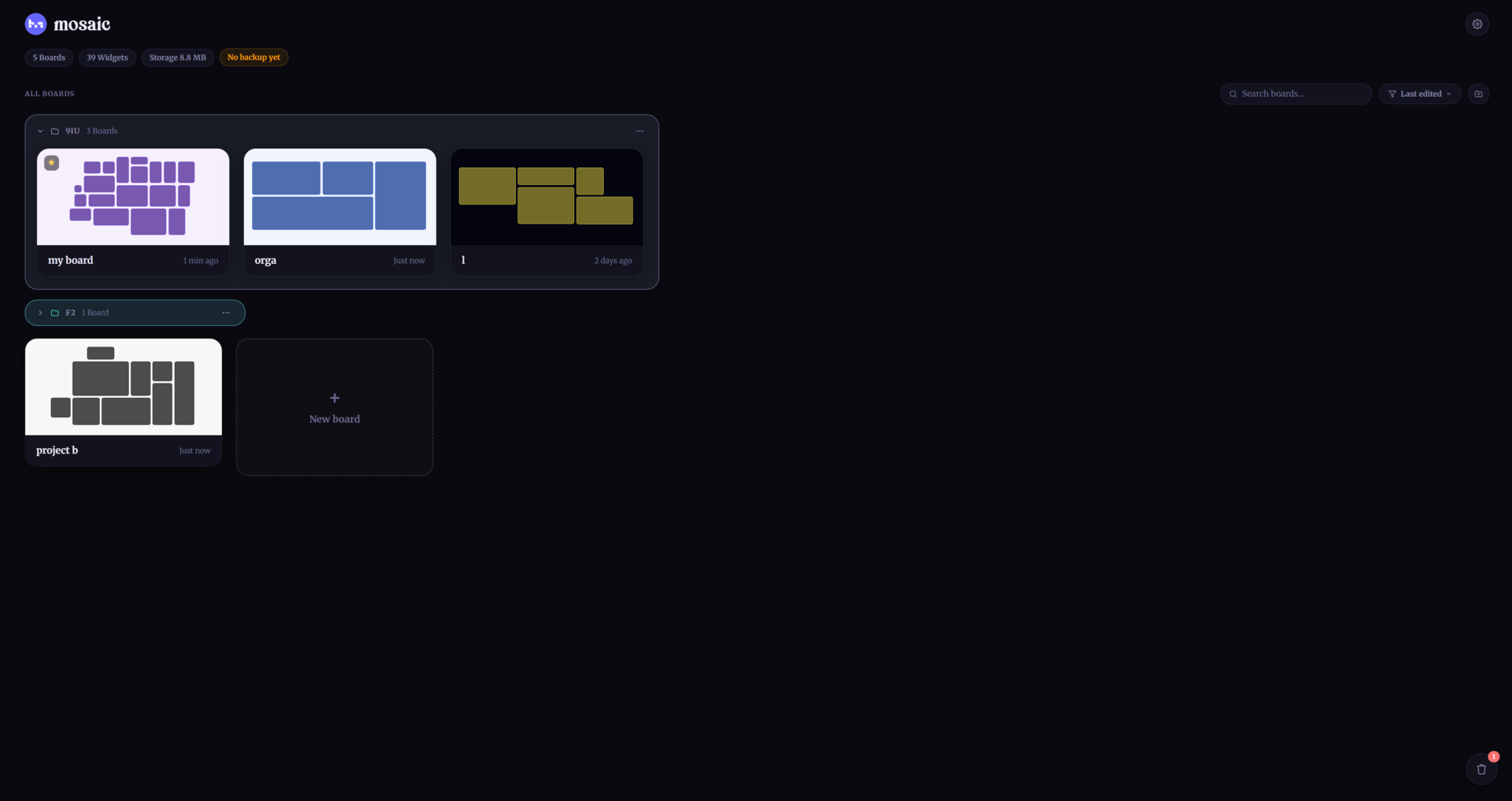
Boards & widgets
|
|
|
|
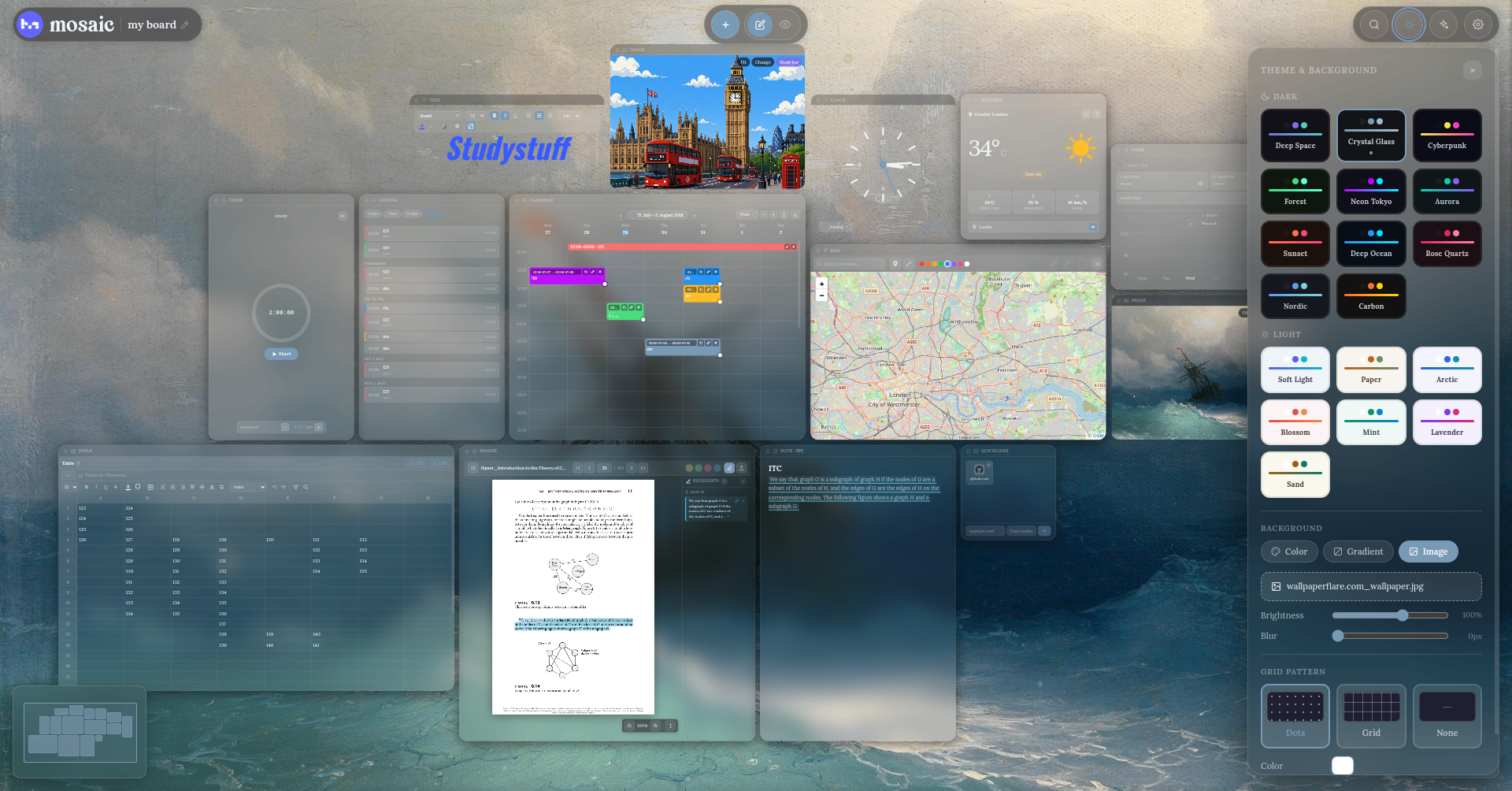
Themes & appearance
|
|
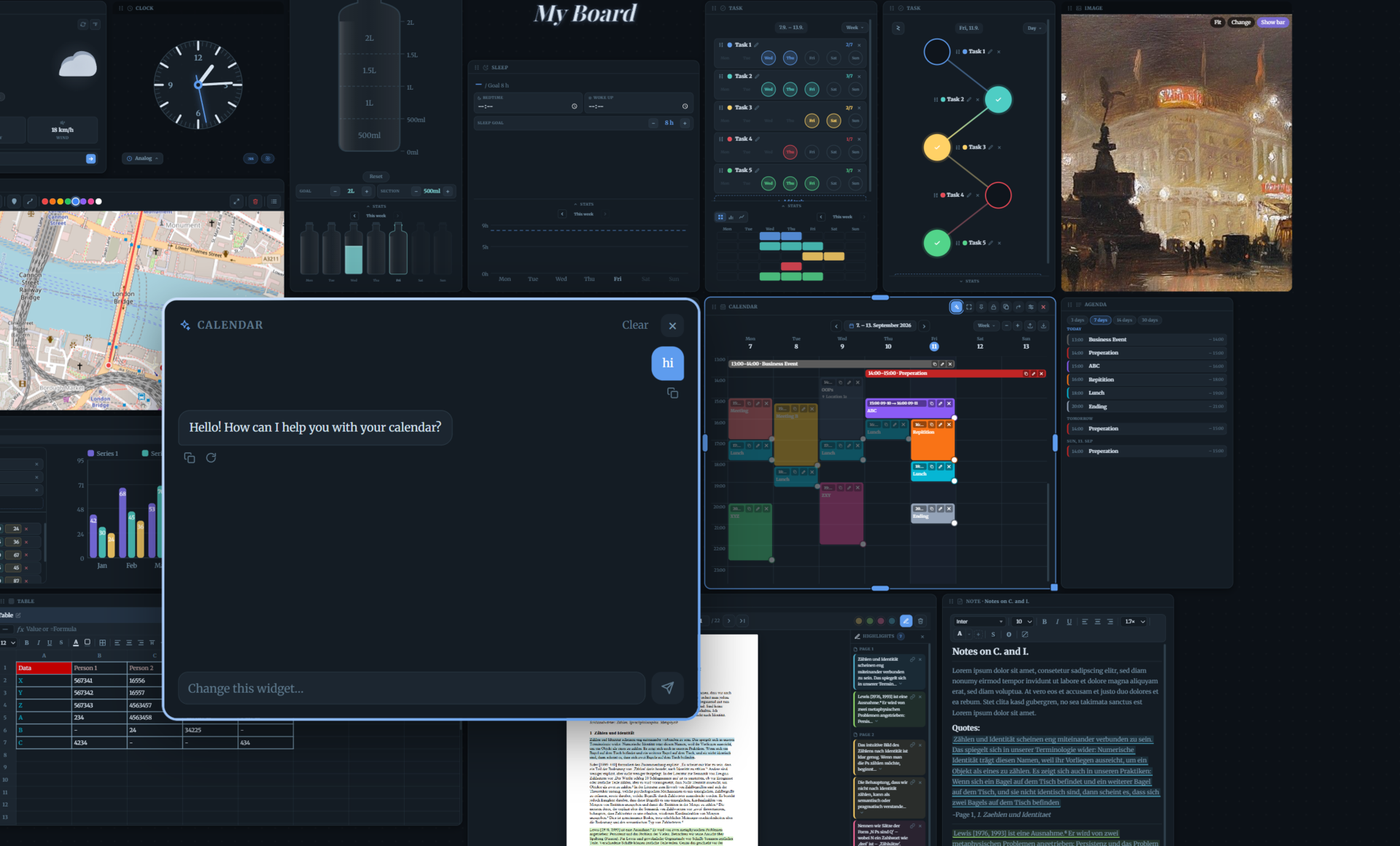
AI assistant (bring your own key)
|
|
A few things that aren't obvious from a feature list:
=SUM(A1:A5), IF, COUNTIF, TEXTJOIN, and 40+ other functions, backed by a hand-written parser (no eval, no arbitrary code execution) — safe to open boards you didn't build yourself..ttf/.otf/.woff2 — it becomes selectable everywhere a font picker shows up, including per-note overrides..ics file into a Calendar widget, or export your events back out as one — recurrence rules, colors, and all..html file and it renders live in a sandboxed iframe — no external URL, no server, no install step. Flip to a built-in code view anytime to see or edit the exact source, or hit reload to restart it. Scripts run, but with no access to cookies/storage from any real origin and no way to reach the rest of the page.Run mosaic locally in about a minute:
git clone https://github.com/Aetherion7/mosaic.git
cd mosaic
npm install
npm run dev
Open http://localhost:3001. That's it — no database, no .env file, no account.
Prefer the packaged desktop app? Grab it from Download, or build it yourself:
npm run electron:dev     # dev mode — hot reload, same as `npm run dev` in an Electron window
npm run electron:pack    # unpacked build for your current OS (for testing)
npm run electron:dist    # installer for your current OS
Cross-platform installers (Windows/macOS/Linux, code-signed if you've set up certificates) are built
automatically by .github/workflows/release.yml whenever a v* tag
is pushed — see GITHUB_SETUP.md for the full release process.
npm ci/package-lock.json)| Command | What it does |
|---|---|
npm run dev | Start the dev server on port 3001 |
npm run build | Production build |
npm start | Run the production build |
npm test | Run the unit test suite (Vitest) |
npm run lint | Lint the codebase |
npm run electron:dev | Run the desktop app against the dev server |
npm run electron:dist | Build a desktop installer for your current OS |
Everything you create — boards, widgets, settings — lives exclusively in your browser's IndexedDB and localStorage. There is no mosaic backend to send it to.
The exceptions, all optional and all documented in-app under Settings → Privacy:
No tracking, no analytics, no ads.
Next.js 16 (App Router) · React 19 · TypeScript · Zustand · IndexedDB · Framer Motion · Tiptap · dnd-kit · react-pdf · epub.js · Leaflet · Electron (desktop) · Vitest
Bug reports, feature ideas, and pull requests are welcome — see CONTRIBUTING.md for how the project is organized and what to know before opening a PR. mosaic is source-available under a noncommercial license (see below); by contributing you agree your changes are licensed under the same terms.
New to GitHub or not sure how forking/PRs work? GITHUB_SETUP.md also covers the basics.
mosaic is free and always will be for personal use. If it's useful to you, a donation helps cover the time that goes into it:
No pressure at all — using it, starring the repo, or reporting a bug is just as appreciated.
mosaic is source-available under the PolyForm Noncommercial License 1.0.0: free to use, modify, and self-host for personal, educational, research, or nonprofit purposes — not for resale or commercial hosting. See LICENSE.md for the full text and a plain-English summary, or open an issue if you're interested in commercial use.





