
Adaptive Prototype Memory: a small prototype learner benchmarked against backprop, plus a chat demo where it learns from a local LLM.
See the codeSee what people are saying (1)
README
JAYCE stands for Jayce Associates Your Categorized Exemplars, inspired by watching a toddler learn toy names through examples and corrections. This project is for reading the code and learning how Adaptive Prototype Memory (APM) works.
APM keeps a limited set of labeled prototypes. Each starts from an exemplar—a specific example saved for comparison—and can change as more examples arrive.
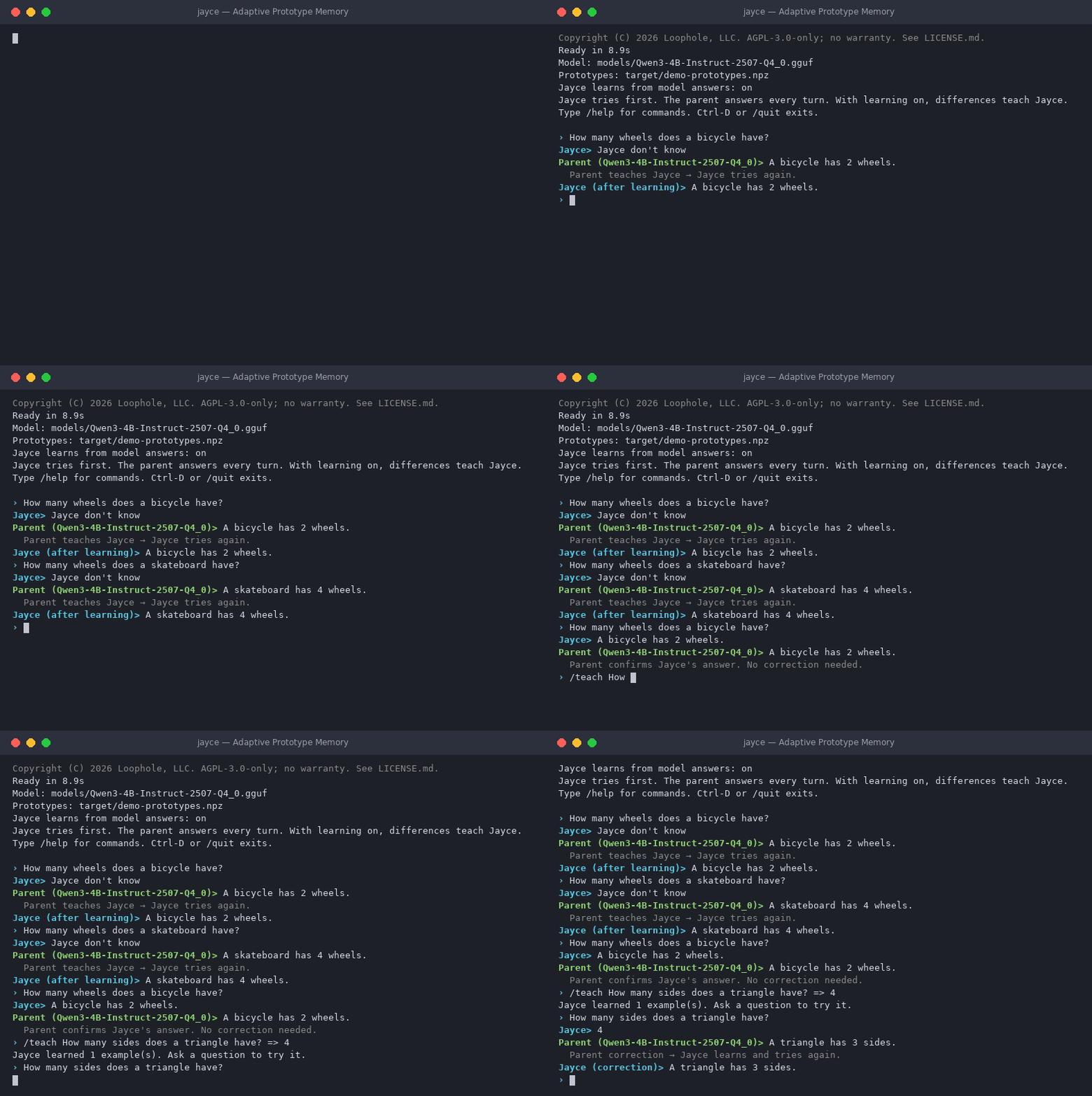
A real session with Qwen3-4B Instruct (Q4_0) as the parent. Model loading is skipped and long waits are shortened.
- Watch Jayce learn: a real chat showing learning, correction, and recall.
- APM vs. backpropagation: accuracy, training time, and memory comparisons.
- Read the code: where to start and what each file does.
Quick start
Requirements: about 4 GB of free memory and 5 GB of disk, which in practice means a computer
with 6 GB of memory or more. Jayce stops before loading the model if the computer does not have
enough memory in total, and on Linux also if too little is free right now, because running out of
memory can freeze the whole computer. Choose a smaller model with --model, close other programs,
or set JAYCE_SKIP_MEMORY_CHECK=1 to load it anyway.
macOS (Apple silicon), Linux, or WSL
Install C++ build tools first: Xcode Command Line Tools on macOS (xcode-select --install)
or build-essential on Ubuntu/WSL.
git clone https://github.com/Loophole-LLC/Jayce.git
cd Jayce
./jayce
The launcher installs uv if needed, sets up Python 3.12 and the dependencies, and downloads Qwen3-4B-Instruct-2507 in 4-bit GGUF format (Q4_K_M, about 2.5 GB). Later runs reuse the cached model, including offline. No Hugging Face login is needed.
Windows (64-bit Intel/AMD)
Install Git, uv, and the Visual Studio C++ build tools from PowerShell:
winget install --id Git.Git -e
winget install --id astral-sh.uv -e
winget install --id Microsoft.VisualStudio.2022.BuildTools --override "--passive --wait --add Microsoft.VisualStudio.Workload.VCTools;includeRecommended"
The last command installs Visual Studio Build Tools with the Desktop development with C++ workload, including the MSVC x64/x86 C++ build tools and a Windows SDK. Jayce needs these to build the llama.cpp backend during setup. The download is large, and Windows may ask you to approve the installer. To install the tools yourself, run the Build Tools installer and select that workload.
Open x64 Native Tools Command Prompt for VS from the Start menu, then run:
git clone https://github.com/Loophole-LLC/Jayce.git
cd Jayce
uv run --locked jayce.py
uv sets up Python and the dependencies; Jayce downloads the same parent model shown above.
After setup, run uv run --locked jayce.py from the Jayce folder in PowerShell to chat again.
Use that command wherever the examples below say ./jayce, and keep commands on one line.
Windows setup errors
Certificate verification errors: Tell uv to use the certificates trusted by Windows:
uv --system-certs run --locked jayce.py
This can help on networks with a company proxy or custom certificates. See uv's certificate documentation.
CMAKE_C_COMPILER or CMAKE_CXX_COMPILER not set: CMake could not configure the C/C++
compiler. Usually the build tools are missing or unavailable in the current terminal.
- Open Visual Studio Installer → Modify and check that the C++ workload and components listed above are installed.
- Open a new x64 Native Tools Command Prompt for VS from the Start menu.
- Run
where.exe cl. It should print a path to Microsoft'scl.execompiler. If it finds nothing, recheck the installation and the terminal you opened. - In that same window, change to the Jayce folder and retry the command above.
The developer prompt sets the compiler paths and SDK environment for you. See Microsoft's build-tools guide.
The default backend uses Metal on supported Macs and CPU on Windows/Linux.
Watch Jayce learn
Jayce tries → the parent answers → APM learns → Jayce tries again.
In this recorded chat, Qwen3-4B Instruct (Q4_0) is the parent model. Jayce starts with empty memory:
› How many wheels does a bicycle have?
Jayce> Jayce don't know
Parent (Qwen3-4B-Instruct-2507-Q4_0)> A bicycle has 2 wheels.
  Parent teaches Jayce → Jayce tries again.
Jayce (after learning)> A bicycle has 2 wheels.

› How many wheels does a skateboard have?
Jayce> Jayce don't know
Parent (Qwen3-4B-Instruct-2507-Q4_0)> A skateboard has 4 wheels.
  Parent teaches Jayce → Jayce tries again.
Jayce (after learning)> A skateboard has 4 wheels.
Ask the bicycle question again, and Jayce remembers:
› How many wheels does a bicycle have?
Jayce> A bicycle has 2 wheels.
Parent (Qwen3-4B-Instruct-2507-Q4_0)> A bicycle has 2 wheels.
  Parent confirms Jayce's answer. No correction needed.
Teach an incorrect answer, then let the parent correct it:
› /teach How many sides does a triangle have? => 4
Jayce learned 1 example(s). Ask a question to try it.

› How many sides does a triangle have?
Jayce> 4
Parent (Qwen3-4B-Instruct-2507-Q4_0)> A triangle has 3 sides.
  Parent correction → Jayce learns and tries again.
Jayce (correction)> A triangle has 3 sides.
The correction remains after restarting with the same prototype file:
› How many sides does a triangle have?
Jayce> A triangle has 3 sides.
Parent (Qwen3-4B-Instruct-2507-Q4_0)> A triangle has three sides.
  Parent correction → Jayce learns and tries again.
Jayce (correction)> A triangle has three sides.
Jayce recalled the corrected answer from the saved file. This time the parent wrote “three” instead of “3”, and answers are compared as text, so Jayce learned that wording too.
Qwen answers every turn using weights learned through backpropagation; those weights stay fixed. It also represents the question and the answer so far as a list of numbers called a context vector. Jayce saves these vectors as prototypes, each labeled with the next token—a piece of text—or the end of the answer. It uses prototype matches to build its reply, including when it retries after learning.
Try the conversation yourself
Start with a new prototype file, then enter the questions and teaching command above:
./jayce --prototype-file target/demo-prototypes.npz
Use /quit and run the same command to check recall after restarting. Choose another filename
to start fresh. The default uses the same 4B Instruct model in Q4_K_M quantization; this
recording used Q4_0. Answers can differ between quantizations and models.
Jayce can also learn the parent's mistakes. /learning off stops automatic teaching
from the parent.
Benchmark results
This Java benchmark compares APM with a neural network that has one hidden layer and learns through backpropagation using Adam. Backpropagation calculates how each weight affects the error; Adam uses those values to update the weights. Neither learner replays old training examples.
The tests use rotated digits, rotated clothing images, and two sets of generated shapes. Each stream passes through twelve phases with changing conditions. Settings are chosen on two random seeds and tested on ten separate seeds. Seeds make the random choices repeatable.
Latest run: September 21, 2026. The full run took 6 minutes 49 seconds on an Apple A18 Pro with 8 GiB RAM, macOS 27.0, and OpenJDK 26.0.1.
Accuracy
Each score is the average accuracy across ten test seeds. The comparisons use:
- Same examples: the same number of training examples.
- Same counted work: similar estimated computation, rather than elapsed time.
- Same memory ceiling: the same examples, with APM's storage capped at the estimated space used by the network's weights and Adam's saved values.
| Test stream | Comparison | APM accuracy | Backprop accuracy |
|---|---|---|---|
| Rotated digits (MNIST) | Same examples | 88.63% | 82.59% |
| Rotated digits (MNIST) | Same counted work | 87.37% | 77.36% |
| Rotated digits (MNIST) | Same memory ceiling | 87.88% | 82.59% |
| Rotated clothing (Fashion-MNIST) | Same examples | 69.28% | 71.75% |
| Rotated clothing (Fashion-MNIST) | Same counted work | 68.33% | 66.23% |
| Rotated clothing (Fashion-MNIST) | Same memory ceiling | 68.05% | 71.75% |
| Shapes, mixed | Same examples | 89.33% | 97.36% |
| Shapes, mixed | Same counted work | 86.56% | 94.05% |
| Shapes, mixed | Same memory ceiling | 86.16% | 97.36% |
| Shapes, shuffled pixels | Same examples | 92.13% | 94.65% |
| Shapes, shuffled pixels | Same counted work | 89.83% | 91.50% |
| Shapes, shuffled pixels | Same memory ceiling | 86.26% | 94.65% |
Training time
Average training time for the same examples comparison: 12,288 examples per test seed. Times are in milliseconds (ms).
| Test stream | APM training time (ms) | Backprop training time (ms) |
|---|---|---|
| Rotated digits (MNIST) | 72.56 | 279.05 |
| Rotated clothing (Fashion-MNIST) | 77.73 | 308.14 |
| Shapes, mixed | 17.05 | 26.59 |
| Shapes, shuffled pixels | 19.07 | 31.25 |
These times cover learner updates only. They exclude data preparation, predictions, and accuracy checks. Background desktop activity was not controlled, so timings may vary between runs.
What we learned
- APM had higher accuracy in all three digit comparisons, including with a memory cap.
- Backprop had higher accuracy in 8 of 12 comparisons. It won every shape comparison and the clothing tests with equal examples or memory. APM won the clothing test with equal counted work.
- APM's training calls were about 1.6–4.0 times faster in the four equal-example tests.
- APM used more model memory with equal examples: about 735 versus 466 KiB for the image tests, and 96 versus 52 KiB for the shape tests. These estimates exclude Java overhead and temporary memory. A KiB is 1,024 bytes.
This comparison covers one network and four test streams. It does not establish an overall advantage for APM or measure chat speed. Other prototype methods, nearest-neighbor lookup, and neural networks with replay remain untested.
See the results guide for detailed scores and uncertainty estimates.
Run ./benchmark/run-benchmark with JDK 17 or newer to repeat the comparison.
The benchmark guide explains the settings and output files.
How APM works
In the Java classifier, an input is a list of numbers, such as image pixels. Each label has a few prototype slots:
- Receive an input and its correct label.
- If that label has an empty slot, save a copy of the input.
- Otherwise, move its closest prototype toward the input.
- Predict a label by finding the closest prototype across all labels.
The update is prototype += rate * (input - prototype). With a rate of 0.1, each value moves
one tenth of the way toward the new example.
The chat uses token labels and a shared pool of slots. It keeps distinct contexts separate so the same token can belong to many saved answers. See what gets saved.
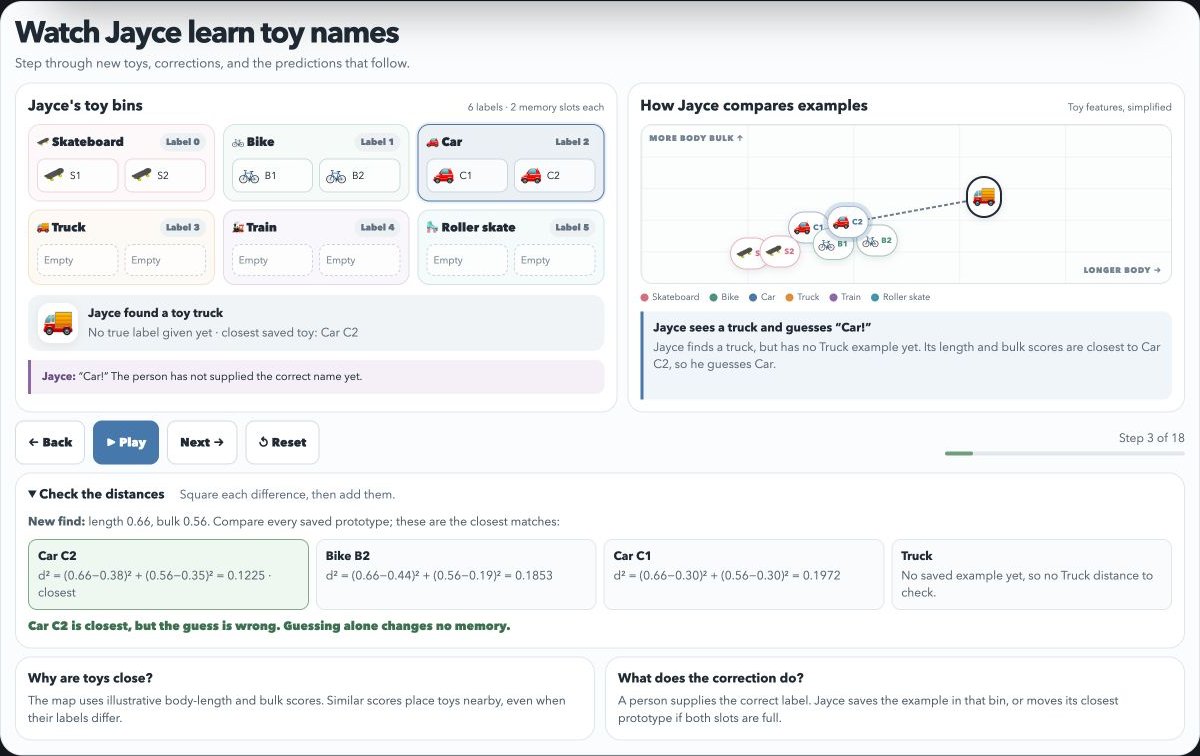
Step through the toy lesson to see examples, corrections, and prototype updates. Its map places toys using illustrative body-length and bulk scores; similar scores put toys close together, even when their labels differ.
Related reading: Exemplar theory.
Read the code
Start with the Java learner, then follow the Python chat:
- JayceMemory.java — the
standalone Java APM learner. Read
train,updateOne, andpredictClassfor the learning rule. - jayce_tokens.py — the Python token-prototype memory, using only NumPy.
TokenMemory.learnsaves and updates prototypes;matchpicks a token label.PrototypeResponder.teachandreplyconnect those steps to whole answers. - jayce.py — start at
ChatSession.answerto follow try → parent answer → learn → retry. The remaining code handles commands and saved files.
Supporting files:
| File | Role |
|---|---|
| jayce_model.py | Load a parent model, generate its answers, and get context vectors |
| jayce_config.py | Choose the default parent model |
| SoftmaxBackpropNetwork.java | The neural network used for comparison |
Use the chat
Run ./jayce to chat, or ./jayce --prompt "What does APM stand for?" for one question.
Normal chat learns from the parent automatically:
| Command | Purpose |
|---|---|
/teach question => answer | Teach one example yourself |
/learn examples/jayce-training.jsonl | Import the included examples |
/learning off or /learning on | Control automatic teaching from the parent |
/stats | Show prototype counts and the last match |
/clear | Clear the parent's conversation history |
/reset-jayce | Clear learned token prototypes |
/save | Save token prototypes now (they are also saved after each lesson) |
/model | Show the loaded model |
/help | Show all commands |
/quit | Exit |
/learning off still allows /teach and /learn. To try the included facts with automatic
teaching off:
./jayce --no-learning --learn examples/jayce-training.jsonl \
  --prototype-file target/import-demo.npz
Ask What is Mira's locker code? The included answer is 7319. In an existing chat, enter
/learning off before importing facts to keep the parent from replacing them.
What gets saved
jayce-prototypes-<model-key>.npz stores context vectors and next-token labels, including an ending label.
The default filename separates models and precision settings automatically; chat startup shows
the active file. Existing jayce-prototypes.npz files are left untouched. To reopen one, select
its original model and pass --prototype-file jayce-prototypes.npz.
Jayce returns an answer only when every token and its ending have a strong match. Otherwise,
it says Jayce don't know.
Jayce uses only the current question, so ask self-contained questions. Rephrased questions may not match saved prototypes. The parent also sees the conversation history. Answers are compared as text, ignoring whitespace; different wording can trigger teaching. Interrupted or length-limited parent answers are not learned.
The chat shares 4,096 slots across all token labels. Distinct contexts get new slots; near-identical repeats update an existing slot at a rate of 0.1. Corrections replace conflicting labels for the same context.
Longer answers need more slots; teaching accepts up to 256 tokens per answer. If a whole answer
cannot fit, that lesson is rejected and the previous memory stays intact. Use a new
--prototype-file or /reset-jayce to start fresh. A strong match can still be wrong.
Choose the parent model
Edit jayce_config.py and restart:
PARENT_MODEL = (
    "hf://bartowski/Qwen_Qwen3-4B-Instruct-2507-GGUF/"
    "Qwen_Qwen3-4B-Instruct-2507-Q4_K_M.gguf"
)
Remote GGUF references use hf://owner/repo/file.gguf; Jayce downloads just that file and
caches it. Hugging Face Transformers model IDs and local GGUF paths also work.
Use --model to override the config for one run:
./jayce --model "/path/to/model.gguf"
Both backends are included in the normal install. The model must be supported by Transformers
or llama.cpp and supply context vectors. For Transformers only, JAYCE_DTYPE=float16 selects
half precision; otherwise it uses float32. GGUF precision is determined by the downloaded file.
If you specify --prototype-file yourself, use separate files for different models or precision,
because their saved vectors are incompatible.
Run the checks
uv run python -m unittest discover -s tests -v
./benchmark/benchmark-java smoke
The Python checks cover learning, corrections, saved memories, and the chat loop. Set
JAYCE_TEST_MODEL=default to include real-model checks with the configured parent, including
skateboard/bicycle answers, learning, and recall after saving. You can also set it to another
model ID or GGUF reference for backend checks. The Java checks verify
backpropagation gradients and basic learner behavior; they need JDK 17 or newer.
Dependencies live in pyproject.toml; uv.lock fixes their versions.
License
Copyright (C) 2026 Loophole, LLC. Licensed under AGPL-3.0-only, without warranty. See NOTICE.md for coverage. Downloaded models, datasets, and dependencies keep their own licenses.
Contributors

1 commits
Similar repos


Languages
Python
50.9%
Java
44.9%
Shell
4.2%
Adaptive Prototype Memory: a small prototype learner benchmarked against backprop, plus a chat demo where it learns from a local LLM.
See the codeSee what people are saying (1)
README
JAYCE stands for Jayce Associates Your Categorized Exemplars, inspired by watching a toddler learn toy names through examples and corrections. This project is for reading the code and learning how Adaptive Prototype Memory (APM) works.
APM keeps a limited set of labeled prototypes. Each starts from an exemplar—a specific example saved for comparison—and can change as more examples arrive.
A real session with Qwen3-4B Instruct (Q4_0) as the parent. Model loading is skipped and long waits are shortened.
- Watch Jayce learn: a real chat showing learning, correction, and recall.
- APM vs. backpropagation: accuracy, training time, and memory comparisons.
- Read the code: where to start and what each file does.
Quick start
Requirements: about 4 GB of free memory and 5 GB of disk, which in practice means a computer
with 6 GB of memory or more. Jayce stops before loading the model if the computer does not have
enough memory in total, and on Linux also if too little is free right now, because running out of
memory can freeze the whole computer. Choose a smaller model with --model, close other programs,
or set JAYCE_SKIP_MEMORY_CHECK=1 to load it anyway.
macOS (Apple silicon), Linux, or WSL
Install C++ build tools first: Xcode Command Line Tools on macOS (xcode-select --install)
or build-essential on Ubuntu/WSL.
git clone https://github.com/Loophole-LLC/Jayce.git
cd Jayce
./jayce
The launcher installs uv if needed, sets up Python 3.12 and the dependencies, and downloads Qwen3-4B-Instruct-2507 in 4-bit GGUF format (Q4_K_M, about 2.5 GB). Later runs reuse the cached model, including offline. No Hugging Face login is needed.
Windows (64-bit Intel/AMD)
Install Git, uv, and the Visual Studio C++ build tools from PowerShell:
winget install --id Git.Git -e
winget install --id astral-sh.uv -e
winget install --id Microsoft.VisualStudio.2022.BuildTools --override "--passive --wait --add Microsoft.VisualStudio.Workload.VCTools;includeRecommended"
The last command installs Visual Studio Build Tools with the Desktop development with C++ workload, including the MSVC x64/x86 C++ build tools and a Windows SDK. Jayce needs these to build the llama.cpp backend during setup. The download is large, and Windows may ask you to approve the installer. To install the tools yourself, run the Build Tools installer and select that workload.
Open x64 Native Tools Command Prompt for VS from the Start menu, then run:
git clone https://github.com/Loophole-LLC/Jayce.git
cd Jayce
uv run --locked jayce.py
uv sets up Python and the dependencies; Jayce downloads the same parent model shown above.
After setup, run uv run --locked jayce.py from the Jayce folder in PowerShell to chat again.
Use that command wherever the examples below say ./jayce, and keep commands on one line.
Windows setup errors
Certificate verification errors: Tell uv to use the certificates trusted by Windows:
uv --system-certs run --locked jayce.py
This can help on networks with a company proxy or custom certificates. See uv's certificate documentation.
CMAKE_C_COMPILER or CMAKE_CXX_COMPILER not set: CMake could not configure the C/C++
compiler. Usually the build tools are missing or unavailable in the current terminal.
- Open Visual Studio Installer → Modify and check that the C++ workload and components listed above are installed.
- Open a new x64 Native Tools Command Prompt for VS from the Start menu.
- Run
where.exe cl. It should print a path to Microsoft'scl.execompiler. If it finds nothing, recheck the installation and the terminal you opened. - In that same window, change to the Jayce folder and retry the command above.
The developer prompt sets the compiler paths and SDK environment for you. See Microsoft's build-tools guide.
The default backend uses Metal on supported Macs and CPU on Windows/Linux.
Watch Jayce learn
Jayce tries → the parent answers → APM learns → Jayce tries again.
In this recorded chat, Qwen3-4B Instruct (Q4_0) is the parent model. Jayce starts with empty memory:
› How many wheels does a bicycle have?
Jayce> Jayce don't know
Parent (Qwen3-4B-Instruct-2507-Q4_0)> A bicycle has 2 wheels.
  Parent teaches Jayce → Jayce tries again.
Jayce (after learning)> A bicycle has 2 wheels.

› How many wheels does a skateboard have?
Jayce> Jayce don't know
Parent (Qwen3-4B-Instruct-2507-Q4_0)> A skateboard has 4 wheels.
  Parent teaches Jayce → Jayce tries again.
Jayce (after learning)> A skateboard has 4 wheels.
Ask the bicycle question again, and Jayce remembers:
› How many wheels does a bicycle have?
Jayce> A bicycle has 2 wheels.
Parent (Qwen3-4B-Instruct-2507-Q4_0)> A bicycle has 2 wheels.
  Parent confirms Jayce's answer. No correction needed.
Teach an incorrect answer, then let the parent correct it:
› /teach How many sides does a triangle have? => 4
Jayce learned 1 example(s). Ask a question to try it.

› How many sides does a triangle have?
Jayce> 4
Parent (Qwen3-4B-Instruct-2507-Q4_0)> A triangle has 3 sides.
  Parent correction → Jayce learns and tries again.
Jayce (correction)> A triangle has 3 sides.
The correction remains after restarting with the same prototype file:
› How many sides does a triangle have?
Jayce> A triangle has 3 sides.
Parent (Qwen3-4B-Instruct-2507-Q4_0)> A triangle has three sides.
  Parent correction → Jayce learns and tries again.
Jayce (correction)> A triangle has three sides.
Jayce recalled the corrected answer from the saved file. This time the parent wrote “three” instead of “3”, and answers are compared as text, so Jayce learned that wording too.
Qwen answers every turn using weights learned through backpropagation; those weights stay fixed. It also represents the question and the answer so far as a list of numbers called a context vector. Jayce saves these vectors as prototypes, each labeled with the next token—a piece of text—or the end of the answer. It uses prototype matches to build its reply, including when it retries after learning.
Try the conversation yourself
Start with a new prototype file, then enter the questions and teaching command above:
./jayce --prototype-file target/demo-prototypes.npz
Use /quit and run the same command to check recall after restarting. Choose another filename
to start fresh. The default uses the same 4B Instruct model in Q4_K_M quantization; this
recording used Q4_0. Answers can differ between quantizations and models.
Jayce can also learn the parent's mistakes. /learning off stops automatic teaching
from the parent.
Benchmark results
This Java benchmark compares APM with a neural network that has one hidden layer and learns through backpropagation using Adam. Backpropagation calculates how each weight affects the error; Adam uses those values to update the weights. Neither learner replays old training examples.
The tests use rotated digits, rotated clothing images, and two sets of generated shapes. Each stream passes through twelve phases with changing conditions. Settings are chosen on two random seeds and tested on ten separate seeds. Seeds make the random choices repeatable.
Latest run: September 21, 2026. The full run took 6 minutes 49 seconds on an Apple A18 Pro with 8 GiB RAM, macOS 27.0, and OpenJDK 26.0.1.
Accuracy
Each score is the average accuracy across ten test seeds. The comparisons use:
- Same examples: the same number of training examples.
- Same counted work: similar estimated computation, rather than elapsed time.
- Same memory ceiling: the same examples, with APM's storage capped at the estimated space used by the network's weights and Adam's saved values.
| Test stream | Comparison | APM accuracy | Backprop accuracy |
|---|---|---|---|
| Rotated digits (MNIST) | Same examples | 88.63% | 82.59% |
| Rotated digits (MNIST) | Same counted work | 87.37% | 77.36% |
| Rotated digits (MNIST) | Same memory ceiling | 87.88% | 82.59% |
| Rotated clothing (Fashion-MNIST) | Same examples | 69.28% | 71.75% |
| Rotated clothing (Fashion-MNIST) | Same counted work | 68.33% | 66.23% |
| Rotated clothing (Fashion-MNIST) | Same memory ceiling | 68.05% | 71.75% |
| Shapes, mixed | Same examples | 89.33% | 97.36% |
| Shapes, mixed | Same counted work | 86.56% | 94.05% |
| Shapes, mixed | Same memory ceiling | 86.16% | 97.36% |
| Shapes, shuffled pixels | Same examples | 92.13% | 94.65% |
| Shapes, shuffled pixels | Same counted work | 89.83% | 91.50% |
| Shapes, shuffled pixels | Same memory ceiling | 86.26% | 94.65% |
Training time
Average training time for the same examples comparison: 12,288 examples per test seed. Times are in milliseconds (ms).
| Test stream | APM training time (ms) | Backprop training time (ms) |
|---|---|---|
| Rotated digits (MNIST) | 72.56 | 279.05 |
| Rotated clothing (Fashion-MNIST) | 77.73 | 308.14 |
| Shapes, mixed | 17.05 | 26.59 |
| Shapes, shuffled pixels | 19.07 | 31.25 |
These times cover learner updates only. They exclude data preparation, predictions, and accuracy checks. Background desktop activity was not controlled, so timings may vary between runs.
What we learned
- APM had higher accuracy in all three digit comparisons, including with a memory cap.
- Backprop had higher accuracy in 8 of 12 comparisons. It won every shape comparison and the clothing tests with equal examples or memory. APM won the clothing test with equal counted work.
- APM's training calls were about 1.6–4.0 times faster in the four equal-example tests.
- APM used more model memory with equal examples: about 735 versus 466 KiB for the image tests, and 96 versus 52 KiB for the shape tests. These estimates exclude Java overhead and temporary memory. A KiB is 1,024 bytes.
This comparison covers one network and four test streams. It does not establish an overall advantage for APM or measure chat speed. Other prototype methods, nearest-neighbor lookup, and neural networks with replay remain untested.
See the results guide for detailed scores and uncertainty estimates.
Run ./benchmark/run-benchmark with JDK 17 or newer to repeat the comparison.
The benchmark guide explains the settings and output files.
How APM works
In the Java classifier, an input is a list of numbers, such as image pixels. Each label has a few prototype slots:
- Receive an input and its correct label.
- If that label has an empty slot, save a copy of the input.
- Otherwise, move its closest prototype toward the input.
- Predict a label by finding the closest prototype across all labels.
The update is prototype += rate * (input - prototype). With a rate of 0.1, each value moves
one tenth of the way toward the new example.
The chat uses token labels and a shared pool of slots. It keeps distinct contexts separate so the same token can belong to many saved answers. See what gets saved.
Step through the toy lesson to see examples, corrections, and prototype updates. Its map places toys using illustrative body-length and bulk scores; similar scores put toys close together, even when their labels differ.
Related reading: Exemplar theory.
Read the code
Start with the Java learner, then follow the Python chat:
- JayceMemory.java — the
standalone Java APM learner. Read
train,updateOne, andpredictClassfor the learning rule. - jayce_tokens.py — the Python token-prototype memory, using only NumPy.
TokenMemory.learnsaves and updates prototypes;matchpicks a token label.PrototypeResponder.teachandreplyconnect those steps to whole answers. - jayce.py — start at
ChatSession.answerto follow try → parent answer → learn → retry. The remaining code handles commands and saved files.
Supporting files:
| File | Role |
|---|---|
| jayce_model.py | Load a parent model, generate its answers, and get context vectors |
| jayce_config.py | Choose the default parent model |
| SoftmaxBackpropNetwork.java | The neural network used for comparison |
Use the chat
Run ./jayce to chat, or ./jayce --prompt "What does APM stand for?" for one question.
Normal chat learns from the parent automatically:
| Command | Purpose |
|---|---|
/teach question => answer | Teach one example yourself |
/learn examples/jayce-training.jsonl | Import the included examples |
/learning off or /learning on | Control automatic teaching from the parent |
/stats | Show prototype counts and the last match |
/clear | Clear the parent's conversation history |
/reset-jayce | Clear learned token prototypes |
/save | Save token prototypes now (they are also saved after each lesson) |
/model | Show the loaded model |
/help | Show all commands |
/quit | Exit |
/learning off still allows /teach and /learn. To try the included facts with automatic
teaching off:
./jayce --no-learning --learn examples/jayce-training.jsonl \
  --prototype-file target/import-demo.npz
Ask What is Mira's locker code? The included answer is 7319. In an existing chat, enter
/learning off before importing facts to keep the parent from replacing them.
What gets saved
jayce-prototypes-<model-key>.npz stores context vectors and next-token labels, including an ending label.
The default filename separates models and precision settings automatically; chat startup shows
the active file. Existing jayce-prototypes.npz files are left untouched. To reopen one, select
its original model and pass --prototype-file jayce-prototypes.npz.
Jayce returns an answer only when every token and its ending have a strong match. Otherwise,
it says Jayce don't know.
Jayce uses only the current question, so ask self-contained questions. Rephrased questions may not match saved prototypes. The parent also sees the conversation history. Answers are compared as text, ignoring whitespace; different wording can trigger teaching. Interrupted or length-limited parent answers are not learned.
The chat shares 4,096 slots across all token labels. Distinct contexts get new slots; near-identical repeats update an existing slot at a rate of 0.1. Corrections replace conflicting labels for the same context.
Longer answers need more slots; teaching accepts up to 256 tokens per answer. If a whole answer
cannot fit, that lesson is rejected and the previous memory stays intact. Use a new
--prototype-file or /reset-jayce to start fresh. A strong match can still be wrong.
Choose the parent model
Edit jayce_config.py and restart:
PARENT_MODEL = (
    "hf://bartowski/Qwen_Qwen3-4B-Instruct-2507-GGUF/"
    "Qwen_Qwen3-4B-Instruct-2507-Q4_K_M.gguf"
)
Remote GGUF references use hf://owner/repo/file.gguf; Jayce downloads just that file and
caches it. Hugging Face Transformers model IDs and local GGUF paths also work.
Use --model to override the config for one run:
./jayce --model "/path/to/model.gguf"
Both backends are included in the normal install. The model must be supported by Transformers
or llama.cpp and supply context vectors. For Transformers only, JAYCE_DTYPE=float16 selects
half precision; otherwise it uses float32. GGUF precision is determined by the downloaded file.
If you specify --prototype-file yourself, use separate files for different models or precision,
because their saved vectors are incompatible.
Run the checks
uv run python -m unittest discover -s tests -v
./benchmark/benchmark-java smoke
The Python checks cover learning, corrections, saved memories, and the chat loop. Set
JAYCE_TEST_MODEL=default to include real-model checks with the configured parent, including
skateboard/bicycle answers, learning, and recall after saving. You can also set it to another
model ID or GGUF reference for backend checks. The Java checks verify
backpropagation gradients and basic learner behavior; they need JDK 17 or newer.
Dependencies live in pyproject.toml; uv.lock fixes their versions.
License
Copyright (C) 2026 Loophole, LLC. Licensed under AGPL-3.0-only, without warranty. See NOTICE.md for coverage. Downloaded models, datasets, and dependencies keep their own licenses.
Similar repos
Contributors
1 commits
Languages
Python
50.9%
Java
44.9%
Shell
4.2%