
Run Jev-style typed decisions locally on your Mac with low RAM usage and fast responses
Python
2
3 commits
updated Sep 21, 2026
See what people are saying (1)
README
Laya MPS
Run Jev-style typed decisions locally on your Mac with low RAM usage and fast responses.
Laya delivers typed decisions with ~32 ms median latency using ~2.1 GiB RAM on M5 Pro, with a slower ~0.74 GiB mode for lower memory use.
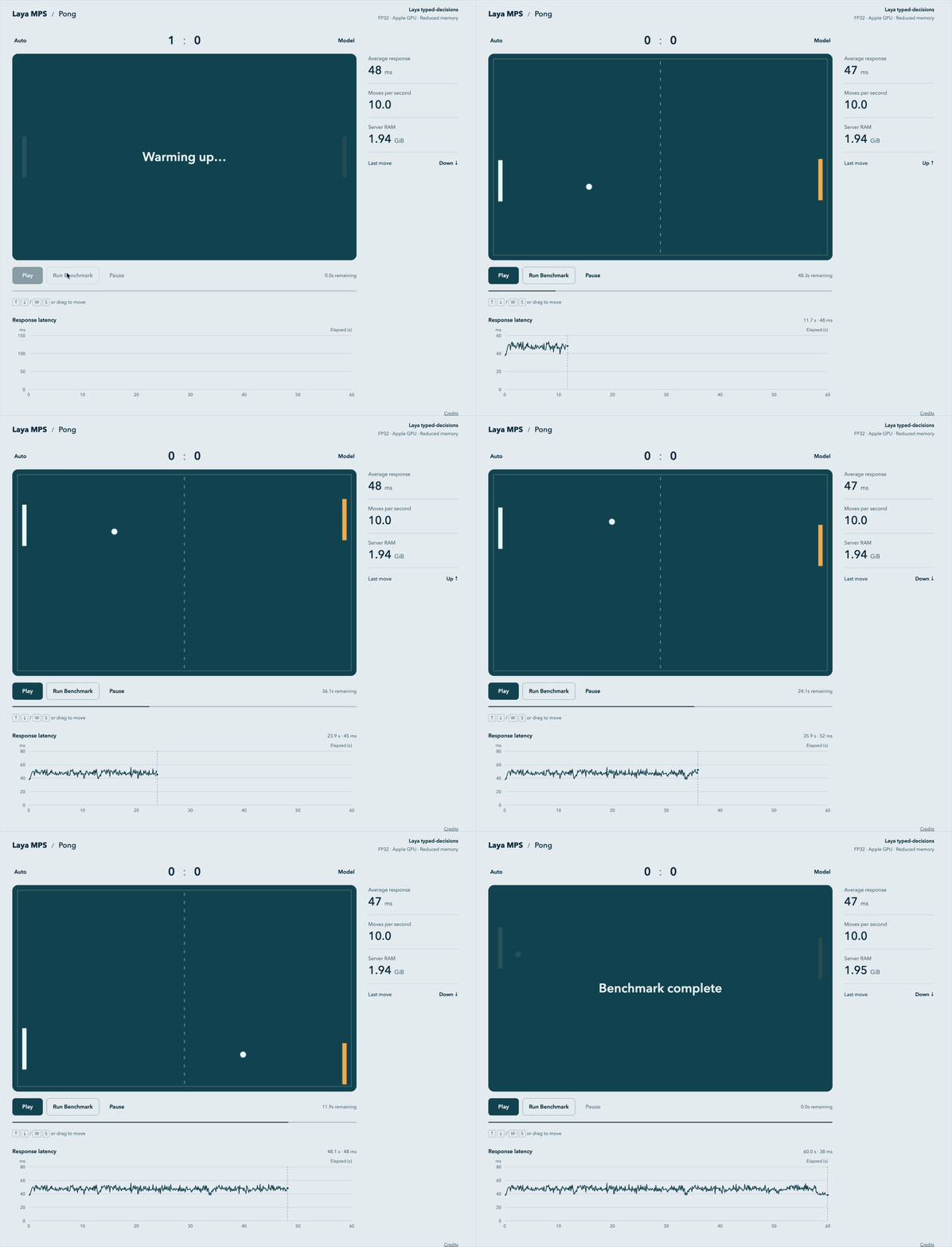
MPS stands for Metal Performance Shaders, which PyTorch uses to run Laya on your Mac's GPU.
Laya typed-decisions chooses options, scores inputs, and estimates whether statements are true. The English model specializes in customer service, invoices, security incidents, and agent traces. It is not a general-purpose language model. Model comparison and benchmarks.
Requirements
- Apple Silicon Mac (M1 or newer), macOS 14+.
- Git and uv. uv installs Python 3.12 if needed.
- Allow 4 GB of free disk space for the runtime, download cache, and ~843 MB model.
Get started
Clone the repository and start the server:
git clone https://github.com/afshinm/laya-mps.git
cd laya-mps
./scripts/serve.sh
The first run installs dependencies and downloads the model. Open the demo and click Play or Run Benchmark. The benchmark runs for 60 seconds and plots response latency.
The server runs on 127.0.0.1:8000. Later runs use local files and inference
works offline. Stop it with Ctrl+C. To update a clone, stop the server,
run git pull, then run the script again.
Memory settings
All settings run the same complete model in FP32. Measured on an M5 Pro, 24 GiB RAM, macOS 26.4:
| Setting | Peak process RAM | Median decision latency |
|---|---|---|
minimal | 0.74 GiB | 171 ms |
reduced (default) | 2.11 GiB | 32 ms |
full | 2.30 GiB | 32 ms |
RAM is the peak across the benchmark suite, excluding macOS, the browser, and other apps. Latency uses fixed Pong inputs and excludes HTTP. All settings matched exactly on 260/260 decisions, including probabilities. Full measurements.
The default keeps transformer layers in RAM and reads embeddings from disk.
minimal also streams layers from disk; full keeps all weights in RAM.
To change the setting, stop the server and restart:
./scripts/serve.sh --memory minimal
How memory savings work
Resident weights load directly into their final FP32 allocation, avoiding a full host-model copy. The checkpoint stores 16-bit values; expanding them to FP32 preserves their values. Computation stays in FP32 in every mode.
Disk embedding lookups fetch only the needed token rows, combine adjacent reads,
and restore the original token order. A 1 MiB row cache keeps the 196.75 MiB FP32
embedding table off the GPU in minimal and reduced.
minimal executes all 28 encoder layers and two decision-head layers through
shared buffers: 24.03 MiB on the host and 48.05 MiB on the GPU. Each forward
requests about 702.66 MiB of layer bytes. GPU work finishes before buffer reuse.
Multiple questions can require multiple forwards, which adds disk-read latency.
F_NOCACHE is requested on macOS, but OS caches may still serve reads; logical
read volume is not physical SSD traffic.
The runtime defaults PYTORCH_MPS_LOW_WATERMARK_RATIO to 0.00001 before GPU
allocation to encourage smaller Metal heaps and earlier reclamation. Explicit
environment values take precedence. This is a soft watermark, not a RAM limit;
the hard high watermark stays at its runtime default. When using Python directly,
create the engine before other MPS allocations. Effective settings appear in
diagnostics=true responses.
Implementation references: Laya source, MPS allocator, PyTorch settings, Safetensors format.
Use the API
With the server running, choose a team for a support ticket:
curl --fail-with-body -sS http://127.0.0.1:8000/v1/decisions \
  -H 'Content-Type: application/json' \
  --data-raw '{
    "state": "The export page returns HTTP 500. Our team cannot finish its work.",
    "questions": {
      "owner": {
        "type": "choice",
        "instructions": "Which team should investigate this report?",
        "criteria": {
          "billing": "Payments and invoices",
          "engineering": "Software failures",
          "unknown": "Insufficient information"
        }
      }
    }
  }'
Example response:
{
  "model": "convaiinnovations/laya-typed-decisions",
  "answers": {
    "owner": {
      "type": "choice",
      "choice": "engineering",
      "probabilities": {
        "billing": 0.06904838234186172,
        "engineering": 0.6391704082489014,
        "unknown": 0.29178112745285034
      },
      "confidence": 0.24445859127951464
    }
  }
}
Check whether work is blocked and score the impact in one request:
curl --fail-with-body -sS http://127.0.0.1:8000/v1/decisions \
  -H 'Content-Type: application/json' \
  --data-raw '{
    "state": "The export page returns HTTP 500. Our team cannot finish its work.",
    "questions": {
      "blocked": {
        "type": "noul",
        "instructions": "Does the report say that work cannot proceed?"
      },
      "severity": {
        "type": "score",
        "instructions": "Rate the operational impact described in the report.",
        "levels": [
          "Cosmetic issue with no work affected",
          "Some inconvenience but work can proceed",
          "Work is blocked for the whole team"
        ]
      }
    }
  }'
Example response:
{
  "model": "convaiinnovations/laya-typed-decisions",
  "answers": {
    "blocked": {
      "type": "noul",
      "noul": 0.7066293954849243
    },
    "severity": {
      "type": "score",
      "score": 1.786898910999298,
      "probabilities": [
        0.019407516345381737,
        0.17428618669509888,
        0.8063063621520996
      ],
      "legend": {
        "0": "Cosmetic issue with no work affected",
        "1": "Some inconvenience but work can proceed",
        "2": "Work is blocked for the whole team"
      },
      "confidence": 0.4951949684505006
    }
  }
}
Responses contain model and typed answers. choice selects a label, noul
is the probability of true (0–1), and score is a probability-weighted level
number (0–2 in this example). Confidence describes how concentrated the
probabilities are; it does not establish correctness. Evaluate the model on
your own inputs before relying on it.
Timing and diagnostics
Add ?metrics=true to include engine evaluation time and current server-process
RAM. The demo measures full HTTP response time separately. Memory is physical
footprint on macOS, or RSS on CPU platforms without that measurement; it is
not peak RAM or whole-machine RAM.
curl --fail-with-body -sS 'http://127.0.0.1:8000/v1/decisions?metrics=true' \
  -H 'Content-Type: application/json' \
  --data-raw '{
    "state": "The export page crashes. Our team cannot finish its work.",
    "questions": {
      "blocked": {
        "type": "noul",
        "instructions": "Does the report say that work cannot proceed?"
      }
    }
  }'
Example response (timing and memory vary):
{
  "model": "convaiinnovations/laya-typed-decisions",
  "answers": {
    "blocked": {
      "type": "noul",
      "noul": 0.6566364169120789
    }
  },
  "metrics": {
    "request_ms": 20.240125013515353,
    "memory_bytes": 2068972792
  }
}
Add ?diagnostics=true for token counts, temperatures, logits, native
probabilities, and auxiliary action probability, plus runtime versions,
timing, memory snapshots, and storage I/O. Both query options can be combined.
Native Noul probabilities are ordered [false, true]; the public noul value
is the probability of true. The auxiliary action probability is a separate head.
API reference and limits
Base URL: http://127.0.0.1:8000. No API key is needed. The server accepts local
connections; cross-origin browser access is not enabled.
| Endpoint | Returns |
|---|---|
GET /health | {"status":"ready","busy":false} |
GET /v1/config | Model, revision, memory setting, device, precision, and limits |
POST /v1/decisions | Model identifier and typed answers |
GET /docs | Interactive API reference; UI assets load from a CDN |
GET /openapi.json | API schema, available offline |
GET /demo/ | Pong and the latency benchmark; no CDN assets |
Send Content-Type: application/json. state accepts finite JSON and
questions contains 1–16 named questions. Optional top-level instructions
apply to every question. Questions run independently.
| Type | Input | Answer |
|---|---|---|
choice | criteria: 2–26 labels with descriptions | Label, probabilities, confidence |
score | levels: 2–10 descriptions, low to high | Weighted zero-based score, probabilities, legend, confidence |
noul | Optional criteria with false and/or true descriptions | Probability of true |
Instructions and descriptions are strings. Score probabilities follow level
order. The default model allows 1,024 formatted tokens per question; the optional
english checkpoint allows 512. Formatting includes the state, instructions,
and options. Inputs that would be shortened are rejected.
| Status | Meaning |
|---|---|
400 | Invalid host, encoding, or unparseable body |
413 | Body exceeds the default 1 MiB limit |
422 | Invalid fields, options, JSON, or context overflow |
503 | Inference is busy or model execution failed |
One inference runs at a time. A busy response includes Retry-After: 1; health
and configuration remain available. Runtime settings are chosen at startup.
The X-Laya-MPS-Config header identifies the active configuration on config and
decision responses, allowing the demo to detect changes during a run.
The answer types follow Jev's typed decisions.
This API has its own request limits, Score levels field, and probability-list
format; it is not a drop-in Jev endpoint.
CLI and setup
Save the JSON payload from a curl example as request.json to evaluate it
without starting a server:
uv run --locked laya-mps decide request.json --download
uv run --locked laya-mps decide request.json --metrics
Pass server options to scripts/serve.sh. Use --port 8001 if port 8000 is busy,
--checkpoint english to evaluate the original English model, or
--model-dir PATH to use another model directory. --device cpu is an explicit fallback;
the published performance numbers use the Mac GPU. The default
--question-batch-size 1 limits peak RAM. List all options with
uv run --locked laya-mps serve --help.
Setup checks and offline startup
uv run --locked laya-mps doctor
uv run --locked laya-mps setup
UV_OFFLINE=1 HF_HUB_OFFLINE=1 TRANSFORMERS_OFFLINE=1 ./scripts/serve.sh
doctor checks GPU availability and model readiness. setup downloads the
pinned model revision. Models live in .models/ unless --model-dir is set;
the helper script always runs from the repository root. serve --download
repairs incomplete installations and reuses complete ones. The setup marker is
written only after all required files are present. There is no automatic model
or device fallback.
Use a normal terminal if a restricted environment cannot access Metal. Setup requires internet access and Git; the final command checks fully offline startup after dependencies and model files have been installed.
Development
Use Python 3.12 and Node.js 22+. From the repository root:
uv sync --locked
uv run --locked ruff check src tests benchmarks scripts
uv run --locked ruff format --check src tests benchmarks scripts
uv run --locked pytest -q
node --test tests/test_demo.mjs
uv build
uv run --no-sync python scripts/check_package.py
Tests use CPU fixtures and need no model download. Tokenization tests use the local tokenizer when available, otherwise a small test tokenizer. CI runs on macOS and tests the installed wheel and bundled demo assets. For GPU measurements, see benchmark reproduction.
uv.lock pins dependencies; laya_setup.py pins Laya
source and model revisions. --locked fails if metadata and the lockfile disagree
instead of updating dependencies. Format Python changes with ruff format.
Inference changes must pass the full memory comparison; demo changes must update
the shared asset revision so browsers cannot mix versions.
Release packages
uv build creates a wheel and source archive in dist/. The package check
verifies their contents, licenses, entry point, executable launcher, and reviewed
benchmark reports. It scans benchmark JSON for common credentials and private
paths, then prints artifact hashes.
Test the built wheel with the locked dependencies:
uv pip install --python .venv/bin/python --no-deps --reinstall-package laya-mps dist/laya_mps-0.1.0-py3-none-any.whl
uv run --no-sync laya-mps serve --help
uv run --no-sync pytest -q
uv sync --locked
--no-sync keeps uv from replacing the wheel with the source checkout during
testing; the final command restores the editable install. The supported setup
for this release is cloning the repository and running scripts/serve.sh.
The wheel alone does not include the dependency lockfile.
Weights, virtual environments, logs, and scratch results are excluded from
packages. Published reports live in benchmarks/results/. New runs go to the
ignored root results/ directory; review them before copying them into the
published folder.
License
MIT. Laya model weights and the bundled workflow benchmark data retain their Apache 2.0 license. Third-party notices.
Contributors

3 commits
Similar repos


Languages
Python
80.4%
JavaScript
14.5%
CSS
2.9%
HTML
1.9%
Run Jev-style typed decisions locally on your Mac with low RAM usage and fast responses
Python
2
3 commits
updated Sep 21, 2026
See what people are saying (1)
README
Laya MPS
Run Jev-style typed decisions locally on your Mac with low RAM usage and fast responses.
Laya delivers typed decisions with ~32 ms median latency using ~2.1 GiB RAM on M5 Pro, with a slower ~0.74 GiB mode for lower memory use.
MPS stands for Metal Performance Shaders, which PyTorch uses to run Laya on your Mac's GPU.
Laya typed-decisions chooses options, scores inputs, and estimates whether statements are true. The English model specializes in customer service, invoices, security incidents, and agent traces. It is not a general-purpose language model. Model comparison and benchmarks.
Requirements
- Apple Silicon Mac (M1 or newer), macOS 14+.
- Git and uv. uv installs Python 3.12 if needed.
- Allow 4 GB of free disk space for the runtime, download cache, and ~843 MB model.
Get started
Clone the repository and start the server:
git clone https://github.com/afshinm/laya-mps.git
cd laya-mps
./scripts/serve.sh
The first run installs dependencies and downloads the model. Open the demo and click Play or Run Benchmark. The benchmark runs for 60 seconds and plots response latency.
The server runs on 127.0.0.1:8000. Later runs use local files and inference
works offline. Stop it with Ctrl+C. To update a clone, stop the server,
run git pull, then run the script again.
Memory settings
All settings run the same complete model in FP32. Measured on an M5 Pro, 24 GiB RAM, macOS 26.4:
| Setting | Peak process RAM | Median decision latency |
|---|---|---|
minimal | 0.74 GiB | 171 ms |
reduced (default) | 2.11 GiB | 32 ms |
full | 2.30 GiB | 32 ms |
RAM is the peak across the benchmark suite, excluding macOS, the browser, and other apps. Latency uses fixed Pong inputs and excludes HTTP. All settings matched exactly on 260/260 decisions, including probabilities. Full measurements.
The default keeps transformer layers in RAM and reads embeddings from disk.
minimal also streams layers from disk; full keeps all weights in RAM.
To change the setting, stop the server and restart:
./scripts/serve.sh --memory minimal
How memory savings work
Resident weights load directly into their final FP32 allocation, avoiding a full host-model copy. The checkpoint stores 16-bit values; expanding them to FP32 preserves their values. Computation stays in FP32 in every mode.
Disk embedding lookups fetch only the needed token rows, combine adjacent reads,
and restore the original token order. A 1 MiB row cache keeps the 196.75 MiB FP32
embedding table off the GPU in minimal and reduced.
minimal executes all 28 encoder layers and two decision-head layers through
shared buffers: 24.03 MiB on the host and 48.05 MiB on the GPU. Each forward
requests about 702.66 MiB of layer bytes. GPU work finishes before buffer reuse.
Multiple questions can require multiple forwards, which adds disk-read latency.
F_NOCACHE is requested on macOS, but OS caches may still serve reads; logical
read volume is not physical SSD traffic.
The runtime defaults PYTORCH_MPS_LOW_WATERMARK_RATIO to 0.00001 before GPU
allocation to encourage smaller Metal heaps and earlier reclamation. Explicit
environment values take precedence. This is a soft watermark, not a RAM limit;
the hard high watermark stays at its runtime default. When using Python directly,
create the engine before other MPS allocations. Effective settings appear in
diagnostics=true responses.
Implementation references: Laya source, MPS allocator, PyTorch settings, Safetensors format.
Use the API
With the server running, choose a team for a support ticket:
curl --fail-with-body -sS http://127.0.0.1:8000/v1/decisions \
  -H 'Content-Type: application/json' \
  --data-raw '{
    "state": "The export page returns HTTP 500. Our team cannot finish its work.",
    "questions": {
      "owner": {
        "type": "choice",
        "instructions": "Which team should investigate this report?",
        "criteria": {
          "billing": "Payments and invoices",
          "engineering": "Software failures",
          "unknown": "Insufficient information"
        }
      }
    }
  }'
Example response:
{
  "model": "convaiinnovations/laya-typed-decisions",
  "answers": {
    "owner": {
      "type": "choice",
      "choice": "engineering",
      "probabilities": {
        "billing": 0.06904838234186172,
        "engineering": 0.6391704082489014,
        "unknown": 0.29178112745285034
      },
      "confidence": 0.24445859127951464
    }
  }
}
Check whether work is blocked and score the impact in one request:
curl --fail-with-body -sS http://127.0.0.1:8000/v1/decisions \
  -H 'Content-Type: application/json' \
  --data-raw '{
    "state": "The export page returns HTTP 500. Our team cannot finish its work.",
    "questions": {
      "blocked": {
        "type": "noul",
        "instructions": "Does the report say that work cannot proceed?"
      },
      "severity": {
        "type": "score",
        "instructions": "Rate the operational impact described in the report.",
        "levels": [
          "Cosmetic issue with no work affected",
          "Some inconvenience but work can proceed",
          "Work is blocked for the whole team"
        ]
      }
    }
  }'
Example response:
{
  "model": "convaiinnovations/laya-typed-decisions",
  "answers": {
    "blocked": {
      "type": "noul",
      "noul": 0.7066293954849243
    },
    "severity": {
      "type": "score",
      "score": 1.786898910999298,
      "probabilities": [
        0.019407516345381737,
        0.17428618669509888,
        0.8063063621520996
      ],
      "legend": {
        "0": "Cosmetic issue with no work affected",
        "1": "Some inconvenience but work can proceed",
        "2": "Work is blocked for the whole team"
      },
      "confidence": 0.4951949684505006
    }
  }
}
Responses contain model and typed answers. choice selects a label, noul
is the probability of true (0–1), and score is a probability-weighted level
number (0–2 in this example). Confidence describes how concentrated the
probabilities are; it does not establish correctness. Evaluate the model on
your own inputs before relying on it.
Timing and diagnostics
Add ?metrics=true to include engine evaluation time and current server-process
RAM. The demo measures full HTTP response time separately. Memory is physical
footprint on macOS, or RSS on CPU platforms without that measurement; it is
not peak RAM or whole-machine RAM.
curl --fail-with-body -sS 'http://127.0.0.1:8000/v1/decisions?metrics=true' \
  -H 'Content-Type: application/json' \
  --data-raw '{
    "state": "The export page crashes. Our team cannot finish its work.",
    "questions": {
      "blocked": {
        "type": "noul",
        "instructions": "Does the report say that work cannot proceed?"
      }
    }
  }'
Example response (timing and memory vary):
{
  "model": "convaiinnovations/laya-typed-decisions",
  "answers": {
    "blocked": {
      "type": "noul",
      "noul": 0.6566364169120789
    }
  },
  "metrics": {
    "request_ms": 20.240125013515353,
    "memory_bytes": 2068972792
  }
}
Add ?diagnostics=true for token counts, temperatures, logits, native
probabilities, and auxiliary action probability, plus runtime versions,
timing, memory snapshots, and storage I/O. Both query options can be combined.
Native Noul probabilities are ordered [false, true]; the public noul value
is the probability of true. The auxiliary action probability is a separate head.
API reference and limits
Base URL: http://127.0.0.1:8000. No API key is needed. The server accepts local
connections; cross-origin browser access is not enabled.
| Endpoint | Returns |
|---|---|
GET /health | {"status":"ready","busy":false} |
GET /v1/config | Model, revision, memory setting, device, precision, and limits |
POST /v1/decisions | Model identifier and typed answers |
GET /docs | Interactive API reference; UI assets load from a CDN |
GET /openapi.json | API schema, available offline |
GET /demo/ | Pong and the latency benchmark; no CDN assets |
Send Content-Type: application/json. state accepts finite JSON and
questions contains 1–16 named questions. Optional top-level instructions
apply to every question. Questions run independently.
| Type | Input | Answer |
|---|---|---|
choice | criteria: 2–26 labels with descriptions | Label, probabilities, confidence |
score | levels: 2–10 descriptions, low to high | Weighted zero-based score, probabilities, legend, confidence |
noul | Optional criteria with false and/or true descriptions | Probability of true |
Instructions and descriptions are strings. Score probabilities follow level
order. The default model allows 1,024 formatted tokens per question; the optional
english checkpoint allows 512. Formatting includes the state, instructions,
and options. Inputs that would be shortened are rejected.
| Status | Meaning |
|---|---|
400 | Invalid host, encoding, or unparseable body |
413 | Body exceeds the default 1 MiB limit |
422 | Invalid fields, options, JSON, or context overflow |
503 | Inference is busy or model execution failed |
One inference runs at a time. A busy response includes Retry-After: 1; health
and configuration remain available. Runtime settings are chosen at startup.
The X-Laya-MPS-Config header identifies the active configuration on config and
decision responses, allowing the demo to detect changes during a run.
The answer types follow Jev's typed decisions.
This API has its own request limits, Score levels field, and probability-list
format; it is not a drop-in Jev endpoint.
CLI and setup
Save the JSON payload from a curl example as request.json to evaluate it
without starting a server:
uv run --locked laya-mps decide request.json --download
uv run --locked laya-mps decide request.json --metrics
Pass server options to scripts/serve.sh. Use --port 8001 if port 8000 is busy,
--checkpoint english to evaluate the original English model, or
--model-dir PATH to use another model directory. --device cpu is an explicit fallback;
the published performance numbers use the Mac GPU. The default
--question-batch-size 1 limits peak RAM. List all options with
uv run --locked laya-mps serve --help.
Setup checks and offline startup
uv run --locked laya-mps doctor
uv run --locked laya-mps setup
UV_OFFLINE=1 HF_HUB_OFFLINE=1 TRANSFORMERS_OFFLINE=1 ./scripts/serve.sh
doctor checks GPU availability and model readiness. setup downloads the
pinned model revision. Models live in .models/ unless --model-dir is set;
the helper script always runs from the repository root. serve --download
repairs incomplete installations and reuses complete ones. The setup marker is
written only after all required files are present. There is no automatic model
or device fallback.
Use a normal terminal if a restricted environment cannot access Metal. Setup requires internet access and Git; the final command checks fully offline startup after dependencies and model files have been installed.
Development
Use Python 3.12 and Node.js 22+. From the repository root:
uv sync --locked
uv run --locked ruff check src tests benchmarks scripts
uv run --locked ruff format --check src tests benchmarks scripts
uv run --locked pytest -q
node --test tests/test_demo.mjs
uv build
uv run --no-sync python scripts/check_package.py
Tests use CPU fixtures and need no model download. Tokenization tests use the local tokenizer when available, otherwise a small test tokenizer. CI runs on macOS and tests the installed wheel and bundled demo assets. For GPU measurements, see benchmark reproduction.
uv.lock pins dependencies; laya_setup.py pins Laya
source and model revisions. --locked fails if metadata and the lockfile disagree
instead of updating dependencies. Format Python changes with ruff format.
Inference changes must pass the full memory comparison; demo changes must update
the shared asset revision so browsers cannot mix versions.
Release packages
uv build creates a wheel and source archive in dist/. The package check
verifies their contents, licenses, entry point, executable launcher, and reviewed
benchmark reports. It scans benchmark JSON for common credentials and private
paths, then prints artifact hashes.
Test the built wheel with the locked dependencies:
uv pip install --python .venv/bin/python --no-deps --reinstall-package laya-mps dist/laya_mps-0.1.0-py3-none-any.whl
uv run --no-sync laya-mps serve --help
uv run --no-sync pytest -q
uv sync --locked
--no-sync keeps uv from replacing the wheel with the source checkout during
testing; the final command restores the editable install. The supported setup
for this release is cloning the repository and running scripts/serve.sh.
The wheel alone does not include the dependency lockfile.
Weights, virtual environments, logs, and scratch results are excluded from
packages. Published reports live in benchmarks/results/. New runs go to the
ignored root results/ directory; review them before copying them into the
published folder.
License
MIT. Laya model weights and the bundled workflow benchmark data retain their Apache 2.0 license. Third-party notices.
Similar repos
Contributors
3 commits
Languages
Python
80.4%
JavaScript
14.5%
CSS
2.9%
HTML
1.9%