
Local typed decisions, contrastive data curation, and model evaluation.
Python
992
2 commits
updated Sep 20, 2026
README
Bespoke Nimble
Data, Model, Recipe for an open Jev
Model · Capabilities · Quickstart · Methodology · Documentation and development · Citation
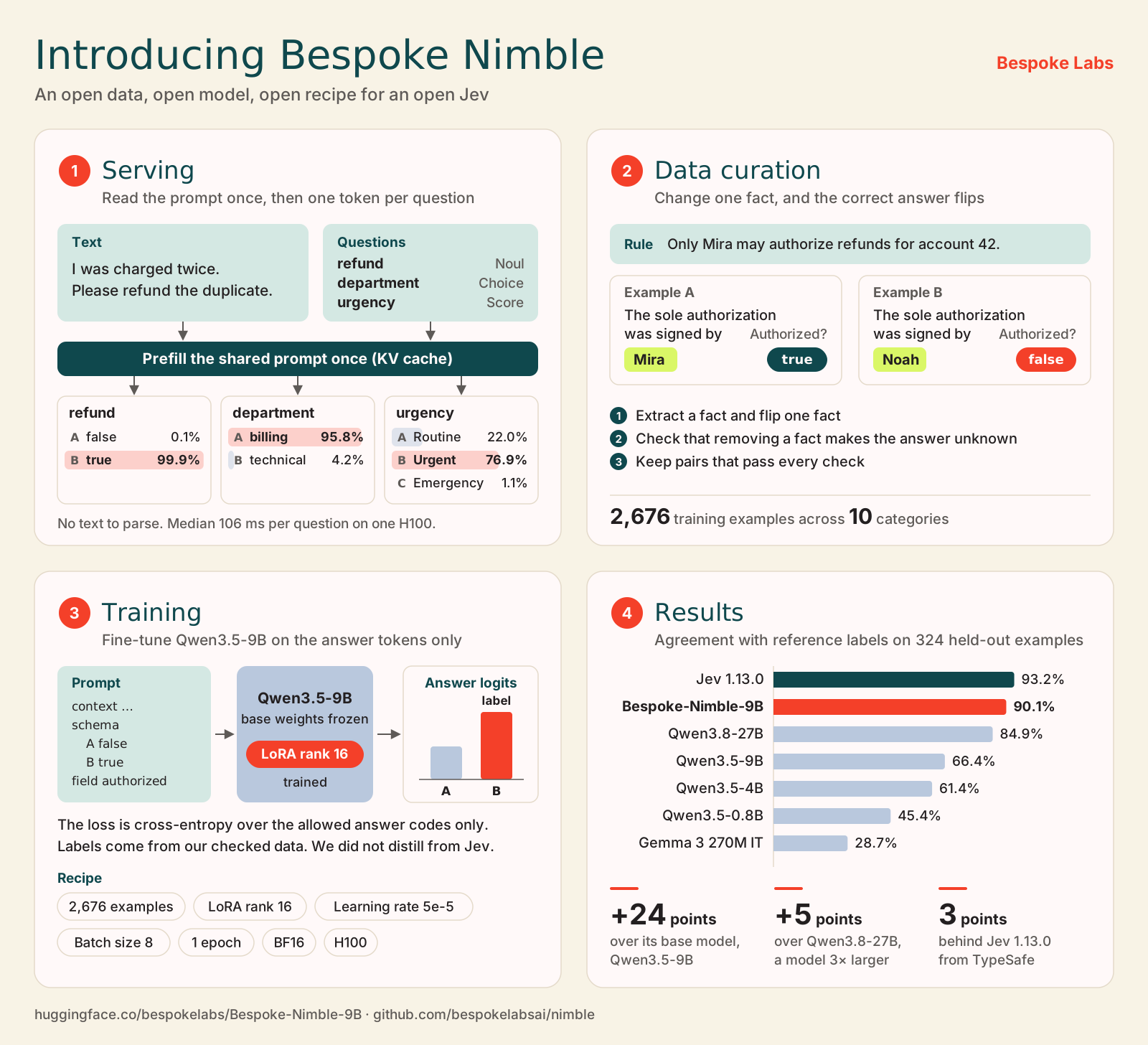
Nimble takes some text and a schema, and makes typed decisions about the text. The schema is the list of questions to answer. Each question is either a choice from a list that you give or a true or false question. For each question, Nimble returns the answer it picked and the probability of each allowed answer.
Nimble makes each decision in one step and does not write out any reasoning first, so it is fast (blazing fast!). Nimble is inspired by the System One approach of TypeSafe's Jev. In this repository, we share our recipe for training such a model.
Note that we did not distill from Jev. The point of the repository is to show how to curate data, how to train, and to serve such a model, and encourage more research!
You can run Bespoke-Nimble-9B on a Mac with Apple Silicon or on a machine with an NVIDIA GPU.
Capabilities
We built Nimble in one day, so expect some rough edges. What Nimble can do comes from two sources: the first is the base model, Qwen3.5-9B, the second is our training data, which we curated for a few specific domains.
What you can build
| Task | You define | You get back |
|---|---|---|
| Route a request | The destinations and when each one applies | The chosen destination and the probability of each destination |
| Check a condition | A yes or no question and the evidence | True or false, and the probability of each |
| Apply a policy | The rules and the allowed outcomes | A typed decision based on the text you supply |
| Rate an outcome | Ordered levels, each with clear criteria | The chosen level and the probability of each level |
You supply a context, which is the text to judge, and a schema. The schema must be flat, which means that it has no nested fields. Each field is an enum or a boolean. An enum field has a fixed list of string choices, and a boolean field is true or false.
Each allowed answer has a code that is one token long. The scorer reads the model's logits for these codes. Logits are the raw scores that the model gives to each token. The scorer turns the logits into probabilities with the softmax function. Our Python code then builds the output from these probabilities, so there is no generated JSON to parse. If a field is an ordered rating scale, your application can use the probabilities to calculate an expected level.
On a Mac, ParallelScorer processes the shared context once and then scores all
the fields in parallel. The CUDA scorer scores each field on its own, with the
full prompt each time. Both scorers return the typed output. They also return
the logits and the probabilities of the candidate answers. Each field is scored
separately, so one field cannot see the answer to another field.
What you cannot build with the current release
- Nimble accepts only text. You cannot use it to judge other kinds of input, e.g., images. This is true even though the base model includes a vision part.
- Nimble only picks from the answers you supply. It cannot write text of its own, e.g., an explanation. It also cannot return nested JSON or a piece of text taken from the context. An enum field can have 1 to 26 string choices, and a boolean field has two.
- The probabilities are not a guarantee that an answer is correct. Nimble scales them so that they add up to 1 across the answers you supplied. A probability of 0.9 does not mean that the answer is right 90% of the time. If it is possible that none of your answers fit, add an answer that means "no match". Test any probability threshold on your own data before you rely on it.
- Each prompt can have at most 2,048 tokens. This limit includes the schema and the part of the prompt that names the field to score. Nimble rejects longer prompts. Fields cannot depend on each other, so your code must check that the answers to different fields are consistent.
We trained Bespoke-Nimble-9B on 2,676 examples that we curated. So it's performance will depend on this data and the domains it comes from. So don't expect a lot of generalization. But we do see that Nibmle is overall better than it's base model Qwen3.5-9B in new domains.
Quickstart
Clone the repository and move into its folder. Run all the commands below from this folder.
git clone https://github.com/bespokelabsai/nimble.git nimble
cd nimble
Use Python 3.12. To run the model on a Mac, you need Apple Silicon. Python must also run directly on macOS so that it can use Metal, which is Apple's interface to the GPU. To run the model on Linux, you need an NVIDIA GPU that supports BF16, a 16-bit number format.
Without quantization, the 9B weights alone take about 18 GB. Quantization means storing the weights with fewer bits to save memory. The model needs more memory than this while it runs. The merge step below runs on the CPU. It needs extra RAM, and it needs disk space for both the base weights and the merged weights. A Mac with 64 GB of memory has more free memory for this than a machine with 24 GB.
Download the model
Create a Python environment for preparing the model. On Linux, you can also use this environment to run the model on the GPU. If you do, install a build of PyTorch with CUDA support that works with your GPU driver.
python3.12 -m venv .cache/venvs/nimble
source .cache/venvs/nimble/bin/activate
python -m pip install torch==2.8.0 -r requirements/training.txt
The following accepts either a full checkpoint or a PEFT LoRA adapter. For an adapter, it downloads the pinned base and merges the trained weights once. It records the resolved revision and local model path for both platform examples. No TypeSafe or generation API key is needed for local inference.
python - <<'PYTHON'
import hashlib
import json
from pathlib import Path

from huggingface_hub import snapshot_download

repo = "bespokelabs/Bespoke-Nimble-9B"
snapshot = Path(snapshot_download(repo, cache_dir=".cache/huggingface/hub"))
contract_file = snapshot / "schema_config.json"
contract = json.loads(contract_file.read_text()) if contract_file.exists() else {}
if contract:
    prompt_hash = hashlib.sha256(
        Path("nimble/scoring/parallel_schema.py").read_bytes()
    ).hexdigest()
    if (contract["task"] != "schema_candidate_classification_v1"
            or contract["prompt_code_sha256"] != prompt_hash):
        raise ValueError("Model contract differs from this checkout's scoring prompt")

model_path = snapshot
if (snapshot / "adapter_config.json").exists():
    import torch
    from peft import PeftModel
    from transformers import AutoTokenizer, Qwen3_5ForConditionalGeneration

    # The adapter release must include its pinned base and prompt contract.
    base = Qwen3_5ForConditionalGeneration.from_pretrained(
        contract["model"], revision=contract["revision"],
        dtype=torch.bfloat16, device_map="cpu",
    )
    adapter = PeftModel.from_pretrained(base, snapshot)
    merged = adapter.merge_and_unload(safe_merge=True)
    model_path = Path(".cache/models") / ("nimble-9b-" + snapshot.name)
    merged.save_pretrained(model_path)
    AutoTokenizer.from_pretrained(snapshot).save_pretrained(model_path)

config = {
    "model_path": str(model_path.resolve()),
    "model_id": repo,
    "revision": snapshot.name,
    "max_input_tokens": contract.get("max_length", 2048),
}
Path(".cache/nimble-model.json").write_text(json.dumps(config, indent=2))
print("Ready:", model_path)
PYTHON
Mac with Apple Silicon (MLX)
Use a separate MLX environment after the model preparation step:
deactivate
python3.12 -m venv .venv-mlx
source .venv-mlx/bin/activate
python -m pip install -r requirements/mlx.txt
In Python, pass the saved model settings to ParallelScorer so that it loads
the prepared 9B weights.
import json
from pathlib import Path
from nimble.scoring.parallel_scorer import ParallelScorer

config = json.loads(Path(".cache/nimble-model.json").read_text())
scorer = ParallelScorer(**config)
[!NOTE] If you call
ParallelScorer()with no arguments, it loads the Qwen3.5-4B model that we used as a baseline, not Nimble. The MLX runner cannot load a LoRA adapter folder directly, so use the merged folder that you prepared above. The MLX runner also does not support quantized weights.
Linux with an NVIDIA GPU (CUDA)
Activate the environment that you used to prepare the model. Then check that PyTorch can use the GPU and that the GPU supports BF16.
source .cache/venvs/nimble/bin/activate
python -c 'import torch; assert torch.cuda.is_available() and torch.cuda.is_bf16_supported()'
In Python, load the same prepared weights.
import json
from pathlib import Path
from nimble.scoring.cuda_scorer import CudaCandidateScorer

config = json.loads(Path(".cache/nimble-model.json").read_text())
scorer = CudaCandidateScorer(**config)
You can also run the adapter without merging it, in the same way as our training evaluation. See the training guide for how to do this. The CUDA runner scores each field with the full prompt. So it processes the shared context again for each field, while the MLX runner processes it only once.
Make a typed decision
After you load either scorer, continue in the same Python session.
schema = {
    "priority": {
        "type": "enum",
        "choices": ["HIGH", "LOW"],
        "description": "Urgency based on current business impact.",
        "choice_descriptions": {
            "HIGH": "A critical business operation is currently blocked.",
            "LOW": "An optional enhancement with no current business impact.",
        },
    },
    "requires_review": {
        "type": "boolean",
        "description": "Whether customers are unable to complete a purchase.",
    },
}
result = scorer.score("The payment service is down for all customers.", schema)
print(result["output"])
print(result["fields"]["priority"]["scores"])  # Candidate probabilities.
print(result["fields"]["priority"]["logits"])
The output has this shape. The values depend on the model:
{"priority": "HIGH", "requires_review": true}
Load the scorer once and reuse it for each new context. Both scorers use a
temperature of 1.0 by default. We have not tuned the temperature so that the
probabilities match how often the answers are right. See the
scoring guide for the schema rules and the ways you
can run the scorer.
Methodology
The serving methodology and training data curation are heavily inspired by Bespoke-MiniCheck.
Serving
We follow the approach laid out by Niels Rogge: see this post on how Jev does decoding.
In a nutshell:
- Process the context and schema once (prefill the KV-cache)
- We obtain the scores for the tokens we care about.
We used this approach (we didn't have to do kv-cache prefill) in Bespoke-MiniCheck, since it always returned a single json tuple: {"is_claim_supported_by_context": p}.
Contrastive data curation
The challenge here is that we don't have access to probabilities from a teacher model (or humans). But as you saw above, we just need to somehow get the logits and ensure the logits are as calibrated to estimate the probabilities as possible.
We push the model to be calibrated to be a better decision maker by creating negative examples, which forces the model to become a better discriminator.
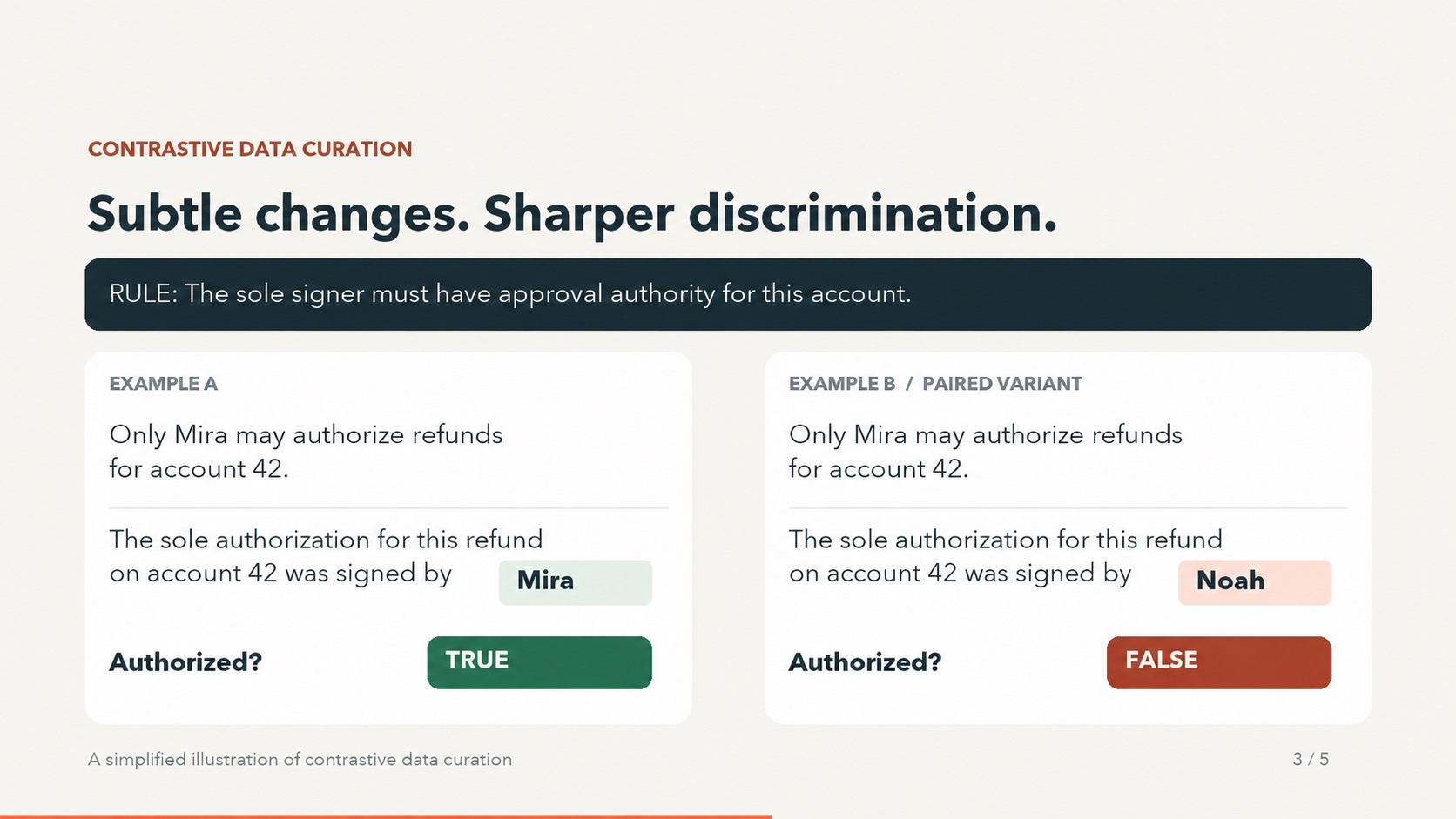
So we made the training data with a new method that we call contrastive data curation. In this method, we write two examples that are almost the same. They differ in one relevant fact, and this difference changes the correct answer. Everything else stays the same, including the question and the policy. From these pairs, the model learns which evidence should change its decision.
Watch the 34-second explanation (silent).
In this example, the rule is that a refund is authorized only when its sole authorization was signed by someone who can approve refunds for that account. The example has two evidence sentences, and you need both of them to answer.
| Evidence | First example | Changed example |
|---|---|---|
| Who can approve refunds | Only Mira may authorize refunds for account 42. | Unchanged |
| Authorization record | The sole authorization for this refund on account 42 was signed by Mira. | The sole authorization for this refund on account 42 was signed by Noah. |
| Is the refund authorized? | true | false |
Our curation pipeline uses this idea for Choice, Noul and Score tasks. It has four steps:
- Check the decision rules. We start from the schema and the policy of a training source. We write down the basic facts that the rules depend on. Then we check that the rules can lead to different answers.
- Build the pair. We write two evidence sentences, and you need both of them to find the answer. Then we change at most eight words in one of the sentences. We make this edit to change one fact, which we call the focus fact, and so the label changes too. The rest of the context and the other facts stay the same.
- Check both examples. We use separate model calls to check the facts in each example. We also use these calls to check that the example is consistent with the policy and that the text does not hint at the answer. Then we remove each evidence sentence in turn. With either sentence removed, the focus fact must become unknown, even with all of the other text present. This way, we know that no other text gives away the answer.
- Make the labels. We use code to apply the checked rules to the checked facts. We keep a pair only when every required check passes and the two labels differ. We save all model requests and responses, along with the check results. You can use them to replay the whole process offline.
The examples with an evidence sentence removed are only checks. We do not add them to the training data with labels, because missing evidence does not mean that the answer is false or that the score is low. A source family is the group of examples that we built from one training source. We keep both examples of a pair, and all examples from one source family, in the same split. The split is either training or evaluation.
Current dataset
There is one training set and one held-out set.
| File | Examples | Use |
|---|---|---|
data/train.jsonl | 2,826 | 2,676 used to train the published model |
data/eval.jsonl | 324 | Final evaluation only |
The published model's training data covers 10 subject categories. The tables
below count only its 2,676 training examples and the 324-example holdout.
Category counts come from each record's domain field; the holdout covers six
of these categories.
| Category | Training examples | Held-out examples |
|---|---|---|
| Commerce | 242 | 58 |
| Education | 230 | 70 |
| Home | 300 | 0 |
| Media | 256 | 44 |
| Public services | 194 | 106 |
| Science | 300 | 0 |
| Software | 300 | 0 |
| Supply chain | 270 | 30 |
| Travel | 284 | 16 |
| Workplace | 300 | 0 |
| Total | 2,676 | 324 |
Across these subjects, each example asks one of three typed questions:
| Task type | Judgment | Training examples | Held-out examples |
|---|---|---|---|
| Choice | Select one candidate | 856 | 146 |
| Noul (Boolean) | Decide whether a condition holds | 888 | 114 |
| Score | Judge an ordered rubric level | 932 | 64 |
| Total | 2,676 | 324 |
All of the labels are synthetic: a model checked them, and no person has reviewed them. Separate calls to the same model can make the same mistake, so the checks can miss some errors. See the generation and replay guide for the full method.
The command below checks the data files. It needs no GPU and makes no API calls. It confirms that the files match their saved checksums and have the expected number of examples. It also confirms that no example or source family appears in both the training set and the evaluation set.
.venv-curator/bin/python -m nimble.training.verify_dataset
See the dataset details and the training guide. The curation guides also describe older ways that we built data. We no longer keep the source folders from those older methods.
Finetuning
The trainer applies LoRA to Qwen3.5-9B, optimizing cross-entropy over the allowed candidate logits. It learns the typed decision directly. Saved Jev probabilities are available for future soft-target distillation if you need it, but the current training objective uses hard reference labels that are not derived from Jev.
The final recipe uses these settings:
- LoRA rank 16
- Learning rate 5e-5
- Effective batch size 8
- Random seed 17
- One epoch of training
It preserves the three-epoch linear learning rate schedule used during selection, stopping after the selected epoch. Training uses BF16 and a 2,048-token prompt limit. Tuning ran on L40S; the final fit and evaluation ran on H100.
Evaluation on 324 held-out examples
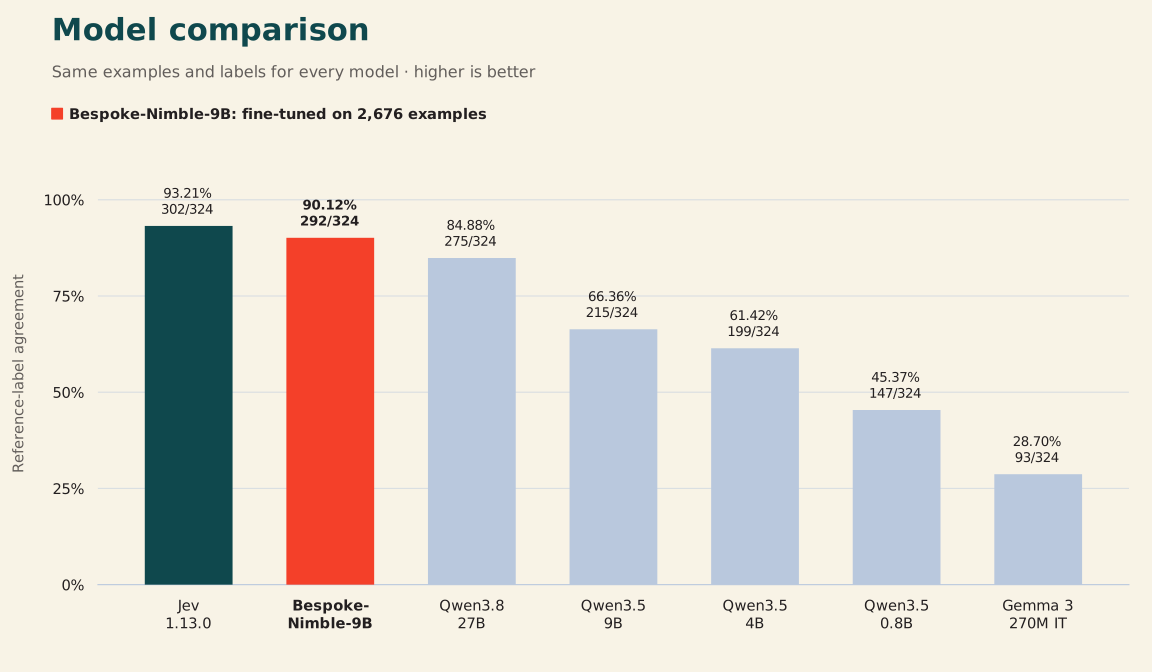
| Model | Reference matches | Agreement |
|---|---|---|
| Gemma 3 270M IT | 93/324 | 28.70% |
| Qwen3.5-0.8B | 147/324 | 45.37% |
| Qwen3.5-4B | 199/324 | 61.42% |
| Qwen3.5-9B | 215/324 | 66.36% |
| Qwen3.8-27B | 275/324 | 84.88% |
| Bespoke-Nimble-9B | 292/324 | 90.12% |
| Jev 1.13.0 | 302/324 | 93.21% |
On these 324 examples, Bespoke-Nimble-9B matched 17 more reference labels than the untuned 27B model, which is 5.25 percentage points more. Jev matched 10 more reference labels than Bespoke-Nimble-9B, which is 3.09 points more. The untuned models are models that we did not fine-tune for this task. We tested all seven models on the same examples with the same reference labels. We ran Gemma and the untuned Qwen models on an H100 GPU. For Bespoke-Nimble-9B, we reused checked results from an earlier H100 run. For Jev, we reused results from an earlier run through its API.
The reference labels are synthetic. The 324 examples form 162 pairs of closely related examples. All of them come from only six source families, so this is a narrow test.
For the untuned models, we computed the scores of the candidate answers in FP32, a 32-bit number format. For Bespoke-Nimble-9B, we kept the setup that we had already checked, which computes the output layer in BF16. In a new run of the untuned 9B model, one answer that had been a 50/50 tie was no longer a tie. This changed the model's count from 214 to 215. For rating tasks, we count a match when the most probable level equals the reference level. The machine-readable comparison contains the reference-match counts shown above.
We checked the saved adapter in two ways. After we reloaded it, it gave exactly the same logits as before. When we turned the adapter off, the model gave the same results as the base model. We ran these checks only on the CUDA path that loads the adapter without merging it. We did not run a separate quality test on the merged model that the Mac and Linux quickstarts use. See the training guide for the commands and for the contract file saved with each model. In the contract file, we record the base model and the prompt format that the model expects.
For external, human-labeled tests on tasks outside these training categories, see the public benchmarks guide, which runs Bespoke-Nimble-9B and Jev on the same records from thirteen public subsets, starting with VitaminC.
Observed inference latency
In the table below, each time is in milliseconds per example. We calculated these times from the timing that we saved for each request. Each example has one question. The local models and Jev return a typed answer and the probability of each candidate answer. The OpenRouter models generate text in the usual way, with the reasoning setting at medium. For local scoring, we run the model once per example. We do not sample more than once, and the model does not write an explanation.
| Model | Examples | Median (ms) | Mean (ms) | p95 (ms) | Run / dataset |
|---|---|---|---|---|---|
| Gemma 3 270M IT | 324 | 21.8 | 23.6 | 29.2 | H100 · contrastive holdout |
| Qwen3.5-0.8B | 324 | 48.6 | 49.4 | 60.2 | H100 · contrastive holdout |
| Qwen3.5-4B | 324 | 58.0 | 58.6 | 70.3 | H100 · contrastive holdout |
| Qwen3.5-9B | 324 | 58.1 | 59.8 | 75.8 | H100 · contrastive holdout |
| Qwen3.8-27B | 324 | 145.3 | 145.2 | 185.5 | H100 · contrastive holdout |
| Bespoke-Nimble-9B | 120 | 106.0 | 110.1 | 119.8 | H100 · contrastive holdout |
| Bespoke-Nimble-9B | 324 | 444.0 | 546.0 | 981.0 | M5 Pro 64GB · contrastive holdout |
| Jev 1.13.0 | 324 | 246.7 | 267.0 | 347.4 | TypeSafe API · contrastive holdout |
| DeepSeek-V4.1-Flash | 100 | 2896.4 | 5238.0 | 15065.4 | OpenRouter / Fireworks · general eval |
| Qwen3.8 2.4T A95B | 100 | 2792.3 | 3108.0 | 5110.5 | OpenRouter / Modal · general eval |
Documentation and development
| I want to… | Start here |
|---|---|
| Define fields or understand parallel scoring | Scoring guide |
| Compare Nimble and Jev interactively | Comparison app |
| Host the published checkpoint on Modal | SGLang deployment · Try the public API |
| Understand the retained training and evaluation data | Dataset guide |
| Evaluate on public, human-labeled benchmarks | Public benchmarks |
| Create or replay contrastive training data | Curation guide |
| Train or use a schema adapter | Training guide |
Compare two models only when both were tested on the same examples in the same way. The guides describe how to generate data and evaluation outputs locally; these generated files are not committed to Git.
Development
Use a separate Python environment for each of these, because they need different package versions:
- MLX
- PyTorch
- Curator
The dependency lists are in requirements/. From the project root, run the offline tests that apply to your change.
.venv-mlx/bin/python -m unittest tests.test_parallel_scorer tests.test_evaluate_pilot tests.test_model_evaluation
.venv-curator/bin/python -m unittest tests.test_dataset_io tests.test_diverse_dataset
To measure how much time MLX saves by processing the shared context once for several fields, run the benchmark for schemas with several fields.
.venv-mlx/bin/python -m nimble.evaluation.benchmark_parallel --repeats 3
Each record in the saved dataset evaluations has only one field. So you cannot use those evaluations to measure the time saved by scoring several fields in parallel. Their recorded times are also not from a controlled serving test.
Folder layout
nimble/
  scoring/       # Local MLX and PyTorch inference
  datasets/      # Generation, curation, and TypeSafe labeling
  evaluation/    # Quality metrics and inference benchmarks
  training/      # Schema-aware CUDA LoRA training
examples/        # Schemas and saved example outputs
data/            # train.jsonl (2,826), eval.jsonl (324), and verification metadata
evaluations/     # Generated locally; not included in Git
assets/          # Comparison graphics, source results, and videos
docs/            # Current usage, training, curation, and deployment guides
ignore/          # Local archive of historical docs and assets; not included in Git
requirements/    # Backend-specific dependencies
tests/           # Offline and small-model checks
Citation
If you use this repository, please cite it. Also give the model revision and the dataset release that you used.
@misc{nimble2026,
  author = {{Bespoke Labs} and Sathiamoorthy, Maheswaran},
  title = {Nimble},
  year = {2026},
  howpublished = {\url{https://github.com/bespokelabsai/nimble}},
  note = {Model: https://huggingface.co/bespokelabs/Bespoke-Nimble-9B}
}
Acknowledgments
- TypeSafe for making Jev.
- Niels Rogge for a post on how Jev does decoding.
- Harsha Gundala for inspiring us to work on this.
- Greg Durett and Liyan Tang's work on MiniCheck (and check out Bespoke-MiniCheck which we did with them), which was two years early and laid the foundations.


Similar repos





Languages
Python
99.5%
Local typed decisions, contrastive data curation, and model evaluation.
Python
992
2 commits
updated Sep 20, 2026
README
Bespoke Nimble
Data, Model, Recipe for an open Jev
Model · Capabilities · Quickstart · Methodology · Documentation and development · Citation
Nimble takes some text and a schema, and makes typed decisions about the text. The schema is the list of questions to answer. Each question is either a choice from a list that you give or a true or false question. For each question, Nimble returns the answer it picked and the probability of each allowed answer.
Nimble makes each decision in one step and does not write out any reasoning first, so it is fast (blazing fast!). Nimble is inspired by the System One approach of TypeSafe's Jev. In this repository, we share our recipe for training such a model.
Note that we did not distill from Jev. The point of the repository is to show how to curate data, how to train, and to serve such a model, and encourage more research!
You can run Bespoke-Nimble-9B on a Mac with Apple Silicon or on a machine with an NVIDIA GPU.
Capabilities
We built Nimble in one day, so expect some rough edges. What Nimble can do comes from two sources: the first is the base model, Qwen3.5-9B, the second is our training data, which we curated for a few specific domains.
What you can build
| Task | You define | You get back |
|---|---|---|
| Route a request | The destinations and when each one applies | The chosen destination and the probability of each destination |
| Check a condition | A yes or no question and the evidence | True or false, and the probability of each |
| Apply a policy | The rules and the allowed outcomes | A typed decision based on the text you supply |
| Rate an outcome | Ordered levels, each with clear criteria | The chosen level and the probability of each level |
You supply a context, which is the text to judge, and a schema. The schema must be flat, which means that it has no nested fields. Each field is an enum or a boolean. An enum field has a fixed list of string choices, and a boolean field is true or false.
Each allowed answer has a code that is one token long. The scorer reads the model's logits for these codes. Logits are the raw scores that the model gives to each token. The scorer turns the logits into probabilities with the softmax function. Our Python code then builds the output from these probabilities, so there is no generated JSON to parse. If a field is an ordered rating scale, your application can use the probabilities to calculate an expected level.
On a Mac, ParallelScorer processes the shared context once and then scores all
the fields in parallel. The CUDA scorer scores each field on its own, with the
full prompt each time. Both scorers return the typed output. They also return
the logits and the probabilities of the candidate answers. Each field is scored
separately, so one field cannot see the answer to another field.
What you cannot build with the current release
- Nimble accepts only text. You cannot use it to judge other kinds of input, e.g., images. This is true even though the base model includes a vision part.
- Nimble only picks from the answers you supply. It cannot write text of its own, e.g., an explanation. It also cannot return nested JSON or a piece of text taken from the context. An enum field can have 1 to 26 string choices, and a boolean field has two.
- The probabilities are not a guarantee that an answer is correct. Nimble scales them so that they add up to 1 across the answers you supplied. A probability of 0.9 does not mean that the answer is right 90% of the time. If it is possible that none of your answers fit, add an answer that means "no match". Test any probability threshold on your own data before you rely on it.
- Each prompt can have at most 2,048 tokens. This limit includes the schema and the part of the prompt that names the field to score. Nimble rejects longer prompts. Fields cannot depend on each other, so your code must check that the answers to different fields are consistent.
We trained Bespoke-Nimble-9B on 2,676 examples that we curated. So it's performance will depend on this data and the domains it comes from. So don't expect a lot of generalization. But we do see that Nibmle is overall better than it's base model Qwen3.5-9B in new domains.
Quickstart
Clone the repository and move into its folder. Run all the commands below from this folder.
git clone https://github.com/bespokelabsai/nimble.git nimble
cd nimble
Use Python 3.12. To run the model on a Mac, you need Apple Silicon. Python must also run directly on macOS so that it can use Metal, which is Apple's interface to the GPU. To run the model on Linux, you need an NVIDIA GPU that supports BF16, a 16-bit number format.
Without quantization, the 9B weights alone take about 18 GB. Quantization means storing the weights with fewer bits to save memory. The model needs more memory than this while it runs. The merge step below runs on the CPU. It needs extra RAM, and it needs disk space for both the base weights and the merged weights. A Mac with 64 GB of memory has more free memory for this than a machine with 24 GB.
Download the model
Create a Python environment for preparing the model. On Linux, you can also use this environment to run the model on the GPU. If you do, install a build of PyTorch with CUDA support that works with your GPU driver.
python3.12 -m venv .cache/venvs/nimble
source .cache/venvs/nimble/bin/activate
python -m pip install torch==2.8.0 -r requirements/training.txt
The following accepts either a full checkpoint or a PEFT LoRA adapter. For an adapter, it downloads the pinned base and merges the trained weights once. It records the resolved revision and local model path for both platform examples. No TypeSafe or generation API key is needed for local inference.
python - <<'PYTHON'
import hashlib
import json
from pathlib import Path

from huggingface_hub import snapshot_download

repo = "bespokelabs/Bespoke-Nimble-9B"
snapshot = Path(snapshot_download(repo, cache_dir=".cache/huggingface/hub"))
contract_file = snapshot / "schema_config.json"
contract = json.loads(contract_file.read_text()) if contract_file.exists() else {}
if contract:
    prompt_hash = hashlib.sha256(
        Path("nimble/scoring/parallel_schema.py").read_bytes()
    ).hexdigest()
    if (contract["task"] != "schema_candidate_classification_v1"
            or contract["prompt_code_sha256"] != prompt_hash):
        raise ValueError("Model contract differs from this checkout's scoring prompt")

model_path = snapshot
if (snapshot / "adapter_config.json").exists():
    import torch
    from peft import PeftModel
    from transformers import AutoTokenizer, Qwen3_5ForConditionalGeneration

    # The adapter release must include its pinned base and prompt contract.
    base = Qwen3_5ForConditionalGeneration.from_pretrained(
        contract["model"], revision=contract["revision"],
        dtype=torch.bfloat16, device_map="cpu",
    )
    adapter = PeftModel.from_pretrained(base, snapshot)
    merged = adapter.merge_and_unload(safe_merge=True)
    model_path = Path(".cache/models") / ("nimble-9b-" + snapshot.name)
    merged.save_pretrained(model_path)
    AutoTokenizer.from_pretrained(snapshot).save_pretrained(model_path)

config = {
    "model_path": str(model_path.resolve()),
    "model_id": repo,
    "revision": snapshot.name,
    "max_input_tokens": contract.get("max_length", 2048),
}
Path(".cache/nimble-model.json").write_text(json.dumps(config, indent=2))
print("Ready:", model_path)
PYTHON
Mac with Apple Silicon (MLX)
Use a separate MLX environment after the model preparation step:
deactivate
python3.12 -m venv .venv-mlx
source .venv-mlx/bin/activate
python -m pip install -r requirements/mlx.txt
In Python, pass the saved model settings to ParallelScorer so that it loads
the prepared 9B weights.
import json
from pathlib import Path
from nimble.scoring.parallel_scorer import ParallelScorer

config = json.loads(Path(".cache/nimble-model.json").read_text())
scorer = ParallelScorer(**config)
[!NOTE] If you call
ParallelScorer()with no arguments, it loads the Qwen3.5-4B model that we used as a baseline, not Nimble. The MLX runner cannot load a LoRA adapter folder directly, so use the merged folder that you prepared above. The MLX runner also does not support quantized weights.
Linux with an NVIDIA GPU (CUDA)
Activate the environment that you used to prepare the model. Then check that PyTorch can use the GPU and that the GPU supports BF16.
source .cache/venvs/nimble/bin/activate
python -c 'import torch; assert torch.cuda.is_available() and torch.cuda.is_bf16_supported()'
In Python, load the same prepared weights.
import json
from pathlib import Path
from nimble.scoring.cuda_scorer import CudaCandidateScorer

config = json.loads(Path(".cache/nimble-model.json").read_text())
scorer = CudaCandidateScorer(**config)
You can also run the adapter without merging it, in the same way as our training evaluation. See the training guide for how to do this. The CUDA runner scores each field with the full prompt. So it processes the shared context again for each field, while the MLX runner processes it only once.
Make a typed decision
After you load either scorer, continue in the same Python session.
schema = {
    "priority": {
        "type": "enum",
        "choices": ["HIGH", "LOW"],
        "description": "Urgency based on current business impact.",
        "choice_descriptions": {
            "HIGH": "A critical business operation is currently blocked.",
            "LOW": "An optional enhancement with no current business impact.",
        },
    },
    "requires_review": {
        "type": "boolean",
        "description": "Whether customers are unable to complete a purchase.",
    },
}
result = scorer.score("The payment service is down for all customers.", schema)
print(result["output"])
print(result["fields"]["priority"]["scores"])  # Candidate probabilities.
print(result["fields"]["priority"]["logits"])
The output has this shape. The values depend on the model:
{"priority": "HIGH", "requires_review": true}
Load the scorer once and reuse it for each new context. Both scorers use a
temperature of 1.0 by default. We have not tuned the temperature so that the
probabilities match how often the answers are right. See the
scoring guide for the schema rules and the ways you
can run the scorer.
Methodology
The serving methodology and training data curation are heavily inspired by Bespoke-MiniCheck.
Serving
We follow the approach laid out by Niels Rogge: see this post on how Jev does decoding.
In a nutshell:
- Process the context and schema once (prefill the KV-cache)
- We obtain the scores for the tokens we care about.
We used this approach (we didn't have to do kv-cache prefill) in Bespoke-MiniCheck, since it always returned a single json tuple: {"is_claim_supported_by_context": p}.
Contrastive data curation
The challenge here is that we don't have access to probabilities from a teacher model (or humans). But as you saw above, we just need to somehow get the logits and ensure the logits are as calibrated to estimate the probabilities as possible.
We push the model to be calibrated to be a better decision maker by creating negative examples, which forces the model to become a better discriminator.
So we made the training data with a new method that we call contrastive data curation. In this method, we write two examples that are almost the same. They differ in one relevant fact, and this difference changes the correct answer. Everything else stays the same, including the question and the policy. From these pairs, the model learns which evidence should change its decision.
Watch the 34-second explanation (silent).
In this example, the rule is that a refund is authorized only when its sole authorization was signed by someone who can approve refunds for that account. The example has two evidence sentences, and you need both of them to answer.
| Evidence | First example | Changed example |
|---|---|---|
| Who can approve refunds | Only Mira may authorize refunds for account 42. | Unchanged |
| Authorization record | The sole authorization for this refund on account 42 was signed by Mira. | The sole authorization for this refund on account 42 was signed by Noah. |
| Is the refund authorized? | true | false |
Our curation pipeline uses this idea for Choice, Noul and Score tasks. It has four steps:
- Check the decision rules. We start from the schema and the policy of a training source. We write down the basic facts that the rules depend on. Then we check that the rules can lead to different answers.
- Build the pair. We write two evidence sentences, and you need both of them to find the answer. Then we change at most eight words in one of the sentences. We make this edit to change one fact, which we call the focus fact, and so the label changes too. The rest of the context and the other facts stay the same.
- Check both examples. We use separate model calls to check the facts in each example. We also use these calls to check that the example is consistent with the policy and that the text does not hint at the answer. Then we remove each evidence sentence in turn. With either sentence removed, the focus fact must become unknown, even with all of the other text present. This way, we know that no other text gives away the answer.
- Make the labels. We use code to apply the checked rules to the checked facts. We keep a pair only when every required check passes and the two labels differ. We save all model requests and responses, along with the check results. You can use them to replay the whole process offline.
The examples with an evidence sentence removed are only checks. We do not add them to the training data with labels, because missing evidence does not mean that the answer is false or that the score is low. A source family is the group of examples that we built from one training source. We keep both examples of a pair, and all examples from one source family, in the same split. The split is either training or evaluation.
Current dataset
There is one training set and one held-out set.
| File | Examples | Use |
|---|---|---|
data/train.jsonl | 2,826 | 2,676 used to train the published model |
data/eval.jsonl | 324 | Final evaluation only |
The published model's training data covers 10 subject categories. The tables
below count only its 2,676 training examples and the 324-example holdout.
Category counts come from each record's domain field; the holdout covers six
of these categories.
| Category | Training examples | Held-out examples |
|---|---|---|
| Commerce | 242 | 58 |
| Education | 230 | 70 |
| Home | 300 | 0 |
| Media | 256 | 44 |
| Public services | 194 | 106 |
| Science | 300 | 0 |
| Software | 300 | 0 |
| Supply chain | 270 | 30 |
| Travel | 284 | 16 |
| Workplace | 300 | 0 |
| Total | 2,676 | 324 |
Across these subjects, each example asks one of three typed questions:
| Task type | Judgment | Training examples | Held-out examples |
|---|---|---|---|
| Choice | Select one candidate | 856 | 146 |
| Noul (Boolean) | Decide whether a condition holds | 888 | 114 |
| Score | Judge an ordered rubric level | 932 | 64 |
| Total | 2,676 | 324 |
All of the labels are synthetic: a model checked them, and no person has reviewed them. Separate calls to the same model can make the same mistake, so the checks can miss some errors. See the generation and replay guide for the full method.
The command below checks the data files. It needs no GPU and makes no API calls. It confirms that the files match their saved checksums and have the expected number of examples. It also confirms that no example or source family appears in both the training set and the evaluation set.
.venv-curator/bin/python -m nimble.training.verify_dataset
See the dataset details and the training guide. The curation guides also describe older ways that we built data. We no longer keep the source folders from those older methods.
Finetuning
The trainer applies LoRA to Qwen3.5-9B, optimizing cross-entropy over the allowed candidate logits. It learns the typed decision directly. Saved Jev probabilities are available for future soft-target distillation if you need it, but the current training objective uses hard reference labels that are not derived from Jev.
The final recipe uses these settings:
- LoRA rank 16
- Learning rate 5e-5
- Effective batch size 8
- Random seed 17
- One epoch of training
It preserves the three-epoch linear learning rate schedule used during selection, stopping after the selected epoch. Training uses BF16 and a 2,048-token prompt limit. Tuning ran on L40S; the final fit and evaluation ran on H100.
Evaluation on 324 held-out examples
| Model | Reference matches | Agreement |
|---|---|---|
| Gemma 3 270M IT | 93/324 | 28.70% |
| Qwen3.5-0.8B | 147/324 | 45.37% |
| Qwen3.5-4B | 199/324 | 61.42% |
| Qwen3.5-9B | 215/324 | 66.36% |
| Qwen3.8-27B | 275/324 | 84.88% |
| Bespoke-Nimble-9B | 292/324 | 90.12% |
| Jev 1.13.0 | 302/324 | 93.21% |
On these 324 examples, Bespoke-Nimble-9B matched 17 more reference labels than the untuned 27B model, which is 5.25 percentage points more. Jev matched 10 more reference labels than Bespoke-Nimble-9B, which is 3.09 points more. The untuned models are models that we did not fine-tune for this task. We tested all seven models on the same examples with the same reference labels. We ran Gemma and the untuned Qwen models on an H100 GPU. For Bespoke-Nimble-9B, we reused checked results from an earlier H100 run. For Jev, we reused results from an earlier run through its API.
The reference labels are synthetic. The 324 examples form 162 pairs of closely related examples. All of them come from only six source families, so this is a narrow test.
For the untuned models, we computed the scores of the candidate answers in FP32, a 32-bit number format. For Bespoke-Nimble-9B, we kept the setup that we had already checked, which computes the output layer in BF16. In a new run of the untuned 9B model, one answer that had been a 50/50 tie was no longer a tie. This changed the model's count from 214 to 215. For rating tasks, we count a match when the most probable level equals the reference level. The machine-readable comparison contains the reference-match counts shown above.
We checked the saved adapter in two ways. After we reloaded it, it gave exactly the same logits as before. When we turned the adapter off, the model gave the same results as the base model. We ran these checks only on the CUDA path that loads the adapter without merging it. We did not run a separate quality test on the merged model that the Mac and Linux quickstarts use. See the training guide for the commands and for the contract file saved with each model. In the contract file, we record the base model and the prompt format that the model expects.
For external, human-labeled tests on tasks outside these training categories, see the public benchmarks guide, which runs Bespoke-Nimble-9B and Jev on the same records from thirteen public subsets, starting with VitaminC.
Observed inference latency
In the table below, each time is in milliseconds per example. We calculated these times from the timing that we saved for each request. Each example has one question. The local models and Jev return a typed answer and the probability of each candidate answer. The OpenRouter models generate text in the usual way, with the reasoning setting at medium. For local scoring, we run the model once per example. We do not sample more than once, and the model does not write an explanation.
| Model | Examples | Median (ms) | Mean (ms) | p95 (ms) | Run / dataset |
|---|---|---|---|---|---|
| Gemma 3 270M IT | 324 | 21.8 | 23.6 | 29.2 | H100 · contrastive holdout |
| Qwen3.5-0.8B | 324 | 48.6 | 49.4 | 60.2 | H100 · contrastive holdout |
| Qwen3.5-4B | 324 | 58.0 | 58.6 | 70.3 | H100 · contrastive holdout |
| Qwen3.5-9B | 324 | 58.1 | 59.8 | 75.8 | H100 · contrastive holdout |
| Qwen3.8-27B | 324 | 145.3 | 145.2 | 185.5 | H100 · contrastive holdout |
| Bespoke-Nimble-9B | 120 | 106.0 | 110.1 | 119.8 | H100 · contrastive holdout |
| Bespoke-Nimble-9B | 324 | 444.0 | 546.0 | 981.0 | M5 Pro 64GB · contrastive holdout |
| Jev 1.13.0 | 324 | 246.7 | 267.0 | 347.4 | TypeSafe API · contrastive holdout |
| DeepSeek-V4.1-Flash | 100 | 2896.4 | 5238.0 | 15065.4 | OpenRouter / Fireworks · general eval |
| Qwen3.8 2.4T A95B | 100 | 2792.3 | 3108.0 | 5110.5 | OpenRouter / Modal · general eval |
Documentation and development
| I want to… | Start here |
|---|---|
| Define fields or understand parallel scoring | Scoring guide |
| Compare Nimble and Jev interactively | Comparison app |
| Host the published checkpoint on Modal | SGLang deployment · Try the public API |
| Understand the retained training and evaluation data | Dataset guide |
| Evaluate on public, human-labeled benchmarks | Public benchmarks |
| Create or replay contrastive training data | Curation guide |
| Train or use a schema adapter | Training guide |
Compare two models only when both were tested on the same examples in the same way. The guides describe how to generate data and evaluation outputs locally; these generated files are not committed to Git.
Development
Use a separate Python environment for each of these, because they need different package versions:
- MLX
- PyTorch
- Curator
The dependency lists are in requirements/. From the project root, run the offline tests that apply to your change.
.venv-mlx/bin/python -m unittest tests.test_parallel_scorer tests.test_evaluate_pilot tests.test_model_evaluation
.venv-curator/bin/python -m unittest tests.test_dataset_io tests.test_diverse_dataset
To measure how much time MLX saves by processing the shared context once for several fields, run the benchmark for schemas with several fields.
.venv-mlx/bin/python -m nimble.evaluation.benchmark_parallel --repeats 3
Each record in the saved dataset evaluations has only one field. So you cannot use those evaluations to measure the time saved by scoring several fields in parallel. Their recorded times are also not from a controlled serving test.
Folder layout
nimble/
  scoring/       # Local MLX and PyTorch inference
  datasets/      # Generation, curation, and TypeSafe labeling
  evaluation/    # Quality metrics and inference benchmarks
  training/      # Schema-aware CUDA LoRA training
examples/        # Schemas and saved example outputs
data/            # train.jsonl (2,826), eval.jsonl (324), and verification metadata
evaluations/     # Generated locally; not included in Git
assets/          # Comparison graphics, source results, and videos
docs/            # Current usage, training, curation, and deployment guides
ignore/          # Local archive of historical docs and assets; not included in Git
requirements/    # Backend-specific dependencies
tests/           # Offline and small-model checks
Citation
If you use this repository, please cite it. Also give the model revision and the dataset release that you used.
@misc{nimble2026,
  author = {{Bespoke Labs} and Sathiamoorthy, Maheswaran},
  title = {Nimble},
  year = {2026},
  howpublished = {\url{https://github.com/bespokelabsai/nimble}},
  note = {Model: https://huggingface.co/bespokelabs/Bespoke-Nimble-9B}
}
Acknowledgments
- TypeSafe for making Jev.
- Niels Rogge for a post on how Jev does decoding.
- Harsha Gundala for inspiring us to work on this.
- Greg Durett and Liyan Tang's work on MiniCheck (and check out Bespoke-MiniCheck which we did with them), which was two years early and laid the foundations.
Similar repos
Languages
Python
99.5%