
A lightweight, self-hosted SQL-to-API gateway with database abstraction, governed saved queries, scoped API access, parameter validation, streaming exports, connection pooling, caching, observability, OpenAPI generation, an administrative UI, and multi-database/JDBC support.
See the codeSee what people are saying
README
QueryAPIGate





Turn SQL queries into secure, governed REST APIs.
QueryAPIGate was previously named SQL2API. Upgrading? See Upgrading from SQL2API for what changed.

QueryAPIGate is a self-hosted, single Flask service that runs SQL against your databases and returns the results as JSON, NDJSON, XML, YAML, CSV, TSV or Excel. Save a query once and it becomes a versioned endpoint with typed, injection-safe parameters and run history - without writing a controller, a repository layer, pagination, auth or serialization boilerplate for it.
Write SQL. Configure the query. Apply access controls. Get an API.
$ curl 'http://127.0.0.1:5000/q/example_film_search?text=Harbor&page_size=2'
[{"film_id":48,"title":"Broken Harbor","category":"Action","rating":"PG-13"},{"film_id":44,"title":"Electric Harbor","category":"Documentary","rating":"G"}]

$ curl 'http://127.0.0.1:5000/q/example_top_films?top_n=2&category=Comedy&format=csv'
title,category,rating,rentals,rank
Electric Signal,Comedy,PG,977,1
Crimson Garden,Comedy,PG-13,631,2
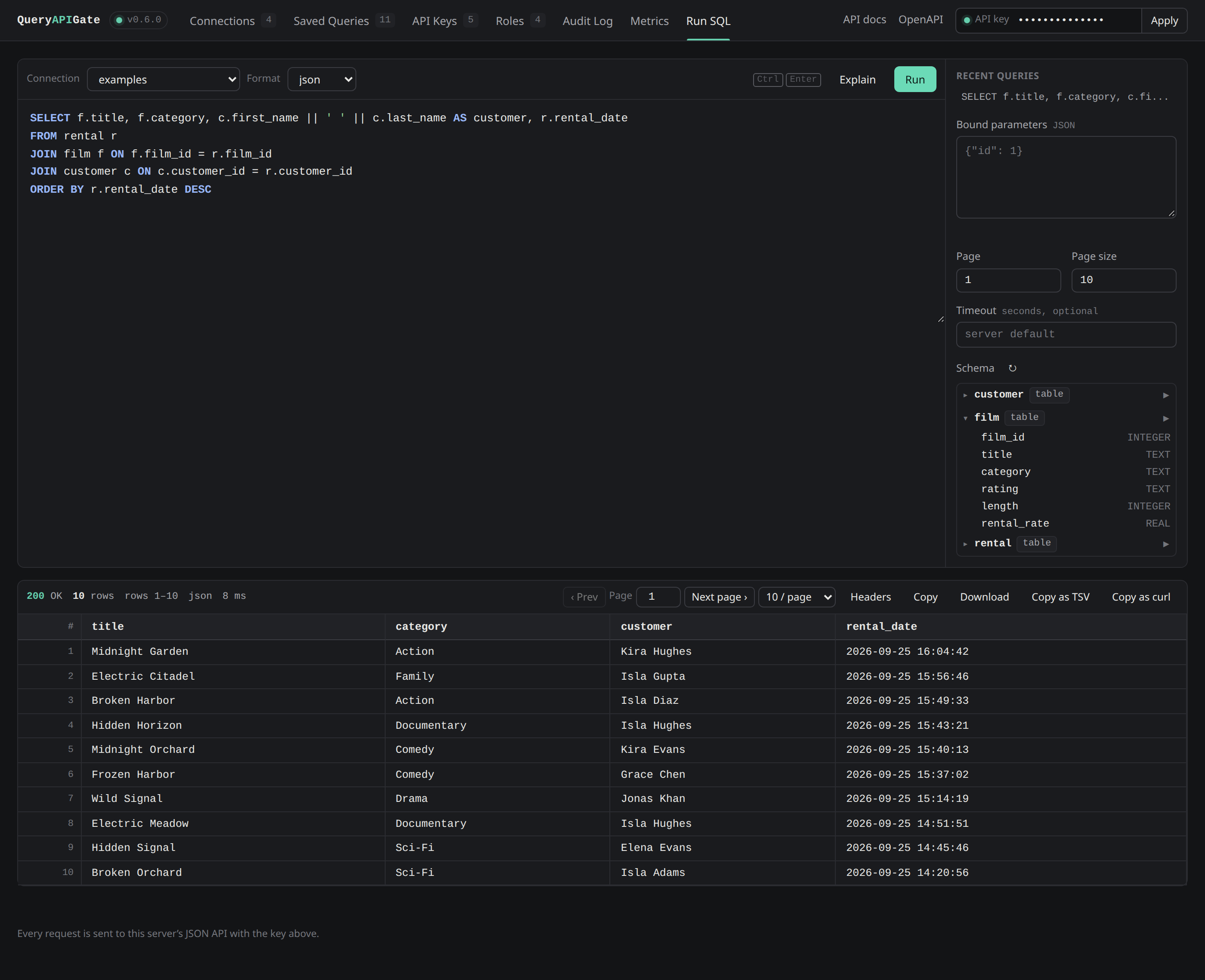
The built-in admin UI at /ui - syntax highlighting, a schema browser and one-click query history, no separate tool to install.
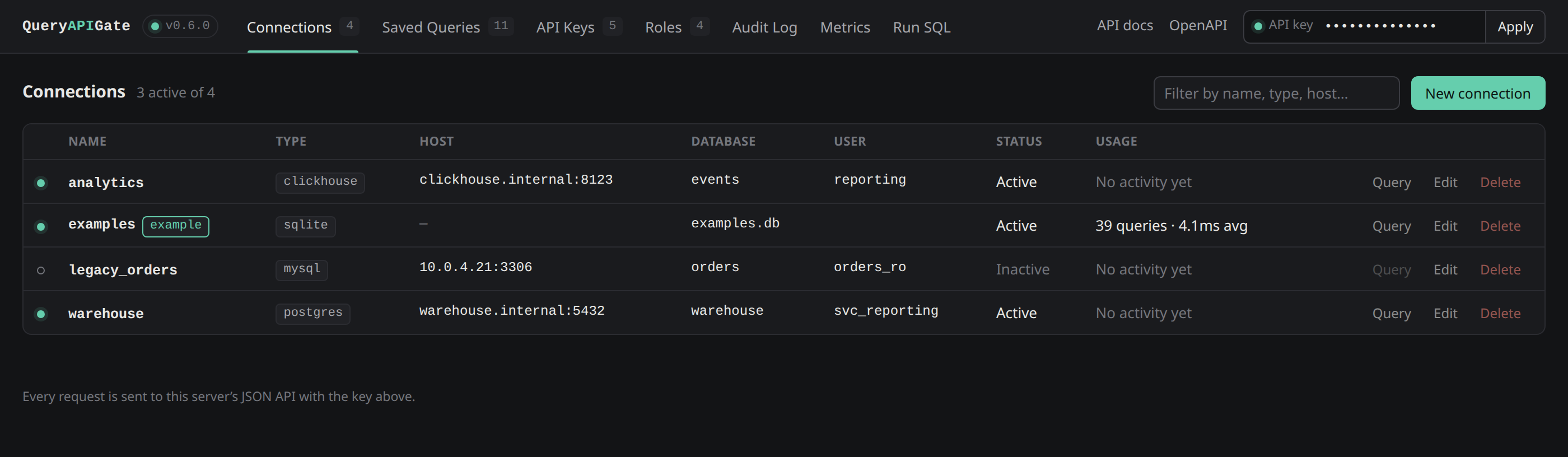
Manage connections across every supported database, with live usage per connection |
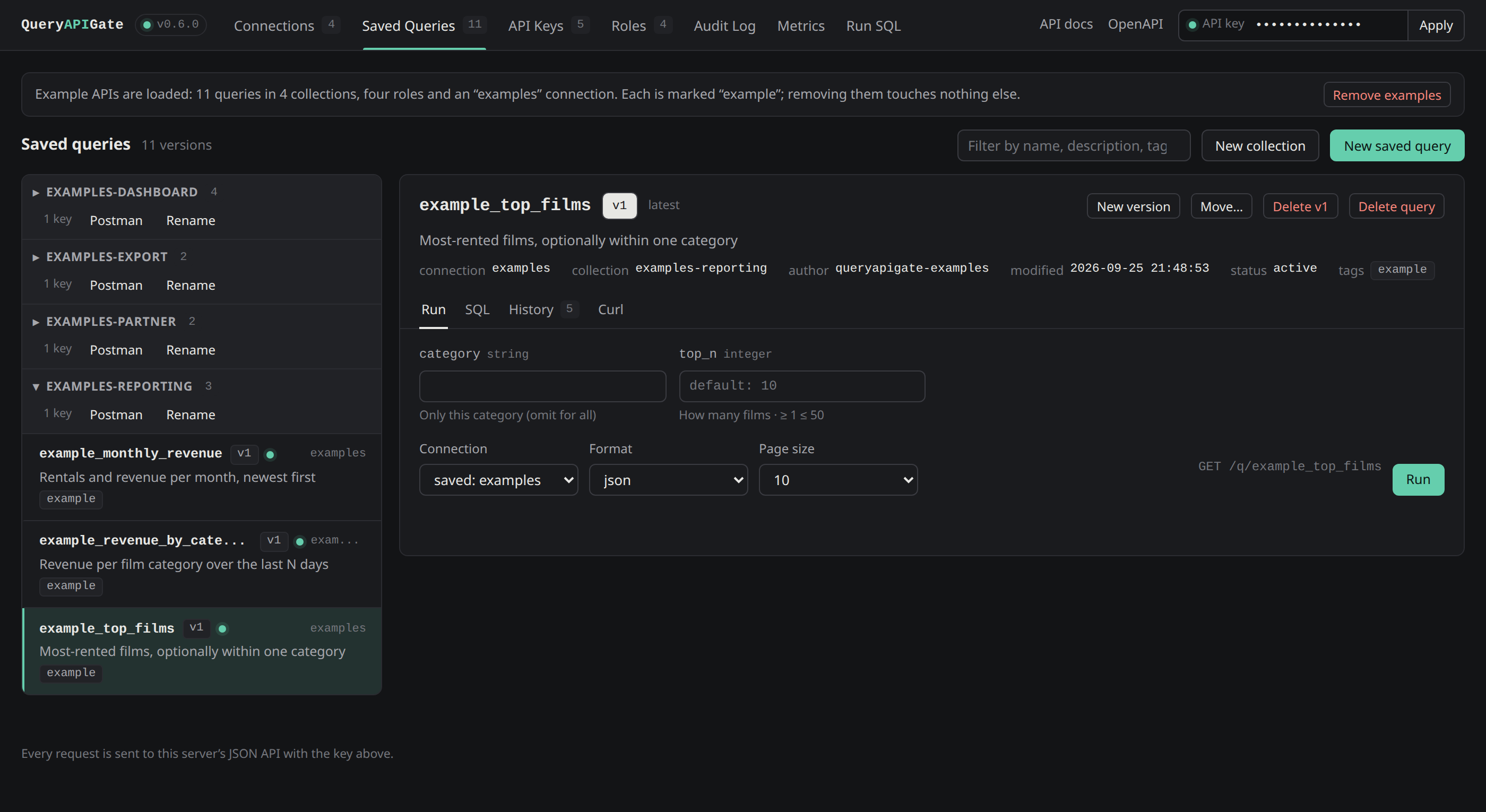
Every saved query becomes a documented REST endpoint - grouped into collections |
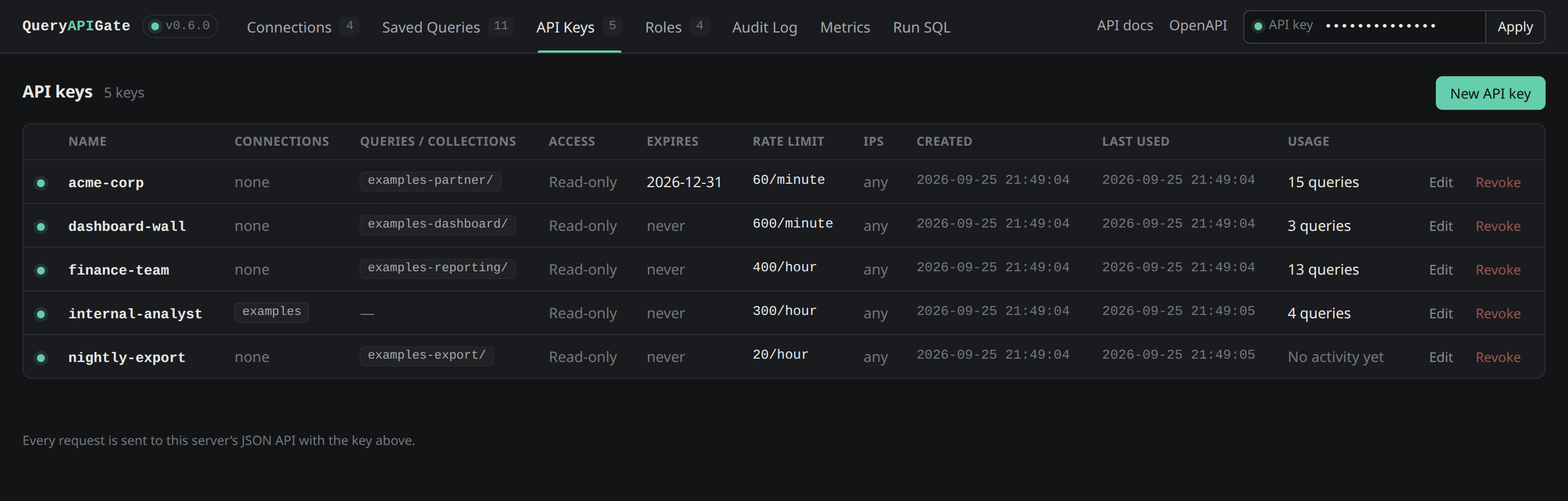
Per-key permissions: connections, specific saved queries, expiry, rate limits - and what each key has actually done |
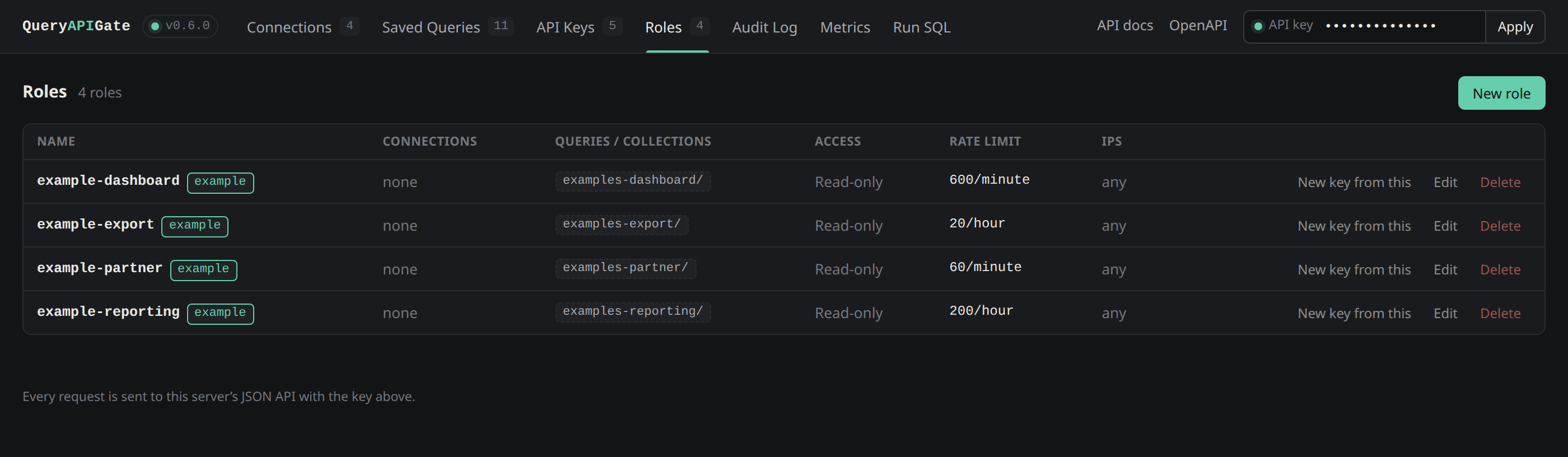
Named roles: a reusable grant template, copied onto a key once at creation |
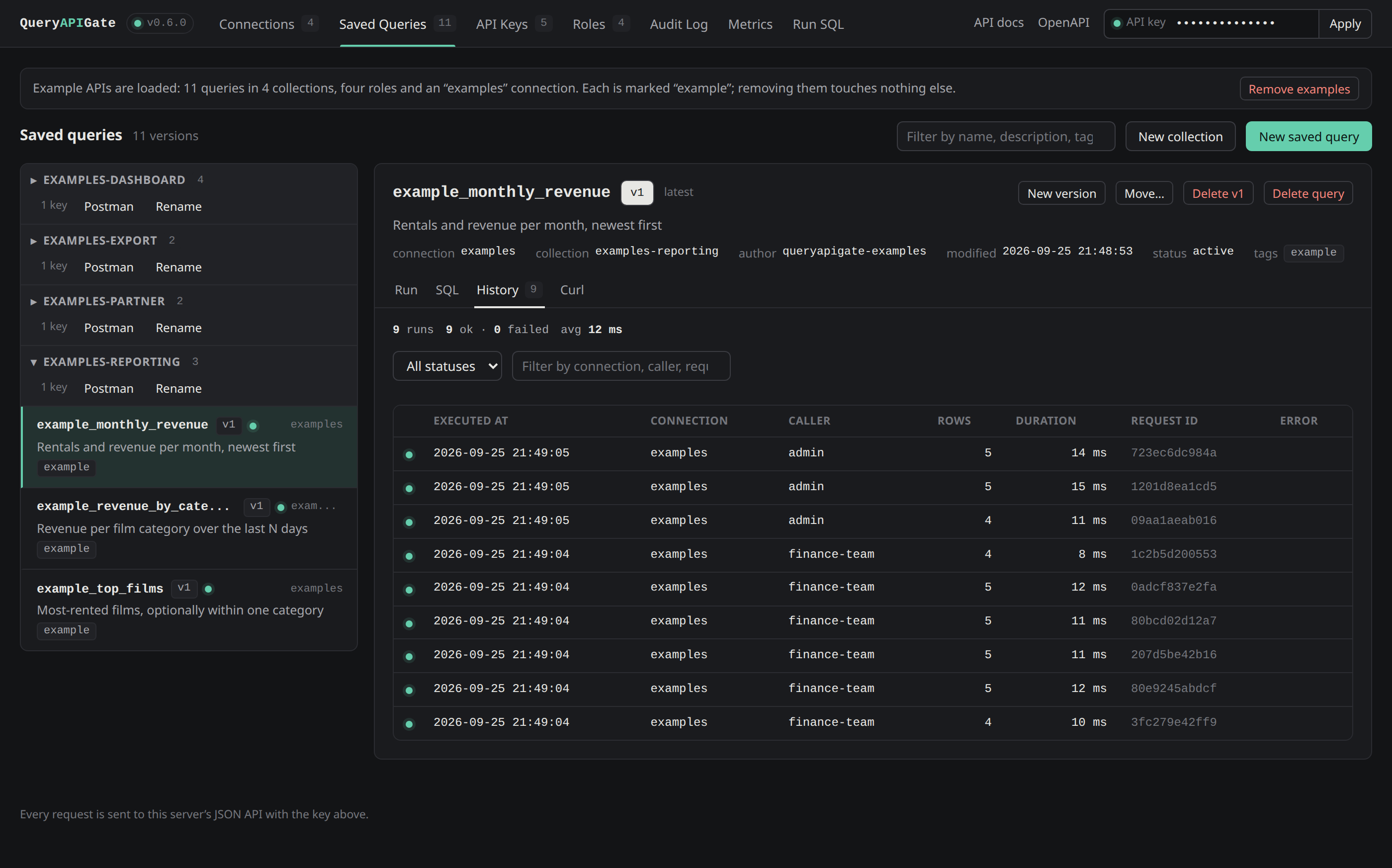
Run history per saved query: who called it, how long it took, and the request ID to find it in the logs |
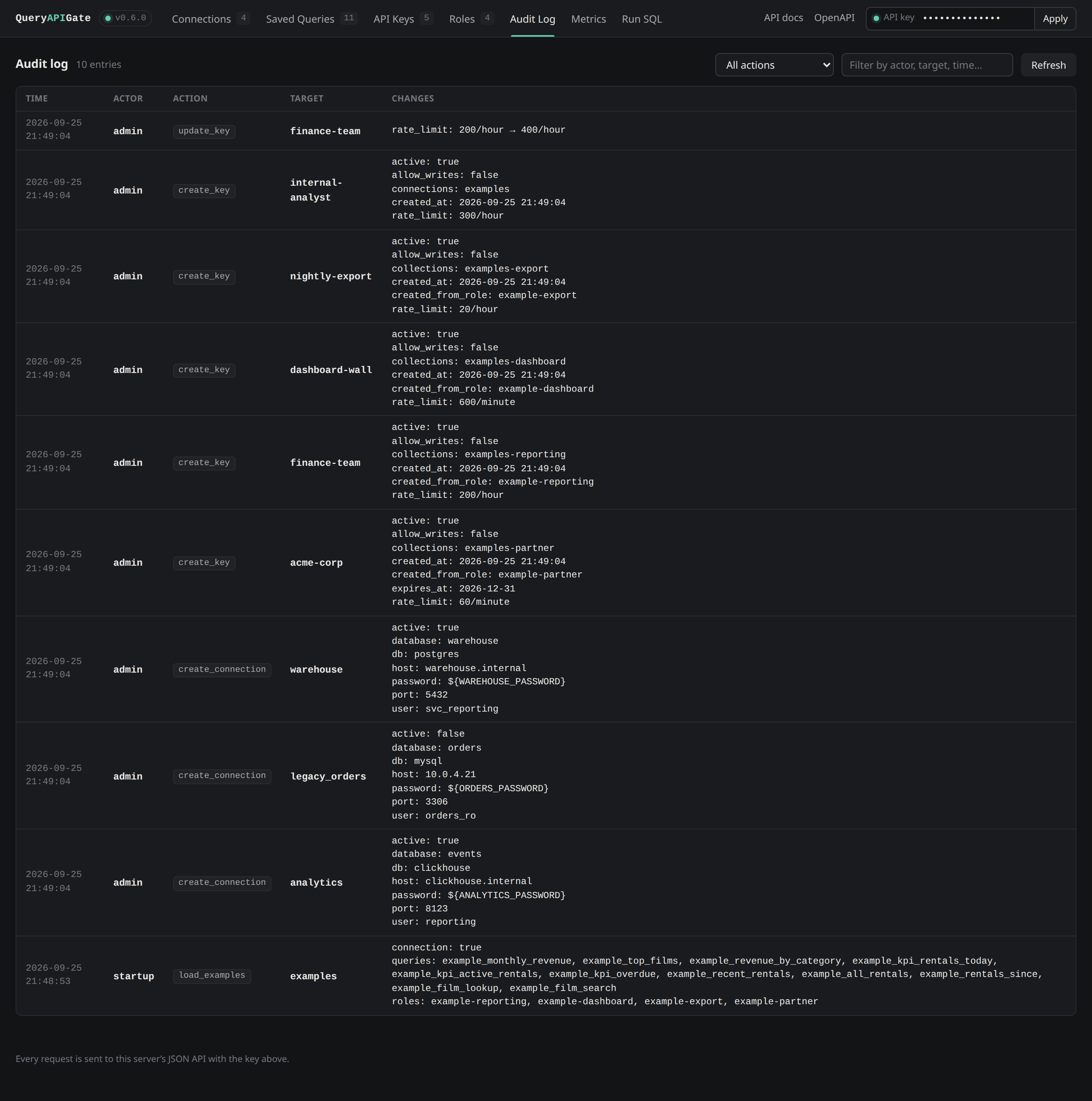
A durable audit log of every configuration change, filterable by action, actor and target |
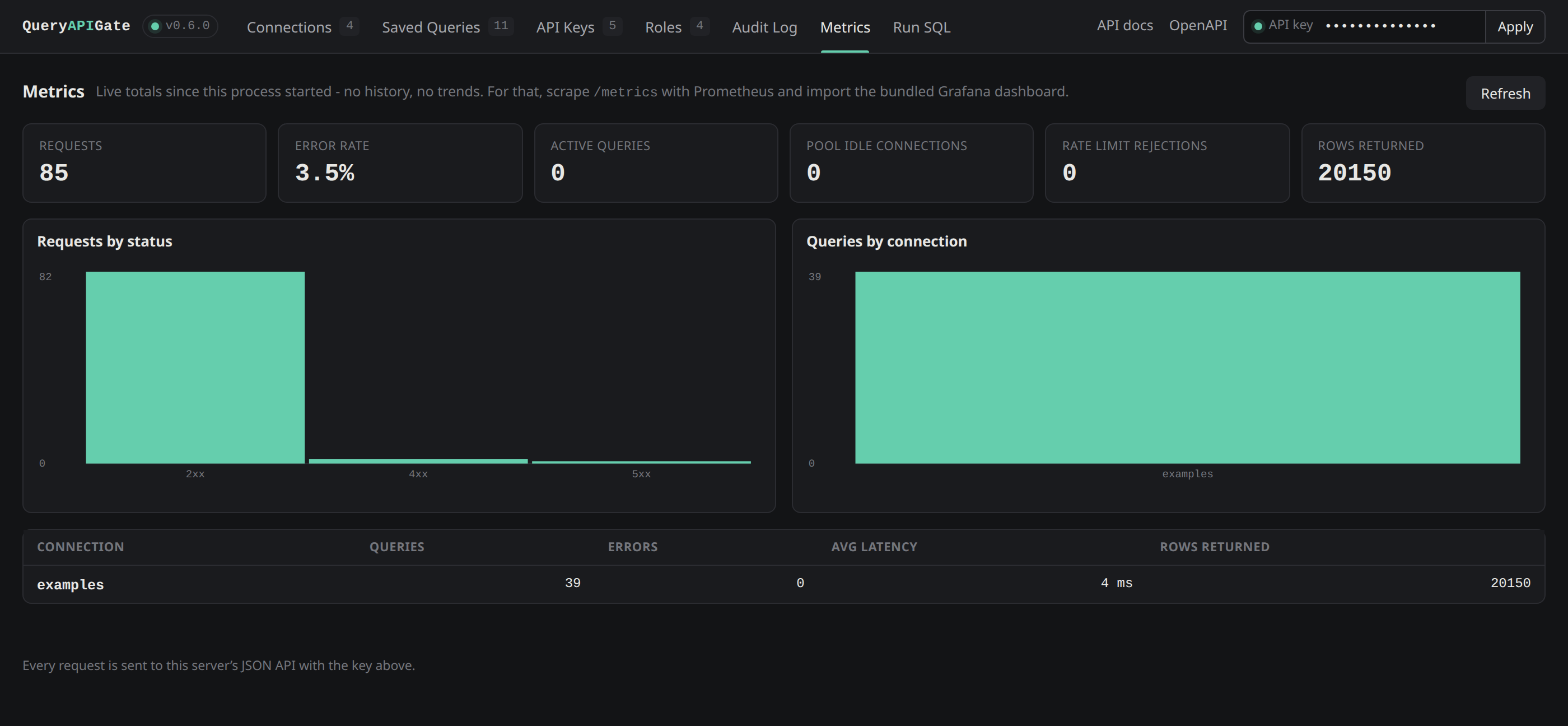
Live metrics with no Prometheus required - or import the bundled Grafana dashboard for history |
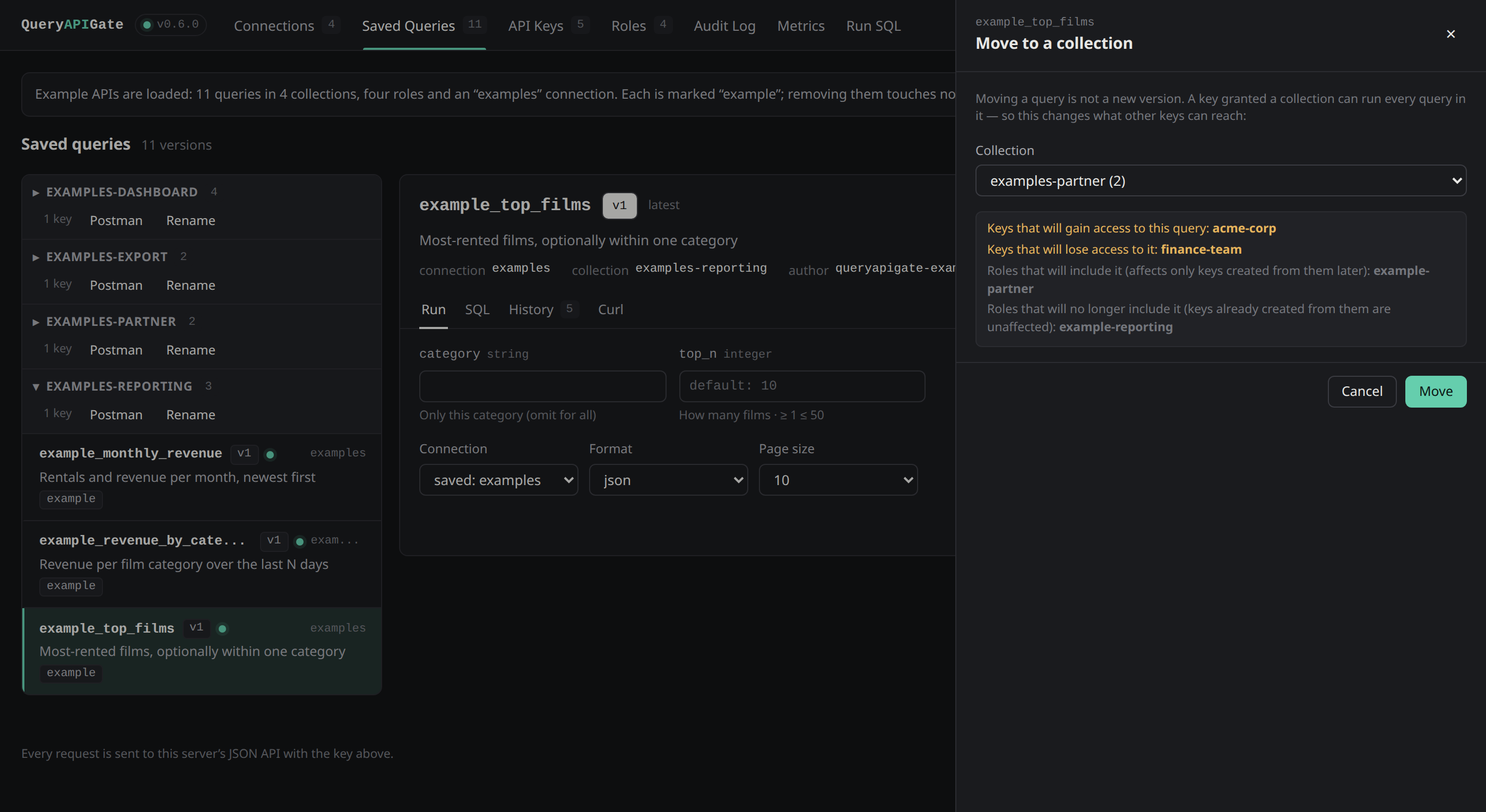
Collections: grant a key a whole group of queries - and see exactly which keys gain or lose access before a query moves |
Why QueryAPIGate?
Organizations often have valuable SQL sitting inside reports, BI dashboards, ETL pipelines, ad-hoc analysis and application code, with no path to a REST endpoint except writing a backend service around it.
              SQL Query
                  |
                  v
          +------------------+
          |   QueryAPIGate   |
          |                  |
          | Parameters       |
          | SQL Guard        |
          | Permissions      |
          | Rate Limiting    |
          | Caching          |
          | Connection Pool  |
          | Streaming        |
          | Observability    |
          +--------+---------+
                   |
                   v
               REST API
                   |
          +--------+--------+
          v        v        v
        JSON      CSV      XLSX
If you already know SQL, you can produce a governed API without building an API application around it.
Key features
Multi-database support
Native drivers for MySQL, PostgreSQL, ClickHouse, SQLite, H2 and DuckDB, plus generic JDBC for anything else with a driver jar - Oracle, SQL Server, DB2, Snowflake and more. The same guard, pooling, parameter binding and output formats apply regardless of which database is behind a given connection.
| Database | JSON | NDJSON | XML | YAML | CSV | TSV | XLSX |
|---|---|---|---|---|---|---|---|
| MySQL | ✅ | ✅ | ✅ | ✅ | ✅ | ✅ | ✅ |
| PostgreSQL | ✅ | ✅ | ✅ | ✅ | ✅ | ✅ | ✅ |
| ClickHouse | ✅ | ✅ | ✅ | ✅ | ✅ | ✅ | ✅ |
| SQLite | ✅ | ✅ | ✅ | ✅ | ✅ | ✅ | ✅ |
| H2 | ✅ | ✅ | ✅ | ✅ | ✅ | ✅ | ✅ |
| DuckDB | ✅ | ✅ | ✅ | ✅ | ✅ | ✅ | ✅ |
Security and access control
QueryAPIGate is built to expose specific query results, not database credentials:
- API key authentication, with hashed key storage (SHA-256, never the raw secret) in
api_keys.json. - Database connection passwords encrypted at rest (
QUERYAPIGATE_SECRET_KEY), decrypted only in memory at the moment a connection is opened; a literal password on disk is never returned to a client either way. - Scoped API keys: restrict a key to a set of connections, and/or to a specific allow-list of saved queries, independent of any connection grant - individual queries in that list can also be curated for write access, without granting it anywhere else reachable through the key.
- Example APIs:
queryapigate examples loadinstalls four worked scenarios - a reporting API, dashboard data, a streaming export and a partner integration - as collections, queries and roles you can run and remove again, touching nothing of yours. - Collections: file saved queries into named groups and grant a key a whole group - read-only, live, and every move that changes who can reach a query is audited with the keys that gained or lost access. Rename a collection without any key losing reach part-way; export one as a portable bundle and import it elsewhere.
- Named permission roles: a reusable template (connections, write access, queries, collections, rate limit, allowed IPs) copied onto a key once at creation, so a shared grant set for many keys lives in one place - editing or deleting a role afterward never affects a key already created from it.
- Read-only by default; write access (
INSERT/UPDATE/DDL) is off unless explicitly enabled server-wide or granted per key, and can be narrowed further to specific write operations a key may perform. - API key expiry (TTL) and revocation.
- Per-key rate limiting, on top of the server-wide, IP-based limit.
- IP allowlisting per key: pin a key to specific addresses or CIDR ranges.
- A row ceiling for streaming exports (
QUERYAPIGATE_STREAM_MAX_ROWS), unbounded by default. - A SQL guard that only allows single
SELECT/WITH/SHOW/DESCRIBE/EXPLAINstatements through by default, with bound:nameparameters rather than string-concatenated SQL.
API Consumer
     |
     | API Key
     v
  QueryAPIGate
     |
     +-- Authentication
     +-- Authorization (connections + saved queries)
     +-- SQL guard
     +-- Rate limiting
     +-- Execution
     |
     v
  Database
This lets an organization hand an external client a key that can only ever reach one named query - never arbitrary SQL and never a whole connection - while internal callers keep broader, connection-level access.
Saved, versioned queries
A saved query bundles SQL, name, description, parameters, author, version, permissions and (optionally) cache
configuration into one addressable resource: GET /q/<name>. Saving again under the same name creates a new
version rather than overwriting the old one, so a change to the SQL doesn't silently change what's already live;
?version=1 still runs the prior one, and each run is recorded in the query's execution history.
Bound query parameters
SELECT * FROM film WHERE film_id = :id
GET /q/film_by_id?id=7
Values are sent to the database separately from the SQL text, so they cannot be injected into it. Parameters can
declare a type, default, required/optional, enum, numeric range, length and pattern - invalid input is rejected
with a field-by-field 400 before it reaches the database.
Multiple response formats
JSON, NDJSON, XML, YAML, CSV, TSV and XLSX are all available per request (?format=), so the same saved query
serves both application clients and reporting/export use cases.
Pagination and streaming
?page=2&page_size=50 pages results with X-Has-More telling the caller whether more exist. For full exports,
?stream=true&format=csv (or tsv/ndjson) streams the entire result straight from the database cursor rather
than buffering it - verified end-to-end with 1,000,000-row results and flat server memory throughout (MySQL,
PostgreSQL and ClickHouse); see Streaming exports for the measured
numbers. queryapigate export <query> --out '/exports/{name}_{date}.csv' wraps the same streaming path as a CLI
command for cron/systemd/Kubernetes CronJob to call directly - no server needs to be running; see
Scheduled exports to a file.
Query caching
Saved queries can opt into HTTP-level caching: cache_ttl, Cache-Control, ETag, conditional requests and
304 Not Modified, plus an X-Cache: HIT/MISS header. Never applied to a query that writes.
Rate limiting
A server-wide, IP-keyed limit (QUERYAPIGATE_RATE_LIMIT) and an independent, optional per-key limit can both be in
effect at once - a request has to pass both. This lets different API consumers get different budgets:
Internal dashboard  -> generous server-wide limit, no per-key limit
Partner key          -> 200/hour of its own
Trial key             -> 20/hour of its own
Observability
Structured JSON logs (QUERYAPIGATE_JSON_LOGS) tagged with a request ID, per-query execution timing, slow-query
warnings (QUERYAPIGATE_SLOW_QUERY_THRESHOLD), and Prometheus metrics at /metrics covering request/query counts and
latencies, connection-pool occupancy and rate-limit rejections.
OpenAPI
/openapi.json is a complete, valid OpenAPI 3.0 document (checked in CI against the official validator) with
every saved query listed as its own typed endpoint; /docs serves it through Swagger UI. A key's endpoint list is
filtered to what that key can actually reach, so a query-scoped external key sees only its approved queries.
Administration UI
A built-in UI at /ui covers the whole workflow: connection management, a SQL editor with syntax highlighting
and schema browsing (click a table/column to insert it), query execution and preview, EXPLAIN, saved-query and
version management, API key management, an audit log of administrative changes, per-query execution history,
response inspection with a collapsible JSON tree for non-tabular results, a quick bar chart of any numeric
result, and one-click "copy as curl" / "copy as TSV" for any result.
The UI has a collapsible sidebar (Data, Access, Observability; Ctrl+B toggles it) and a read-only Settings
screen that shows every environment variable, its effective value and whether it was set or is the default (secrets are
reported as configured or not, never shown), with a "Copy as .env" button. Theme, table density and the default
result format are per-browser preferences.
Connect Database
       |
       v
   Write SQL
       |
       v
  Test Query
       |
       v
  Save Query
       |
       v
Configure Access
       |
       v
  Expose API
Testing and quality
Unit tests, integration tests against real MySQL, PostgreSQL, ClickHouse and H2 servers (run in CI against service containers), DuckDB integration tests that run unconditionally since it's embedded, SQL-guard fuzz testing with Hypothesis, static type checking with mypy, linting with ruff, and CI on every push. See Development below.
Architecture
                         +---------------------+
                         |     API Client      |
                         +----------+----------+
                                    |
                                    v
                         +---------------------+
                         |    QueryAPIGate     |
                         |                     |
                         | Authentication      |
                         | Authorization       |
                         | Rate Limiting       |
                         | SQL Guard           |
                         | Parameter Binding   |
                         +----------+----------+
                                    |
                                    v
                         +---------------------+
                         |   Query Manager     |
                         |                     |
                         | Saved Queries       |
                         | Versions            |
                         | Cache               |
                         | API Metadata        |
                         +----------+----------+
                                    |
                                    v
                         +---------------------+
                         | Database Abstraction|
                         |                     |
                         | MySQL               |
                         | PostgreSQL          |
                         | ClickHouse          |
                         | SQLite              |
                         | H2                  |
                         | DuckDB              |
                         | JDBC                |
                         +----------+----------+
                                    |
                                    v
                              Database
Best use cases
Internal data APIs. Expose internal data to web apps, mobile apps, internal tools and other engineering teams without building a service per query:
GET /q/film_by_id?id=7
GET /q/example_top_films?top_n=5&category=Comedy
Reporting APIs. Turn an existing analytical SQL report into a reusable endpoint that dashboards or scheduled jobs can call directly, in JSON or as a CSV/XLSX export.
Partner and external-client integrations. Give a partner an API key scoped to a curated list of saved queries, with its own rate limit and expiry, instead of database credentials:
Partner --API Key--> QueryAPIGate --queries grant--> Database
Data engineering to application engineering. Data teams write and version the SQL; application teams consume it as a normal REST endpoint, without either side depending on the other's deploy cycle.
Data export. Stream large results as CSV, TSV, XLSX, JSON or NDJSON without loading the whole result into memory first.
Rapid prototyping. Get a working, parameterized API around an existing query for a proof of concept or internal tool without standing up a backend application for it.
How QueryAPIGate differs
| Approach | Primary model |
|---|---|
| QueryAPIGate | SQL query -> governed REST API |
| PostgREST | PostgreSQL schema -> REST API |
| Hasura | Database -> GraphQL/API platform |
| DreamFactory | Data source -> generated APIs |
| SQLPad | SQL -> interactive query environment |
QueryAPIGate's primary abstraction is the SQL query as an API resource, not the schema as a whole - so it fits well when an API should expose one specific, curated query rather than automatically surface an entire database.
Philosophy
Your database already contains the data logic. The goal isn't to replace application backends; it's to remove repetitive boilerplate when the actual requirement is "expose this query safely as an API" - existing SQL, plus governance, is the API.
Install
pip install "queryapigate[postgres]"         # pick the drivers you need: mysql, postgres, clickhouse, h2, duckdb
# or everything:                        pip install "queryapigate[all]"
SQLite needs no extra driver. H2 and generic JDBC connections (queryapigate[h2]) also need a Java runtime; H2's own
driver jar is bundled, a JDBC connection to another vendor brings its own. DuckDB (queryapigate[duckdb]) needs no
external runtime either - it's a native Python extension, same as SQLite. queryapigate[encryption] adds
encryption at rest for connection passwords -
only needed if you set QUERYAPIGATE_SECRET_KEY.
From a clone: pip install -e ".[dev]". Or use Docker - see below.
Quick start
Fastest: queryapigate examples load && queryapigate serve installs four worked example APIs
(reporting, dashboard, export, partner) you can try, and queryapigate examples unload removes them again.
queryapigate examples load
queryapigate serve                            # http://127.0.0.1:5000
The examples come with a small generated examples database (films, customers and rentals), so you can also run ad-hoc SQL
straight away:
curl -X POST 'http://127.0.0.1:5000/execute_sql?page_size=3' -H 'Content-Type: application/json' \
     -d '{"sql": "SELECT film_id, title, rating FROM film WHERE film_id > :min", "params": {"min": 10}, "connection_name": "examples"}'
Open http://127.0.0.1:5000/docs for the interactive API reference, or http://127.0.0.1:5000/ui for a small admin UI to manage connections and saved queries and run ad-hoc SQL without leaving the browser.
For your own databases, run queryapigate init in an empty folder: it creates db_connections.json (inactive templates for
every supported database) and saved_sql/. Edit the file, set "active": true, and start the server there.
Saving a query as an endpoint
This uses the examples connection that queryapigate examples load sets up:
curl -X PATCH http://127.0.0.1:5000/save_sql_to_file -H 'Content-Type: application/json' -d '{
  "filename": "film_by_id",
  "sql_query": "SELECT * FROM film WHERE film_id = :id",
  "query_parameters": {"id": {"type": "int", "min": 1, "max": 60, "description": "Film id"}},
  "connection_name": "examples",
  "author": "me", "description": "Look up a film"
}'

curl 'http://127.0.0.1:5000/q/film_by_id?id=7&format=yaml'
curl 'http://127.0.0.1:5000/q/film_by_id?id=0'
# {"error": "Invalid parameters: id must be at least 1", "errors": {"id": "must be at least 1"}}
Rules: type (int, float, str, bool), default, required, enum, min/max, min_length/max_length,
pattern and description - see the API reference.
Saving again under the same name adds version 2; DELETE /saved_sql/film_by_id?version=1 removes one version.
Add "cache_ttl": 60 to cache a response for that many seconds (X-Cache: HIT/MISS, ETag, Cache-Control) -
opt-in, and never used for a query that writes. See
Response caching.
Configuration
Everything is configured through environment variables (all optional):
| Variable | Default | Effect |
|---|---|---|
QUERYAPIGATE_HOME | current directory | Folder holding db_connections.json and saved_sql/. |
QUERYAPIGATE_ALLOW_WRITES | off | Allow INSERT/UPDATE/DDL. Otherwise only single read-only statements are accepted. |
QUERYAPIGATE_API_KEY | unset | A full-access admin key. When set (or once a scoped key exists via /api_keys), every request except /health, /docs, /ui, /openapi.json and /metrics needs a matching X-API-Key header. |
QUERYAPIGATE_MAX_PAGE_SIZE | 1000 | Upper limit for page_size. |
QUERYAPIGATE_STREAM_MAX_ROWS | unset | Row cap for a ?stream=true export. Off (unbounded) by default; a malformed value stops startup. |
QUERYAPIGATE_CORS_ORIGINS | unset | Websites allowed to call the API from a browser: comma-separated origins such as https://app.example.com, or *. Off by default. |
QUERYAPIGATE_RATE_LIMIT | unset | Requests allowed per client address, e.g. 60/minute (also second, hour, day). Off by default; a malformed value stops startup. |
QUERYAPIGATE_TRUST_PROXY | 0 | Number of reverse proxies in front of the app whose X-Forwarded-* headers are trusted. Set it (usually 1) behind nginx, a load balancer or a platform router, or every client looks like the proxy. |
QUERYAPIGATE_POOL_SIZE | 5 | Idle connections kept per distinct connection setting. 0 turns pooling off. |
QUERYAPIGATE_POOL_IDLE_TIMEOUT | 300 | Seconds an idle pooled connection is kept before it is closed. |
QUERYAPIGATE_QUERY_TIMEOUT | 30 | Seconds a query may run before it is cancelled (HTTP 504). 0 disables the limit. A request can lower it with ?timeout=, never raise it. |
QUERYAPIGATE_HOST / QUERYAPIGATE_PORT | 127.0.0.1 / 5000 | Bind address for queryapigate serve. |
QUERYAPIGATE_DEBUG | off | Flask debug mode. Never enable on a reachable host. |
QUERYAPIGATE_H2_JAR | bundled | Path to a different H2 JDBC jar. |
QUERYAPIGATE_SECRET_KEY | unset | A Fernet key encrypting connection passwords at rest. Off by default (stored as given); needs queryapigate[encryption]. A malformed value stops startup. |
QUERYAPIGATE_JSON_LOGS | off | Emit one JSON object per log line, tagged with the request ID, instead of plain text. |
QUERYAPIGATE_SLOW_QUERY_THRESHOLD | 1 | Seconds a query may take before it is logged as a warning. 0 disables it. |
QUERYAPIGATE_AUDIT_LOG_LIMIT | 500 | Administrative-change entries kept in audit_log.json; older ones roll off. Always a positive count; a malformed value stops startup. |
QUERYAPIGATE_LOAD_EXAMPLES | unset | yes loads the example APIs (reporting, dashboard, export, partner) at startup - idempotent; a malformed value stops startup. Never removes anything: use queryapigate examples unload. |
QUERYAPIGATE_AUDIT_LOG_EXPORT_FILE | unset | Path to also append every audit entry to, one JSON object per line, never capped - for retention beyond the rolling window above. |
Security and production considerations
QueryAPIGate runs whatever SQL it is given against your databases, so it ships locked down and expects you to finish the job:
- Set
QUERYAPIGATE_API_KEYand serve over TLS (put it behind a reverse proxy). It's a full-access admin key; for anyone who only needs to run queries against specific connections, create a scoped key instead (POST /api_keys, admin only) - see documentation/API.md. For an external client that should only reach a curated handful of saved queries and nothing else, scope the key to those query names specifically (queries) instead of a whole connection - see Per-saved-query access. - Connect with a database account that only has the privileges the API needs - the read-only guard is defence in depth, not a replacement for grants. (H2's driver cannot enforce read-only, so H2 relies on the guard.)
- Use bound
:nameparameters. The older{name}placeholders paste text into the SQL and are therefore restricted to numbers and plain text. - Saved-query files are only read from
saved_sql/; passwords are never returned by the API. - Set
QUERYAPIGATE_SECRET_KEYto encrypt connection passwords at rest instead of relying solely on the${VAR}convention - keep the key itself outsidedb_connections.jsonand out of version control, the same as any other credential; there is no way to recover an encrypted password without it. - Set query timeouts and result-size expectations deliberately (
QUERYAPIGATE_QUERY_TIMEOUT,QUERYAPIGATE_MAX_PAGE_SIZE), enable rate limiting, and route logs and/metricsinto your existing monitoring. - Plan for backup and recovery of
db_connections.json,saved_sql/andapi_keys.json(QUERYAPIGATE_HOME), and put QueryAPIGate behind your normal reverse-proxy/TLS-termination setup rather than exposing it directly.
See SECURITY.md to report a vulnerability.
Calling the API from a browser
Browsers refuse cross-origin JSON calls unless the server allows them. List the sites that may call the API:
QUERYAPIGATE_API_KEY=change-me QUERYAPIGATE_CORS_ORIGINS=https://app.example.com queryapigate serve
Preflight checks are answered automatically, and the pagination headers (X-Has-More etc.) are exposed to the page's
JavaScript. CORS only tells the browser which sites may call; it is not authentication, so keep the API key. Avoid
* without a key: any website a visitor opens could then reach your databases through their browser (the server logs
a warning if you start that way).
Rate limiting
QUERYAPIGATE_RATE_LIMIT=60/minute gives each client address a bucket of 60 requests that refills steadily, so short bursts
work but the sustained rate is capped. Over the limit, requests get 429 with a Retry-After header, and every
response carries X-RateLimit-Limit and X-RateLimit-Remaining. The limit is applied before the API key check, so
guessing keys is throttled too; /health and CORS preflights are never counted. State is per process: with several
workers, the effective limit is multiplied by the number of workers.
An API key can also carry its own rate_limit (same grammar), checked in addition to the server-wide limit, never
instead of it - a request has to pass both. See Per-key rate limiting.
Docker
Every release is published to GitHub Container Registry for linux/amd64 and linux/arm64:
docker run -p 5000:5000 -v queryapigate-data:/data -e QUERYAPIGATE_API_KEY=change-me ghcr.io/anantharajuc/queryapigate:latest
| Tag | Contents |
|---|---|
X.Y.Z, latest | QueryAPIGate with the MySQL, PostgreSQL and ClickHouse drivers (SQLite is built in) |
X.Y.Z-h2, latest-h2 | The same plus Java and the H2 driver - also the variant to use for a generic jdbc connection (mount your vendor's jar) |
The container keeps db_connections.json and saved_sql/ in /data (create a starter with
docker run --rm -v queryapigate-data:/data ghcr.io/anantharajuc/queryapigate queryapigate init). The named volume above works
out of the box. To use a folder on the host instead (-v "$PWD/data:/data"), create it yourself first (mkdir data) and make sure
it is writable by uid 1000, the container's user - a folder that Docker creates for you is owned by root, which the container
cannot write to (or run with --user "$(id -u):$(id -g)"). It runs as a non-root user under
gunicorn with one worker (the files are protected by an in-process lock) and a health check on /health. Behind a
reverse proxy or load balancer, set QUERYAPIGATE_TRUST_PROXY=1. To build it yourself:
docker build -t queryapigate . (add --build-arg WITH_H2=true for H2).
Try it with one command
docker-compose.yml starts QueryAPIGate in front
of a PostgreSQL database seeded with sample films:
docker compose up --build
curl -H 'X-API-Key: demo-key' 'http://127.0.0.1:5000/q/films_by_rating?rating=PG&max_length=90'
Open http://127.0.0.1:5000/docs, paste demo-key into the box at the top, and both saved queries appear as endpoints.
The demo listens on localhost only, mounts its configuration read-only, and reads the database password from an
environment variable (${DEMO_DB_PASSWORD} in
demo/data/db_connections.json).
Clean up with docker compose down -v.
API overview
| Endpoint | Method | Purpose |
|---|---|---|
/execute_sql | POST | Run ad-hoc SQL (sql, connection_name, optional params). |
/q/<name> | GET, POST | Run a saved query; query-string or body values become parameters. |
/save_sql_to_file | PATCH | Save a query (creates the next version). |
/list_files | GET | List saved queries and their versions (sort_by, sort_order). |
/saved_sql/<name> | DELETE | Delete a saved query or one ?version=. |
/view_file_content | GET | Raw content of a saved query file. |
/execute_sql_from_file, /execute_sql_with_parameters_from_file | POST | Run a saved query by filepath (same as /q/<name>). |
/connections | GET, PATCH | List (passwords masked) / add / update connections. |
/connections/<name> | DELETE | Remove a connection. |
/connections/<name>/schema | GET | List its tables/views and their columns. |
/api_keys | GET, POST | List / create scoped API keys (admin only). |
/api_keys/<name> | PATCH, DELETE | Update / revoke a scoped API key (admin only). |
/audit_log | GET | Durable record of administrative changes - keys, connections, saved queries (admin only). |
/settings | GET | The server's own configuration - each setting's effective value and whether it comes from the environment or the default; read-only, secrets never returned (admin only). |
/health, /docs, /openapi.json | GET | Liveness, Swagger UI, OpenAPI spec. |
/metrics | GET | Prometheus text-format metrics: request/query counts and latencies, pool occupancy, rate-limit rejections. |
/ui | GET | A small admin UI: manage connections and saved queries, run ad-hoc SQL. |
Full details are in documentation/API.md.
Client SDKs
/openapi.json is a complete, valid OpenAPI 3.0 document (checked in CI against the official validator), so a typed
client for Java, TypeScript, Go, or any of the ~50 languages openapi-generator supports
costs nothing in application code - generate it from the running server's own spec:
npx @openapitools/openapi-generator-cli generate \
  -i http://127.0.0.1:5000/openapi.json -g java -o clients/java
# or: -g typescript-fetch, -g go, -g python, ...
This is deliberately not something QueryAPIGate ships pre-generated: the spec already includes every saved query
as its own typed /q/<name> endpoint (see Quick start above), so a client generated against
your server reflects your saved queries, not a generic snapshot.
Development
pip install -e ".[dev]"
ruff check .
mypy queryapigate
python -m unittest discover -s tests -t .
The integration tests in tests/test_integration.py run against real MySQL, PostgreSQL, ClickHouse and H2 servers when
the matching QUERYAPIGATE_IT_* variables are set, and are skipped otherwise; CI runs them against service containers.
DuckDB's integration tests need no such variable - being embedded, they run unconditionally whenever the duckdb
package is installed.
tests/test_sql_guard_fuzz.py fuzzes the SQL guard and parameter binder with Hypothesis.
See CONTRIBUTING.md for the pull request process, CHANGELOG.md for what changed, and
BACKLOG.md for what's planned, in priority order.
Documentation
Full documentation covers installation, configuration, database connections (including JDBC and DuckDB),
saved queries and parameters, authentication and authorization, API keys, rate limiting, caching, streaming,
OpenAPI, metrics, the admin UI, security and deployment. Start at the
documentation site or the documentation/ directory in this repo.
Roadmap
See BACKLOG.md for the full, prioritized list with rationale. Currently open: table-level query allow-listing (write operation-type granularity and a streaming row ceiling already shipped), and not recommended without a specific hard requirement since it needs real SQL parsing. Everything else on the list is shipped, including reusable permission roles/templates on top of per-key ACLs.
Contributing
Contributions are welcome - database drivers, security, performance, UI, documentation, testing and observability are all useful areas. Please review CONTRIBUTING.md before submitting changes.
Third-party components
The wheel bundles the H2 Database JDBC driver (MPL 2.0 / EPL 1.0). The example data is generated
locally by queryapigate examples load; no third-party datasets are included.
License
QueryAPIGate is source-available, under the
Functional Source License, Version 1.1, MIT Future License
(FSL-1.1-MIT) © Anantha Raju C. It is not an OSI-approved open source license.
In plain terms - the LICENSE is the only authoritative text:
- You may use, copy, modify and redistribute it for any purpose that is not a Competing Use - including running it inside your own company, non-commercial education and research, and professional services you provide to someone who is themselves licensed to use it.
- You may not make it available to others in a commercial product or service that substitutes for QueryAPIGate or offers the same or substantially similar functionality (for example, selling it, or hosting it as a paid service).
- Each version becomes MIT on the second anniversary of the date it was released, and can then be used under MIT terms.
- Versions up to and including 0.6.1 were released under the MIT license. They are no longer distributed (and the repository history was reset in 0.7.0), but a copy you already obtained under MIT remains yours under those terms.
Need something the license does not cover, such as offering it as part of a hosted service? Get in touch - commercial licensing may be available. This is a summary, not legal advice.
Contact
Anantha Raju C - @anantharajuc - arcswdev@gmail.com
Project link: https://github.com/AnanthaRajuC/QueryAPIGate
Contributors

8 commits
Similar repos


Languages
Python
99.8%
A lightweight, self-hosted SQL-to-API gateway with database abstraction, governed saved queries, scoped API access, parameter validation, streaming exports, connection pooling, caching, observability, OpenAPI generation, an administrative UI, and multi-database/JDBC support.
See the codeSee what people are saying
README
QueryAPIGate
Turn SQL queries into secure, governed REST APIs.
QueryAPIGate was previously named SQL2API. Upgrading? See Upgrading from SQL2API for what changed.
QueryAPIGate is a self-hosted, single Flask service that runs SQL against your databases and returns the results as JSON, NDJSON, XML, YAML, CSV, TSV or Excel. Save a query once and it becomes a versioned endpoint with typed, injection-safe parameters and run history - without writing a controller, a repository layer, pagination, auth or serialization boilerplate for it.
Write SQL. Configure the query. Apply access controls. Get an API.
$ curl 'http://127.0.0.1:5000/q/example_film_search?text=Harbor&page_size=2'
[{"film_id":48,"title":"Broken Harbor","category":"Action","rating":"PG-13"},{"film_id":44,"title":"Electric Harbor","category":"Documentary","rating":"G"}]

$ curl 'http://127.0.0.1:5000/q/example_top_films?top_n=2&category=Comedy&format=csv'
title,category,rating,rentals,rank
Electric Signal,Comedy,PG,977,1
Crimson Garden,Comedy,PG-13,631,2
The built-in admin UI at /ui - syntax highlighting, a schema browser and one-click query history, no separate tool to install.
|
Manage connections across every supported database, with live usage per connection |
Every saved query becomes a documented REST endpoint - grouped into collections |
Per-key permissions: connections, specific saved queries, expiry, rate limits - and what each key has actually done |
Named roles: a reusable grant template, copied onto a key once at creation |
|
Run history per saved query: who called it, how long it took, and the request ID to find it in the logs |
A durable audit log of every configuration change, filterable by action, actor and target |
Live metrics with no Prometheus required - or import the bundled Grafana dashboard for history |
|
Collections: grant a key a whole group of queries - and see exactly which keys gain or lose access before a query moves |
Why QueryAPIGate?
Organizations often have valuable SQL sitting inside reports, BI dashboards, ETL pipelines, ad-hoc analysis and application code, with no path to a REST endpoint except writing a backend service around it.
              SQL Query
                  |
                  v
          +------------------+
          |   QueryAPIGate   |
          |                  |
          | Parameters       |
          | SQL Guard        |
          | Permissions      |
          | Rate Limiting    |
          | Caching          |
          | Connection Pool  |
          | Streaming        |
          | Observability    |
          +--------+---------+
                   |
                   v
               REST API
                   |
          +--------+--------+
          v        v        v
        JSON      CSV      XLSX
If you already know SQL, you can produce a governed API without building an API application around it.
Key features
Multi-database support
Native drivers for MySQL, PostgreSQL, ClickHouse, SQLite, H2 and DuckDB, plus generic JDBC for anything else with a driver jar - Oracle, SQL Server, DB2, Snowflake and more. The same guard, pooling, parameter binding and output formats apply regardless of which database is behind a given connection.
| Database | JSON | NDJSON | XML | YAML | CSV | TSV | XLSX |
|---|---|---|---|---|---|---|---|
| MySQL | ✅ | ✅ | ✅ | ✅ | ✅ | ✅ | ✅ |
| PostgreSQL | ✅ | ✅ | ✅ | ✅ | ✅ | ✅ | ✅ |
| ClickHouse | ✅ | ✅ | ✅ | ✅ | ✅ | ✅ | ✅ |
| SQLite | ✅ | ✅ | ✅ | ✅ | ✅ | ✅ | ✅ |
| H2 | ✅ | ✅ | ✅ | ✅ | ✅ | ✅ | ✅ |
| DuckDB | ✅ | ✅ | ✅ | ✅ | ✅ | ✅ | ✅ |
Security and access control
QueryAPIGate is built to expose specific query results, not database credentials:
- API key authentication, with hashed key storage (SHA-256, never the raw secret) in
api_keys.json. - Database connection passwords encrypted at rest (
QUERYAPIGATE_SECRET_KEY), decrypted only in memory at the moment a connection is opened; a literal password on disk is never returned to a client either way. - Scoped API keys: restrict a key to a set of connections, and/or to a specific allow-list of saved queries, independent of any connection grant - individual queries in that list can also be curated for write access, without granting it anywhere else reachable through the key.
- Example APIs:
queryapigate examples loadinstalls four worked scenarios - a reporting API, dashboard data, a streaming export and a partner integration - as collections, queries and roles you can run and remove again, touching nothing of yours. - Collections: file saved queries into named groups and grant a key a whole group - read-only, live, and every move that changes who can reach a query is audited with the keys that gained or lost access. Rename a collection without any key losing reach part-way; export one as a portable bundle and import it elsewhere.
- Named permission roles: a reusable template (connections, write access, queries, collections, rate limit, allowed IPs) copied onto a key once at creation, so a shared grant set for many keys lives in one place - editing or deleting a role afterward never affects a key already created from it.
- Read-only by default; write access (
INSERT/UPDATE/DDL) is off unless explicitly enabled server-wide or granted per key, and can be narrowed further to specific write operations a key may perform. - API key expiry (TTL) and revocation.
- Per-key rate limiting, on top of the server-wide, IP-based limit.
- IP allowlisting per key: pin a key to specific addresses or CIDR ranges.
- A row ceiling for streaming exports (
QUERYAPIGATE_STREAM_MAX_ROWS), unbounded by default. - A SQL guard that only allows single
SELECT/WITH/SHOW/DESCRIBE/EXPLAINstatements through by default, with bound:nameparameters rather than string-concatenated SQL.
API Consumer
     |
     | API Key
     v
  QueryAPIGate
     |
     +-- Authentication
     +-- Authorization (connections + saved queries)
     +-- SQL guard
     +-- Rate limiting
     +-- Execution
     |
     v
  Database
This lets an organization hand an external client a key that can only ever reach one named query - never arbitrary SQL and never a whole connection - while internal callers keep broader, connection-level access.
Saved, versioned queries
A saved query bundles SQL, name, description, parameters, author, version, permissions and (optionally) cache
configuration into one addressable resource: GET /q/<name>. Saving again under the same name creates a new
version rather than overwriting the old one, so a change to the SQL doesn't silently change what's already live;
?version=1 still runs the prior one, and each run is recorded in the query's execution history.
Bound query parameters
SELECT * FROM film WHERE film_id = :id
GET /q/film_by_id?id=7
Values are sent to the database separately from the SQL text, so they cannot be injected into it. Parameters can
declare a type, default, required/optional, enum, numeric range, length and pattern - invalid input is rejected
with a field-by-field 400 before it reaches the database.
Multiple response formats
JSON, NDJSON, XML, YAML, CSV, TSV and XLSX are all available per request (?format=), so the same saved query
serves both application clients and reporting/export use cases.
Pagination and streaming
?page=2&page_size=50 pages results with X-Has-More telling the caller whether more exist. For full exports,
?stream=true&format=csv (or tsv/ndjson) streams the entire result straight from the database cursor rather
than buffering it - verified end-to-end with 1,000,000-row results and flat server memory throughout (MySQL,
PostgreSQL and ClickHouse); see Streaming exports for the measured
numbers. queryapigate export <query> --out '/exports/{name}_{date}.csv' wraps the same streaming path as a CLI
command for cron/systemd/Kubernetes CronJob to call directly - no server needs to be running; see
Scheduled exports to a file.
Query caching
Saved queries can opt into HTTP-level caching: cache_ttl, Cache-Control, ETag, conditional requests and
304 Not Modified, plus an X-Cache: HIT/MISS header. Never applied to a query that writes.
Rate limiting
A server-wide, IP-keyed limit (QUERYAPIGATE_RATE_LIMIT) and an independent, optional per-key limit can both be in
effect at once - a request has to pass both. This lets different API consumers get different budgets:
Internal dashboard  -> generous server-wide limit, no per-key limit
Partner key          -> 200/hour of its own
Trial key             -> 20/hour of its own
Observability
Structured JSON logs (QUERYAPIGATE_JSON_LOGS) tagged with a request ID, per-query execution timing, slow-query
warnings (QUERYAPIGATE_SLOW_QUERY_THRESHOLD), and Prometheus metrics at /metrics covering request/query counts and
latencies, connection-pool occupancy and rate-limit rejections.
OpenAPI
/openapi.json is a complete, valid OpenAPI 3.0 document (checked in CI against the official validator) with
every saved query listed as its own typed endpoint; /docs serves it through Swagger UI. A key's endpoint list is
filtered to what that key can actually reach, so a query-scoped external key sees only its approved queries.
Administration UI
A built-in UI at /ui covers the whole workflow: connection management, a SQL editor with syntax highlighting
and schema browsing (click a table/column to insert it), query execution and preview, EXPLAIN, saved-query and
version management, API key management, an audit log of administrative changes, per-query execution history,
response inspection with a collapsible JSON tree for non-tabular results, a quick bar chart of any numeric
result, and one-click "copy as curl" / "copy as TSV" for any result.
The UI has a collapsible sidebar (Data, Access, Observability; Ctrl+B toggles it) and a read-only Settings
screen that shows every environment variable, its effective value and whether it was set or is the default (secrets are
reported as configured or not, never shown), with a "Copy as .env" button. Theme, table density and the default
result format are per-browser preferences.
Connect Database
       |
       v
   Write SQL
       |
       v
  Test Query
       |
       v
  Save Query
       |
       v
Configure Access
       |
       v
  Expose API
Testing and quality
Unit tests, integration tests against real MySQL, PostgreSQL, ClickHouse and H2 servers (run in CI against service containers), DuckDB integration tests that run unconditionally since it's embedded, SQL-guard fuzz testing with Hypothesis, static type checking with mypy, linting with ruff, and CI on every push. See Development below.
Architecture
                         +---------------------+
                         |     API Client      |
                         +----------+----------+
                                    |
                                    v
                         +---------------------+
                         |    QueryAPIGate     |
                         |                     |
                         | Authentication      |
                         | Authorization       |
                         | Rate Limiting       |
                         | SQL Guard           |
                         | Parameter Binding   |
                         +----------+----------+
                                    |
                                    v
                         +---------------------+
                         |   Query Manager     |
                         |                     |
                         | Saved Queries       |
                         | Versions            |
                         | Cache               |
                         | API Metadata        |
                         +----------+----------+
                                    |
                                    v
                         +---------------------+
                         | Database Abstraction|
                         |                     |
                         | MySQL               |
                         | PostgreSQL          |
                         | ClickHouse          |
                         | SQLite              |
                         | H2                  |
                         | DuckDB              |
                         | JDBC                |
                         +----------+----------+
                                    |
                                    v
                              Database
Best use cases
Internal data APIs. Expose internal data to web apps, mobile apps, internal tools and other engineering teams without building a service per query:
GET /q/film_by_id?id=7
GET /q/example_top_films?top_n=5&category=Comedy
Reporting APIs. Turn an existing analytical SQL report into a reusable endpoint that dashboards or scheduled jobs can call directly, in JSON or as a CSV/XLSX export.
Partner and external-client integrations. Give a partner an API key scoped to a curated list of saved queries, with its own rate limit and expiry, instead of database credentials:
Partner --API Key--> QueryAPIGate --queries grant--> Database
Data engineering to application engineering. Data teams write and version the SQL; application teams consume it as a normal REST endpoint, without either side depending on the other's deploy cycle.
Data export. Stream large results as CSV, TSV, XLSX, JSON or NDJSON without loading the whole result into memory first.
Rapid prototyping. Get a working, parameterized API around an existing query for a proof of concept or internal tool without standing up a backend application for it.
How QueryAPIGate differs
| Approach | Primary model |
|---|---|
| QueryAPIGate | SQL query -> governed REST API |
| PostgREST | PostgreSQL schema -> REST API |
| Hasura | Database -> GraphQL/API platform |
| DreamFactory | Data source -> generated APIs |
| SQLPad | SQL -> interactive query environment |
QueryAPIGate's primary abstraction is the SQL query as an API resource, not the schema as a whole - so it fits well when an API should expose one specific, curated query rather than automatically surface an entire database.
Philosophy
Your database already contains the data logic. The goal isn't to replace application backends; it's to remove repetitive boilerplate when the actual requirement is "expose this query safely as an API" - existing SQL, plus governance, is the API.
Install
pip install "queryapigate[postgres]"         # pick the drivers you need: mysql, postgres, clickhouse, h2, duckdb
# or everything:                        pip install "queryapigate[all]"
SQLite needs no extra driver. H2 and generic JDBC connections (queryapigate[h2]) also need a Java runtime; H2's own
driver jar is bundled, a JDBC connection to another vendor brings its own. DuckDB (queryapigate[duckdb]) needs no
external runtime either - it's a native Python extension, same as SQLite. queryapigate[encryption] adds
encryption at rest for connection passwords -
only needed if you set QUERYAPIGATE_SECRET_KEY.
From a clone: pip install -e ".[dev]". Or use Docker - see below.
Quick start
Fastest: queryapigate examples load && queryapigate serve installs four worked example APIs
(reporting, dashboard, export, partner) you can try, and queryapigate examples unload removes them again.
queryapigate examples load
queryapigate serve                            # http://127.0.0.1:5000
The examples come with a small generated examples database (films, customers and rentals), so you can also run ad-hoc SQL
straight away:
curl -X POST 'http://127.0.0.1:5000/execute_sql?page_size=3' -H 'Content-Type: application/json' \
     -d '{"sql": "SELECT film_id, title, rating FROM film WHERE film_id > :min", "params": {"min": 10}, "connection_name": "examples"}'
Open http://127.0.0.1:5000/docs for the interactive API reference, or http://127.0.0.1:5000/ui for a small admin UI to manage connections and saved queries and run ad-hoc SQL without leaving the browser.
For your own databases, run queryapigate init in an empty folder: it creates db_connections.json (inactive templates for
every supported database) and saved_sql/. Edit the file, set "active": true, and start the server there.
Saving a query as an endpoint
This uses the examples connection that queryapigate examples load sets up:
curl -X PATCH http://127.0.0.1:5000/save_sql_to_file -H 'Content-Type: application/json' -d '{
  "filename": "film_by_id",
  "sql_query": "SELECT * FROM film WHERE film_id = :id",
  "query_parameters": {"id": {"type": "int", "min": 1, "max": 60, "description": "Film id"}},
  "connection_name": "examples",
  "author": "me", "description": "Look up a film"
}'

curl 'http://127.0.0.1:5000/q/film_by_id?id=7&format=yaml'
curl 'http://127.0.0.1:5000/q/film_by_id?id=0'
# {"error": "Invalid parameters: id must be at least 1", "errors": {"id": "must be at least 1"}}
Rules: type (int, float, str, bool), default, required, enum, min/max, min_length/max_length,
pattern and description - see the API reference.
Saving again under the same name adds version 2; DELETE /saved_sql/film_by_id?version=1 removes one version.
Add "cache_ttl": 60 to cache a response for that many seconds (X-Cache: HIT/MISS, ETag, Cache-Control) -
opt-in, and never used for a query that writes. See
Response caching.
Configuration
Everything is configured through environment variables (all optional):
| Variable | Default | Effect |
|---|---|---|
QUERYAPIGATE_HOME | current directory | Folder holding db_connections.json and saved_sql/. |
QUERYAPIGATE_ALLOW_WRITES | off | Allow INSERT/UPDATE/DDL. Otherwise only single read-only statements are accepted. |
QUERYAPIGATE_API_KEY | unset | A full-access admin key. When set (or once a scoped key exists via /api_keys), every request except /health, /docs, /ui, /openapi.json and /metrics needs a matching X-API-Key header. |
QUERYAPIGATE_MAX_PAGE_SIZE | 1000 | Upper limit for page_size. |
QUERYAPIGATE_STREAM_MAX_ROWS | unset | Row cap for a ?stream=true export. Off (unbounded) by default; a malformed value stops startup. |
QUERYAPIGATE_CORS_ORIGINS | unset | Websites allowed to call the API from a browser: comma-separated origins such as https://app.example.com, or *. Off by default. |
QUERYAPIGATE_RATE_LIMIT | unset | Requests allowed per client address, e.g. 60/minute (also second, hour, day). Off by default; a malformed value stops startup. |
QUERYAPIGATE_TRUST_PROXY | 0 | Number of reverse proxies in front of the app whose X-Forwarded-* headers are trusted. Set it (usually 1) behind nginx, a load balancer or a platform router, or every client looks like the proxy. |
QUERYAPIGATE_POOL_SIZE | 5 | Idle connections kept per distinct connection setting. 0 turns pooling off. |
QUERYAPIGATE_POOL_IDLE_TIMEOUT | 300 | Seconds an idle pooled connection is kept before it is closed. |
QUERYAPIGATE_QUERY_TIMEOUT | 30 | Seconds a query may run before it is cancelled (HTTP 504). 0 disables the limit. A request can lower it with ?timeout=, never raise it. |
QUERYAPIGATE_HOST / QUERYAPIGATE_PORT | 127.0.0.1 / 5000 | Bind address for queryapigate serve. |
QUERYAPIGATE_DEBUG | off | Flask debug mode. Never enable on a reachable host. |
QUERYAPIGATE_H2_JAR | bundled | Path to a different H2 JDBC jar. |
QUERYAPIGATE_SECRET_KEY | unset | A Fernet key encrypting connection passwords at rest. Off by default (stored as given); needs queryapigate[encryption]. A malformed value stops startup. |
QUERYAPIGATE_JSON_LOGS | off | Emit one JSON object per log line, tagged with the request ID, instead of plain text. |
QUERYAPIGATE_SLOW_QUERY_THRESHOLD | 1 | Seconds a query may take before it is logged as a warning. 0 disables it. |
QUERYAPIGATE_AUDIT_LOG_LIMIT | 500 | Administrative-change entries kept in audit_log.json; older ones roll off. Always a positive count; a malformed value stops startup. |
QUERYAPIGATE_LOAD_EXAMPLES | unset | yes loads the example APIs (reporting, dashboard, export, partner) at startup - idempotent; a malformed value stops startup. Never removes anything: use queryapigate examples unload. |
QUERYAPIGATE_AUDIT_LOG_EXPORT_FILE | unset | Path to also append every audit entry to, one JSON object per line, never capped - for retention beyond the rolling window above. |
Security and production considerations
QueryAPIGate runs whatever SQL it is given against your databases, so it ships locked down and expects you to finish the job:
- Set
QUERYAPIGATE_API_KEYand serve over TLS (put it behind a reverse proxy). It's a full-access admin key; for anyone who only needs to run queries against specific connections, create a scoped key instead (POST /api_keys, admin only) - see documentation/API.md. For an external client that should only reach a curated handful of saved queries and nothing else, scope the key to those query names specifically (queries) instead of a whole connection - see Per-saved-query access. - Connect with a database account that only has the privileges the API needs - the read-only guard is defence in depth, not a replacement for grants. (H2's driver cannot enforce read-only, so H2 relies on the guard.)
- Use bound
:nameparameters. The older{name}placeholders paste text into the SQL and are therefore restricted to numbers and plain text. - Saved-query files are only read from
saved_sql/; passwords are never returned by the API. - Set
QUERYAPIGATE_SECRET_KEYto encrypt connection passwords at rest instead of relying solely on the${VAR}convention - keep the key itself outsidedb_connections.jsonand out of version control, the same as any other credential; there is no way to recover an encrypted password without it. - Set query timeouts and result-size expectations deliberately (
QUERYAPIGATE_QUERY_TIMEOUT,QUERYAPIGATE_MAX_PAGE_SIZE), enable rate limiting, and route logs and/metricsinto your existing monitoring. - Plan for backup and recovery of
db_connections.json,saved_sql/andapi_keys.json(QUERYAPIGATE_HOME), and put QueryAPIGate behind your normal reverse-proxy/TLS-termination setup rather than exposing it directly.
See SECURITY.md to report a vulnerability.
Calling the API from a browser
Browsers refuse cross-origin JSON calls unless the server allows them. List the sites that may call the API:
QUERYAPIGATE_API_KEY=change-me QUERYAPIGATE_CORS_ORIGINS=https://app.example.com queryapigate serve
Preflight checks are answered automatically, and the pagination headers (X-Has-More etc.) are exposed to the page's
JavaScript. CORS only tells the browser which sites may call; it is not authentication, so keep the API key. Avoid
* without a key: any website a visitor opens could then reach your databases through their browser (the server logs
a warning if you start that way).
Rate limiting
QUERYAPIGATE_RATE_LIMIT=60/minute gives each client address a bucket of 60 requests that refills steadily, so short bursts
work but the sustained rate is capped. Over the limit, requests get 429 with a Retry-After header, and every
response carries X-RateLimit-Limit and X-RateLimit-Remaining. The limit is applied before the API key check, so
guessing keys is throttled too; /health and CORS preflights are never counted. State is per process: with several
workers, the effective limit is multiplied by the number of workers.
An API key can also carry its own rate_limit (same grammar), checked in addition to the server-wide limit, never
instead of it - a request has to pass both. See Per-key rate limiting.
Docker
Every release is published to GitHub Container Registry for linux/amd64 and linux/arm64:
docker run -p 5000:5000 -v queryapigate-data:/data -e QUERYAPIGATE_API_KEY=change-me ghcr.io/anantharajuc/queryapigate:latest
| Tag | Contents |
|---|---|
X.Y.Z, latest | QueryAPIGate with the MySQL, PostgreSQL and ClickHouse drivers (SQLite is built in) |
X.Y.Z-h2, latest-h2 | The same plus Java and the H2 driver - also the variant to use for a generic jdbc connection (mount your vendor's jar) |
The container keeps db_connections.json and saved_sql/ in /data (create a starter with
docker run --rm -v queryapigate-data:/data ghcr.io/anantharajuc/queryapigate queryapigate init). The named volume above works
out of the box. To use a folder on the host instead (-v "$PWD/data:/data"), create it yourself first (mkdir data) and make sure
it is writable by uid 1000, the container's user - a folder that Docker creates for you is owned by root, which the container
cannot write to (or run with --user "$(id -u):$(id -g)"). It runs as a non-root user under
gunicorn with one worker (the files are protected by an in-process lock) and a health check on /health. Behind a
reverse proxy or load balancer, set QUERYAPIGATE_TRUST_PROXY=1. To build it yourself:
docker build -t queryapigate . (add --build-arg WITH_H2=true for H2).
Try it with one command
docker-compose.yml starts QueryAPIGate in front
of a PostgreSQL database seeded with sample films:
docker compose up --build
curl -H 'X-API-Key: demo-key' 'http://127.0.0.1:5000/q/films_by_rating?rating=PG&max_length=90'
Open http://127.0.0.1:5000/docs, paste demo-key into the box at the top, and both saved queries appear as endpoints.
The demo listens on localhost only, mounts its configuration read-only, and reads the database password from an
environment variable (${DEMO_DB_PASSWORD} in
demo/data/db_connections.json).
Clean up with docker compose down -v.
API overview
| Endpoint | Method | Purpose |
|---|---|---|
/execute_sql | POST | Run ad-hoc SQL (sql, connection_name, optional params). |
/q/<name> | GET, POST | Run a saved query; query-string or body values become parameters. |
/save_sql_to_file | PATCH | Save a query (creates the next version). |
/list_files | GET | List saved queries and their versions (sort_by, sort_order). |
/saved_sql/<name> | DELETE | Delete a saved query or one ?version=. |
/view_file_content | GET | Raw content of a saved query file. |
/execute_sql_from_file, /execute_sql_with_parameters_from_file | POST | Run a saved query by filepath (same as /q/<name>). |
/connections | GET, PATCH | List (passwords masked) / add / update connections. |
/connections/<name> | DELETE | Remove a connection. |
/connections/<name>/schema | GET | List its tables/views and their columns. |
/api_keys | GET, POST | List / create scoped API keys (admin only). |
/api_keys/<name> | PATCH, DELETE | Update / revoke a scoped API key (admin only). |
/audit_log | GET | Durable record of administrative changes - keys, connections, saved queries (admin only). |
/settings | GET | The server's own configuration - each setting's effective value and whether it comes from the environment or the default; read-only, secrets never returned (admin only). |
/health, /docs, /openapi.json | GET | Liveness, Swagger UI, OpenAPI spec. |
/metrics | GET | Prometheus text-format metrics: request/query counts and latencies, pool occupancy, rate-limit rejections. |
/ui | GET | A small admin UI: manage connections and saved queries, run ad-hoc SQL. |
Full details are in documentation/API.md.
Client SDKs
/openapi.json is a complete, valid OpenAPI 3.0 document (checked in CI against the official validator), so a typed
client for Java, TypeScript, Go, or any of the ~50 languages openapi-generator supports
costs nothing in application code - generate it from the running server's own spec:
npx @openapitools/openapi-generator-cli generate \
  -i http://127.0.0.1:5000/openapi.json -g java -o clients/java
# or: -g typescript-fetch, -g go, -g python, ...
This is deliberately not something QueryAPIGate ships pre-generated: the spec already includes every saved query
as its own typed /q/<name> endpoint (see Quick start above), so a client generated against
your server reflects your saved queries, not a generic snapshot.
Development
pip install -e ".[dev]"
ruff check .
mypy queryapigate
python -m unittest discover -s tests -t .
The integration tests in tests/test_integration.py run against real MySQL, PostgreSQL, ClickHouse and H2 servers when
the matching QUERYAPIGATE_IT_* variables are set, and are skipped otherwise; CI runs them against service containers.
DuckDB's integration tests need no such variable - being embedded, they run unconditionally whenever the duckdb
package is installed.
tests/test_sql_guard_fuzz.py fuzzes the SQL guard and parameter binder with Hypothesis.
See CONTRIBUTING.md for the pull request process, CHANGELOG.md for what changed, and
BACKLOG.md for what's planned, in priority order.
Documentation
Full documentation covers installation, configuration, database connections (including JDBC and DuckDB),
saved queries and parameters, authentication and authorization, API keys, rate limiting, caching, streaming,
OpenAPI, metrics, the admin UI, security and deployment. Start at the
documentation site or the documentation/ directory in this repo.
Roadmap
See BACKLOG.md for the full, prioritized list with rationale. Currently open: table-level query allow-listing (write operation-type granularity and a streaming row ceiling already shipped), and not recommended without a specific hard requirement since it needs real SQL parsing. Everything else on the list is shipped, including reusable permission roles/templates on top of per-key ACLs.
Contributing
Contributions are welcome - database drivers, security, performance, UI, documentation, testing and observability are all useful areas. Please review CONTRIBUTING.md before submitting changes.
Third-party components
The wheel bundles the H2 Database JDBC driver (MPL 2.0 / EPL 1.0). The example data is generated
locally by queryapigate examples load; no third-party datasets are included.
License
QueryAPIGate is source-available, under the
Functional Source License, Version 1.1, MIT Future License
(FSL-1.1-MIT) © Anantha Raju C. It is not an OSI-approved open source license.
In plain terms - the LICENSE is the only authoritative text:
- You may use, copy, modify and redistribute it for any purpose that is not a Competing Use - including running it inside your own company, non-commercial education and research, and professional services you provide to someone who is themselves licensed to use it.
- You may not make it available to others in a commercial product or service that substitutes for QueryAPIGate or offers the same or substantially similar functionality (for example, selling it, or hosting it as a paid service).
- Each version becomes MIT on the second anniversary of the date it was released, and can then be used under MIT terms.
- Versions up to and including 0.6.1 were released under the MIT license. They are no longer distributed (and the repository history was reset in 0.7.0), but a copy you already obtained under MIT remains yours under those terms.
Need something the license does not cover, such as offering it as part of a hosted service? Get in touch - commercial licensing may be available. This is a summary, not legal advice.
Contact
Anantha Raju C - @anantharajuc - arcswdev@gmail.com
Project link: https://github.com/AnanthaRajuC/QueryAPIGate
Similar repos
Contributors
8 commits
Languages
Python
99.8%