
Production-grade Arrow FlightSQL gateway in front of DuckDB Quack + DuckLake. Multi-tenant pools, pluggable auth (DB/JWT/OIDC), table-level ACLs, role-aware routing, and a live admin console
See the codeREADME

Quack on Demand
The open-source serving layer for DuckDB and DuckLake. Multi-tenant DuckDB serving with table, row, and column level security, and Arrow Flight SQL on the wire.





uvx qod@latest serve --demo             # the full gateway on your laptop: no install, no Postgres
uvx qod@latest serve ./sales.duckdb     # the same gateway over YOUR DuckDB file, persistent + secured
uvx qod@latest serve ./warehouse/       # ...or a directory of parquet / csv
uvx qod@latest serve s3://bucket/data/  # ...or a remote prefix

# admin UI: http://localhost:20900/ui/ - FlightSQL edge: localhost:31338
# Ctrl-C stops the gateway and its nodes; so does `uvx qod@latest stop` from another terminal
One command boots a seeded warehouse with row, column, and table security already live. Connect with tenant=acme + pool=bi (in the admin UI login, set the tenant to acme) and switch principals to watch the policies apply:
alice/demo-alice(analyst) -c_phonecomes back masked to***, and onlyBUILDING-segment rows appearacme-admin/demo-acme-admin- same query, full unmasked data- a table
alicehas no grant on - denied
Client connection strings, printed again by the server at boot (replace <tenant>, <pool>, <user>):
JDBC : jdbc:arrow-flight-sql://localhost:31338/?tenant=<tenant>&pool=<pool>&user=<user>&useEncryption=true&disableCertificateVerification=true
ADBC : uri=grpc+tls://localhost:31338  (adbc_driver_flightsql; db_kwargs: username, password, plus grpc headers tenant=<tenant>, pool=<pool>)
ODBC : Driver={Arrow Flight SQL ODBC Driver};Host=localhost;Port=31338;UseEncryption=true;DisableCertificateVerification=true;UID=<user>;PWD=<password>;TENANT=<tenant>;POOL=<pool>
The missing serving layer
DuckLake gives you a Postgres-backed lakehouse catalog. DuckDB gives you the engine. Between them and a room full of analysts sits the part DuckLake explicitly leaves out by design: concurrent users, authentication, authorization, and connection routing.
Quack on Demand is that part. It turns a DuckLake lakehouse into a multi-tenant SQL warehouse your whole org can query: on-demand DuckDB nodes, least-loaded routing, table-level RBAC with column-level security and dynamic data masking, and Arrow Flight SQL on the wire so Power BI, Tableau, DBeaver, and any JDBC / ODBC / ADBC client just connect. Think self-hosted MotherDuck, scoped to serving, on your own infrastructure. Single binary.
Who is this for?
Use Quack on Demand if you want to:
- Expose a DuckLake / DuckDB warehouse to multiple teams or apps over a standard wire protocol (Arrow Flight SQL: works with JDBC, ODBC, ADBC, PyArrow, DBeaver, Spark, and other Flight-aware clients)
- Authenticate users against your existing identity provider (Keycloak / Azure AD / Google / Cognito / JWT / database) and enforce table-level RBAC at query time
- Run several tenants on shared infrastructure without giving each one a private DuckDB process to manage; each tenant owns a separate DuckLake catalog DB
Look elsewhere if you:
- Just need a single embedded DuckDB inside one application: use DuckDB directly
- Need a distributed query engine with cross-node shuffles and joins on TB-scale tables: look at Trino / Dremio / StarRocks. Quack on Demand routes each statement to a single node; it doesn't fan out across them
Quick start
Native Linux / macOS / Windows
The command below boots a fully seeded instance against an embedded, throwaway Postgres. With uv installed there are no other prerequisites - the launcher fetches everything it needs (sha256-verified against the GitHub release) and caches it under your user cache dir.
uvx qod@latest serve --demo # the full gateway on your laptop: no install, no Postgres
pip install qod && qod serve --demo is equivalent. The @latest matters: uvx otherwise freezes on the first version it ever resolved.
Docker
# trivial on Linux; on Mac/Windows requires Docker Desktop or a
# drop-in like Podman/Colima/OrbStack
docker run --rm -p 20900:20900 -p 31338:31338 starlakeai/quack-on-demand demo
It starts an embedded ephemeral Postgres, seeds tenant acme (acme_tpch.tpch1) with a small TPC-H dataset, boots the manager REST API on :20900 and the FlightSQL edge on :31338 (TLS on with an auto-generated self-signed cert; clients skip verification), and prints a connect snippet. All state lives under /tmp/qod-demo and is deleted when you stop it with Ctrl-C.
Demo mode is insecure by design (self-signed TLS, open REST, demo credentials, ephemeral catalog). Use it to evaluate, never in production.
Serve your own data
The demo is throwaway. To point the same gateway at data you already have, with nothing else to install (no Postgres, no Docker):
uvx qod@latest serve ./sales.duckdb          # an existing DuckDB file
uvx qod@latest serve ./warehouse/            # a directory of parquet / csv
uvx qod@latest serve s3://bucket/sales/      # a remote prefix
uvx qod@latest serve                         # a fresh, empty DuckLake to load into
One command provisions a tenant, a database, and a pool around the target, then
prints the JDBC / ADBC / ODBC strings. The control plane runs on a bundled
embedded Postgres under your user data dir, and it persists: restart and
everything is still there. Re-running adds a second database beside the first,
so qod serve ./other.duckdb extends the same gateway rather than replacing it.
Unlike --demo, this keeps the normal secure posture: TLS on, database auth on,
ACL on, and a random admin password generated on the first run and printed once.
If a gateway is already running locally, qod serve provisions straight into it
instead of booting a second one; qod stop still stops it.
An existing .duckdb file is attached read-write and served by a single node.
Parquet and CSV targets become views (read_parquet / read_csv), so nothing is
copied or converted.
Not sure which command you want?
| Command | What it is | Needs |
|---|---|---|
qod serve --demo | throwaway showcase on sample data, insecure by design | nothing |
qod serve ./your-data | persistent gateway over your own data, secure defaults | nothing |
qod start | your deployment: your own Postgres, your config | Postgres + qod setup |
For production, run against your own Postgres instead: see the deployment shapes below.
Full multi-tenant stack (Docker)
Zero to first query in under 5 minutes. Clone this repo, then:
cp .env.example .env                            # tweak ports / auth / admin password
LOAD_TPCH=1 ./scripts/run-docker-compose.sh     # pulls starlakeai/quack-on-demand:latest + seeds TPC-H SF=1
Windows: run inside WSL2 with
LOAD_TPCH=1 ./scripts/run-docker-compose.sh
That brings up Postgres + the manager, bootstraps the demo tenants acme (tenant-db acme_tpch with pools bi and etl) and globex (pool bi), and seeds the DuckLake catalog with TPC-H at scale factor 1 (~6M lineitem rows) into acme_tpch.tpch1. The admin UI is on http://localhost:20900/ui/ (log in admin / admin - change both before exposing anything beyond localhost). The FlightSQL edge is on localhost:31338; every client scopes its session with tenant=acme + pool=bi.
Connect a BI tool or client with the connection strings at the top - for this stack use tenant=acme, pool=bi, user admin.
The Power BI walkthrough, full ADBC db_kwargs examples, and the Python load tester are in Quickstart and Connecting clients.
Runnable client examples live in examples/: FlightSQL clients in TypeScript, Python, Java, and Rust, each running a single query and the 22 TPC-H queries. An n8n community node lives in its own repo.
Production-level deployment
Past the demo, the manager runs against your own Postgres and your own object store.
Pick the deployment shape in the docs:
- Laptop deployment - nodes as child processes of the manager, against an external Postgres or the zero-prerequisite embedded control plane (
qod serve,QOD_PG_EMBEDDED=true) - Single-server production deployment - end-to-end walkthrough on one large server: sizing, existing Postgres + S3-compatible store, pool provisioning, RBAC, monitoring, with runnable scripts
- Docker Compose - manager + Postgres as containers on a single host, persistent state bind-mounted
- Kubernetes - manager pod spawning node pods on demand; the Helm chart and a kind smoke-test rig live under
charts/quack-on-demand/
Then harden it: Production hardening, TLS, and the configuration reference (every QOD_* / PROXY_* env var).
Features
Security & identity
- Arrow Flight SQL edge with TLS on by default (auto-generated self-signed cert; drop in a CA-signed one for prod)
- Pluggable authentication: Postgres / any JDBC backend (BCrypt passwords), external JWT (HS256 / RS256 / PEM), or OIDC (Keycloak with ROPC, Google, Azure AD, AWS Cognito)
- First-class RBAC graph: two gates at handshake (user-scope, pool-access), then per-statement table and column checks against a cached EffectiveSet. See the RBAC model
- Column-level security and dynamic data masking: per-role policies on
catalog.schema.table.columneither deny the column or mask it through a custom SQL transform, applied by rewriting each statement at the edge before it reaches a node. Row-level security (predicate filters) ships too. Both are on by default, withQOD_CLS_ENABLED=false/QOD_RLS_ENABLED=falseas kill switches - Admin REST API guarded by an
X-API-Keystatic key OR a session token from/api/auth/login - MCP server for AI agents at
POST /mcp: agents authenticate with a personal access token (self-scoped, tenant-inferred) or the static key, and reach the full admin control plane - identity, access, pools & nodes, databases, maintenance & tags, time travel, federation, manifest, PATs, telemetry - gated by the same server-side guards as REST. Seeskills/quack-on-demand/SKILL.md("Administering over MCP") for the tool families and setup - Account security: opt-in login lockout after N failed attempts (
QOD_AUTH_LOCKOUT_ENABLED), self-service password reset over SMTP (email a single-use link), and admin-forced password change at next login. Database users can carry an email; an email-format username is its own email
Data plane
- One-command serving:
qod serve <target>boots a persistent, secured gateway over an existing.duckdbfile, a directory of parquet/csv, or an object-store prefix - control plane on a bundled embedded Postgres, so there is nothing to install first - Multi-tenant pools of Quack nodes (
READONLY/WRITEONLY/DUAL); the router classifies each statement and picks a compatible least-loaded node - Per-tenant DuckLake catalog DB (
${tenant}_${tenantDb}) auto-provisioned next to the control-plane DB: tenant isolation at the Postgres-database boundary, not just row level - Single binary deployment
Operability
- React admin console at
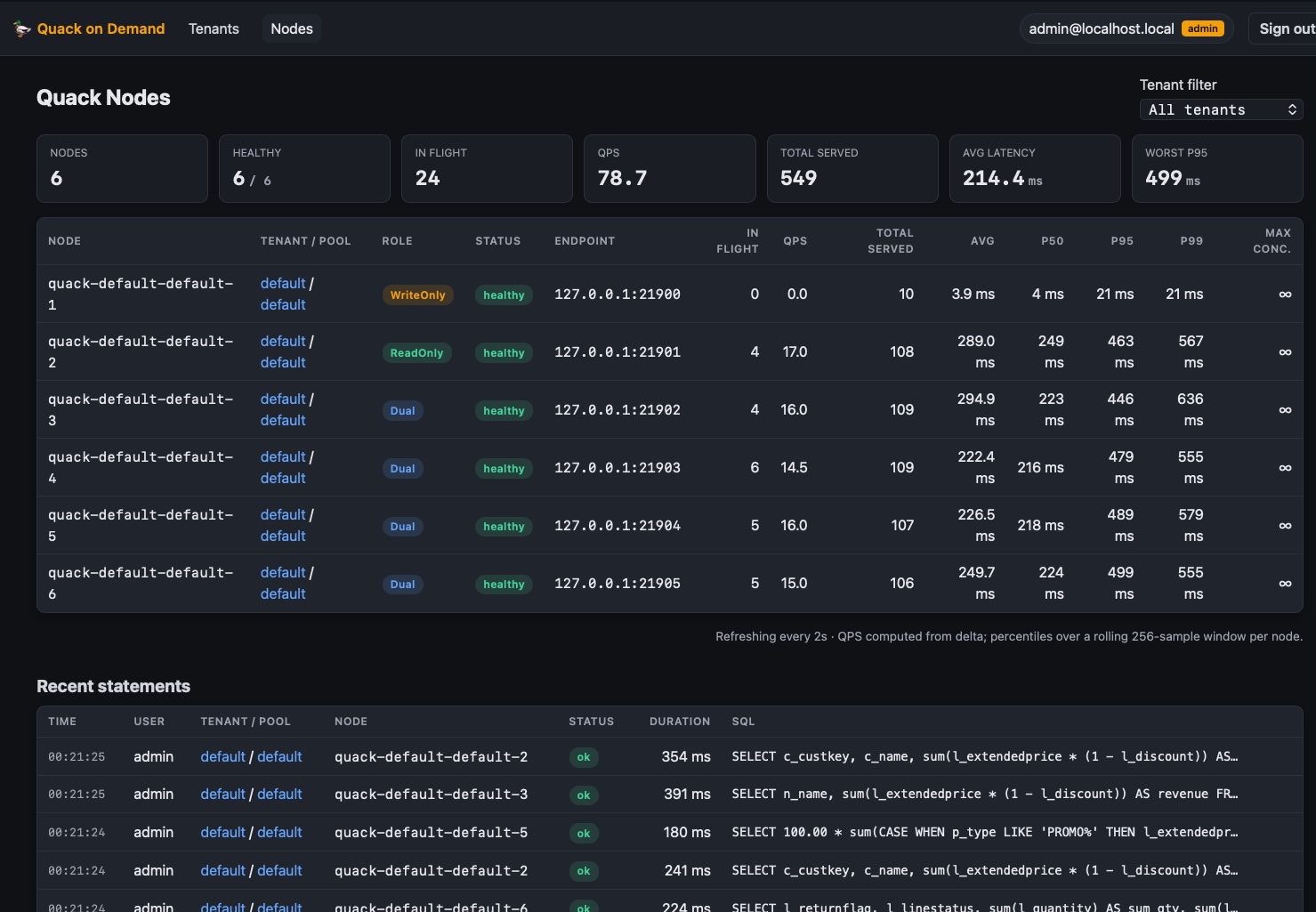
http://localhost:20900/ui/: tenant / pool / user CRUD, per-user "Effective permissions" drilldown, live node dashboard (in-flight, total served, EWMA latency) - Observability built in: Prometheus
/metrics, or push to CloudWatch / Azure Monitor / GCP. Ships two Grafana dashboards: single-node and Kubernetes - Self-healing on restart: the registry is reconciled against the runtime backend; dead nodes are respawned before the edge accepts traffic. Full matrix in Resilience
- Every config key is overridable via a
QOD_*env var
How it compares
| DuckDB embedded | OSS Flight SQL servers (GizmoSQL, sqlflite) | MotherDuck | Trino / Dremio | Quack on Demand | |
|---|---|---|---|---|---|
| Embedded / in-process | ✅ | ❌ | ❌ | ❌ | ❌ |
| Self-hosted | ✅ | ✅ | ❌ | ✅ | ✅ |
| Open source | ✅ | ✅ | ❌ | ✅ | ✅ |
| Fully managed SaaS (zero ops) | ❌ | ❌ | ✅ | vendor cloud | ❌ |
| Multi-user serving | ❌ | ✅ | ✅ | ✅ | ✅ |
| Multi-tenant isolation | ❌ | ❌ | ✅ | ✅ | ✅ |
| Table-level RBAC | ❌ | ❌ | ❌ | ✅ | ✅ |
| Row-level security | ❌ | ❌ | ❌ | add-on | ✅ |
| Column security + masking | ❌ | ❌ | ❌ | add-on | ✅ |
| Audit log | ❌ | ❌ | partial | via plugin | ✅ |
| Per-tenant usage metering | ❌ | ❌ | ✅ | add-on | ✅ |
| Active-active manager HA | n/a | ❌ | ✅ | ✅ | ✅ |
| Autoscaling node pools | ❌ | ❌ | ✅ | ✅ | ✅ |
| Distributed joins (TB-scale) | ❌ | ❌ | ❌ | ✅ | ❌ |
| BI via JDBC / ODBC | via files | ✅ | ✅ | ✅ | ✅ |
| DuckLake-native catalog | ✅ | partial | ✅ | ❌ | ✅ |
| Footprint | library | single binary | SaaS | cluster | single binary |
Pick DuckDB for one embedded database in one app. Pick MotherDuck if managed SaaS fits and data residency isn't a constraint. Pick Trino / Dremio for distributed joins across TB-scale tables. Pick Quack on Demand when you want DuckLake served to many users, with auth, table / row / column level security, an audit trail, and per-tenant usage metering, in open source, on infrastructure you control.
Architecture
Data residency - the base tables never leave the server
When Power BI or Tableau connect with a live / DirectQuery connection, each user interaction issues SQL over the FlightSQL wire. The query runs on a Quack node, against DuckLake data that stays in your object storage, and only the result rows stream back as an Arrow batch. The base tables never cross the trust boundary onto the analyst's machine.
flowchart LR
    subgraph client["BI client (Power BI / Tableau)"]
        bi["user / password<br/>or OAuth (OIDC / JWT)"]
    end

    subgraph server["Quack on Demand · your infrastructure"]
        edge["FlightSQL edge :31338<br/>authn + RBAC"]
        node["Quack nodes<br/>DuckDB + DuckLake"]
        store[("Postgres catalog +<br/>object storage<br/>S3 · GCS · FS")]
        edge --> node
        node -. data at rest .-> store
    end

    bi -- "SQL over TLS" --> edge
    edge -- "Arrow result rows only" --> bi
Live / DirectQuery only. Power BI Import mode and Tableau extract mode copy the full dataset into a local
.pbix/.hyperfile by design - that data lands on the client regardless of the gateway. Use a live / DirectQuery connection when server-side residency is the goal.
Project status
Stable. In production use against the documented surface: multi-tenant FlightSQL gateway, per-tenant DuckLake catalogs, the full RBAC graph (users / groups / roles / table permissions / pool grants), statement-level federation across external Postgres / S3 / Iceberg, and YAML-round-trippable control-plane manifests. The REST API, FlightSQL wire protocol, control-plane schema, and CLI surface are stable.
The manager runs as a single instance by default (safely restartable), and supports opt-in active-active HA on Kubernetes (replicaCount > 1). Worker pools scale horizontally in both modes.
Configuration
Every scalar in application.conf accepts a matching QOD_* env-var override. The security-critical ones to set before any non-localhost deploy:
| Setting | Env var | Default |
|---|---|---|
| Static admin key | QOD_API_KEY | unset (open if unset!) |
| Session JWT secret | QOD_SESSION_JWT_SECRET | well-known dev string (change!) |
| Admin password | QOD_ADMIN_PASSWORD | admin (change!) |
| Metastore password | QOD_PG_PASSWORD | azizam (change!) |
| Enable per-statement RBAC | QOD_ACL_ENABLED | false |
Full reference: Configuration.
Hosted / self-serve deployments should also harden the data plane:
QOD_NODE_LOCKDOWN=true(default off, so first-run smoke tests keep working out of the box) deniesATTACH, extensionINSTALL/LOAD, protectedSET/PRAGMAs, and local-file read functions for non-superuser sessions, and freezes the DuckDB engine's settings for the process lifetime- Per-pool override via
POST /api/pool/setLockdown(tri-stateinherit/on/off, superuser only), which restarts the pool's nodes immediately to apply the change - Network policy: enable
networkPolicy.enabled=truein the Helm chart to restrict node-pod ingress/egress - Catalog-reader eviction: tune
QOD_CATALOG_READER_SWEEP_MIN/QOD_CATALOG_READER_IDLE_EVICT_MINif the default 10/30-minute cadence for evicting idle per-tenant-db catalog readers needs adjusting
The full hardening runbook is in plugins/qod/skills/quack-on-demand/SKILL.md.
Claude Code skill
The operator runbook also ships as a Claude Code skill, so Claude can drive a live manager through the qod CLI. Install it one of two ways:
- With the CLI:
qod skill install(afteruv tool install qodorpip install qod) asks which LLM to install for (Claude Code, GitHub Copilot, Gemini CLI) and copies it into the matching skills directory (~/.claude/skillsetc.;--platform claude|copilot|gemini|allskips the prompt); re-run after a CLI upgrade to refresh it - As a plugin:
/plugin marketplace add starlake-ai/quack-on-demand, then/plugin install quack-on-demand@quack-on-demand
Documentation
Full guides, configuration reference, and REST API: https://docs.starlake.ai/qod
Jump to: Quickstart · Deployment · Configuration · Administration · Architecture · RBAC model · CONTRIBUTING.md
License
Apache 2.0.
Community
- Questions / discussion -> Discord
- Bug or feature -> file an issue using the templates
Contributing
PRs welcome. See CONTRIBUTING.md for the dev loop and CODE_OF_CONDUCT.md for community standards. Start with an issue labelled good first issue.


Similar repos


Languages
Scala
76.3%
TypeScript
8.5%
Python
8.2%
Shell
4.4%
PowerShell
1.2%
Production-grade Arrow FlightSQL gateway in front of DuckDB Quack + DuckLake. Multi-tenant pools, pluggable auth (DB/JWT/OIDC), table-level ACLs, role-aware routing, and a live admin console
See the codeREADME
Quack on Demand
The open-source serving layer for DuckDB and DuckLake. Multi-tenant DuckDB serving with table, row, and column level security, and Arrow Flight SQL on the wire.
uvx qod@latest serve --demo             # the full gateway on your laptop: no install, no Postgres
uvx qod@latest serve ./sales.duckdb     # the same gateway over YOUR DuckDB file, persistent + secured
uvx qod@latest serve ./warehouse/       # ...or a directory of parquet / csv
uvx qod@latest serve s3://bucket/data/  # ...or a remote prefix

# admin UI: http://localhost:20900/ui/ - FlightSQL edge: localhost:31338
# Ctrl-C stops the gateway and its nodes; so does `uvx qod@latest stop` from another terminal
One command boots a seeded warehouse with row, column, and table security already live. Connect with tenant=acme + pool=bi (in the admin UI login, set the tenant to acme) and switch principals to watch the policies apply:
alice/demo-alice(analyst) -c_phonecomes back masked to***, and onlyBUILDING-segment rows appearacme-admin/demo-acme-admin- same query, full unmasked data- a table
alicehas no grant on - denied
Client connection strings, printed again by the server at boot (replace <tenant>, <pool>, <user>):
JDBC : jdbc:arrow-flight-sql://localhost:31338/?tenant=<tenant>&pool=<pool>&user=<user>&useEncryption=true&disableCertificateVerification=true
ADBC : uri=grpc+tls://localhost:31338  (adbc_driver_flightsql; db_kwargs: username, password, plus grpc headers tenant=<tenant>, pool=<pool>)
ODBC : Driver={Arrow Flight SQL ODBC Driver};Host=localhost;Port=31338;UseEncryption=true;DisableCertificateVerification=true;UID=<user>;PWD=<password>;TENANT=<tenant>;POOL=<pool>
The missing serving layer
DuckLake gives you a Postgres-backed lakehouse catalog. DuckDB gives you the engine. Between them and a room full of analysts sits the part DuckLake explicitly leaves out by design: concurrent users, authentication, authorization, and connection routing.
Quack on Demand is that part. It turns a DuckLake lakehouse into a multi-tenant SQL warehouse your whole org can query: on-demand DuckDB nodes, least-loaded routing, table-level RBAC with column-level security and dynamic data masking, and Arrow Flight SQL on the wire so Power BI, Tableau, DBeaver, and any JDBC / ODBC / ADBC client just connect. Think self-hosted MotherDuck, scoped to serving, on your own infrastructure. Single binary.
Who is this for?
Use Quack on Demand if you want to:
- Expose a DuckLake / DuckDB warehouse to multiple teams or apps over a standard wire protocol (Arrow Flight SQL: works with JDBC, ODBC, ADBC, PyArrow, DBeaver, Spark, and other Flight-aware clients)
- Authenticate users against your existing identity provider (Keycloak / Azure AD / Google / Cognito / JWT / database) and enforce table-level RBAC at query time
- Run several tenants on shared infrastructure without giving each one a private DuckDB process to manage; each tenant owns a separate DuckLake catalog DB
Look elsewhere if you:
- Just need a single embedded DuckDB inside one application: use DuckDB directly
- Need a distributed query engine with cross-node shuffles and joins on TB-scale tables: look at Trino / Dremio / StarRocks. Quack on Demand routes each statement to a single node; it doesn't fan out across them
Quick start
Native Linux / macOS / Windows
The command below boots a fully seeded instance against an embedded, throwaway Postgres. With uv installed there are no other prerequisites - the launcher fetches everything it needs (sha256-verified against the GitHub release) and caches it under your user cache dir.
uvx qod@latest serve --demo # the full gateway on your laptop: no install, no Postgres
pip install qod && qod serve --demo is equivalent. The @latest matters: uvx otherwise freezes on the first version it ever resolved.
Docker
# trivial on Linux; on Mac/Windows requires Docker Desktop or a
# drop-in like Podman/Colima/OrbStack
docker run --rm -p 20900:20900 -p 31338:31338 starlakeai/quack-on-demand demo
It starts an embedded ephemeral Postgres, seeds tenant acme (acme_tpch.tpch1) with a small TPC-H dataset, boots the manager REST API on :20900 and the FlightSQL edge on :31338 (TLS on with an auto-generated self-signed cert; clients skip verification), and prints a connect snippet. All state lives under /tmp/qod-demo and is deleted when you stop it with Ctrl-C.
Demo mode is insecure by design (self-signed TLS, open REST, demo credentials, ephemeral catalog). Use it to evaluate, never in production.
Serve your own data
The demo is throwaway. To point the same gateway at data you already have, with nothing else to install (no Postgres, no Docker):
uvx qod@latest serve ./sales.duckdb          # an existing DuckDB file
uvx qod@latest serve ./warehouse/            # a directory of parquet / csv
uvx qod@latest serve s3://bucket/sales/      # a remote prefix
uvx qod@latest serve                         # a fresh, empty DuckLake to load into
One command provisions a tenant, a database, and a pool around the target, then
prints the JDBC / ADBC / ODBC strings. The control plane runs on a bundled
embedded Postgres under your user data dir, and it persists: restart and
everything is still there. Re-running adds a second database beside the first,
so qod serve ./other.duckdb extends the same gateway rather than replacing it.
Unlike --demo, this keeps the normal secure posture: TLS on, database auth on,
ACL on, and a random admin password generated on the first run and printed once.
If a gateway is already running locally, qod serve provisions straight into it
instead of booting a second one; qod stop still stops it.
An existing .duckdb file is attached read-write and served by a single node.
Parquet and CSV targets become views (read_parquet / read_csv), so nothing is
copied or converted.
Not sure which command you want?
| Command | What it is | Needs |
|---|---|---|
qod serve --demo | throwaway showcase on sample data, insecure by design | nothing |
qod serve ./your-data | persistent gateway over your own data, secure defaults | nothing |
qod start | your deployment: your own Postgres, your config | Postgres + qod setup |
For production, run against your own Postgres instead: see the deployment shapes below.
Full multi-tenant stack (Docker)
Zero to first query in under 5 minutes. Clone this repo, then:
cp .env.example .env                            # tweak ports / auth / admin password
LOAD_TPCH=1 ./scripts/run-docker-compose.sh     # pulls starlakeai/quack-on-demand:latest + seeds TPC-H SF=1
Windows: run inside WSL2 with
LOAD_TPCH=1 ./scripts/run-docker-compose.sh
That brings up Postgres + the manager, bootstraps the demo tenants acme (tenant-db acme_tpch with pools bi and etl) and globex (pool bi), and seeds the DuckLake catalog with TPC-H at scale factor 1 (~6M lineitem rows) into acme_tpch.tpch1. The admin UI is on http://localhost:20900/ui/ (log in admin / admin - change both before exposing anything beyond localhost). The FlightSQL edge is on localhost:31338; every client scopes its session with tenant=acme + pool=bi.
Connect a BI tool or client with the connection strings at the top - for this stack use tenant=acme, pool=bi, user admin.
The Power BI walkthrough, full ADBC db_kwargs examples, and the Python load tester are in Quickstart and Connecting clients.
Runnable client examples live in examples/: FlightSQL clients in TypeScript, Python, Java, and Rust, each running a single query and the 22 TPC-H queries. An n8n community node lives in its own repo.
Production-level deployment
Past the demo, the manager runs against your own Postgres and your own object store.
Pick the deployment shape in the docs:
- Laptop deployment - nodes as child processes of the manager, against an external Postgres or the zero-prerequisite embedded control plane (
qod serve,QOD_PG_EMBEDDED=true) - Single-server production deployment - end-to-end walkthrough on one large server: sizing, existing Postgres + S3-compatible store, pool provisioning, RBAC, monitoring, with runnable scripts
- Docker Compose - manager + Postgres as containers on a single host, persistent state bind-mounted
- Kubernetes - manager pod spawning node pods on demand; the Helm chart and a kind smoke-test rig live under
charts/quack-on-demand/
Then harden it: Production hardening, TLS, and the configuration reference (every QOD_* / PROXY_* env var).
Features
Security & identity
- Arrow Flight SQL edge with TLS on by default (auto-generated self-signed cert; drop in a CA-signed one for prod)
- Pluggable authentication: Postgres / any JDBC backend (BCrypt passwords), external JWT (HS256 / RS256 / PEM), or OIDC (Keycloak with ROPC, Google, Azure AD, AWS Cognito)
- First-class RBAC graph: two gates at handshake (user-scope, pool-access), then per-statement table and column checks against a cached EffectiveSet. See the RBAC model
- Column-level security and dynamic data masking: per-role policies on
catalog.schema.table.columneither deny the column or mask it through a custom SQL transform, applied by rewriting each statement at the edge before it reaches a node. Row-level security (predicate filters) ships too. Both are on by default, withQOD_CLS_ENABLED=false/QOD_RLS_ENABLED=falseas kill switches - Admin REST API guarded by an
X-API-Keystatic key OR a session token from/api/auth/login - MCP server for AI agents at
POST /mcp: agents authenticate with a personal access token (self-scoped, tenant-inferred) or the static key, and reach the full admin control plane - identity, access, pools & nodes, databases, maintenance & tags, time travel, federation, manifest, PATs, telemetry - gated by the same server-side guards as REST. Seeskills/quack-on-demand/SKILL.md("Administering over MCP") for the tool families and setup - Account security: opt-in login lockout after N failed attempts (
QOD_AUTH_LOCKOUT_ENABLED), self-service password reset over SMTP (email a single-use link), and admin-forced password change at next login. Database users can carry an email; an email-format username is its own email
Data plane
- One-command serving:
qod serve <target>boots a persistent, secured gateway over an existing.duckdbfile, a directory of parquet/csv, or an object-store prefix - control plane on a bundled embedded Postgres, so there is nothing to install first - Multi-tenant pools of Quack nodes (
READONLY/WRITEONLY/DUAL); the router classifies each statement and picks a compatible least-loaded node - Per-tenant DuckLake catalog DB (
${tenant}_${tenantDb}) auto-provisioned next to the control-plane DB: tenant isolation at the Postgres-database boundary, not just row level - Single binary deployment
Operability
- React admin console at
http://localhost:20900/ui/: tenant / pool / user CRUD, per-user "Effective permissions" drilldown, live node dashboard (in-flight, total served, EWMA latency) - Observability built in: Prometheus
/metrics, or push to CloudWatch / Azure Monitor / GCP. Ships two Grafana dashboards: single-node and Kubernetes - Self-healing on restart: the registry is reconciled against the runtime backend; dead nodes are respawned before the edge accepts traffic. Full matrix in Resilience
- Every config key is overridable via a
QOD_*env var
How it compares
| DuckDB embedded | OSS Flight SQL servers (GizmoSQL, sqlflite) | MotherDuck | Trino / Dremio | Quack on Demand | |
|---|---|---|---|---|---|
| Embedded / in-process | ✅ | ❌ | ❌ | ❌ | ❌ |
| Self-hosted | ✅ | ✅ | ❌ | ✅ | ✅ |
| Open source | ✅ | ✅ | ❌ | ✅ | ✅ |
| Fully managed SaaS (zero ops) | ❌ | ❌ | ✅ | vendor cloud | ❌ |
| Multi-user serving | ❌ | ✅ | ✅ | ✅ | ✅ |
| Multi-tenant isolation | ❌ | ❌ | ✅ | ✅ | ✅ |
| Table-level RBAC | ❌ | ❌ | ❌ | ✅ | ✅ |
| Row-level security | ❌ | ❌ | ❌ | add-on | ✅ |
| Column security + masking | ❌ | ❌ | ❌ | add-on | ✅ |
| Audit log | ❌ | ❌ | partial | via plugin | ✅ |
| Per-tenant usage metering | ❌ | ❌ | ✅ | add-on | ✅ |
| Active-active manager HA | n/a | ❌ | ✅ | ✅ | ✅ |
| Autoscaling node pools | ❌ | ❌ | ✅ | ✅ | ✅ |
| Distributed joins (TB-scale) | ❌ | ❌ | ❌ | ✅ | ❌ |
| BI via JDBC / ODBC | via files | ✅ | ✅ | ✅ | ✅ |
| DuckLake-native catalog | ✅ | partial | ✅ | ❌ | ✅ |
| Footprint | library | single binary | SaaS | cluster | single binary |
Pick DuckDB for one embedded database in one app. Pick MotherDuck if managed SaaS fits and data residency isn't a constraint. Pick Trino / Dremio for distributed joins across TB-scale tables. Pick Quack on Demand when you want DuckLake served to many users, with auth, table / row / column level security, an audit trail, and per-tenant usage metering, in open source, on infrastructure you control.
Architecture
Data residency - the base tables never leave the server
When Power BI or Tableau connect with a live / DirectQuery connection, each user interaction issues SQL over the FlightSQL wire. The query runs on a Quack node, against DuckLake data that stays in your object storage, and only the result rows stream back as an Arrow batch. The base tables never cross the trust boundary onto the analyst's machine.
flowchart LR
    subgraph client["BI client (Power BI / Tableau)"]
        bi["user / password<br/>or OAuth (OIDC / JWT)"]
    end

    subgraph server["Quack on Demand · your infrastructure"]
        edge["FlightSQL edge :31338<br/>authn + RBAC"]
        node["Quack nodes<br/>DuckDB + DuckLake"]
        store[("Postgres catalog +<br/>object storage<br/>S3 · GCS · FS")]
        edge --> node
        node -. data at rest .-> store
    end

    bi -- "SQL over TLS" --> edge
    edge -- "Arrow result rows only" --> bi
Live / DirectQuery only. Power BI Import mode and Tableau extract mode copy the full dataset into a local
.pbix/.hyperfile by design - that data lands on the client regardless of the gateway. Use a live / DirectQuery connection when server-side residency is the goal.
Project status
Stable. In production use against the documented surface: multi-tenant FlightSQL gateway, per-tenant DuckLake catalogs, the full RBAC graph (users / groups / roles / table permissions / pool grants), statement-level federation across external Postgres / S3 / Iceberg, and YAML-round-trippable control-plane manifests. The REST API, FlightSQL wire protocol, control-plane schema, and CLI surface are stable.
The manager runs as a single instance by default (safely restartable), and supports opt-in active-active HA on Kubernetes (replicaCount > 1). Worker pools scale horizontally in both modes.
Configuration
Every scalar in application.conf accepts a matching QOD_* env-var override. The security-critical ones to set before any non-localhost deploy:
| Setting | Env var | Default |
|---|---|---|
| Static admin key | QOD_API_KEY | unset (open if unset!) |
| Session JWT secret | QOD_SESSION_JWT_SECRET | well-known dev string (change!) |
| Admin password | QOD_ADMIN_PASSWORD | admin (change!) |
| Metastore password | QOD_PG_PASSWORD | azizam (change!) |
| Enable per-statement RBAC | QOD_ACL_ENABLED | false |
Full reference: Configuration.
Hosted / self-serve deployments should also harden the data plane:
QOD_NODE_LOCKDOWN=true(default off, so first-run smoke tests keep working out of the box) deniesATTACH, extensionINSTALL/LOAD, protectedSET/PRAGMAs, and local-file read functions for non-superuser sessions, and freezes the DuckDB engine's settings for the process lifetime- Per-pool override via
POST /api/pool/setLockdown(tri-stateinherit/on/off, superuser only), which restarts the pool's nodes immediately to apply the change - Network policy: enable
networkPolicy.enabled=truein the Helm chart to restrict node-pod ingress/egress - Catalog-reader eviction: tune
QOD_CATALOG_READER_SWEEP_MIN/QOD_CATALOG_READER_IDLE_EVICT_MINif the default 10/30-minute cadence for evicting idle per-tenant-db catalog readers needs adjusting
The full hardening runbook is in plugins/qod/skills/quack-on-demand/SKILL.md.
Claude Code skill
The operator runbook also ships as a Claude Code skill, so Claude can drive a live manager through the qod CLI. Install it one of two ways:
- With the CLI:
qod skill install(afteruv tool install qodorpip install qod) asks which LLM to install for (Claude Code, GitHub Copilot, Gemini CLI) and copies it into the matching skills directory (~/.claude/skillsetc.;--platform claude|copilot|gemini|allskips the prompt); re-run after a CLI upgrade to refresh it - As a plugin:
/plugin marketplace add starlake-ai/quack-on-demand, then/plugin install quack-on-demand@quack-on-demand
Documentation
Full guides, configuration reference, and REST API: https://docs.starlake.ai/qod
Jump to: Quickstart · Deployment · Configuration · Administration · Architecture · RBAC model · CONTRIBUTING.md
License
Apache 2.0.
Community
- Questions / discussion -> Discord
- Bug or feature -> file an issue using the templates
Contributing
PRs welcome. See CONTRIBUTING.md for the dev loop and CODE_OF_CONDUCT.md for community standards. Start with an issue labelled good first issue.
Similar repos
Languages
Scala
76.3%
TypeScript
8.5%
Python
8.2%
Shell
4.4%
PowerShell
1.2%