
Windows AI voice assistant: Tauri + React HUD, Python backend, browser & desktop autopilot, phone remote
Python
1
4 commits
updated Oct 5, 2026
See what people are saying
README
J.A.R.V.I.S. for Windows
A voice assistant that actually does things on your PC. Say "Hey Jarvis", ask for something, and it answers out loud, drives a browser, clicks through desktop apps, and remembers you. All from an Iron-Man-style HUD.




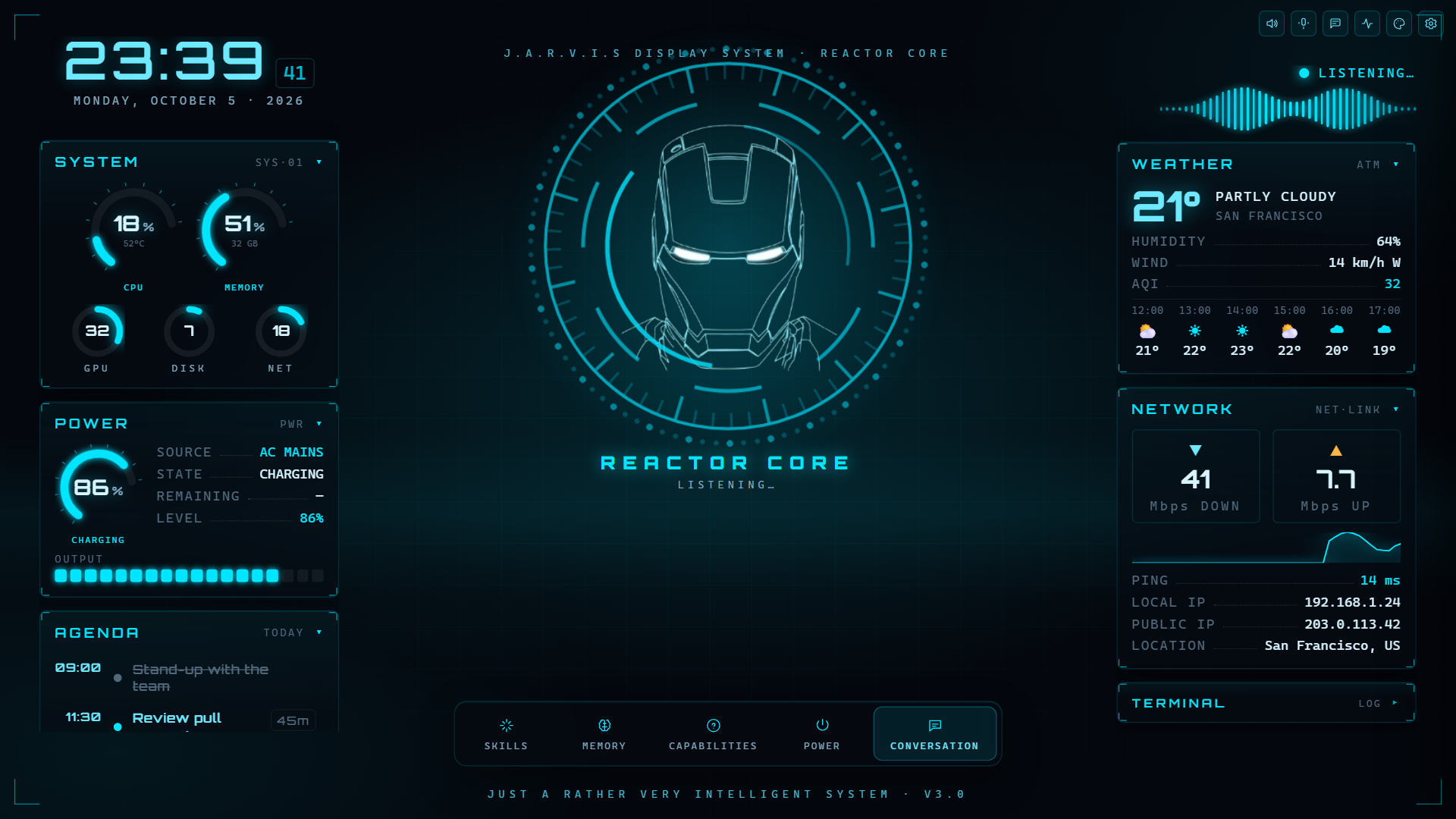
Screenshot shows demo data.
Why it's different
Most desktop assistants stop at answering questions. JARVIS hands the task to an autopilot that reads the screen, plans the steps, acts, checks each step landed, and corrects itself when it didn't.
- "Find a carbonara recipe and open it": it drives its own Chromium, reads the page, clicks, types and verifies.
- "Open Notepad and write a shopping list": it reads the Windows accessibility tree and works real desktop apps, behind an explicit time-limited consent and a corner-of-the-screen abort.
- From your phone: pair it over Tailscale and send tasks, watch the PC live, and take over the mouse and keyboard, all end-to-end on your own network.
Features
| 🎙️ Hands-free voice | Local wake word ("Hey Jarvis") and local Whisper transcription. Push-to-talk with Ctrl+Space from any app. Full-duplex voice mode via Gemini Live. |
| 🧠 Any model, routed for you | Bring keys for Groq, Gemini, OpenRouter, NVIDIA NIM, Mistral, Claude, OpenAI, Grok or Meta Llama. Auto ranks your models by benchmark and picks per request, falling back when one is rate-limited. Vertex AI (Google Cloud login) and offline Ollama work too. |
| 🌐 Browser autopilot | Goal in, result out. Sandboxed to a browser JARVIS owns, with approvals for anything risky. Watch every step and screenshot in the Agent Activity panel. |
| 🖥️ Desktop control | Opens, closes and operates Windows apps through UI Automation. Off until you arm it, with a live "JARVIS CONTROLLING" bar to pause or correct it. |
| 📱 Phone remote | QR + PIN pairing, signed messages, WebRTC screen streaming. A phone can run tasks but can never touch the PC's keys or settings. |
| 📊 Rich answers | Charts, tables, timelines and flowcharts render inline in the chat. |
| 💾 Memory & playbooks | "Remember that…" keeps facts across sessions. Teach a multi-step routine once and it reuses it. Everything is stored locally and viewable in the Memory panel. |
| ⏰ Everyday stuff | Reminders, timers, recurring routines, a voice-editable agenda, weather, nearby places, directions, news, web search with citations. |
| 🛠️ PC actions | Volume, power, screenshots, screen/voice/video recording, QR codes, AI images, PDF read/write, speed test, camera OCR with translation. |
| 🎨 Make it yours | Restyle the HUD by voice: colours, background, density and panel layout. Voices: Piper (offline), ElevenLabs or Google Chirp 3 HD. |
Download
Grab the installer from the latest release.
- It bundles everything (backend, Chromium, Whisper, the Piper voice), so it works offline right after install. No Python needed.
- On first launch, paste one API key (Groq and Gemini both have free tiers) and choose where JARVIS saves its files.
- The installer isn't code-signed yet, so Windows SmartScreen will warn you. Click More info → Run anyway.
Run from source
Requires Windows 10/11, Python 3.11+, Node.js 20+ and the Rust toolchain.
git clone https://github.com/AnaaySampat/jarvis-windows.git
cd jarvis-windows

# Backend
cd jarvis-studio-backend
python -m venv .venv
.venv\Scripts\activate
pip install -r requirements.txt
playwright install chromium     # for the browser autopilot
cd ..

# GUI
cd jarvis-studio-gui
npm install
cd ..

# Launch both
python start.py
python jarvis-studio-backend\main.py --text runs the backend with typed input
instead of the mic.
Every optional package fails soft. If one is missing, only its feature turns off,
and JARVIS tells you what to pip install.
Which package powers which feature
| Feature | Package(s) |
|---|---|
| Vertex AI (Gemini / Imagen / Chirp / Vision) | google-auth + gcloud auth application-default login |
| Browser autopilot | playwright + playwright install chromium |
| Camera OCR | Cloud Vision via Vertex, or local easyocr + opencv-python + pillow |
| Live HUD telemetry | psutil (GPU gauge: nvidia-ml-py or GPUtil) |
| Exact volume control | pycaw, comtypes |
| Screenshots / QR codes | mss or pillow / qrcode |
| PDFs | pypdf (read), fpdf2 (write) |
| Video recording | opencv-python |
| Speed test | speedtest-cli |
| Phone pairing | cryptography + Tailscale on both devices |
| Live remote desktop | aiortc |
How it works
  Phone                                Desktop
  ─────────────────────                ─────────────────────────────────────
  signed envelopes  ──── Tailscale ──▶ +-------------------+
  WebRTC video      ◀───  (100.64/10)  |   JARVIS HUD      |
                                       |  (Tauri + React)  |
                                       +-------------------+
                                            │ WebSocket ws://127.0.0.1:8765
                                            ▼
  +------------------------------------------------------------------+
  |              Python backend (jarvis-studio-backend)               |
  |  openWakeWord → faster-whisper → LLM router → TTS                 |
  |  autopilot.py (browser + desktop operators) · task_router.py      |
  |  actions/ · llm/ · server/ (ws + webrtc) · autonomy/ (pairing)    |
  +------------------------------------------------------------------+
One WebSocket server serves both the local HUD (loopback, full access) and a paired
phone (signed, allowlisted). A deterministic router (task_router.py) decides
whether a goal needs the browser or the desktop before any model commits to one.
| Path | What's there |
|---|---|
jarvis-studio-backend/ | main.py (handlers + orchestration), autopilot.py, actions/, llm/ (routing, model catalog), server/, autonomy/ (pairing crypto), transcription/, tts/, wake_word/ |
jarvis-studio-gui/ | Tauri 2 + React HUD: main window, status pill overlay, browser panel, control bar |
scripts/ | Installer build scripts |
start.py | Launches backend + GUI for development |
Privacy
- Wake word and transcription run on your PC. Mic audio stays local, except in the optional Gemini Live voice mode, which streams it to Google.
- What you say (as text), plus camera frames when you use OCR, goes to the AI provider you chose.
- API keys and settings live in
%APPDATA%\Jarvis\, never in the project folder. - Memory, chats and everything JARVIS creates stay on your disk (default
~/Jarvis). - Phone pairing stays on your own devices and Tailscale network. No relay, broker or account in between.
Development
# Backend tests: no network or API keys needed
cd jarvis-studio-backend
python -m unittest discover -s . -p "test_*.py" -t .

# GUI
cd jarvis-studio-gui
npm test
npm run lint
npm run build
CI runs all of these on every push. Build the Windows installer with
.\scripts\build.ps1. It freezes the backend with PyInstaller, bundles the runtime
assets, and writes the NSIS installer to
jarvis-studio-gui\src-tauri\target\release\bundle\nsis\. Add -Lean to
scripts\package-backend.ps1 for a small installer that downloads assets on first run.
Contributing
Bug reports and pull requests are welcome. See CONTRIBUTING.md and the Code of Conduct. Found a security issue? Please report it privately as described in SECURITY.md, not in a public issue.
License
MIT. See LICENSE.
Wake-word model: the bundled hey_jarvis model comes from
openWakeWord by David Scripka. Its code
is Apache 2.0, but its pre-trained models are
CC BY-NC-SA 4.0, which
forbids commercial use. For a commercial build, train your own model and put it
at jarvis-studio-backend/wake_word/models/hey_jarvis.onnx, or point
JARVIS_WAKE_MODEL_PATH at it.
JARVIS and Iron Man are trademarks of Marvel. This is an unofficial fan project, not affiliated with or endorsed by Marvel or Disney.
Similar repos


Windows AI voice assistant: Tauri + React HUD, Python backend, browser & desktop autopilot, phone remote
Python
1
4 commits
updated Oct 5, 2026
See what people are saying
README
J.A.R.V.I.S. for Windows
A voice assistant that actually does things on your PC. Say "Hey Jarvis", ask for something, and it answers out loud, drives a browser, clicks through desktop apps, and remembers you. All from an Iron-Man-style HUD.
Screenshot shows demo data.
Why it's different
Most desktop assistants stop at answering questions. JARVIS hands the task to an autopilot that reads the screen, plans the steps, acts, checks each step landed, and corrects itself when it didn't.
- "Find a carbonara recipe and open it": it drives its own Chromium, reads the page, clicks, types and verifies.
- "Open Notepad and write a shopping list": it reads the Windows accessibility tree and works real desktop apps, behind an explicit time-limited consent and a corner-of-the-screen abort.
- From your phone: pair it over Tailscale and send tasks, watch the PC live, and take over the mouse and keyboard, all end-to-end on your own network.
Features
| 🎙️ Hands-free voice | Local wake word ("Hey Jarvis") and local Whisper transcription. Push-to-talk with Ctrl+Space from any app. Full-duplex voice mode via Gemini Live. |
| 🧠 Any model, routed for you | Bring keys for Groq, Gemini, OpenRouter, NVIDIA NIM, Mistral, Claude, OpenAI, Grok or Meta Llama. Auto ranks your models by benchmark and picks per request, falling back when one is rate-limited. Vertex AI (Google Cloud login) and offline Ollama work too. |
| 🌐 Browser autopilot | Goal in, result out. Sandboxed to a browser JARVIS owns, with approvals for anything risky. Watch every step and screenshot in the Agent Activity panel. |
| 🖥️ Desktop control | Opens, closes and operates Windows apps through UI Automation. Off until you arm it, with a live "JARVIS CONTROLLING" bar to pause or correct it. |
| 📱 Phone remote | QR + PIN pairing, signed messages, WebRTC screen streaming. A phone can run tasks but can never touch the PC's keys or settings. |
| 📊 Rich answers | Charts, tables, timelines and flowcharts render inline in the chat. |
| 💾 Memory & playbooks | "Remember that…" keeps facts across sessions. Teach a multi-step routine once and it reuses it. Everything is stored locally and viewable in the Memory panel. |
| ⏰ Everyday stuff | Reminders, timers, recurring routines, a voice-editable agenda, weather, nearby places, directions, news, web search with citations. |
| 🛠️ PC actions | Volume, power, screenshots, screen/voice/video recording, QR codes, AI images, PDF read/write, speed test, camera OCR with translation. |
| 🎨 Make it yours | Restyle the HUD by voice: colours, background, density and panel layout. Voices: Piper (offline), ElevenLabs or Google Chirp 3 HD. |
Download
Grab the installer from the latest release.
- It bundles everything (backend, Chromium, Whisper, the Piper voice), so it works offline right after install. No Python needed.
- On first launch, paste one API key (Groq and Gemini both have free tiers) and choose where JARVIS saves its files.
- The installer isn't code-signed yet, so Windows SmartScreen will warn you. Click More info → Run anyway.
Run from source
Requires Windows 10/11, Python 3.11+, Node.js 20+ and the Rust toolchain.
git clone https://github.com/AnaaySampat/jarvis-windows.git
cd jarvis-windows

# Backend
cd jarvis-studio-backend
python -m venv .venv
.venv\Scripts\activate
pip install -r requirements.txt
playwright install chromium     # for the browser autopilot
cd ..

# GUI
cd jarvis-studio-gui
npm install
cd ..

# Launch both
python start.py
python jarvis-studio-backend\main.py --text runs the backend with typed input
instead of the mic.
Every optional package fails soft. If one is missing, only its feature turns off,
and JARVIS tells you what to pip install.
Which package powers which feature
| Feature | Package(s) |
|---|---|
| Vertex AI (Gemini / Imagen / Chirp / Vision) | google-auth + gcloud auth application-default login |
| Browser autopilot | playwright + playwright install chromium |
| Camera OCR | Cloud Vision via Vertex, or local easyocr + opencv-python + pillow |
| Live HUD telemetry | psutil (GPU gauge: nvidia-ml-py or GPUtil) |
| Exact volume control | pycaw, comtypes |
| Screenshots / QR codes | mss or pillow / qrcode |
| PDFs | pypdf (read), fpdf2 (write) |
| Video recording | opencv-python |
| Speed test | speedtest-cli |
| Phone pairing | cryptography + Tailscale on both devices |
| Live remote desktop | aiortc |
How it works
  Phone                                Desktop
  ─────────────────────                ─────────────────────────────────────
  signed envelopes  ──── Tailscale ──▶ +-------------------+
  WebRTC video      ◀───  (100.64/10)  |   JARVIS HUD      |
                                       |  (Tauri + React)  |
                                       +-------------------+
                                            │ WebSocket ws://127.0.0.1:8765
                                            ▼
  +------------------------------------------------------------------+
  |              Python backend (jarvis-studio-backend)               |
  |  openWakeWord → faster-whisper → LLM router → TTS                 |
  |  autopilot.py (browser + desktop operators) · task_router.py      |
  |  actions/ · llm/ · server/ (ws + webrtc) · autonomy/ (pairing)    |
  +------------------------------------------------------------------+
One WebSocket server serves both the local HUD (loopback, full access) and a paired
phone (signed, allowlisted). A deterministic router (task_router.py) decides
whether a goal needs the browser or the desktop before any model commits to one.
| Path | What's there |
|---|---|
jarvis-studio-backend/ | main.py (handlers + orchestration), autopilot.py, actions/, llm/ (routing, model catalog), server/, autonomy/ (pairing crypto), transcription/, tts/, wake_word/ |
jarvis-studio-gui/ | Tauri 2 + React HUD: main window, status pill overlay, browser panel, control bar |
scripts/ | Installer build scripts |
start.py | Launches backend + GUI for development |
Privacy
- Wake word and transcription run on your PC. Mic audio stays local, except in the optional Gemini Live voice mode, which streams it to Google.
- What you say (as text), plus camera frames when you use OCR, goes to the AI provider you chose.
- API keys and settings live in
%APPDATA%\Jarvis\, never in the project folder. - Memory, chats and everything JARVIS creates stay on your disk (default
~/Jarvis). - Phone pairing stays on your own devices and Tailscale network. No relay, broker or account in between.
Development
# Backend tests: no network or API keys needed
cd jarvis-studio-backend
python -m unittest discover -s . -p "test_*.py" -t .

# GUI
cd jarvis-studio-gui
npm test
npm run lint
npm run build
CI runs all of these on every push. Build the Windows installer with
.\scripts\build.ps1. It freezes the backend with PyInstaller, bundles the runtime
assets, and writes the NSIS installer to
jarvis-studio-gui\src-tauri\target\release\bundle\nsis\. Add -Lean to
scripts\package-backend.ps1 for a small installer that downloads assets on first run.
Contributing
Bug reports and pull requests are welcome. See CONTRIBUTING.md and the Code of Conduct. Found a security issue? Please report it privately as described in SECURITY.md, not in a public issue.
License
MIT. See LICENSE.
Wake-word model: the bundled hey_jarvis model comes from
openWakeWord by David Scripka. Its code
is Apache 2.0, but its pre-trained models are
CC BY-NC-SA 4.0, which
forbids commercial use. For a commercial build, train your own model and put it
at jarvis-studio-backend/wake_word/models/hey_jarvis.onnx, or point
JARVIS_WAKE_MODEL_PATH at it.
JARVIS and Iron Man are trademarks of Marvel. This is an unofficial fan project, not affiliated with or endorsed by Marvel or Disney.