
README
Jarvis
Jarvis is a local-first macOS desktop assistant for chat, voice dictation, web research, Notion workflows, document inspection, and browser automation. It supports local Ollama models and hosted models through OpenRouter or OpenCode Go.
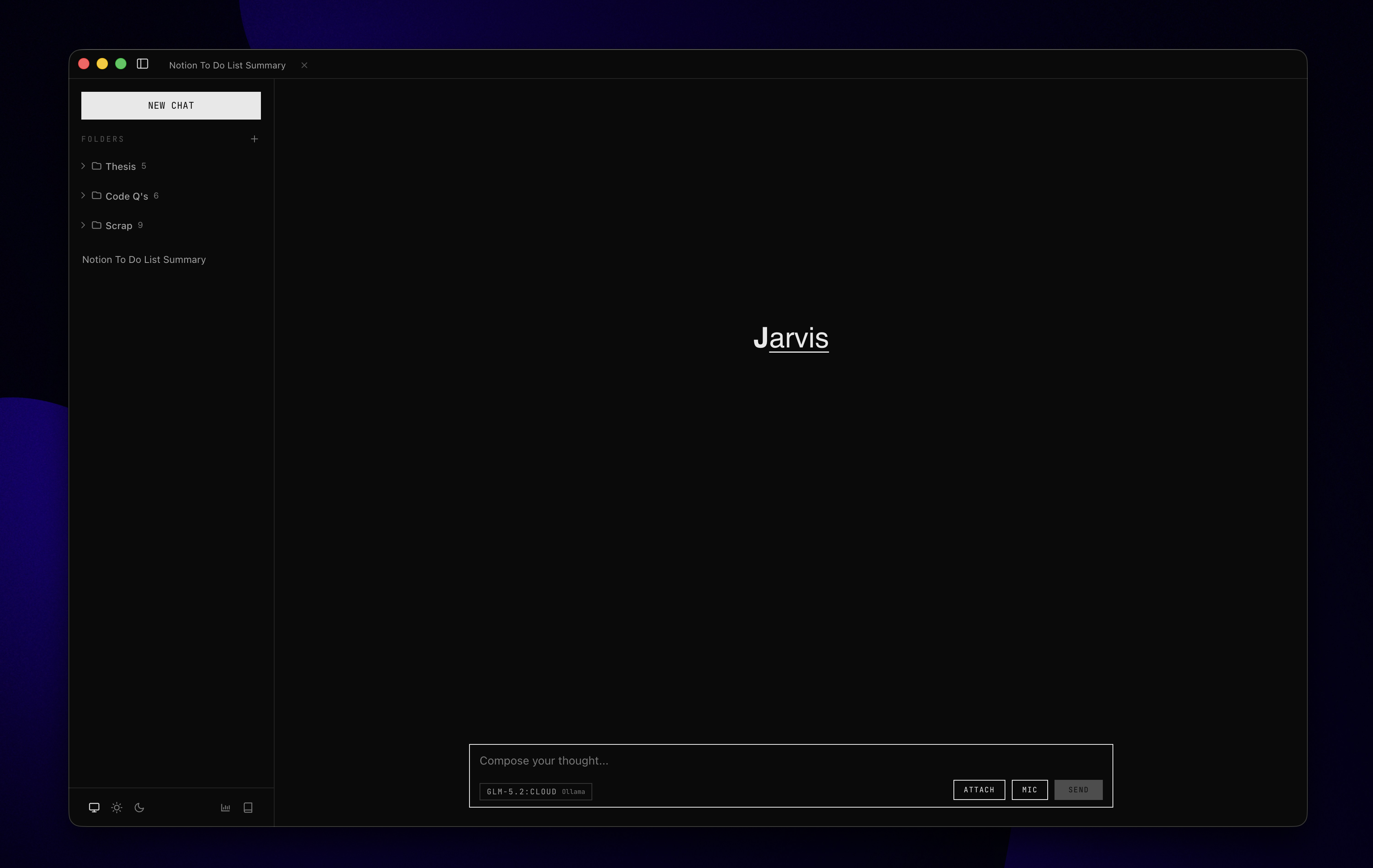
What You Can Do
- Chat with local or hosted language models.
- Dictate into Jarvis or another focused macOS app with
Cmd+Shift+Space. - Build a personal vocabulary from recurring dictation corrections.
- Search the web and fetch public pages for current information.
- Search Notion, query databases, create pages, and append blocks.
- Open and control a separate Jarvis-owned browser workspace.
- Attach documents and render Markdown, code, math, and citations.
- Review local token usage and model response performance.
Requirements
- macOS
- Node.js 22.13 or newer
- pnpm 10.28 or newer
- Python 3.11 or newer for voice features
- Optional: a running Ollama server for local models
Quick Start
git clone https://github.com/Alaud01/assistant-app.git
cd assistant-app
pnpm install
cp .env.example .env
Open .env and add only the credentials for the services you intend to use. You can leave every cloud key empty when using a local Ollama server.
Start the development app:
pnpm dev
Jarvis runs in the macOS menu bar. Open it from the tray icon after Electron starts.
Provider Configuration
| Variable | Enables |
|---|---|
OPENROUTER_API_KEY | Hosted chat, cloud transcription, and transcript refinement |
OPENCODE_GO_API_KEY | OpenCode Go models |
TAVILY_KEY | Web search |
OLLAMA_BASE_URL | Local Ollama server; defaults to http://localhost:11434 |
OLLAMA_API_KEY | Optional Ollama cloud access |
See .env.example for optional provider, voice-model, and timeout settings. Credentials are read from the environment and are not copied into Jarvis application storage.
Voice Setup
Install the lightweight Python sidecar dependencies:
pnpm setup:python
Jarvis will offer to install the larger local Parakeet speech-recognition runtime when voice features are first configured. That managed runtime and its model weights are stored under ~/Library/Application Support/Jarvis, not in this repository.
Without the local model, Jarvis can use OpenRouter for transcription when OPENROUTER_API_KEY is configured. Voice features may request microphone, Accessibility, and Automation permissions for recording, app detection, and cross-app text insertion.
Running and Building
pnpm dev              # Vite dev server and Electron app
pnpm start            # Production-style local build and launch
pnpm start:python     # Run only the voice sidecar on port 8765
pnpm test             # TypeScript, lint, JavaScript, and Python tests
pnpm build            # Build the macOS application, ZIP, and DMG
The generated macOS application is ad-hoc signed for local development. Public binary distribution requires an Apple Developer certificate and notarization.
Using Jarvis
- Select a provider and model from the composer.
- Enter a message, attach a document, or press
Cmd+Shift+Spaceto dictate. - Configure
TAVILY_KEYfor web search, and use Notion → Connect… to authorize Notion through OAuth. - Browser Control opens a separate Chromium workspace and reports page state after each action.
- Review learned vocabulary in Personal Dictionary and local metrics in Usage Dashboard.
Security and Privacy
.envis ignored by Git but is still a plaintext local file; do not share or commit it.- Hosted providers receive the prompts, attachments, audio, or tool context required for requests sent to them.
fetch_urlaccepts only public-internet destinations and rejects non-public DNS results and redirects.- Browser Control uses its own browser profile rather than the user's normal browser profile.
- Notion authorization is encrypted with Electron secure storage; Jarvis exposes only the approved hosted-MCP capabilities negotiated at connection time.
browser_evaluatecan execute JavaScript inside the Jarvis-owned page. Treat it as a trusted debugging/recovery capability.- Voice refinement and correction learning may inspect bounded text around the focused field.
Read SECURITY.md before using Jarvis with sensitive accounts or data.
Current Limitations
- Jarvis is macOS-specific and depends on macOS tray, accessibility, and automation APIs.
- Browser Control and cross-app dictation are powerful local capabilities; review requested permissions carefully.
- The optional local Parakeet runtime is a large download and can use significant memory during transcription.
- Release builds are not notarized unless signing credentials are configured separately.
Architecture
- Electron main process: provider orchestration, tool execution, IPC, storage, Browser Control, and voice routing
- React + TypeScript renderer: conversations, model selection, attachments, dictionary management, and usage views
- Secure preload bridge: narrow renderer-to-main IPC surface with context isolation
- FastAPI sidecar: voice activity detection, transcription, and transcript refinement
Architecture decisions live in docs/adr, and the voice-personalization glossary lives in CONTEXT.md.
Project Layout
jarvis/
├── assets/              # Application and tray icons
├── docs/adr/            # Architecture decision records
├── python-service/      # FastAPI voice sidecar
├── src/main/            # Electron main process and tools
├── src/preload/         # IPC bridge
├── src/renderer/        # React application
├── src/shared/          # Shared types and pure logic
└── tests/               # JavaScript tests
License
Licensed under the MIT License.
Contributors

61 commits
Similar repos


Languages
TypeScript
82.6%
Python
10.2%
JavaScript
5.1%
CSS
2.0%
README
Jarvis
Jarvis is a local-first macOS desktop assistant for chat, voice dictation, web research, Notion workflows, document inspection, and browser automation. It supports local Ollama models and hosted models through OpenRouter or OpenCode Go.
What You Can Do
- Chat with local or hosted language models.
- Dictate into Jarvis or another focused macOS app with
Cmd+Shift+Space. - Build a personal vocabulary from recurring dictation corrections.
- Search the web and fetch public pages for current information.
- Search Notion, query databases, create pages, and append blocks.
- Open and control a separate Jarvis-owned browser workspace.
- Attach documents and render Markdown, code, math, and citations.
- Review local token usage and model response performance.
Requirements
- macOS
- Node.js 22.13 or newer
- pnpm 10.28 or newer
- Python 3.11 or newer for voice features
- Optional: a running Ollama server for local models
Quick Start
git clone https://github.com/Alaud01/assistant-app.git
cd assistant-app
pnpm install
cp .env.example .env
Open .env and add only the credentials for the services you intend to use. You can leave every cloud key empty when using a local Ollama server.
Start the development app:
pnpm dev
Jarvis runs in the macOS menu bar. Open it from the tray icon after Electron starts.
Provider Configuration
| Variable | Enables |
|---|---|
OPENROUTER_API_KEY | Hosted chat, cloud transcription, and transcript refinement |
OPENCODE_GO_API_KEY | OpenCode Go models |
TAVILY_KEY | Web search |
OLLAMA_BASE_URL | Local Ollama server; defaults to http://localhost:11434 |
OLLAMA_API_KEY | Optional Ollama cloud access |
See .env.example for optional provider, voice-model, and timeout settings. Credentials are read from the environment and are not copied into Jarvis application storage.
Voice Setup
Install the lightweight Python sidecar dependencies:
pnpm setup:python
Jarvis will offer to install the larger local Parakeet speech-recognition runtime when voice features are first configured. That managed runtime and its model weights are stored under ~/Library/Application Support/Jarvis, not in this repository.
Without the local model, Jarvis can use OpenRouter for transcription when OPENROUTER_API_KEY is configured. Voice features may request microphone, Accessibility, and Automation permissions for recording, app detection, and cross-app text insertion.
Running and Building
pnpm dev              # Vite dev server and Electron app
pnpm start            # Production-style local build and launch
pnpm start:python     # Run only the voice sidecar on port 8765
pnpm test             # TypeScript, lint, JavaScript, and Python tests
pnpm build            # Build the macOS application, ZIP, and DMG
The generated macOS application is ad-hoc signed for local development. Public binary distribution requires an Apple Developer certificate and notarization.
Using Jarvis
- Select a provider and model from the composer.
- Enter a message, attach a document, or press
Cmd+Shift+Spaceto dictate. - Configure
TAVILY_KEYfor web search, and use Notion → Connect… to authorize Notion through OAuth. - Browser Control opens a separate Chromium workspace and reports page state after each action.
- Review learned vocabulary in Personal Dictionary and local metrics in Usage Dashboard.
Security and Privacy
.envis ignored by Git but is still a plaintext local file; do not share or commit it.- Hosted providers receive the prompts, attachments, audio, or tool context required for requests sent to them.
fetch_urlaccepts only public-internet destinations and rejects non-public DNS results and redirects.- Browser Control uses its own browser profile rather than the user's normal browser profile.
- Notion authorization is encrypted with Electron secure storage; Jarvis exposes only the approved hosted-MCP capabilities negotiated at connection time.
browser_evaluatecan execute JavaScript inside the Jarvis-owned page. Treat it as a trusted debugging/recovery capability.- Voice refinement and correction learning may inspect bounded text around the focused field.
Read SECURITY.md before using Jarvis with sensitive accounts or data.
Current Limitations
- Jarvis is macOS-specific and depends on macOS tray, accessibility, and automation APIs.
- Browser Control and cross-app dictation are powerful local capabilities; review requested permissions carefully.
- The optional local Parakeet runtime is a large download and can use significant memory during transcription.
- Release builds are not notarized unless signing credentials are configured separately.
Architecture
- Electron main process: provider orchestration, tool execution, IPC, storage, Browser Control, and voice routing
- React + TypeScript renderer: conversations, model selection, attachments, dictionary management, and usage views
- Secure preload bridge: narrow renderer-to-main IPC surface with context isolation
- FastAPI sidecar: voice activity detection, transcription, and transcript refinement
Architecture decisions live in docs/adr, and the voice-personalization glossary lives in CONTEXT.md.
Project Layout
jarvis/
├── assets/              # Application and tray icons
├── docs/adr/            # Architecture decision records
├── python-service/      # FastAPI voice sidecar
├── src/main/            # Electron main process and tools
├── src/preload/         # IPC bridge
├── src/renderer/        # React application
├── src/shared/          # Shared types and pure logic
└── tests/               # JavaScript tests
License
Licensed under the MIT License.
Similar repos
Contributors
61 commits
Languages
TypeScript
82.6%
Python
10.2%
JavaScript
5.1%
CSS
2.0%