
Inkframe — comic studio for photos, video stills, and dialogue
See the codeSee what people are saying
README
Inkframe
Inkframe is an open hobby project created to make comic creation easy, intuitive, and seamlessly connected with AI through the Model Context Protocol (MCP).
It serves as a local-first web application and AI-assisted studio that turns photos, illustrations, and video stills into structured graphic novels, comics, and visual storyboards.
Interface Showcase
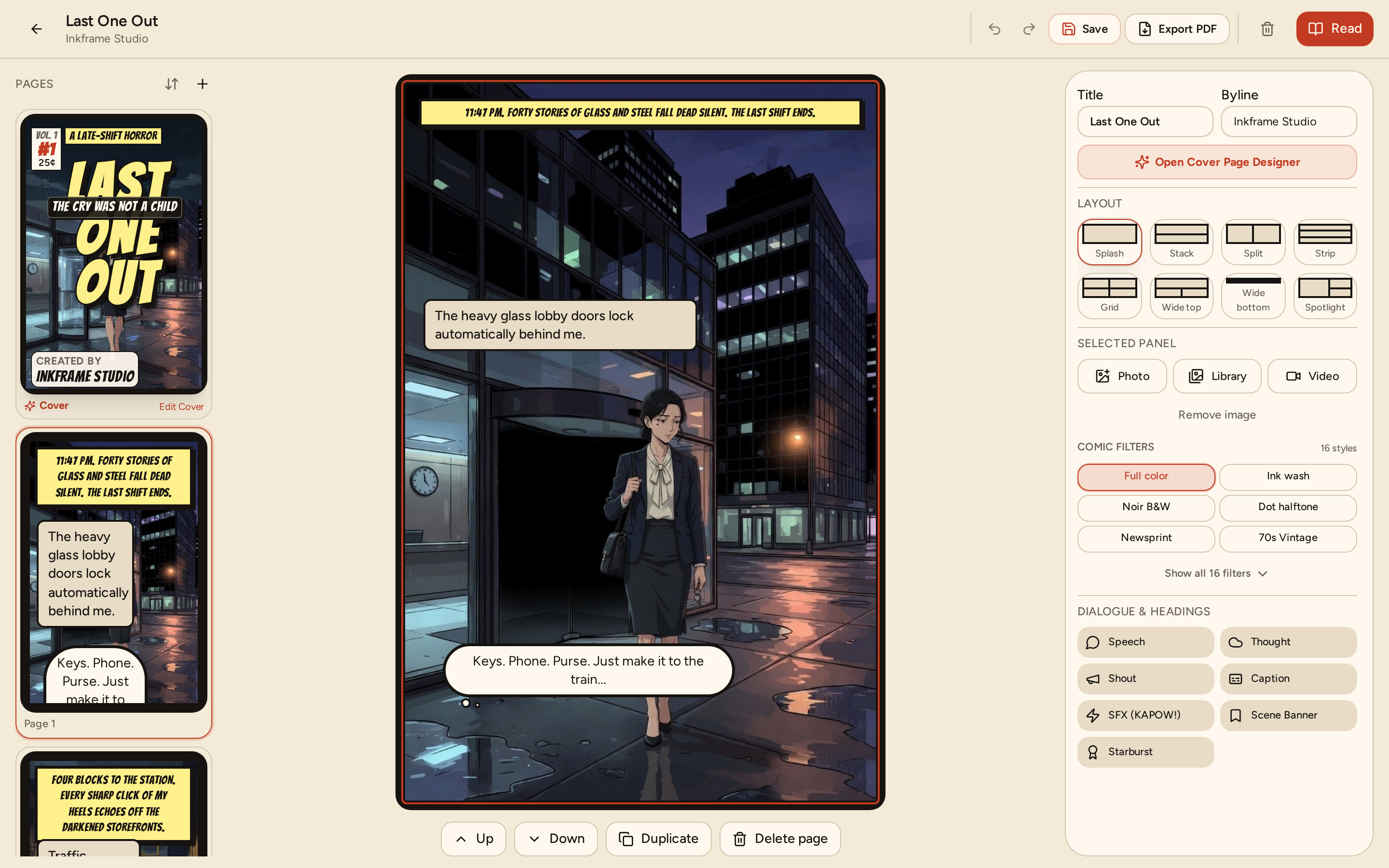
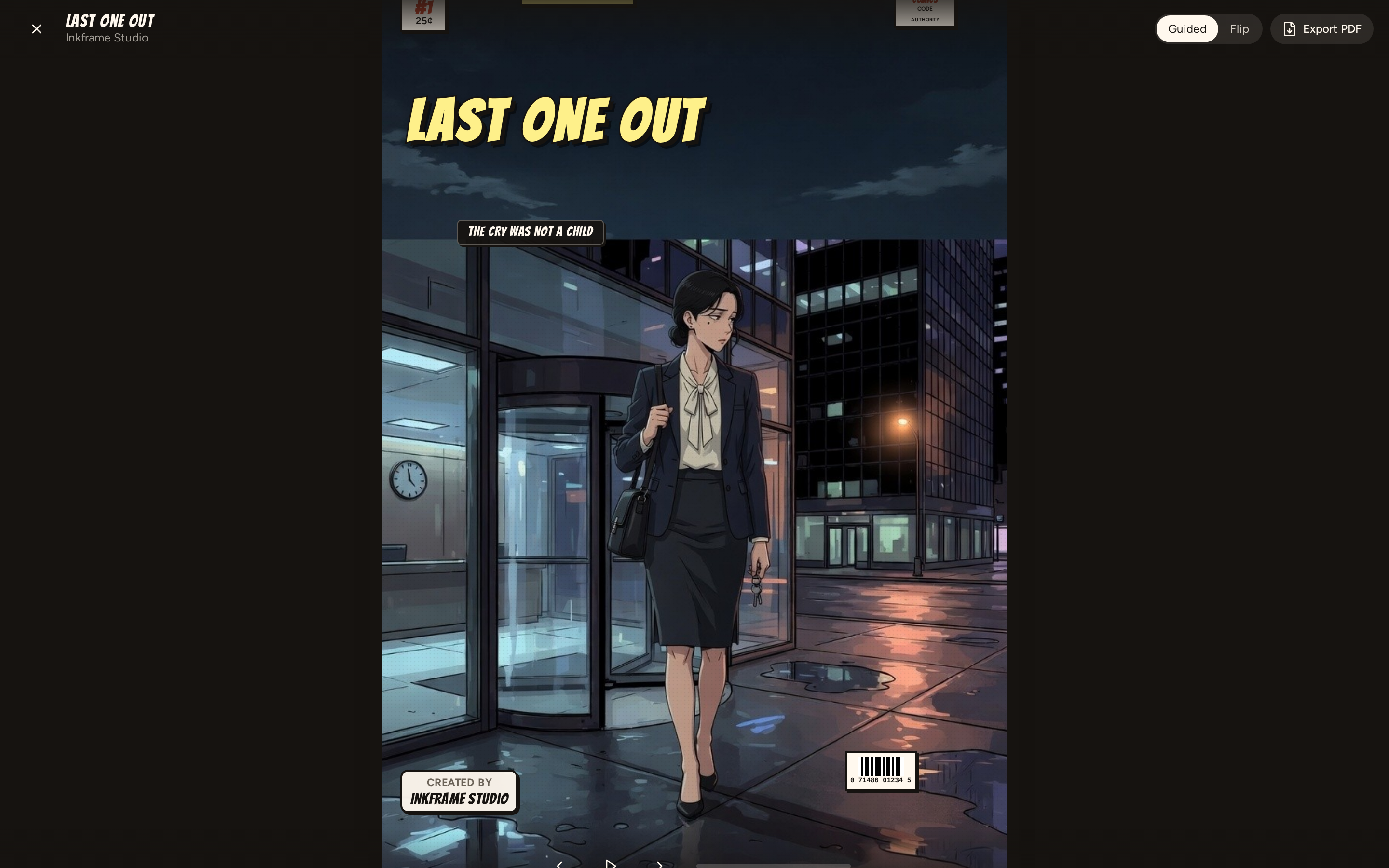
| Studio Canvas & Panel Editor | Immersive Comic Reader |
|---|---|
 |  |
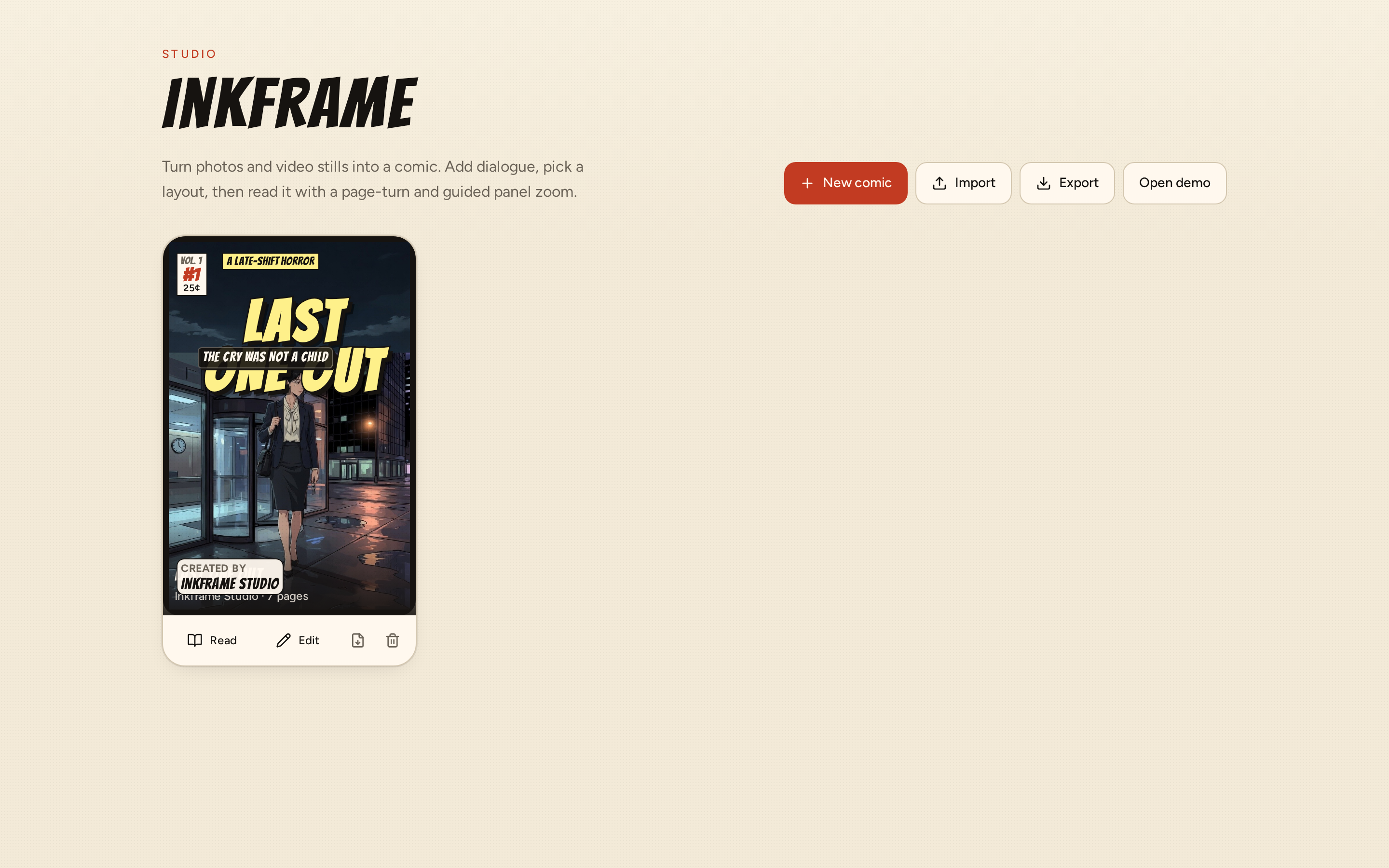
| Project Library & Workspace Gallery |
|---|
 |
About & Vision
Inkframe started as a personal passion project with a simple goal: to lower the barrier to comic creation and experiment with AI-driven narrative tools.
By integrating a native Model Context Protocol (MCP) server, Inkframe allows AI assistants (like Claude, Cursor, and Antigravity) to act as creative partners—manipulating panel layouts, inserting dialogue, and generating panel prompts directly inside your workspace.
Core Goals & Future Roadmap
- Design & Layout Enhancements: Continuously elevate canvas aesthetics, UI typography, dynamic panel grid systems, and custom speech bubble styling.
- Expanded Creation Tools: Introduce richer color grading, screentone generators, asset libraries, and character reference management.
- Multi-Format Export Engine: Move beyond PDF export to support:
- CBZ (Comic Book Zip) archives for digital comic reader applications.
- High-Resolution Image Bundles (PNG and JPEG exports per page or panel).
- Layout Interchange Format (JSON import/export for sharing comic templates and drafts).
Features
1. Studio Canvas & Panel Editor
- Dynamic Layout Templates: Standard layout presets including Splash, Stack, Split, Strip, Grid, Spotlight, and Wide Top/Bottom.
- Drag & Drop Media Staging: Direct drag-and-drop mapping of imported imagery onto panel slots.
- Speech Bubble & Dialogue Engine: Insert and style Speech, Thought, Shout, and Caption balloons with interactive tail placement controls.
- Real-Time Visual Filters: Authentic ink filters including Noir, Wash, Halftone, Newsprint, and Screentone.
2. Cover Designer & Branding
- Custom Comic Covers: Control over issue titles, subtitles, issue numbering, taglines, publisher branding, and pricing overlays.
- Live Visual Preview: High-DPI preview stage for cover layout templates and styling.
3. Video Frame Capture & Extraction
- Timeline Scrubbing: Scrub through custom video uploads or demo media to select exact freeze-frames.
- Automated Interval Sampling: Automatically extract video frames at defined time intervals (e.g., 1 frame every 5s, 10s, or 15s).
4. Model Context Protocol (MCP) Server
- AI-Driven Authoring: Built-in MCP server enabling AI models to inspect project states, add pages, update covers, and inject dialogue.
- Tool Suite: Standardized tool interface covering page generation, filter applications, prompt engineering, and character context setting.
5. Reader Modes & Export
- Guided Focus Reader: Sequential panel-by-panel reading experience with smooth focus zoom and pan transitions.
- 3D Flipbook Reader: Interactive 3D page-turning presentation for full-page comic reading.
- Multi-Format Export: PDF export with upcoming support for CBZ, PNG/JPEG image packages, and JSON template schemas.
6. Local-First Storage
- Browser Persistence: Powered by PGlite (PostgreSQL compiled to WebAssembly), IndexedDB, and localStorage fallback.
- Page Management: Sidebar thumbnail drag-and-drop page reordering.
- Bundled Sample Comic: Pre-loaded with the demo graphic novel "Last One Out".
Architecture Overview
flowchart TD
    subgraph Client["Inkframe Studio Client"]
        UI["React 19 + TanStack Router"]
        Canvas["Studio Canvas & Cover Stage"]
        Video["Video Timeline Extractor"]
        Reader["Guided & 3D Flip Readers"]
        Store["Zustand State Engine"]
    end

    subgraph Storage["Local-First Storage"]
        PG["PGlite (PostgreSQL WASM)"]
        IDB["IndexedDB / LocalStorage"]
    end

    subgraph AI["AI Integration"]
        MCPServer["Inkframe MCP Server (src/mcp/server.ts)"]
        AIAgents["AI Assistants (Claude / Cursor / Antigravity)"]
    end

    subgraph Export["Export Engine"]
        PDF["PDF Generator (jsPDF + HTML2Canvas)"]
        MultiExport["Planned Exports: CBZ / PNG / JPEG / JSON"]
    end

    UI --> Store
    Canvas --> Store
    Video --> Store
    Store <--> PG
    Store <--> IDB
    AIAgents <-->|JSON-RPC via STDIO| MCPServer
    MCPServer <-->|Sync State| Store
    Reader --> Store
    Store --> PDF
    Store --> MultiExport
Tech Stack
| Component | Technology | Role |
|---|---|---|
| Framework | React 19 | Client rendering library |
| Routing | TanStack Router & TanStack Start | Type-safe file-based routing |
| Build & Server | Vite 8 & Nitro | Development server and bundler engine |
| Styling | Tailwind CSS v4 & tw-animate-css | CSS framework and animations |
| UI Components | Radix UI & Lucide Icons | Accessible headless components and UI icons |
| State Management | Zustand 5 | Central state management store |
| Database & Auth | PGlite & Better Auth | WASM PostgreSQL browser database |
| AI Protocol | @modelcontextprotocol/sdk | Model Context Protocol API layer |
| Export Engines | jsPDF & HTML2Canvas | PDF rendering and canvas capture |
Quick Start
1. Prerequisites
Node.js 18.0.0 or higher is required.
node -v
2. Installation
Clone the repository and install project dependencies:
git clone https://github.com/AjiMk/inkframe.git
cd inkframe
npm install
3. Development Server
Start the local development server:
npm run dev
The application will be accessible at http://localhost:8080.
NPM Scripts Reference
| Script | Command | Description |
|---|---|---|
dev | npm run dev | Starts Vite development server at http://0.0.0.0:8080 |
build | npm run build | Builds production bundle and executes database migrations |
build:dev | npm run build:dev | Builds bundle in development mode |
preview | npm run preview | Previews the production build locally |
preview:restart | npm run preview:restart | Restarts the background preview process |
preview:stop | npm run preview:stop | Stops the background preview process |
typecheck | npm run typecheck | Executes TypeScript type checking (tsc --noEmit) |
mcp | npm run mcp | Launches the Model Context Protocol stdio server |
test | npm run test | Runs internal test suites |
lint | npm run lint | Runs ESLint across the workspace |
format | npm run format | Runs Prettier to format source files |
check:auth | npm run check:auth | Checks authentication invariants |
Model Context Protocol (MCP) Integration
To connect Inkframe with AI tools such as Claude Desktop, Cursor, or Antigravity, add the server definition to your client's mcp.json:
{
  "mcpServers": {
    "inkframe": {
      "command": "npm",
      "args": ["run", "mcp"],
      "cwd": "/path/to/inkframe"
    }
  }
}
MCP Tool Manifest
| Tool | Action | Details |
|---|---|---|
list_comics | List Workspace Comics | Returns array of all comics in the current workspace. |
create_comic | Create New Project | Instantiates a new comic with metadata (title, author). |
get_comic | Get Comic Details | Returns complete comic object including pages, layouts, and dialogue. |
add_page | Add Page | Appends a new page with a target panel layout. |
set_page_layout | Change Layout | Updates layout template for a designated page. |
add_dialogue | Inject Dialogue | Adds Speech, Thought, Shout, or Caption bubbles into a panel. |
update_cover_config | Edit Cover Specs | Modifies title, subtitle, tagline, issue number, and price styling. |
apply_panel_filter | Apply Visual FX | Sets filters (Noir, Wash, Halftone, Newsprint) for a panel. |
set_comic_references | Set Reference Context | Sets character and background image references for AI continuity. |
get_panel_prompt | Prompt Engineering | Constructs detailed AI image generation prompts for panel scenes. |
Project Structure
inkframe/
├── public/                 # Static assets and demo media
│   ├── favicon.svg
│   └── mcp_comics.json     # MCP dataset state sync file
├── scripts/                # Utility and migration scripts
├── server/                 # Server handlers and API routes
├── src/
│   ├── components/
│   │   ├── comic/          # Studio canvas, cover designer, reader, video timeline
│   │   └── ui/             # Radix UI styled primitives
│   ├── lib/
│   │   ├── app-data/       # IndexedDB and demo dataset loaders
│   │   ├── auth/           # Authentication handlers
│   │   └── comics/         # Stores, layout definitions, and export logic
│   ├── mcp/
│   │   └── server.ts       # Model Context Protocol stdio implementation
│   └── routes/             # TanStack file-based routes
├── mcp.json                # MCP server configuration example
├── CONTRIBUTING.md         # Contribution and git workflow guidelines
├── package.json            # Project configuration and npm scripts
└── vite.config.ts          # Vite build configuration
Contribution Guide
Contributions, feature ideas, and bug reports are welcome! As a hobby project, community contributions help drive new layout tools, filters, and export formats.
1. Branching Strategy
Inkframe uses a Trunk-Based / GitHub-Flow model. Create short-lived branches off main:
| Prefix | Branch Purpose | Example |
|---|---|---|
feat/ | New features or UI enhancements | feat/cbz-export-engine |
fix/ | Bug resolutions | fix/canvas-dialogue-tail |
refactor/ | Code cleanup without functional changes | refactor/layout-picker |
docs/ | Documentation additions | docs/mcp-setup |
release/ | Version releases | release/v1.1.0 |
hotfix/ | Critical hotfixes targeting main | hotfix/editor-crash |
2. Conventional Commit Standards
Commit messages must follow the Conventional Commits format:
<type>(<scope>): <short description>
Common types:
feat: A new feature (e.g.,feat(export): add CBZ archive builder)fix: A bug fix (e.g.,fix(mcp): resolve dialogue placement offset)docs: Documentation updatesstyle: Code formatting or visual CSS adjustmentsrefactor: Internal code structure improvementstest: Unit or integration test additionschore: Maintenance, dependencies, or build config
3. Local Verification Workflow
Before opening a Pull Request, verify that all local checks pass without errors:
# 1. Typecheck TypeScript files
npm run typecheck

# 2. Run unit tests
npm run test

# 3. Check linting standards
npm run lint

# 4. Format files
npm run format
4. Submitting Pull Requests
- Push your branch to GitHub:
git push -u origin feat/your-feature-name - Open a Pull Request targeting
main. - Provide a clear summary of the changes and motivation in the PR description.
- Squash & Merge (or Rebase & Merge) upon approval to maintain a clean linear commit history.
For further details, see CONTRIBUTING.md.
License
This project is licensed under the MIT License - see the LICENSE file for full details.
Similar repos


Languages
TypeScript
92.4%
JavaScript
4.1%
CSS
3.3%
Inkframe — comic studio for photos, video stills, and dialogue
See the codeSee what people are saying
README
Inkframe
Inkframe is an open hobby project created to make comic creation easy, intuitive, and seamlessly connected with AI through the Model Context Protocol (MCP).
It serves as a local-first web application and AI-assisted studio that turns photos, illustrations, and video stills into structured graphic novels, comics, and visual storyboards.
Interface Showcase
| Studio Canvas & Panel Editor | Immersive Comic Reader |
|---|---|
| |
| Project Library & Workspace Gallery |
|---|
|
About & Vision
Inkframe started as a personal passion project with a simple goal: to lower the barrier to comic creation and experiment with AI-driven narrative tools.
By integrating a native Model Context Protocol (MCP) server, Inkframe allows AI assistants (like Claude, Cursor, and Antigravity) to act as creative partners—manipulating panel layouts, inserting dialogue, and generating panel prompts directly inside your workspace.
Core Goals & Future Roadmap
- Design & Layout Enhancements: Continuously elevate canvas aesthetics, UI typography, dynamic panel grid systems, and custom speech bubble styling.
- Expanded Creation Tools: Introduce richer color grading, screentone generators, asset libraries, and character reference management.
- Multi-Format Export Engine: Move beyond PDF export to support:
- CBZ (Comic Book Zip) archives for digital comic reader applications.
- High-Resolution Image Bundles (PNG and JPEG exports per page or panel).
- Layout Interchange Format (JSON import/export for sharing comic templates and drafts).
Features
1. Studio Canvas & Panel Editor
- Dynamic Layout Templates: Standard layout presets including Splash, Stack, Split, Strip, Grid, Spotlight, and Wide Top/Bottom.
- Drag & Drop Media Staging: Direct drag-and-drop mapping of imported imagery onto panel slots.
- Speech Bubble & Dialogue Engine: Insert and style Speech, Thought, Shout, and Caption balloons with interactive tail placement controls.
- Real-Time Visual Filters: Authentic ink filters including Noir, Wash, Halftone, Newsprint, and Screentone.
2. Cover Designer & Branding
- Custom Comic Covers: Control over issue titles, subtitles, issue numbering, taglines, publisher branding, and pricing overlays.
- Live Visual Preview: High-DPI preview stage for cover layout templates and styling.
3. Video Frame Capture & Extraction
- Timeline Scrubbing: Scrub through custom video uploads or demo media to select exact freeze-frames.
- Automated Interval Sampling: Automatically extract video frames at defined time intervals (e.g., 1 frame every 5s, 10s, or 15s).
4. Model Context Protocol (MCP) Server
- AI-Driven Authoring: Built-in MCP server enabling AI models to inspect project states, add pages, update covers, and inject dialogue.
- Tool Suite: Standardized tool interface covering page generation, filter applications, prompt engineering, and character context setting.
5. Reader Modes & Export
- Guided Focus Reader: Sequential panel-by-panel reading experience with smooth focus zoom and pan transitions.
- 3D Flipbook Reader: Interactive 3D page-turning presentation for full-page comic reading.
- Multi-Format Export: PDF export with upcoming support for CBZ, PNG/JPEG image packages, and JSON template schemas.
6. Local-First Storage
- Browser Persistence: Powered by PGlite (PostgreSQL compiled to WebAssembly), IndexedDB, and localStorage fallback.
- Page Management: Sidebar thumbnail drag-and-drop page reordering.
- Bundled Sample Comic: Pre-loaded with the demo graphic novel "Last One Out".
Architecture Overview
flowchart TD
    subgraph Client["Inkframe Studio Client"]
        UI["React 19 + TanStack Router"]
        Canvas["Studio Canvas & Cover Stage"]
        Video["Video Timeline Extractor"]
        Reader["Guided & 3D Flip Readers"]
        Store["Zustand State Engine"]
    end

    subgraph Storage["Local-First Storage"]
        PG["PGlite (PostgreSQL WASM)"]
        IDB["IndexedDB / LocalStorage"]
    end

    subgraph AI["AI Integration"]
        MCPServer["Inkframe MCP Server (src/mcp/server.ts)"]
        AIAgents["AI Assistants (Claude / Cursor / Antigravity)"]
    end

    subgraph Export["Export Engine"]
        PDF["PDF Generator (jsPDF + HTML2Canvas)"]
        MultiExport["Planned Exports: CBZ / PNG / JPEG / JSON"]
    end

    UI --> Store
    Canvas --> Store
    Video --> Store
    Store <--> PG
    Store <--> IDB
    AIAgents <-->|JSON-RPC via STDIO| MCPServer
    MCPServer <-->|Sync State| Store
    Reader --> Store
    Store --> PDF
    Store --> MultiExport
Tech Stack
| Component | Technology | Role |
|---|---|---|
| Framework | React 19 | Client rendering library |
| Routing | TanStack Router & TanStack Start | Type-safe file-based routing |
| Build & Server | Vite 8 & Nitro | Development server and bundler engine |
| Styling | Tailwind CSS v4 & tw-animate-css | CSS framework and animations |
| UI Components | Radix UI & Lucide Icons | Accessible headless components and UI icons |
| State Management | Zustand 5 | Central state management store |
| Database & Auth | PGlite & Better Auth | WASM PostgreSQL browser database |
| AI Protocol | @modelcontextprotocol/sdk | Model Context Protocol API layer |
| Export Engines | jsPDF & HTML2Canvas | PDF rendering and canvas capture |
Quick Start
1. Prerequisites
Node.js 18.0.0 or higher is required.
node -v
2. Installation
Clone the repository and install project dependencies:
git clone https://github.com/AjiMk/inkframe.git
cd inkframe
npm install
3. Development Server
Start the local development server:
npm run dev
The application will be accessible at http://localhost:8080.
NPM Scripts Reference
| Script | Command | Description |
|---|---|---|
dev | npm run dev | Starts Vite development server at http://0.0.0.0:8080 |
build | npm run build | Builds production bundle and executes database migrations |
build:dev | npm run build:dev | Builds bundle in development mode |
preview | npm run preview | Previews the production build locally |
preview:restart | npm run preview:restart | Restarts the background preview process |
preview:stop | npm run preview:stop | Stops the background preview process |
typecheck | npm run typecheck | Executes TypeScript type checking (tsc --noEmit) |
mcp | npm run mcp | Launches the Model Context Protocol stdio server |
test | npm run test | Runs internal test suites |
lint | npm run lint | Runs ESLint across the workspace |
format | npm run format | Runs Prettier to format source files |
check:auth | npm run check:auth | Checks authentication invariants |
Model Context Protocol (MCP) Integration
To connect Inkframe with AI tools such as Claude Desktop, Cursor, or Antigravity, add the server definition to your client's mcp.json:
{
  "mcpServers": {
    "inkframe": {
      "command": "npm",
      "args": ["run", "mcp"],
      "cwd": "/path/to/inkframe"
    }
  }
}
MCP Tool Manifest
| Tool | Action | Details |
|---|---|---|
list_comics | List Workspace Comics | Returns array of all comics in the current workspace. |
create_comic | Create New Project | Instantiates a new comic with metadata (title, author). |
get_comic | Get Comic Details | Returns complete comic object including pages, layouts, and dialogue. |
add_page | Add Page | Appends a new page with a target panel layout. |
set_page_layout | Change Layout | Updates layout template for a designated page. |
add_dialogue | Inject Dialogue | Adds Speech, Thought, Shout, or Caption bubbles into a panel. |
update_cover_config | Edit Cover Specs | Modifies title, subtitle, tagline, issue number, and price styling. |
apply_panel_filter | Apply Visual FX | Sets filters (Noir, Wash, Halftone, Newsprint) for a panel. |
set_comic_references | Set Reference Context | Sets character and background image references for AI continuity. |
get_panel_prompt | Prompt Engineering | Constructs detailed AI image generation prompts for panel scenes. |
Project Structure
inkframe/
├── public/                 # Static assets and demo media
│   ├── favicon.svg
│   └── mcp_comics.json     # MCP dataset state sync file
├── scripts/                # Utility and migration scripts
├── server/                 # Server handlers and API routes
├── src/
│   ├── components/
│   │   ├── comic/          # Studio canvas, cover designer, reader, video timeline
│   │   └── ui/             # Radix UI styled primitives
│   ├── lib/
│   │   ├── app-data/       # IndexedDB and demo dataset loaders
│   │   ├── auth/           # Authentication handlers
│   │   └── comics/         # Stores, layout definitions, and export logic
│   ├── mcp/
│   │   └── server.ts       # Model Context Protocol stdio implementation
│   └── routes/             # TanStack file-based routes
├── mcp.json                # MCP server configuration example
├── CONTRIBUTING.md         # Contribution and git workflow guidelines
├── package.json            # Project configuration and npm scripts
└── vite.config.ts          # Vite build configuration
Contribution Guide
Contributions, feature ideas, and bug reports are welcome! As a hobby project, community contributions help drive new layout tools, filters, and export formats.
1. Branching Strategy
Inkframe uses a Trunk-Based / GitHub-Flow model. Create short-lived branches off main:
| Prefix | Branch Purpose | Example |
|---|---|---|
feat/ | New features or UI enhancements | feat/cbz-export-engine |
fix/ | Bug resolutions | fix/canvas-dialogue-tail |
refactor/ | Code cleanup without functional changes | refactor/layout-picker |
docs/ | Documentation additions | docs/mcp-setup |
release/ | Version releases | release/v1.1.0 |
hotfix/ | Critical hotfixes targeting main | hotfix/editor-crash |
2. Conventional Commit Standards
Commit messages must follow the Conventional Commits format:
<type>(<scope>): <short description>
Common types:
feat: A new feature (e.g.,feat(export): add CBZ archive builder)fix: A bug fix (e.g.,fix(mcp): resolve dialogue placement offset)docs: Documentation updatesstyle: Code formatting or visual CSS adjustmentsrefactor: Internal code structure improvementstest: Unit or integration test additionschore: Maintenance, dependencies, or build config
3. Local Verification Workflow
Before opening a Pull Request, verify that all local checks pass without errors:
# 1. Typecheck TypeScript files
npm run typecheck

# 2. Run unit tests
npm run test

# 3. Check linting standards
npm run lint

# 4. Format files
npm run format
4. Submitting Pull Requests
- Push your branch to GitHub:
git push -u origin feat/your-feature-name - Open a Pull Request targeting
main. - Provide a clear summary of the changes and motivation in the PR description.
- Squash & Merge (or Rebase & Merge) upon approval to maintain a clean linear commit history.
For further details, see CONTRIBUTING.md.
License
This project is licensed under the MIT License - see the LICENSE file for full details.
Similar repos
Languages
TypeScript
92.4%
JavaScript
4.1%
CSS
3.3%