
A front-end UI for ComfyUI made for beginner level users.
See the codeREADME
MooshieUI
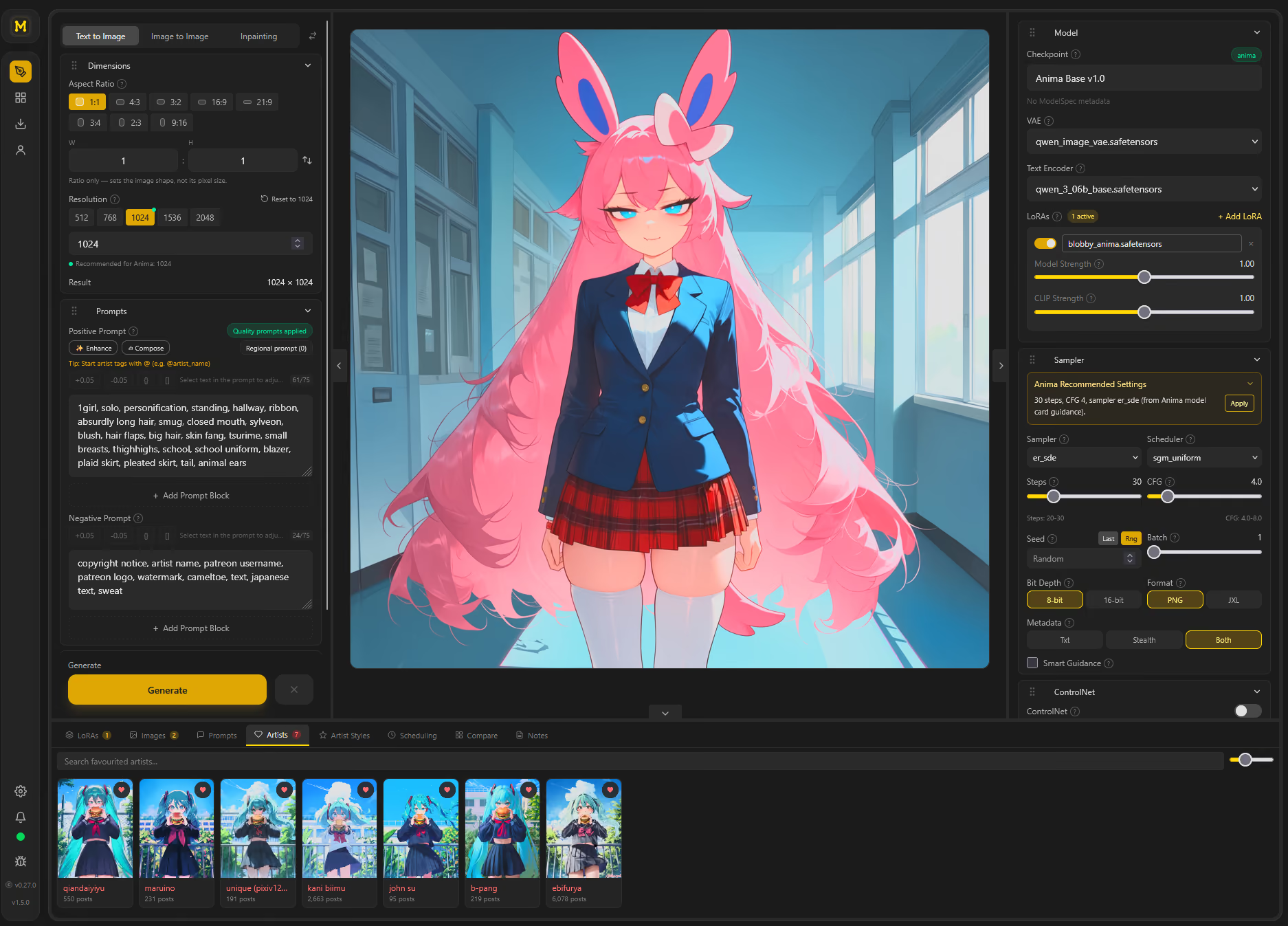
MooshieUI is a beginner-friendly interface for image, video and music generation through ComfyUI, with optional image generation through the NovelAI API using your own key. It runs in two modes:
- Desktop app via Tauri (Windows/Linux; native Apple Silicon macOS candidates)
- Browser/server mode via the built-in web server (LAN/Docker friendly, mobile UI)
Built with Svelte 5 + Rust, it hides ComfyUI's node-graph complexity behind a clean, guided workflow so you can generate without hand-editing graphs.




MooshieUI is free and open source. If it saves you time or sparks joy, a sponsorship keeps the updates coming. No pressure, just gratitude. 🙏 (where does the money go?)
📚 Documentation
Full guides live in the MooshieUI Wiki:
| Guide | Covers |
|---|---|
| Installation | Desktop, Docker, remote/cloud ComfyUI, Apple Silicon candidates |
| Generation Basics | Image modes, pause/continue, queue, dimensions and guidance |
| NovelAI Backend | Personal API keys, characters, references, costs, face detailing and Director Tools |
| Video Generation | MiniMax H3, model stacks, timeline, interpolation, playback and export |
| Music Generation | YuE2 songs, lyric writing, playlists, shared playback and manual lyric timing |
| Image Edit Mode | Qwen Image Edit, Flux Kontext and Anima ReStyler |
| Prompting Guide | Prompt Chunks, random syntax, Artist Styles, Style Creator and interrogation |
| Prompt Assistant | Local or external LLM-assisted prompt building |
| Models & the Model Hub | Supported architectures, auto-detection, downloads |
| Upscaling & Face Fix | Tiled diffusion, guidance nodes, face fix |
| ControlNet & Style Transfer | ControlNet and reference/style transfer |
| Inpainting & the Canvas Editor | Mask painting and selective edits |
| Compare Grid | XYZ parameter sweeps |
| Image Comparison | Slider, fade, difference and side-by-side comparison |
| Gallery & Metadata | Persistent gallery, metadata import/remix |
| Server, LAN & Multi-User | Self-hosting, roles, auth, mobile |
| Settings & Accessibility | Persistence, i18n, accessibility |
| FAQ | Common questions |
Technical references and project planning documents are indexed in docs/README.md.
✨ Highlights
v2.3.6: Build music styles from reference songs or audio, sign in to supported Prompt Assistant accounts, and use new H3 Turbo presets. See the release notes.
- Image generation and editing - text to image, image to image, inpainting with a built-in canvas/mask editor, and Image Edit for Qwen Image Edit/Edit Plus, Flux.1 Kontext and Anima ReStyler.
- NovelAI backend - V5 Full/Curated, V4.5 Full and V4 Full, with character prompts and positioning, supported reference modes, Anlas estimates, Enhance/Upscale/Variations, Director Tools and a dedicated face detailer. Hosted users and moderators can save their own encrypted API key.
- Video generation - MiniMax H3 text-to-video, first/last frames and reference images; preset or custom model stacks, a shot timeline, Standard and Larryvrh/LightX2V/PDD Turbo methods, retained drafts with experimental 2× refinement, TeaCache, animated live previews, RIFE/GMFSS interpolation, a gallery player and MP4/animated-image export.
- Music studio - YuE2 songs, native SheetSage2 covers and score-aware assistance through your configured Prompt Assistant. Review and edit scores, preview melodies, export MIDI, generate sequential candidates, compare saved versions and export projects with original FLAC and settings. Review recognized lyrics and approximate cover timing using xAI transcription and your assistant, with playable evidence. Includes playlists, shared playback, manual lyric timing, reference-song lookup, temporary song-link imports, style analysis from selected audio sections, reusable style profiles, volume-matched A/B listening, scoped edits with before/after previews, and an arrangement-planning prototype.
- Pause and continue - pause ComfyUI text-to-image sampling, inspect a preview, change prompts or sampling settings, or paint a masked correction before continuing. Keep a pause to try different endings.
- Full generation controls - searchable checkpoint/VAE/LoRA pickers with auto-download, all ComfyUI samplers and schedulers, steps/CFG/seed/batch, and smart dimension presets.
- Smart model detection - 20+ architectures identified through hashes, model metadata, tensor structure and filenames, with sampler/scheduler/CFG presets, split components, GGUF support and optional INT8-Fast loading.
- Prompt and style tools - autocomplete, Prompt Chunks and wildcards, seeded random prompt syntax, scheduling, regional prompts, a local or external Prompt Assistant, and Style Creator rounds for discovering artist combinations.
- Refinement and references - MultiDiffusion/SpotDiffusion upscaling, SeedVR2 restoration, face detailing, ControlNet, IP-Adapter/Flux Redux style references, sampler guidance and the SDXL DMD2 preset.
- Compare Grid (XYZ) - per-cell parameter sweeps stitched into a single labelled image.
- Queue and feedback - reorder or cancel pending jobs, interrupt a run, watch previews and progress, and opt into completion notifications.
- Gallery & metadata - Persistent image and video gallery with a Refresh gallery action for externally added, restored or removed files, manual save mode, generation times and A/B comparison; import SwarmUI, A1111 and NovelAI settings, with original NovelAI PNG metadata preserved when copying. Refresh scans the current user's gallery folder and reloads embedded metadata without renaming files.
- Self-hostable - headless web server with roles, per-user galleries, auth, and a dedicated mobile layout.
- 12 languages - English, German, Spanish, French, Italian, Japanese, Korean, Polish, Portuguese, Russian, Simplified Chinese and Traditional Chinese, switchable without restart.
Controls depend on the selected backend and model. NovelAI offers the three standard image modes; Image Edit, video, music and pause/continue use ComfyUI. YuE2 requires its own checkpoint and native ComfyUI support; managed installs offer the tested runtime update. See the Wiki for each feature's requirements.
📦 Quick Start
Desktop (Windows/Linux)
- Download a release from Releases.
- Run the app. The setup wizard downloads uv, Python, ComfyUI, and PyTorch (NVIDIA, AMD, or Intel Arc GPU auto-detected) and installs MooshieUI's custom nodes - no Python or pip setup required. On Windows, it also installs an app-local copy of Git when a working Git installation cannot be found.
- Start generating; ComfyUI launches automatically.
Managed ComfyUI uses port 18288 for new installations, preserves saved port settings, and chooses another free port if needed. Setup, restart, and shutdown stop only processes identified as MooshieUI's own, including verified keep-alive instances. Existing ComfyUI applications can stay running. To connect to one intentionally, choose Remote in the connection settings.
The generation model picker uses the connected ComfyUI server's model inventory. A file downloaded locally may still be unavailable to that server; the picker and model manager show this separately. For an external server, install models on that server and refresh the model list. Startup progress appears above the page, keeping the tips readable while controls initialize.
Allow roughly 5–10 GB for the runtime, plus space for model downloads; first setup typically takes 5–15 minutes depending on your connection. GPU support varies by platform, including an allowlisted AMD Windows preview. See Installation for details.
Generate with NovelAI
Save your API key in Settings > NovelAI, then select a NovelAI model in the model picker. The generation page adapts to that backend and shows an estimated Anlas cost before submission. Local upscaling and face detection still need a running ComfyUI; NovelAI requests use your account's subscription and balance. See NovelAI Backend.
Self-host (Docker)
cp .env.example .env
# Edit .env: set MOOSHIEUI_ADMIN_USER and a strong MOOSHIEUI_ADMIN_PASS before first launch.
docker compose up -d --build
Open http://localhost:3200 (or the host port set by MOOSHIEUI_PORT) and sign in with the initial admin account. Empty passwords and changeme are not accepted for account creation. The supplied Docker stack targets NVIDIA GPUs and requires GPU support in Docker; it is separate from the desktop wizard's AMD/Intel setup. Full server/LAN/multi-user setup: Server, LAN & Multi-User.
Build from source
Use Node.js 22.12+ or 24+, stable Rust, and the platform's Tauri v2 build prerequisites. See CONTRIBUTING.md for validation and both Rust build targets.
git clone https://github.com/Mooshieblob1/MooshieUI.git
cd MooshieUI
npm install
npm run tauri dev      # hot-reload dev
npm run tauri build    # production build
🏗️ How it works
- You adjust settings in the Svelte UI.
- On Generate,
ipcInvoke()sends settings to Rust through Tauri IPC on desktop or HTTP in browser mode;ipcListen()receives events through Tauri or SSE. - Rust builds an image, video or music ComfyUI workflow from templates, or a NovelAI image request using the selected account's key.
- ComfyUI workflows go to its
/promptAPI; NovelAI requests go to its image API. Optional local post-processing sends returned NovelAI images through ComfyUI. - ComfyUI WebSocket events and NovelAI streaming responses feed progress and previews. Images and videos use the gallery; music has a separate audio player and device-local library.
MooshieUI also ships custom ComfyUI nodes (tiled diffusion, soft/smart guidance, an SDXL↔Flux2 VAE adapter, Nanosaur DiT support, and face fix) that are auto-installed into ComfyUI. Details live in Models & the Model Hub. The tiled diffusion node is also available as a standalone ComfyUI custom node: ComfyUI-MooshieTiledDiffusion.
🛠️ Tech Stack
| Layer | Technology |
|---|---|
| Frontend | Svelte 5, TypeScript 6, Tailwind CSS 4 |
| Runtime | Tauri desktop app + axum headless web server |
| State | Svelte 5 runes - class-based singleton stores |
| Persistence | Tauri Store (JSON), SQLite (rusqlite), and per-account IndexedDB for the music library |
| Generation transport | ComfyUI REST/WebSocket and NovelAI HTTP/streaming through Rust |
| Prompt Assistant | Local llama.cpp, configured external LLM endpoint, or ChatGPT / Gemini account sign-in |
| Inference | ONNX Runtime (ort) for WD v3 image interrogation |
| Autocomplete | Danbooru + Anima tag databases (~140k tags) |
| i18n | 12 languages, checked key/placeholder parity, runtime switching |
| Build | Vite 6 + @sveltejs/vite-plugin-svelte |
🔒 Security
Automated GlassWorm resistance checks run on every push and pull request to catch supply-chain attacks that hide payloads in invisible Unicode variation selectors or tamper with git timestamps. The CI workflow (.github/workflows/glassworm-scan.yml) blocks merges on failure. Contributors should enable the same checks locally:
bash scripts/setup-hooks.sh
💛 Support & Where the Money Goes
First off, to be clear: this is not meant to be income. MooshieUI is a passion project. I build it in my spare time around a regular day job, I don't expect to earn anything from it, and right now the running costs come straight out of my own pocket.
If you sponsor the project, here is exactly where it goes:
- Domain & hosting - keeping the project site and download links online.
- SaaS & dev tooling - the paid services and tools used to actually build and ship MooshieUI.
- GitHub Pro+ - CI/CD minutes for the build, release, and security-scan pipelines.
The goal is simply to stop the project from costing me money to keep alive. Anything beyond covering costs just goes right back into building more features, faster.
Longer term, the ideal is that MooshieUI can outlast my own availability. I intend to support this project for as long as I can, but every maintainer has lulls, and life can pull you away for a stretch. A small buffer means the domain, hosting, and infrastructure stay paid up through those quiet periods, so the project stays online and usable even when I am not actively maintaining it.
Sponsoring is completely optional and the app will always be free and open source either way. Thank you for even considering it. 🙏
🤝 Contributing
Pull requests are welcome. main is protected: open a PR from a chore/<topic> branch after local validation and GlassWorm pre-commit checks. See push-instructions.md for the full workflow (branch naming, build gates, IPC/gallery conventions, and CI).
📋 Changelog
See CHANGELOG.md for the full version history.
📄 License
Licensed under the GNU Affero General Public License v3.0.
🙏 Acknowledgments
MooshieUI stands on the shoulders of a huge amount of open-source work. Sincere thanks to every project, researcher, model creator, and service below.
Core foundations
- ComfyUI (comfyanonymous) - the local image/video backend and optional post-processing for NovelAI output. MooshieUI would not exist without it.
- Tauri - the Rust desktop app framework, plus its store, shell, dialog, fs, clipboard, updater, and process plugins.
- Svelte, Tailwind CSS, Vite, and TypeScript - the frontend stack.
- PyTorch - the ML framework behind ComfyUI inference.
- uv (Astral) - manages Python and the ComfyUI environment during setup.
- MinGit (Git for Windows) - downloaded when needed for ComfyUI updates and custom-node installation on Windows.
Inference runtimes
- llama.cpp (ggml-org) - local LLM inference for the Prompt Assistant.
- ONNX Runtime (Microsoft) via the ort Rust crate - runs the image interrogator.
- Ultralytics - YOLOv8/YOLO11 detection powering Face Fix and segment refinement.
Bundled third-party ComfyUI nodes
Auto-installed into ComfyUI alongside MooshieUI's own nodes:
- comfyui_controlnet_aux (Fannovel16) - ControlNet preprocessors (Canny, Depth, OpenPose, LineArt, and more).
- ComfyUi-Untwisting-RoPE and ComfyUi-Scale-Image-to-Total-Pixels-Advanced (BigStationW) - training-free style transfer (the Anima style-transfer workflow is ported from Untwisting-RoPE's examples) and advanced image scaling.
Research implemented by MooshieUI's own nodes
- MultiDiffusion - Bar-Tal et al., ICML 2023 (arXiv:2302.08113) - overlapping-tile fusion for tiled diffusion upscaling.
- SpotDiffusion - Frolov et al., 2024 (arXiv:2407.15507) - seam-free shifted-window tiling.
- CFG Rescale - "Common Diffusion Noise Schedules and Sample Steps are Flawed" (Lin et al., arXiv:2305.08891) - the basis of MooshieSoftGuidance, plus community "Mahiro"-style positive-biased guidance behind MooshieSmartGuidance.
- OmniSR - "Omni Aggregation Networks for Lightweight Image Super-Resolution" (CVPR 2023, arXiv:2304.10244) - lightweight super-resolution.
Models & model creators
- WD Taggers v3 (SmilingWolf) - image interrogation/tagging. EVA02 Large is the default; ViT Large, SwinV2, ConvNeXt, and ViT are selectable in Settings. You can also register a custom tagger folder in Settings by pointing MooshieUI at any local folder that contains a WD v3-compatible model.onnx and matching selected_tags.csv; the folder is never modified by the app.
- CLIPSeg (CIDAS) - text-prompted region detection for
<segment:...>refinement. - Face detection models - Anzhc's YOLOs (default face segmentation) and ADetailer models (Bingsu) for Face Fix.
- Upscalers - OmniSR, SPAN, and DAT (IllustrationJaNai) model weights hosted by Acly and AshtakaOOf.
- Prompt Assistant LLMs - Qwen (Alibaba) instruct models and DanTagGen (KBlueLeaf), with GGUF quantizations by bartowski.
- Supported architectures & recommended models - Anima (Circlestone Labs), Mugen (CabalResearch), Nanosaur (whose VAE builds on Meta's DINOv3 and whose text encoder uses Google's Gemma 3), SDXL and its VAE (Stability AI), and Juice (Enferlain).
Ecosystem compatibility & inspiration
- SwarmUI - MooshieUI reads and writes SwarmUI-compatible metadata, supports its
<segment>/<fromto>prompt syntax, and borrows its backend-handler and in-memory image delivery patterns. - AUTOMATIC1111 Stable Diffusion WebUI - legacy metadata parsing and the
(tag:1.1)weight syntax. - InvokeAI and NovelAI - additional prompt weight syntaxes MooshieUI understands and converts.
- stealth-pnginfo (ashen-sensored) - the alpha-channel metadata embedding technique.
- ComfyUI Impact Pack (ltdrdata) - the face-detailer concept that MooshieUI's lightweight FaceDetailer node reimplements.
Data & services
- CivitAI - model search, hash lookup, and metadata.
- Hugging Face - hosting for nearly every model MooshieUI downloads.
- Danbooru and Gelbooru - the tag taxonomies behind autocomplete (~140k tags; Gelbooru-derived Anima list curated by BetaDoggo).
- Animadex - the character and LoRA database integration.
- NovelAI - the optional hosted image-generation backend, enhancement passes and Director Tools.
- Photopea - the embedded full image editor.
- GitHub and Cloudflare - code hosting, CI/CD, releases, and the CDN behind the artist gallery.
Libraries
- Frontend: Konva + svelte-konva (canvas editor), marked (markdown), DOMPurify (sanitization), SortableJS (drag & drop), and ntc-ts (a TypeScript port of Chirag Mehta's "Name that Color").
- Rust: Tokio, axum, reqwest, tokio-tungstenite, rusqlite + SQLite, jxl-oxide and jxl-encoder (JPEG XL gallery storage), and RustCrypto's Argon2 (password hashing).
If your work is used in MooshieUI and you feel it isn't credited properly here, please open an issue, it will be fixed promptly.
Significant stargazers

102 followers · starred May 2026
Similar repos


Languages
TypeScript
44.0%
Rust
28.6%
Svelte
20.7%
Python
4.5%
JavaScript
1.6%
A front-end UI for ComfyUI made for beginner level users.
See the codeREADME
MooshieUI
MooshieUI is a beginner-friendly interface for image, video and music generation through ComfyUI, with optional image generation through the NovelAI API using your own key. It runs in two modes:
- Desktop app via Tauri (Windows/Linux; native Apple Silicon macOS candidates)
- Browser/server mode via the built-in web server (LAN/Docker friendly, mobile UI)
Built with Svelte 5 + Rust, it hides ComfyUI's node-graph complexity behind a clean, guided workflow so you can generate without hand-editing graphs.
MooshieUI is free and open source. If it saves you time or sparks joy, a sponsorship keeps the updates coming. No pressure, just gratitude. 🙏 (where does the money go?)
📚 Documentation
Full guides live in the MooshieUI Wiki:
| Guide | Covers |
|---|---|
| Installation | Desktop, Docker, remote/cloud ComfyUI, Apple Silicon candidates |
| Generation Basics | Image modes, pause/continue, queue, dimensions and guidance |
| NovelAI Backend | Personal API keys, characters, references, costs, face detailing and Director Tools |
| Video Generation | MiniMax H3, model stacks, timeline, interpolation, playback and export |
| Music Generation | YuE2 songs, lyric writing, playlists, shared playback and manual lyric timing |
| Image Edit Mode | Qwen Image Edit, Flux Kontext and Anima ReStyler |
| Prompting Guide | Prompt Chunks, random syntax, Artist Styles, Style Creator and interrogation |
| Prompt Assistant | Local or external LLM-assisted prompt building |
| Models & the Model Hub | Supported architectures, auto-detection, downloads |
| Upscaling & Face Fix | Tiled diffusion, guidance nodes, face fix |
| ControlNet & Style Transfer | ControlNet and reference/style transfer |
| Inpainting & the Canvas Editor | Mask painting and selective edits |
| Compare Grid | XYZ parameter sweeps |
| Image Comparison | Slider, fade, difference and side-by-side comparison |
| Gallery & Metadata | Persistent gallery, metadata import/remix |
| Server, LAN & Multi-User | Self-hosting, roles, auth, mobile |
| Settings & Accessibility | Persistence, i18n, accessibility |
| FAQ | Common questions |
Technical references and project planning documents are indexed in docs/README.md.
✨ Highlights
v2.3.6: Build music styles from reference songs or audio, sign in to supported Prompt Assistant accounts, and use new H3 Turbo presets. See the release notes.
- Image generation and editing - text to image, image to image, inpainting with a built-in canvas/mask editor, and Image Edit for Qwen Image Edit/Edit Plus, Flux.1 Kontext and Anima ReStyler.
- NovelAI backend - V5 Full/Curated, V4.5 Full and V4 Full, with character prompts and positioning, supported reference modes, Anlas estimates, Enhance/Upscale/Variations, Director Tools and a dedicated face detailer. Hosted users and moderators can save their own encrypted API key.
- Video generation - MiniMax H3 text-to-video, first/last frames and reference images; preset or custom model stacks, a shot timeline, Standard and Larryvrh/LightX2V/PDD Turbo methods, retained drafts with experimental 2× refinement, TeaCache, animated live previews, RIFE/GMFSS interpolation, a gallery player and MP4/animated-image export.
- Music studio - YuE2 songs, native SheetSage2 covers and score-aware assistance through your configured Prompt Assistant. Review and edit scores, preview melodies, export MIDI, generate sequential candidates, compare saved versions and export projects with original FLAC and settings. Review recognized lyrics and approximate cover timing using xAI transcription and your assistant, with playable evidence. Includes playlists, shared playback, manual lyric timing, reference-song lookup, temporary song-link imports, style analysis from selected audio sections, reusable style profiles, volume-matched A/B listening, scoped edits with before/after previews, and an arrangement-planning prototype.
- Pause and continue - pause ComfyUI text-to-image sampling, inspect a preview, change prompts or sampling settings, or paint a masked correction before continuing. Keep a pause to try different endings.
- Full generation controls - searchable checkpoint/VAE/LoRA pickers with auto-download, all ComfyUI samplers and schedulers, steps/CFG/seed/batch, and smart dimension presets.
- Smart model detection - 20+ architectures identified through hashes, model metadata, tensor structure and filenames, with sampler/scheduler/CFG presets, split components, GGUF support and optional INT8-Fast loading.
- Prompt and style tools - autocomplete, Prompt Chunks and wildcards, seeded random prompt syntax, scheduling, regional prompts, a local or external Prompt Assistant, and Style Creator rounds for discovering artist combinations.
- Refinement and references - MultiDiffusion/SpotDiffusion upscaling, SeedVR2 restoration, face detailing, ControlNet, IP-Adapter/Flux Redux style references, sampler guidance and the SDXL DMD2 preset.
- Compare Grid (XYZ) - per-cell parameter sweeps stitched into a single labelled image.
- Queue and feedback - reorder or cancel pending jobs, interrupt a run, watch previews and progress, and opt into completion notifications.
- Gallery & metadata - Persistent image and video gallery with a Refresh gallery action for externally added, restored or removed files, manual save mode, generation times and A/B comparison; import SwarmUI, A1111 and NovelAI settings, with original NovelAI PNG metadata preserved when copying. Refresh scans the current user's gallery folder and reloads embedded metadata without renaming files.
- Self-hostable - headless web server with roles, per-user galleries, auth, and a dedicated mobile layout.
- 12 languages - English, German, Spanish, French, Italian, Japanese, Korean, Polish, Portuguese, Russian, Simplified Chinese and Traditional Chinese, switchable without restart.
Controls depend on the selected backend and model. NovelAI offers the three standard image modes; Image Edit, video, music and pause/continue use ComfyUI. YuE2 requires its own checkpoint and native ComfyUI support; managed installs offer the tested runtime update. See the Wiki for each feature's requirements.
📦 Quick Start
Desktop (Windows/Linux)
- Download a release from Releases.
- Run the app. The setup wizard downloads uv, Python, ComfyUI, and PyTorch (NVIDIA, AMD, or Intel Arc GPU auto-detected) and installs MooshieUI's custom nodes - no Python or pip setup required. On Windows, it also installs an app-local copy of Git when a working Git installation cannot be found.
- Start generating; ComfyUI launches automatically.
Managed ComfyUI uses port 18288 for new installations, preserves saved port settings, and chooses another free port if needed. Setup, restart, and shutdown stop only processes identified as MooshieUI's own, including verified keep-alive instances. Existing ComfyUI applications can stay running. To connect to one intentionally, choose Remote in the connection settings.
The generation model picker uses the connected ComfyUI server's model inventory. A file downloaded locally may still be unavailable to that server; the picker and model manager show this separately. For an external server, install models on that server and refresh the model list. Startup progress appears above the page, keeping the tips readable while controls initialize.
Allow roughly 5–10 GB for the runtime, plus space for model downloads; first setup typically takes 5–15 minutes depending on your connection. GPU support varies by platform, including an allowlisted AMD Windows preview. See Installation for details.
Generate with NovelAI
Save your API key in Settings > NovelAI, then select a NovelAI model in the model picker. The generation page adapts to that backend and shows an estimated Anlas cost before submission. Local upscaling and face detection still need a running ComfyUI; NovelAI requests use your account's subscription and balance. See NovelAI Backend.
Self-host (Docker)
cp .env.example .env
# Edit .env: set MOOSHIEUI_ADMIN_USER and a strong MOOSHIEUI_ADMIN_PASS before first launch.
docker compose up -d --build
Open http://localhost:3200 (or the host port set by MOOSHIEUI_PORT) and sign in with the initial admin account. Empty passwords and changeme are not accepted for account creation. The supplied Docker stack targets NVIDIA GPUs and requires GPU support in Docker; it is separate from the desktop wizard's AMD/Intel setup. Full server/LAN/multi-user setup: Server, LAN & Multi-User.
Build from source
Use Node.js 22.12+ or 24+, stable Rust, and the platform's Tauri v2 build prerequisites. See CONTRIBUTING.md for validation and both Rust build targets.
git clone https://github.com/Mooshieblob1/MooshieUI.git
cd MooshieUI
npm install
npm run tauri dev      # hot-reload dev
npm run tauri build    # production build
🏗️ How it works
- You adjust settings in the Svelte UI.
- On Generate,
ipcInvoke()sends settings to Rust through Tauri IPC on desktop or HTTP in browser mode;ipcListen()receives events through Tauri or SSE. - Rust builds an image, video or music ComfyUI workflow from templates, or a NovelAI image request using the selected account's key.
- ComfyUI workflows go to its
/promptAPI; NovelAI requests go to its image API. Optional local post-processing sends returned NovelAI images through ComfyUI. - ComfyUI WebSocket events and NovelAI streaming responses feed progress and previews. Images and videos use the gallery; music has a separate audio player and device-local library.
MooshieUI also ships custom ComfyUI nodes (tiled diffusion, soft/smart guidance, an SDXL↔Flux2 VAE adapter, Nanosaur DiT support, and face fix) that are auto-installed into ComfyUI. Details live in Models & the Model Hub. The tiled diffusion node is also available as a standalone ComfyUI custom node: ComfyUI-MooshieTiledDiffusion.
🛠️ Tech Stack
| Layer | Technology |
|---|---|
| Frontend | Svelte 5, TypeScript 6, Tailwind CSS 4 |
| Runtime | Tauri desktop app + axum headless web server |
| State | Svelte 5 runes - class-based singleton stores |
| Persistence | Tauri Store (JSON), SQLite (rusqlite), and per-account IndexedDB for the music library |
| Generation transport | ComfyUI REST/WebSocket and NovelAI HTTP/streaming through Rust |
| Prompt Assistant | Local llama.cpp, configured external LLM endpoint, or ChatGPT / Gemini account sign-in |
| Inference | ONNX Runtime (ort) for WD v3 image interrogation |
| Autocomplete | Danbooru + Anima tag databases (~140k tags) |
| i18n | 12 languages, checked key/placeholder parity, runtime switching |
| Build | Vite 6 + @sveltejs/vite-plugin-svelte |
🔒 Security
Automated GlassWorm resistance checks run on every push and pull request to catch supply-chain attacks that hide payloads in invisible Unicode variation selectors or tamper with git timestamps. The CI workflow (.github/workflows/glassworm-scan.yml) blocks merges on failure. Contributors should enable the same checks locally:
bash scripts/setup-hooks.sh
💛 Support & Where the Money Goes
First off, to be clear: this is not meant to be income. MooshieUI is a passion project. I build it in my spare time around a regular day job, I don't expect to earn anything from it, and right now the running costs come straight out of my own pocket.
If you sponsor the project, here is exactly where it goes:
- Domain & hosting - keeping the project site and download links online.
- SaaS & dev tooling - the paid services and tools used to actually build and ship MooshieUI.
- GitHub Pro+ - CI/CD minutes for the build, release, and security-scan pipelines.
The goal is simply to stop the project from costing me money to keep alive. Anything beyond covering costs just goes right back into building more features, faster.
Longer term, the ideal is that MooshieUI can outlast my own availability. I intend to support this project for as long as I can, but every maintainer has lulls, and life can pull you away for a stretch. A small buffer means the domain, hosting, and infrastructure stay paid up through those quiet periods, so the project stays online and usable even when I am not actively maintaining it.
Sponsoring is completely optional and the app will always be free and open source either way. Thank you for even considering it. 🙏
🤝 Contributing
Pull requests are welcome. main is protected: open a PR from a chore/<topic> branch after local validation and GlassWorm pre-commit checks. See push-instructions.md for the full workflow (branch naming, build gates, IPC/gallery conventions, and CI).
📋 Changelog
See CHANGELOG.md for the full version history.
📄 License
Licensed under the GNU Affero General Public License v3.0.
🙏 Acknowledgments
MooshieUI stands on the shoulders of a huge amount of open-source work. Sincere thanks to every project, researcher, model creator, and service below.
Core foundations
- ComfyUI (comfyanonymous) - the local image/video backend and optional post-processing for NovelAI output. MooshieUI would not exist without it.
- Tauri - the Rust desktop app framework, plus its store, shell, dialog, fs, clipboard, updater, and process plugins.
- Svelte, Tailwind CSS, Vite, and TypeScript - the frontend stack.
- PyTorch - the ML framework behind ComfyUI inference.
- uv (Astral) - manages Python and the ComfyUI environment during setup.
- MinGit (Git for Windows) - downloaded when needed for ComfyUI updates and custom-node installation on Windows.
Inference runtimes
- llama.cpp (ggml-org) - local LLM inference for the Prompt Assistant.
- ONNX Runtime (Microsoft) via the ort Rust crate - runs the image interrogator.
- Ultralytics - YOLOv8/YOLO11 detection powering Face Fix and segment refinement.
Bundled third-party ComfyUI nodes
Auto-installed into ComfyUI alongside MooshieUI's own nodes:
- comfyui_controlnet_aux (Fannovel16) - ControlNet preprocessors (Canny, Depth, OpenPose, LineArt, and more).
- ComfyUi-Untwisting-RoPE and ComfyUi-Scale-Image-to-Total-Pixels-Advanced (BigStationW) - training-free style transfer (the Anima style-transfer workflow is ported from Untwisting-RoPE's examples) and advanced image scaling.
Research implemented by MooshieUI's own nodes
- MultiDiffusion - Bar-Tal et al., ICML 2023 (arXiv:2302.08113) - overlapping-tile fusion for tiled diffusion upscaling.
- SpotDiffusion - Frolov et al., 2024 (arXiv:2407.15507) - seam-free shifted-window tiling.
- CFG Rescale - "Common Diffusion Noise Schedules and Sample Steps are Flawed" (Lin et al., arXiv:2305.08891) - the basis of MooshieSoftGuidance, plus community "Mahiro"-style positive-biased guidance behind MooshieSmartGuidance.
- OmniSR - "Omni Aggregation Networks for Lightweight Image Super-Resolution" (CVPR 2023, arXiv:2304.10244) - lightweight super-resolution.
Models & model creators
- WD Taggers v3 (SmilingWolf) - image interrogation/tagging. EVA02 Large is the default; ViT Large, SwinV2, ConvNeXt, and ViT are selectable in Settings. You can also register a custom tagger folder in Settings by pointing MooshieUI at any local folder that contains a WD v3-compatible model.onnx and matching selected_tags.csv; the folder is never modified by the app.
- CLIPSeg (CIDAS) - text-prompted region detection for
<segment:...>refinement. - Face detection models - Anzhc's YOLOs (default face segmentation) and ADetailer models (Bingsu) for Face Fix.
- Upscalers - OmniSR, SPAN, and DAT (IllustrationJaNai) model weights hosted by Acly and AshtakaOOf.
- Prompt Assistant LLMs - Qwen (Alibaba) instruct models and DanTagGen (KBlueLeaf), with GGUF quantizations by bartowski.
- Supported architectures & recommended models - Anima (Circlestone Labs), Mugen (CabalResearch), Nanosaur (whose VAE builds on Meta's DINOv3 and whose text encoder uses Google's Gemma 3), SDXL and its VAE (Stability AI), and Juice (Enferlain).
Ecosystem compatibility & inspiration
- SwarmUI - MooshieUI reads and writes SwarmUI-compatible metadata, supports its
<segment>/<fromto>prompt syntax, and borrows its backend-handler and in-memory image delivery patterns. - AUTOMATIC1111 Stable Diffusion WebUI - legacy metadata parsing and the
(tag:1.1)weight syntax. - InvokeAI and NovelAI - additional prompt weight syntaxes MooshieUI understands and converts.
- stealth-pnginfo (ashen-sensored) - the alpha-channel metadata embedding technique.
- ComfyUI Impact Pack (ltdrdata) - the face-detailer concept that MooshieUI's lightweight FaceDetailer node reimplements.
Data & services
- CivitAI - model search, hash lookup, and metadata.
- Hugging Face - hosting for nearly every model MooshieUI downloads.
- Danbooru and Gelbooru - the tag taxonomies behind autocomplete (~140k tags; Gelbooru-derived Anima list curated by BetaDoggo).
- Animadex - the character and LoRA database integration.
- NovelAI - the optional hosted image-generation backend, enhancement passes and Director Tools.
- Photopea - the embedded full image editor.
- GitHub and Cloudflare - code hosting, CI/CD, releases, and the CDN behind the artist gallery.
Libraries
- Frontend: Konva + svelte-konva (canvas editor), marked (markdown), DOMPurify (sanitization), SortableJS (drag & drop), and ntc-ts (a TypeScript port of Chirag Mehta's "Name that Color").
- Rust: Tokio, axum, reqwest, tokio-tungstenite, rusqlite + SQLite, jxl-oxide and jxl-encoder (JPEG XL gallery storage), and RustCrypto's Argon2 (password hashing).
If your work is used in MooshieUI and you feel it isn't credited properly here, please open an issue, it will be fixed promptly.
Similar repos
Significant stargazers
102 followers · starred May 2026
Languages
TypeScript
44.0%
Rust
28.6%
Svelte
20.7%
Python
4.5%
JavaScript
1.6%