CUE-Mem: Benchmarking Long-Term User Memory via Implicit Cues in Multimodal Conversations
See the codeLong-Term Memory for Omni-Modal Agents
Yulin Hu · Yanyan Zhao · Zimo Long · Xing Fu · Mengtong Ji
Weixiang Zhao · Yutai Hou · Qianchao Wang · Dandan Tu
Harbin Institute of Technology · Huawei Technologies Co., Ltd.




Overview • Installation • Experiments • Citation • 中文指南
CUE-Mem benchmarks long-term user memory in omni-modal agents, with 2,674 questions grounded in explicit and implicit cues across text, images, and audio.
2,674 questions · Omni-modal: Text · Image · Audio · 4 tasks · Explicit & implicit evidence
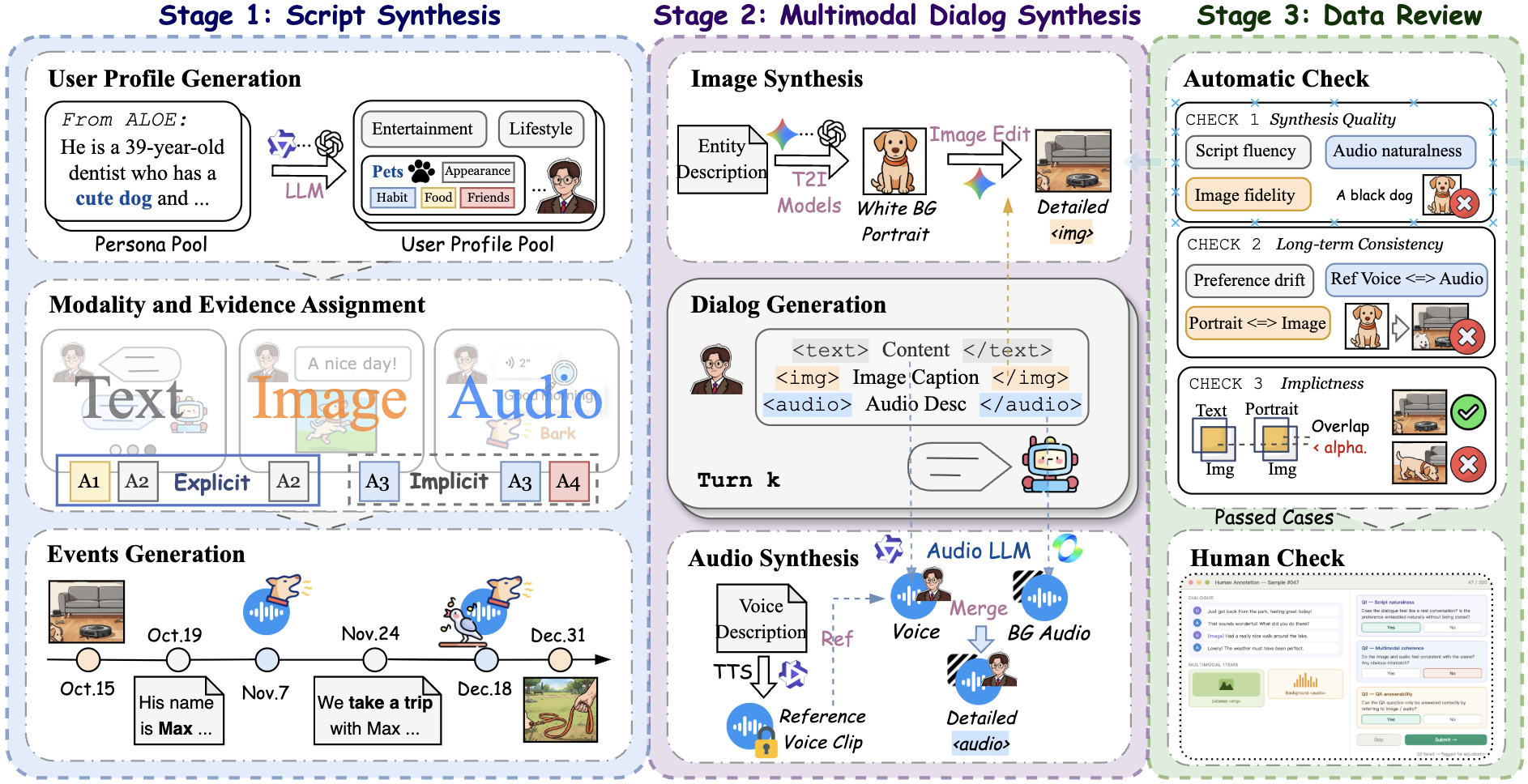
CUE-Mem construction and evaluation. Explore image, audio, and QA examples in the interactive demo →
CUE-Mem evaluates how agents retain and use user information from multimodal conversation histories. It compares explicit statements with implicit cues, such as objects in photographs and background sounds in audio, across four memory tasks.
| Task | What should the agent remember or infer? |
|---|---|
| 🧩 Entity Recall | User-related entities and their attributes |
| 🔎 Long Pattern | Persistent preferences and habits across interactions |
| 🎯 Personalized Recommendation | Information needed for a new recommendation |
| 🛑 Answer Refusal | Whether the history provides enough evidence to answer |
The repository includes data-construction scripts, RQ1–RQ3 evaluation pipelines, and interactive demos. The dataset is available on Hugging Face.
Explore the online demo, or run it locally:
git clone https://github.com/yulinlp/CUE-MEM.git
cd CUE-MEM
python -m http.server 8000 --bind 127.0.0.1 --directory docs
Open http://127.0.0.1:8000.
Use Python 3.10 or later, and run commands from the repository root.
python -m venv .venv
source .venv/bin/activate
python -m pip install --upgrade pip
python -m pip install -r requirements-eval.txt
python -m pip install torch
For GPU experiments, install PyTorch for your CUDA version. Install the packages and weights for your chosen memory backend, ImageBind, or TTS service as needed.
python -m pip install huggingface_hub
hf download Kkryptonite/CUE-Mem --repo-type dataset --local-dir benchmark-data

python -m scripts.prepare_dataset \
  --dataset-root benchmark-data \
  --output-root workdir/benchmark
The command prepares dialogue and QA files for the evaluation runners and links them to media in benchmark-data/. Keep that directory in place after preparation.
Download any missing media listed in workdir/benchmark/dataset_preparation.json before running multimodal experiments.
cp .env.example .env
# Edit .env with the endpoint and credentials for your selected services.
set -a
source .env
set +a

export CUE_MEM_BENCHMARK_ROOT="$PWD/workdir/benchmark"
Set CUE_MEM_LLM_API_KEY and CUE_MEM_LLM_BASE_URL for RQ1/RQ2, and choose a model served by your endpoint from the runner’s --help list. For RQ3, configure RQ3_OMNI_* and your embedding provider in .env.example.
Evaluate one profile with your configured model service:
python -m scripts.RQ1_RQ2.benchmark.run.run_bench \
  --llm_name qwen3.6-35b-a3b \
  --memory_name FUMemory \
  --data_name history_with_qa_p0 \
  --caption_category base \
  --sample 1 \
  --save_results
--sample sets the number of QA items per category. Memory backends process the conversation history separately. With --caption_category base, --data_name selects a JSON file under data/dialog/base/, without the .json extension.
Question-only and oracle-evidence baselines have separate entry points:
python -m scripts.RQ1_RQ2.benchmark.run.run_bench_question_only --help
python -m scripts.RQ1_RQ2.benchmark.run.run_bench_oracle_evidence --help
RQ2 compares image-caption detail and audio representations. Prepare the caption variants, then run memory evaluation:
python -m scripts.RQ1_RQ2.benchmark.run.run_bench --help
python -m scripts.qa.build_bench_input --help
python -m scripts.qa.build_audio_caption_study_inputs --help
Use the runner's --caption_category and --audio_caption options for prepared variants. Summarize existing results with:
python -m scripts.RQ1_RQ2.benchmark.run.aggregate_results \
  --mode overall \
  --result-dir "$CUE_MEM_BENCHMARK_ROOT/result_debug/base"
The detailed guide covers caption/audio comparisons, memory backends, and Slurm wrappers.
RQ3 evaluates how Omni models use retrieved user memories, separating the retrieval index from the evidence supplied to the answering model. Its four settings isolate the contributions of multimodal retrieval and omni-modal evidence use:
| Variant | Index | Evidence use |
|---|---|---|
TT | Text | Text |
TM | Text | Multimodal |
MT | Multimodal | Text |
MM | Multimodal | Multimodal |
Point RQ3 to the prepared histories and the downloaded media:
export RQ3_HISTORY_DIR="$PWD/workdir/benchmark/data/dialog/base"
export RQ3_DATA_DIR="$PWD/benchmark-data"
export CUE_MEM_RQ3_ROOT="$PWD/workdir/RQ3"
After installing ImageBind and its checkpoint, generate the indices needed for the selected variants:
python -m scripts.RQ3.step1_encode_embeddings \
  --embedding-provider imagebind \
  --profiles 0 \
  --modes text unified_multimodal \
  --skip-existing

python -m scripts.RQ3.step2_run_experiment \
  --variants TT TM MT MM \
  --profiles 0 \
  --sample 10 \
  --max-workers 1

python -m scripts.RQ3.step3_evaluate \
  --result-root workdir/RQ3/results
The experiment stage requires an Omni answering service configured through RQ3_OMNI_*. A Gemini-compatible embedding backend is also supported; see the detailed guide.
The data-construction pipeline follows profiles → events and conversations → QA → benchmark inputs.
| Directory | Contents |
|---|---|
scripts/profile/ | Profiles, entity anchors, portraits, and voice design |
scripts/event/ | Event plans, conversations, images, and audio |
scripts/qa/ | Question construction, checks, and input conversion |
scripts/RQ1_RQ2/ | Textualized memory methods, baselines, and aggregation |
scripts/RQ3/ | Embedding, retrieval, Omni answering, and evaluation |
scripts/human_baseline_demo/ | Interactive annotation interface |
scripts/common/ | Shared configuration, paths, and I/O |
docs/ | Static website and selected demo media |
To collect human answers using a prepared profile:
python -m scripts.human_baseline_demo \
  --data workdir/benchmark/data/dialog/base/history_with_qa_p0.json \
  --media-root benchmark-data \
  --output-dir workdir/human-results \
  --host 127.0.0.1 --port 8765
Open http://127.0.0.1:8765. Participant submissions are saved to workdir/human-results/.
@misc{hu2026cuemem,
  title = {CUE-Mem: Benchmarking Long-Term User Memory via Implicit Cues in Multimodal Conversations},
  author = {Hu, Yulin and Zhao, Yanyan and Long, Zimo and Fu, Xing and Ji, Mengtong and Zhao, Weixiang and Hou, Yutai and Wang, Qianchao and Tu, Dandan},
  year = {2026},
  url = {https://github.com/yulinlp/CUE-MEM}
}
Thanks to our collaborators for the original implementation and demo, and to the authors of the memory systems and model backends used in our experiments.
Dataset terms are available on Hugging Face.
CUE-Mem: Benchmarking Long-Term User Memory via Implicit Cues in Multimodal Conversations
See the codeLong-Term Memory for Omni-Modal Agents
Yulin Hu · Yanyan Zhao · Zimo Long · Xing Fu · Mengtong Ji
Weixiang Zhao · Yutai Hou · Qianchao Wang · Dandan Tu
Harbin Institute of Technology · Huawei Technologies Co., Ltd.
Overview • Installation • Experiments • Citation • 中文指南
CUE-Mem benchmarks long-term user memory in omni-modal agents, with 2,674 questions grounded in explicit and implicit cues across text, images, and audio.
2,674 questions · Omni-modal: Text · Image · Audio · 4 tasks · Explicit & implicit evidence
CUE-Mem construction and evaluation. Explore image, audio, and QA examples in the interactive demo →
CUE-Mem evaluates how agents retain and use user information from multimodal conversation histories. It compares explicit statements with implicit cues, such as objects in photographs and background sounds in audio, across four memory tasks.
| Task | What should the agent remember or infer? |
|---|---|
| 🧩 Entity Recall | User-related entities and their attributes |
| 🔎 Long Pattern | Persistent preferences and habits across interactions |
| 🎯 Personalized Recommendation | Information needed for a new recommendation |
| 🛑 Answer Refusal | Whether the history provides enough evidence to answer |
The repository includes data-construction scripts, RQ1–RQ3 evaluation pipelines, and interactive demos. The dataset is available on Hugging Face.
Explore the online demo, or run it locally:
git clone https://github.com/yulinlp/CUE-MEM.git
cd CUE-MEM
python -m http.server 8000 --bind 127.0.0.1 --directory docs
Open http://127.0.0.1:8000.
Use Python 3.10 or later, and run commands from the repository root.
python -m venv .venv
source .venv/bin/activate
python -m pip install --upgrade pip
python -m pip install -r requirements-eval.txt
python -m pip install torch
For GPU experiments, install PyTorch for your CUDA version. Install the packages and weights for your chosen memory backend, ImageBind, or TTS service as needed.
python -m pip install huggingface_hub
hf download Kkryptonite/CUE-Mem --repo-type dataset --local-dir benchmark-data

python -m scripts.prepare_dataset \
  --dataset-root benchmark-data \
  --output-root workdir/benchmark
The command prepares dialogue and QA files for the evaluation runners and links them to media in benchmark-data/. Keep that directory in place after preparation.
Download any missing media listed in workdir/benchmark/dataset_preparation.json before running multimodal experiments.
cp .env.example .env
# Edit .env with the endpoint and credentials for your selected services.
set -a
source .env
set +a

export CUE_MEM_BENCHMARK_ROOT="$PWD/workdir/benchmark"
Set CUE_MEM_LLM_API_KEY and CUE_MEM_LLM_BASE_URL for RQ1/RQ2, and choose a model served by your endpoint from the runner’s --help list. For RQ3, configure RQ3_OMNI_* and your embedding provider in .env.example.
Evaluate one profile with your configured model service:
python -m scripts.RQ1_RQ2.benchmark.run.run_bench \
  --llm_name qwen3.6-35b-a3b \
  --memory_name FUMemory \
  --data_name history_with_qa_p0 \
  --caption_category base \
  --sample 1 \
  --save_results
--sample sets the number of QA items per category. Memory backends process the conversation history separately. With --caption_category base, --data_name selects a JSON file under data/dialog/base/, without the .json extension.
Question-only and oracle-evidence baselines have separate entry points:
python -m scripts.RQ1_RQ2.benchmark.run.run_bench_question_only --help
python -m scripts.RQ1_RQ2.benchmark.run.run_bench_oracle_evidence --help
RQ2 compares image-caption detail and audio representations. Prepare the caption variants, then run memory evaluation:
python -m scripts.RQ1_RQ2.benchmark.run.run_bench --help
python -m scripts.qa.build_bench_input --help
python -m scripts.qa.build_audio_caption_study_inputs --help
Use the runner's --caption_category and --audio_caption options for prepared variants. Summarize existing results with:
python -m scripts.RQ1_RQ2.benchmark.run.aggregate_results \
  --mode overall \
  --result-dir "$CUE_MEM_BENCHMARK_ROOT/result_debug/base"
The detailed guide covers caption/audio comparisons, memory backends, and Slurm wrappers.
RQ3 evaluates how Omni models use retrieved user memories, separating the retrieval index from the evidence supplied to the answering model. Its four settings isolate the contributions of multimodal retrieval and omni-modal evidence use:
| Variant | Index | Evidence use |
|---|---|---|
TT | Text | Text |
TM | Text | Multimodal |
MT | Multimodal | Text |
MM | Multimodal | Multimodal |
Point RQ3 to the prepared histories and the downloaded media:
export RQ3_HISTORY_DIR="$PWD/workdir/benchmark/data/dialog/base"
export RQ3_DATA_DIR="$PWD/benchmark-data"
export CUE_MEM_RQ3_ROOT="$PWD/workdir/RQ3"
After installing ImageBind and its checkpoint, generate the indices needed for the selected variants:
python -m scripts.RQ3.step1_encode_embeddings \
  --embedding-provider imagebind \
  --profiles 0 \
  --modes text unified_multimodal \
  --skip-existing

python -m scripts.RQ3.step2_run_experiment \
  --variants TT TM MT MM \
  --profiles 0 \
  --sample 10 \
  --max-workers 1

python -m scripts.RQ3.step3_evaluate \
  --result-root workdir/RQ3/results
The experiment stage requires an Omni answering service configured through RQ3_OMNI_*. A Gemini-compatible embedding backend is also supported; see the detailed guide.
The data-construction pipeline follows profiles → events and conversations → QA → benchmark inputs.
| Directory | Contents |
|---|---|
scripts/profile/ | Profiles, entity anchors, portraits, and voice design |
scripts/event/ | Event plans, conversations, images, and audio |
scripts/qa/ | Question construction, checks, and input conversion |
scripts/RQ1_RQ2/ | Textualized memory methods, baselines, and aggregation |
scripts/RQ3/ | Embedding, retrieval, Omni answering, and evaluation |
scripts/human_baseline_demo/ | Interactive annotation interface |
scripts/common/ | Shared configuration, paths, and I/O |
docs/ | Static website and selected demo media |
To collect human answers using a prepared profile:
python -m scripts.human_baseline_demo \
  --data workdir/benchmark/data/dialog/base/history_with_qa_p0.json \
  --media-root benchmark-data \
  --output-dir workdir/human-results \
  --host 127.0.0.1 --port 8765
Open http://127.0.0.1:8765. Participant submissions are saved to workdir/human-results/.
@misc{hu2026cuemem,
  title = {CUE-Mem: Benchmarking Long-Term User Memory via Implicit Cues in Multimodal Conversations},
  author = {Hu, Yulin and Zhao, Yanyan and Long, Zimo and Fu, Xing and Ji, Mengtong and Zhao, Weixiang and Hou, Yutai and Wang, Qianchao and Tu, Dandan},
  year = {2026},
  url = {https://github.com/yulinlp/CUE-MEM}
}
Thanks to our collaborators for the original implementation and demo, and to the authors of the memory systems and model backends used in our experiments.
Dataset terms are available on Hugging Face.



