macOS menu bar app to fix playback issues with KEF speakers
Swift
0
37 commits
updated Oct 15, 2026

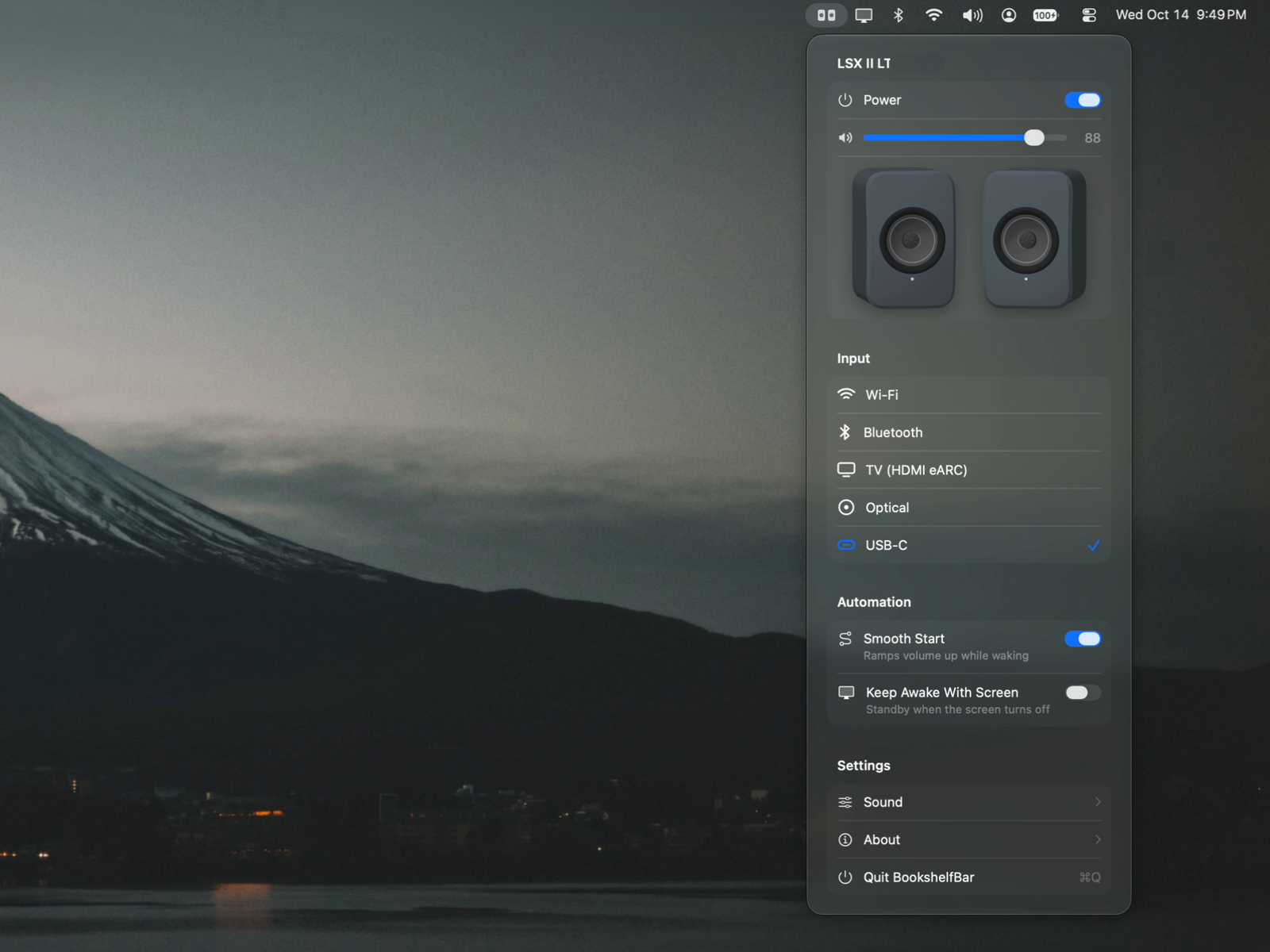
A native macOS menu bar app for KEF wireless speakers (LSX II LT, LSX II and the rest of the W2 platform), with a fix for common problems, including:
Not affiliated with KEF.
Requires macOS 26 or later.
Homebrew:
brew install --cask yeutterg/tap/bookshelfbar
Or download BookshelfBar-<version>.dmg from Releases, open it, and drag BookshelfBar to Applications.
BookshelfBar isn't notarized by Apple yet, so the first time you open it macOS says it can't verify the app. To open it anyway:
Or, in Terminal, remove the download quarantine and open it normally:
xattr -dr com.apple.quarantine /Applications/BookshelfBar.app
Only do this for apps you trust. The source is all here, and you can build it yourself instead.
Found a bug or have an idea? Please open an issue. Pull requests are welcome too, but for feature requests and bug reports we prefer an issue first, so we can talk it through and throw our agents at it.
swift build                 # library, CLI and app
swift test                  # unit tests
scripts/bundle.sh           # builds build/BookshelfBar.app
open build/BookshelfBar.app
On first launch macOS asks for Local Network access, which the app needs to find and control the speakers.
A command-line tool on top of the same library, handy for scripting and debugging:
swift run kefctl discover
swift run kefctl info
swift run kefctl vol 30
swift run kefctl source usb
swift run kefctl events          # live changes
swift run kefctl usb             # KEF USB audio device state on this Mac
The speakers expose a local HTTP API on port 80, the same one KEF Connect uses. Since firmware 2.0, writes to settings (DSP, power options) must be signed with the speaker's HMAC_SHA256_AES256 scheme; KEFKit implements it. The USB port is a plain USB Audio Class device, so all control goes over the network.
When a sleeping speaker starts playing over USB, it wakes, drops off the USB bus about 3 s later, and comes back 1–4 s after that as a new audio device. Sometimes it returns at full USB gain before macOS restores the saved volume, and sometimes macOS moves output to another device and doesn't move it back. docs/RESEARCH.md has the measurements, the API notes and the design decisions.
| Target | What |
|---|---|
KEFKit | HTTP client, request signing, event stream, Bonjour discovery, finish decoding |
KEFAudio | CoreAudio: the KEF USB device, its volume, mute and default-output state |
BookshelfBarCore | Speaker model for the UI and the Smooth Start logic |
BookshelfBar | The SwiftUI menu bar app |
kefctl | CLI |
Request signing is adapted from tkelkermans/KefSleepSync (0BSD). The API notes draw on EvotecIT/homeassistant-kef, N0ciple/pykefcontrol, hilli/go-kef-w2 and roberdorfer/kef-lsx-volume. KEF, LSX and Uni-Q are trademarks of GP Acoustics. Speaker artwork is rendered from KEF's product models.
MIT
Push a tag like v0.2.0. The release workflow tests, builds a universal app, signs and notarizes it when the secrets below are set, publishes a GitHub release, and updates the cask in yeutterg/homebrew-tap. Repository secrets:
| Secret | What |
|---|---|
DEVELOPER_ID_P12 | Developer ID Application certificate + private key, exported as .p12, base64-encoded |
DEVELOPER_ID_P12_PASSWORD | Password for that .p12 |
NOTARY_KEY_P8 | App Store Connect API key (.p8 contents) for notarytool |
NOTARY_KEY_ID, NOTARY_ISSUER_ID | That key's ID and issuer ID |
HOMEBREW_TAP_TOKEN | Fine-grained token with write access to yeutterg/homebrew-tap |
Without the signing secrets the workflow still builds a DMG, but it isn't notarized. Locally: VERSION=0.2.0 scripts/release.sh (set SIGN_IDENTITY and the NOTARY_* variables to sign and notarize).
macOS menu bar app to fix playback issues with KEF speakers
Swift
0
37 commits
updated Oct 15, 2026
A native macOS menu bar app for KEF wireless speakers (LSX II LT, LSX II and the rest of the W2 platform), with a fix for common problems, including:
Not affiliated with KEF.
Requires macOS 26 or later.
Homebrew:
brew install --cask yeutterg/tap/bookshelfbar
Or download BookshelfBar-<version>.dmg from Releases, open it, and drag BookshelfBar to Applications.
BookshelfBar isn't notarized by Apple yet, so the first time you open it macOS says it can't verify the app. To open it anyway:
Or, in Terminal, remove the download quarantine and open it normally:
xattr -dr com.apple.quarantine /Applications/BookshelfBar.app
Only do this for apps you trust. The source is all here, and you can build it yourself instead.
Found a bug or have an idea? Please open an issue. Pull requests are welcome too, but for feature requests and bug reports we prefer an issue first, so we can talk it through and throw our agents at it.
swift build                 # library, CLI and app
swift test                  # unit tests
scripts/bundle.sh           # builds build/BookshelfBar.app
open build/BookshelfBar.app
On first launch macOS asks for Local Network access, which the app needs to find and control the speakers.
A command-line tool on top of the same library, handy for scripting and debugging:
swift run kefctl discover
swift run kefctl info
swift run kefctl vol 30
swift run kefctl source usb
swift run kefctl events          # live changes
swift run kefctl usb             # KEF USB audio device state on this Mac
The speakers expose a local HTTP API on port 80, the same one KEF Connect uses. Since firmware 2.0, writes to settings (DSP, power options) must be signed with the speaker's HMAC_SHA256_AES256 scheme; KEFKit implements it. The USB port is a plain USB Audio Class device, so all control goes over the network.
When a sleeping speaker starts playing over USB, it wakes, drops off the USB bus about 3 s later, and comes back 1–4 s after that as a new audio device. Sometimes it returns at full USB gain before macOS restores the saved volume, and sometimes macOS moves output to another device and doesn't move it back. docs/RESEARCH.md has the measurements, the API notes and the design decisions.
| Target | What |
|---|---|
KEFKit | HTTP client, request signing, event stream, Bonjour discovery, finish decoding |
KEFAudio | CoreAudio: the KEF USB device, its volume, mute and default-output state |
BookshelfBarCore | Speaker model for the UI and the Smooth Start logic |
BookshelfBar | The SwiftUI menu bar app |
kefctl | CLI |
Request signing is adapted from tkelkermans/KefSleepSync (0BSD). The API notes draw on EvotecIT/homeassistant-kef, N0ciple/pykefcontrol, hilli/go-kef-w2 and roberdorfer/kef-lsx-volume. KEF, LSX and Uni-Q are trademarks of GP Acoustics. Speaker artwork is rendered from KEF's product models.
MIT
Push a tag like v0.2.0. The release workflow tests, builds a universal app, signs and notarizes it when the secrets below are set, publishes a GitHub release, and updates the cask in yeutterg/homebrew-tap. Repository secrets:
| Secret | What |
|---|---|
DEVELOPER_ID_P12 | Developer ID Application certificate + private key, exported as .p12, base64-encoded |
DEVELOPER_ID_P12_PASSWORD | Password for that .p12 |
NOTARY_KEY_P8 | App Store Connect API key (.p8 contents) for notarytool |
NOTARY_KEY_ID, NOTARY_ISSUER_ID | That key's ID and issuer ID |
HOMEBREW_TAP_TOKEN | Fine-grained token with write access to yeutterg/homebrew-tap |
Without the signing secrets the workflow still builds a DMG, but it isn't notarized. Locally: VERSION=0.2.0 scripts/release.sh (set SIGN_IDENTITY and the NOTARY_* variables to sign and notarize).



