Browser 3D interior level designer: a tiny yes/no model (Microsoft Decision-1) presses the buttons. Exports JSON + multi-mesh GLB.
Python
0
6 commits
updated Oct 11, 2026
Design richly furnished indoor spaces in your browser, hand the boring parts to a yes/no AI, and export a JSON layout plus a multi-mesh GLB your engine can load.




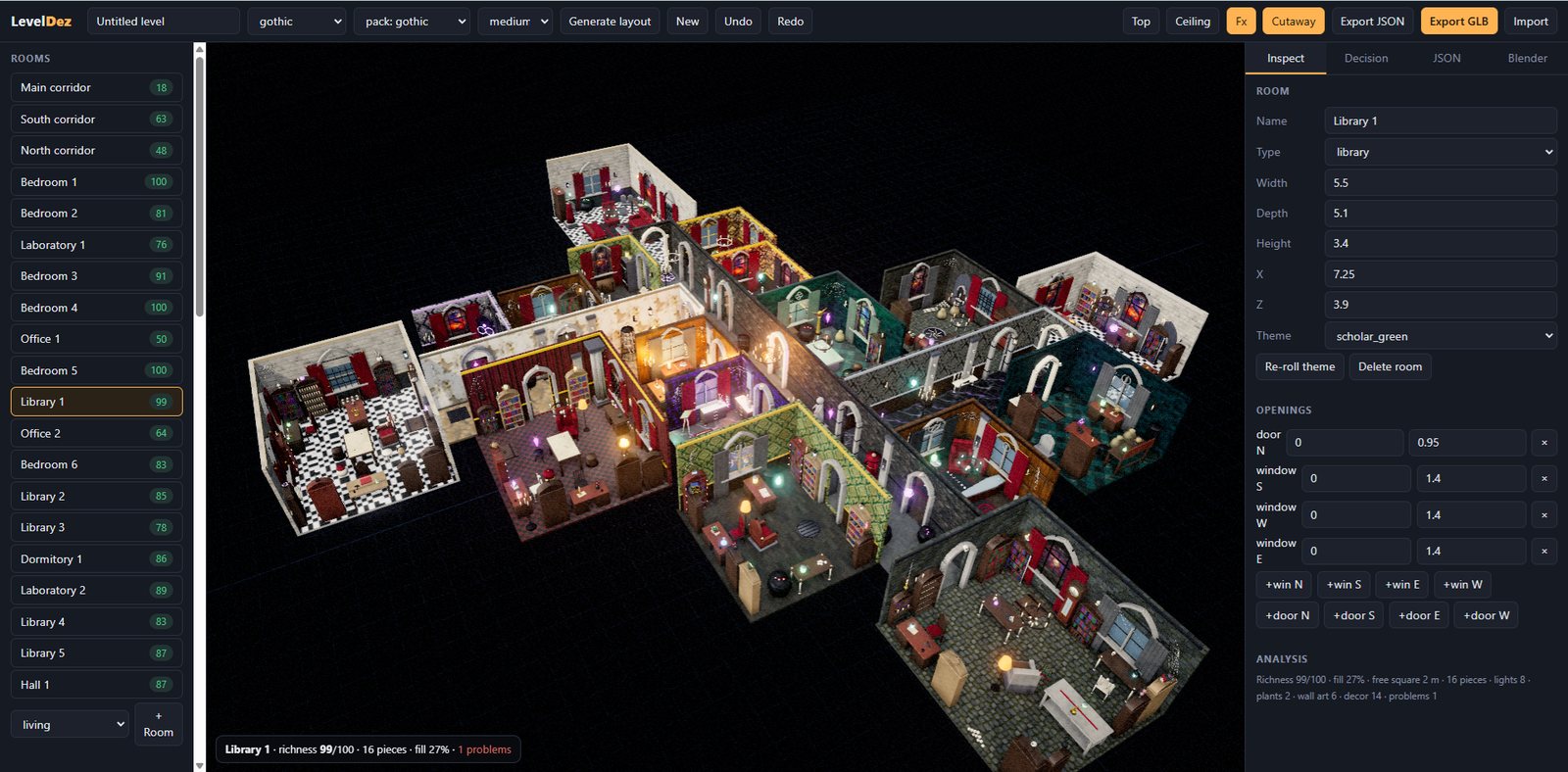
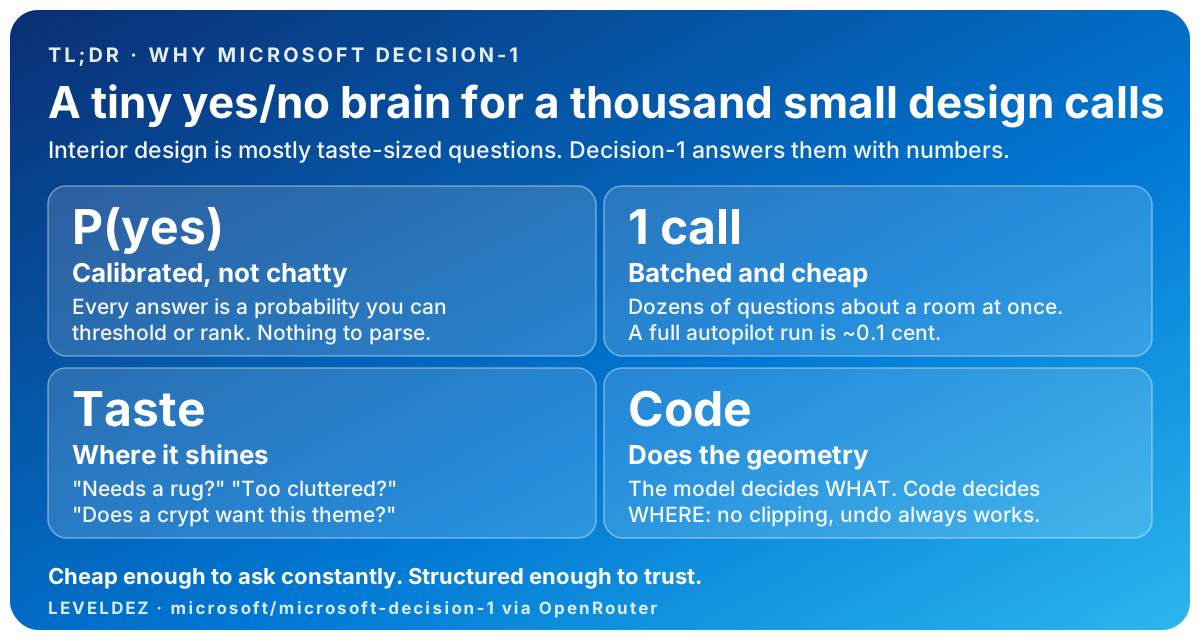
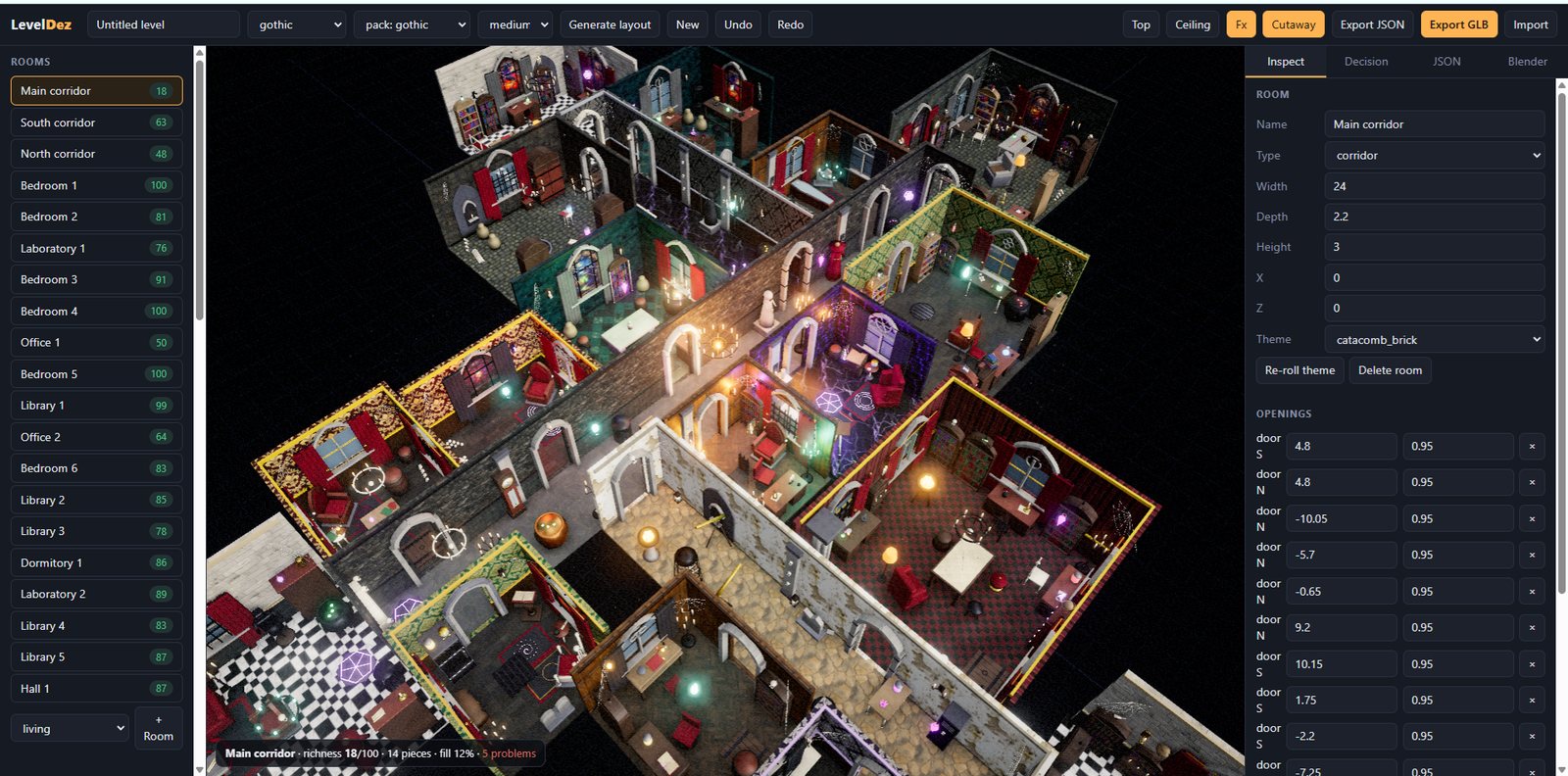
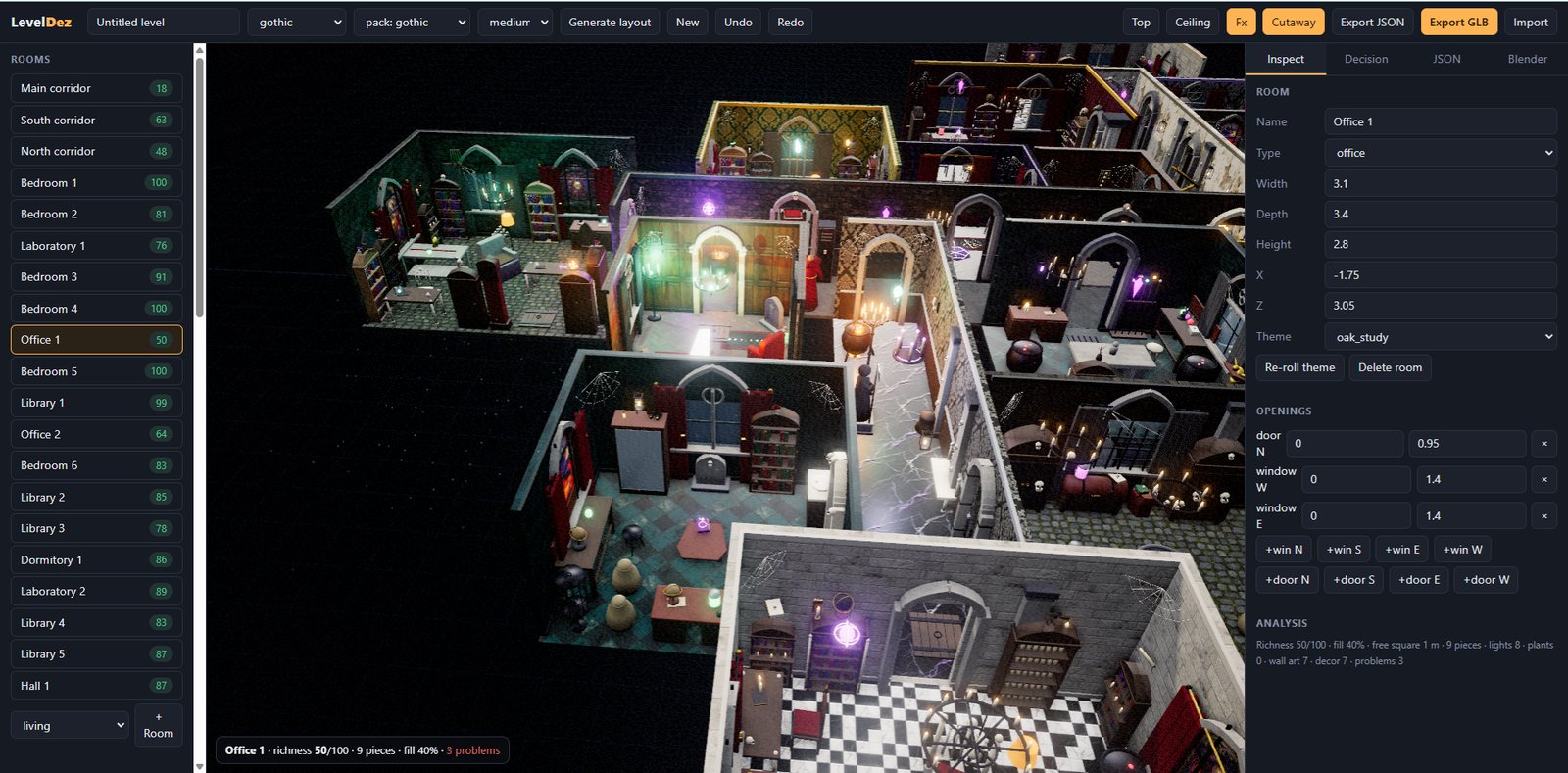
Greyboxing a believable interior is slow: a floor plan, forty doors, a hundred props, lighting, and the hundred small decisions that make a room feel lived in. LevelDez automates those decisions with a small, cheap model and a library of real assets, and keeps you in control with an ordinary editor and undo.
The quickest is that you vibe your own stuff (took me a few hours), but I'm sharing my project so that my claims are not empty-handed and it can be tried out.
git clone https://github.com/yeme-oss/LevelDez.git
cd LevelDez
cp .env.example .env        # optional: add your keys (see below)
npm start                   # -> http://localhost:5173
Requires Node 18+. No npm install is needed. three.js is loaded from a CDN, so the first load needs an internet connection.
Then, in the browser:
Prefer to drive it with words? Type this into the Go box instead:
Generate a large, complex gothic necromancer academy: a main corridor with side corridors and many rooms of varying sizes (classrooms, dormitories, libraries, alchemy laboratories, a crypt, a ritual chamber, chapels and a grand hall). Use the gothic style and asset pack, give every room a different wallpaper and floor, and furnish it richly with composed setups, gothic architecture (pillars, window tracery, ceiling vaults, cobwebs), candlelight and lighting, curtains, paintings and tapestries on the walls, decorated surfaces and lived-in clutter.
then press Autopilot (all rooms) to let Decision-1 finish what is still missing. The same prompt is saved in promptGO.txt.
Both keys are optional. The editor works without them.
| Variable | Used for | Without it |
|---|---|---|
OPENROUTER_API_KEY | Decision-1: the Go box, Autopilot, Critic, Ask and per-room theme choice. The key stays on your server and is never sent to the browser. | Keyword routing and rule-based autopilot still work. |
GEMINI_API_KEY | Regenerating wall art and textures with Nano Banana (≈ $0.034 per image). | Nothing: the generated images already ship in assets/. |
Other optional settings: DECISION_MODEL, PORT, HOST, BLENDER_PORT, LEVELDEZ_ROOT (see .env.example). Set them in .env or as real environment variables (which take priority). Never commit .env.
Security defaults. The server listens on
127.0.0.1only. The raw Blender bridge (/api/blender, which can run arbitrary Python inside a connected Blender) is disabled unless you setLEVELDEZ_ALLOW_RAW_BLENDER=1.
| Add rooms | + Room (pick a type), the Add adjoining room button, or Generate layout for a whole floor plan. |
| Place furniture | Click an item in the left palette (searchable, grouped by pack), then click inside a room. Wall, ceiling and tabletop items snap to the right surface. |
| Edit | Click a prop to select it: drag the gizmo to move or rotate (snaps to 5 cm / 15°), or edit numbers in Inspect. Rooms have name, size, height, theme, and doors/windows you can add or remove. |
| Shortcuts | Del delete · R rotate 45° · T top view · Esc deselect · Ctrl+Z / Ctrl+Y undo / redo |
| View | Top, Ceiling (show ceilings), Cutaway (hides walls facing the camera), Fx (cinematic rendering). |
| Styles & packs | The style dropdown (modern, scandi, rustic, industrial, luxe, gothic) and the pack dropdown swap whole palettes and model sets. |
| Start over | New gives a blank level; every change, including New, is undoable. |
There are about 35 procedural furniture types that work with no assets at all, and any GLB dropped into assets/ automatically overrides or extends them (see Asset packs).
microsoft/microsoft-decision-1 is not a chat model. It reads a state and returns calibrated probabilities for fixed answer options. LevelDez uses three question types through OpenRouter's decisions endpoint, and batches many questions into one request:
| Type | Returns | Used for |
|---|---|---|
noul | probability of yes | "should the Add rug button be pressed?" |
choice | probability per option | style, room type, target room, wall/floor theme per room |
score | probability per level | rating how furnished a room feels (empty → cluttered) |
flowchart LR
  U[You: Go box / Autopilot] --> A[Analyse each room<br/>fill %, lights, art, problems...]
  A --> G{Cheap local gates}
  G --> D[Decision-1<br/>batched yes/no panel]
  D -->|p ≥ 0.5| B[Press buttons<br/>furnish, compose, light, decorate]
  B --> C[Critic: score empty..cluttered]
  C -->|not done| A
  C -->|done| E[Export JSON + GLB]
choice questions fill in the parameters (style, room types, size, which room).choice per room (type, size and neighbours) with a penalty for repeats, so adjacent rooms get different finishes.Decision-1 presses the same buttons you can click yourself.
| Group | Buttons |
|---|---|
| Layout | Furnish core · Compose room · Fill empty space · Declutter · Fix overlaps · Snap to walls · Face seating · Clear room |
| Furnish | Add rug · Bedside tables · Style surfaces · Hang wall art · Gothic architecture · Add clutter · Add plants · Add lighting · Add curtains |
| Structure | Add window · Add door · Resize room · Add adjoining room · Generate layout |
| Style | Restyle · Apply asset pack · Vary surfaces · Mirror layout |
Sub-folders of assets/ are packs. Drop in GLBs, optionally describe them in a manifest.json, and pick the pack in the header. GLBs without an entry are auto-registered, with placement and light guessed from the file name. GLBs download lazily, only for props a level actually uses, using the bounding boxes in the manifest.
| Field | Meaning |
|---|---|
as | Variant of a base type (bed, wardrobe, rug…). The layout logic keeps working on the base type; the model is swapped in and fitted to its footprint. |
replaces | Pack-only type that stands in for a base type (candelabra for floor_lamp, arched_mirror for mirror…). |
place / y | floor, wall (mount height), ceiling, or surface (sits on tables and shelves). |
tags | wall-hug, holds-decor, light, altar, curtain, decor… (these drive the buttons). |
light, lightColor, lightY | Glow: adds a point light above the model. |
tint | Palette key that recolours materials named tint_*. |
assets/gothic, ~600 assets)| Group | Built | Contents |
|---|---|---|
| Architecture | 87 | columns, pilasters, arch panels, window & door surrounds, ceiling vaults, cobwebs, wall weapons, skull mounts, chains, floor features, daises |
| Furniture | 95 | bed, wardrobe, bookshelf, table, chair, throne, pew, desk, chest… variants; cabinets, lecterns, organs, bath and kitchen pieces |
| Sacred & death | 65 | altars, sarcophagi, coffins, tombstones, crypt niches, statues, slabs, fonts, reliquaries, bone heaps |
| Alchemy | 95 | cauldrons, benches, apparatus, 12 potions, 8 specimen jars, herbs, grimoires, scrolls, orbs, skulls, cages |
| Lighting | 41 | candelabras, chandeliers, sconces, candle groups, lanterns, braziers, floating lights |
| Study | 27 | book stacks, globes, orrery, astrolabe, telescope, hourglasses, map table |
| Decor | 75 | urns, chalices, ravens, barrels, crates, rugs, banners, mirrors, clocks, masks, drapes |
| Academy | 30 | student desks, podiums, slates, trophy cases, robe mannequins, racks, trunks |
| Composition | 11 | fireplaces, wall-length bookcases, kneelers, grand candelabras |
| Wall art | 50 | paintings, tapestries and stained glass, generated with Nano Banana |
Plus a library of 49 textures (walls, floors, wainscots and neutral detail maps), all generated and made seamless by script. tools/gothic/PLAN.md is the full checklist of every item.
assets/scifi, 325 assets)Built from docs/make-a-pack-prompt - Scifi.md as a test of the make-a-pack prompt. Pick style: scifi (it selects the pack and eight sci-fi room themes: hull white, bridge navy, neon noir, clean lab, cargo grey, hydroponic green, crew quarters, medbay).
| Group | Built | Contents |
|---|---|---|
| Furniture (variants of base types) | 134 | beds, sofas, armchairs, chairs, tables, desks, storage, rugs, mirrors, lamps, plants, curtains, bath and kitchen pieces |
| Signature props | 86 | cryo pods, bridge consoles, holotables, reactor cores, server racks, medbay, drones, vending machines, hydroponics, teleporters, android mannequins |
| Lighting | 28 | neon signs, light strips, wall lights, beacons, holo lamps |
| Wall | 34 | holo posters, screens, vents, shelves, pipe runs, signage, control panels |
| Decor | 22 | datapads, holo cubes, mini bots, vials, ship models, cables |
| Architecture | 20 | pillars, pilasters, door and window surrounds, ceiling details, floor decals |
Generate or extend it with tools/scifi/load.py (same resumable workflow as the gothic pack; PLAN.md lists every item). Wall and floor textures reuse the neutral texture library, tinted per theme.
You don't need to learn the toolchain. Any genre works (cyberpunk noodle bar, Mediterranean villa, haunted motel, alien hive…):
docs/make-a-pack-prompt.md and fill in the genre, a pack name and a size.manifest.json, then opens the editor and checks its own work.pack: <your name> in the header and press Generate layout.The prompt is resumable (it keeps a plan and a progress file), and it can add AI wall art if GEMINI_API_KEY is set. Want to see how the gothic pack was made? The recipes live in tools/gothic/ (PLAN.md lists every item), and python tools/gothic/gen_art.py / gen_textures.py regenerate its paintings and textures (≈ $0.034 per image via Nano Banana).
exports/.{
"version": 1, "meta": { "name": "Nekro", "units": "m" }, "style": "gothic", "pack": "gothic",
"rooms": [{ "id": "r1", "name": "Library 1", "type": "library", "x": 7.25, "z": 3.9, "w": 5.5, "d": 5.1, "h": 3.4,
"theme": { "key": "scholar_green", "wall": {...}, "floor": {...}, "wains": {...}, "mood": { "color": "#ffb35a", "i": 0.55 } } }],
"openings": [{ "id": "o1", "room": "r1", "wall": "N", "type": "door", "t": 0, "w": 0.95, "h": 2.1 }],
"props": [{ "id": "p1", "type": "bed", "room": "r1", "x": 1.2, "z": -0.4, "y": 0, "rot": 90, "scale": 1, "variant": "gothic_bed_coffin_bed" }]
}
Rooms are axis-aligned rectangles in metres (x, z = centre). rot is degrees about Y; host links a lamp or vase to the table it stands on.
server.js                  zero-dependency Node server: static files, Decision-1 proxy, asset scan, exports
public/
  index.html  app.js       the editor (three.js scene, UI, undo, export, Fx stack)
  level.js                 level model, geometry, analysis, every button, layout generator, composition kits
  decision.js              Decision-1 client: router, autopilot, critic, theme chooser
  catalog.js               procedural furniture + lazy GLB loading, variants/replacements, detail shader
  themes.js  surfaces.js   room themes and textured wall/floor materials
assets/
  gothic/                  ~600 GLBs + manifest.json + art/ source images
  textures/                wall, floor, wainscot and detail textures + manifest.json
tools/
  blender_kit.py           modelling kit for BlenderMCP
  gothic/                  recipes, generator core, plan, Nano Banana scripts and prompts
docs/screenshots/          images used in this README
Public domain under the Unlicense: use, modify and sell it for any purpose, no attribution needed. (The Nano Banana images carry the caveat above.)
I'm on Patreon. I share insights about AI ventures, practical hands-on stuff. No fluff.
Browser 3D interior level designer: a tiny yes/no model (Microsoft Decision-1) presses the buttons. Exports JSON + multi-mesh GLB.
Python
0
6 commits
updated Oct 11, 2026
Design richly furnished indoor spaces in your browser, hand the boring parts to a yes/no AI, and export a JSON layout plus a multi-mesh GLB your engine can load.
Greyboxing a believable interior is slow: a floor plan, forty doors, a hundred props, lighting, and the hundred small decisions that make a room feel lived in. LevelDez automates those decisions with a small, cheap model and a library of real assets, and keeps you in control with an ordinary editor and undo.
The quickest is that you vibe your own stuff (took me a few hours), but I'm sharing my project so that my claims are not empty-handed and it can be tried out.
git clone https://github.com/yeme-oss/LevelDez.git
cd LevelDez
cp .env.example .env        # optional: add your keys (see below)
npm start                   # -> http://localhost:5173
Requires Node 18+. No npm install is needed. three.js is loaded from a CDN, so the first load needs an internet connection.
Then, in the browser:
Prefer to drive it with words? Type this into the Go box instead:
Generate a large, complex gothic necromancer academy: a main corridor with side corridors and many rooms of varying sizes (classrooms, dormitories, libraries, alchemy laboratories, a crypt, a ritual chamber, chapels and a grand hall). Use the gothic style and asset pack, give every room a different wallpaper and floor, and furnish it richly with composed setups, gothic architecture (pillars, window tracery, ceiling vaults, cobwebs), candlelight and lighting, curtains, paintings and tapestries on the walls, decorated surfaces and lived-in clutter.
then press Autopilot (all rooms) to let Decision-1 finish what is still missing. The same prompt is saved in promptGO.txt.
Both keys are optional. The editor works without them.
| Variable | Used for | Without it |
|---|---|---|
OPENROUTER_API_KEY | Decision-1: the Go box, Autopilot, Critic, Ask and per-room theme choice. The key stays on your server and is never sent to the browser. | Keyword routing and rule-based autopilot still work. |
GEMINI_API_KEY | Regenerating wall art and textures with Nano Banana (≈ $0.034 per image). | Nothing: the generated images already ship in assets/. |
Other optional settings: DECISION_MODEL, PORT, HOST, BLENDER_PORT, LEVELDEZ_ROOT (see .env.example). Set them in .env or as real environment variables (which take priority). Never commit .env.
Security defaults. The server listens on
127.0.0.1only. The raw Blender bridge (/api/blender, which can run arbitrary Python inside a connected Blender) is disabled unless you setLEVELDEZ_ALLOW_RAW_BLENDER=1.
| Add rooms | + Room (pick a type), the Add adjoining room button, or Generate layout for a whole floor plan. |
| Place furniture | Click an item in the left palette (searchable, grouped by pack), then click inside a room. Wall, ceiling and tabletop items snap to the right surface. |
| Edit | Click a prop to select it: drag the gizmo to move or rotate (snaps to 5 cm / 15°), or edit numbers in Inspect. Rooms have name, size, height, theme, and doors/windows you can add or remove. |
| Shortcuts | Del delete · R rotate 45° · T top view · Esc deselect · Ctrl+Z / Ctrl+Y undo / redo |
| View | Top, Ceiling (show ceilings), Cutaway (hides walls facing the camera), Fx (cinematic rendering). |
| Styles & packs | The style dropdown (modern, scandi, rustic, industrial, luxe, gothic) and the pack dropdown swap whole palettes and model sets. |
| Start over | New gives a blank level; every change, including New, is undoable. |
There are about 35 procedural furniture types that work with no assets at all, and any GLB dropped into assets/ automatically overrides or extends them (see Asset packs).
microsoft/microsoft-decision-1 is not a chat model. It reads a state and returns calibrated probabilities for fixed answer options. LevelDez uses three question types through OpenRouter's decisions endpoint, and batches many questions into one request:
| Type | Returns | Used for |
|---|---|---|
noul | probability of yes | "should the Add rug button be pressed?" |
choice | probability per option | style, room type, target room, wall/floor theme per room |
score | probability per level | rating how furnished a room feels (empty → cluttered) |
flowchart LR
  U[You: Go box / Autopilot] --> A[Analyse each room<br/>fill %, lights, art, problems...]
  A --> G{Cheap local gates}
  G --> D[Decision-1<br/>batched yes/no panel]
  D -->|p ≥ 0.5| B[Press buttons<br/>furnish, compose, light, decorate]
  B --> C[Critic: score empty..cluttered]
  C -->|not done| A
  C -->|done| E[Export JSON + GLB]
choice questions fill in the parameters (style, room types, size, which room).choice per room (type, size and neighbours) with a penalty for repeats, so adjacent rooms get different finishes.Decision-1 presses the same buttons you can click yourself.
| Group | Buttons |
|---|---|
| Layout | Furnish core · Compose room · Fill empty space · Declutter · Fix overlaps · Snap to walls · Face seating · Clear room |
| Furnish | Add rug · Bedside tables · Style surfaces · Hang wall art · Gothic architecture · Add clutter · Add plants · Add lighting · Add curtains |
| Structure | Add window · Add door · Resize room · Add adjoining room · Generate layout |
| Style | Restyle · Apply asset pack · Vary surfaces · Mirror layout |
Sub-folders of assets/ are packs. Drop in GLBs, optionally describe them in a manifest.json, and pick the pack in the header. GLBs without an entry are auto-registered, with placement and light guessed from the file name. GLBs download lazily, only for props a level actually uses, using the bounding boxes in the manifest.
| Field | Meaning |
|---|---|
as | Variant of a base type (bed, wardrobe, rug…). The layout logic keeps working on the base type; the model is swapped in and fitted to its footprint. |
replaces | Pack-only type that stands in for a base type (candelabra for floor_lamp, arched_mirror for mirror…). |
place / y | floor, wall (mount height), ceiling, or surface (sits on tables and shelves). |
tags | wall-hug, holds-decor, light, altar, curtain, decor… (these drive the buttons). |
light, lightColor, lightY | Glow: adds a point light above the model. |
tint | Palette key that recolours materials named tint_*. |
assets/gothic, ~600 assets)| Group | Built | Contents |
|---|---|---|
| Architecture | 87 | columns, pilasters, arch panels, window & door surrounds, ceiling vaults, cobwebs, wall weapons, skull mounts, chains, floor features, daises |
| Furniture | 95 | bed, wardrobe, bookshelf, table, chair, throne, pew, desk, chest… variants; cabinets, lecterns, organs, bath and kitchen pieces |
| Sacred & death | 65 | altars, sarcophagi, coffins, tombstones, crypt niches, statues, slabs, fonts, reliquaries, bone heaps |
| Alchemy | 95 | cauldrons, benches, apparatus, 12 potions, 8 specimen jars, herbs, grimoires, scrolls, orbs, skulls, cages |
| Lighting | 41 | candelabras, chandeliers, sconces, candle groups, lanterns, braziers, floating lights |
| Study | 27 | book stacks, globes, orrery, astrolabe, telescope, hourglasses, map table |
| Decor | 75 | urns, chalices, ravens, barrels, crates, rugs, banners, mirrors, clocks, masks, drapes |
| Academy | 30 | student desks, podiums, slates, trophy cases, robe mannequins, racks, trunks |
| Composition | 11 | fireplaces, wall-length bookcases, kneelers, grand candelabras |
| Wall art | 50 | paintings, tapestries and stained glass, generated with Nano Banana |
Plus a library of 49 textures (walls, floors, wainscots and neutral detail maps), all generated and made seamless by script. tools/gothic/PLAN.md is the full checklist of every item.
assets/scifi, 325 assets)Built from docs/make-a-pack-prompt - Scifi.md as a test of the make-a-pack prompt. Pick style: scifi (it selects the pack and eight sci-fi room themes: hull white, bridge navy, neon noir, clean lab, cargo grey, hydroponic green, crew quarters, medbay).
| Group | Built | Contents |
|---|---|---|
| Furniture (variants of base types) | 134 | beds, sofas, armchairs, chairs, tables, desks, storage, rugs, mirrors, lamps, plants, curtains, bath and kitchen pieces |
| Signature props | 86 | cryo pods, bridge consoles, holotables, reactor cores, server racks, medbay, drones, vending machines, hydroponics, teleporters, android mannequins |
| Lighting | 28 | neon signs, light strips, wall lights, beacons, holo lamps |
| Wall | 34 | holo posters, screens, vents, shelves, pipe runs, signage, control panels |
| Decor | 22 | datapads, holo cubes, mini bots, vials, ship models, cables |
| Architecture | 20 | pillars, pilasters, door and window surrounds, ceiling details, floor decals |
Generate or extend it with tools/scifi/load.py (same resumable workflow as the gothic pack; PLAN.md lists every item). Wall and floor textures reuse the neutral texture library, tinted per theme.
You don't need to learn the toolchain. Any genre works (cyberpunk noodle bar, Mediterranean villa, haunted motel, alien hive…):
docs/make-a-pack-prompt.md and fill in the genre, a pack name and a size.manifest.json, then opens the editor and checks its own work.pack: <your name> in the header and press Generate layout.The prompt is resumable (it keeps a plan and a progress file), and it can add AI wall art if GEMINI_API_KEY is set. Want to see how the gothic pack was made? The recipes live in tools/gothic/ (PLAN.md lists every item), and python tools/gothic/gen_art.py / gen_textures.py regenerate its paintings and textures (≈ $0.034 per image via Nano Banana).
exports/.{
"version": 1, "meta": { "name": "Nekro", "units": "m" }, "style": "gothic", "pack": "gothic",
"rooms": [{ "id": "r1", "name": "Library 1", "type": "library", "x": 7.25, "z": 3.9, "w": 5.5, "d": 5.1, "h": 3.4,
"theme": { "key": "scholar_green", "wall": {...}, "floor": {...}, "wains": {...}, "mood": { "color": "#ffb35a", "i": 0.55 } } }],
"openings": [{ "id": "o1", "room": "r1", "wall": "N", "type": "door", "t": 0, "w": 0.95, "h": 2.1 }],
"props": [{ "id": "p1", "type": "bed", "room": "r1", "x": 1.2, "z": -0.4, "y": 0, "rot": 90, "scale": 1, "variant": "gothic_bed_coffin_bed" }]
}
Rooms are axis-aligned rectangles in metres (x, z = centre). rot is degrees about Y; host links a lamp or vase to the table it stands on.
server.js                  zero-dependency Node server: static files, Decision-1 proxy, asset scan, exports
public/
  index.html  app.js       the editor (three.js scene, UI, undo, export, Fx stack)
  level.js                 level model, geometry, analysis, every button, layout generator, composition kits
  decision.js              Decision-1 client: router, autopilot, critic, theme chooser
  catalog.js               procedural furniture + lazy GLB loading, variants/replacements, detail shader
  themes.js  surfaces.js   room themes and textured wall/floor materials
assets/
  gothic/                  ~600 GLBs + manifest.json + art/ source images
  textures/                wall, floor, wainscot and detail textures + manifest.json
tools/
  blender_kit.py           modelling kit for BlenderMCP
  gothic/                  recipes, generator core, plan, Nano Banana scripts and prompts
docs/screenshots/          images used in this README
Public domain under the Unlicense: use, modify and sell it for any purpose, no attribution needed. (The Nano Banana images carry the caveat above.)
I'm on Patreon. I share insights about AI ventures, practical hands-on stuff. No fluff.





