🔗 Website: https://tumcms.github.io/BIMgent.github.io/ 📄 Paper on arXiv: arXiv:2506.07217
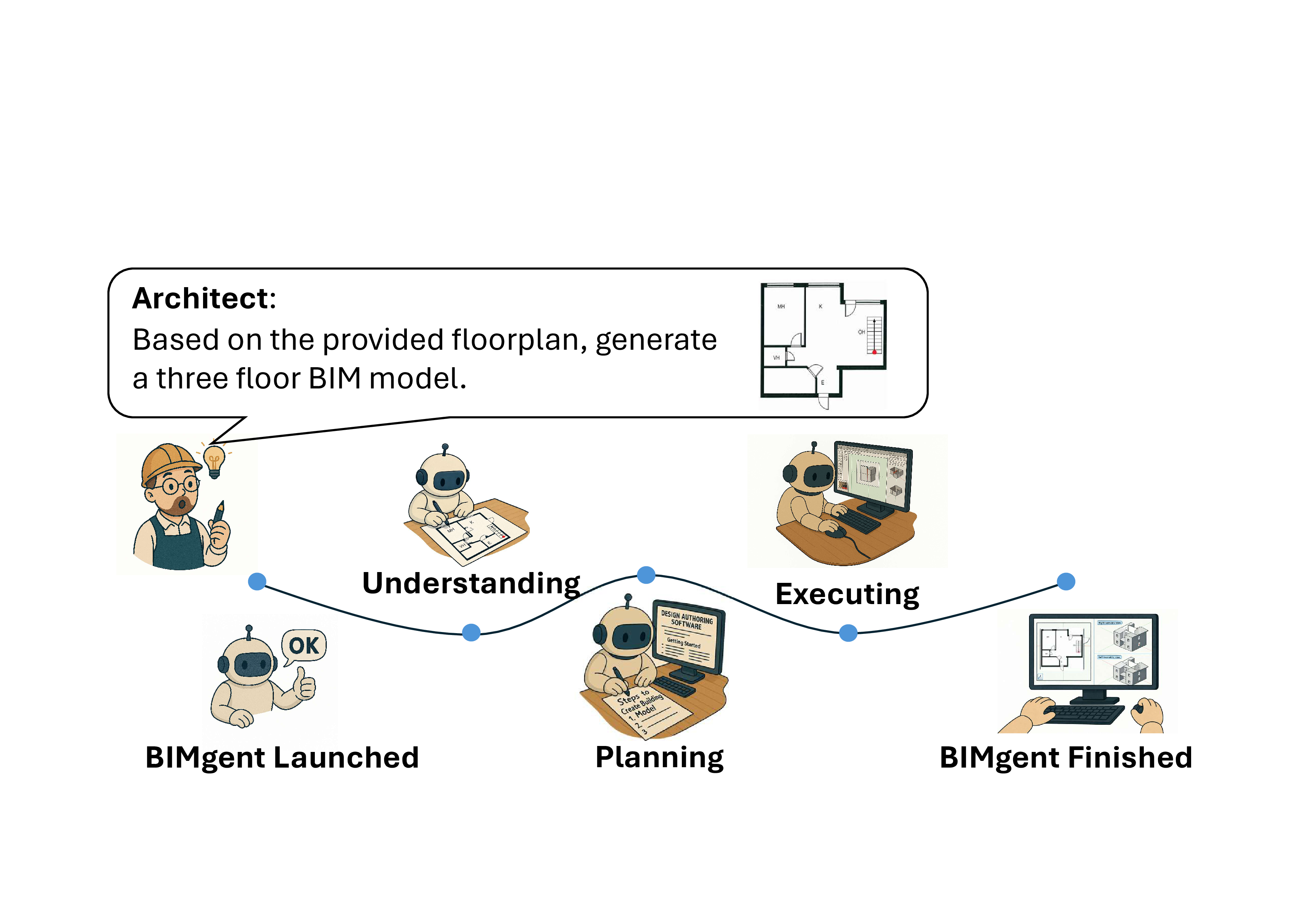
BIMgent is an agentic framework that lets Large Language Models autonomously perform architectural building modeling in a real BIM authoring tool. Instead of generating BIM files through custom APIs, BIMgent drives the actual GUI of Vectorworks — it looks at the screen, plans like a human modeler, and acts through the mouse and keyboard. Given a floorplan image and the number of floors, the agent produces a complete 3D BIM model end-to-end.
From a floorplan image to a finished BIM model in Vectorworks, fully driven by the agent.

More demo videos are available on the project website: 🔗 https://tumcms.github.io/BIMgent.github.io/
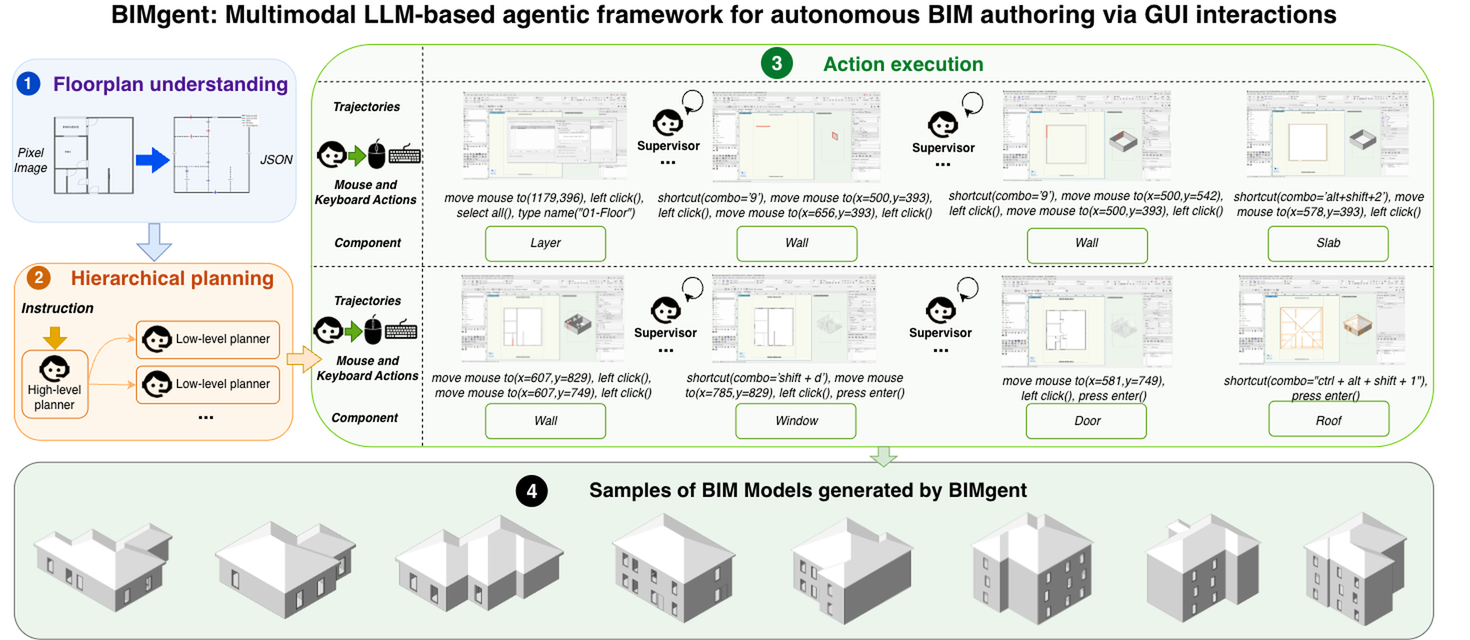
BIMgent implements the three-stage pipeline described in the paper:
Floorplan Understanding — the input floorplan image is resized and segmented by DeepFloorplan to extract wall and opening candidates. A Design Interpreter (Gemini) then refines wall geometry and classifies openings into doors and windows, producing structured floorplan metadata.
Hierarchical Planning (Project Manager) — an LLM-based planner decomposes the modeling task into:
res/vectorworks/builders/*.md) so the agent follows the correct tool-specific workflow.Builders with Closed-Loop GUI Control — each sub-step is executed by one of two builder agents:
All interactions with Vectorworks happen through the MouseController (PyAutoGUI-based) and a ScreenshotsProcessor that captures full-screen screenshots and masks them down to the changed pop-up / design-panel region.
BIMgent/
├── agent_runner.py                 # Entry point — prompts for floorplan + floors, then runs the pipeline
├── check_setup.py                  # Pre-flight check: keys, model paths, panel coordinates, packages
├── .env.example                    # Template for API keys (copy to .env)
├── conf/
│   ├── config.py                   # Global Config (singleton)
│   └── env_config_vectorworks.example.json # Template env config (copy to env_config_vectorworks.json)
├── BIMgent/                        # Core package
│   ├── runner/
│   │   └── vectorworks_runner.py   # Main pipeline orchestration
│   ├── provider/
│   │   ├── ui_controller.py        # Mouse / keyboard control
│   │   ├── screenshots_processor.py# Screenshot capture + popup / panel masking
│   │   ├── Deep_fp_provider/       # DeepFloorplan wall/opening segmentation + geometric post-processing
│   │   ├── omni_provider/          # OmniParser UI element grounding
│   │   ├── builders_provider/      # RAG over builder documentation
│   │   └── loop_providers/
│   │       ├── design_interpreter.py     # Gemini-based floorplan interpreter
│   │       ├── project_manager.py        # High-level + low-level planners
│   │       ├── skill_generator_provider.py # Vision-driven builder (action generator + supervisor)
│   │       ├── skill_executor.py         # Executes generated actions
│   │       └── llm_provider.py           # Single entry point for all Gemini calls
│   ├── memory/                     # Working-area memory shared across stages
│   ├── floorplan/                  # Maps floorplan coordinates onto the Vectorworks design panel
│   └── utils/                      # Config helpers, image resizing, Gemini retry wrapper
├── res/vectorworks/
│   ├── prompts/                    # Prompt templates for every LLM stage
│   └── builders/                   # Markdown docs retrieved via RAG (wall, door, window, slab, roof, stair, layer)
├── mini_building_benchmark/        # Mini benchmark + evaluation scripts used in the paper
└── docs/                           # Figures and demo media
git clone https://github.com/ZihanDDD/BIMgent_private_sourcecode.git BIMgent && cd BIMgent
py -3.10 -m venv .venv && .venv\Scripts\activate      # Windows; on macOS/Linux: python3.10 -m venv .venv && source .venv/bin/activate
pip install -r requirements.txt

cp .env.example .env                                                  # 1. add your API keys
cp conf/env_config_vectorworks.example.json conf/env_config_vectorworks.json   # 2. set model paths + panel coordinates
python check_setup.py                                                 # 3. verify everything before touching Vectorworks

# Open Vectorworks 2025 with an empty document, then:
python agent_runner.py --floorplanPath mini_building_benchmark/scaled_images/1floor/cubicasa1.png \
                       --taskDescription "The building has 1 floor based on the provided layout."
check_setup.py validates the Python version, .env keys, model paths, panel coordinates, screen size and package imports, and prints exactly what still needs fixing. The detailed steps behind each line are below.
Requirements at a glance
| OS | Windows 10/11 (the agent drives the Vectorworks desktop GUI via PyAutoGUI; shortcuts and dialogs are Windows-specific) |
| Display | 1920×1080, Windows display scaling 100% — all click coordinates are absolute screen pixels |
| Python | 3.10 |
| GPU | Optional but recommended (CUDA). DeepFloorplan falls back to CPU automatically; OmniParser (YOLO + Florence-2) runs on CPU too but is several times slower per screenshot |
| Accounts | Vectorworks 2025 license, Google Gemini API key, OpenAI API key |
| Network | Needed at runtime for the LLM calls, and on the first run to download the Florence-2 processor and PaddleOCR models |
The current release targets Vectorworks 2025. Install it; the agent does not launch Vectorworks itself, so you will start it manually with an empty document before each run.
# Windows (Python 3.10 must be installed; `py -0` lists available versions)
py -3.10 -m venv .venv
.venv\Scripts\activate

# macOS / Linux
python3.10 -m venv .venv
source .venv/bin/activate

python -m pip install --upgrade pip
pip install -r requirements.txt
.venv/ is git-ignored.
The heavy dependencies are TensorFlow (DeepFloorplan), PyTorch + transformers + ultralytics (OmniParser) and PaddleOCR. Two version notes:
torch wheel on Windows is CPU-only. For CUDA, install torch/torchvision from the PyTorch index before the pip install -r above, picking the CUDA tag that matches your driver (see pytorch.org):
pip install torch torchvision --index-url https://download.pytorch.org/whl/cu128
pip uninstall torch torchvision first — pip treats 2.x.0+cpu and 2.x.0+cu128 as the same version and will not replace it. check_setup.py reports whether CUDA is visible.requirements.txt). Florence-2 is loaded through Hugging Face remote code that transformers 5 no longer supports; with 5.x you get AttributeError: 'Florence2LanguageConfig' object has no attribute 'forced_bos_token_id' at start-up.BIMgent uses Google Gemini for planning, vision and floorplan interpretation, and OpenAI embeddings (text-embedding-3-large) to index the builder documentation for RAG. Copy the template and fill in both keys:
cp .env.example .env
OA_OPENAI_KEY=your_openai_api_key
GEMINI_API_KEY=your_gemini_api_key      # GOOGLE_API_KEY is accepted as a fallback
.env is git-ignored — never commit it. The Gemini model ids used for each stage are class attributes on LLMProvider (MODEL_PLANNING, MODEL_VISION, MODEL_UNDERSTANDING); change them there if you want to swap models.
cp conf/env_config_vectorworks.example.json conf/env_config_vectorworks.json
Edit conf/env_config_vectorworks.json:
| Key | What to put there |
|---|---|
env_path | Path to Vectorworks2025.exe (informational — the agent expects Vectorworks to be already running, see below) |
models_path | Paths to the downloaded weights (step 5) |
panel_coordinates | Screen rectangles of the Vectorworks panels (step 6) |
task_description_list, floorplan_image_path | Filled in automatically by agent_runner.py on every run — leave as is |
This file is git-ignored because it holds machine-specific paths and is rewritten on each run.
BIMgent reuses two pretrained models. Download them and update models_path in the config.
| Model | Purpose | Where to get it | Expected files |
|---|---|---|---|
| DeepFloorplan | Wall / opening segmentation of the input floorplan | zlzeng/DeepFloorplan → pretrained checkpoint | a directory containing pretrained_r3d.meta, pretrained_r3d.index, pretrained_r3d.data-* |
| OmniParser icon detector | YOLO model that finds clickable UI elements in Vectorworks screenshots | microsoft/OmniParser-v2.0 → icon_detect/model.pt | single .pt file |
| OmniParser Florence-2 captioner | Describes each detected element so the LLM can pick the right one | microsoft/OmniParser-v2.0 → icon_caption_florence/ | a directory with config.json + weights |
"models_path": {
  "deep_floorplan": "D:/models/deep_floorplan/pretrained",
  "omini":          "D:/models/omni/weights/icon_detect/model.pt",
  "Florence2":      "D:/models/omni/weights/icon_caption_florence"
}
Two more models are fetched automatically on first use and cached by their libraries: the Florence-2 processor (microsoft/Florence-2-base, from the Hugging Face Hub) and the PaddleOCR English text models.
The agent needs to know where the Vectorworks panels sit on screen. Open Vectorworks, arrange the workspace the way you will run it (the defaults in the example config assume a maximised window at 1920×1080 with the tool palette on the left and the Object Info palette on the right), then set panel_coordinates:
"panel_coordinates": {
  "tool_panel":   [x1, y1, x2, y2],   // Left-hand tool palette
  "design_panel": [x1, y1, x2, y2],   // Central drawing area — the floorplan is scaled to fit inside this box
  "object_info":  [x1, y1, x2, y2],   // Right-hand Object Info palette
  "whole_panel":  [0, 0, 1920, 1080]  // Full screen
}
Each rectangle is [top-left x, top-left y, bottom-right x, bottom-right y] in screen pixels. design_panel matters most: floorplan coordinates are mapped into it, so it must be the empty drawing canvas with no palettes overlapping. To read a coordinate, hover the mouse over the point and run:
python -c "import pyautogui, time; time.sleep(3); print(pyautogui.position())"
python check_setup.py
Fix every [FAIL] line it prints. [WARN] lines (no CUDA, screen size mismatch, Vectorworks path) are informational but worth reading.
Always run from the repository root — prompts, builder docs and the RAG index (chroma_db/) are resolved relative to the working directory.
python agent_runner.py
python agent_runner.py \
  --envConfig ./conf/env_config_vectorworks.json \
  --floorplanPath /path/to/floorplan.png \
  --taskDescription "The building has 2 floors based on the provided layout."
Ctrl+C in the terminal; the agent yields control between actions.What happens during a run:
chroma_db/ (embedded automatically on the first run, takes a few seconds) and the low-level planner produces sub-steps.Every run writes to runs/run_<timestamp>/:
| File | Content |
|---|---|
resized_floorplan.png, segmented_floorplan.png, cleaned.png, postprocessed_floorplan_visualization.png | Floorplan-understanding stages |
openings/ | Crops of every detected opening sent to the door/window classifier |
working_process_data.json | Floorplan metadata, high-/low-level plans, per-sub-step actions, supervisor reasoning, screenshot paths and total runtime |
memory.json | Final shared working area |
screenshots/ | Every screenshot taken, plus the masked / OmniParser-annotated variants |
The main orchestration logic lives in BIMgent/runner/vectorworks_runner.py.
| Symptom | Likely cause |
|---|---|
No Gemini API key found at startup | .env missing or key still a placeholder — run check_setup.py |
AttributeError: 'Florence2LanguageConfig' object has no attribute 'forced_bos_token_id' | transformers 5.x installed — pip install "transformers>=4.49,<5" |
SOM model loaded to cpu although you have an NVIDIA GPU | CPU-only torch wheel — reinstall from the PyTorch CUDA index (step 2) |
Pretrained model not found in '...' | models_path.deep_floorplan must point at the directory that contains pretrained_r3d.* |
FileNotFoundError: res/vectorworks/prompts/... | Not running from the repository root |
| Clicks land in the wrong place | Display scaling is not 100%, or panel_coordinates no longer match the Vectorworks layout |
| Long pause on the first vision-driven step | Florence-2 processor / PaddleOCR models being downloaded and loaded; subsequent steps are faster |
| Supervisor keeps rejecting a step | Check the _seg_*.png screenshot in screenshots/ — if OmniParser found no elements, the popup diff probably masked the wrong region |
The mini_building_benchmark/ folder contains the small-scale benchmark used in the paper for evaluating floorplan understanding and end-to-end modeling:
ori_images/ and scaled_images/ — source and resized floorplans,GT/ — ground-truth annotations,run_floorplan_understanding.py — runs DeepFloorplan + the Design Interpreter over all 45 cases and writes predictions to floorplan_understanding/,eva_matric.py — compares those predictions against GT/ and writes evaluation_results.xlsx (requires openpyxl).python mini_building_benchmark/run_floorplan_understanding.py
python mini_building_benchmark/eva_matric.py
The complete set of floorplans, task specifications, and generated model visualizations for all 45 evaluation cases did not fit in the paper and is provided in appendices/. Click any page to open it at full resolution.
Each case lists the input floorplan image together with its task specification (number of floors).
Cases 1–10 | Cases 11–20 |
Cases 21–30 | Cases 31–40 |
Cases 41–45 |
For each case, the shaded and wireframe views of the model generated by BIMgent (Ours) are shown next to those produced by the Claude-Sonnet-4.5 and GPT-5.4 computer-use baselines.
Cases 1–3 | Cases 4–6 |
Cases 7–9 | Cases 10–12 |
Cases 13–15 | Cases 16–18 |
Cases 19–21 | Cases 22–24 |
Cases 25–27 | Cases 28–30 |
Cases 31–33 | Cases 34–36 |
Cases 37–39 | Cases 40–42 |
Cases 43–45 |
If you use this work, please cite:
@misc{deng2025bimgentautonomousbuildingmodeling,
  title         = {BIMgent: Towards Autonomous Building Modeling via Computer-use Agents},
  author        = {Zihan Deng and Changyu Du and Stavros Nousias and André Borrmann},
  year          = {2025},
  eprint        = {2506.07217},
  archivePrefix = {arXiv},
  primaryClass  = {cs.AI},
  url           = {https://arxiv.org/abs/2506.07217}
}
🔗 Website: https://tumcms.github.io/BIMgent.github.io/ 📄 Paper on arXiv: arXiv:2506.07217
BIMgent is an agentic framework that lets Large Language Models autonomously perform architectural building modeling in a real BIM authoring tool. Instead of generating BIM files through custom APIs, BIMgent drives the actual GUI of Vectorworks — it looks at the screen, plans like a human modeler, and acts through the mouse and keyboard. Given a floorplan image and the number of floors, the agent produces a complete 3D BIM model end-to-end.
From a floorplan image to a finished BIM model in Vectorworks, fully driven by the agent.
More demo videos are available on the project website: 🔗 https://tumcms.github.io/BIMgent.github.io/
BIMgent implements the three-stage pipeline described in the paper:
Floorplan Understanding — the input floorplan image is resized and segmented by DeepFloorplan to extract wall and opening candidates. A Design Interpreter (Gemini) then refines wall geometry and classifies openings into doors and windows, producing structured floorplan metadata.
Hierarchical Planning (Project Manager) — an LLM-based planner decomposes the modeling task into:
res/vectorworks/builders/*.md) so the agent follows the correct tool-specific workflow.Builders with Closed-Loop GUI Control — each sub-step is executed by one of two builder agents:
All interactions with Vectorworks happen through the MouseController (PyAutoGUI-based) and a ScreenshotsProcessor that captures full-screen screenshots and masks them down to the changed pop-up / design-panel region.
BIMgent/
├── agent_runner.py                 # Entry point — prompts for floorplan + floors, then runs the pipeline
├── check_setup.py                  # Pre-flight check: keys, model paths, panel coordinates, packages
├── .env.example                    # Template for API keys (copy to .env)
├── conf/
│   ├── config.py                   # Global Config (singleton)
│   └── env_config_vectorworks.example.json # Template env config (copy to env_config_vectorworks.json)
├── BIMgent/                        # Core package
│   ├── runner/
│   │   └── vectorworks_runner.py   # Main pipeline orchestration
│   ├── provider/
│   │   ├── ui_controller.py        # Mouse / keyboard control
│   │   ├── screenshots_processor.py# Screenshot capture + popup / panel masking
│   │   ├── Deep_fp_provider/       # DeepFloorplan wall/opening segmentation + geometric post-processing
│   │   ├── omni_provider/          # OmniParser UI element grounding
│   │   ├── builders_provider/      # RAG over builder documentation
│   │   └── loop_providers/
│   │       ├── design_interpreter.py     # Gemini-based floorplan interpreter
│   │       ├── project_manager.py        # High-level + low-level planners
│   │       ├── skill_generator_provider.py # Vision-driven builder (action generator + supervisor)
│   │       ├── skill_executor.py         # Executes generated actions
│   │       └── llm_provider.py           # Single entry point for all Gemini calls
│   ├── memory/                     # Working-area memory shared across stages
│   ├── floorplan/                  # Maps floorplan coordinates onto the Vectorworks design panel
│   └── utils/                      # Config helpers, image resizing, Gemini retry wrapper
├── res/vectorworks/
│   ├── prompts/                    # Prompt templates for every LLM stage
│   └── builders/                   # Markdown docs retrieved via RAG (wall, door, window, slab, roof, stair, layer)
├── mini_building_benchmark/        # Mini benchmark + evaluation scripts used in the paper
└── docs/                           # Figures and demo media
git clone https://github.com/ZihanDDD/BIMgent_private_sourcecode.git BIMgent && cd BIMgent
py -3.10 -m venv .venv && .venv\Scripts\activate      # Windows; on macOS/Linux: python3.10 -m venv .venv && source .venv/bin/activate
pip install -r requirements.txt

cp .env.example .env                                                  # 1. add your API keys
cp conf/env_config_vectorworks.example.json conf/env_config_vectorworks.json   # 2. set model paths + panel coordinates
python check_setup.py                                                 # 3. verify everything before touching Vectorworks

# Open Vectorworks 2025 with an empty document, then:
python agent_runner.py --floorplanPath mini_building_benchmark/scaled_images/1floor/cubicasa1.png \
                       --taskDescription "The building has 1 floor based on the provided layout."
check_setup.py validates the Python version, .env keys, model paths, panel coordinates, screen size and package imports, and prints exactly what still needs fixing. The detailed steps behind each line are below.
Requirements at a glance
| OS | Windows 10/11 (the agent drives the Vectorworks desktop GUI via PyAutoGUI; shortcuts and dialogs are Windows-specific) |
| Display | 1920×1080, Windows display scaling 100% — all click coordinates are absolute screen pixels |
| Python | 3.10 |
| GPU | Optional but recommended (CUDA). DeepFloorplan falls back to CPU automatically; OmniParser (YOLO + Florence-2) runs on CPU too but is several times slower per screenshot |
| Accounts | Vectorworks 2025 license, Google Gemini API key, OpenAI API key |
| Network | Needed at runtime for the LLM calls, and on the first run to download the Florence-2 processor and PaddleOCR models |
The current release targets Vectorworks 2025. Install it; the agent does not launch Vectorworks itself, so you will start it manually with an empty document before each run.
# Windows (Python 3.10 must be installed; `py -0` lists available versions)
py -3.10 -m venv .venv
.venv\Scripts\activate

# macOS / Linux
python3.10 -m venv .venv
source .venv/bin/activate

python -m pip install --upgrade pip
pip install -r requirements.txt
.venv/ is git-ignored.
The heavy dependencies are TensorFlow (DeepFloorplan), PyTorch + transformers + ultralytics (OmniParser) and PaddleOCR. Two version notes:
torch wheel on Windows is CPU-only. For CUDA, install torch/torchvision from the PyTorch index before the pip install -r above, picking the CUDA tag that matches your driver (see pytorch.org):
pip install torch torchvision --index-url https://download.pytorch.org/whl/cu128
pip uninstall torch torchvision first — pip treats 2.x.0+cpu and 2.x.0+cu128 as the same version and will not replace it. check_setup.py reports whether CUDA is visible.requirements.txt). Florence-2 is loaded through Hugging Face remote code that transformers 5 no longer supports; with 5.x you get AttributeError: 'Florence2LanguageConfig' object has no attribute 'forced_bos_token_id' at start-up.BIMgent uses Google Gemini for planning, vision and floorplan interpretation, and OpenAI embeddings (text-embedding-3-large) to index the builder documentation for RAG. Copy the template and fill in both keys:
cp .env.example .env
OA_OPENAI_KEY=your_openai_api_key
GEMINI_API_KEY=your_gemini_api_key      # GOOGLE_API_KEY is accepted as a fallback
.env is git-ignored — never commit it. The Gemini model ids used for each stage are class attributes on LLMProvider (MODEL_PLANNING, MODEL_VISION, MODEL_UNDERSTANDING); change them there if you want to swap models.
cp conf/env_config_vectorworks.example.json conf/env_config_vectorworks.json
Edit conf/env_config_vectorworks.json:
| Key | What to put there |
|---|---|
env_path | Path to Vectorworks2025.exe (informational — the agent expects Vectorworks to be already running, see below) |
models_path | Paths to the downloaded weights (step 5) |
panel_coordinates | Screen rectangles of the Vectorworks panels (step 6) |
task_description_list, floorplan_image_path | Filled in automatically by agent_runner.py on every run — leave as is |
This file is git-ignored because it holds machine-specific paths and is rewritten on each run.
BIMgent reuses two pretrained models. Download them and update models_path in the config.
| Model | Purpose | Where to get it | Expected files |
|---|---|---|---|
| DeepFloorplan | Wall / opening segmentation of the input floorplan | zlzeng/DeepFloorplan → pretrained checkpoint | a directory containing pretrained_r3d.meta, pretrained_r3d.index, pretrained_r3d.data-* |
| OmniParser icon detector | YOLO model that finds clickable UI elements in Vectorworks screenshots | microsoft/OmniParser-v2.0 → icon_detect/model.pt | single .pt file |
| OmniParser Florence-2 captioner | Describes each detected element so the LLM can pick the right one | microsoft/OmniParser-v2.0 → icon_caption_florence/ | a directory with config.json + weights |
"models_path": {
  "deep_floorplan": "D:/models/deep_floorplan/pretrained",
  "omini":          "D:/models/omni/weights/icon_detect/model.pt",
  "Florence2":      "D:/models/omni/weights/icon_caption_florence"
}
Two more models are fetched automatically on first use and cached by their libraries: the Florence-2 processor (microsoft/Florence-2-base, from the Hugging Face Hub) and the PaddleOCR English text models.
The agent needs to know where the Vectorworks panels sit on screen. Open Vectorworks, arrange the workspace the way you will run it (the defaults in the example config assume a maximised window at 1920×1080 with the tool palette on the left and the Object Info palette on the right), then set panel_coordinates:
"panel_coordinates": {
  "tool_panel":   [x1, y1, x2, y2],   // Left-hand tool palette
  "design_panel": [x1, y1, x2, y2],   // Central drawing area — the floorplan is scaled to fit inside this box
  "object_info":  [x1, y1, x2, y2],   // Right-hand Object Info palette
  "whole_panel":  [0, 0, 1920, 1080]  // Full screen
}
Each rectangle is [top-left x, top-left y, bottom-right x, bottom-right y] in screen pixels. design_panel matters most: floorplan coordinates are mapped into it, so it must be the empty drawing canvas with no palettes overlapping. To read a coordinate, hover the mouse over the point and run:
python -c "import pyautogui, time; time.sleep(3); print(pyautogui.position())"
python check_setup.py
Fix every [FAIL] line it prints. [WARN] lines (no CUDA, screen size mismatch, Vectorworks path) are informational but worth reading.
Always run from the repository root — prompts, builder docs and the RAG index (chroma_db/) are resolved relative to the working directory.
python agent_runner.py
python agent_runner.py \
  --envConfig ./conf/env_config_vectorworks.json \
  --floorplanPath /path/to/floorplan.png \
  --taskDescription "The building has 2 floors based on the provided layout."
Ctrl+C in the terminal; the agent yields control between actions.What happens during a run:
chroma_db/ (embedded automatically on the first run, takes a few seconds) and the low-level planner produces sub-steps.Every run writes to runs/run_<timestamp>/:
| File | Content |
|---|---|
resized_floorplan.png, segmented_floorplan.png, cleaned.png, postprocessed_floorplan_visualization.png | Floorplan-understanding stages |
openings/ | Crops of every detected opening sent to the door/window classifier |
working_process_data.json | Floorplan metadata, high-/low-level plans, per-sub-step actions, supervisor reasoning, screenshot paths and total runtime |
memory.json | Final shared working area |
screenshots/ | Every screenshot taken, plus the masked / OmniParser-annotated variants |
The main orchestration logic lives in BIMgent/runner/vectorworks_runner.py.
| Symptom | Likely cause |
|---|---|
No Gemini API key found at startup | .env missing or key still a placeholder — run check_setup.py |
AttributeError: 'Florence2LanguageConfig' object has no attribute 'forced_bos_token_id' | transformers 5.x installed — pip install "transformers>=4.49,<5" |
SOM model loaded to cpu although you have an NVIDIA GPU | CPU-only torch wheel — reinstall from the PyTorch CUDA index (step 2) |
Pretrained model not found in '...' | models_path.deep_floorplan must point at the directory that contains pretrained_r3d.* |
FileNotFoundError: res/vectorworks/prompts/... | Not running from the repository root |
| Clicks land in the wrong place | Display scaling is not 100%, or panel_coordinates no longer match the Vectorworks layout |
| Long pause on the first vision-driven step | Florence-2 processor / PaddleOCR models being downloaded and loaded; subsequent steps are faster |
| Supervisor keeps rejecting a step | Check the _seg_*.png screenshot in screenshots/ — if OmniParser found no elements, the popup diff probably masked the wrong region |
The mini_building_benchmark/ folder contains the small-scale benchmark used in the paper for evaluating floorplan understanding and end-to-end modeling:
ori_images/ and scaled_images/ — source and resized floorplans,GT/ — ground-truth annotations,run_floorplan_understanding.py — runs DeepFloorplan + the Design Interpreter over all 45 cases and writes predictions to floorplan_understanding/,eva_matric.py — compares those predictions against GT/ and writes evaluation_results.xlsx (requires openpyxl).python mini_building_benchmark/run_floorplan_understanding.py
python mini_building_benchmark/eva_matric.py
The complete set of floorplans, task specifications, and generated model visualizations for all 45 evaluation cases did not fit in the paper and is provided in appendices/. Click any page to open it at full resolution.
Each case lists the input floorplan image together with its task specification (number of floors).
| Cases 1–10 | Cases 11–20 |
| Cases 21–30 | Cases 31–40 |
| Cases 41–45 |
For each case, the shaded and wireframe views of the model generated by BIMgent (Ours) are shown next to those produced by the Claude-Sonnet-4.5 and GPT-5.4 computer-use baselines.
| Cases 1–3 | Cases 4–6 |
| Cases 7–9 | Cases 10–12 |
| Cases 13–15 | Cases 16–18 |
| Cases 19–21 | Cases 22–24 |
| Cases 25–27 | Cases 28–30 |
| Cases 31–33 | Cases 34–36 |
| Cases 37–39 | Cases 40–42 |
| Cases 43–45 |
If you use this work, please cite:
@misc{deng2025bimgentautonomousbuildingmodeling,
  title         = {BIMgent: Towards Autonomous Building Modeling via Computer-use Agents},
  author        = {Zihan Deng and Changyu Du and Stavros Nousias and André Borrmann},
  year          = {2025},
  eprint        = {2506.07217},
  archivePrefix = {arXiv},
  primaryClass  = {cs.AI},
  url           = {https://arxiv.org/abs/2506.07217}
}



