
README
MANSION
MANSION: Multi-floor lANguage-to-3D Scene generatIOn for loNg-horizon tasks
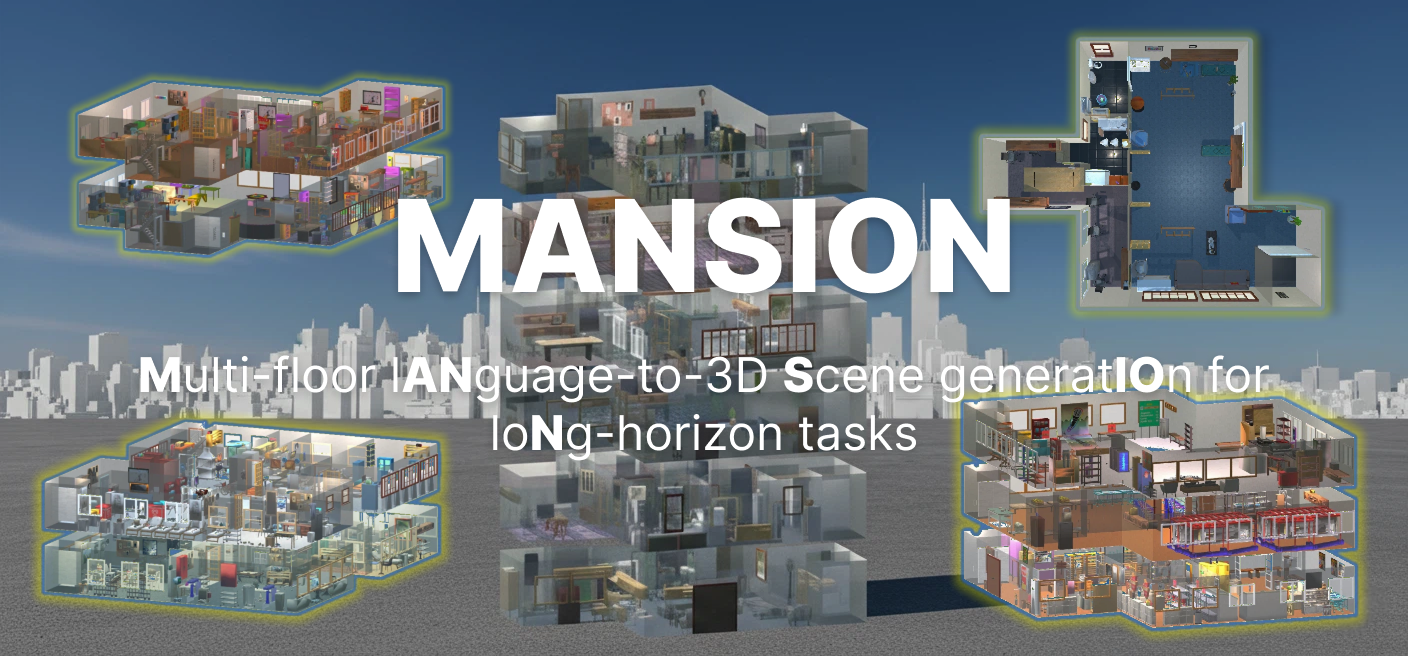
LLM-driven procedural multi-floor building generation. Given a natural-language description (e.g., "2-story office building with conference rooms"), Mansion generates complete building layouts including room segmentation, walls, doors, windows, furniture placement, lighting, and top-down rendered images.
🎉 MANSION has been accepted to CVPR 2026!



Installation
1. Create a virtual environment
conda create -n mansion python=3.10 -y
conda activate mansion
2. Install Python dependencies
cd mansion
pip install -r requirements.txt

# Install the required AI2-THOR version
pip install --extra-index-url https://ai2thor-pypi.allenai.org ai2thor==0+6f165fdaf3cf2d03728f931f39261d14a67414d0
3. Download scene assets (first run)
The project requires AI2-THOR and Objaverse-THOR model assets:
python -m objathor.dataset.download_holodeck_base_data --version 2023_09_23
python -m objathor.dataset.download_assets --version 2023_09_23
python -m objathor.dataset.download_annotations --version 2023_09_23
python -m objathor.dataset.download_features --version 2023_09_23
If the download is interrupted, you can manually download and extract the assets to ~/.objathor-assets/2023_09_23/:
https://pub-daedd7738a984186a00f2ab264d06a07.r2.dev/2023_09_23/assets.tar
4. Install Mansion patch assets (required)
Download mansion_patch.zip from our HuggingFace repository:
Place the downloaded mansion_patch.zip in the project root directory (next to setup_mansion.py), then run:
python setup_mansion.py
This script will automatically extract the patch and install AI2-THOR local release, door database, annotations, and extra 3D assets to the correct locations.
LLM Configuration
Before running the pipeline, configure your LLM API credentials. We support OpenAI-compatible APIs, Azure OpenAI, and custom model endpoints. See config/constants.py for all available options.
# Example: OpenAI-compatible API
export OPENAI_API_KEY="your-api-key"
export OPENAI_API_BASE="https://api.openai.com"  # optional, for proxy/custom endpoints
Then specify llm_provider in mansion_quickstart.py:
cfg = make_config(
    requirement="...",
    llm_provider="openai",   # "openai" | "azure" | "mixed"
)
"openai"— All nodes useOPENAI_CONFIGfromconfig/constants.py"azure"— All nodes useAZURE_CONFIGfromconfig/constants.py"mixed"— Per-node LLM routing viaconfig/node_config.json, supporting different models per pipeline stage
Quick Start
python mansion_quickstart.py
MansionWorld
MansionWorld is our dataset of 1,000 pre-generated multi-floor buildings. You can download it directly from HuggingFace without running the full MANSION generation pipeline:
Mansion Gym
Mansion Gym (mansion-api) is a gymnasium-compatible environment built on top of MansionWorld, providing cross-floor embodied AI capabilities — navigation, object interaction, and long-horizon task execution across multiple floors.
Installation
pip install mansion-api
Quick Start
If you haven't set up the full MANSION pipeline yet, download the MansionWorld dataset from HuggingFace and open mansionworld_quickstart.ipynb to explore the key skills and interfaces provided by Mansion Gym.
For full API documentation, see the project page:
Citation
If you find this work useful, please cite our paper:
@misc{che2026mansionmultifloorlanguageto3dscene,
      title={MANSION: Multi-floor lANguage-to-3D Scene generatIOn for loNg-horizon tasks},
      author={Lirong Che and Shuo Wen and Shan Huang and Chuang Wang and Yuzhe Yang and Gregory Dudek and Xueqian Wang and Jian Su},
      year={2026},
      eprint={2603.11554},
      archivePrefix={arXiv},
      primaryClass={cs.CV},
      url={https://arxiv.org/abs/2603.11554},
}
Acknowledgements
This repository includes code adapted from Holodeck (allenai/Holodeck), licensed under Apache-2.0. We modified the original implementation for scene instantiation and object placement. See the LICENSE file and third-party notices for attribution details.
License
This project is licensed under the Apache License 2.0. See LICENSE for details.
Contributors

2 commits
Similar repos


Languages
Jupyter Notebook
83.7%
Python
16.3%
README
MANSION
MANSION: Multi-floor lANguage-to-3D Scene generatIOn for loNg-horizon tasks
LLM-driven procedural multi-floor building generation. Given a natural-language description (e.g., "2-story office building with conference rooms"), Mansion generates complete building layouts including room segmentation, walls, doors, windows, furniture placement, lighting, and top-down rendered images.
🎉 MANSION has been accepted to CVPR 2026!
Installation
1. Create a virtual environment
conda create -n mansion python=3.10 -y
conda activate mansion
2. Install Python dependencies
cd mansion
pip install -r requirements.txt

# Install the required AI2-THOR version
pip install --extra-index-url https://ai2thor-pypi.allenai.org ai2thor==0+6f165fdaf3cf2d03728f931f39261d14a67414d0
3. Download scene assets (first run)
The project requires AI2-THOR and Objaverse-THOR model assets:
python -m objathor.dataset.download_holodeck_base_data --version 2023_09_23
python -m objathor.dataset.download_assets --version 2023_09_23
python -m objathor.dataset.download_annotations --version 2023_09_23
python -m objathor.dataset.download_features --version 2023_09_23
If the download is interrupted, you can manually download and extract the assets to ~/.objathor-assets/2023_09_23/:
https://pub-daedd7738a984186a00f2ab264d06a07.r2.dev/2023_09_23/assets.tar
4. Install Mansion patch assets (required)
Download mansion_patch.zip from our HuggingFace repository:
Place the downloaded mansion_patch.zip in the project root directory (next to setup_mansion.py), then run:
python setup_mansion.py
This script will automatically extract the patch and install AI2-THOR local release, door database, annotations, and extra 3D assets to the correct locations.
LLM Configuration
Before running the pipeline, configure your LLM API credentials. We support OpenAI-compatible APIs, Azure OpenAI, and custom model endpoints. See config/constants.py for all available options.
# Example: OpenAI-compatible API
export OPENAI_API_KEY="your-api-key"
export OPENAI_API_BASE="https://api.openai.com"  # optional, for proxy/custom endpoints
Then specify llm_provider in mansion_quickstart.py:
cfg = make_config(
    requirement="...",
    llm_provider="openai",   # "openai" | "azure" | "mixed"
)
"openai"— All nodes useOPENAI_CONFIGfromconfig/constants.py"azure"— All nodes useAZURE_CONFIGfromconfig/constants.py"mixed"— Per-node LLM routing viaconfig/node_config.json, supporting different models per pipeline stage
Quick Start
python mansion_quickstart.py
MansionWorld
MansionWorld is our dataset of 1,000 pre-generated multi-floor buildings. You can download it directly from HuggingFace without running the full MANSION generation pipeline:
Mansion Gym
Mansion Gym (mansion-api) is a gymnasium-compatible environment built on top of MansionWorld, providing cross-floor embodied AI capabilities — navigation, object interaction, and long-horizon task execution across multiple floors.
Installation
pip install mansion-api
Quick Start
If you haven't set up the full MANSION pipeline yet, download the MansionWorld dataset from HuggingFace and open mansionworld_quickstart.ipynb to explore the key skills and interfaces provided by Mansion Gym.
For full API documentation, see the project page:
Citation
If you find this work useful, please cite our paper:
@misc{che2026mansionmultifloorlanguageto3dscene,
      title={MANSION: Multi-floor lANguage-to-3D Scene generatIOn for loNg-horizon tasks},
      author={Lirong Che and Shuo Wen and Shan Huang and Chuang Wang and Yuzhe Yang and Gregory Dudek and Xueqian Wang and Jian Su},
      year={2026},
      eprint={2603.11554},
      archivePrefix={arXiv},
      primaryClass={cs.CV},
      url={https://arxiv.org/abs/2603.11554},
}
Acknowledgements
This repository includes code adapted from Holodeck (allenai/Holodeck), licensed under Apache-2.0. We modified the original implementation for scene instantiation and object placement. See the LICENSE file and third-party notices for attribution details.
License
This project is licensed under the Apache License 2.0. See LICENSE for details.
Similar repos
Contributors
2 commits
Languages
Jupyter Notebook
83.7%
Python
16.3%