
Superintelligence Personal AI that does work you while you sleep. Open source, model agnostic alternative to Dots & Muse. Built on Hermes
See the codeSee what people are saying
README
Melete
The open-source, always-on agent with its own computer: any model, your machine, you approve what matters.
Melete is in early beta. You can run it yourself today, and hosted Melete is coming soon.
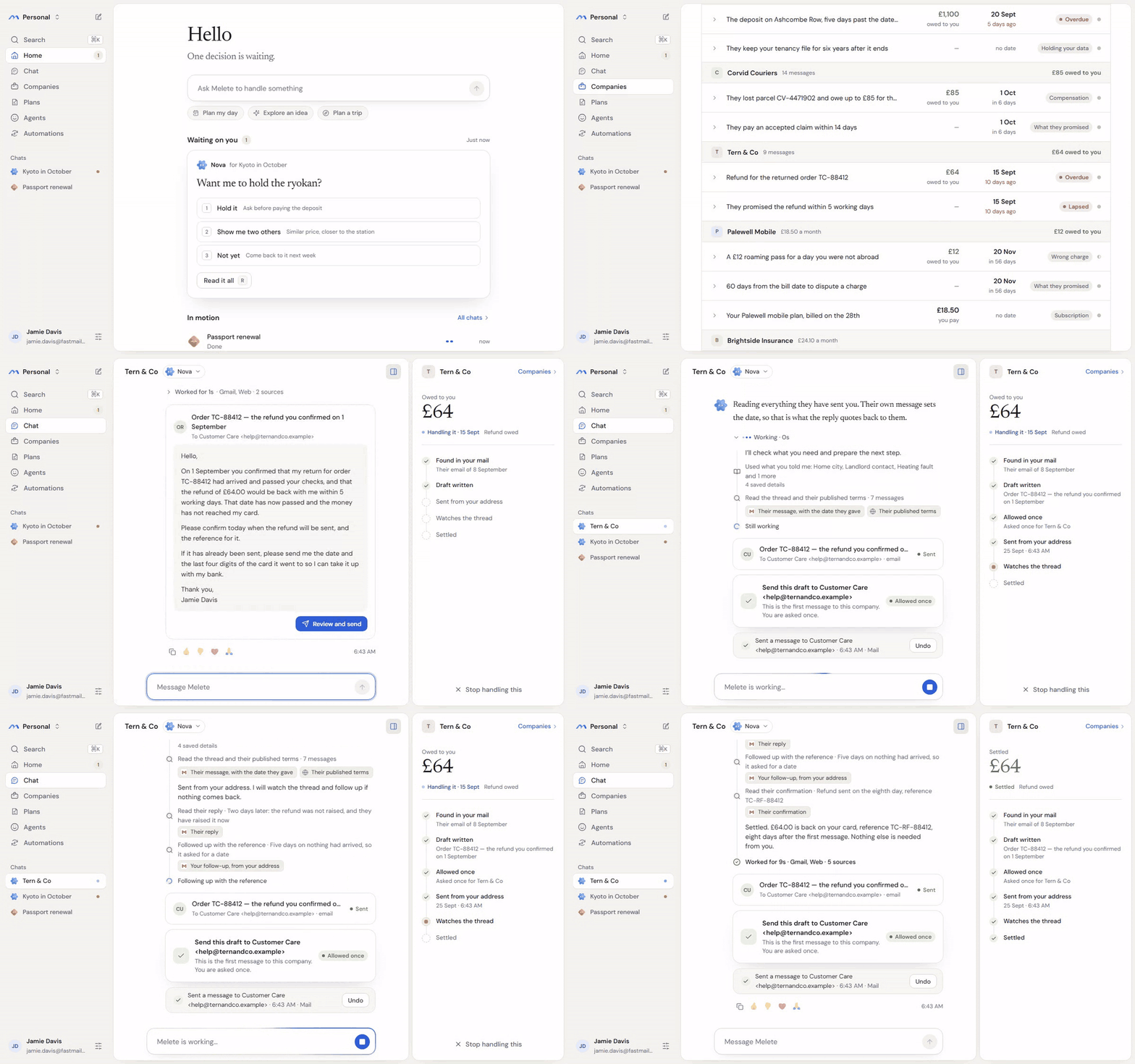
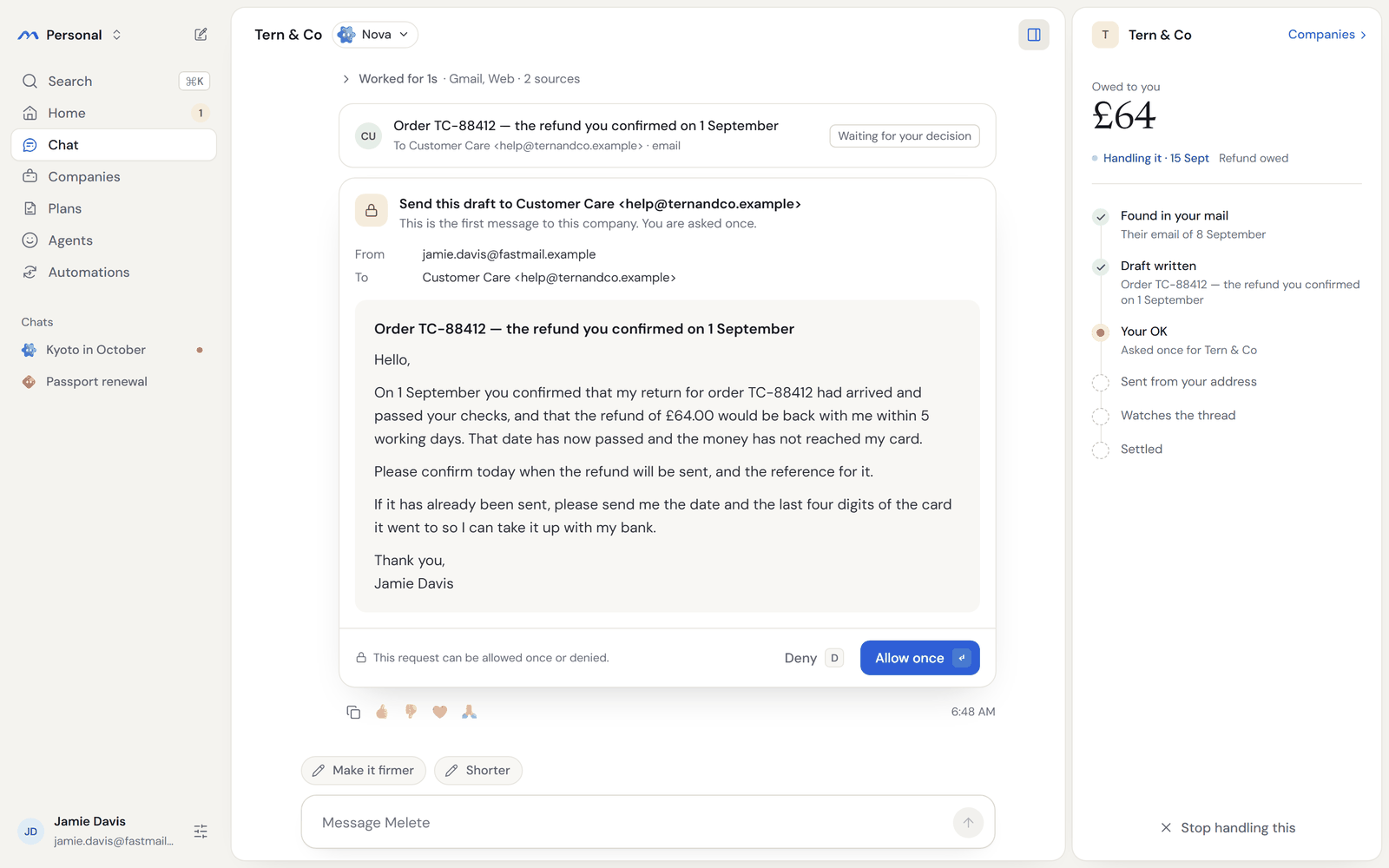
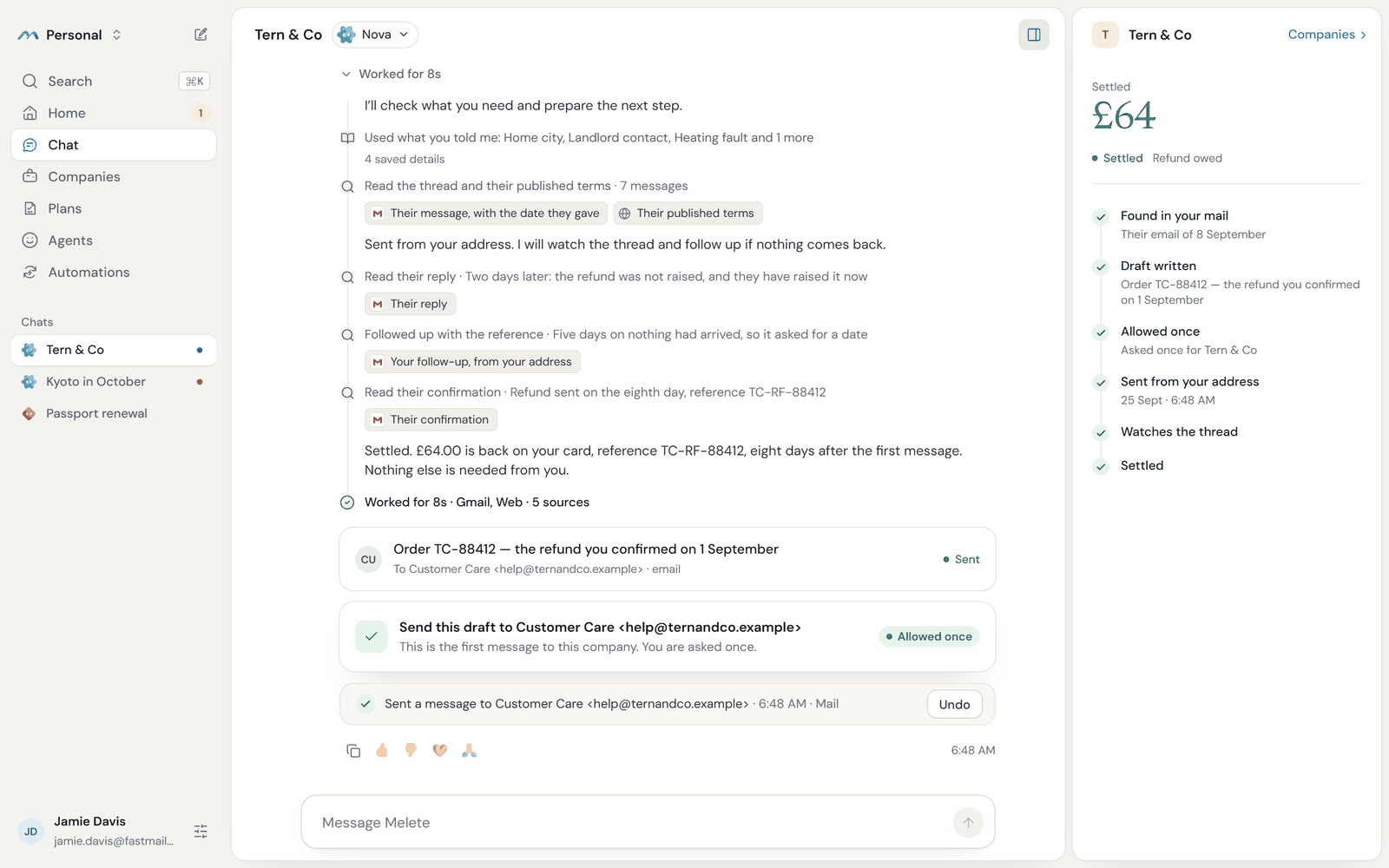
Hand Melete a loose end, like a refund you were promised or a reply you're still waiting for. It writes from your own address, waits for the answer, and follows up until it's settled. You approve the first message, and it follows up within the limits you set.
What it does
- Keeps going while you're away. A job can wait for a reply, a date or an event, then wake up and take the next step.
- Has its own computer. Code and commands run in a cloud sandbox on E2B, Modal or Daytona, and a separate browser handles web forms.
- Works with your model. Anthropic, OpenAI, Google, Fireworks, your ChatGPT account, or a model on your own network.
- Connects to your accounts. Gmail, Google Calendar and Outlook connect by signing in with Google or Microsoft, any mailbox connects over IMAP, and any remote MCP server adds new tools.
- Asks before it acts. You see the exact text of every message before it sends, and each action leaves a receipt you can undo while it still works.
- Remembers what you tell it, in the open. You can see, correct or forget anything it knows, and a correction can teach it a better way to do the job.
- Shares a space. Your household or small team can work in one space, and each person's jobs and messages stay private to them.
How it compares
| Melete | Closed always-on agents | |
|---|---|---|
| Source code | Open source, Apache-2.0 | Closed |
| Where it runs | Your computer or your own server | The vendor's cloud |
| Models | Anthropic, OpenAI, Google, Fireworks, a ChatGPT sign-in, or a local model | The vendor's models |
| Where you can use it | Anywhere you can run Docker, including the EU and the UK | The countries the vendor serves |
| Outgoing actions | You approve the exact text, with a receipt and Undo | Set by the vendor |
| Price | Free. You pay your model provider, or run a model yourself | A paid plan |
See it work
-
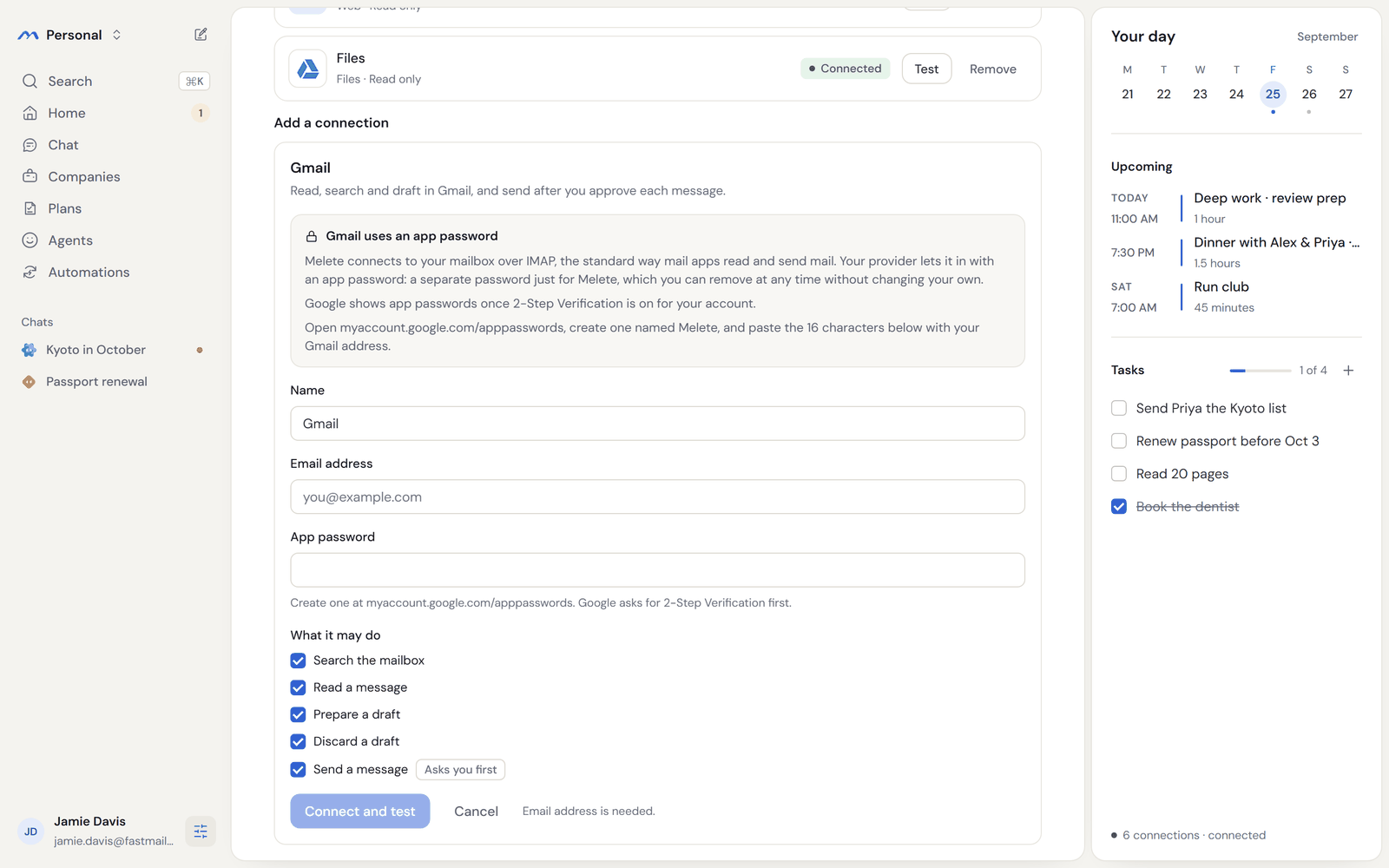
Connect your inbox. Gmail and iCloud take an app password, Gmail and Outlook can also connect by signing in, and most other mailboxes connect over IMAP.
-
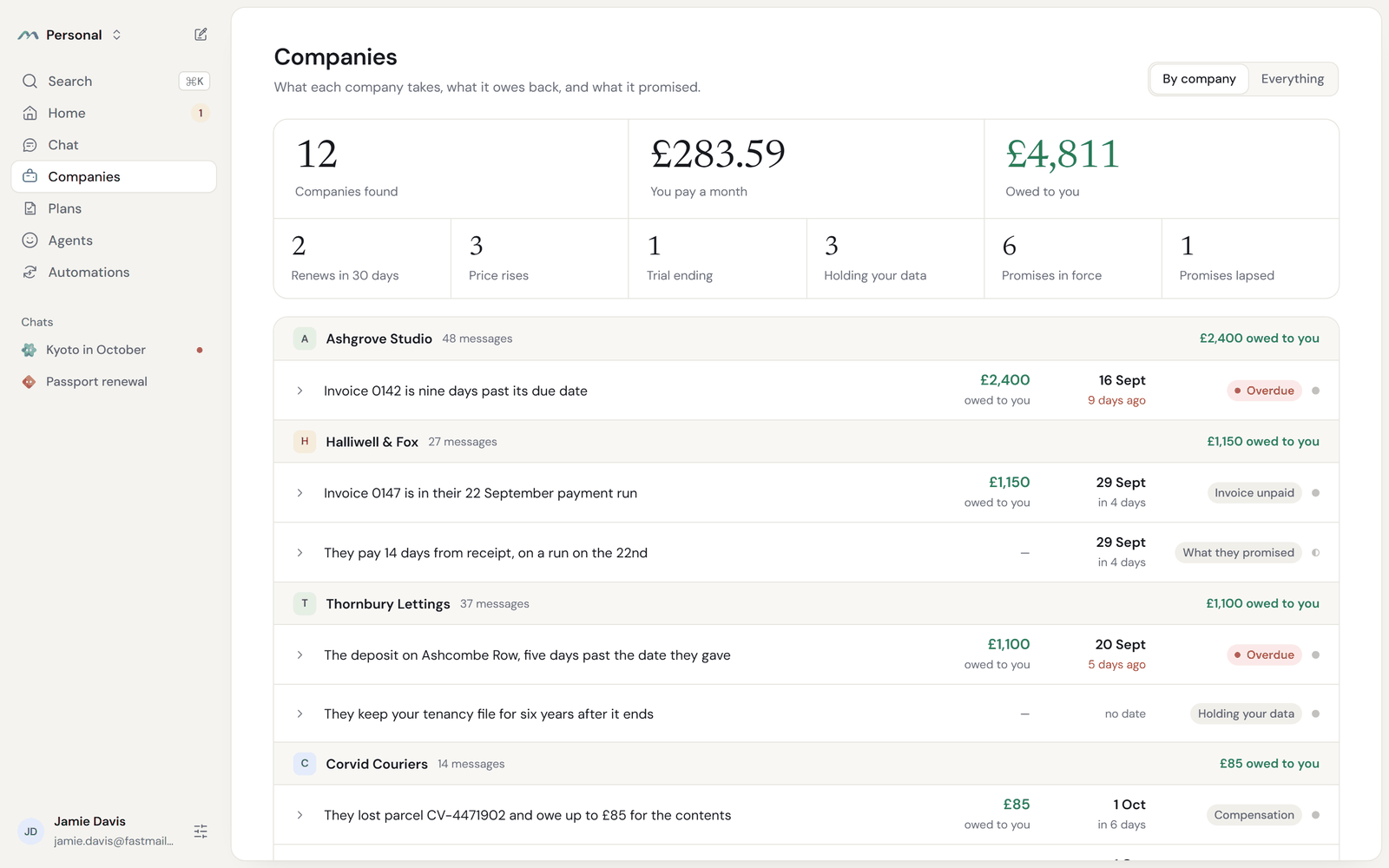
See what's open. Melete reads your mail and lists what each company owes you and what is overdue.
-
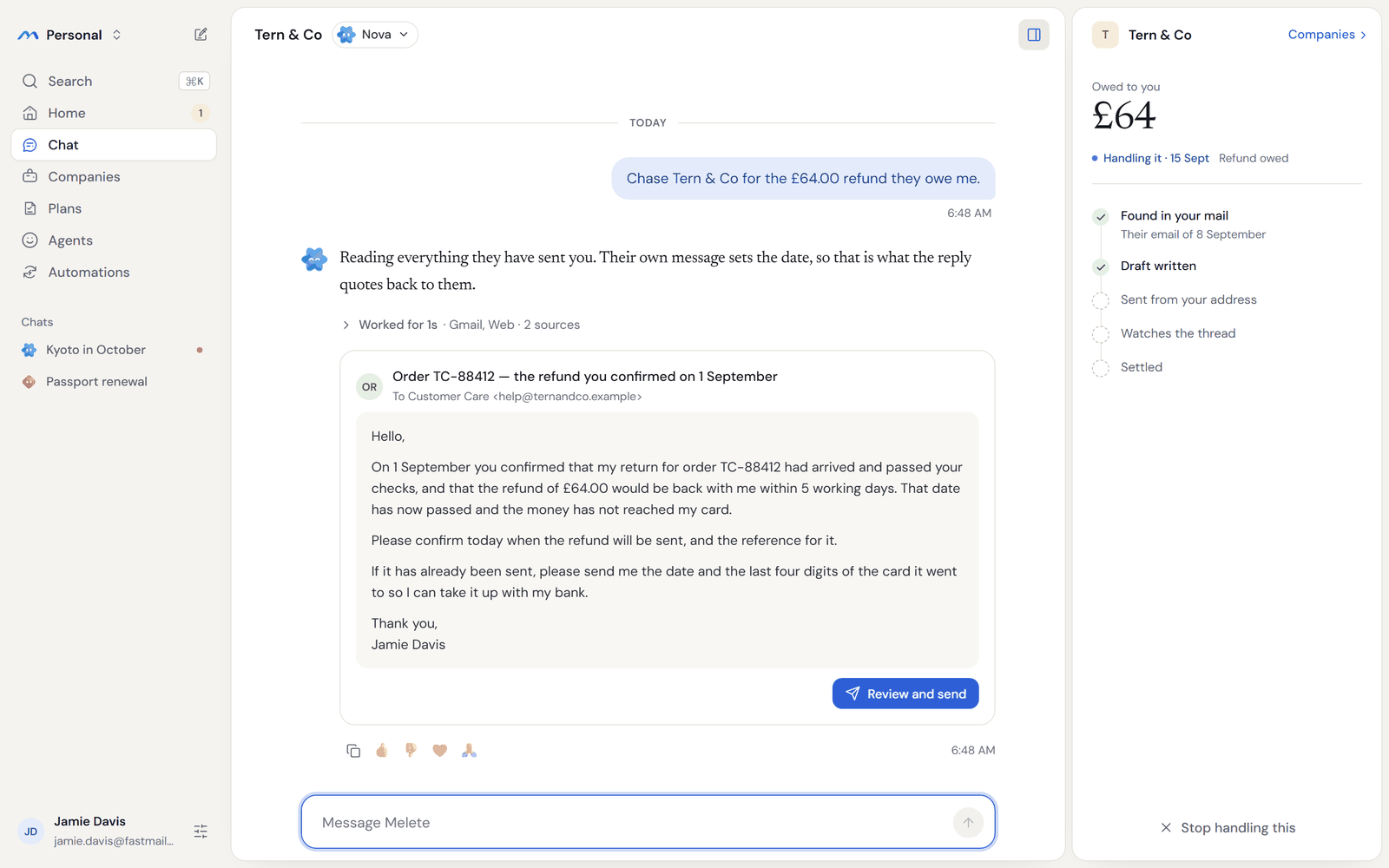
Hand it one. Ask it to chase the refund, and it drafts an email that quotes the date the company gave you.
-
Approve the exact email. You see who it's from, who it's to and every word, and it goes out when you allow it.
-
It follows up until it's settled. When the money doesn't arrive, it writes again with the reference, and tells you when the refund is back.
Run it yourself
You need Docker, Bun and an API key for your model provider.
git clone https://github.com/ychampion/melete.git && cd melete && bun install --frozen-lockfile
read -rs FIREWORKS_API_KEY && export FIREWORKS_API_KEY && bun run deploy/scripts/configure.ts && unset FIREWORKS_API_KEY
docker compose -f deploy/docker-compose.yml up -d --build --wait
The second line waits for you to paste your Fireworks API key and press Enter.
The key stays hidden, configure.ts writes it into deploy/.env, and the line
then clears it from your shell. For another provider, export its key instead and
name the provider and model, for example
bun run deploy/scripts/configure.ts --provider anthropic --model <model id>
with ANTHROPIC_API_KEY. Then open http://localhost:3101 and create your
account.
To try a demo with a practice model first, use
bun run deploy/scripts/configure.ts --fake as the second line. It needs no
key, and you can switch to your own model later.
Deployment covers version requirements, Windows, remote servers, HTTPS, Tailscale, backups and removal.
Set it up with your coding agent
Paste one of these into Claude Code, Codex or Cursor.
To run it on a small cloud server:
Create a small Linux VM on my cloud provider (Ubuntu 24.04, 2 vCPU, 4 GB RAM,
30 GB disk) and connect to it over SSH. Install Docker Engine 28 or newer with
the Compose plugin, following Docker's official instructions for Ubuntu. Then
install Melete from https://github.com/ychampion/melete by following the
"Install on a Linux Docker host" section of its docs/DEPLOYMENT.md, which also
installs Bun. Configure it for my model provider with the key I give you,
exporting the key before running configure.ts as the Providers section of
docs/DEPLOYMENT.md shows, so the key is never printed. Melete listens only on
the VM's own loopback address, so keep ports 3100 and 3101 closed to the
internet. When it's running, give me the SSH tunnel command from
docs/DEPLOYMENT.md so I can open http://localhost:3101, and summarise what that
file says about HTTPS and Tailscale for reaching it from my phone.
To run it on this computer:
Clone https://github.com/ychampion/melete and run it on this machine with
Docker, following the "Run it yourself" section of its README. First check that
Docker Engine is 28 or newer and Docker Compose is 2.33.1 or newer. If this
machine runs Windows, follow the "Windows (Docker Desktop)" section of
docs/DEPLOYMENT.md instead. The API key for my model provider is already in my
environment, so run configure.ts with --provider and --model for that provider
as the README shows, and it reads the key from there without printing it. When
`docker compose -f deploy/docker-compose.yml ps` shows the services running and
healthy, tell me to open http://localhost:3101.
To connect your email and calendar:
Help me connect my email and calendar to Melete at http://localhost:3101.
For Gmail, walk me through turning on 2-Step Verification and creating an app
password named Melete at https://myaccount.google.com/apppasswords. For iCloud,
walk me through creating an app-specific password at https://account.apple.com
under Sign-In and Security. Then tell me to open Settings, then Connections, and
add Gmail, iCloud Mail or Other mail (IMAP) for my email, and iCloud Calendar,
Other calendar (CalDAV) or Google Calendar (read only) for my calendar. Don't ask
me to paste any password into this chat.
To connect your model:
Switch my Melete install to my own model. My API key is in my environment as
ANTHROPIC_API_KEY. In deploy/.env, set MELETE_DEFAULT_PROVIDER=anthropic, set
MELETE_DEFAULT_MODEL to the model I name, and copy the key into
ANTHROPIC_API_KEY without printing it. If MELETE_ENABLE_FAKE_PROVIDER or
MELETE_ENABLE_TEST_CONNECTOR is true, set it to false. Then run
`docker compose -f deploy/docker-compose.yml up -d --force-recreate --wait melete runtime`
and check `docker compose -f deploy/docker-compose.yml logs --tail=50 melete`
for a warning about the provider key. If my key is for another provider, use
the matching name and key from the Providers section of docs/DEPLOYMENT.md.
Connect your model
Pass the provider to configure.ts with --provider and --model, and export
the key it reads first:
| Provider | Key it reads |
|---|---|
fireworks (the default) | FIREWORKS_API_KEY |
anthropic | ANTHROPIC_API_KEY |
openai | OPENAI_API_KEY |
google | GOOGLE_API_KEY |
openai-compatible | OPENAI_COMPAT_BASE_URL and OPENAI_COMPAT_API_KEY, which can point at a model server on your own network |
chatgpt | No key. You sign in with your ChatGPT account once Melete is running. |
Write the model's name the way the provider does. To change provider or model
later, edit MELETE_DEFAULT_PROVIDER, MELETE_DEFAULT_MODEL and the key in
deploy/.env, then restart the two services that use them:
docker compose -f deploy/docker-compose.yml up -d --force-recreate --wait melete runtime
Providers explains each one, including signing in with ChatGPT.
Connections and plugins
- Mail and calendars. Add them in Settings → Connections. Gmail and
iCloud take an app password, and other IMAP and CalDAV accounts take their
password. With your own Google or Microsoft app set in
deploy/.env, Gmail, Google Calendar and Outlook connect by signing in (Google setup, Microsoft setup). - Any MCP server. Add one over HTTP, or from a package or image, and a
packaged server runs in its own locked-down container. A starter set of files,
fetch, time and GitHub is listed at
GET /plugins, and each installs with one request. - A sandbox. Connect an E2B, Modal or Daytona account as a Sandbox connection, and the agent's terminal runs there, with a receipt for each command.
- A browser. The browser worker fills forms in its own isolated browser.
Security
- Every message it sends waits for your approval, or falls under a limit you set for someone you trust. Approving a chase's first message also covers up to three follow-ups that repeat it to the same person, and you can withdraw that in Settings → Rules.
- The passwords and sign-in tokens it stores are sealed with your installation's master key.
- The agent's code runs in an isolated container that can reach only Melete's own service, which checks each action against what you allowed.
- Each person on an installation has their own space, and their jobs, drafts and receipts stay private to them.
- Every action leaves a receipt, and one that can be reversed shows an Undo button while it still works.
- To report a vulnerability, follow SECURITY.md. The threat model has the details.
More it can do
- Teach it by correcting it, then see, pause or remove what it learned in Settings → Memory.
- Start your day with a short brief of your calendar, your tasks and the decisions waiting on you.
- Correct or forget anything it remembers, and a forgotten fact stays gone after a restore.
Coming soon
- Hosted Melete and our website, so you can try it in your browser.
Documentation
- Deployment: hosting, providers, sandboxes, Tailscale, backups and removal
- Upgrading: moving an installation to a later release
- Connectors and mail and calendars
- Melete in other assistants: adding Melete to ChatGPT, Claude or Hermes as a connector
- Browser worker: the browser Melete drives, and taking over from it
- Memory and learning
- Architecture and threat model
- Building a client: the API and how the app uses it
- Problem reports: reporting a problem from the app, and pulling one by its id to fix it
- Contributing: setting up, testing and sending changes
Licence and credits
Melete is Apache-2.0. See LICENSE and NOTICE.
Melete's agent runtime is built on Hermes Agent by Nous Research, customised for Melete.
Similar repos


Languages
TypeScript
91.2%
HTML
5.5%
Python
2.1%
Superintelligence Personal AI that does work you while you sleep. Open source, model agnostic alternative to Dots & Muse. Built on Hermes
See the codeSee what people are saying
README
Melete
The open-source, always-on agent with its own computer: any model, your machine, you approve what matters.
Melete is in early beta. You can run it yourself today, and hosted Melete is coming soon.
Hand Melete a loose end, like a refund you were promised or a reply you're still waiting for. It writes from your own address, waits for the answer, and follows up until it's settled. You approve the first message, and it follows up within the limits you set.
What it does
- Keeps going while you're away. A job can wait for a reply, a date or an event, then wake up and take the next step.
- Has its own computer. Code and commands run in a cloud sandbox on E2B, Modal or Daytona, and a separate browser handles web forms.
- Works with your model. Anthropic, OpenAI, Google, Fireworks, your ChatGPT account, or a model on your own network.
- Connects to your accounts. Gmail, Google Calendar and Outlook connect by signing in with Google or Microsoft, any mailbox connects over IMAP, and any remote MCP server adds new tools.
- Asks before it acts. You see the exact text of every message before it sends, and each action leaves a receipt you can undo while it still works.
- Remembers what you tell it, in the open. You can see, correct or forget anything it knows, and a correction can teach it a better way to do the job.
- Shares a space. Your household or small team can work in one space, and each person's jobs and messages stay private to them.
How it compares
| Melete | Closed always-on agents | |
|---|---|---|
| Source code | Open source, Apache-2.0 | Closed |
| Where it runs | Your computer or your own server | The vendor's cloud |
| Models | Anthropic, OpenAI, Google, Fireworks, a ChatGPT sign-in, or a local model | The vendor's models |
| Where you can use it | Anywhere you can run Docker, including the EU and the UK | The countries the vendor serves |
| Outgoing actions | You approve the exact text, with a receipt and Undo | Set by the vendor |
| Price | Free. You pay your model provider, or run a model yourself | A paid plan |
See it work
-
Connect your inbox. Gmail and iCloud take an app password, Gmail and Outlook can also connect by signing in, and most other mailboxes connect over IMAP.
-
See what's open. Melete reads your mail and lists what each company owes you and what is overdue.
-
Hand it one. Ask it to chase the refund, and it drafts an email that quotes the date the company gave you.
-
Approve the exact email. You see who it's from, who it's to and every word, and it goes out when you allow it.
-
It follows up until it's settled. When the money doesn't arrive, it writes again with the reference, and tells you when the refund is back.
Run it yourself
You need Docker, Bun and an API key for your model provider.
git clone https://github.com/ychampion/melete.git && cd melete && bun install --frozen-lockfile
read -rs FIREWORKS_API_KEY && export FIREWORKS_API_KEY && bun run deploy/scripts/configure.ts && unset FIREWORKS_API_KEY
docker compose -f deploy/docker-compose.yml up -d --build --wait
The second line waits for you to paste your Fireworks API key and press Enter.
The key stays hidden, configure.ts writes it into deploy/.env, and the line
then clears it from your shell. For another provider, export its key instead and
name the provider and model, for example
bun run deploy/scripts/configure.ts --provider anthropic --model <model id>
with ANTHROPIC_API_KEY. Then open http://localhost:3101 and create your
account.
To try a demo with a practice model first, use
bun run deploy/scripts/configure.ts --fake as the second line. It needs no
key, and you can switch to your own model later.
Deployment covers version requirements, Windows, remote servers, HTTPS, Tailscale, backups and removal.
Set it up with your coding agent
Paste one of these into Claude Code, Codex or Cursor.
To run it on a small cloud server:
Create a small Linux VM on my cloud provider (Ubuntu 24.04, 2 vCPU, 4 GB RAM,
30 GB disk) and connect to it over SSH. Install Docker Engine 28 or newer with
the Compose plugin, following Docker's official instructions for Ubuntu. Then
install Melete from https://github.com/ychampion/melete by following the
"Install on a Linux Docker host" section of its docs/DEPLOYMENT.md, which also
installs Bun. Configure it for my model provider with the key I give you,
exporting the key before running configure.ts as the Providers section of
docs/DEPLOYMENT.md shows, so the key is never printed. Melete listens only on
the VM's own loopback address, so keep ports 3100 and 3101 closed to the
internet. When it's running, give me the SSH tunnel command from
docs/DEPLOYMENT.md so I can open http://localhost:3101, and summarise what that
file says about HTTPS and Tailscale for reaching it from my phone.
To run it on this computer:
Clone https://github.com/ychampion/melete and run it on this machine with
Docker, following the "Run it yourself" section of its README. First check that
Docker Engine is 28 or newer and Docker Compose is 2.33.1 or newer. If this
machine runs Windows, follow the "Windows (Docker Desktop)" section of
docs/DEPLOYMENT.md instead. The API key for my model provider is already in my
environment, so run configure.ts with --provider and --model for that provider
as the README shows, and it reads the key from there without printing it. When
`docker compose -f deploy/docker-compose.yml ps` shows the services running and
healthy, tell me to open http://localhost:3101.
To connect your email and calendar:
Help me connect my email and calendar to Melete at http://localhost:3101.
For Gmail, walk me through turning on 2-Step Verification and creating an app
password named Melete at https://myaccount.google.com/apppasswords. For iCloud,
walk me through creating an app-specific password at https://account.apple.com
under Sign-In and Security. Then tell me to open Settings, then Connections, and
add Gmail, iCloud Mail or Other mail (IMAP) for my email, and iCloud Calendar,
Other calendar (CalDAV) or Google Calendar (read only) for my calendar. Don't ask
me to paste any password into this chat.
To connect your model:
Switch my Melete install to my own model. My API key is in my environment as
ANTHROPIC_API_KEY. In deploy/.env, set MELETE_DEFAULT_PROVIDER=anthropic, set
MELETE_DEFAULT_MODEL to the model I name, and copy the key into
ANTHROPIC_API_KEY without printing it. If MELETE_ENABLE_FAKE_PROVIDER or
MELETE_ENABLE_TEST_CONNECTOR is true, set it to false. Then run
`docker compose -f deploy/docker-compose.yml up -d --force-recreate --wait melete runtime`
and check `docker compose -f deploy/docker-compose.yml logs --tail=50 melete`
for a warning about the provider key. If my key is for another provider, use
the matching name and key from the Providers section of docs/DEPLOYMENT.md.
Connect your model
Pass the provider to configure.ts with --provider and --model, and export
the key it reads first:
| Provider | Key it reads |
|---|---|
fireworks (the default) | FIREWORKS_API_KEY |
anthropic | ANTHROPIC_API_KEY |
openai | OPENAI_API_KEY |
google | GOOGLE_API_KEY |
openai-compatible | OPENAI_COMPAT_BASE_URL and OPENAI_COMPAT_API_KEY, which can point at a model server on your own network |
chatgpt | No key. You sign in with your ChatGPT account once Melete is running. |
Write the model's name the way the provider does. To change provider or model
later, edit MELETE_DEFAULT_PROVIDER, MELETE_DEFAULT_MODEL and the key in
deploy/.env, then restart the two services that use them:
docker compose -f deploy/docker-compose.yml up -d --force-recreate --wait melete runtime
Providers explains each one, including signing in with ChatGPT.
Connections and plugins
- Mail and calendars. Add them in Settings → Connections. Gmail and
iCloud take an app password, and other IMAP and CalDAV accounts take their
password. With your own Google or Microsoft app set in
deploy/.env, Gmail, Google Calendar and Outlook connect by signing in (Google setup, Microsoft setup). - Any MCP server. Add one over HTTP, or from a package or image, and a
packaged server runs in its own locked-down container. A starter set of files,
fetch, time and GitHub is listed at
GET /plugins, and each installs with one request. - A sandbox. Connect an E2B, Modal or Daytona account as a Sandbox connection, and the agent's terminal runs there, with a receipt for each command.
- A browser. The browser worker fills forms in its own isolated browser.
Security
- Every message it sends waits for your approval, or falls under a limit you set for someone you trust. Approving a chase's first message also covers up to three follow-ups that repeat it to the same person, and you can withdraw that in Settings → Rules.
- The passwords and sign-in tokens it stores are sealed with your installation's master key.
- The agent's code runs in an isolated container that can reach only Melete's own service, which checks each action against what you allowed.
- Each person on an installation has their own space, and their jobs, drafts and receipts stay private to them.
- Every action leaves a receipt, and one that can be reversed shows an Undo button while it still works.
- To report a vulnerability, follow SECURITY.md. The threat model has the details.
More it can do
- Teach it by correcting it, then see, pause or remove what it learned in Settings → Memory.
- Start your day with a short brief of your calendar, your tasks and the decisions waiting on you.
- Correct or forget anything it remembers, and a forgotten fact stays gone after a restore.
Coming soon
- Hosted Melete and our website, so you can try it in your browser.
Documentation
- Deployment: hosting, providers, sandboxes, Tailscale, backups and removal
- Upgrading: moving an installation to a later release
- Connectors and mail and calendars
- Melete in other assistants: adding Melete to ChatGPT, Claude or Hermes as a connector
- Browser worker: the browser Melete drives, and taking over from it
- Memory and learning
- Architecture and threat model
- Building a client: the API and how the app uses it
- Problem reports: reporting a problem from the app, and pulling one by its id to fix it
- Contributing: setting up, testing and sending changes
Licence and credits
Melete is Apache-2.0. See LICENSE and NOTICE.
Melete's agent runtime is built on Hermes Agent by Nous Research, customised for Melete.
Similar repos
Languages
TypeScript
91.2%
HTML
5.5%
Python
2.1%