中文版 | English
A complete AI-powered document OCR (Optical Character Recognition) solution based on PaddleOCR v5, optimized for invoice and accounting document recognition with support for Chinese and English text.
| Original | OCR Result | Text Output |
|---|---|---|
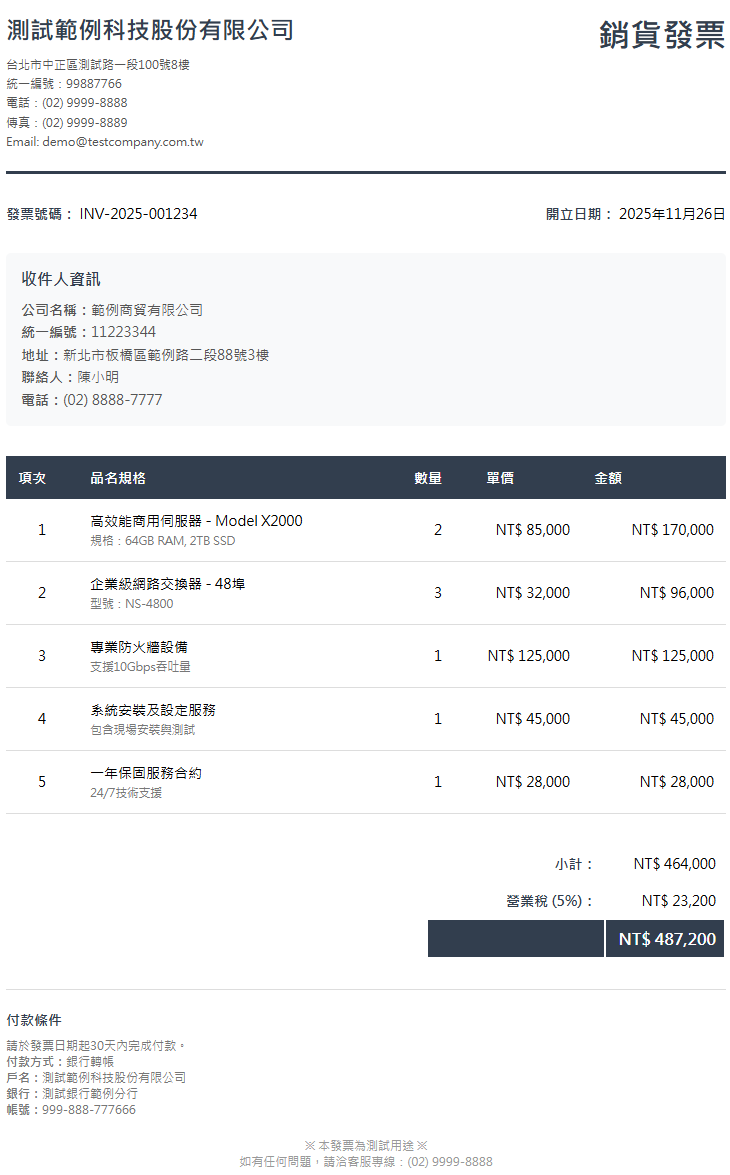 | 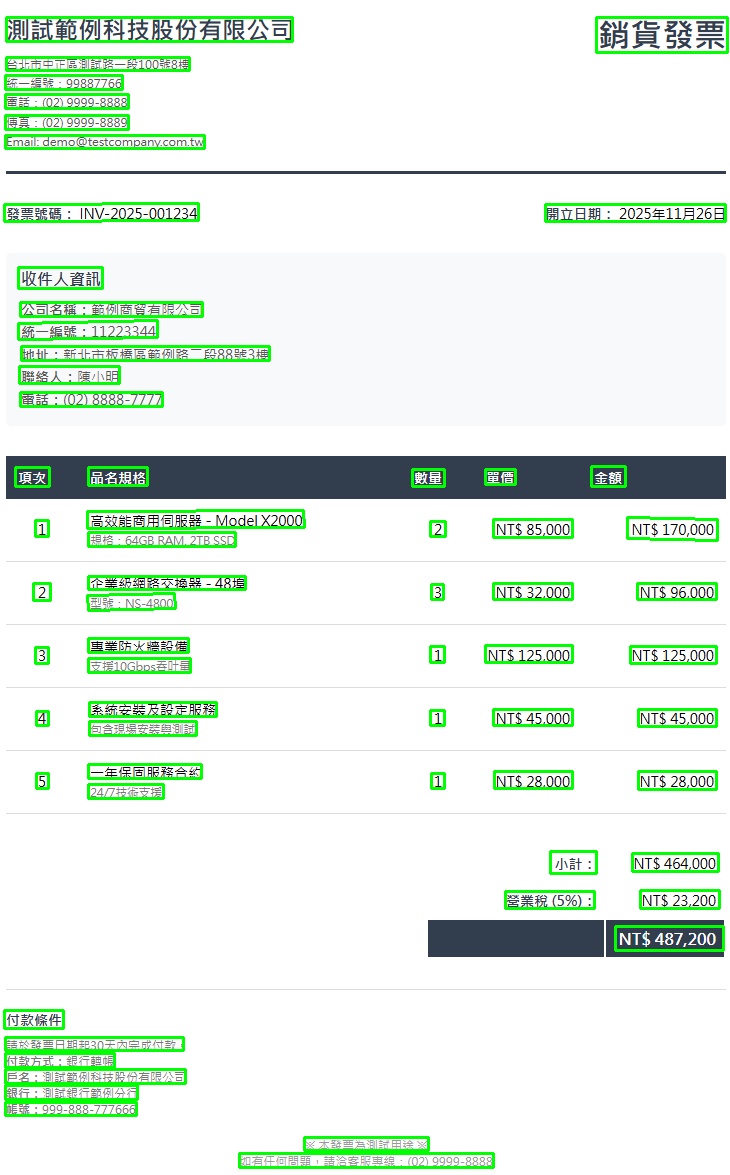 | 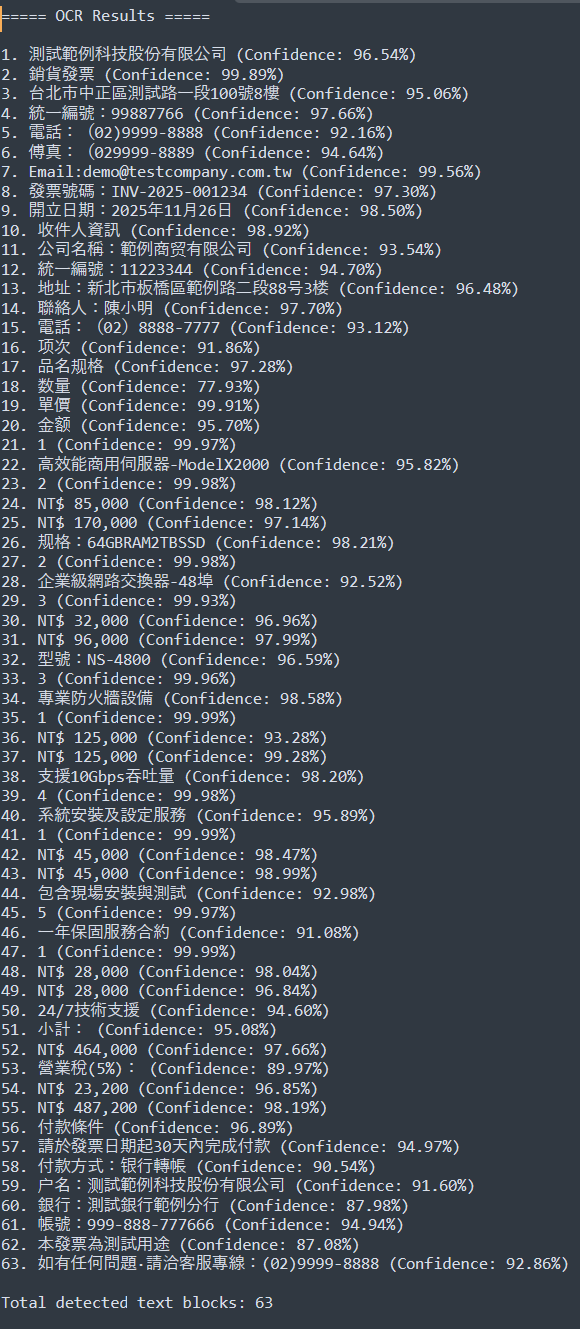 |
| Original | OCR Result | Text Output |
|---|---|---|
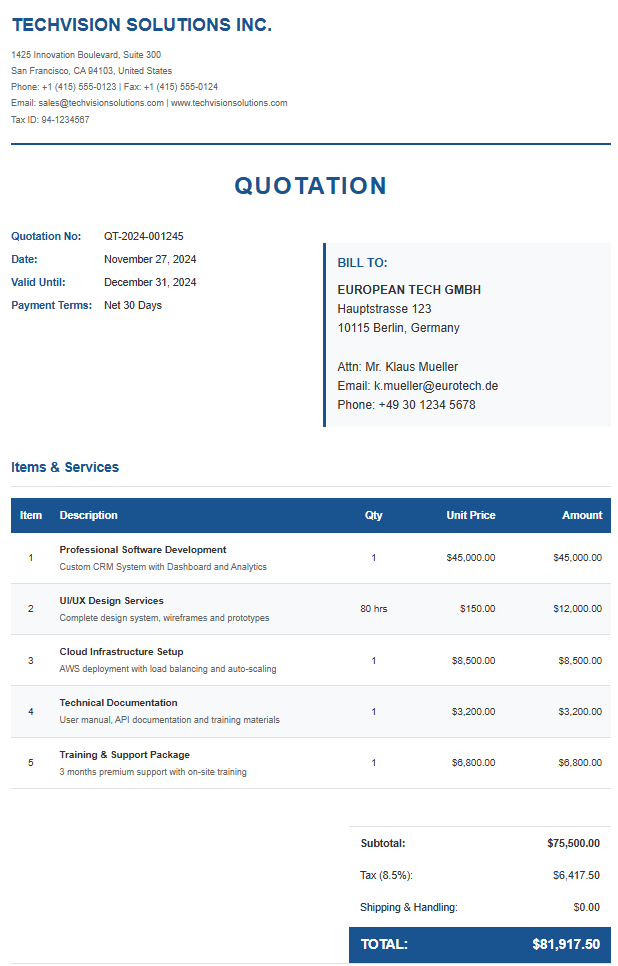 | 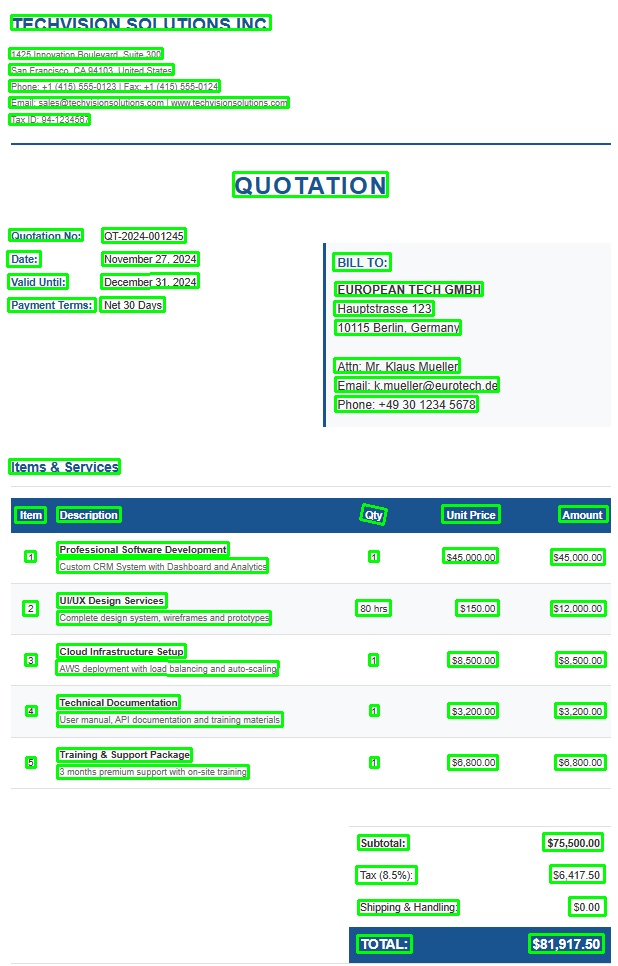 | 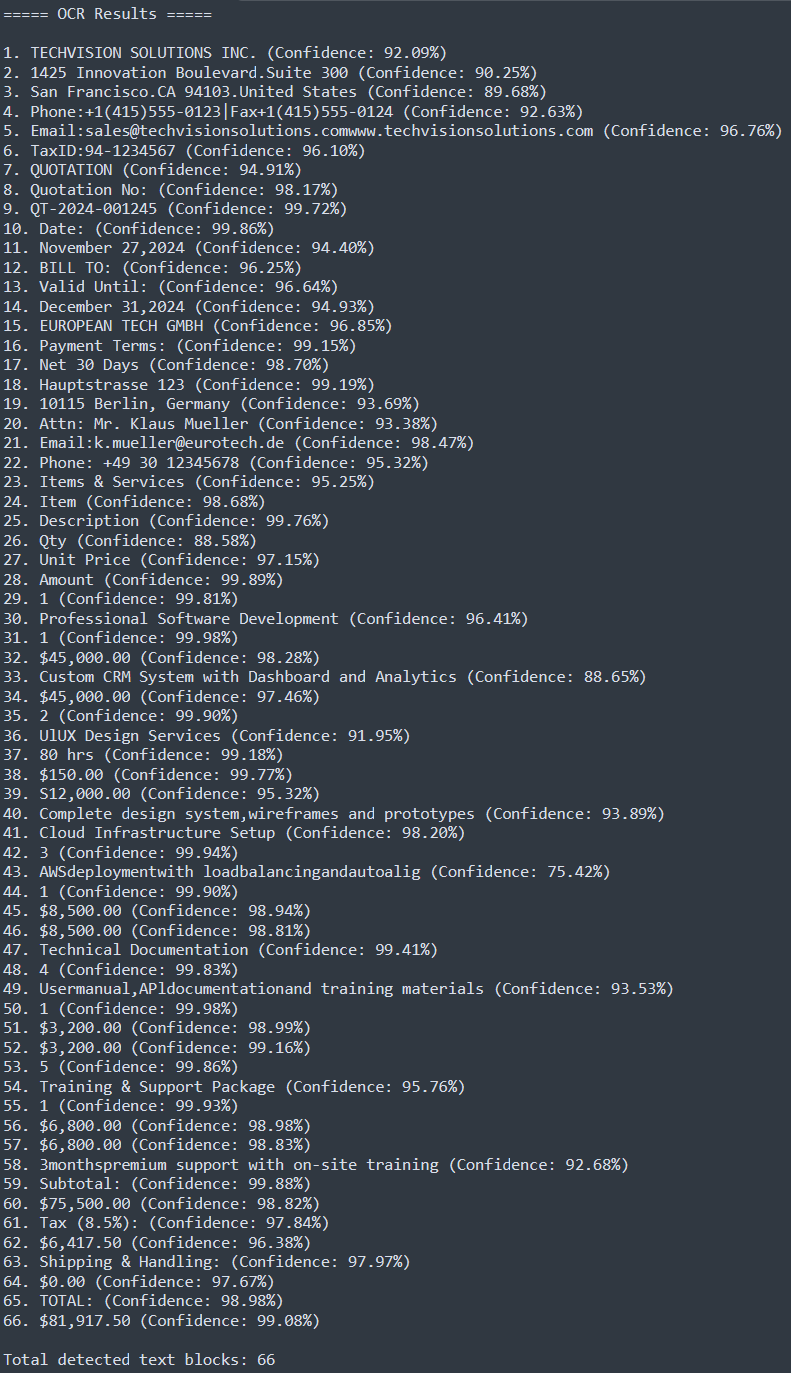 |

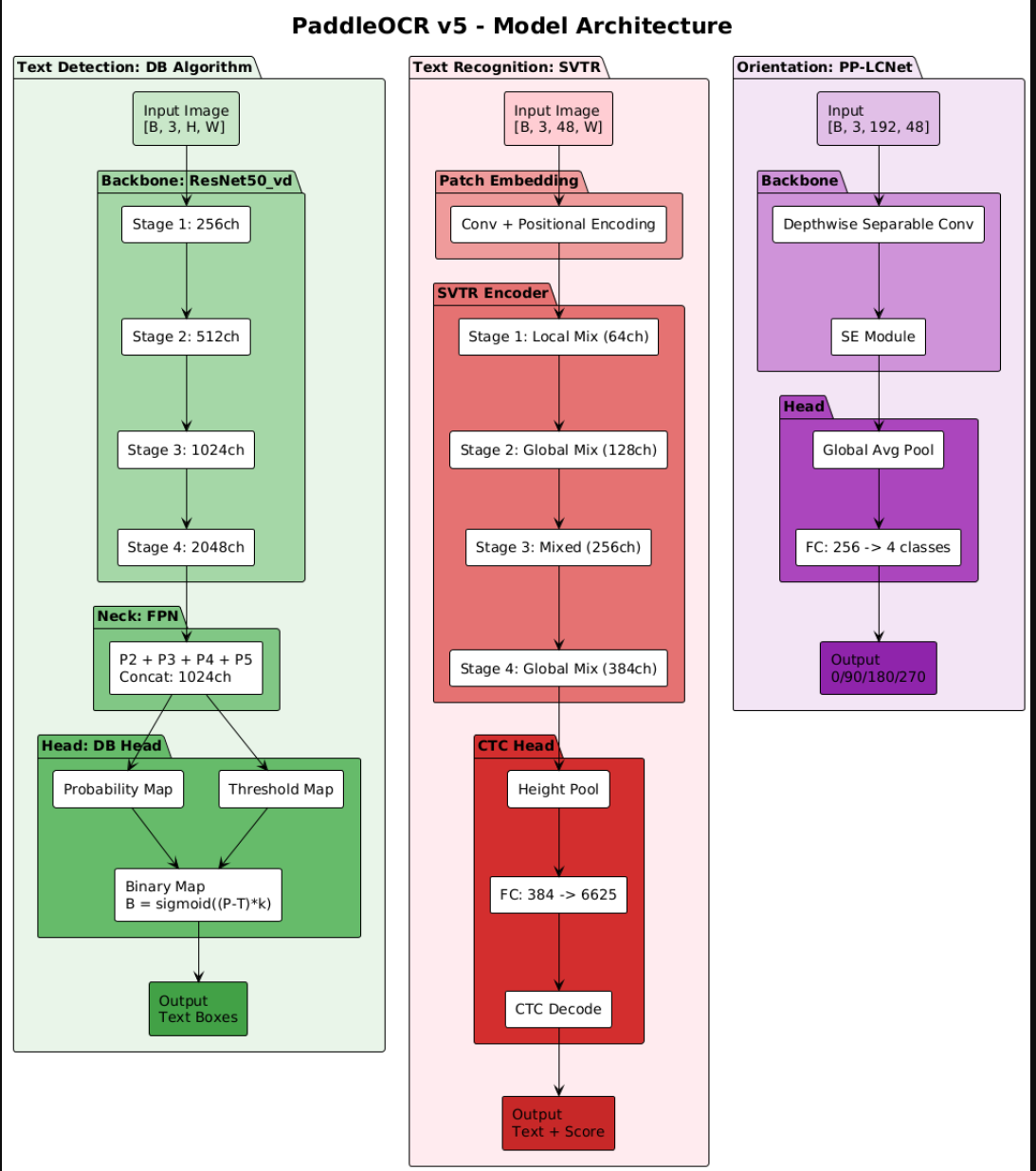
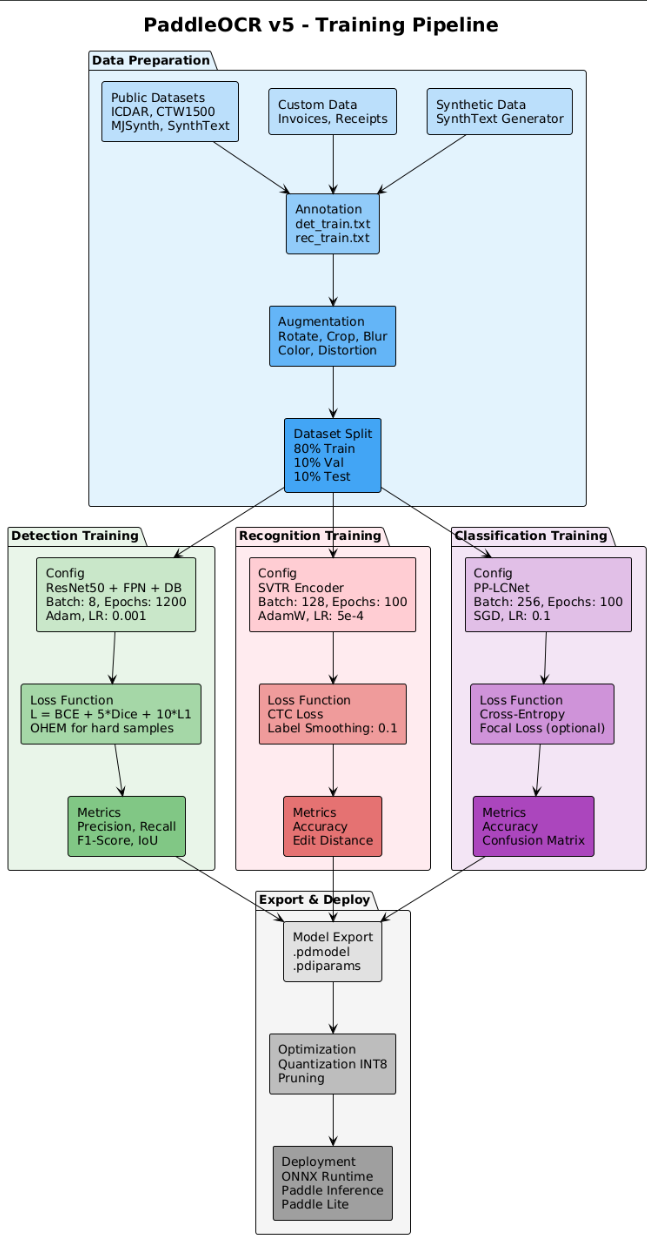
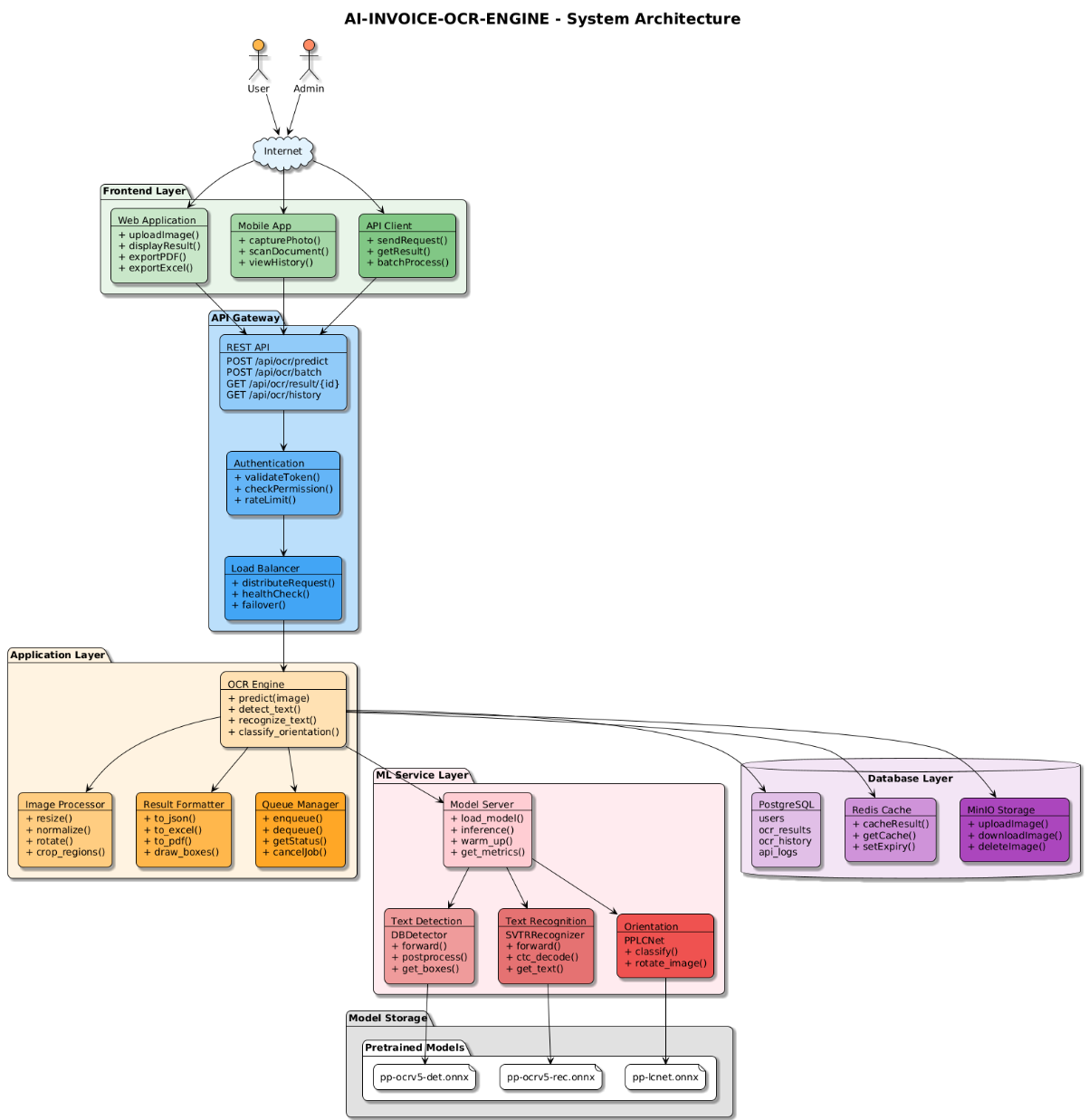
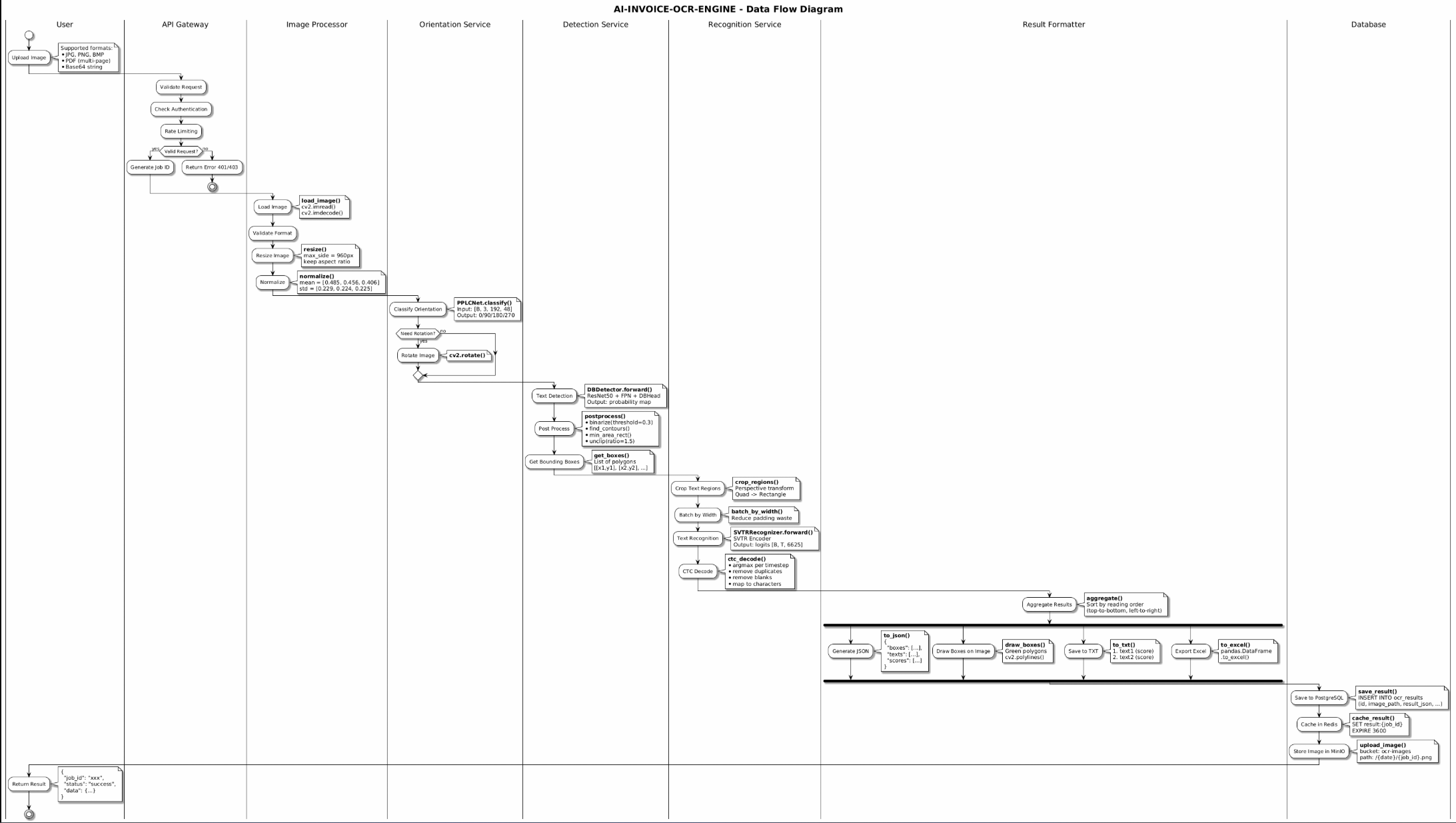
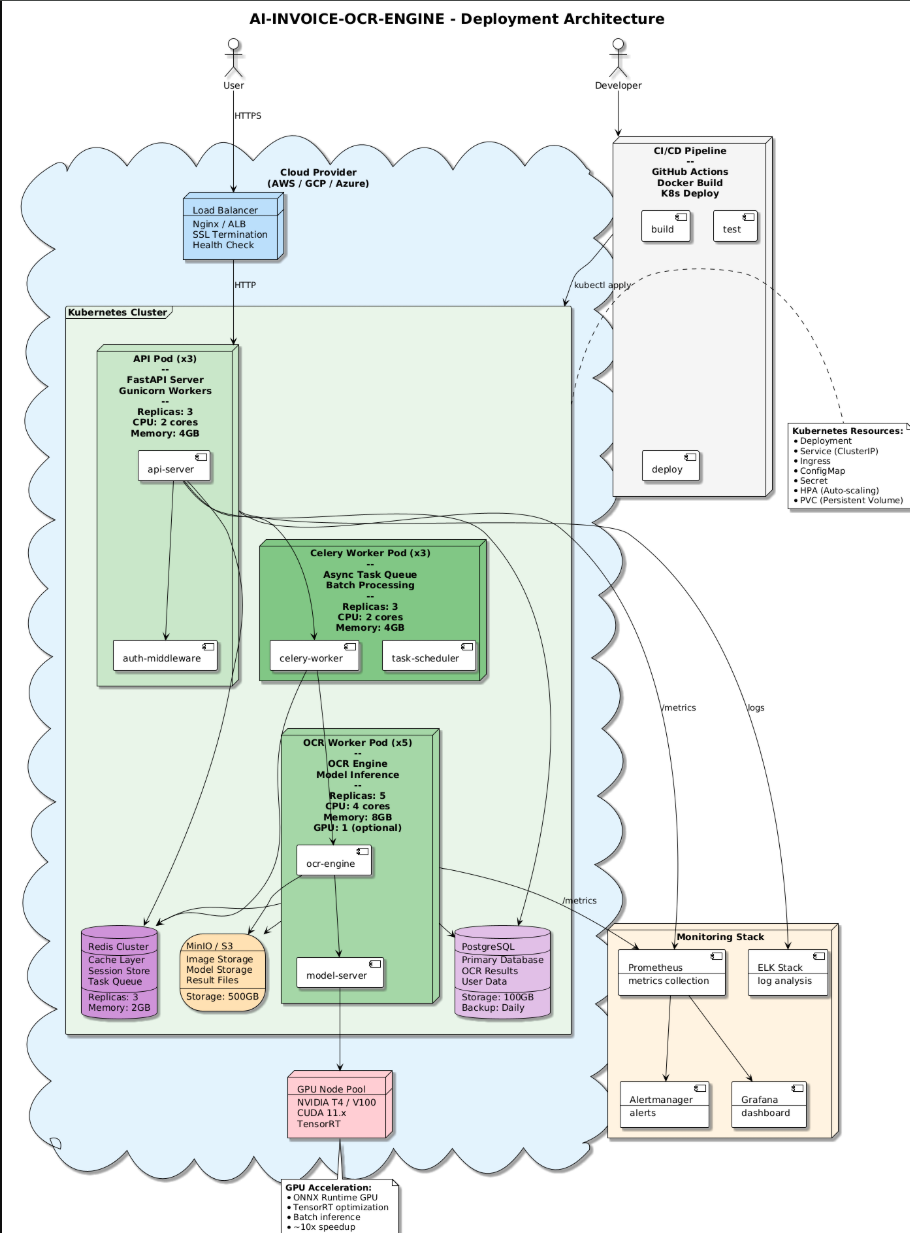
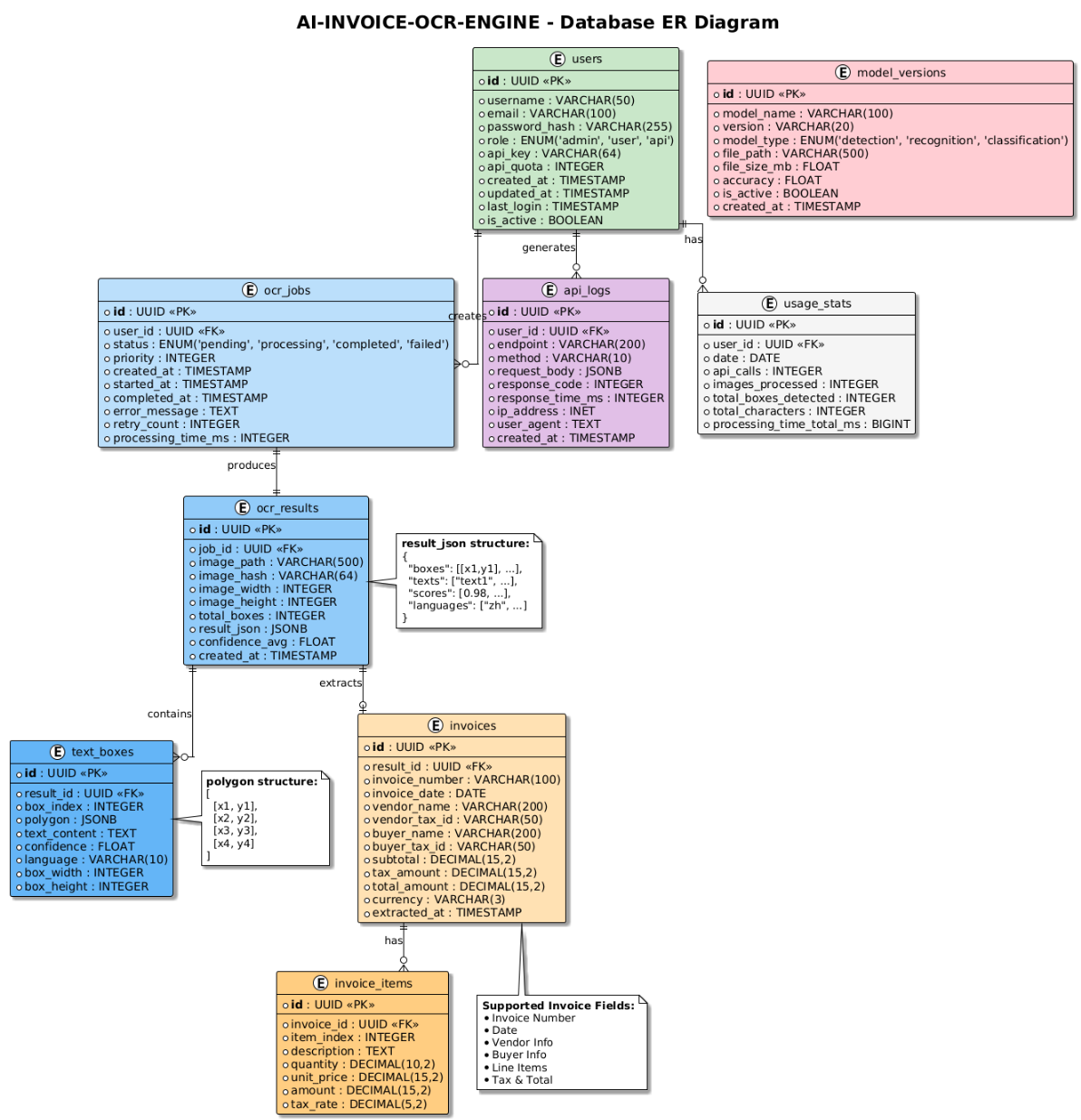
Input Image → Preprocessing → Text Detection → Text Recognition → Output
                                    ↓                  ↓
                              Green Boxes         TXT File
| Component | Model | Description |
|---|---|---|
| Document Orientation | PP-LCNet | Classifies document rotation (0°/90°/180°/270°) |
| Document Unwarping | UVDoc | Corrects curved/warped documents |
| Text Detection | PP-OCRv5_det (DB) | Detects text regions using Differentiable Binarization |
| Text Line Classification | PP-LCNet | Determines text line orientation (0°/180°) |
| Text Recognition | PP-OCRv5_rec (SVTR) | Recognizes text using Scene Text Recognition with CTC |
Text Detection (DB Algorithm)
Text Recognition (SVTR)
pip install paddlepaddle>=2.5.0
pip install paddleocr>=3.0.0
pip install pillow>=9.0.0
pip install opencv-python>=4.5.0
from paddleocr import PaddleOCR

# Initialize OCR engine
ocr = PaddleOCR(
    use_doc_orientation_classify=False,
    use_doc_unwarping=False
)

# Perform OCR on an image
result = ocr.predict('invoice.png')

# Process results
for item in result:
    if 'rec_texts' in item:
        for i, text in enumerate(item['rec_texts']):
            score = item['rec_scores'][i]
            print(f"Text: {text}, Confidence: {score:.2%}")
import cv2
import numpy as np

def draw_boxes_only(image_path, boxes, output_path):
    img = cv2.imread(image_path)
    for box in boxes:
        pts = np.array(box).astype(np.int32)
        cv2.polylines(img, [pts], True, (0, 255, 0), 2)
    cv2.imwrite(output_path, img)
def save_text_to_file(txts, scores, output_path):
    with open(output_path, 'w', encoding='utf-8') as f:
        for i, (txt, score) in enumerate(zip(txts, scores)):
            f.write(f"{i+1}. {txt} (Confidence: {score:.2%})\n")
AI-INVOICE-OCR-ENGINE/
├── README.md
├── README_CN.md
├── LICENSE-MIT
├── setup.py
├── demo/
│   ├── invoice_ch.png           # Chinese invoice (input)
│   ├── invoice_en.png           # English invoice (input)
│   ├── result_invoice_cn.jpg    # Chinese result (output)
│   ├── result_invoice_en.jpg    # English result (output)
│   ├── 1.png ~ 7.png            # Architecture diagrams
│   └── *.puml                   # PlantUML source files
├── models/
│   └── pretrained/
│       └── weights/             # Model files (.onnx, .pdmodel, .pdiparams)
├── preprocess/
├── detect/
├── recognize/
├── data/
├── losses/
├── train/
└── utils/
| Model | Size | Inference Time (CPU) | Accuracy |
|---|---|---|---|
| PP-OCRv5_det | ~88MB | ~200ms/image | F1: 0.85+ |
| PP-OCRv5_rec | ~85MB | ~50ms/text line | Acc: 0.95+ |
| PP-LCNet (orientation) | ~7MB | ~10ms/image | Acc: 0.99+ |
*Times measured on Intel i7-10700 CPU
Jammy Lin Email: [email protected]
This project is licensed under the MIT License - see the LICENSE-MIT file for details.
If this project helps you, please give it a Star!
Your support is my motivation to keep improving!
Ways to support:
中文版 | English
A complete AI-powered document OCR (Optical Character Recognition) solution based on PaddleOCR v5, optimized for invoice and accounting document recognition with support for Chinese and English text.
| Original | OCR Result | Text Output |
|---|---|---|
| | |
| Original | OCR Result | Text Output |
|---|---|---|
| | |
Input Image → Preprocessing → Text Detection → Text Recognition → Output
                                    ↓                  ↓
                              Green Boxes         TXT File
| Component | Model | Description |
|---|---|---|
| Document Orientation | PP-LCNet | Classifies document rotation (0°/90°/180°/270°) |
| Document Unwarping | UVDoc | Corrects curved/warped documents |
| Text Detection | PP-OCRv5_det (DB) | Detects text regions using Differentiable Binarization |
| Text Line Classification | PP-LCNet | Determines text line orientation (0°/180°) |
| Text Recognition | PP-OCRv5_rec (SVTR) | Recognizes text using Scene Text Recognition with CTC |
Text Detection (DB Algorithm)
Text Recognition (SVTR)
pip install paddlepaddle>=2.5.0
pip install paddleocr>=3.0.0
pip install pillow>=9.0.0
pip install opencv-python>=4.5.0
from paddleocr import PaddleOCR

# Initialize OCR engine
ocr = PaddleOCR(
    use_doc_orientation_classify=False,
    use_doc_unwarping=False
)

# Perform OCR on an image
result = ocr.predict('invoice.png')

# Process results
for item in result:
    if 'rec_texts' in item:
        for i, text in enumerate(item['rec_texts']):
            score = item['rec_scores'][i]
            print(f"Text: {text}, Confidence: {score:.2%}")
import cv2
import numpy as np

def draw_boxes_only(image_path, boxes, output_path):
    img = cv2.imread(image_path)
    for box in boxes:
        pts = np.array(box).astype(np.int32)
        cv2.polylines(img, [pts], True, (0, 255, 0), 2)
    cv2.imwrite(output_path, img)
def save_text_to_file(txts, scores, output_path):
    with open(output_path, 'w', encoding='utf-8') as f:
        for i, (txt, score) in enumerate(zip(txts, scores)):
            f.write(f"{i+1}. {txt} (Confidence: {score:.2%})\n")
AI-INVOICE-OCR-ENGINE/
├── README.md
├── README_CN.md
├── LICENSE-MIT
├── setup.py
├── demo/
│   ├── invoice_ch.png           # Chinese invoice (input)
│   ├── invoice_en.png           # English invoice (input)
│   ├── result_invoice_cn.jpg    # Chinese result (output)
│   ├── result_invoice_en.jpg    # English result (output)
│   ├── 1.png ~ 7.png            # Architecture diagrams
│   └── *.puml                   # PlantUML source files
├── models/
│   └── pretrained/
│       └── weights/             # Model files (.onnx, .pdmodel, .pdiparams)
├── preprocess/
├── detect/
├── recognize/
├── data/
├── losses/
├── train/
└── utils/
| Model | Size | Inference Time (CPU) | Accuracy |
|---|---|---|---|
| PP-OCRv5_det | ~88MB | ~200ms/image | F1: 0.85+ |
| PP-OCRv5_rec | ~85MB | ~50ms/text line | Acc: 0.95+ |
| PP-LCNet (orientation) | ~7MB | ~10ms/image | Acc: 0.99+ |
*Times measured on Intel i7-10700 CPU
Jammy Lin Email: [email protected]
This project is licensed under the MIT License - see the LICENSE-MIT file for details.
If this project helps you, please give it a Star!
Your support is my motivation to keep improving!
Ways to support:



