基于PaddleOCR重构,并且脱离PaddlePaddle深度学习训练框架的轻量级OCR,推理速度超快 —— A lightweight OCR system based on PaddleOCR, decoupled from the PaddlePaddle deep learning training framework, with ultra-fast inference speed.
Python
1,875
52 commits
updated Jun 11, 2026
If this project helps you, please consider giving it a Star.

A high-performance multilingual OCR project based on ONNXRuntime


2026.05.27
onnxocr.qwen35_2b as the package-level Qwen3.5-2B ONNX download, verification, and pure Python inference module.examples/id_card_extract_with_qwen.py as an end-to-end example: OnnxOCR full-text recognition first, then Qwen3.5-2B extracts structured ID-card fields.2026.05.01
/plate, /table, /layout, /layout_markdown, and related HTTP endpoints.2025.05.21
onnxocr/inference_engine.py.rapid_layout, rapid_table, and rapid_doc live under the onnxocr/ package, with no dependency on rapidocr==3.4.3 or rapid-orientation.python>=3.8
pip install -i https://pypi.tuna.tsinghua.edu.cn/simple -r requirements.txt
Notes:
tests/test_general_ocr.py.onnxocr/models/ppocrv5/.Extra models are hosted on HuggingFace: jingsongliu/onnxocr_model. International users are recommended to download from HuggingFace:
python scripts/download_models.py --source huggingface
The core HuggingFace API is:
from huggingface_hub import snapshot_download

model_dir = snapshot_download("jingsongliu/onnxocr_model")
For users in mainland China, ModelScope remains the default and recommended source:
python scripts/download_models.py
ModelScope repository: supersong/onnxocr_model.
The script copies the repository models/ directory into local onnxocr/models/ and checks required optional files such as onnxocr/models/rapid_doc/layout/pp_doclayoutv2.onnx.
To check local models only:
python scripts/download_models.py --check-only
OnnxOCR can also use a local Qwen3.5-2B ONNX model as an information-extraction backbone after OCR. This is useful for workflows such as:
Qwen3.5-2B ONNX uses a dedicated model repository, separate from other optional OCR models:
onnxocr/models/qwen_2bPrepare the Qwen3.5-2B ONNX files:
python examples/qwen35_2b_onnx.py download --variant q4
python examples/qwen35_2b_onnx.py verify
The model is stored under:
onnxocr/models/qwen_2b
Pure Python text or image-text smoke test:
python examples/qwen35_2b_onnx.py run-python --prompt "Hello, introduce yourself briefly."
python examples/qwen35_2b_onnx.py run-python --image onnxocr/models/qwen_2b/images/demo.jpeg --prompt "Describe this image in one short sentence."
Use the package API directly:
from onnxocr.qwen35_2b import Qwen35ONNX

qwen = Qwen35ONNX("onnxocr/models/qwen_2b")
text, stopped = qwen.generate("Extract key fields from this OCR text: ...")
print(text)
DIY a new extraction scenario:
from onnxocr.qwen35_2b import ExtractionTemplate, QwenScenarioExtractor

invoice_template = ExtractionTemplate(
    name="invoice_basic",
    description="invoice OCR",
    fields=["invoice_number", "seller", "buyer", "amount", "date"],
    rules=[
        "Extract fields only from the OCR text.",
        "Use an empty string when a field is missing or uncertain.",
        "Return JSON only.",
    ],
)

extractor = QwenScenarioExtractor(model_dir="onnxocr/models/qwen_2b")
fields, raw = extractor.extract(ocr_text, template=invoice_template)
print(fields)
The base package does not ship vertical-scene prompts. Put scenario-specific templates in your application or under examples/, then pass the template into QwenScenarioExtractor. You can add templates for invoices, business licenses, contracts, logistics waybills, medical reports, or any other vertical OCR scene by defining fields and rules.
python test_ocr.py
test_ocr.py runs only general OCR by default. The optional examples are commented out; uncomment them after downloading the corresponding models with python scripts/download_models.py.
Feature-specific tests:
python tests/test_general_ocr.py
python tests/test_license_plate_ocr.py
python tests/test_table_ocr.py
python tests/test_layout_analysis.py
python tests/test_layout_markdown.py
Generated files are written to result_img/, which is ignored by git.
import cv2
from onnxocr.onnx_paddleocr import ONNXPaddleOcr

img = cv2.imread("onnxocr/test_images/715873facf064583b44ef28295126fa7.jpg")
model = ONNXPaddleOcr(use_angle_cls=False, use_gpu=False)
result = model.ocr(img)
print(result)
examples/id_card_extract_with_qwen.py is a minimal end-to-end vertical-scene example. The reusable Qwen inference and generic template extraction code lives in onnxocr.qwen35_2b; the ID-card fields and prompt rules live only in this example.
Default example:
python examples/id_card_extract_with_qwen.py
Specify an image explicitly:
python examples/id_card_extract_with_qwen.py --image "onnxocr/test_images/8f113149-ff64-4c9f-8dc0-e34100365aa4.jpg"
Output:
result_img/id_card_front_qwen_extract.json
The script does not print sensitive ID-card fields by default. Use --show-sensitive only in a trusted local environment.
License plate recognition is integrated into ONNXPaddleOcr as an optional mode. Existing general OCR usage is unchanged.
from onnxocr.onnx_paddleocr import ONNXPaddleOcr, sav2PlateImg

plate_model = ONNXPaddleOcr(
    use_angle_cls=True,
    use_gpu=False,
    use_plate_recognition=True,
    plate_min_score=0.4,
)
plate_result = plate_model.ocr(img)
sav2PlateImg(img, plate_result, name="./result_img/test_plate_vis.jpg")
Model files:
onnxocr/models/license_plate/car_plate_detect.onnx
onnxocr/models/license_plate/plate_rec.onnx
Table recognition is integrated from RapidTable. It reuses general OCR detection/recognition results, restores table structure, and outputs HTML, cell boxes, and logical row/column coordinates.
from onnxocr.onnx_paddleocr import ONNXPaddleOcr, sav2TableImg

table_model = ONNXPaddleOcr(
    use_angle_cls=True,
    use_gpu=False,
    use_table_recognition=True,
    table_model_type="slanet_plus",
)
table_result = table_model.ocr(img)
print(table_result["html"])
sav2TableImg(img, table_result, name="./result_img/test_table_vis.jpg")
Model files:
onnxocr/models/table/slanet-plus.onnx
onnxocr/models/table/ch_ppstructure_mobile_v2_SLANet.onnx
onnxocr/models/table/en_ppstructure_mobile_v2_SLANet.onnx
Layout analysis is integrated from RapidLayout. It locates document elements such as titles, text blocks, tables, figures, headers, and footers.
from onnxocr.onnx_paddleocr import ONNXPaddleOcr, sav2LayoutImg

layout_model = ONNXPaddleOcr(
    use_gpu=False,
    use_layout_analysis=True,
    layout_model_type="pp_layout_cdla",
)
layout_result = layout_model.ocr(img)
sav2LayoutImg(img, layout_result, name="./result_img/test_layout_vis.jpg")
For English layout analysis, set layout_model_type to pp_layout_publaynet.
Model files:
onnxocr/models/layout/layout_cdla.onnx
onnxocr/models/layout/layout_publaynet.onnx
Document-to-Markdown export is integrated from RapidDoc. It analyzes titles, paragraphs, tables, figures, and other layout elements, then saves the result as a Markdown file.
from onnxocr.layout_markdown import LayoutMarkdownConverter

converter = LayoutMarkdownConverter(
    layout_model_type="pp_doclayoutv2",
    formula_enable=False,
    table_enable=True,
)
result = converter.convert_file(
    "onnxocr/test_images/layout_cdla.jpg",
    output_md_path="./result_img/test_layout_markdown.md",
)
print(result["markdown_path"])
RapidDoc model files:
onnxocr/models/rapid_doc/layout/pp_doclayoutv2.onnx
onnxocr/models/rapid_doc/table/q_cls.onnx
onnxocr/models/rapid_doc/table/unet.onnx
onnxocr/models/rapid_doc/table/slanet-plus.onnx
General OCR, license plate recognition, table recognition, layout analysis, and RapidDoc document parsing all create ONNXRuntime sessions through onnxocr/inference_engine.py.
To adapt a downstream GPU/NPU provider, start from:
from onnxocr.inference_engine import create_session
Main extension points:
create_session(model_path, providers=None, use_gpu=False, gpu_id=0, sess_options=None)build_providers(use_gpu=False, gpu_id=0, providers=None)build_providers_from_engine_cfg(engine_cfg)ProviderConfig(engine_cfg)Only onnxocr/inference_engine.py imports onnxruntime directly. Feature modules do not call ONNXRuntime APIs directly.
app-service.py is the deployable JSON API service. webui.py is the browser UI service. Keeping them separate makes the repository easier to deploy, test, and extend.
Start API service:
python app-service.py
Environment variables:
ONNXOCR_PORT: service port, default 5005.ONNXOCR_USE_GPU: set to 1 / true to enable GPU providers.ONNXOCR_DEBUG: set to 1 / true to enable Flask debug mode.ONNXOCR_OUTPUT_DIR: output directory for generated Markdown/assets, default result_img.ONNXOCR_MAX_UPLOAD_MB: max upload size in MB, default 200.Main endpoints accept JSON base64 images or multipart file uploads:
/health: service health check./ocr: general OCR./plate: license plate recognition./table: table recognition./layout: layout analysis./layout_markdown: image/PDF to Markdown.JSON example:
curl -X POST http://127.0.0.1:5005/ocr \
  -H "Content-Type: application/json" \
  -d "{\"image\":\"<base64-image>\"}"
Multipart example:
curl -X POST http://127.0.0.1:5005/ocr \
  -F "image=@onnxocr/test_images/715873facf064583b44ef28295126fa7.jpg"
Start WebUI:
python webui.py
docker build -t ocr-service .
docker run -itd --name onnxocr-service -p 5006:5005 ocr-service
The Docker image excludes generated outputs and optional large model artifacts through .dockerignore. Mount or download optional models when you need plate, table, layout, or RapidDoc features.
app-service.py                 # deployable JSON API service
webui.py                       # browser UI service
test_ocr.py                    # one-click local OCR demo
requirements.txt               # runtime dependencies
Dockerfile                     # container image for API deployment
.dockerignore                  # keeps caches/outputs/large models out of Docker context
Readme.md                      # English documentation
Readme_cn.md                   # Simplified Chinese documentation
Readme_ja.md                   # Japanese documentation
onnxocr/
  inference_engine.py        # single ONNXRuntime entry
  onnx_paddleocr.py          # public user API
  predict_det.py             # general OCR detection
  predict_rec.py             # general OCR recognition
  orientation.py             # local RapidOrientation ONNX adapter
  license_plate.py           # license plate OCR
  table_recognition.py       # table recognition wrapper
  layout_recognition.py      # layout analysis wrapper
  layout_markdown.py         # RapidDoc Markdown wrapper
  rapid_layout/              # source-level RapidLayout ONNX integration
  rapid_table/               # source-level RapidTable ONNX integration
  rapid_doc/                 # source-level RapidDoc ONNX integration
  models/                    # local ONNX models
scripts/
  download_models.py         # optional model download/check helper
tests/                       # feature-specific tests and API smoke tests
| Example 1 | Example 2 |
|---|---|
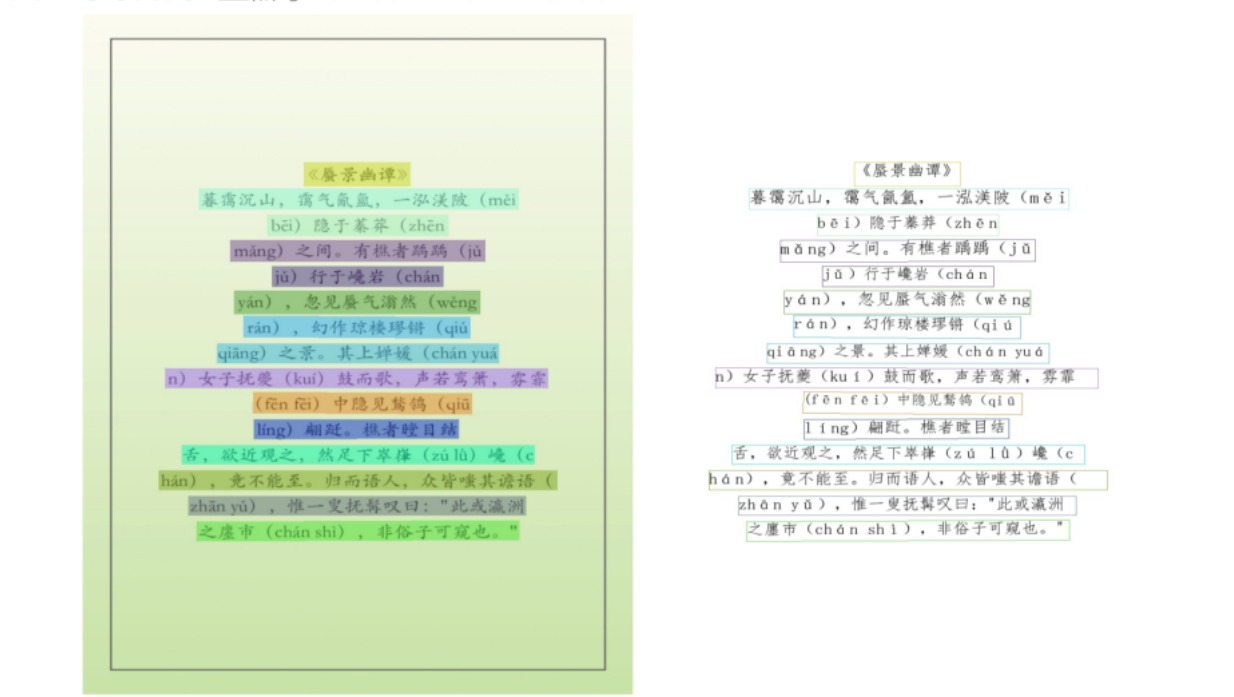 | 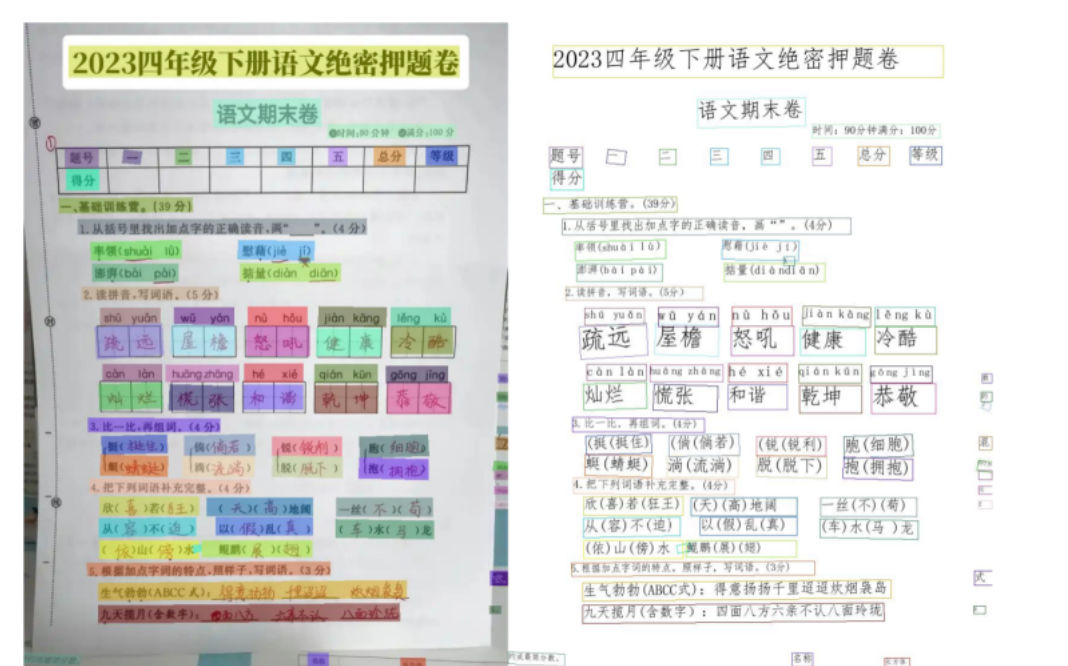 |
| Example 3 | Example 4 |
|---|---|
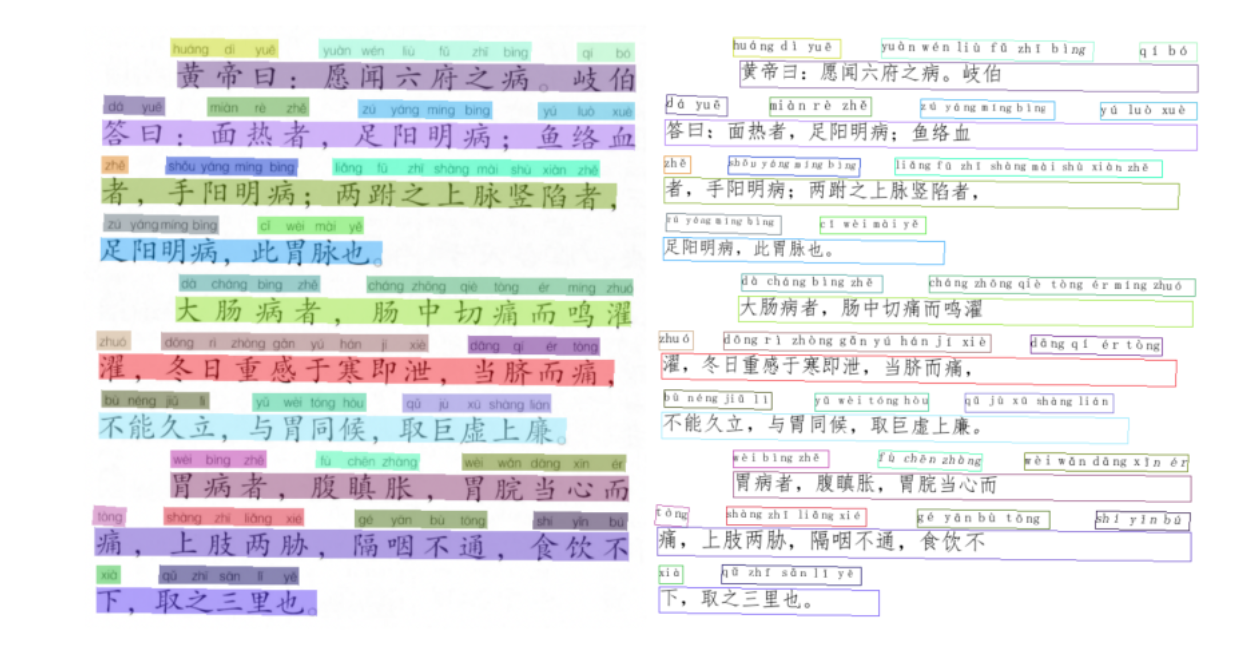 |  |
Thanks to PaddleOCR for technical support and model references.
Thanks to the RapidAI open-source community, including RapidTable, RapidLayout, RapidDoc, and RapidOrientation, for excellent models, code, and engineering references.
If you recognize this project, you can support it via Alipay or WeChat Pay.


Issues and Pull Requests are welcome. To keep the project usable for open-source users, please follow these rules:
app-service.py and browser/UI behavior in webui.py.result_img/, results/, uploads/, or local cache directories.Recommended checks before opening a pull request:
python -B -m pytest tests/test_app_service.py -p no:cacheprovider
python tests/test_general_ocr.py
python tests/test_license_plate_ocr.py
python tests/test_table_ocr.py
python tests/test_layout_analysis.py
python tests/test_layout_markdown.py
Some tests require optional model files. If you cannot run them locally, mention the missing model files in your pull request.
27 followers · starred May 2026
735 followers · starred Jun 2025
789 followers · starred Aug 2025
41 followers · starred Nov 2025
基于PaddleOCR重构,并且脱离PaddlePaddle深度学习训练框架的轻量级OCR,推理速度超快 —— A lightweight OCR system based on PaddleOCR, decoupled from the PaddlePaddle deep learning training framework, with ultra-fast inference speed.
Python
1,875
52 commits
updated Jun 11, 2026
If this project helps you, please consider giving it a Star.
A high-performance multilingual OCR project based on ONNXRuntime
2026.05.27
onnxocr.qwen35_2b as the package-level Qwen3.5-2B ONNX download, verification, and pure Python inference module.examples/id_card_extract_with_qwen.py as an end-to-end example: OnnxOCR full-text recognition first, then Qwen3.5-2B extracts structured ID-card fields.2026.05.01
/plate, /table, /layout, /layout_markdown, and related HTTP endpoints.2025.05.21
onnxocr/inference_engine.py.rapid_layout, rapid_table, and rapid_doc live under the onnxocr/ package, with no dependency on rapidocr==3.4.3 or rapid-orientation.python>=3.8
pip install -i https://pypi.tuna.tsinghua.edu.cn/simple -r requirements.txt
Notes:
tests/test_general_ocr.py.onnxocr/models/ppocrv5/.Extra models are hosted on HuggingFace: jingsongliu/onnxocr_model. International users are recommended to download from HuggingFace:
python scripts/download_models.py --source huggingface
The core HuggingFace API is:
from huggingface_hub import snapshot_download

model_dir = snapshot_download("jingsongliu/onnxocr_model")
For users in mainland China, ModelScope remains the default and recommended source:
python scripts/download_models.py
ModelScope repository: supersong/onnxocr_model.
The script copies the repository models/ directory into local onnxocr/models/ and checks required optional files such as onnxocr/models/rapid_doc/layout/pp_doclayoutv2.onnx.
To check local models only:
python scripts/download_models.py --check-only
OnnxOCR can also use a local Qwen3.5-2B ONNX model as an information-extraction backbone after OCR. This is useful for workflows such as:
Qwen3.5-2B ONNX uses a dedicated model repository, separate from other optional OCR models:
onnxocr/models/qwen_2bPrepare the Qwen3.5-2B ONNX files:
python examples/qwen35_2b_onnx.py download --variant q4
python examples/qwen35_2b_onnx.py verify
The model is stored under:
onnxocr/models/qwen_2b
Pure Python text or image-text smoke test:
python examples/qwen35_2b_onnx.py run-python --prompt "Hello, introduce yourself briefly."
python examples/qwen35_2b_onnx.py run-python --image onnxocr/models/qwen_2b/images/demo.jpeg --prompt "Describe this image in one short sentence."
Use the package API directly:
from onnxocr.qwen35_2b import Qwen35ONNX

qwen = Qwen35ONNX("onnxocr/models/qwen_2b")
text, stopped = qwen.generate("Extract key fields from this OCR text: ...")
print(text)
DIY a new extraction scenario:
from onnxocr.qwen35_2b import ExtractionTemplate, QwenScenarioExtractor

invoice_template = ExtractionTemplate(
    name="invoice_basic",
    description="invoice OCR",
    fields=["invoice_number", "seller", "buyer", "amount", "date"],
    rules=[
        "Extract fields only from the OCR text.",
        "Use an empty string when a field is missing or uncertain.",
        "Return JSON only.",
    ],
)

extractor = QwenScenarioExtractor(model_dir="onnxocr/models/qwen_2b")
fields, raw = extractor.extract(ocr_text, template=invoice_template)
print(fields)
The base package does not ship vertical-scene prompts. Put scenario-specific templates in your application or under examples/, then pass the template into QwenScenarioExtractor. You can add templates for invoices, business licenses, contracts, logistics waybills, medical reports, or any other vertical OCR scene by defining fields and rules.
python test_ocr.py
test_ocr.py runs only general OCR by default. The optional examples are commented out; uncomment them after downloading the corresponding models with python scripts/download_models.py.
Feature-specific tests:
python tests/test_general_ocr.py
python tests/test_license_plate_ocr.py
python tests/test_table_ocr.py
python tests/test_layout_analysis.py
python tests/test_layout_markdown.py
Generated files are written to result_img/, which is ignored by git.
import cv2
from onnxocr.onnx_paddleocr import ONNXPaddleOcr

img = cv2.imread("onnxocr/test_images/715873facf064583b44ef28295126fa7.jpg")
model = ONNXPaddleOcr(use_angle_cls=False, use_gpu=False)
result = model.ocr(img)
print(result)
examples/id_card_extract_with_qwen.py is a minimal end-to-end vertical-scene example. The reusable Qwen inference and generic template extraction code lives in onnxocr.qwen35_2b; the ID-card fields and prompt rules live only in this example.
Default example:
python examples/id_card_extract_with_qwen.py
Specify an image explicitly:
python examples/id_card_extract_with_qwen.py --image "onnxocr/test_images/8f113149-ff64-4c9f-8dc0-e34100365aa4.jpg"
Output:
result_img/id_card_front_qwen_extract.json
The script does not print sensitive ID-card fields by default. Use --show-sensitive only in a trusted local environment.
License plate recognition is integrated into ONNXPaddleOcr as an optional mode. Existing general OCR usage is unchanged.
from onnxocr.onnx_paddleocr import ONNXPaddleOcr, sav2PlateImg

plate_model = ONNXPaddleOcr(
    use_angle_cls=True,
    use_gpu=False,
    use_plate_recognition=True,
    plate_min_score=0.4,
)
plate_result = plate_model.ocr(img)
sav2PlateImg(img, plate_result, name="./result_img/test_plate_vis.jpg")
Model files:
onnxocr/models/license_plate/car_plate_detect.onnx
onnxocr/models/license_plate/plate_rec.onnx
Table recognition is integrated from RapidTable. It reuses general OCR detection/recognition results, restores table structure, and outputs HTML, cell boxes, and logical row/column coordinates.
from onnxocr.onnx_paddleocr import ONNXPaddleOcr, sav2TableImg

table_model = ONNXPaddleOcr(
    use_angle_cls=True,
    use_gpu=False,
    use_table_recognition=True,
    table_model_type="slanet_plus",
)
table_result = table_model.ocr(img)
print(table_result["html"])
sav2TableImg(img, table_result, name="./result_img/test_table_vis.jpg")
Model files:
onnxocr/models/table/slanet-plus.onnx
onnxocr/models/table/ch_ppstructure_mobile_v2_SLANet.onnx
onnxocr/models/table/en_ppstructure_mobile_v2_SLANet.onnx
Layout analysis is integrated from RapidLayout. It locates document elements such as titles, text blocks, tables, figures, headers, and footers.
from onnxocr.onnx_paddleocr import ONNXPaddleOcr, sav2LayoutImg

layout_model = ONNXPaddleOcr(
    use_gpu=False,
    use_layout_analysis=True,
    layout_model_type="pp_layout_cdla",
)
layout_result = layout_model.ocr(img)
sav2LayoutImg(img, layout_result, name="./result_img/test_layout_vis.jpg")
For English layout analysis, set layout_model_type to pp_layout_publaynet.
Model files:
onnxocr/models/layout/layout_cdla.onnx
onnxocr/models/layout/layout_publaynet.onnx
Document-to-Markdown export is integrated from RapidDoc. It analyzes titles, paragraphs, tables, figures, and other layout elements, then saves the result as a Markdown file.
from onnxocr.layout_markdown import LayoutMarkdownConverter

converter = LayoutMarkdownConverter(
    layout_model_type="pp_doclayoutv2",
    formula_enable=False,
    table_enable=True,
)
result = converter.convert_file(
    "onnxocr/test_images/layout_cdla.jpg",
    output_md_path="./result_img/test_layout_markdown.md",
)
print(result["markdown_path"])
RapidDoc model files:
onnxocr/models/rapid_doc/layout/pp_doclayoutv2.onnx
onnxocr/models/rapid_doc/table/q_cls.onnx
onnxocr/models/rapid_doc/table/unet.onnx
onnxocr/models/rapid_doc/table/slanet-plus.onnx
General OCR, license plate recognition, table recognition, layout analysis, and RapidDoc document parsing all create ONNXRuntime sessions through onnxocr/inference_engine.py.
To adapt a downstream GPU/NPU provider, start from:
from onnxocr.inference_engine import create_session
Main extension points:
create_session(model_path, providers=None, use_gpu=False, gpu_id=0, sess_options=None)build_providers(use_gpu=False, gpu_id=0, providers=None)build_providers_from_engine_cfg(engine_cfg)ProviderConfig(engine_cfg)Only onnxocr/inference_engine.py imports onnxruntime directly. Feature modules do not call ONNXRuntime APIs directly.
app-service.py is the deployable JSON API service. webui.py is the browser UI service. Keeping them separate makes the repository easier to deploy, test, and extend.
Start API service:
python app-service.py
Environment variables:
ONNXOCR_PORT: service port, default 5005.ONNXOCR_USE_GPU: set to 1 / true to enable GPU providers.ONNXOCR_DEBUG: set to 1 / true to enable Flask debug mode.ONNXOCR_OUTPUT_DIR: output directory for generated Markdown/assets, default result_img.ONNXOCR_MAX_UPLOAD_MB: max upload size in MB, default 200.Main endpoints accept JSON base64 images or multipart file uploads:
/health: service health check./ocr: general OCR./plate: license plate recognition./table: table recognition./layout: layout analysis./layout_markdown: image/PDF to Markdown.JSON example:
curl -X POST http://127.0.0.1:5005/ocr \
  -H "Content-Type: application/json" \
  -d "{\"image\":\"<base64-image>\"}"
Multipart example:
curl -X POST http://127.0.0.1:5005/ocr \
  -F "image=@onnxocr/test_images/715873facf064583b44ef28295126fa7.jpg"
Start WebUI:
python webui.py
docker build -t ocr-service .
docker run -itd --name onnxocr-service -p 5006:5005 ocr-service
The Docker image excludes generated outputs and optional large model artifacts through .dockerignore. Mount or download optional models when you need plate, table, layout, or RapidDoc features.
app-service.py                 # deployable JSON API service
webui.py                       # browser UI service
test_ocr.py                    # one-click local OCR demo
requirements.txt               # runtime dependencies
Dockerfile                     # container image for API deployment
.dockerignore                  # keeps caches/outputs/large models out of Docker context
Readme.md                      # English documentation
Readme_cn.md                   # Simplified Chinese documentation
Readme_ja.md                   # Japanese documentation
onnxocr/
  inference_engine.py        # single ONNXRuntime entry
  onnx_paddleocr.py          # public user API
  predict_det.py             # general OCR detection
  predict_rec.py             # general OCR recognition
  orientation.py             # local RapidOrientation ONNX adapter
  license_plate.py           # license plate OCR
  table_recognition.py       # table recognition wrapper
  layout_recognition.py      # layout analysis wrapper
  layout_markdown.py         # RapidDoc Markdown wrapper
  rapid_layout/              # source-level RapidLayout ONNX integration
  rapid_table/               # source-level RapidTable ONNX integration
  rapid_doc/                 # source-level RapidDoc ONNX integration
  models/                    # local ONNX models
scripts/
  download_models.py         # optional model download/check helper
tests/                       # feature-specific tests and API smoke tests
| Example 1 | Example 2 |
|---|---|
| |
| Example 3 | Example 4 |
|---|---|
| |
Thanks to PaddleOCR for technical support and model references.
Thanks to the RapidAI open-source community, including RapidTable, RapidLayout, RapidDoc, and RapidOrientation, for excellent models, code, and engineering references.
If you recognize this project, you can support it via Alipay or WeChat Pay.
Issues and Pull Requests are welcome. To keep the project usable for open-source users, please follow these rules:
app-service.py and browser/UI behavior in webui.py.result_img/, results/, uploads/, or local cache directories.Recommended checks before opening a pull request:
python -B -m pytest tests/test_app_service.py -p no:cacheprovider
python tests/test_general_ocr.py
python tests/test_license_plate_ocr.py
python tests/test_table_ocr.py
python tests/test_layout_analysis.py
python tests/test_layout_markdown.py
Some tests require optional model files. If you cannot run them locally, mention the missing model files in your pull request.
27 followers · starred May 2026
735 followers · starred Jun 2025
789 followers · starred Aug 2025
41 followers · starred Nov 2025



